
Specifying the Roles an IAM Identity Can Assume
ACM.33 Limiting the Confused Deputy Attack in IAM Policies
~~~~~~~~~~~~~~~~~~~~~~~~~~~~~~~~~~~~~~~~~~~~~~~~~~~~~~~~~~~
⚙️ Check out my series on Automating Cybersecurity Metrics. The Code.
🔒 Related Stories: IAM | AWS Security | Application Security
💻 Free Content on Jobs in Cybersecurity | ✉️ Sign up for the Email List
~~~~~~~~~~~~~~~~~~~~~~~~~~~~~~~~~~~~~~~~~~~~~~~~~~~~~~~~~~~
In the last post we used AWS CloudFormation conditions and mappings to overcome a security problem with trust policies — the confused deputy attack.
In the post on the confused deputy problem I referred to the IAM documentation that explains how to limit the ability for a user to assume a role with a IAM Policy like this:
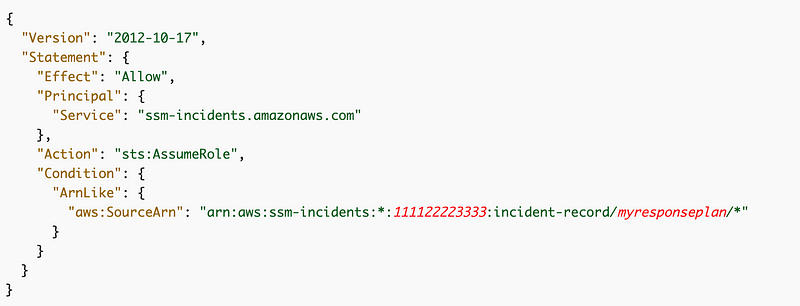
Recall that an IAM Policy places restrictions on an identity as opposed to a resource or role assumption as I explained here:
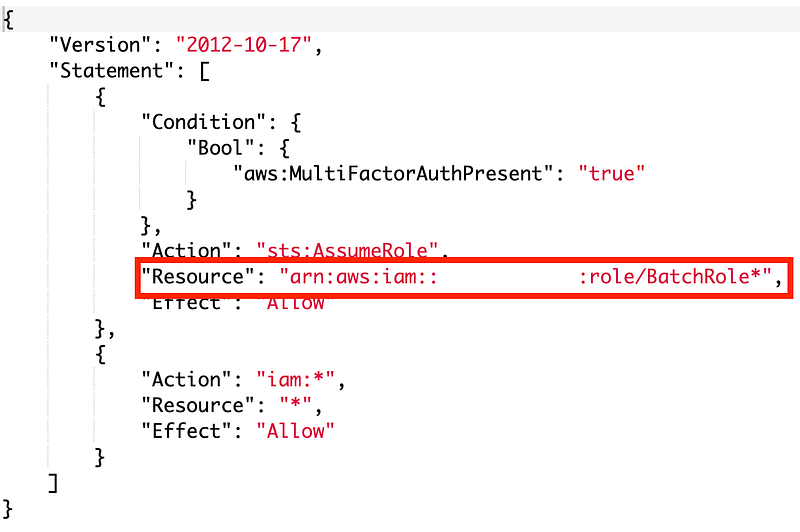
Let’s review the policy for our IAM Admin user that we created earlier. Navigate to the IAM console and search for your IAM Admin are review permissions. Notice that we have allowed the IAM user to assume a role that starts with the name BatchRole.
Question:
This is implemented without a condition like the example above. This policy instead whitelists the role resources the user can assume. Does it work?
Run the script in the root directory one more time.
When the script asks me for a code to assume the role it does fail with an unauthorized message:

Why didn’t we get the unauthorized message when we tested the first time? Maybe I missed it. It also could be that the trust policy had not completely updated by the time the batch job test ran. As I mentioned, IAM is eventually consistent, meaning it doesn’t lock out users while making changes. AWS will enforce the new policy as the change gets pushed out to all systems.
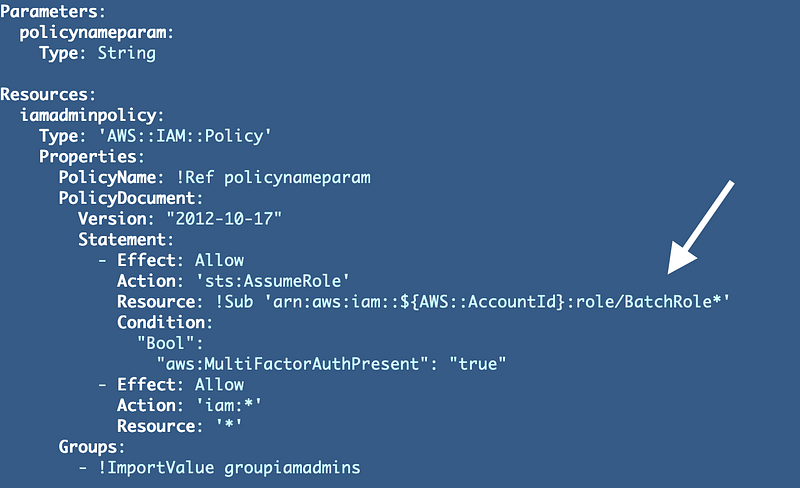
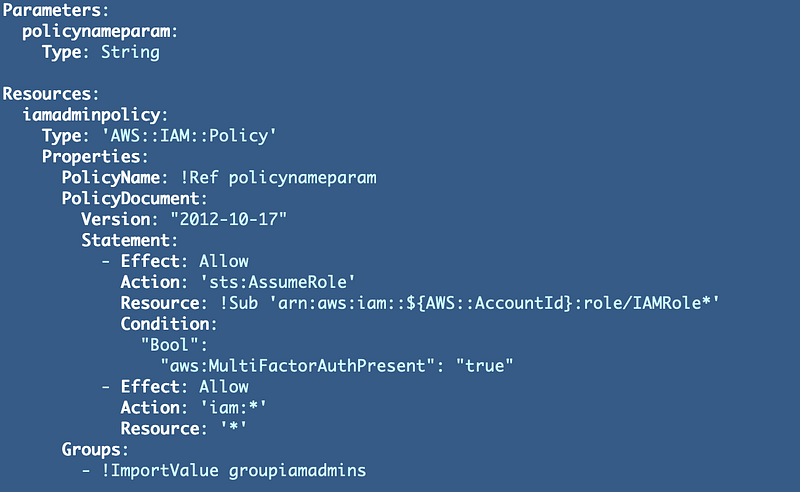
Let’s update our IAM policy to use the new prefix for IAM roles.
Our IAM administrator policy exists at:
iam/iam_admins/cfn/policy.yamlChange this:
To this:
Deploy the change by executing the deploy script found here:
iam/iam_admins/deploy.shlike this:
./deploy.sh
~~~~~~~~~~~~~~~~~~~~~~~~~~~~~~~~~~~~~~~
Notice how easy it was to deploy one change compared to a huge monolithic CloudFormation template. You may have seen such templates elsewhere. Don’t do it. Think ahead and build your CloudFormation templates so you can change and test individual resources easily.
~~~~~~~~~~~~~~~~~~~~~~~~~~~~~~~~~~~~~~~
Now if you were to try to test the script again you would still get an error.
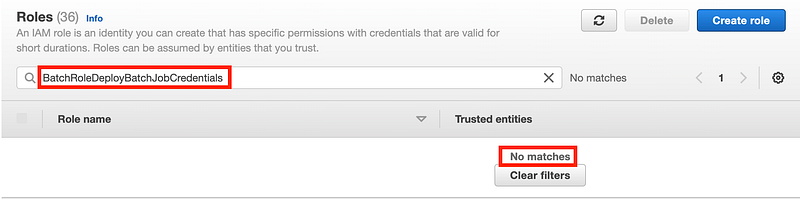
./test.shThat’s because the role BatchRoleDeployBatchJobCredentials no longer exists and that’s what we have configured the AWS CLI to use as explained in these two posts:
Head over to IAM and search for the role:
Now just search for Deploy:
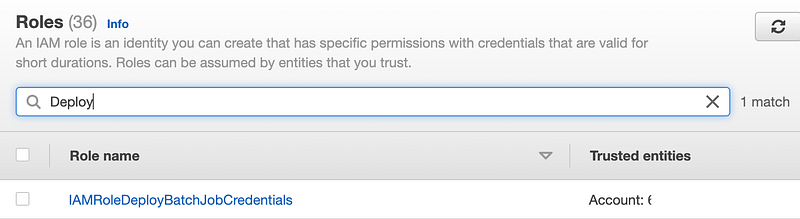
Our role has been renamed to start with IAM as expected. Edit your AWS config file as explained in the posts above to use this role instead of the old batch job role.
Now I can assume the role.
This proves that our version of an IAM Policy works just as good as a policy with a condition. In fact, I think it’s a bit cleaner. Defining specific ARNs likely has stricter type checking than the logic used behind the scenes to parse conditions. If you’re wondering why that is, it’s explained in this series on secure code:
Next we’ll look at resource policies and the confused deputy attack.
Follow for updates.
Teri Radichel | © 2nd Sight Lab 2022
About Teri Radichel:
~~~~~~~~~~~~~~~~~~~~
⭐️ Author: Cybersecurity Books
⭐️ Presentations: Presentations by Teri Radichel
⭐️ Recognition: SANS Award, AWS Security Hero, IANS Faculty
⭐️ Certifications: SANS ~ GSE 240
⭐️ Education: BA Business, Master of Software Engineering, Master of Infosec
⭐️ Company: Penetration Tests, Assessments, Phone Consulting ~ 2nd Sight Lab
Need Help With Cybersecurity, Cloud, or Application Security?
~~~~~~~~~~~~~~~~~~~~~~~~~~~~~~~~~~~~~~~~~~~~~~~~~~~~~~~~~~~~~
🔒 Request a penetration test or security assessment
🔒 Schedule a consulting call
🔒 Cybersecurity Speaker for PresentationFollow for more stories like this:
~~~~~~~~~~~~~~~~~~~~~~~~~~~~~~~~~~~~~~~~~~~~~~~~~~~~~~~~~~~~~
❤️ Sign Up my Medium Email List
❤️ Twitter: @teriradichel
❤️ LinkedIn: https://www.linkedin.com/in/teriradichel
❤️ Mastodon: @teriradichel@infosec.exchange
❤️ Facebook: 2nd Sight Lab
❤️ YouTube: @2ndsightlab