
ADVICE
So You Have a New Medium Publication
More Tips On Weird Questions That Nobody Knows the Answer To
When I cruise through the Facebook groups, I see lots of basic questions and answers. But there are always those questions that someone asks, and people respond,
ME TOO! I don’t know the answer either, but I have the same question!
And then nobody ever answers it.
So this post is for you!
You might want to read this post below first. And then come back here. Because this is actually lesson 2.
So in today’s episode, we’re going to talk about TABS. These are basically sections off of your publication’s home page where you can collect like minded pieces, typically by the tags you choose.
Please remember that you can use the top tags that everyone uses on Medium. Or you can CREATE and use — and OWN — whatever tags you would like. Here’s a good example of Kristi Keller owning the tag “testicles.”
So you could, if you so choose, have a tab in your publication with the title “Testicles” and the only articles that would show up behind that tab, would be those where the writer included that tag. That way, when anyone searches on the tag “testicles”, you’ll get this result.
Top writers and articles for tag testicles — click HERE. As you can see, as of today, Justine Reed is the top writer for the tag “Testicles.” But that could just as easily be you owning that top writer position.
Here’s a screenshot of the tabs on our MuddyUm home page.
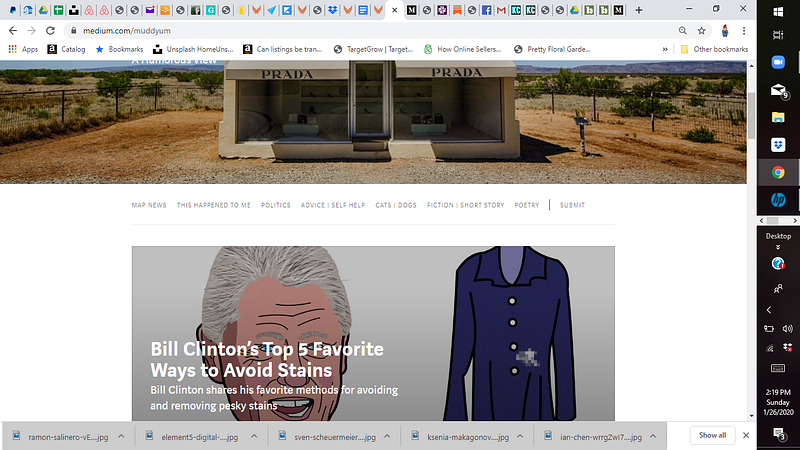
As you can see, we have tags for MAP NEWS — our fine news reporting syndication with dozens of affiliate news reporters around the globe, THIS HAPPENED TO ME, POLITICS, ADVICE/SELF HELP, CATS/DOGS, FICTION/SHORT STORY, and POETRY. Then there’s that outlier — SUBMIT.
The tabs coincide with and scoop up automagically the articles that writers submit that have the same tags as you see on the tab. I was clever, and combined two tags in one tab, three times.
So if a writer tags either ADVICE or SELF HELP, all those articles will get scoooped into and plopped behind that tab.
Same for the cats and dogs, as well as fiction and short story. Go ahead and take a look at that — I’ll wait. Here’s a link to the CATS and DOGs tab, click through and if you scroll down, you’ll see how they are organized.
The top SECTION is mixed chronologically. The bottom sections are organized by FIRST cats — because my cats insist they come first — and then dogs. Check that out.
Remember in the first article how I mentioned you can either have a section that is chronological or by tag? On these pages, I mixed them, so I could incorporate more topic and more articles, neatly organized in nice compartments. It helps my brain that way. Disorganization is not my friend, as you may well know.
Now how do you get those tabs set up?
AHHHH! That’s a good question.
You need to create a feature page for each tab. That’s what it is called. FEATURE PAGE.
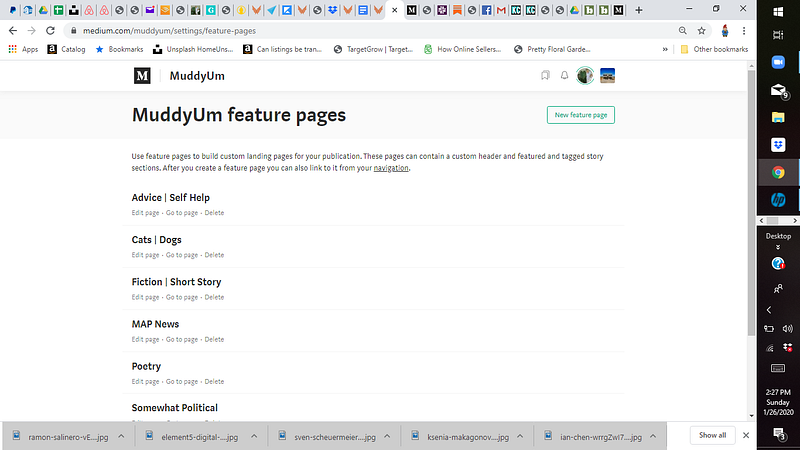
So go play with creating your first feature page, and REMEMBER TO SAVE IT.
Be sure to create one at a time, so you can play with sections and formatting, before you go creating a second or third. Don’t put the cart before the horse. Just, NO.

If you have more questions, feel free to ask in the comments.
Episode 3 is coming soon to a theater near you. I’ll be talking about that crazy SUBMIT tab, as well as some of the finer points of tab esthetics.
Susan Brearley is a brilliant strategist and writer/editor. She’s the owner/operator of the MuddyUm Writer’s Self Help Clinic. And the Captain and Editor in Chief of the Good Ship MuddyUm.
She’s been writing comedy for about 2 weeks.