
So I finally learned how to use Slack in a way that stops giving me the @.@ feeling
Maybe I’m late on this but maybe I’m not, so I’m sharing it just in case :’)

Remember how it was something embarrassing like four months into using Medium that I realized you could “clap” more than once? Here’s the evidence of my Dumb (tm):
I was reading an article that had a fantastic introduction that seemed to signal that things were going in one direction. I clapped early, already enjoying their writing style and points. This was a mistake.
Well, I’ve been using Slack for even longer for a number of different reasons and I’ve always been frustrated with it. I’ve been using it with my research lab for the longest, and it’s been useful to help separate project collaborations by channel, but as I became more of a senior student with 1298376123817263 (read: 2+) projects, it started becoming overwhelming to manage the different channels and make sure I read all the messages and threads.
Plus, when I finally joined WEOC (Writers and Editors of Colour), I was so excited to find that there’s a channel in which everyone shares their articles. The algorithm almost consistently buries pieces from my favourite writers, even when I bookmark and manually go back to their pieces over and over again, so having a channel where I can just go down everyone’s responses and make sure I’m caught up has been so much easier for me.
Well, with every single platform where there is an algorithm generating feed content, I consciously “feed” content to my algorithm from time to time. For example, I specifically search certain hashtags (or tags) or scroll through and interact with specific types of accounts on a more regular basis.
For some absurdly funny and inconvenient reason, this channel always sends me back to mid-March no matter how long I spend sitting in that channel, what I type into the channel, or what I’ve reacted/ responded to in the channel.
For some reason, I just couldn’t get Slack to recognize that I’d “read” and am now updated on the channel.
Today, in total procrastination (and celebration that I finished grading assignments for the semester, phew!), I was poking around a few of my Slack workspaces, trying to fix this.
I’ve been using the “Threads” feature located in the top left of each Slack workspace to keep track of embedded conversations. I find that this has been insufficient because while some folks like to use the thread feature, others reply in-channel using mentions, which makes tracking conversations difficult.
In my lab, given my seniority, I may have just trained all new RAs to use the threads rather than tagging. However, that’s not always possible when you’re in more of a participant role than a management role within a Slack workspace.
I didn’t realize that you could customize your slack workspace so that all unreads can also be listed in one single space.
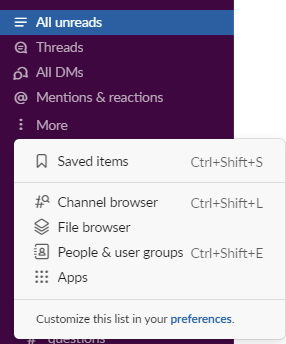
Doing so lets me see all new updates, including new threads, responses, mentions, that I haven’t read. For me, this has been far more useful than mentions-only and thread-only features.
What are your tips for using Slack?
Please share them below so I can stop Suffering™.
Hi I’m Lucy Dan 蛋小姐 (she/her/她) and I write about whatever my heart desires — that’s my commitment to myself as a writer. Sometimes that looks like life hacks written in a more casual tone (Unsure about you but I’ve read 1010101 self-improvement pieces that are written with strong imperatives and shame as “empowerment” and it’s tiring. I want someone to write self-improvement from the point of view of how messy and complex life truly is.) Sometimes it’s in the form of dumb poems. Who knows what adventure today will bring you, right?
Hop down the rabbit hole? 🐰🕳


