
CODEX
Serverless Machine Learning APIs using Lambda and EFS

Overview
In previous article I walk through with you on how to set up a serverless API to test out web pages under different resolutions. In that solution in order to work around AWS Lambda limitation I use the chrome-aws-lambda binary instead of the full Puppeteer library.
However, this definitely will not work if we need to host machine learning APIs. Specifically AWS Lambda has the limitation of
- Deployment package (.zip file archive) size — 50 MB (zipped, for direct upload), 250 MB (unzipped, including layers)
/tmpdirectory storage — 512 MB
There are basically 2 issues here related to hosting serverless machine learning APIs, not including the lack of GPU support currently.
Size of Machine Learning Libraries
With the recent torch and torchvision libraries, the unzipped files size already exceed the above limits.
Size of Machine Learning Models
Machine learning models, with millions or billions of parameters, definitely take up storage way beyond the AWS Lambda limits.
Also API gateway has a limit of 30 seconds so it is necessary to warm up the AWS Lambda function for better performance.
In this article I am going to show you how to host a machine learning API using AWS Lambda and AWS EFS to overcome some of the limitations imposed.
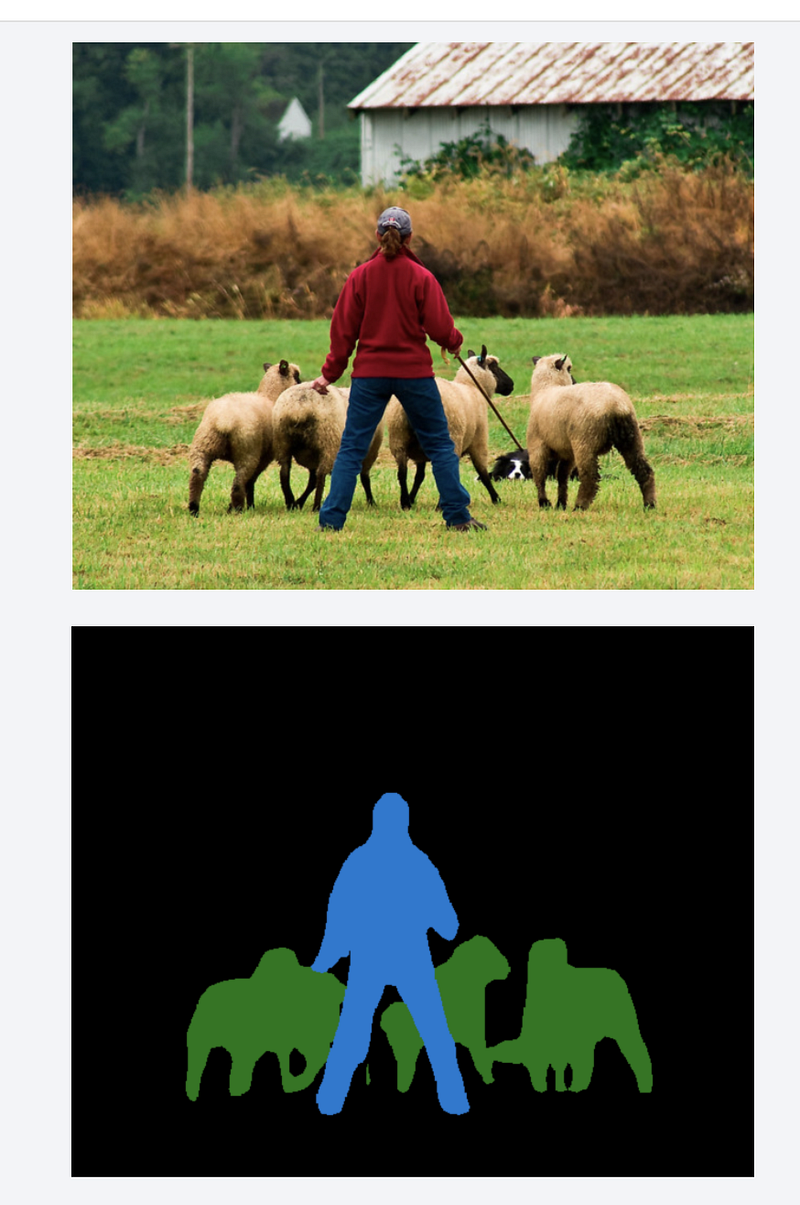
I am going to deploy the DeepLabV3 model with a ResNet-101 backbone.
Solutions
AWS Lambda Layers — Not Working
As mentioned in AWS documentation, AWS Lambda layers do count into the unzipped deployment package size. Using AWS Lambda layers will reduce your deployment time but is not going to solve the issue on size limitations.
AWS S3 — Partial Solution
You can use AWS S3 to store the machine learning models and load them when Lambda function starts. This resolves the issue on machine learning model storage. However this solution does not help in resolving the issue related to large libraries and binaries.
AWS Lambda /tmp Folder — Partial Solution
AWS Lambda /tmp folder can store files up to 512MB. The serverless-python-requirements plugin can zip up the libraries specified in requirements.txt and unzip the files into /tmp, set the Python sys.path when the Lambda function starts.
However, due to the 512MB limitation, this only resolves the issue partially. What if the libraries or the models go beyond 512MB?
I will demonstrate this feature later in this article.
AWS EFS
Using AWS EFS together with AWS Lambda resolves the storage issue for large libraries/binaries and machine learning models. By keeping Lambda functions warm and leveraging AWS EFS, you can develop reasonable good performing machine learning APIs.
Setting up AWS EFS for Lambda
I am assuming you have some basic knowledge of AWS on how to set up EC2 and EFS. If not check out the links to the documentation in below steps.
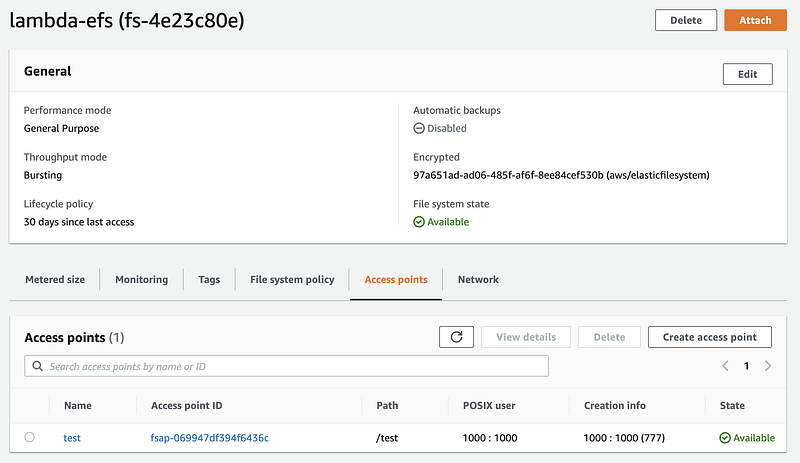
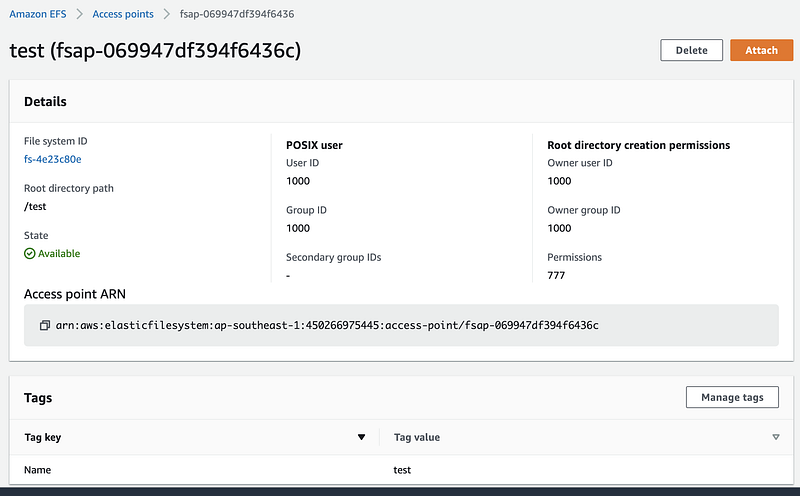
Create EFS File System and Access Point
Follow the documentation to create a EFS file system and access point. Below are screenshots on what I have created for my Lambda functions.
Launch EC2 and Attach to EFS
Launch a t2-micro EC2 instance using Amazon Linux 2 AMI (make sure the security group is same as the one you use to create EFS).
Login to the EC2 instance and mount the EFS folder. In my case I mount it to /home/ec2-user/efs.
# sudo mount -t efs -o tls,accesspoint=fsap-069947df394f6436c fs-4e23c80e:/ /home/ec2-user/efs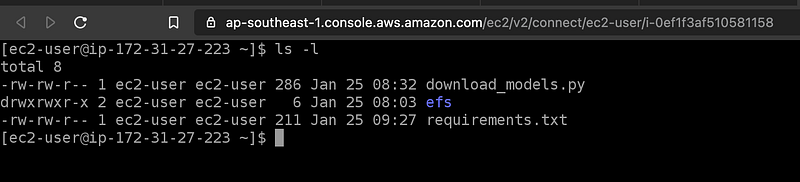
Install Python and Pip
I need to install Python and Pip in order to set up the libraries in EFS folder. For my Lambda function I use Python 3.7 runtime.
$ sudo yum install python37
$ curl -O https://bootstrap.pypa.io/get-pip.py
$ python3 get-pip.py
Install Machine Learning Libraries to EFS
For the machine learning APIs that I am going to deploy as Lambda function, I need to use torch and torchvision libraries.
Create a file called requirements.txt with the required libraries (cp37 means CPU and Python 3.7).
https://download.pytorch.org/whl/cpu/torch-1.7.1%2Bcpu-cp37-cp37m-linux_x86_64.whl
https://download.pytorch.org/whl/cpu/torchvision-0.8.2%2Bcpu-cp37-cp37m-linux_x86_64.whl
Then I run the pip command to install the libraries to /home/ec2-user/efs/lib
# pip install --target=/home/ec2-user/efs/lib -r requirements.txt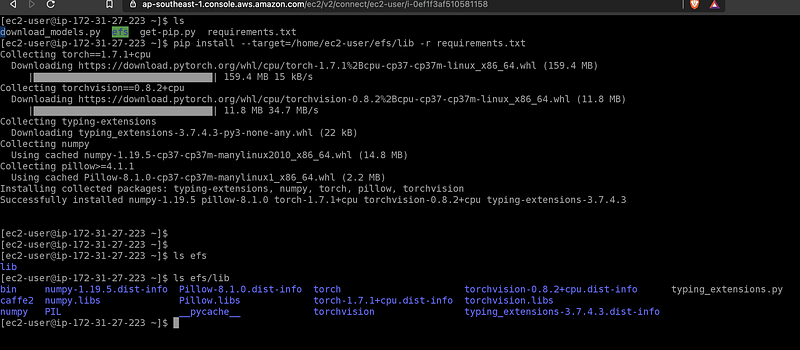
Deploy Machine Learning Models to EFS
The machine learning models that I will be using is from Torch Hub.
I create a Python file called download_models.py with the following content to download the models into /home/ec2-user/efs/.cache
import torch print(f"Pytorch version - {torch.__version__}") torch.hub.set_dir("/home/ec2-user/efs/.cache") model = torch.hub.load("pytorch/vision:v0.6.0","deeplabv3_resnet101", pretrained=True) print("Model downloaded") model.eval()
Run the file to download the models.
# python3 download_models.py
Refer to this article on how I automate these manual steps using AWS CDK.
The Code
With the machine learning libraries and models deployed to EFS, let’s look at the code now. Just like previous article, I am using serverless framework to deploy the Lambda function and API.
serverless.xml
The full serverless.xml is available here. There are few things to highlight.
functions:
  vision:
    handler: mllib/vision.main
    fileSystemConfig:
      localMountPath: /mnt/efs
      arn: arn:aws:elasticfilesystem:ap-southeast-1:450266975445:access-point/fsap-069947df394f6436c
    vpc:
      securityGroupIds:
        - sg-9cae01ec
      subnetIds:
        - subnet-ee22e788
    memorySize: 3008
    timeout: 300
    # layers:
    #   - { Ref: PythonRequirementsLambdaLayer }
    events:
      - httpApi:
          path: /vision
          method: post
    warmup:
      default:
enabled: truefileSystemConfig— I mounted the EFS folder to/mnt/efsinside the Lambda container providing the required ARN, security group and subnet.memorySize— Set to 3GBwarmup— I useserverless-plugin-warm to warm up the Lambda function. Alternatively for a simpler solution just set theprovisionedconcurrency.
custom:
  region: ${opt:region, self:provider.region}
  stage: ${opt:stage, self:provider.stage}
  pythonRequirements:
    dockerizePip: true
    zip: true
    slim: true
    strip: false
    nodeploy:
      - pip
      - setuptools
      - six
    usestaticcache: true
    usedownloadcache: true
    cachelocation: "/mnt/efs/.cache"
    # layer: true
warmup:
events:
- schedule: "rate(5 minutes)"
timeout: 50
default:
enabled: true
role: IamRoleLambdaExecutionAs an additional example, I also use serverless-python-requirements to bundle some requirements using requirements.txt. Note that I set zip:true to indicate I want to zip up the libraries. Later in the Python code I am going to use the code provided by the plugin to unzip it under /tmp folder inside Lambda container.
vision.py
The full source code of vision.py is available here.
You can see these code snippets at the beginning of the file.
# Load from EFS mounted folder
try:
    import sys
import ossys.path.append("/mnt/efs/lib")
except ImportError:
pass# Load from /tmp
try:
import unzip_requirements
except ImportError:
pass- The 1st part of the code is to add
/mnt/efs/libto Pythonsys.path - The 2nd part uses code snippet from
serverless-python-requirementsto unzip the libraries to/tmpand add the path tosys.path
print(f"Pytorch version is {torch.__version__}")torch.hub.set_dir("/mnt/efs/.cache")
model = torch.hub.load("pytorch/vision:v0.6.0", "deeplabv3_resnet101", pretrained=True)
model.eval()print("Model is loaded successfully.")For Torch Hub I also set it to use the .cache folder under EFS.
Deployment and Testing
Deployment
To deploy the API, just run serverless deploy or sls deploy. The deployment should be fast as I am not bundling large libraries into the package.
# sls deployTesting
Run the serverless logs command to monitor the CloudWatch log.
In case you need to retrieve information regarding the deployed APIs, run sls info.
# sls logs -f vision -tMonitor the log file until the Lambda function is warm up.
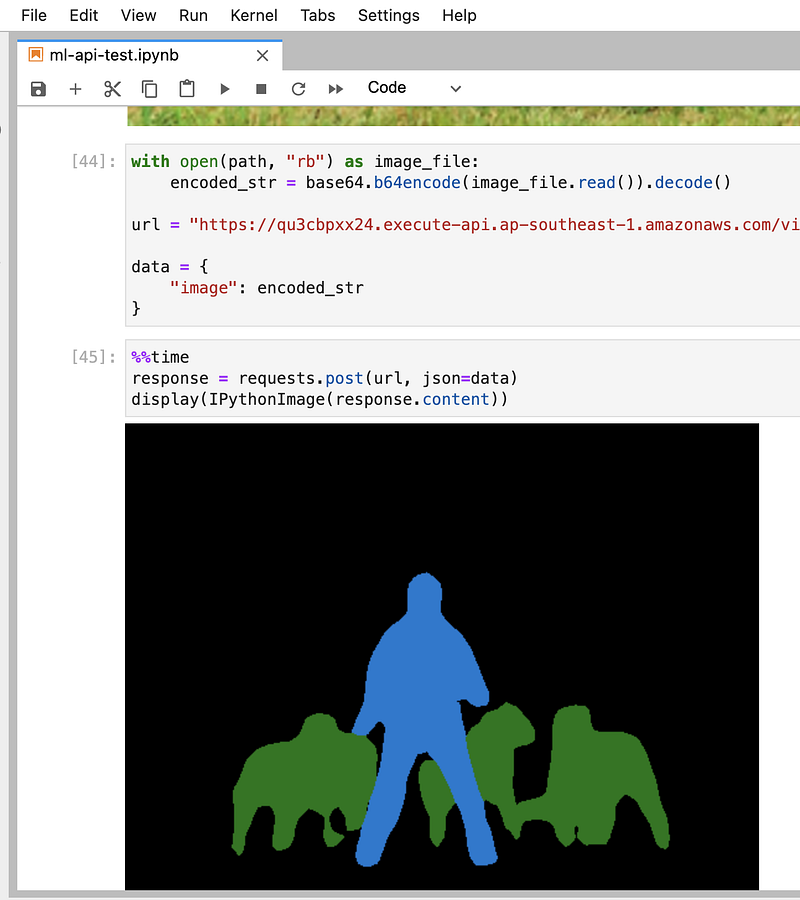
Use the notebook available here to send the image to the API for testing.
Summary
As you can see it is possible to deploy machine learning APIs on AWS using Lambda, API Gateway and EFS, though it may not be so straight forward.
However, currently there is no GPU support for AWS Lambda. If your models require GPU support for good performance, Lambda may not be the right solution for you.
You may also want to check out this article.