avatarTeri Radichel

Free AI web copilot to create summaries, insights and extended knowledge, download it at here

7102

Abstract

access in future posts. For now we want to try to add the payment method using our root administrator in the child account.</li><li><b>Since our OrgRoot </b>user is based in the root AWS Organization account it will not be restricted by any SCPs.</li><li><b>Limit Child Account Actions in the Governance OU. </b>We will continue to disallow removing an account from the organization if the account is in any other OU.</li></ul><h2 id="cce5">Implementing the changes to our Service Control Policy</h2><p id="610b">We need to <b>remove the DenyAll SCP from the Suspended OU.</b></p><p id="a38e">We will create a new SPC named <b>DenyAllButCloseAccount</b>.</p><p id="6d8a">What specific actions do we need to allow? Well if you search around you might find this method. If you happen to skip over the documentation at the top of the page which tells you in a really wordy manner that this is being deprecated you might try to use it as I initially did — even though I wrote about how it is being deprecated in a prior post!</p><figure id="bbec"><img src="https://cdn-images-1.readmedium.com/v2/resize:fit:800/1*ilYyXK-MEERSkTjQWk1L1g.png"><figcaption></figcaption></figure><div id="d385" class="link-block"> <a href="https://docs.aws.amazon.com/awsaccountbilling/latest/aboutv2/billing-permissions-ref.html#user-permissions"> <div> <div> <h2>Using identity-based policies (IAM policies) for AWS Billing</h2> <div><h3>undefined</h3></div> <div><p>undefined</p></div> </div> <div> <div style="background-image: url(https://miro.readmedium.com/v2/resize:fit:320/)"></div> </div> </div> </a> </div><p id="dc2c">As a reminder, AWS recently changed their billing-related actions. I went over the available actions in this post:</p><div id="fa67" class="link-block"> <a href="https://readmedium.com/okta-saml-integration-with-aws-iam-step-3-creating-saml-roles-4179e6d2be94"> <div> <div> <h2>Okta SAML Integration with AWS IAM Step 3: Creating SAML Roles</h2> <div><h3>ACM.174 Determining permissions for an AWS Billing Administrator Role</h3></div> <div><p>medium.com</p></div> </div> <div> <div style="background-image: url(https://miro.readmedium.com/v2/resize:fit:320/1*PTJZogALr41ieCvMb_zZqA.png)"></div> </div> </div> </a> </div><p id="0e1f">What would be very, very helpful is a simple change to the AWS documentation like this:</p><figure id="1bd4"><img src="https://cdn-images-1.readmedium.com/v2/resize:fit:800/1*HHVlh5YBzpH0fk0gjuSZGg.png"><figcaption></figcaption></figure><p id="e78f">We will allow the Billing Administrator to remove the account from the organization.</p><div id="a6dd" class="link-block"> <a href="https://docs.aws.amazon.com/organizations/latest/APIReference/API_RemoveAccountFromOrganization.html"> <div> <div> <h2>RemoveAccountFromOrganization</h2> <div><h3>undefined</h3></div> <div><p>undefined</p></div> </div> <div> <div style="background-image: url(https://miro.readmedium.com/v2/resize:fit:320/)"></div> </div> </div> </a> </div><p id="2353">Note that if you also wanted to allow the root user in the child account to remove the account from that account you would use the LeaveOrganization action. I’m not going to add this one to the SCP because we want the organization to control removal of the account.</p><div id="7355" class="link-block"> <a href="https://docs.aws.amazon.com/organizations/latest/APIReference/API_LeaveOrganization.html"> <div> <div> <h2>LeaveOrganization</h2> <div><h3>undefined</h3></div> <div><p>undefined</p></div> </div> <div> <div style="background-image: url(https://miro.readmedium.com/v2/resize:fit:320/)"></div> </div> </div> </a> </div><p id="a9a3">We will also allow the billing administrator to close the account. Remember this option leaves the account in the organization in a suspended state for 30 days.</p><div id="06c5" class="link-block"> <a href="https://docs.aws.amazon.com/organizations/latest/APIReference/API_CloseAccount.html"> <div> <div> <h2>CloseAccount</h2> <div><h3>undefined</h3></div> <div><p>undefined</p></div> </div> <div> <div style="background-image: url(https://miro.readmedium.com/v2/resize:fit:320/)"></div> </div> </div> </a> </div><h2 id="9649">Changes to our SCP hierarchy</h2><p id="8ab9">We’ll need to add our new SCP to the deployment script. We will deploy it to the Suspended OU, not the root SCP. But think about our existing policies for a minute and how they apply.</p><figure id="ed0a"><img src="https://cdn-images-1.readmedium.com/v2/resize:fit:800/1*ybTiMItqd3ER4gVKL0-wWw.png"><figcaption></figcaption></figure><p id="7397">Remember that the <b><i>higher level SCPs on AWS take precedence over the lower level SCPs</i></b>. We have a policy that denies the root administrator of a child account from taking any actions. We also disallow removing accounts from an organization at the root. Allowing the action at the lower level in the hierarchy will have no effect. In fact, SCPs are not meant to allow actions at all. They are supposed to only remove permissions.</p><p id="0567">On that note, I just put in a feature request to remove all the default AllowFullAccess SCPs. Since SCPs do not “grant” access they only deny access and these should be extraneous.</p><div id="a6ca" class="link-block"> <a href="https://readmedium.com/aws-organizations-scps-redundant-and-extraneous-policies-9539cb262f20"> <div> <div> <h2>AWS Organizations SCPs — Redundant and Extraneous Policies</h2> <div><h3>The design of AWS Organizations is such that accounts and OUs end up having repetitive and redundant FullAWSAccess…</h3></div> <div><p>medium.com</p></div> </div> <div> <div style="background-image: url(https://miro.readmedium.com/v2/resize:fit:320/1*4oxP4LXk8l8c3mpRvO7ejg.png)"></div> </div> </div> </a> </div><p id="994e">We can still make this work. It’s just that we will probably end up having to do some funky work arounds to add new SCPs and remove the SCPs not managed through our own source control.</p><p id="19b8">Consider our other OUs.</p><ul><li>The DenyAll OU already denies all actions.</li><li>We need the restrictions on our Governance OU.</li>

Options

<li>We need to remove those restrictions from the Suspended OU.</li></ul><p id="bd42">Based on that logic:</p><ul><li>Attach the restrictions to the Governance OU instead of the Root OU.</li><li>Make sure accounts cannot be added to the Root OU directly (or restrict any accounts assigned to the root OU in some other way if necessary).</li><li>Deny all actions except those required to close an account on the Suspended OU.</li></ul><p id="6c9c">Here’s the idea — but we need to test it:</p><figure id="32de"><img src="https://cdn-images-1.readmedium.com/v2/resize:fit:800/1*nhC642ppVjCb3yLz3CwqXQ.png"><figcaption></figcaption></figure><p id="aee4">Now, because we’re moving these OUs from the root to the Governance OU we’re going to have a naming conflict so you’ll have to delete the CloudFormation stacks that we are moving around.</p><p id="62e7">We can change our deployment script to move the two existing SCPs to the Governance OU. We’ll add a new SCP to the Suspended OU:</p><figure id="6bb2"><img src="https://cdn-images-1.readmedium.com/v2/resize:fit:800/1*rqMbrMazIq8_wl8gPEiyCg.png"><figcaption></figcaption></figure><p id="8d08">Our new SCP looks like this (at first — I initially used the incorrect action which is deprecated as noted above):</p><figure id="f976"><img src="https://cdn-images-1.readmedium.com/v2/resize:fit:800/1*kzkrCBzz5gio64xn2lmErQ.png"><figcaption></figcaption></figure><p id="5485"><b>ImportValue vs. the AWS::AccountId Pseudo Parameter</b></p><p id="a398">Now mind you, I provide this policy and you’re like “oh cool thanks.” What you don’t know is I probably spent hours trying to figure out how to get <b>ImportValue</b> working in an <b>AWS policy</b> in a <b>CloudFormation</b> template. I wanted to pull the billing admin ARN from the output of the billing admin role stack. And I think I’ve done this somewhere before in my codebase on GitHub so I’ll have to go back and find this, revise this template and update it later.</p><p id="7a64">However, I finally gave up, hardcoded the ARN with the use of the <b>AWS::AccountId</b> parameter. What this means is that you have to deploy this particular template the account where the billing admin role exists because it’s going to add that account ID to the ARN. But you’d probably be doing that in any case because an ImportValue statement would be pulling from a stack in the same account and region.</p><p id="881d">That is not really what I wanted to do because what if you rename the billing ARN? But I can’t spend more time on it right now. AWS really needs to provide error messages for policy related errors when deployed by CloudFormation that provide syntax instructions. That would save the universe a massive amount of time.</p><div id="789c" class="link-block"> <a href="https://readmedium.com/resource-handler-returned-message-the-provided-policy-document-does-not-meet-the-requirements-of-accff901e08f"> <div> <div> <h2>Resource handler returned message: “The provided policy document does not meet the requirements of…</h2> <div><h3>Error message for AWS CloudFormation with a Service Control Policy is *Not Helpful* (or any IAM-like policy)</h3></div> <div><p>medium.com</p></div> </div> <div> <div style="background-image: url(https://miro.readmedium.com/v2/resize:fit:320/1*4oxP4LXk8l8c3mpRvO7ejg.png)"></div> </div> </div> </a> </div><p id="b818">At any rate, this works and now hopefully the root user of the account I have in the Suspended OU can hopefully now add the billing information in that account. Let’s check.</p><p id="c3c5">No.</p><p id="09b7">I then added ViewBillingPreferences to my policy.</p><p id="e3a6">Then I get this — Yay!</p><figure id="336a"><img src="https://cdn-images-1.readmedium.com/v2/resize:fit:800/1*eY4emFAKYjaGXdr-q81ZdA.png"><figcaption></figcaption></figure><p id="f53c">One thing I don’t understand is why the page complains about a default payment method when the account is part of an organization. Shouldn’t it recognize that? At any rate it appears to work. I can add the payment method and attempt to close the account.</p><p id="5b2c">After adding the card I see this error:</p><figure id="1040"><img src="https://cdn-images-1.readmedium.com/v2/resize:fit:800/1*-cc9M8jyIyhWUJhT2rByAQ.png"><figcaption></figcaption></figure><p id="0273">Hmm. Well, lets go back to to the organization root account and see if we can remove this account from the organization.</p><p id="dd16">So far so good.</p><figure id="c9fa"><img src="https://cdn-images-1.readmedium.com/v2/resize:fit:800/1*bXnB7GmoWk_jtgooMWgMCg.png"><figcaption></figcaption></figure><p id="4486">No.</p><figure id="9022"><img src="https://cdn-images-1.readmedium.com/v2/resize:fit:800/1*lAS_4cqOE6RzLmoZSvISmw.png"><figcaption></figcaption></figure><p id="1af1">So apparently whatever happened with the root user in the child account prevented the adding a default payment method. [The issue became clearer in later posts.]</p><p id="e5b5">Well, I’ve spent entirely too much time on this for one day and one blog post. This was going to be a “quick” post. Far from it. I’m going to have to continue troubleshooting this in a later post. One thing I know I need to do is update my billing action to the correct one because AWS is deprecating the old actions. But now I’m curious what is going on…</p><p id="b15c">Follow for updates.</p><p id="4a3a">Teri Radichel | <i>© <a href="https://2ndsightlab.com/?source=post_page---------------------------">2nd Sight Lab</a> 2023</i></p><div id="8b5f"><pre><span class="hljs-section">About Teri Radichel: ~~~~~~~~~~~~~~~~~~~~</span> ⭐️ Author: Cybersecurity Books ⭐️ Presentations: Presentations by Teri Radichel ⭐️ Recognition: SANS Award, AWS Security Hero, IANS Faculty ⭐️ Certifications: SANS ~ GSE 240 ⭐️ Education: BA Business, Master of Software Engineering, Master of Infosec ⭐️ Company: Penetration Tests, Assessments, Phone Consulting ~ 2nd Sight Lab</pre></div><div id="caae"><pre><span class="hljs-section">Need Help With Cybersecurity, Cloud, or Application Security? ~~~~~~~~~~~~~~~~~~~~~~~~~~~~~~~~~~~~~~~~~~~~~~~~~~~~~~~~~~~~~</span> 🔒 Request a penetration test or security assessment 🔒 Schedule a consulting call 🔒 Cybersecurity Speaker for Presentation</pre></div><div id="5a42"><pre>Follow <span class="hljs-keyword">for</span> more stories like <span class="hljs-keyword">this</span>: ~~~~~~~~~~~~~~~~~~~~~~~~~~~~~~~~~~~~~~~~~~~~~~~~~~~~~~~~~~~~~ ❤️ Sign Up my Medium Email List ❤️ Twitter: <span class="hljs-meta">@teriradichel</span> ❤️ LinkedIn: https:<span class="hljs-comment">//www.linkedin.com/in/teriradichel</span> ❤️ Mastodon: <span class="hljs-meta">@teriradichel</span><span class="hljs-meta">@infosec</span>.exchange ❤️ Facebook: 2nd Sight Lab ❤️ YouTube: @2ndsightlab</pre></div><figure id="faf5"><img src="https://cdn-images-1.readmedium.com/v2/resize:fit:800/0*H9Ew1KCl-29nZiPR.jpeg"><figcaption></figcaption></figure></article></body>

SCP to Allow Closing and Removing AWS Accounts — Part 1

ACM.182 Only allow closing and removing accounts moved to an organizational unit for suspended accounts

Part of my series on Automating Cybersecurity Metrics. AWS Organizations. Governance. The Code.

Free Content on Jobs in Cybersecurity | Sign up for the Email List

In the last post I showed you how I performed some troubleshooting on an SCP that wasn’t performing as expected.

In this post we’re going to look at how to allow removal of AWS accounts when we actually need to do that, but deny it in all other cases. I wrote about the steps to remove an AWS account here.

You’ll want to understand the steps in advance of trying to perform them because if you do them in the incorrect order you may have some challenges (depending on what you are trying to to do.)

I also explained the risk associated with someone who has access to the administrator account for an account in your organization. In order to prevent removing AWS accounts from the organization we have an SCP to prevent that which I created in this post:

In the OU deployment script in the GitHub repo I’ve deployed three OUs so far:
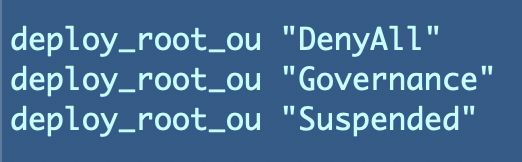
Currently the DenyAll OU and the Suspended OU both have the SCP attached that denies any action. We’re going to change that because there are certain scenarios where we do actually want to allow someone to remove an account from our organization.

Let’s think through the process where you want to remove an account from the organization. Under what scenarios might you be closing an account or removing it from the organization?

  1. The organization no longer needs the account. They want to stop all actions in the account to prevent additional expenses. They want to close the account. In this scenario, it might be OK if the account goes into a suspended state for thirty days so the company can retrieve it again if needed. In order to facilitate a two step process, the Governance or OrgRoot user must first move the account to the Suspended OU. Then the Billing Administrator can close the account.
  2. The organization has sold the assets in the account to anther company. They want to provide the root account login to another company and allow that company to take over the account and the billing. In this scenario, the governance user or the OrgRoot user moves the account to the suspended OU. Then someone provides the root administrator credentials for the account to the third party. The root administrator puts in the new billing information. The Billing Administrator removes the account from the organization.
  3. The organization made a mistake setting up the account and wants to close it and recreate the account correctly. Perhaps the account got set up with an incorrect name. Maybe you want to remove any accounts created manually and recreate them with CloudFormation. The Billing Administrator should have the ability to manage the account details such as the email address while it exists in the Governance OU. Then the Governance administrator moves the account to the Suspended OU. The Billing Administrator enters payment information if necessary and can either close the account or remove it from the organization.

Permissions for the above scenarios

  • OrgRoot User: The OrgRoot user we created in the root AWS is unaffected by SCPs as explained in prior posts, and we want to avoid using that user as much as possible. That user is not linked with Okta in my previous posts and is a break glass account in case any IdP is having issues and preventing access to our account. The OrgRoot user would be able to take any actions needed that can be performed within the organization itself.
  • Governance Administrator: Move the account to the suspended OU. We haven’t set up the governance user yet.

Once the account is in the OU, we need to allow (or rather deny all but the following permissions via the Suspended OU SCP:

  • Root administrator on the account: Change the payment method. After the account is removed, the SCPs no longer apply to the user or the account.
  • Billing Administrator: Ability to change the payment method, close the account, or remove it from the organization. We’ll test out billing administrator access in future posts. For now we want to try to add the payment method using our root administrator in the child account.
  • Since our OrgRoot user is based in the root AWS Organization account it will not be restricted by any SCPs.
  • Limit Child Account Actions in the Governance OU. We will continue to disallow removing an account from the organization if the account is in any other OU.

Implementing the changes to our Service Control Policy

We need to remove the DenyAll SCP from the Suspended OU.

We will create a new SPC named DenyAllButCloseAccount.

What specific actions do we need to allow? Well if you search around you might find this method. If you happen to skip over the documentation at the top of the page which tells you in a really wordy manner that this is being deprecated you might try to use it as I initially did — even though I wrote about how it is being deprecated in a prior post!
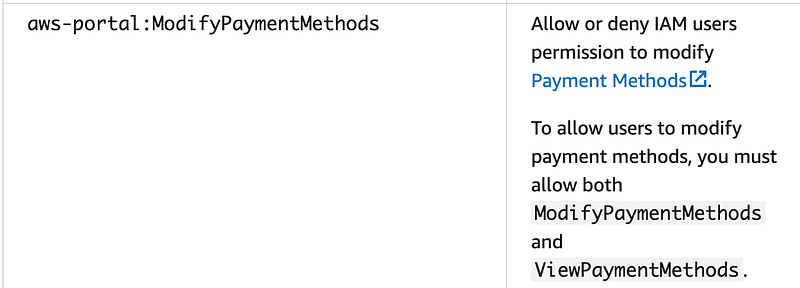
As a reminder, AWS recently changed their billing-related actions. I went over the available actions in this post:

What would be very, very helpful is a simple change to the AWS documentation like this:
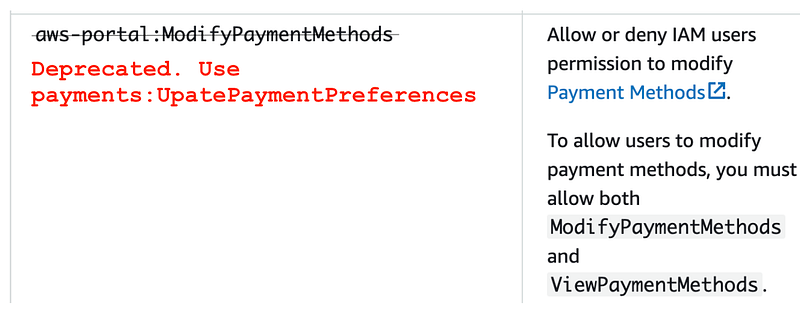
We will allow the Billing Administrator to remove the account from the organization.

Note that if you also wanted to allow the root user in the child account to remove the account from that account you would use the LeaveOrganization action. I’m not going to add this one to the SCP because we want the organization to control removal of the account.

We will also allow the billing administrator to close the account. Remember this option leaves the account in the organization in a suspended state for 30 days.

Changes to our SCP hierarchy

We’ll need to add our new SCP to the deployment script. We will deploy it to the Suspended OU, not the root SCP. But think about our existing policies for a minute and how they apply.
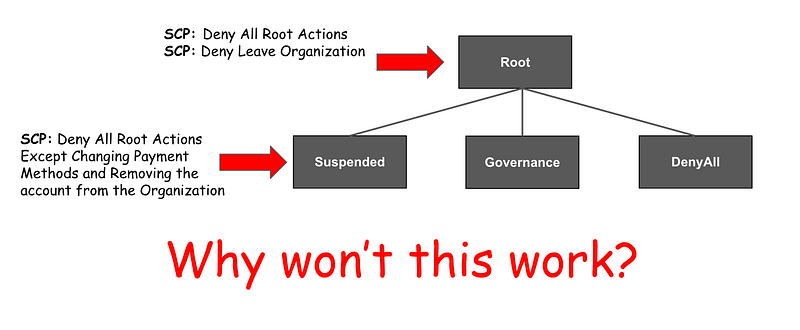
Remember that the higher level SCPs on AWS take precedence over the lower level SCPs. We have a policy that denies the root administrator of a child account from taking any actions. We also disallow removing accounts from an organization at the root. Allowing the action at the lower level in the hierarchy will have no effect. In fact, SCPs are not meant to allow actions at all. They are supposed to only remove permissions.

On that note, I just put in a feature request to remove all the default AllowFullAccess SCPs. Since SCPs do not “grant” access they only deny access and these *should* be extraneous.

We can still make this work. It’s just that we will probably end up having to do some funky work arounds to add new SCPs and remove the SCPs not managed through our own source control.

Consider our other OUs.

  • The DenyAll OU already denies all actions.
  • We need the restrictions on our Governance OU.
  • We need to remove those restrictions from the Suspended OU.

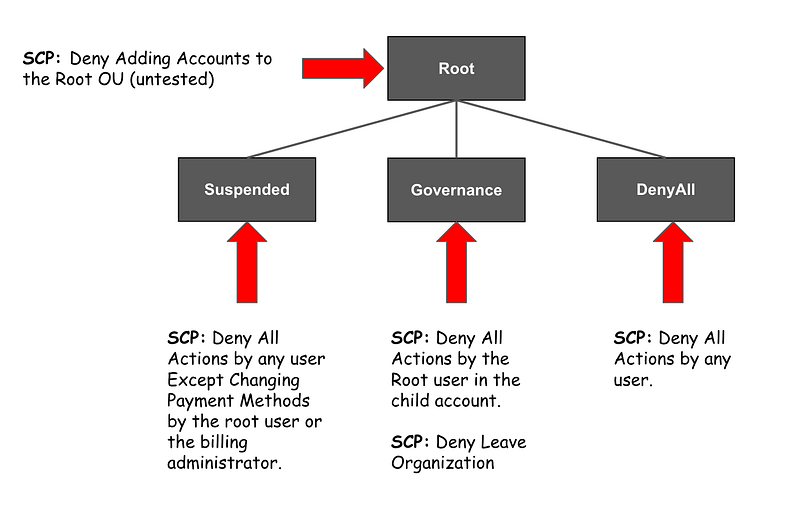
Based on that logic:

  • Attach the restrictions to the Governance OU instead of the Root OU.
  • Make sure accounts cannot be added to the Root OU directly (or restrict any accounts assigned to the root OU in some other way if necessary).
  • Deny all actions except those required to close an account on the Suspended OU.

Here’s the idea — but we need to test it:
Now, because we’re moving these OUs from the root to the Governance OU we’re going to have a naming conflict so you’ll have to delete the CloudFormation stacks that we are moving around.

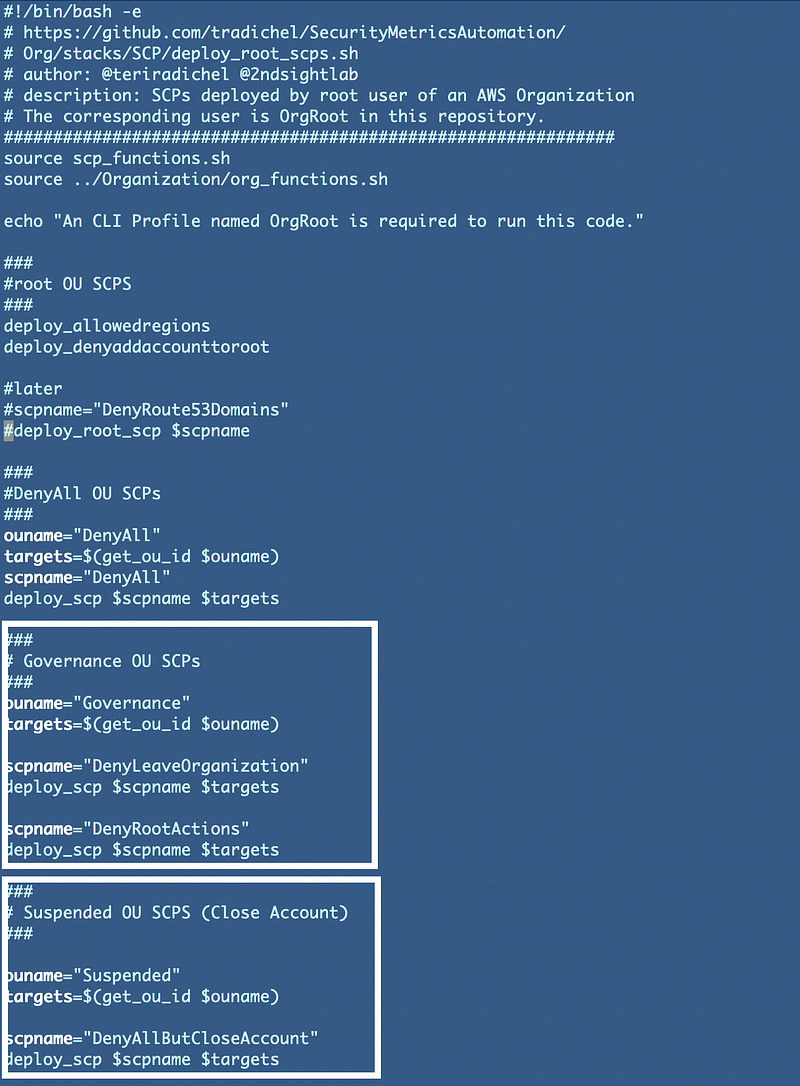
We can change our deployment script to move the two existing SCPs to the Governance OU. We’ll add a new SCP to the Suspended OU:
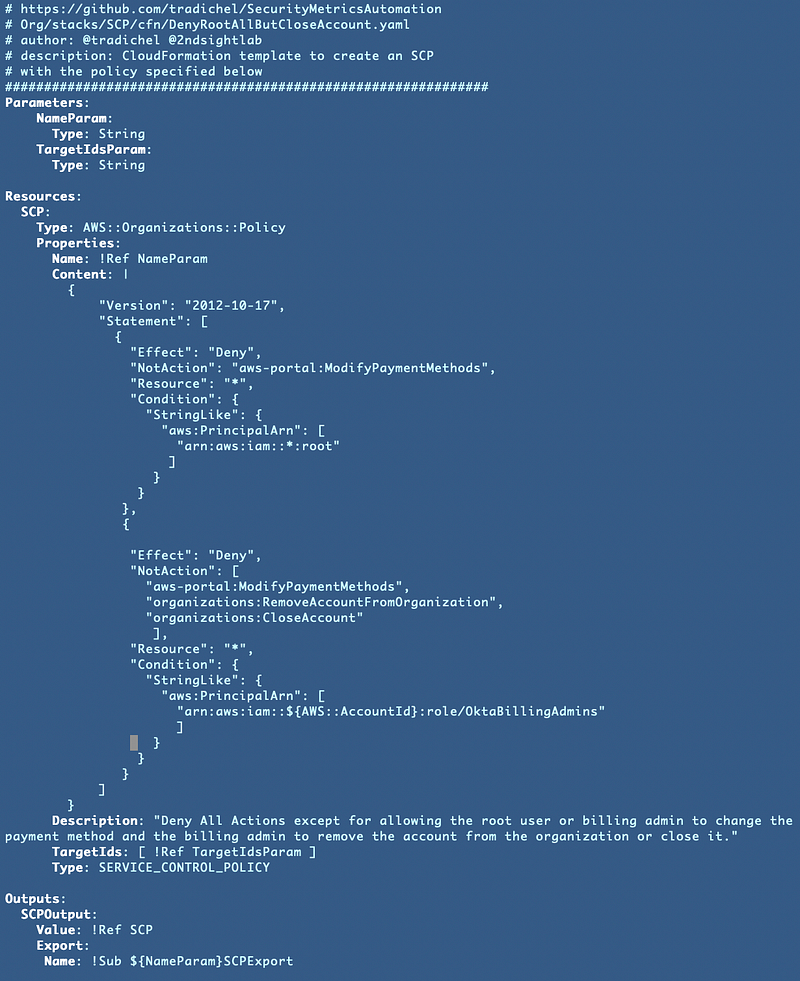
Our new SCP looks like this (at first — I initially used the incorrect action which is deprecated as noted above):
ImportValue vs. the AWS::AccountId Pseudo Parameter

Now mind you, I provide this policy and you’re like “oh cool thanks.” What you don’t know is I probably spent hours trying to figure out how to get ImportValue working in an AWS policy in a CloudFormation template. I wanted to pull the billing admin ARN from the output of the billing admin role stack. And I think I’ve done this somewhere before in my codebase on GitHub so I’ll have to go back and find this, revise this template and update it later.

However, I finally gave up, hardcoded the ARN with the use of the AWS::AccountId parameter. What this means is that you have to deploy this particular template the account where the billing admin role exists because it’s going to add that account ID to the ARN. But you’d probably be doing that in any case because an ImportValue statement would be pulling from a stack in the same account and region.

That is not really what I wanted to do because what if you rename the billing ARN? But I can’t spend more time on it right now. AWS really needs to provide error messages for policy related errors when deployed by CloudFormation that provide syntax instructions. That would save the universe a massive amount of time.

At any rate, this works and now hopefully the root user of the account I have in the Suspended OU can hopefully now add the billing information in that account. Let’s check.

No.

I then added ViewBillingPreferences to my policy.

Then I get this — Yay!
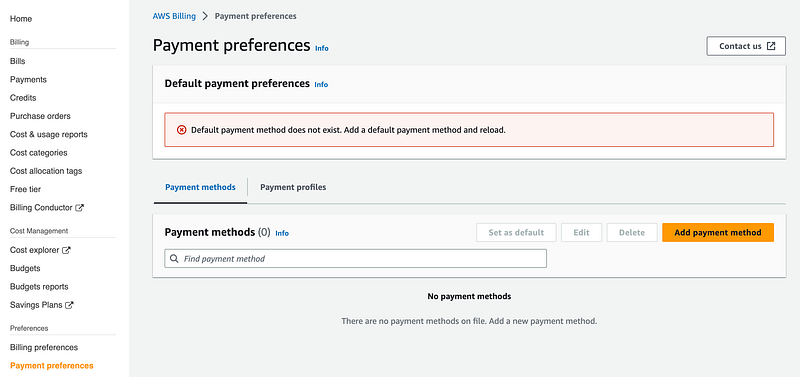
One thing I don’t understand is why the page complains about a default payment method when the account is part of an organization. Shouldn’t it recognize that? At any rate it appears to work. I can add the payment method and attempt to close the account.

After adding the card I see this error:
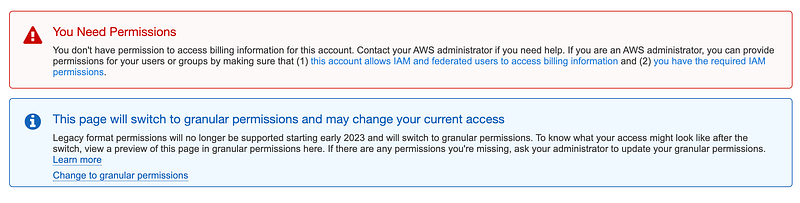
Hmm. Well, lets go back to to the organization root account and see if we can remove this account from the organization.

So far so good.
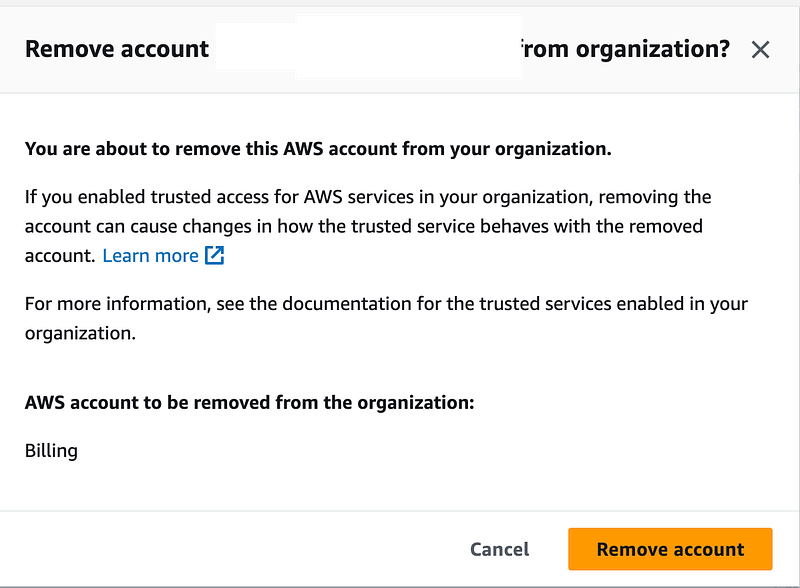
No.
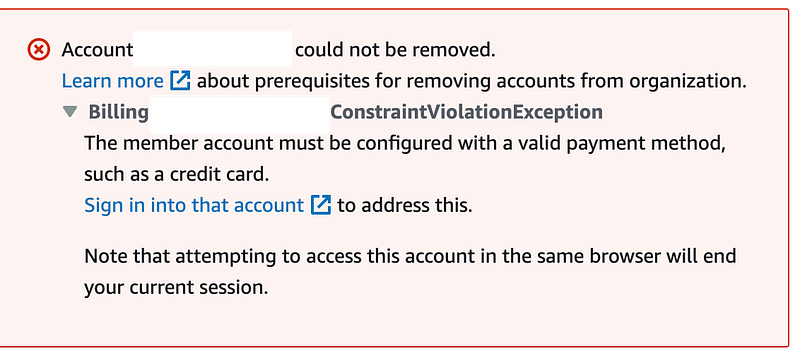
So apparently whatever happened with the root user in the child account prevented the adding a default payment method. [The issue became clearer in later posts.]

Well, I’ve spent entirely too much time on this for one day and one blog post. This was going to be a “quick” post. Far from it. I’m going to have to continue troubleshooting this in a later post. One thing I know I need to do is update my billing action to the correct one because AWS is deprecating the old actions. But now I’m curious what is going on…

Follow for updates.

Teri Radichel | © 2nd Sight Lab 2023

About Teri Radichel:
~~~~~~~~~~~~~~~~~~~~
⭐️ Author: Cybersecurity Books
⭐️ Presentations: Presentations by Teri Radichel
⭐️ Recognition: SANS Award, AWS Security Hero, IANS Faculty
⭐️ Certifications: SANS ~ GSE 240
⭐️ Education: BA Business, Master of Software Engineering, Master of Infosec
⭐️ Company: Penetration Tests, Assessments, Phone Consulting ~ 2nd Sight Lab
Need Help With Cybersecurity, Cloud, or Application Security?
~~~~~~~~~~~~~~~~~~~~~~~~~~~~~~~~~~~~~~~~~~~~~~~~~~~~~~~~~~~~~
🔒 Request a penetration test or security assessment
🔒 Schedule a consulting call
🔒 Cybersecurity Speaker for Presentation
Follow for more stories like this:
~~~~~~~~~~~~~~~~~~~~~~~~~~~~~~~~~~~~~~~~~~~~~~~~~~~~~~~~~~~~~ 
❤️ Sign Up my Medium Email List
❤️ Twitter: @teriradichel
❤️ LinkedIn: https://www.linkedin.com/in/teriradichel
❤️ Mastodon: @teriradichel@infosec.exchange
❤️ Facebook: 2nd Sight Lab
❤️ YouTube: @2ndsightlab

Cloud Security
Service Control Policy
Close Account
Remove Account
Aws Organizations
Recommended from ReadMedium