avatarRuslan Brilenkov

Free AI web copilot to create summaries, insights and extended knowledge, download it at here

10668

Abstract

nteger might crop a decimal part completely, so we might lose important information, such as:</p><figure id="aade"><img src="https://cdn-images-1.readmedium.com/v2/resize:fit:800/1*Q3qLTs_GtvLonCSWOSeYhg.png"><figcaption>Float → int transformation might crop decimal part. Be careful!</figcaption></figure><p id="c80b">We can also convert numbers into strings and back using <code>str()</code>, or strings into numbers as follows:</p><figure id="be70"><img src="https://cdn-images-1.readmedium.com/v2/resize:fit:800/1*Fr52C4oPtZDazc1z9CmrYA.png"><figcaption>Converting numbers to strings and vice versa.</figcaption></figure><p id="6437">However, if the string is not a number, then it cannot be converted into a number:</p><figure id="157b"><img src="https://cdn-images-1.readmedium.com/v2/resize:fit:800/1*FVEJ4MI3XgmjQNi-f6XdGw.png"><figcaption>It is impossible to convert a non-number string to a number.</figcaption></figure><p id="9bec">However, it is possible to get a number corresponding to a given symbol.</p><blockquote id="e838"><p><b>Note: </b><i>There is way to transform a character into a number using a command <code>ord()</code> — that will give a number of a given character.</i></p></blockquote><figure id="8dce"><img src="https://cdn-images-1.readmedium.com/v2/resize:fit:800/1*68sDoKQF_TQt1ydSH3Mnaw.png"><figcaption>Symbol to number transformation.</figcaption></figure><p id="8b53">Computers store data in form of numbers. Even the characters like <code>a</code>, <code>b</code>, <code>k</code>, <code>s</code>, etc. are stored as numbers. So, every character has its own corresponding number. The interested reader might want to take a look at the <a href="https://en.wikipedia.org/wiki/ASCII">ASCII table</a>, a character encoding standard for electronic communication.</p><h2 id="0ddd">A few words about List VS. Tuple VS. Dictionary</h2><p id="d7a1">The list can be updated while the tuple cannot be updated. For example, let us create two dummy variables (list & tuple), and try to modify them — to see what is a valid syntax.</p><figure id="00f2"><img src="https://cdn-images-1.readmedium.com/v2/resize:fit:800/1*QPhFiOslHRvyobsz8ap76Q.png"><figcaption>Editing a list is allowed.</figcaption></figure><p id="262a">The result will be <code>[1, 2, 3]</code>.</p><blockquote id="ed91"><p><b>Note:</b> <i>Python uses 0-reference indexes, meaning the first element of an array/list/tuple, etc. is a zeroth element.</i></p></blockquote><p id="0387">The very same procedure with tuple will result in an error because we are not allowed to update the tuple.</p><figure id="33fe"><img src="https://cdn-images-1.readmedium.com/v2/resize:fit:800/1*azEcyptVzOOqD_SU2--D0w.png"><figcaption>Editing a tuple is not allowed.</figcaption></figure><p id="8345">The output gives the following exception: <code>TypeError: ‘tuple’ object does not support item assignment</code>.</p><p id="dc22">Now, what about dictionaries.? Dictionary is a set of key-value pairs. It is not ordered following any particular order/index. I would like to give a broad overview of what Python can offer but the dictionary is something I did not use myself for a long time when I started learning Python. It looked a bit more complex than a simple list, for example, so I did not see the need to use it. So, why is a dictionary useful?</p><p id="cb93">It is useful to use a dictionary when you have a set of unique keys mapped to values, while for an ordered collection of items it is better to use a list. For example, in Data Science, we have to deal with databases. They can be in the form of dictionaries: a column is a key and a corresponding row element is a value. Here is a key-value pair!</p><h1 id="c25a">Part 3: Comments and how to write them</h1><p id="4baf">Sometimes it happens that one is working on a code and leaving it for 1 week. After coming back to the very same code, one is not able to understand what is going on inside! And it can be very frustrating sometimes. I am talking from my experience:</p><p id="11b3" type="7">It is very important to make comments in the code to explicitly tell which part of the code is doing what.</p><p id="3a29">So, this is how to write the comments:</p><ol><li>To comment single line of code we use <code>#</code> (hash). Everything behind it will be shown in a different color than a code and will be ignored during execution.</li><li>To comment multiple lines we use triple quotes <code>''' … many comments … '''</code> or triple-double quotes <code>""" … many comments … """</code>.</li></ol><p id="635c">Let us see several visual examples in each case:</p><figure id="7c42"><img src="https://cdn-images-1.readmedium.com/v2/resize:fit:800/1*tZqZ9uvmT2Fq_XalZHbz8A.png"><figcaption>An example of the single-line comments.</figcaption></figure><p id="3e0c">This code will not give any output at all because there is no task to run.</p><blockquote id="2c25"><p><b>Pro tip: </b><i>To comment out multiple lines each as a single-line comment, select the lines and use <b>CTRL+/</b> combination.</i></p></blockquote><figure id="565a"><img src="https://cdn-images-1.readmedium.com/v2/resize:fit:800/1*UKRSxDdwz0VXthVx9yjEWA.gif"><figcaption>Animation showing how to comment out multiple lines each as a single-line comment.</figcaption></figure><h2 id="7b90">Single VS. Double quotes?</h2><p id="e59a">It does not matter much, after all.</p><p id="c74f">In the case of multi-string comments, you might be wondering what is the difference between single and double quotes? There is no difference at all. The only difference comes when using strings! Such as, how would you print out the sentence: <code>It’s me, Ruslan</code> using a pair of single quotes?</p><p id="1d01">Using apostrophe would end the string, so one way would be using double-quote to enclose the whole string, or another would be using a back-slash <code></code> that shows that the next character is a special character.</p><figure id="5b66"><img src="https://cdn-images-1.readmedium.com/v2/resize:fit:800/1*osE27nl71y0MIHHS1Ersng.png"><figcaption>An example of printing out a string containing an apostrophe sign.</figcaption></figure><p id="f9e3">Similar goes about a multi-line comment - using both types of quotes makes our comment more flexible.</p><figure id="0e4e"><img src="https://cdn-images-1.readmedium.com/v2/resize:fit:800/1*d9a2Gq1Q25vJXnPJet8oow.png"><figcaption>Multi-line comments with single and double-quotes.</figcaption></figure><p id="8f9c">You might notice, that the output of the code cell from above gives the string inside commented part. It can be ignored. Just notice that <code>\n</code> is also a special character indicating <i>a new line</i>.</p><figure id="a42a"><img src="https://cdn-images-1.readmedium.com/v2/resize:fit:800/1*oHp_FIk2BzlEHfo87PR1kQ.png"><figcaption>Multi-line comment combining single and double-quotes.</figcaption></figure><h1 id="3567">Part 4: Lists and several useful operations on them</h1><p id="2cde">Till now, we have learned how to perform fundamental mathematical operations, print out an output, make a comment to keep a good track of the program, and learned about different types of variables in Python.</p><p id="0ded">Here, we will talk a bit more about the lists, and two particularly useful and interesting operations on them — <b>Extend</b> and <b>Append</b>.</p><p id="6a65">First of all, let us recall that <i>List is a collection of items</i>. It can be of any type, and it can contain another list inside:</p><figure id="8888"><img src="https://cdn-images-1.readmedium.com/v2/resize:fit:800/1*FyjLAvz4nHkbPiGm6U-H2Q.png"><figcaption>Creating a list containing another list inside.</figcaption></figure><p id="fef1">To get the list length use command <code>len()</code></p><figure id="0120"><img src="https://cdn-images-1.readmedium.com/v2/resize:fit:800/1*czmUoCqvY5YLZy9BOT4hzA.png"><figcaption>Getting a length of the list.</figcaption></figure><p id="25fc">To access any element of the list we use <code>L[index]</code></p><figure id="a65e"><img src="https://cdn-images-1.readmedium.com/v2/resize:fit:800/1*_vweeA4foS2a63E1Fef7yw.png"><figcaption>Getting a 2nd element of the list.</figcaption></figure><blockquote id="7e70"><p><b>Note: </b><i>The indexing in Python starts from 0, not 1. So, the first element would be accessed as <code>L[0]</code> and will be equal to “Hello World” string in our case.</i></p></blockquote><p id="fe11">There is also a possibility of accessing the list elements from the end of the list. For this, we can use negative indexing, such as <code>L[-index]</code></p><figure id="398d"><img src="https://cdn-images-1.readmedium.com/v2/resize:fit:800/1*2sGIzy2mVsMPfnC4CqJkmw.png"><figcaption>Accessing the list elements from the back.</figcaption></figure><p id="5cb8">Now, let us talk about two interesting operations on lists and how are they different — Extend VS. Append:</p><ul><li><b>Extend</b> is used to extend (insert) elements of one list into another list.</li><li><b>Append</b> is used to insert the whole list as it is into another list.</li></ul><p id="e1a6">For example, let us define two lists <code>L1</code> and <code>L2</code></p><figure id="7f51"><img src="https://cdn-images-1.readmedium.com/v2/resize:fit:800/1*OY3r8txFNj-0qIUh5NCUVA.png"><figcaption>Initializing two lists for the subsequent operations.</figcaption></figure><p id="3248">To <b>extend</b> one list’s elements into another, we use the list’s attribute <code>.extend</code></p><figure id="be0a"><img src="https://cdn-images-1.readmedium.com/v2/resize:fit:800/1*mMy3IrW7BPYJlXpc3E4HPQ.png"><figcaption>Extending one list with the elements from another one.</figcaption></figure><p id="b9f1">As a result, our list has 4 elements.</p><p id="10f1">To <b>append</b> the same list L1 with the whole list L2, we call, as you guessed, <code>.append</code> attribute</p><figure id="c61c"><img src="https://cdn-images-1.readmedium.com/v2/resize:fit:800/1*Htu78ACMzX2ByKfEY64njw.png"><figcaption>Appending one list with the elements from another one.</figcaption></figure><p id="961e">As a result, our list has only 3 elements with the 2nd element being a list of two elements on its own.</p><h1 id="e5ea">Part 5: Loops (for, while)</h1><p id="f5a5">There are two types of loops, namely, <code>for</code> and <code>while</code>. Loops are extremely useful, especially when working with lists and arrays, for example, databases.</p><ul><li><code>For</code> loops run through a definite number of times/iterations.</li><li><code>While</code> loops run indefinitely, while the condition is true. Beware to not make a program with an infinite loop!</li></ul><p id="55d8">

Options

Let us consider these two cases separately.</p><h2 id="97cf">For loop</h2><p id="b0ef">We can use <code>for</code> loop either when we want to iterate over a particular number of times or iterate over the specific elements of an array.</p><p id="9464">For-loop it is defined with the keyword <code>for</code>, indexing variable, keyword <code>in</code>, some list of iteration and colon <code>:</code>. Everything behind a colon is inside a loop and should be written with a proper indentation (use spaces or Tab button for this)</p><figure id="0d09"><img src="https://cdn-images-1.readmedium.com/v2/resize:fit:800/1*QbXhROkO8_paGqAdhkm6mQ.png"><figcaption>Iterating a for a loop.</figcaption></figure><blockquote id="ce84"><p><b>Note</b>: <i>Remember, Python indexes start with 0, not 1, and<code>range</code> indicates the range of numbers between two given numbers.</i></p></blockquote><blockquote id="5ad0"><p><b>Note</b>: <i>The iteration variable (index) can be called as you wish, even a <code>pineapple</code>. Just as a rule of thumb, it is called <code>i</code> indicating an index.</i></p></blockquote><figure id="3066"><img src="https://cdn-images-1.readmedium.com/v2/resize:fit:800/1*gRiPRy7wweciu75tolwo-g.png"><figcaption>Iterating a for loop with an arbitrary variable name.</figcaption></figure><p id="40ab">As I mentioned earlier, we can also iterate over the elements of an array. Instead of a <code>range()</code> we simply use an array itself:</p><figure id="31ba"><img src="https://cdn-images-1.readmedium.com/v2/resize:fit:800/1*N_yRkJ8l7zCyZyoMLGUyhA.png"><figcaption>Iterating a for loop from an array.</figcaption></figure><p id="a1c1">Instead of the numbers from a <code>range</code>, our index variable is assigned to the specific array element on every iteration. We can also use the range by iterating over the array/list length:</p><figure id="ef31"><img src="https://cdn-images-1.readmedium.com/v2/resize:fit:800/1*LHRrKwTayZD2u0HlQoLDFw.png"><figcaption>Iterating a for loop in a range of array elements.</figcaption></figure><blockquote id="082b"><p><b>Pro tip:</b> <i>A fancy addition to a <code>for</code> loop would be to use <code><b>enumerate</b></code> method instead of using a <code>range</code> method. It would automatically determine the element index instead of looping through a range of list length.</i></p></blockquote><figure id="6fa4"><img src="https://cdn-images-1.readmedium.com/v2/resize:fit:800/1*ojaV-1yw5boSCIljqCPmlw.png"><figcaption>Iterating with a for loop and enumerate method.</figcaption></figure><p id="6cc5">When we use enumerate, it is important to assign both the index variable and the actual value, such as <code>i, color</code>. I would consider this option slightly advanced and is not always necessary.</p><p id="6b28">When I was starting out with Python, I did not know that it exists. It is definitely not essential to use this method in every <code>for</code> loop but sometimes it might make a code looking a bit cleaner and nicer.</p><h2 id="c6f7">While loop</h2><p id="5eb9">We can use <code>while</code> loop mainly when something depends on a specific condition, for example, to be <code>True/False</code>, or if <code>i < 10</code>.</p><p id="3e6d">While-loop is defined by the keyword <code>while</code>, a condition, and the colon. For example,</p><figure id="a5cf"><img src="https://cdn-images-1.readmedium.com/v2/resize:fit:800/1*pW1Xs_yr123wbta8AgfIsA.png"><figcaption>Iterating with a while loop.</figcaption></figure><blockquote id="cdbb"><p><i>Again, remember to not run an endless loop. Such a loop will never stop because the condition is always satisfied.</i></p></blockquote><h1 id="3c6a">Part 6: Functions</h1><p id="bdc4">Last but not least for this tutorial, a topic of functions. Let us start with a definition, and then show how to write our own functions.</p><p id="ccde">A function is a block or a group of organized and reusable code. It is used to perform a single, related action. Using functions can not only help to keep your code clean but also improve its computing speed.</p><p id="4adf">We have already seen several build-in Python functions, such as <code>len()</code>, <code>print()</code>, <code>type()</code>, etc. These are very useful but, in my opinion, to get the most out of Python we need to create our own function for a specific task.</p><h2 id="9a66">How to define a function?</h2><p id="e2ca">These are simple rules to define a function in Python:</p><ul><li>Similar to <code>for</code> or <code>while</code> loop, function block begins with the keyword <code><b>def</b></code> followed by the function name and parentheses <code>( )</code></li><li>A function can have (optional) input parameter(s). They should be placed within these parentheses. We can even define some parameters inside these parentheses.</li><li>A colon <code>:</code> separates a function header and its body.</li><li>The function body can have the documentation string (<i>docstring</i>). That is an optional statement indicating the function information. In one of my <a href="https://readmedium.com/track-your-weight-with-python-4bf0cae42ef3">previous tutorials</a>, I mentioned docstrings. Please refer there if you would like to learn more about it.</li><li>To exit a function, we can provide a <code>return</code> statement with an (optional) expression. A return statement with no arguments is the same as <code>return None</code></li></ul><p id="6fbd">Example of a simple function:</p><figure id="f9d3"><img src="https://cdn-images-1.readmedium.com/v2/resize:fit:800/1*8yX_TCg9cCFGDHG9rOL1YQ.png"><figcaption>Several examples to define a function.</figcaption></figure><blockquote id="1eae"><p><b>Note:</b> <i>If we specify default values for the parameters inside a function header, we can simply call this function without providing any parameters. This is <code>my_sum3()</code> case</i></p></blockquote><p id="0475">Let us also see another simple example:</p><figure id="d3bb"><img src="https://cdn-images-1.readmedium.com/v2/resize:fit:800/1*RubX_nl_ENFzXfyXbgi8RA.png"><figcaption>Greeting our World from a function.</figcaption></figure><p id="55a7">These simple examples illustrate the principle of using functions in Python. The larger the program, the more complex it is, the more functions it is better to use to keep things in order.</p><p id="59f8">Here, I would like to mention one important topic: the difference between global and local variables.</p><h2 id="960c">Global VS. Local variables</h2><p id="6e27"><b>Global </b>variables are declared <i>outside</i> any <b>function</b>, so they can be used (accessed) on any function in the program.</p><p id="f025"><b>Local </b>variables are declared <i>inside</i> a function and can be used only inside that particular function.</p><p id="45b3">Let us see the difference between these two when we use the same variable name for both of them:</p><figure id="bcd7"><img src="https://cdn-images-1.readmedium.com/v2/resize:fit:800/1*bCY_GP1du7wR9XacXUPvBg.png"><figcaption>Local VS. Global variables.</figcaption></figure><p id="d61b">It might be a bit confusing right now but when you get used to that idea, it gets better.</p><p id="c014">This also makes it clear why using functions can speed up the code. Defining functions means having more local variables. Each of them occupies less space in the memory. That means the program would not need to store a lot of information globally but only when it has to use it (inside functions).</p><h1 id="a8b7">Conclusions</h1><p id="9351">With functions, we conclude this tutorial. Again, the main idea is to teach everybody Python and Machine Learning (ML). Before we get to the ML part, I would like everyone to be on the same page. We have already covered a range of topics here. With a bit of patience, we will get there in no time.</p><p id="dcde" type="7">Remember, practice makes progress.</p><p id="12cc">As I mentioned earlier, here are a few of my projects that I explained from the beginning until the end. It can be a great opportunity to try to practice some of the skills you have learned in this tutorial to enhance your experience:</p><ul><li><a href="https://readmedium.com/track-your-weight-with-python-4bf0cae42ef3">tracking your weight</a> from scratch in Python</li><li>analyzing <a href="https://readmedium.com/analyzing-covid-19-papers-with-python-part-1-22706eb92270">COVID-19 scientific papers</a></li><li>creating a <a href="https://readmedium.com/create-productivity-app-in-python-from-scratch-part-1-d715d1f393db">productivity app</a> (Pomodoro) from scratch</li></ul><p id="e1f8">Thank you for reading until the end. I hope you have learned something new.</p><p id="8b10">Are you curious about the emerging field of Prompt Engineering? Grab <a href="https://ruslanbrilenkov.gumroad.com/l/promptengineering300">my new e-book</a>! You will learn and master everything from fundamental concepts to practical tips and real-world applications. Additionally, you will receive a bonus of 300 prompts and some of the free resources to kick-start your AI-driven journey. With all this value packed into one e-book, what is the price? The cost of a cup of coffee! Do not miss out on this opportunity to take your skills to the next level!</p><div id="0e12" class="link-block"> <a href="https://ruslanbrilenkov.gumroad.com/l/promptengineering300"> <div> <div> <h2>Prompt Engineering, 300 Prompts, & Free AI Resources</h2> <div><h3>Welcome to this e-book on prompt engineering — a rapidly growing field in artificial intelligence. This comprehensive…</h3></div> <div><p>ruslanbrilenkov.gumroad.com</p></div> </div> <div> <div style="background-image: url(https://miro.readmedium.com/v2/resize:fit:320/0*kbPKUVsdzyKqgLhI)"></div> </div> </div> </a> </div><h1 id="5339">Contact</h1><p id="7098"><a href="https://www.linkedin.com/in/ruslan-brilenkov/"><b><i>LinkedIn</i></b></a></p><p id="7e91"><i>I recently started a <a href="https://bit.ly/RBrilenkovYT"><b>YouTube channel</b></a><b> </b>where I talk about different topics, including data science and AI news, research, and life in general among others. It is a steep learning curve for me but I invite you to <a href="https://bit.ly/RBrilenkovYT">check it out here</a>.</i></p><p id="f07a"><i>Never miss a story, join my <a href="https://ruslan-brilenkov.medium.com/subscribe"><b>mailing list</b></a>!</i></p><p id="f373"><a href="https://github.com/RuslanBrilenkov"><b><i>GitHub</i></b></a></p></article></body>

Python Tutorial for Complete Beginners. From ‘Hello World’ to Functions.

This tutorial is the starting point of my big project — “From Zero to a Machine Learning (ML) practitioner”. The main idea is to teach everybody Python and ML despite their educational background.

Photo by rishi on Unsplash

This tutorial is meant for everyone interested in Python. Especially, for those who are just starting out and cannot break the ice from intention to action. You are here which means you are serious about learning Python and I appreciate it.

I am using Python for my work a lot. Some of the applications are scientific computing, statistics, and advanced visualization. But in my free time, I enjoy creating mini-applications for various reasons. Some of them solve a particular problem (personal, or a world large-scale problem), others are just for fun, or just something to challenge myself.

This particular lesson is an expansion of the tutorials I gave to a friend of mine, who happened to be just at the beginning of his Ph.D. research. We started talking about various topics: variable types, functions, visualization, and even touched machine learning. I told him that it is never too late to learn something new, especially something like Python in our digital era.

Because Python is a powerful and popular general-purpose programming language. And here is the best part, Python is developed under an OSI-approved open source license, making it freely usable and distributable, even for commercial uses.

In short, we can use Python from the basic to advanced computations and statistics, to visualizations and plotting, to data analysis and machine learning.

I know that the last part in the list sounds the most interesting BUT without proper preparation and preliminary work it will be too hard to handle, and it might sound no more than magic!

I can start showing cool machine learning algorithms to you already but I want to be sure that we are all on the same page to understand what is going on under the hood. So, let us be a little bit more patient and we will get there in no time:

I am fascinated to share with you my Python-journey and show you the way from a complete beginner to a machine learning practitioner.

And, along the way, I will share with you some of my Python projects — such as analyzing COVID-19 scientific papers, creating a productivity app, and tracking your weight from scratch in Python, and more. I believe that each of them has something interesting and new to offer.

But before we dive into these projects, we want to understand the following topics:

  • Part 0: Standard Mathematical Operations (+, -, *, /)
  • Part 1: Hello World!
  • Part 2: Variables and their Types
  • Part 3: Comments and how to write them
  • Part 4: Lists and several useful operations on them
  • Part 5: Loops (for, while)
  • Part 6: Functions

Here, we start our Python-journey …

Part 0: Standard Mathematical Operations

Whether you are working directly in the python script (.py) or inside an interactive Jupyter Notebook (.ipynb), you can use the code equally well.

I will be using a Jupyter Notebook. Here is a really quick guide on how to install the Jupyter Notebook:

  1. Download Anaconda. It is recommended to download Anaconda’s latest Python 3 version (currently Python 3.7).
  2. Install the version of Anaconda which you downloaded, following the instructions on the download page.
  3. Congratulations, you have installed Jupyter Notebook! To run the notebook just type in terminal:
jupyter notebook

Now, you can see the Web-based application where you can create a new notebook. The rest of this tutorial will be inside one of these notebooks.
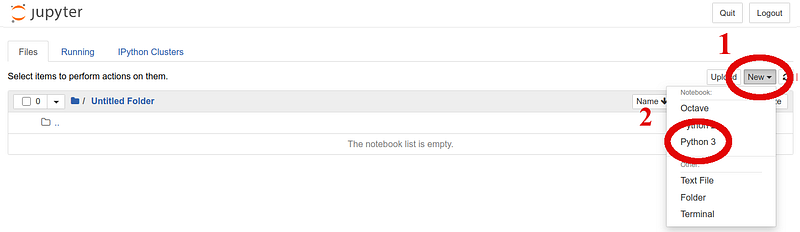
Made by Author. Creating our first Jupyter Notebook.

Next, I will show how to perform standard mathematical operations in Python. It is as easy as taking two numbers or variables and performing the desired operation, as follows
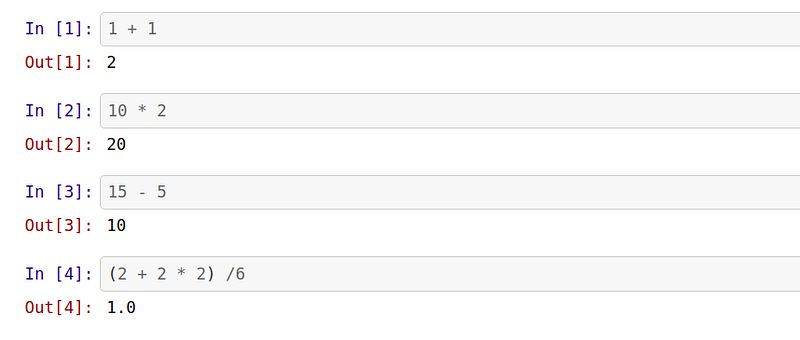
Made by Author. Standard Mathematical Operations.

Note: In the notebook, you have cells. You type inside them and then run a code (by pressing an arrow button on top).

That would show the indication of In [x] and Out [x] for the input and the output of a given number.

Pro tip: Instead of pressing that button, you can press SHIFT+ENTER (a hot key) to execute a given cell. It will make your life easier in future.
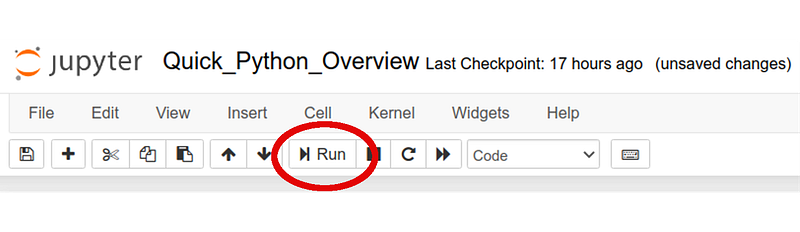
Running Notebook cells.

Part 1: Hello World!

Now we know how to perform these basic operations. The next step would be to print something out. The most natural phrase is Hello World!

Everyone knows that to become a programmer one has to write a program to greet the world, i.e., Hello World program. To do this in python we can use the command print(object).

An object can be anything, in this particular case, it is the phrase or so-called string of characters. We will go through different variables and their types in Part 2, so do not worry about the quote signs, it is just how strings are defined. In Python printing is done very easily:

Print out “Hello World!”

Congratulations! Now, you are officially a programmer!

We are moving pretty fast, right? We already know how to operate with numbers and print outputs. Let us talk about a very important topic — variables. Because variables are the basis of any programming language.

Part 2: Variables and their Types

In general, we can define a variable as a reserved memory location to store value. In my opinion, programming in its essence is just assigning, reassigning, and operating with different variables in a smart way to create the desired outcome.

Let us talk about standard types of variables in Python:

  • Number (Integer as 5, Float as 3.1415 — a number like an integer but it has a decimal part). There are also Long and Complex numbers but to my knowledge, they are used less frequently.
  • String (an example is ‘Hello World!’ — a string is a sequence/collection of characters. A sentence consists of letters, so a string consists of characters. A string value is anything between single or double quotes)
  • List (the type that contains items separated by commas, enclosed within square brackets [ ], the items can be various in type! That is a big difference with arrays in the C language. Example: [1, ‘2’, 3], the list can be modified/changed)
  • Tuple (similar to a list, enclosed in the parentheses ( ), cannot be updated. Example: (1, ‘2’, 3))
  • Dictionary (similar to list but instead of indexes uses key-value pairs, enclosed in curly brackets { }, a key is usually a number or a string but the corresponding value can be any Python object. Example: {'name': 'Harry Potter', 'profession':'magician', 'dept': 'Gryffindor'})
  • I would also add a Boolean which can be either True or False. This type of variable is very handy in checking a given condition. For example, if a is greater than b, or if a given file exists in a given folder/directory.

How do we check the type of the variable?

To check the type of any variable we simply use the command type() in the following way:
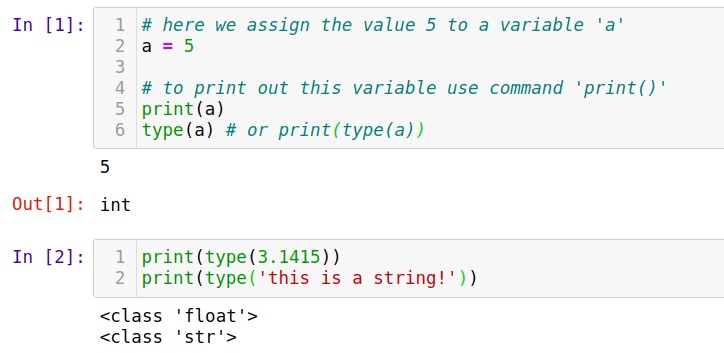
Checking the integer, float, and string variable types.
Checking the list variable type.

The output can be, for instance, int, float, str, or list for integers, floats, strings, or lists, respectively.

How do we transform one type into another?

We might want to change a type of variable. To do this, we have to use a corresponding type name for transformation. For example, if we want to transform float → int, we can use int() as follows:
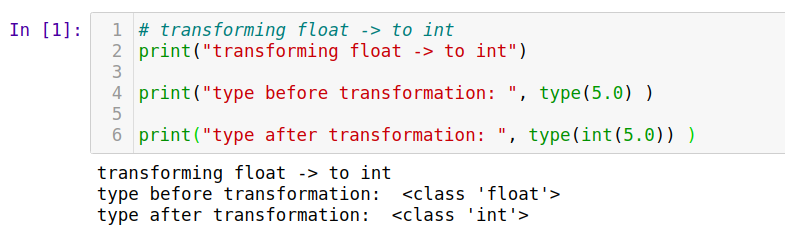
Transforming float to integer.

Bear in mind, changing a float into an integer might crop a decimal part completely, so we might lose important information, such as:

Float → int transformation might crop decimal part. Be careful!

We can also convert numbers into strings and back using str(), or strings into numbers as follows:
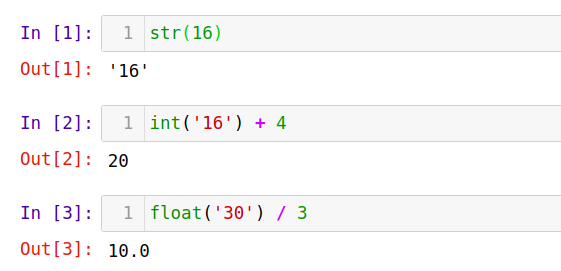
Converting numbers to strings and vice versa.

However, if the string is not a number, then it cannot be converted into a number:
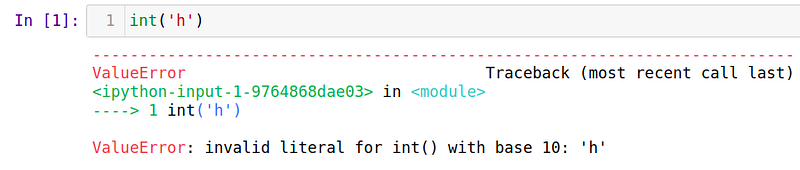
It is impossible to convert a non-number string to a number.

However, it is possible to get a number corresponding to a given symbol.

Note: There is way to transform a character into a number using a command ord() — that will give a number of a given character.

Symbol to number transformation.

Computers store data in form of numbers. Even the characters like a, b, k, s, etc. are stored as numbers. So, every character has its own corresponding number. The interested reader might want to take a look at the ASCII table, a character encoding standard for electronic communication.

A few words about List VS. Tuple VS. Dictionary

The list can be updated while the tuple cannot be updated. For example, let us create two dummy variables (list & tuple), and try to modify them — to see what is a valid syntax.
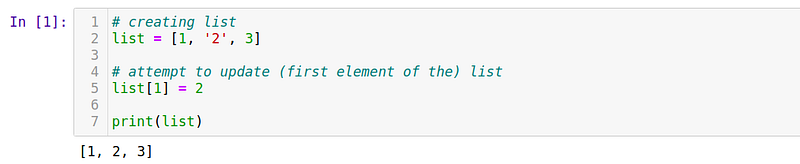
Editing a list is allowed.

The result will be [1, 2, 3].

Note: Python uses 0-reference indexes, meaning the first element of an array/list/tuple, etc. is a zeroth element.

The very same procedure with tuple will result in an error because we are not allowed to update the tuple.
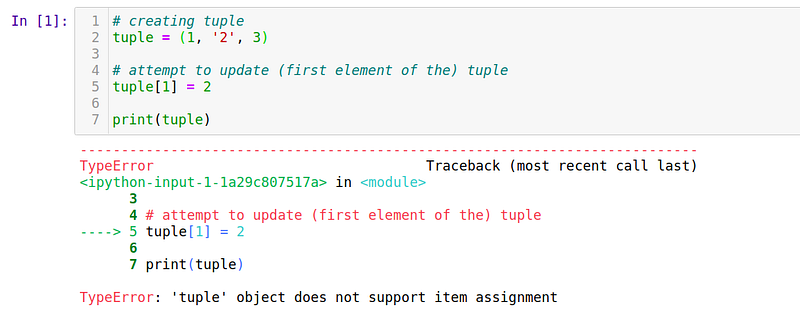
Editing a tuple is not allowed.

The output gives the following exception: TypeError: ‘tuple’ object does not support item assignment.

Now, what about dictionaries.? Dictionary is a set of key-value pairs. It is not ordered following any particular order/index. I would like to give a broad overview of what Python can offer but the dictionary is something I did not use myself for a long time when I started learning Python. It looked a bit more complex than a simple list, for example, so I did not see the need to use it. So, why is a dictionary useful?

It is useful to use a dictionary when you have a set of unique keys mapped to values, while for an ordered collection of items it is better to use a list. For example, in Data Science, we have to deal with databases. They can be in the form of dictionaries: a column is a key and a corresponding row element is a value. Here is a key-value pair!

Part 3: Comments and how to write them

Sometimes it happens that one is working on a code and leaving it for 1 week. After coming back to the very same code, one is not able to understand what is going on inside! And it can be very frustrating sometimes. I am talking from my experience:

It is very important to make comments in the code to explicitly tell which part of the code is doing what.

So, this is how to write the comments:

  1. To comment single line of code we use # (hash). Everything behind it will be shown in a different color than a code and will be ignored during execution.
  2. To comment multiple lines we use triple quotes ''' … many comments … ''' or triple-double quotes """ … many comments … """.

Let us see several visual examples in each case:

An example of the single-line comments.

This code will not give any output at all because there is no task to run.

Pro tip: To comment out multiple lines each as a single-line comment, select the lines and use CTRL+/ combination.

Animation showing how to comment out multiple lines each as a single-line comment.

Single VS. Double quotes?

It does not matter much, after all.

In the case of multi-string comments, you might be wondering what is the difference between single and double quotes? There is no difference at all. The only difference comes when using strings! Such as, how would you print out the sentence: It’s me, Ruslan using a pair of single quotes?

Using apostrophe would end the string, so one way would be using double-quote to enclose the whole string, or another would be using a back-slash \ that shows that the next character is a special character.

An example of printing out a string containing an apostrophe sign.

Similar goes about a multi-line comment - using both types of quotes makes our comment more flexible.
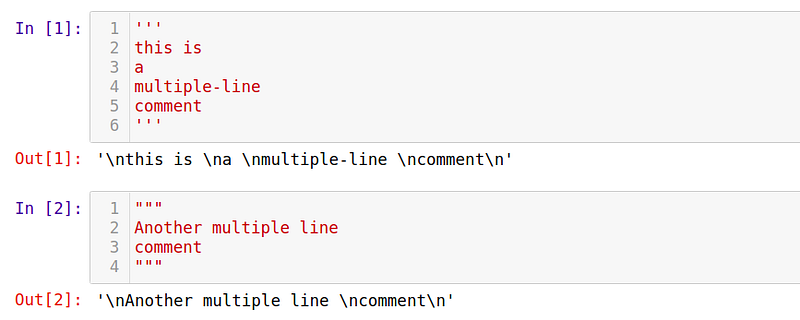
Multi-line comments with single and double-quotes.

You might notice, that the output of the code cell from above gives the string inside commented part. It can be ignored. Just notice that \n is also a special character indicating a new line.

Multi-line comment combining single and double-quotes.

Part 4: Lists and several useful operations on them

Till now, we have learned how to perform fundamental mathematical operations, print out an output, make a comment to keep a good track of the program, and learned about different types of variables in Python.

Here, we will talk a bit more about the lists, and two particularly useful and interesting operations on them — Extend and Append.

First of all, let us recall that List is a collection of items. It can be of any type, and it can contain another list inside:

Creating a list containing another list inside.

To get the list length use command len()

Getting a length of the list.

To access any element of the list we use L[index]

Getting a 2nd element of the list.

Note: The indexing in Python starts from 0, not 1. So, the first element would be accessed as L[0] and will be equal to “Hello World” string in our case.

There is also a possibility of accessing the list elements from the end of the list. For this, we can use negative indexing, such as L[-index]
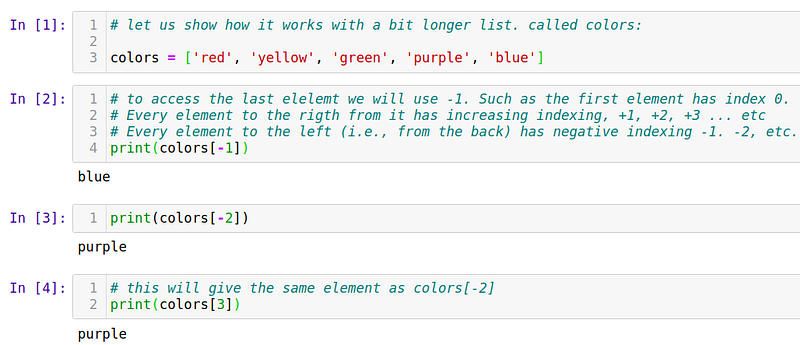
Accessing the list elements from the back.

Now, let us talk about two interesting operations on lists and how are they different — Extend VS. Append:

  • Extend is used to extend (insert) elements of one list into another list.
  • Append is used to insert the whole list as it is into another list.

For example, let us define two lists L1 and L2
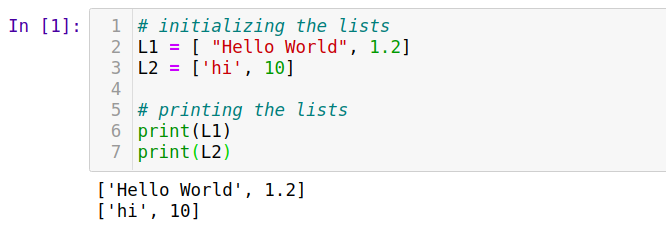
Initializing two lists for the subsequent operations.

To extend one list’s elements into another, we use the list’s attribute .extend
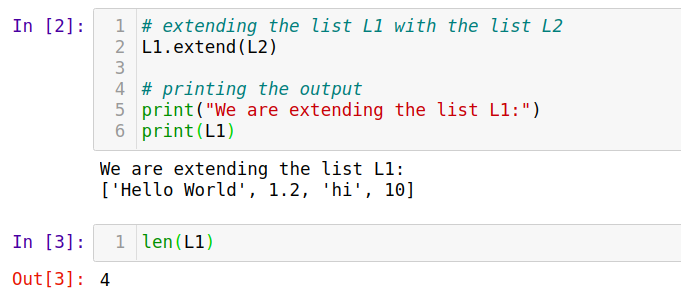
Extending one list with the elements from another one.

As a result, our list has 4 elements.

To append the same list L1 with the whole list L2, we call, as you guessed, .append attribute
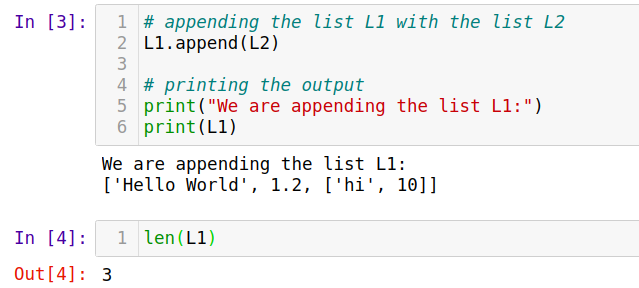
Appending one list with the elements from another one.

As a result, our list has only 3 elements with the 2nd element being a list of two elements on its own.

Part 5: Loops (for, while)

There are two types of loops, namely, for and while. Loops are extremely useful, especially when working with lists and arrays, for example, databases.

  • For loops run through a definite number of times/iterations.
  • While loops run indefinitely, while the condition is true. Beware to not make a program with an infinite loop!

Let us consider these two cases separately.

For loop

We can use for loop either when we want to iterate over a particular number of times or iterate over the specific elements of an array.

For-loop it is defined with the keyword for, indexing variable, keyword in, some list of iteration and colon :. Everything behind a colon is inside a loop and should be written with a proper indentation (use spaces or Tab button for this)
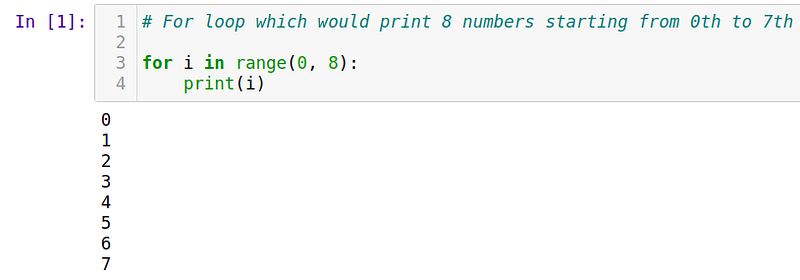
Iterating a for a loop.

Note: Remember, Python indexes start with 0, not 1, andrange indicates the range of numbers between two given numbers.

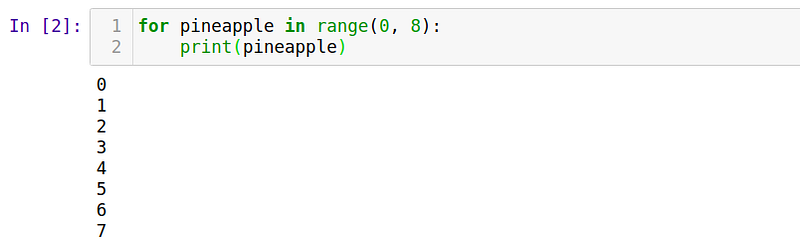
Note: The iteration variable (index) can be called as you wish, even a pineapple. Just as a rule of thumb, it is called i indicating an index.

Iterating a for loop with an arbitrary variable name.

As I mentioned earlier, we can also iterate over the elements of an array. Instead of a range() we simply use an array itself:
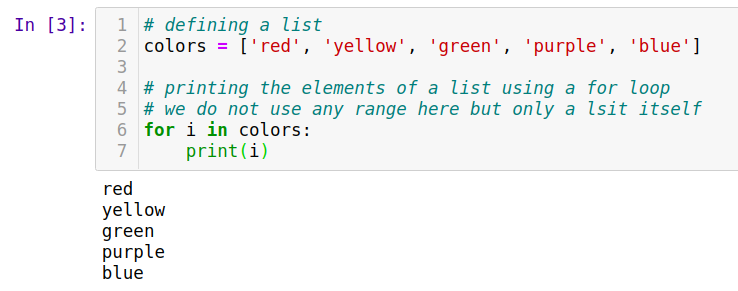
Iterating a for loop from an array.

Instead of the numbers from a range, our index variable is assigned to the specific array element on every iteration. We can also use the range by iterating over the array/list length:
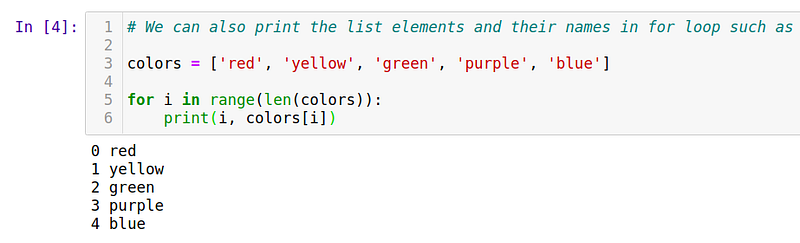
Iterating a for loop in a range of array elements.

Pro tip: A fancy addition to a for loop would be to use enumerate method instead of using a range method. It would automatically determine the element index instead of looping through a range of list length.
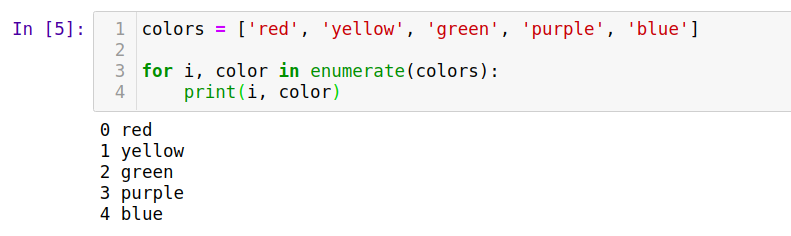
Iterating with a for loop and enumerate method.

When we use enumerate, it is important to assign both the index variable and the actual value, such as i, color. I would consider this option slightly advanced and is not always necessary.

When I was starting out with Python, I did not know that it exists. It is definitely not essential to use this method in every for loop but sometimes it might make a code looking a bit cleaner and nicer.

While loop

We can use while loop mainly when something depends on a specific condition, for example, to be True/False, or if i < 10.

While-loop is defined by the keyword while, a condition, and the colon. For example,
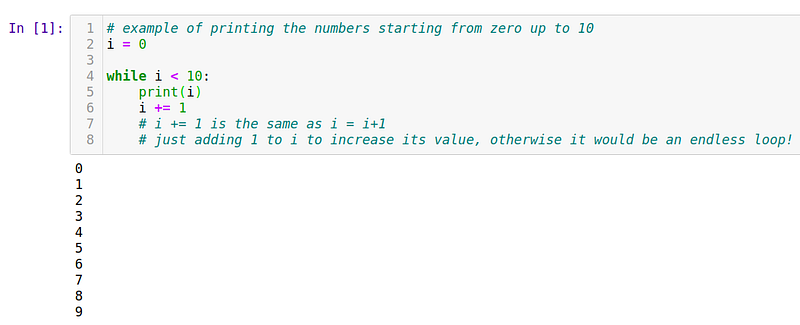
Iterating with a while loop.

Again, remember to not run an endless loop. Such a loop will never stop because the condition is always satisfied.

Part 6: Functions

Last but not least for this tutorial, a topic of functions. Let us start with a definition, and then show how to write our own functions.

A function is a block or a group of organized and reusable code. It is used to perform a single, related action. Using functions can not only help to keep your code clean but also improve its computing speed.

We have already seen several build-in Python functions, such as len(), print(), type(), etc. These are very useful but, in my opinion, to get the most out of Python we need to create our own function for a specific task.

How to define a function?

These are simple rules to define a function in Python:

  • Similar to for or while loop, function block begins with the keyword def followed by the function name and parentheses ( )
  • A function can have (optional) input parameter(s). They should be placed within these parentheses. We can even define some parameters inside these parentheses.
  • A colon : separates a function header and its body.
  • The function body can have the documentation string (docstring). That is an optional statement indicating the function information. In one of my previous tutorials, I mentioned docstrings. Please refer there if you would like to learn more about it.
  • To exit a function, we can provide a return statement with an (optional) expression. A return statement with no arguments is the same as return None

Example of a simple function:
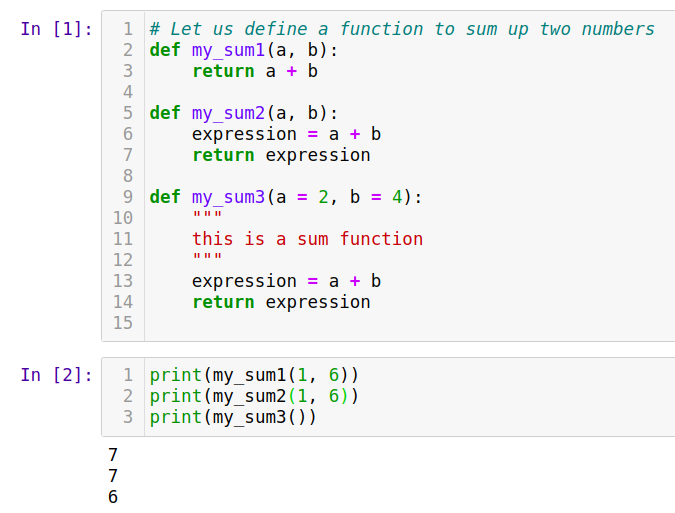
Several examples to define a function.

Note: If we specify default values for the parameters inside a function header, we can simply call this function without providing any parameters. This is my_sum3() case

Let us also see another simple example:
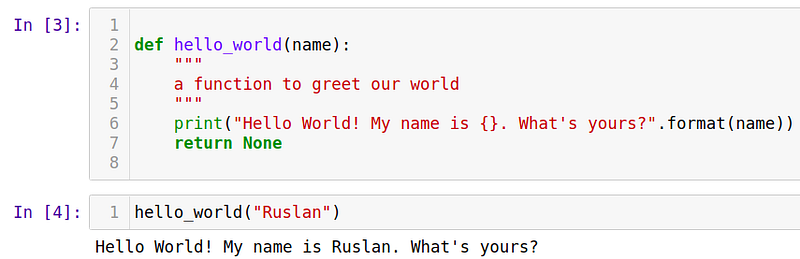
Greeting our World from a function.

These simple examples illustrate the principle of using functions in Python. The larger the program, the more complex it is, the more functions it is better to use to keep things in order.

Here, I would like to mention one important topic: the difference between global and local variables.

Global VS. Local variables

Global variables are declared outside any function, so they can be used (accessed) on any function in the program.

Local variables are declared inside a function and can be used only inside that particular function.

Let us see the difference between these two when we use the same variable name for both of them:
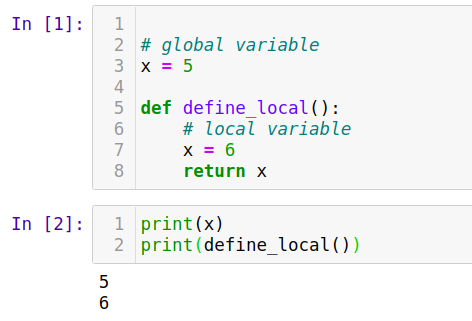
Local VS. Global variables.

It might be a bit confusing right now but when you get used to that idea, it gets better.

This also makes it clear why using functions can speed up the code. Defining functions means having more local variables. Each of them occupies less space in the memory. That means the program would not need to store a lot of information globally but only when it has to use it (inside functions).

Conclusions

With functions, we conclude this tutorial. Again, the main idea is to teach everybody Python and Machine Learning (ML). Before we get to the ML part, I would like everyone to be on the same page. We have already covered a range of topics here. With a bit of patience, we will get there in no time.

Remember, practice makes progress.

As I mentioned earlier, here are a few of my projects that I explained from the beginning until the end. It can be a great opportunity to try to practice some of the skills you have learned in this tutorial to enhance your experience:

Thank you for reading until the end. I hope you have learned something new.

Are you curious about the emerging field of Prompt Engineering? Grab my new e-book! You will learn and master everything from fundamental concepts to practical tips and real-world applications. Additionally, you will receive a bonus of 300 prompts and some of the free resources to kick-start your AI-driven journey. With all this value packed into one e-book, what is the price? The cost of a cup of coffee! Do not miss out on this opportunity to take your skills to the next level!

Contact

LinkedIn

I recently started a YouTube channel where I talk about different topics, including data science and AI news, research, and life in general among others. It is a steep learning curve for me but I invite you to check it out here.

Never miss a story, join my mailing list!

GitHub

Python
Python Programming
Tutorial
Programming
Data Science
Recommended from ReadMedium