Free AI web copilot to create summaries, insights and extended knowledge, download it at here
2325
Abstract
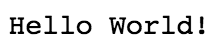
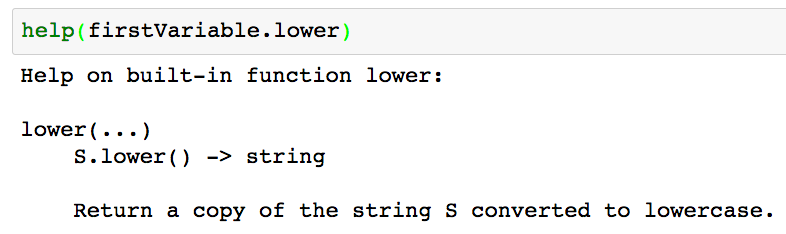
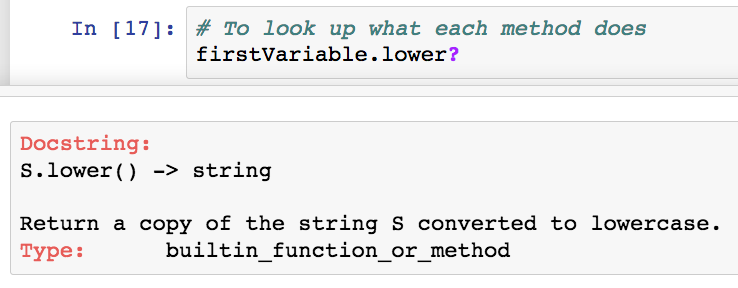
ges-1.readmedium.com/v2/resize:fit:800/1*tRRBPYjREydsRIcKFa9NPQ.png"><figcaption>Output of printing ‘Hello World!’</figcaption></figure><h2 id="8f10">Strings and String Manipulation</h2><p id="f200">Strings are a special type of a python class. As objects, in a class, you can call methods on string objects using the .methodName() notation. The string class is available by default in python, so you do not need an import statement to use the object interface to strings.</p><div id="1d85"><pre><span class="hljs-comment"># Create a variable</span>
<span class="hljs-comment"># Variables are used to store information to be referenced </span>
<span class="hljs-comment"># and manipulated in a computer program.</span>
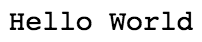
firstVariable = <span class="hljs-string">'Hello World'</span>
<span class="hljs-built_in">print</span>(firstVariable)</pre></div><figure id="50ff"><img src="https://cdn-images-1.readmedium.com/v2/resize:fit:800/1*f0aXyvLgXb7PCV1Xao_D8Q.png"><figcaption>Output of printing the variable firstVariable</figcaption></figure><div id="68d4"><pre><span class="hljs-comment"># Explore what various string methods</span>
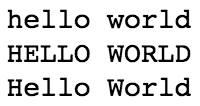
<span class="hljs-built_in">print</span>(firstVariable.lower())
<span class="hljs-built_in">print</span>(firstVariable.upper())
<span class="hljs-built_in">print</span>(firstVariable.title())</pre></div><figure id="34f4"><img src="https://cdn-images-1.readmedium.com/v2/resize:fit:800/1*8dZfNBBABBSTuXxqE9mI3g.png"><figcaption>Output of using .lower(), .upper() , and title() methods</figcaption></figure><div id="dd9e"><pre># Use the split <span class="hljs-keyword">method</span> <span class="hljs-title function_">to</span> <span class="hljs-title function_">convert</span> <span class="hljs-title function_">your</span> <span class="hljs-title function_">string</span> <span class="hljs-title function_">into</span> <span class="hljs-title function_">a</span> <span class="hljs-title function_">list</span>
<span class="hljs-title function_">print</span><span class="hljs-params">(firstVariable.split(<span class="hljs-string">' '</span>)</span>)</pre></div><figure id="896c"><img src="https://cdn-images-1.readmedium.com/v2/resize:fit:800/1*gG7KFXpkNjbYjQgZwgtGTQ.png"><figcaption>Output of using the split method (in this case, split on space)</figcaption></figure><div id="f0fc"><pre><s
Options
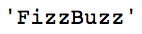
pan class="hljs-comment"># You can add strings together. </span>
<span class="hljs-keyword">a</span> = <span class="hljs-string">"Fizz"</span> + <span class="hljs-string">"Buzz"</span>
print(<span class="hljs-keyword">a</span>)</pre></div><figure id="cf06"><img src="https://cdn-images-1.readmedium.com/v2/resize:fit:800/1*p7y9qCsQmXAbae7Cf9t_3w.png"><figcaption>string concatenation</figcaption></figure><h2 id="79ee">Look up what Methods Do</h2><p id="cc81">For new programmers, they often ask how you know what each method does. Python provides two ways to do this.</p><p id="58df">1. (works in and out of Jupyter Notebook) Use <b>help</b> to lookup what each method does.</p><figure id="be50"><img src="https://cdn-images-1.readmedium.com/v2/resize:fit:800/1*3Mz8PtPFypNrptb9JqyOqA.png"><figcaption>Use help to lookup what each method does</figcaption></figure><p id="8cc1">2. (Jupyter Notebook exclusive) You can also look up what a method does by having a question mark after a method.</p><div id="5a19"><pre># <span class="hljs-keyword">To</span> look up what <span class="hljs-keyword">each</span> <span class="hljs-keyword">method</span> <span class="hljs-title function_">does</span> <span class="hljs-title function_">in</span> <span class="hljs-title function_">jupyter</span>
<span class="hljs-params">(doesnt work <span class="hljs-keyword">in</span> outside <span class="hljs-keyword">of</span> jupyter)</span>
<span class="hljs-title function_">firstVariable</span>.<span class="hljs-title function_">lower</span>?</pre></div><figure id="5c02"><img src="https://cdn-images-1.readmedium.com/v2/resize:fit:800/1*VrLofndKpFcsKNAsv5vz9Q.png"><figcaption>Look up what each method does in Jupyter</figcaption></figure><h2 id="f934">Closing Remarks</h2><p id="e464">Please let me know if you have any questions either here, in the comments section of the <a href="https://www.youtube.com/watch?v=JqGjkNzzU4s">youtube video</a>, or through <a href="https://twitter.com/GalarnykMichael">Twitter</a>! The code in the post is also available on my <a href="https://github.com/mGalarnyk/Python_Tutorials/blob/master/Python_Basics/Intro/Python3Basics_Part1.ipynb">github</a>. Part 2 of the tutorial series is <a href="https://readmedium.com/python-basics-2-simple-math-4ac7cc928738">Simple Math</a>.</p></article></body>