avatarEllane W

Free AI web copilot to create summaries, insights and extended knowledge, download it at here

2583

Abstract

(and a little paper)</h1><h2 id="6cc7">A fresh new set of pages in my Paper Saver notebook</h2><p id="777b">Prior to going interstate to see family, I’ve set up my Paper Saver with a brand new set of pages. Love the fresh start! This time my collection of recycled paper includes the backs of a large envelope I received in the mail, and the back of Mother’s Day wrapping paper made from pictures drawn by my grandchildren.</p><figure id="1e3c"><img src="https://cdn-images-1.readmedium.com/v2/resize:fit:800/1*nItrFqIxmkxO6UcWY5MP5g.png"><figcaption>Image by Author</figcaption></figure><p id="1312">Still happily planning with the paper calendar pages (<a href="https://miscellaneplans.gumroad.com/l/calendar-month">template</a>) in the middle of my Paper Saver. This way of bird’s-eye planning, taking fleeting notes, and sketch noting talks on recycled paper feels like something I’ll be sticking with for the foreseeable future.</p><h2 id="75cc">Planning by hand—interactive PDFs on the iPad</h2><p id="21f3">I’m back to using the iPad when I want to plan in the peaceful darkness of the early morning. I’m using the <a href="https://passionplanner.com/products/weekly-undated-french">French version of the Passion Planner</a> for additional passive immersion learning. To make it easier to navigate, I imported the file into Affinity Publisher and added some anchors to create a PDF outline on export.</p><p id="a3e5">iPad notes app of choice — now that I’m using a PDF planner on my iPad again, I’ve had to once more face the struggle of deciding which app to use. Wouldn’t it be nice if annotations made in one were editable in the others! But no. A choice must be made.</p><p id="0a80">Noteful’s two-finger tap to undo, plus layers and zoom super-powers, made it my initial choice this time round, but using it for a week helped me to see that Noteshelf’s pencil, and pinch to snap the page to the screen, weren’t features I was happy to do without.</p><p id="58c9">So which is the best app for your interactive planning adventures? You’ll just have to compare and see.</p><div id="2057" class="link-block"> <a href="https://readmedium.com/which-ipad-notes-app-is-best-for-writing-and-drawing-ee7ed1ef375f"> <div> <div> <h2>What’s the Best iPad Notes App For Drawing and Handwriting?</h2> <div><h3>Out of GoodNotes, Notability and Noteshelf — it’s not the one you think</h3></div> <div><p>medium.com</p></div> </div> <div> <div style="background-

Options

image: url(https://miro.readmedium.com/v2/resize:fit:320/1*t38boWkeFVMiQoqXL0kgDQ.png)"></div> </div> </div> </a> </div><div id="b3ed" class="link-block"> <a href="https://readmedium.com/5-reasons-goodnotes-is-the-perfect-app-for-your-interactive-planner-aabc0848bc44"> <div> <div> <h2>GoodNotes is the Best App for Your Interactive Planner</h2> <div><h3>…So why did I choose Noteshelf instead?</h3></div> <div><p>medium.com</p></div> </div> <div> <div style="background-image: url(https://miro.readmedium.com/v2/resize:fit:320/1*_x6hftnNX_gTfpiXlNSP7A.png)"></div> </div> </div> </a> </div><p id="687b">The Plain Text, Paper-Less Productivity Digest explores productivity through a future-proof, plain text mindset, with a soft spot for the paper that counts. Past episodes live in my <a href="https://medium.com/@miscellaneplans/list/plain-text-paper-less-1f9f2037ef8e">PTPL List</a>, and can also be accessed by non-Medium members for free — for a few days after they’re released — on <a href="https://www.blog.plaintextpaperless.com">Substack</a>.</p><p id="12f0"><a href="https://medium.com/@miscellaneplans/list/obsidian-my-stories-d3cc5e031983">Click here</a> for other things I’ve written about Obsidian.</p><p id="15e4">Download some free productivity goodies (including an Obsidian Planner demo vault) <a href="https://miscellaneplans.gumroad.com/">here</a>.</p><p id="72f8"><b><i>Get unlimited access to Medium</i></b><i> for 5 a month or 50 a year, and directly support the work of everyone you read here. If you use my</i> <a href="https://miscellaneplans.medium.com/membership"><i>referral link</i></a><i> you pay the same, but I get a small (much appreciated) commission.</i></p><div id="d3cc" class="link-block"> <a href="https://miscellaneplans.medium.com/membership"> <div> <div> <h2>Join Medium with my referral link - Ellane W</h2> <div><h3>Hello, fellow human! Want unlimited access to gratuitous geeky gems? Join today to directly support the work of…</h3></div> <div><p>miscellaneplans.medium.com</p></div> </div> <div> <div style="background-image: url(https://miro.readmedium.com/v2/resize:fit:320/0*Fvl6LMsaSWb84MXG)"></div> </div> </div> </a> </div></article></body>

PLAIN TEXT; PAPER, LESS — PRODUCTIVITY DIGEST

PTPL 056: Getting Text into Obsidian with Shortcuts and Drafts

PLUS A fresh start for my upcycled Paper Saver notebook, and choosing an iPad app for an interactive planner
Not a Medium member? Here’s my referral link, or you can read much of my work for free as it’s released, on Substack. Articles lock a few days after publication.

This week

  • Mobile capture for Obsidian in Shortcuts, and Drafts
  • A fresh new set of upcycled pages in my Paper Saver notebook (photo)
  • Choosing an iPad app for interactive PDF planning

Welcome! I’m Ellane, and this is a once-a-week taster of the unusual, the helpful, and the delightfully mundane, as well as the next instalment of my quest to future proof and simplify my digital-analog workflow.

Inspired Productivity

Mobile capture in Obsidian

Here’s a detailed tutorial from Nuno Campos for capturing information into Obsidian using Shortcuts. It looks cool. I’m still very happy with Drafts as the entry point for most things that I write so I’ll be sticking with that, but it’s always good to find alternatives that don’t require a subscription.
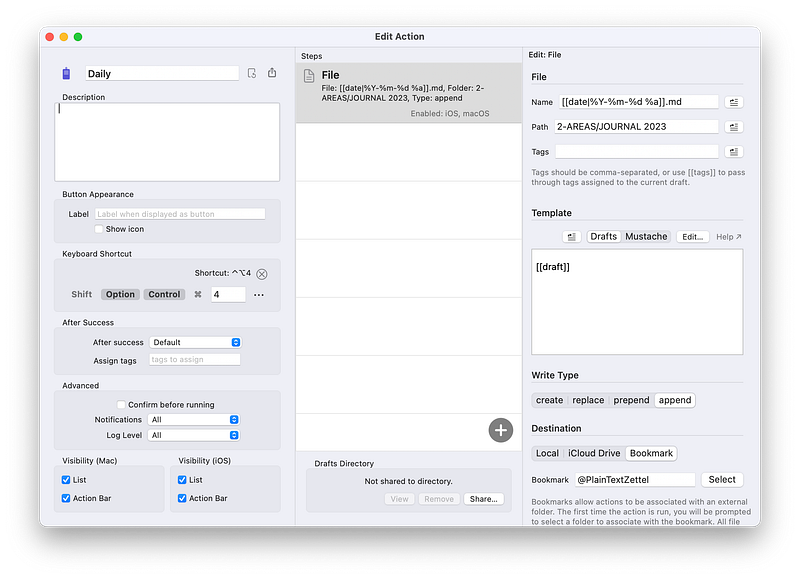
Screen capture by the Author, showing the Drafts action for adding text to her daily note in Obsidian

Obsidian is behaving better on my iOS devices these days, but Drafts is just so simple! Now that my actions are refined, I can do the following with just one click:

  • Add a task to my TaskPaper inbox
  • Append to my daily note, with a time stamp
  • Add a writing idea into the right section of my vault
  • Add an atomic note, and automatically label it as either a seed, sprout, or evergreen
  • Post to Mastodon, and have a time-stamped copy of the post appended to my daily note

Adventures in Plain Text (and a little paper)

A fresh new set of pages in my Paper Saver notebook

Prior to going interstate to see family, I’ve set up my Paper Saver with a brand new set of pages. Love the fresh start! This time my collection of recycled paper includes the backs of a large envelope I received in the mail, and the back of Mother’s Day wrapping paper made from pictures drawn by my grandchildren.
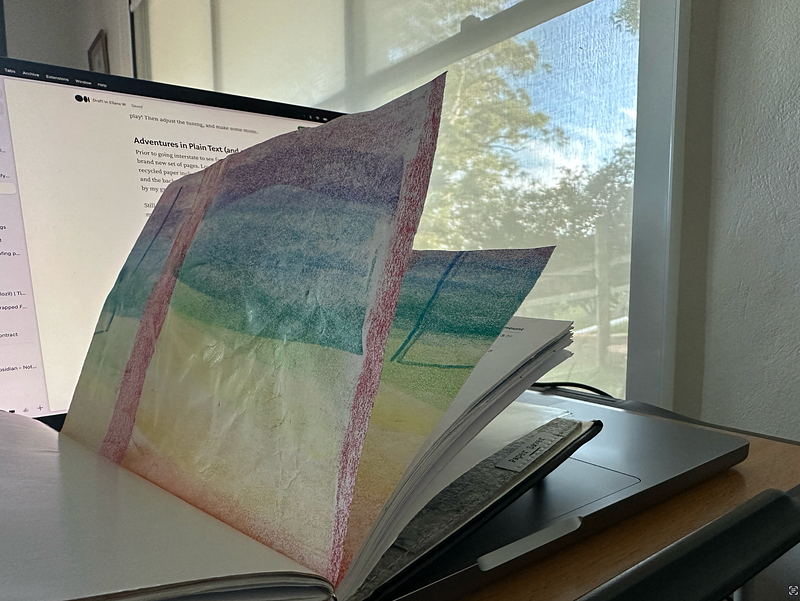
Image by Author

Still happily planning with the paper calendar pages (template) in the middle of my Paper Saver. This way of bird’s-eye planning, taking fleeting notes, and sketch noting talks on recycled paper feels like something I’ll be sticking with for the foreseeable future.

Planning by hand—interactive PDFs on the iPad

I’m back to using the iPad when I want to plan in the peaceful darkness of the early morning. I’m using the French version of the Passion Planner for additional passive immersion learning. To make it easier to navigate, I imported the file into Affinity Publisher and added some anchors to create a PDF outline on export.

iPad notes app of choice — now that I’m using a PDF planner on my iPad again, I’ve had to once more face the struggle of deciding which app to use. Wouldn’t it be nice if annotations made in one were editable in the others! But no. A choice must be made.

Noteful’s two-finger tap to undo, plus layers and zoom super-powers, made it my initial choice this time round, but using it for a week helped me to see that Noteshelf’s pencil, and pinch to snap the page to the screen, weren’t features I was happy to do without.

So which is the best app for your interactive planning adventures? You’ll just have to compare and see.

The Plain Text, Paper-Less Productivity Digest explores productivity through a future-proof, plain text mindset, with a soft spot for the paper that counts. Past episodes live in my PTPL List, and can also be accessed by non-Medium members for free — for a few days after they’re released — on Substack.

Click here for other things I’ve written about Obsidian.

Download some free productivity goodies (including an Obsidian Planner demo vault) here.

Get unlimited access to Medium for $5 a month or $50 a year, and directly support the work of everyone you read here. If you use my referral link you pay the same, but I get a small (much appreciated) commission.

Obsidian
Productivity
iPad
Paper
Technology
Recommended from ReadMedium