
Perform Speech Synthesis in Your JavaScript Applications
A look into web speech-synthesis APIs

Speech synthesis is the artificial production of human speech. A computer system used for this purpose is called a speech computer, speech synthesizer, or text-to-speech (TTS) system. Speech synthesis organizes sentences by concatenating prerecorded words saved in a database. The following diagram is an overview of a typical TTS system:
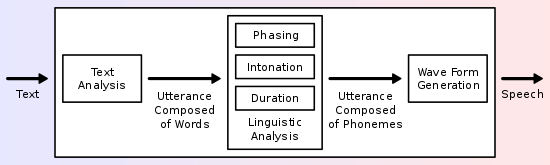
Web speech APIs enable web apps to handle voice data. They’re composed of APIs for speech recognition and speech synthesis. In our previous article, we walked through speech recognition. Here, we’re going to take an in-depth look at speech synthesis and give a few examples to combine them together.
SpeechSynthesis Interface
SpeechSynthesis is the controller interface for the speech service. It’s a text-to-speech component that allows programs to read out their text content.
Open your browser console, and run the following bit of JavaScript. It takes one line of code to speak.
speechSynthesis.speak(new SpeechSynthesisUtterance('Currently it is 3 o\'clock in the afternoon.'));There are three things in this one line of code:
speechSynthesis: A read-only property of thewindowobject that returns aSpeechSynthesis object.SpeechSynthesisUtterance: Represents a speech request, which contains the content and other configurable settings.SpeechSynthesis.speak(): A function to add an utterance to the utterance queue. The newly added utterance will be spoken when any other utterances queued before it have been spoken. All utterances in the utterance queue can be paused, resumed, or cancelled.
Why do we need to make a SpeechSynthesisUtterance object instead of taking a string directly?
Because this voice utterance object can be configured:
utterance.rate: Sets the speed, accepting a value between 0.1-10. The default value is 1.utterance.pitch: Sets the pitch, accepting a value between 0-2. The default value is 1.utterance.volume: Sets the volume, accepting a value between 0-1. The default value is 1.utterance.lang: Sets the language, accepting a value of a BCP 47 language tag. The default value isen-US.utterance.text: Sets a text to be said, accepting a string with a maximum of 32,767 characters. This is the alternative way to set a text to be said if it’s not set in the constructor.utterance.voice: Sets the voice from a predefined list.
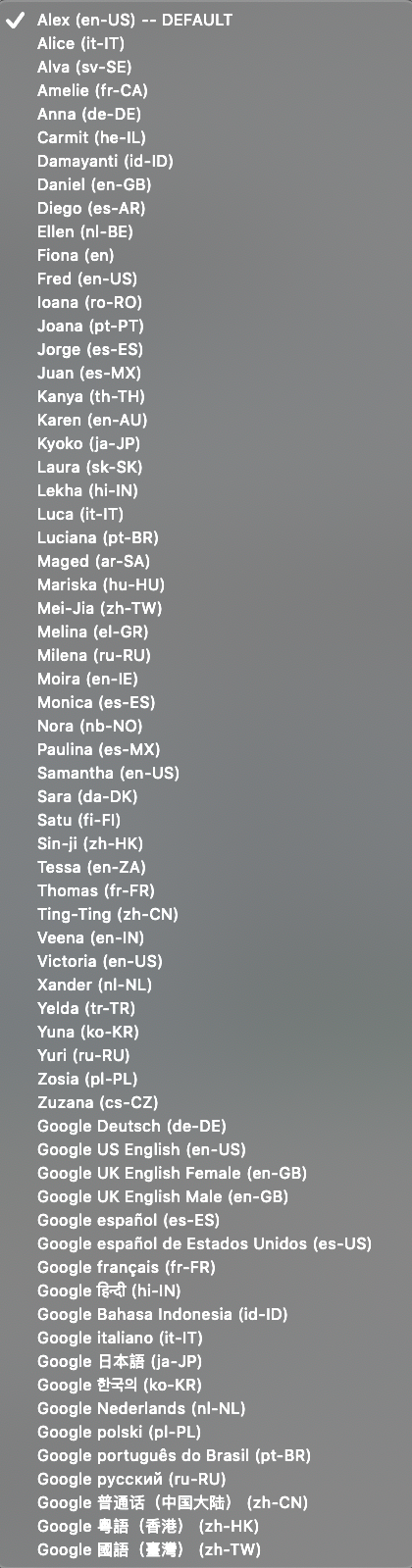
Here’s a video clip with different voices:
Here’s a video clip with different rates and pitches:
You can try this JavaScript code on a browser console:
As this page describes, the voice loading is executed asynchronously. When a page is loaded, it takes some amount of time to populate the array of voices. We can use a pulling loop to ensure voices are loaded before assigning.
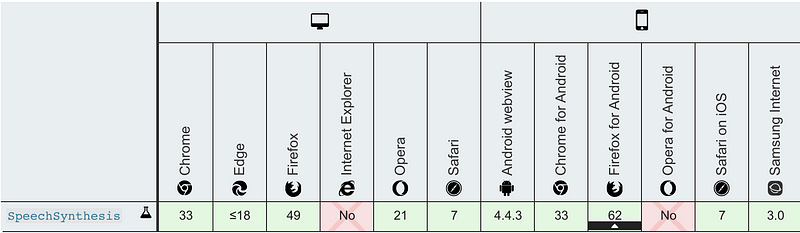
The following is the table of browser compatibility:
Interactive Talks
In our previous article, we tried speech recognition with web speech APIs. By adding SpeechSynthesis to the speech-recognition program, we put together a conversation to repeat whatever the program hears.
At line 12, recognition.abort() instead of recognition.stop() is used for the immediate stopping.
At line 27, recognition.interimResults is set to false. We don’t want the interim results being said.
At line 34, SpeechSynthesis repeats whatever it recognizes.
Here’s the video clip for the example:
What happened? Why does the program keep saying “today is Sunday”? Here’s what happened:
We said the first sentence, and then the program repeated it. And then, it heard itself and repeated again.
We need to be very careful in order to make conversations.
In the previous article, we also tried speech recognition with annyang. We used SpeechSynthesis to add the responding talk in the annyang example.
The function expression, setContent, is created at lines 25-28. It sets up the display text and says the text.
Commands from line 30-43 are designed to avoid a self-feeding loop:
- It only listens to defined commands (annyang’s feature).
- The response message doesn’t match any commands (developer’s choice).
Here’s the video clip for the example:
React Voice Projects
Armed with speech recognition and speech synthesis, we’re ready to build React voice projects — voice interaction between a program and its users.
Artyom.js
We’ve mentioned that Artyom is another popular speech library, built on top of web speech APIs. It handles both JavaScript speech recognition and a speech-synthesis library. Our first try is Artyom.
As always, we start with Create React App.
npx create-react-app my-appThen, install Artyom:
npm i artyom.jsWe can see the new package in the dependencies of package.json:
"dependencies": {
  "artyom.js": "^1.0.6"
}
With this package, we build a speech system for the following form:
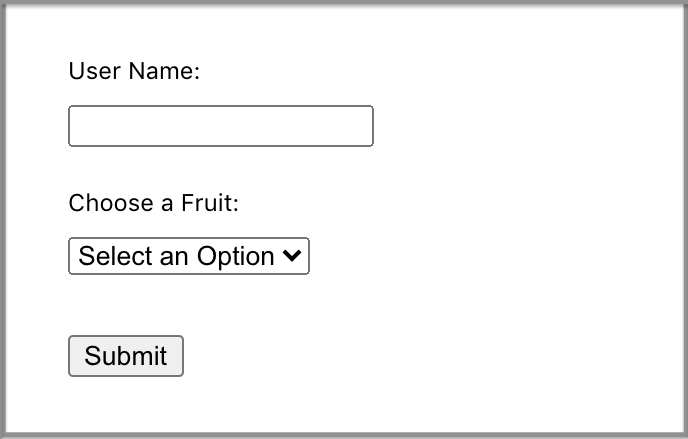
Here’s the code in our modified src/App.js:
At line 5, an Artyom object is created.
Lines 14-24 build the onSubmit callback.
Upon submission, line 15 checks whether there’s a name. If there’s no name, it says ‘Username is required.’. The submission is aborted.
Line 18 checks whether there’s a fruit selected. If one’s not selected, it says ‘Please select a fruit.’. The submission is aborted.
Otherwise, data are submitted. The program confirms ‘Your data have been submitted. Thank you!’.
Here’s the code in our modified src/App.css:
Here is a video clip for the voice talking project:
It works quite well until we add voice control to the program. It loses its voice quite frequently. Somehow, the utterance queue gets stuck. Calling speechSynthesis.cancel() fixes the issue, and restarting the browser window or tab works as well. However, it’s not adequate for a project. We’re waiting for this issue to be fixed.
Annyang
Let’s try to build the same project using Annyang and SpeechSynthesis.
Install annyang.js:
npm i annyang.jsWe can see the new package in the dependencies of package.json:
"dependencies": {
  "annyang": "^2.6.1"
}
Since we’re building a voice-control-and-speak system, a control button is added to the UI for starting or stopping the voice control.
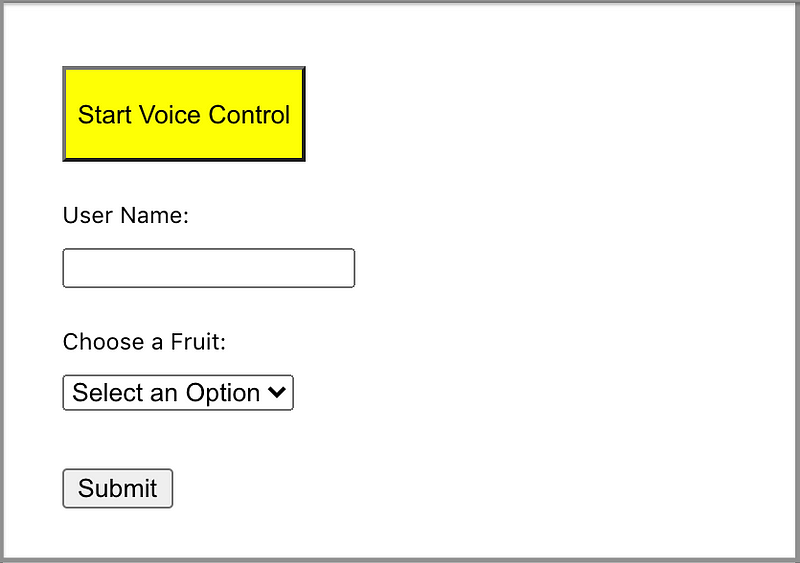
Here’s the code in our modified src/App.js:
At line 5, a function expression, say, is created.
Line 8 introduces a state, voiceOn, for starting (line 41) or stopping (line 43) voice control.
Line 11 is a ref to control the fruit selection (lines 19, 24, and 82).
Line 12 is a ref to control the submit button (lines 29 and 92).
Lines 14-32 run the one-time useEffect to create voice commands in Annyang.
Lines 34-45 run useEffect to handle the voiceOn state change.
Lines 49-52 build the voice on and off button.
Line 59 changes the error response from ‘Username is required.’ to ‘First field is required.’. We have to be very careful with what’s to be said. Otherwise, the program will recognize required as a username based on the rule at line 16.
Similarly, line 62 changes the error response from ‘Please select a fruit.’ to ‘Second field is required.’.
As we can see, ref is handy to manually trigger an event, such as when clicking the submit button. However, it’s a little tricky to manually trigger the drop-down of a selection. We’ve used a hack to set choiceRef.current.size. It works, although the style is a little different. The drop-down style can be fixed by CSS, but our recommendation is to use React-Select.
Here’s the code in our modified src/App.css:
Here’s a video clip for the voice control and voice-talking experience:
Conclusion
Previously, we explored speech recognition. In this article, we’ve gone though speech synthesis and built examples for voice-control-and-speak systems. Chrome has the best support for web speech APIs. All of our examples are implemented and tested on Chrome browsers.
Occasionally, voice recognition programs may not understand our language. Say it again, slowly and clearly. Be patient, the web voice is growing and gets better day by day.
Thanks, Shraddha Chadha and Jonathan Ma for getting me interested in this field. Part of this work includes contributions by Jonathan Ma.
Thanks for reading. I hope this was helpful. You can see my other Medium publications here.


