
avatarGeorge Sotiropoulos

Free AI web copilot to create summaries, insights and extended knowledge, download it at here

21908

Abstract

span class="hljs-literal">true</span>,updatable = <span class="hljs-literal">true</span>) <span class="hljs-keyword">public</span> <span class="hljs-title class_">Location</span> location = <span class="hljs-keyword">new</span> <span class="hljs-title class_">Location</span>();

<span class="hljs-keyword">private</span> <span class="hljs-title class_">String</span> phone;

<span class="hljs-keyword">private</span> <span class="hljs-title class_">String</span> fax;


<span class="hljs-comment">//Here mappedBy indicates that the owner is in the other side</span>
<span class="hljs-meta">@OneToMany</span>(fetch = <span class="hljs-title class_">FetchType</span>.<span class="hljs-property">LAZY</span>, mappedBy = <span class="hljs-string">"supplier"</span>, cascade = <span class="hljs-title class_">CascadeType</span>.<span class="hljs-property">ALL</span>)
<span class="hljs-keyword">private</span> <span class="hljs-title class_">Set</span>&lt;<span class="hljs-title class_">Product</span>&gt; products = <span class="hljs-keyword">new</span> <span class="hljs-title class_">HashSet</span>&lt;<span class="hljs-title class_">Product</span>&gt;();

}</pre></div><p id="8906"><b>3.4 Product — Inventory — Warehouse Relationship Modeling.</b></p><blockquote id="3213"><p>A Single Product can exist in multiple Warehouses across the continent or across different continents. In addition each Warehouse may have different stock levels of the product.</p></blockquote><p id="a5f9"><b>How do we actually model that Many to Many Relationship between Product and Warehouse? By Introducing The ‘Inventory’ Entity.</b></p><p id="c35c" type="7">The inventory entity plays a pivotal role as it symbolizes the connection between products and warehouses. Each product can be present in multiple warehouses, while each warehouse can house a diverse range of products.</p><blockquote id="ea94"><p>Beyond merely establishing this relationship, it is essential to store supplementary data, such as product quantities available. Therefore, we will introduce an entity to encapsulate this association, <b>featuring fundamental stock level attributes such as</b></p></blockquote><blockquote id="0b11"><p><b>a) minimum stock level before auto-order kicks-in b) maximum stock that the warehouse can manage and c) current stock level ‘quantityInStock’.</b></p></blockquote><p id="2d75"><b>Inventory.java</b></p><div id="6e80"><pre><span class="hljs-keyword">package</span> com.platform.ecommerce.inventory.model;

<span class="hljs-keyword">import</span> com.fasterxml.jackson.annotation.JsonIgnore; <span class="hljs-keyword">import</span> io.quarkus.hibernate.orm.panache.PanacheEntity; <span class="hljs-keyword">import</span> jakarta.persistence.*; <span class="hljs-keyword">import</span> java.util.function.Predicate;

<span class="hljs-meta">@Entity</span> <span class="hljs-keyword">public</span> <span class="hljs-keyword">class</span> <span class="hljs-title class_">Inventory</span> <span class="hljs-keyword">extends</span> <span class="hljs-title class_">PanacheEntity</span> {

<span class="hljs-meta">@Column(nullable = false)</span>
<span class="hljs-keyword">private</span> Integer minimumStockLevel;

<span class="hljs-meta">@Column(nullable = false)</span>
<span class="hljs-keyword">private</span> Integer maximumStockLevel;

<span class="hljs-meta">@Column(nullable = false)</span>
<span class="hljs-keyword">private</span> Integer quantityInStock;

<span class="hljs-meta">@Column(nullable = false)</span>
<span class="hljs-keyword">private</span> Integer quantityOnOrder;


<span class="hljs-meta">@ManyToOne(optional = false, fetch = FetchType.EAGER)</span>
<span class="hljs-meta">@JoinColumn(name="product_id", nullable=false)</span>
<span class="hljs-meta">@JsonIgnore</span>
<span class="hljs-keyword">public</span> Product product;

<span class="hljs-meta">@ManyToOne(optional = false, fetch = FetchType.EAGER)</span>
<span class="hljs-meta">@JoinColumn(name="warehouse_id", nullable=false)</span>
<span class="hljs-meta">@JsonIgnore</span>
<span class="hljs-keyword">public</span> Warehouse warehouse;


<span class="hljs-keyword">public</span> Integer <span class="hljs-title function_">getQuantityInStock</span><span class="hljs-params">()</span> {
    <span class="hljs-keyword">return</span> quantityInStock;
}

<span class="hljs-keyword">public</span> <span class="hljs-keyword">void</span> <span class="hljs-title function_">setQuantityInStock</span><span class="hljs-params">(Integer quantityInStock)</span> {
    <span class="hljs-built_in">this</span>.quantityInStock = quantityInStock;
}

}</pre></div><p id="dc68"><b>3.5 Location</b></p><blockquote id="c21a"><p>Finally the location entity holds information about the geographical sites where both warehouses and suppliers are situated. Many organizations operate across multiple locations, and each of these locations may comprise one or more warehouses.</p></blockquote><p id="30ca"><b>Location.java</b></p><div id="a954"><pre>package com.<span class="hljs-property">platform</span>.<span class="hljs-property">ecommerce</span>.<span class="hljs-property">inventory</span>.<span class="hljs-property">model</span>;

<span class="hljs-keyword">import</span> io.<span class="hljs-property">quarkus</span>.<span class="hljs-property">hibernate</span>.<span class="hljs-property">orm</span>.<span class="hljs-property">panache</span>.<span class="hljs-property">PanacheEntity</span>; <span class="hljs-keyword">import</span> jakarta.<span class="hljs-property">persistence</span>.<span class="hljs-property">Column</span>; <span class="hljs-keyword">import</span> jakarta.<span class="hljs-property">persistence</span>.<span class="hljs-property">Entity</span>;

<span class="hljs-meta">@Entity</span> <span class="hljs-keyword">public</span> <span class="hljs-keyword">class</span> <span class="hljs-title class_">Location</span> <span class="hljs-keyword">extends</span> <span class="hljs-title class_ inherited__">PanacheEntity</span> {

<span class="hljs-meta">@Column</span>(nullable = <span class="hljs-literal">false</span>)
<span class="hljs-keyword">public</span>  <span class="hljs-title class_">String</span> address;

<span class="hljs-meta">@Column</span>(nullable = <span class="hljs-literal">false</span>)
<span class="hljs-keyword">public</span>  <span class="hljs-title class_">String</span> city;

<span class="hljs-meta">@Column</span>(nullable = <span class="hljs-literal">false</span>)
<span class="hljs-keyword">public</span>  <span class="hljs-title class_">String</span> region;

 <span class="hljs-meta">@Column</span>(nullable = <span class="hljs-literal">false</span>)
<span class="hljs-keyword">public</span>  <span class="hljs-title class_">String</span> postalCode;

<span class="hljs-meta">@Column</span>(nullable = <span class="hljs-literal">false</span>)
<span class="hljs-keyword">public</span>  <span class="hljs-title class_">String</span> country;

}</pre></div><h1 id="de9f">STEP 4. Transfering ‘Product’ domain code from order-service to the new inventory-service.</h1><p id="3029">Since both of our micro-services sharing the ‘Product’ entity we are going to transfer the product code from <b>order-service</b> to <b>inventory-service</b> and <b>enrich</b> it.</p><blockquote id="4431"><p>For start we need to open both of our projects order-service and inventory-service in <b>IntelliJ</b> IDEA. The good thing about Macs and <b>IntelliJ</b> is that you can have multiple projects opened in tabs.</p></blockquote><p id="99cf"><b>1. Create Product Resource REST API.</b></p><p id="d0d7"><b>COPY:</b><i>order-service<b>/</b>ProductResource.java</i> -><i> inventory-service/ProductResource.java</i></p><p id="ce1c">We start our domain transfer process by coping <b>ProductResource</b> code from <b>order-service</b> to inventory-service within a new package named <b>com.platform.ecommerce.inventory.resource</b>.</p><p id="d872">We also change the REST path to ‘<b>inventory-service/v1/product’ </b>and<b> </b>we implement the<b> </b>new<b> checkStockAvailability</b> method and <b>findProductByUUID </b>method. We also clean the code from any bounded logic to the monolithic application. The end result is:</p><p id="69ff"><b>inventory-service/ProductResource.java</b></p><div id="8e78"><pre><span class="hljs-keyword">package</span> com.platform.ecommerce.inventory.resource;

<span class="hljs-keyword">import</span> com.platform.ecommerce.inventory.model.InventoryProductRecord; <span class="hljs-keyword">import</span> com.platform.ecommerce.inventory.model.InventoryStockResultRecord; <span class="hljs-keyword">import</span> com.platform.ecommerce.inventory.model.Product; <span class="hljs-keyword">import</span> com.platform.ecommerce.inventory.service.IInventoryService; <span class="hljs-keyword">import</span> io.quarkus.logging.Log; <span class="hljs-keyword">import</span> jakarta.enterprise.context.ApplicationScoped; <span class="hljs-keyword">import</span> jakarta.inject.Inject; <span class="hljs-keyword">import</span> jakarta.ws.rs.; <span class="hljs-keyword">import</span> jakarta.ws.rs.core.;

<span class="hljs-keyword">import</span> java.net.URI; <span class="hljs-keyword">import</span> java.util.List;

<span class="hljs-meta">@Path(<span class="hljs-string">"inventory-service/v1/product"</span>)</span> <span class="hljs-meta">@ApplicationScoped</span> <span class="hljs-meta">@Produces(MediaType.APPLICATION_JSON)</span> <span class="hljs-meta">@Consumes(MediaType.APPLICATION_JSON)</span>

<span class="hljs-keyword">public</span> <span class="hljs-keyword">class</span> <span class="hljs-title class_">ProductResource</span> {

<span class="hljs-meta">@Inject</span>
IInventoryService inventoryService;

<span class="hljs-meta">@GET</span>
<span class="hljs-meta">@Path(<span class="hljs-string">"all"</span>)</span>
<span class="hljs-keyword">public</span> List&lt;Product&gt; getAllProducts() {
    <span class="hljs-keyword">return</span> Product.listAll();
}

<span class="hljs-meta">@GET</span>
<span class="hljs-meta">@Path(<span class="hljs-string">"uuid/{UUID}"</span>)</span>
<span class="hljs-keyword">public</span> InventoryProductRecord findProductByUUID(<span class="hljs-meta">@PathParam(<span class="hljs-string">"UUID"</span>)</span> String UUID) {
    Log.infof(<span class="hljs-string">":request item  details with id: %s from inventory"</span>,UUID);
    InventoryProductRecord productRecordResult = inventoryService.findProductByUUID(UUID);
    <span class="hljs-keyword">return</span> inventoryService.findProductByUUID(UUID);

}

<span class="hljs-meta">@GET</span>
<span class="hljs-meta">@Path(<span class="hljs-string">"stock/availability/{UUID}/{quantity}"</span>)</span>
<span class="hljs-keyword">public</span> InventoryStockResultRecord checkStockAvailability(<span class="hljs-meta">@PathParam(<span class="hljs-string">"UUID"</span>)</span> String UUID, <span class="hljs-meta">@PathParam(<span class="hljs-string">"quantity"</span>)</span> Integer quantity) {
    InventoryStockResultRecord stockAvailabilityResult = inventoryService.checkStockAvailability(UUID,quantity);
    Log.infof(<span class="hljs-string">":requested quantity %s of  inventory item: %s.  Available quantity is:  %s"</span>,quantity,stockAvailabilityResult.productUUID(),stockAvailabilityResult.availableQuantity());
    <span class="hljs-keyword">return</span> stockAvailabilityResult;
}
<span class="hljs-meta">@GET</span>
<span class="hljs-meta">@Path(<span class="hljs-string">"category/{category}"</span>)</span>
<span class="hljs-keyword">public</span> List&lt;Product&gt;  findByCategory(<span class="hljs-meta">@QueryParam(<span class="hljs-string">"category"</span>)</span> String category) {
    <span class="hljs-keyword">return</span> Product.findByCategory(category);
}

<span class="hljs-meta">@GET</span>
<span class="hljs-meta">@Path(<span class="hljs-string">"price/maximum/{price}"</span>)</span>
<span class="hljs-keyword">public</span> List&lt;Product&gt; findByMaximumPrice(<span class="hljs-meta">@PathParam(<span class="hljs-string">"price"</span>)</span> double price) {
    <span class="hljs-keyword">return</span> Product.findByMaximumPrice(price);
}

<span class="hljs-meta">@GET</span>
<span class="hljs-meta">@Path(<span class="hljs-string">"price/minimum/{price}"</span>)</span>
<span class="hljs-keyword">public</span> List&lt;Product&gt; findByMinimumPrice(<span class="hljs-meta">@PathParam(<span class="hljs-string">"price"</span>)</span> double price) {
    <span class="hljs-keyword">return</span> Product.findByMinimumPrice(price);
}

<span class="hljs-meta">@POST</span>
<span class="hljs-meta">@Path(<span class="hljs-string">"create"</span>)</span>
<span class="hljs-keyword">public</span> Response createProduct(Product product) {
    Product.createProduct(product);

    Log.info(<span class="hljs-string">"Product created:"</span>+product.UUID);
    <span class="hljs-keyword">return</span> Response.status(Response.Status.CREATED).build();

}

<span class="hljs-meta">@PUT</span>
<span class="hljs-meta">@Path(<span class="hljs-string">"update/{UUID}"</span>)</span>
<span class="hljs-keyword">public</span> Response updateProduct(<span class="hljs-meta">@PathParam(<span class="hljs-string">"UUID"</span>)</span> String UUID, Product product) {
    Product.updateProduct(UUID,product);
    Log.info(<span class="hljs-string">"Product updated:"</span>+product.UUID);
    <span class="hljs-keyword">return</span> Response.status(Response.Status.OK).build();
}

}</pre></div><p id="8b37"><b>2. Create Persistent Service Layer Service.</b></p><p id="6b81">We then move forward and create our Persistent Service Layer by creating a new interface <b>InventoryService </b>and the<b> </b>implemenetation of it <b>PostGRESDatabaseService.</b></p><p id="0868"><b>InventoryService.java</b></p><div id="6128"><pre><span class="hljs-keyword">package</span> com.platform.ecommerce.inventory.service;

<span class="hljs-keyword">import</span> com.platform.ecommerce.inventory.model.InventoryProductRecord; <span class="hljs-keyword">import</span> com.platform.ecommerce.inventory.model.InventoryStockResultRecord;

<span class="hljs-keyword">public</span> <span class="hljs-keyword">interface</span> <span class="hljs-title class_">IInventoryService</span> {

InventoryProductRecord <span class="hljs-title function_">findProductByUUID</span><span class="hljs-params">(String UUID)</span>;

InventoryStockResultRecord <span class="hljs-title function_">checkStockAvailability</span><span class="hljs-params">(String UUID, Integer quantity)</span>;

}</pre></div><p id="ab53"><b>PostGRESDatabaseService.java</b></p><div id="b7b7"><pre><span class="hljs-keyword">package</span> com.platform.ecommerce.inventory.service;

<span class="hljs-keyword">import</span> com.platform.ecommerce.inventory.model.InventoryProductRecord; <span class="hljs-keyword">import</span> com.platform.ecommerce.inventory.model.InventoryStockResultRecord; <span class="hljs-keyword">import</span> com.platform.ecommerce.inventory.model.Product; <span class="hljs-keyword">import</span> io.quarkus.arc.DefaultBean; <span class="hljs-keyword">import</span> jakarta.enterprise.context.ApplicationScoped;

<span class="hljs-meta">@ApplicationScoped</span> <span class="hljs-meta">@DefaultBean</span> <span class="hljs-keyword">public</span> <span class="hljs-keyword">class</span> <span class="hljs-title class_">PostGRESDatabaseService</span> <span class="hljs-keyword">implements</span> <span class="hljs-title class_">IInventoryService</span> {

<span class="hljs-meta">@Override</span>
<span class="hljs-keyword">public</span> InventoryProductRecord <span class="hljs-title function_">findProductByUUID</span><span class="hljs-params">(String UUID)</span> {
      <span class="hljs-type">Product</span> <span class="hljs-variable">product</span> <span class="hljs-operator">=</span> Product.findProductByUUID(UUID);
    <span class="hljs-type">InventoryProductRecord</span> <span class="hljs-variable">productResult</span> <span class="hljs-operator">=</span> <span class="hljs-keyword">new</span> <span class="hljs-title class_">InventoryProductRecord</span>(product);
      <span class="hljs-keyword">return</span> productResult;
}

<span class="hljs-meta">@Override</span>
<span class="hljs-keyword">public</span> InventoryStockResultRecord <span class="hljs-title function_">checkStockAvailability</span><span class="hljs-params">(String UUID, Integer requestedQuantity)</span> {
    <span class="hljs-type">Product</span> <span class="hljs-variable">product</span> <span class="hljs-operator">=</span> Product.findProductByUUID(UUID);
    <span class="hljs-type">InventoryStockResultRecord</span> <span class="hljs-variable">availabilityResult</span> <span class="hljs-operator">=</span> <span class="hljs-keyword">new</span> <span class="hljs-title class_">InventoryStockResultRecord</span>(product,requestedQuantity);
    <span class="hljs-keyword">return</span> availabilityResult;
}

}</pre></div><p id="b513"><b>3. Create or Copy Value Objects</b></p><p id="61fe">We continue our domain transfer process by coping the necessary <b>Data Transfer Objects — Or Else Value Objects in Domain Design Terms — </b>from <b>order-service</b> to inventory-service within package <b>com.platform.ecommerce.inventory.model.</b></p><p id="8b0c">These objects are<b> InventoryProductRecord</b> and <b>InventoryStockResultRecord.</b></p><h1 id="160d">STEP 5. Populate inventory DB with Sample Product Data.</h1><p id="5412">We also populating our newly created database with proper sample data this time.</p><p id="6f60"><b>inventory-service/import.sql</b></p><div id="e08f"><pre><span class="hljs-comment">------------------------------- CATEGORIES -----------------------------------------------------</span>

<span class="hljs-comment">-- PARENT 1 Mac</span> <span class="hljs-keyword">INSERT</span> <span class="hljs-keyword">INTO</span> category(id, parent_id, name) <span class="hljs-keyword">VALUES</span> ( <span class="hljs-number">100</span>, <span class="hljs-keyword">null</span>, <span class="hljs-string">'Mac'</span>); <span class="hljs-comment">-- PARENT 2 iPad</span> <span class="hljs-keyword">INSERT</span> <span class="hljs-keyword">INTO</span> category(id, parent_id, name) <span class="hljs-keyword">VALUES</span> ( <span class="hljs-number">200</span>, <span class="hljs-keyword">null</span>, <span class="hljs-string">'iPad'</span>); <span class="hljs-comment">-- PARENT 3 IPhone</span> <span class="hljs-keyword">INSERT</span> <span class="hljs-keyword">INTO</span> category(id, parent_id, name) <span class="hljs-keyword">VALUES</span> ( <span class="hljs-number">300</span>, <span class="hljs-keyword">null</span>, <span class="hljs-string">'iPhone'</span>);

<span class="hljs-comment">-- CHILD 1 OF PARENT 1</span> <span class="hljs-keyword">INSERT</span> <span class="hljs-keyword">INTO</span> category(id, parent_id, name) <span class="hljs-keyword">VALUES</span> ( <span class="hljs-number">101</span>, <span class="hljs-number">100</span>, <span class="hljs-string">'Mac Studio'</span>); <span class="hljs-comment">-- CHILD 2 OF PARENT 1</span> <span class="hljs-keyword">INSERT</span> <span class="hljs-keyword">INTO</span> category(id, parent_id, name) <span class="hljs-keyword">VALUES</span> ( <span class="hljs-number">102</span>, <span class="hljs-number">100</span>, <span class="hljs-string">'Mac Mini'</span>); <span class="hljs-comment">-- CHILD 3 OF PARENT 1</span> <span class="hljs-keyword">INSERT</span> <span class="hljs-keyword">INTO</span> category(id, parent_id, name) <span class="hljs-keyword">VALUES</span> ( <span class="hljs-number">103</span>, <span class="hljs-number">100</span>, <span class="hljs-string">'Mac Book'</span>); <span class="hljs-comment">-- CHILD 4 OF PARENT 1</span> <span class="hljs-keyword">INSERT</span> <span class="hljs-keyword">INTO</span> category(id, parent_id, name) <span class="hljs-keyword">VALUES</span> ( <span class="hljs-number">104</span>, <span class="hljs-number">100</span>, <span class="hljs-string">'Mac Pro'</span>);

<span class="hljs-comment">-- CHILD 1 OF PARENT 2</span> <span class="hljs-keyword">INSERT</span> <span class="hljs-keyword">INTO</span> category(id, parent_id, name) <span class="hljs-keyword">VALUES</span> ( <span class="hljs-number">201</span>, <span class="hljs-number">200</span>, <span class="hljs-string">'Ipad Pro'</span>); <span class="hljs-comment">-- CHILD 2 OF PARENT 2</span> <span class="hljs-keyword">INSERT</span> <span class="hljs-keyword">INTO</span> category(id, parent_id, name) <span class="hljs-keyword">VALUES</span> ( <span class="hljs-number">202</span>, <span class="hljs-number">200</span>, <span class="hljs-string">'Ipad Air'</span>);

<span class="hljs-comment">-- CHILD 1 OF PARENT 3</span> <span class="hljs-keyword">INSERT</span> <span class="hljs-keyword">INTO</span> category(id, parent_id, name) <span class="hljs-keyword">VALUES</span> ( <span class="hljs-number">301</span>, <span class="hljs-number">300</span>, <span class="hljs-string">'IPhone 13'</span>); <span class="hljs-comment">-- CHILD 2 OF PARENT 3</span> <span class="hljs-keyword">INSERT</span> <span class="hljs-keyword">INTO</span> category(id, parent_id, name) <span class="hljs-keyword">VALUES</span> ( <span class="hljs-number">302</span>, <span class="hljs-number">300</span>, <span class="hljs-str

Options

ing">'IPhone 14'</span>);

<span class="hljs-comment">------------------------------- Locations -----------------------------------------------------</span>

<span class="hljs-comment">-- Location 1</span> <span class="hljs-keyword">INSERT</span> <span class="hljs-keyword">INTO</span> location(id, address, city, country, postalcode, region) <span class="hljs-keyword">VALUES</span> (<span class="hljs-number">101</span>, <span class="hljs-string">'123 Main St'</span>, <span class="hljs-string">'New York'</span>, <span class="hljs-string">'USA'</span>, <span class="hljs-string">'10001'</span>, <span class="hljs-string">'East Coast'</span>);

<span class="hljs-comment">-- Location 2</span> <span class="hljs-keyword">INSERT</span> <span class="hljs-keyword">INTO</span> location(id, address, city, country, postalcode, region) <span class="hljs-keyword">VALUES</span> (<span class="hljs-number">102</span>, <span class="hljs-string">'456 Elm St'</span>, <span class="hljs-string">'Los Angeles'</span>, <span class="hljs-string">'USA'</span>, <span class="hljs-string">'90001'</span>, <span class="hljs-string">'West Coast'</span>);

<span class="hljs-comment">-- Location 3</span> <span class="hljs-keyword">INSERT</span> <span class="hljs-keyword">INTO</span> location(id, address, city, country, postalcode, region) <span class="hljs-keyword">VALUES</span> (<span class="hljs-number">103</span>, <span class="hljs-string">'789 Oak St'</span>, <span class="hljs-string">'Chicago'</span>, <span class="hljs-string">'USA'</span>, <span class="hljs-string">'60601'</span>, <span class="hljs-string">'Midwest'</span>);

<span class="hljs-comment">-- Location 4</span> <span class="hljs-keyword">INSERT</span> <span class="hljs-keyword">INTO</span> location(id, address, city, country, postalcode, region) <span class="hljs-keyword">VALUES</span> (<span class="hljs-number">104</span>, <span class="hljs-string">'101 Pine St'</span>, <span class="hljs-string">'London'</span>, <span class="hljs-string">'UK'</span>, <span class="hljs-string">'SW1A 1AA'</span>, <span class="hljs-string">'England'</span>);

<span class="hljs-comment">-- Location 5</span> <span class="hljs-keyword">INSERT</span> <span class="hljs-keyword">INTO</span> location(id, address, city, country, postalcode, region) <span class="hljs-keyword">VALUES</span> (<span class="hljs-number">105</span>, <span class="hljs-string">'202 Maple St'</span>, <span class="hljs-string">'Paris'</span>, <span class="hljs-string">'France'</span>, <span class="hljs-string">'75001'</span>, <span class="hljs-string">'Ile-de-France'</span>);

<span class="hljs-comment">------------------------------- Suppliers -----------------------------------------------------</span>

<span class="hljs-comment">-- Supplier 1</span> <span class="hljs-keyword">INSERT</span> <span class="hljs-keyword">INTO</span> supplier(id, location_id, companyname, contactname, contacttitle, fax, phone) <span class="hljs-keyword">VALUES</span> (<span class="hljs-number">1</span>, <span class="hljs-number">101</span>, <span class="hljs-string">'Supplier A'</span>, <span class="hljs-string">'John Doe'</span>, <span class="hljs-string">'CEO'</span>, <span class="hljs-string">'555-123-4567'</span>, <span class="hljs-string">'555-987-6543'</span>);

<span class="hljs-comment">-- Supplier 2</span> <span class="hljs-keyword">INSERT</span> <span class="hljs-keyword">INTO</span> supplier(id, location_id, companyname, contactname, contacttitle, fax, phone) <span class="hljs-keyword">VALUES</span> (<span class="hljs-number">2</span>, <span class="hljs-number">102</span>, <span class="hljs-string">'Supplier B'</span>, <span class="hljs-string">'Jane Smith'</span>, <span class="hljs-string">'Sales Manager'</span>, <span class="hljs-string">'555-111-2222'</span>, <span class="hljs-string">'555-333-4444'</span>);

<span class="hljs-comment">-- Supplier 3</span> <span class="hljs-keyword">INSERT</span> <span class="hljs-keyword">INTO</span> supplier(id, location_id, companyname, contactname, contacttitle, fax, phone) <span class="hljs-keyword">VALUES</span> (<span class="hljs-number">3</span>, <span class="hljs-number">103</span>, <span class="hljs-string">'Supplier C'</span>, <span class="hljs-string">'Robert Johnson'</span>, <span class="hljs-string">'CFO'</span>, <span class="hljs-string">'555-555-5555'</span>, <span class="hljs-string">'555-666-6666'</span>);

<span class="hljs-comment">-- Supplier 4</span> <span class="hljs-keyword">INSERT</span> <span class="hljs-keyword">INTO</span> supplier(id, location_id, companyname, contactname, contacttitle, fax, phone) <span class="hljs-keyword">VALUES</span> (<span class="hljs-number">4</span>, <span class="hljs-number">104</span>, <span class="hljs-string">'Supplier D'</span>, <span class="hljs-string">'Mary Brown'</span>, <span class="hljs-string">'Marketing Director'</span>, <span class="hljs-string">'555-777-8888'</span>, <span class="hljs-string">'555-999-0000'</span>);

<span class="hljs-comment">-- Supplier 5</span> <span class="hljs-keyword">INSERT</span> <span class="hljs-keyword">INTO</span> supplier(id, location_id, companyname, contactname, contacttitle, fax, phone) <span class="hljs-keyword">VALUES</span> (<span class="hljs-number">5</span>, <span class="hljs-number">105</span>, <span class="hljs-string">'Supplier E'</span>, <span class="hljs-string">'Michael Wilson'</span>, <span class="hljs-string">'Supply Chain Manager'</span>, <span class="hljs-string">'555-123-7890'</span>, <span class="hljs-string">'555-456-7890'</span>);

<span class="hljs-comment">------------------------------- Products -----------------------------------------------------</span>

<span class="hljs-comment">-- Apple Product 1</span> <span class="hljs-keyword">INSERT</span> <span class="hljs-keyword">INTO</span> product(id, category_id, supplier_id, sku, uuid, barcode, description, name) <span class="hljs-keyword">VALUES</span> (<span class="hljs-number">1</span>, <span class="hljs-number">104</span>, <span class="hljs-number">1</span>, <span class="hljs-string">'MAC001'</span>, <span class="hljs-string">'4a05b88a-6e9f-4e94-b799-9d032b33d749'</span>, <span class="hljs-string">'123456789012'</span>, <span class="hljs-string">'Powerful desktop computer for professionals'</span>, <span class="hljs-string">'Mac Pro'</span>);

<span class="hljs-comment">-- Apple Product 2</span> <span class="hljs-keyword">INSERT</span> <span class="hljs-keyword">INTO</span> product(id, category_id, supplier_id, sku, uuid, barcode, description, name) <span class="hljs-keyword">VALUES</span> (<span class="hljs-number">2</span>, <span class="hljs-number">103</span>, <span class="hljs-number">1</span>, <span class="hljs-string">'MAC002'</span>, <span class="hljs-string">'b74fe0a0-5799-4343-9820-251d4b3c49ef'</span>, <span class="hljs-string">'987654321098'</span>, <span class="hljs-string">'Slim and lightweight laptop with Retina display'</span>, <span class="hljs-string">'Mac Book'</span>);

<span class="hljs-comment">-- Apple Product 3</span> <span class="hljs-keyword">INSERT</span> <span class="hljs-keyword">INTO</span> product(id, category_id, supplier_id, sku, uuid, barcode, description, name) <span class="hljs-keyword">VALUES</span> (<span class="hljs-number">3</span>, <span class="hljs-number">102</span>, <span class="hljs-number">1</span>, <span class="hljs-string">'IPD001'</span>, <span class="hljs-string">'7d06a914-4ec3-42d1-821a-21ff8a98e13f'</span>, <span class="hljs-string">'654321098765'</span>, <span class="hljs-string">'High-performance tablet with Apple Pencil support'</span>, <span class="hljs-string">'iPad Pro'</span>);

<span class="hljs-comment">-- Apple Product 4</span> <span class="hljs-keyword">INSERT</span> <span class="hljs-keyword">INTO</span> product(id, category_id, supplier_id, sku, uuid, barcode, description, name) <span class="hljs-keyword">VALUES</span> (<span class="hljs-number">4</span>, <span class="hljs-number">101</span>, <span class="hljs-number">1</span>, <span class="hljs-string">'MST001'</span>, <span class="hljs-string">'b3f42c5e-8c7e-4e8f-92f6-104a7a480932'</span>, <span class="hljs-string">'789012345678'</span>, <span class="hljs-string">'Compact desktop computer for creative professionals'</span>, <span class="hljs-string">'Mac Studio'</span>);

<span class="hljs-comment">-- Apple Product 5</span> <span class="hljs-keyword">INSERT</span> <span class="hljs-keyword">INTO</span> product(id, category_id, supplier_id, sku, uuid, barcode, description, name) <span class="hljs-keyword">VALUES</span> (<span class="hljs-number">5</span>, <span class="hljs-number">202</span>, <span class="hljs-number">1</span>, <span class="hljs-string">'IPA001'</span>, <span class="hljs-string">'6a5e89d0-17a6-4b5a-85de-12fb17001f9d'</span>, <span class="hljs-string">'543210987654'</span>, <span class="hljs-string">'Lightweight and versatile iPad'</span>, <span class="hljs-string">'iPad Air'</span>);

<span class="hljs-comment">-- Apple Product 6</span> <span class="hljs-keyword">INSERT</span> <span class="hljs-keyword">INTO</span> product(id, category_id, supplier_id, sku, uuid, barcode, description, name) <span class="hljs-keyword">VALUES</span> (<span class="hljs-number">6</span>, <span class="hljs-number">201</span>, <span class="hljs-number">1</span>, <span class="hljs-string">'IPA002'</span>, <span class="hljs-string">'14cfe9e5-5d5e-45d3-8b60-8d89e5cdd96e'</span>, <span class="hljs-string">'234567890123'</span>, <span class="hljs-string">'Professional tablet with Apple Pencil support'</span>, <span class="hljs-string">'iPad Pro'</span>);

<span class="hljs-comment">-- Apple Product 7</span> <span class="hljs-keyword">INSERT</span> <span class="hljs-keyword">INTO</span> product(id, category_id, supplier_id, sku, uuid, barcode, description, name) <span class="hljs-keyword">VALUES</span> (<span class="hljs-number">7</span>, <span class="hljs-number">301</span>, <span class="hljs-number">1</span>, <span class="hljs-string">'IPH001'</span>, <span class="hljs-string">'a70c22b7-5a0e-4587-92e5-f85572ca075f'</span>, <span class="hljs-string">'345678901234'</span>, <span class="hljs-string">'Latest iPhone with A15 Bionic chip'</span>, <span class="hljs-string">'iPhone 13'</span>);

<span class="hljs-comment">-- Apple Product 8</span> <span class="hljs-keyword">INSERT</span> <span class="hljs-keyword">INTO</span> product(id, category_id, supplier_id, sku, uuid, barcode, description, name) <span class="hljs-keyword">VALUES</span> (<span class="hljs-number">8</span>, <span class="hljs-number">301</span>, <span class="hljs-number">1</span>, <span class="hljs-string">'IPH002'</span>, <span class="hljs-string">'bc4e30d8-5089-4e35-94cc-d305c0906b22'</span>, <span class="hljs-string">'456789012345'</span>, <span class="hljs-string">'Advanced iPhone with Pro camera system'</span>, <span class="hljs-string">'iPhone 13 Pro'</span>);

<span class="hljs-comment">-- Apple Product 9</span> <span class="hljs-keyword">INSERT</span> <span class="hljs-keyword">INTO</span> product(id, category_id, supplier_id, sku, uuid, barcode, description, name) <span class="hljs-keyword">VALUES</span> (<span class="hljs-number">9</span>, <span class="hljs-number">301</span>, <span class="hljs-number">1</span>, <span class="hljs-string">'IPH003'</span>, <span class="hljs-string">'28aa1913-67a3-4929-ba4b-93019e00e3b5'</span>, <span class="hljs-string">'567890123456'</span>, <span class="hljs-string">'Compact iPhone with powerful features'</span>, <span class="hljs-string">'iPhone SE'</span>);

<span class="hljs-comment">-- Apple Product 10</span> <span class="hljs-keyword">INSERT</span> <span class="hljs-keyword">INTO</span> product(id, category_id, supplier_id, sku, uuid, barcode, description, name) <span class="hljs-keyword">VALUES</span> (<span class="hljs-number">10</span>, <span class="hljs-number">300</span>, <span class="hljs-number">1</span>, <span class="hljs-string">'IPH004'</span>, <span class="hljs-string">'ad0da00c-2633-4dd1-9329-aa9437e208e4'</span>, <span class="hljs-string">'678901234567'</span>, <span class="hljs-string">'Flagship iPhone with Pro Max camera system'</span>, <span class="hljs-string">'iPhone 13 Pro Max'</span>);

<span class="hljs-comment">---------------------------------- Ware House Data ------------------------------------</span>

<span class="hljs-comment">-- USA Warehouse</span> <span class="hljs-keyword">INSERT</span> <span class="hljs-keyword">INTO</span> public.warehouse(id, location_id, name) <span class="hljs-keyword">VALUES</span> (<span class="hljs-number">1</span>, <span class="hljs-number">101</span>, <span class="hljs-string">'USA Warehouse'</span>);

<span class="hljs-comment">-- European Warehouse</span> <span class="hljs-keyword">INSERT</span> <span class="hljs-keyword">INTO</span> public.warehouse(id, location_id, name) <span class="hljs-keyword">VALUES</span> (<span class="hljs-number">2</span>, <span class="hljs-number">105</span>, <span class="hljs-string">'European WareHouse'</span>);

<span class="hljs-comment">---------------------------------- Inventory Data ------------------------------------</span>

<span class="hljs-comment">-- Inventory for Warehouse 1</span> <span class="hljs-comment">-- Product 1</span> <span class="hljs-keyword">INSERT</span> <span class="hljs-keyword">INTO</span> inventory(id, product_id, warehouse_id, maximumstocklevel, minimumstocklevel, quantityinstock, quantityonorder) <span class="hljs-keyword">VALUES</span> (<span class="hljs-number">1</span>, <span class="hljs-number">1</span>, <span class="hljs-number">1</span>, <span class="hljs-number">100</span>, <span class="hljs-number">10</span>, <span class="hljs-number">75</span>, <span class="hljs-number">5</span>);

<span class="hljs-comment">-- Product 2</span> <span class="hljs-keyword">INSERT</span> <span class="hljs-keyword">INTO</span> inventory(id, product_id, warehouse_id, maximumstocklevel, minimumstocklevel, quantityinstock, quantityonorder) <span class="hljs-keyword">VALUES</span> (<span class="hljs-number">2</span>, <span class="hljs-number">2</span>, <span class="hljs-number">1</span>, <span class="hljs-number">150</span>, <span class="hljs-number">20</span>, <span class="hljs-number">120</span>, <span class="hljs-number">10</span>);

<span class="hljs-comment">-- Product 3</span> <span class="hljs-keyword">INSERT</span> <span class="hljs-keyword">INTO</span> inventory(id, product_id, warehouse_id, maximumstocklevel, minimumstocklevel, quantityinstock, quantityonorder) <span class="hljs-keyword">VALUES</span> (<span class="hljs-number">3</span>, <span class="hljs-number">3</span>, <span class="hljs-number">1</span>, <span class="hljs-number">80</span>, <span class="hljs-number">5</span>, <span class="hljs-number">60</span>, <span class="hljs-number">5</span>);

<span class="hljs-comment">-- Product 4</span> <span class="hljs-keyword">INSERT</span> <span class="hljs-keyword">INTO</span> inventory(id, product_id, warehouse_id, maximumstocklevel, minimumstocklevel, quantityinstock, quantityonorder) <span class="hljs-keyword">VALUES</span> (<span class="hljs-number">4</span>, <span class="hljs-number">4</span>, <span class="hljs-number">1</span>, <span class="hljs-number">200</span>, <span class="hljs-number">25</span>, <span class="hljs-number">180</span>, <span class="hljs-number">15</span>);

<span class="hljs-comment">-- Product 5</span> <span class="hljs-keyword">INSERT</span> <span class="hljs-keyword">INTO</span> inventory(id, product_id, warehouse_id, maximumstocklevel, minimumstocklevel, quantityinstock, quantityonorder) <span class="hljs-keyword">VALUES</span> (<span class="hljs-number">5</span>, <span class="hljs-number">5</span>, <span class="hljs-number">1</span>, <span class="hljs-number">120</span>, <span class="hljs-number">10</span>, <span class="hljs-number">100</span>, <span class="hljs-number">8</span>);

<span class="hljs-comment">-- Inventory for Warehouse 2</span> <span class="hljs-comment">-- Product 6</span> <span class="hljs-keyword">INSERT</span> <span class="hljs-keyword">INTO</span> inventory(id, product_id, warehouse_id, maximumstocklevel, minimumstocklevel, quantityinstock, quantityonorder) <span class="hljs-keyword">VALUES</span> (<span class="hljs-number">6</span>, <span class="hljs-number">6</span>, <span class="hljs-number">2</span>, <span class="hljs-number">90</span>, <span class="hljs-number">8</span>, <span class="hljs-number">70</span>, <span class="hljs-number">7</span>);

<span class="hljs-comment">-- Product 7</span> <span class="hljs-keyword">INSERT</span> <span class="hljs-keyword">INTO</span> inventory(id, product_id, warehouse_id, maximumstocklevel, minimumstocklevel, quantityinstock, quantityonorder) <span class="hljs-keyword">VALUES</span> (<span class="hljs-number">7</span>, <span class="hljs-number">7</span>, <span class="hljs-number">2</span>, <span class="hljs-number">160</span>, <span class="hljs-number">15</span>, <span class="hljs-number">140</span>, <span class="hljs-number">12</span>);

<span class="hljs-comment">-- Product 8</span> <span class="hljs-keyword">INSERT</span> <span class="hljs-keyword">INTO</span> inventory(id, product_id, warehouse_id, maximumstocklevel, minimumstocklevel, quantityinstock, quantityonorder) <span class="hljs-keyword">VALUES</span> (<span class="hljs-number">8</span>, <span class="hljs-number">8</span>, <span class="hljs-number">2</span>, <span class="hljs-number">70</span>, <span class="hljs-number">6</span>, <span class="hljs-number">50</span>, <span class="hljs-number">4</span>);

<span class="hljs-comment">-- Product 9</span> <span class="hljs-keyword">INSERT</span> <span class="hljs-keyword">INTO</span> inventory(id, product_id, warehouse_id, maximumstocklevel, minimumstocklevel, quantityinstock, quantityonorder) <span class="hljs-keyword">VALUES</span> (<span class="hljs-number">9</span>, <span class="hljs-number">9</span>, <span class="hljs-number">2</span>, <span class="hljs-number">180</span>, <span class="hljs-number">18</span>, <span class="hljs-number">160</span>, <span class="hljs-number">10</span>);

<span class="hljs-comment">-- Product 10</span> <span class="hljs-keyword">INSERT</span> <span class="hljs-keyword">INTO</span> inventory(id, product_id, warehouse_id, maximumstocklevel, minimumstocklevel, quantityinstock, quantityonorder) <span class="hljs-keyword">VALUES</span> (<span class="hljs-number">10</span>, <span class="hljs-number">10</span>, <span class="hljs-number">2</span>, <span class="hljs-number">110</span>, <span class="hljs-number">12</span>, <span class="hljs-number">95</span>, <span class="hljs-number">8</span>);</pre></div><h1 id="244f">STEP 5. Run order-service and inventory-service.</h1><blockquote id="a443"><p>We need to open both of our projects order-service and inventory-service in <b>IntelliJ</b> IDEA. The good thing about Macs and <b>IntelliJ</b> is that you can have multiple projects opened in tabs.</p></blockquote><p id="be04">That’s all! Our inventory-service is ready to run.</p><p id="9a60">Open up a terminal within <b>inventory-service project</b> in IntelliJ and run the project by typing <b>quarkus dev</b>.</p><p id="bdbf">Our inventory-service should start and listen at <b>port 8091</b>. Leave it running.</p><h1 id="adc6">STEP 5. Enable the REST Client micro-service invocation functionality.</h1><p id="2ae6">Now it is time to test if this new functionality actually works. In our <b>order-service project </b>in IntelliJ change the remote inventory “feature-toggle” to true</p><p id="c6a9"><b>microservices.inventory.release.enabled = true</b></p><p id="8cb4">Then open up a terminal within <b>order-service project</b> run the test by typing <b>mvn clean test</b>.</p><p id="484d">EVERYTHING SHOULD BE WORKING FINE!</p><figure id="1f92"><img src="https://cdn-images-1.readmedium.com/v2/resize:fit:800/1*UtngQLLEOCQJd-FX7_Kabw.png"><figcaption></figcaption></figure><p id="e18a">Phew! At Last! We finally decompose our Monolith to actually a <b>smaller monolith (hahahah!) </b>by extracting the inventory functionality to a separate <b>micro-service. </b>We name our monolith<b> ‘order-service’</b> and the new micro-service <b>inventory-service.</b></p><p id="d626">We are using synchronous REST communication for their communication, using Quarkus REST Client to exchange Product Info Details and Stock Availability Info.</p><p id="854f"><b>Our prodution monolith runs as normal and with the use of ‘feature toggles’ and ‘Branch by Abstraction’ we can work towards the decomposition, without breaking apart the whole system.</b></p><p id="7383"><b>That’s all for now guys.</b></p><blockquote id="ec2d"><p><b>By no means the end result is a production ready microservices architecture but it is one of the first steps towards the decomposition of your production monolith.</b></p></blockquote><p id="5a0d"><b>I hope it helps!</b></p><p id="2eb8">TUTORIAL PARTS</p><p id="3339"><a href="https://readmedium.com/part-3-1-quarkus-e1b8f9732a5f">Part 1: Quarkus. From Monolithic to a Microservice Architecture. How to Decompose using ‘Branch By Abstraction’ Pattern.</a></p><p id="d9e1"><a href="https://readmedium.com/part-3-2-quarkus-from-monolithic-to-a-microservice-architecture-building-the-inventory-4e019f9812b6">Part 2: Quarkus. From Monolithic to a Microservice Architecture. How to Decompose using ‘Branch By Abstraction’ Pattern.</a></p><p id="4e05">PREVIOUS TUTORIAL</p><p id="59de"><a href="https://readmedium.com/part-1-crud-with-panache-orm-in-quarkus-an-eshop-example-cd37ccf051e2">Part 1: Quarkus Persistence, CRUD with Panache. E-commerce example.</a></p><p id="8cf4"><a href="https://readmedium.com/part-2-quarkus-persistence-crud-with-panache-e-commerce-example-a19aa5af13d9">Part 2: Quarkus Persistence, CRUD with Panache. E-commerce example.</a></p></article></body>

Quarkus. From Monolithic to a Microservice Architecture. How to Decompose using ‘Branch By Abstraction’ Pattern. Part 2.

Branch By Abstraction’ & ‘Database-Per-Service’ patterns implementation using Quarkus REST Client Reactive and Feature Toggles.E-commerce Case Study.

In the previous article of migrating our monolithic application to a micro-service architecture we discussed about the patterns, the challenges faced and we refactored our order-service adding a new abstraction service layer, thus enabling fetching product related data such as a single product and stock availablity info from a hypothetical inventory-service using Quarkus REST Client [1].

In this tutorial we are finally building this inventory-service.

STEP 1. Create the new Inventory Micro Service.

We start by creating a new Quarkus application named inventory-service. Open up a terminal and execute the following command to create a quarkus project using mvn or quarkus CLI.

MVN

mvn io.quarkus:quarkus-maven-plugin:3.4.1.Final:create \
    -DprojectGroupId=com.platform.ecommerce.inventory \
    -DprojectArtifactId=inventory-service

OR using Quarkus CLI

quarkus create app com.platform.ecommerce.inventory:inventory-service

We also need to add the following extensions for a) Postgres JDBC Driver support, b) Hibernate Panache ORM, c) Rest ‘Server’ Reactive functionality in order to provide JSON REST Services

a) jdbc-postgresql b) hibernate-orm-panache c) resteasy-reactive-jackson

In order to add the above extensions open up a terminal with inventory-service folder and type:

quarkus extension add 'resteasy-reactive-jackson' 'quarkus-hibernate-orm-panache' 'quarkus-jdbc-postgresql'

STEP 2. Create the Database for our inventory Service

First you have to create a new separate database for our inventory service, and add a new user with the necessary privileges. Open the postgres terminal and type:

create database ecommerce_inventory_db;
create user ecommerce_inventory_usr with  password 'password';
grant all privileges on database ecommerce_inventory_db to ecommerce_inventory_usr;
grant all on schema public to ecommerce_inventory_usr;

Tip:PostgreSQL version 15+ doesn’t allow to create objects in public schema, you need to explicitly specify that hence ‘grant all on schema public to ecommerce_inventory_usr’ . If for some reason you still cannot create tables use the route user to connect to ecommerce_inventory_db for the shake of this tutorial.

Add the relevant configuration properties for postgresSQL as well as a new port 8091 in application.properties in our inventory-service project.

Remember that our order micro-service declared port 8091 in applcation.properties as the config-key for the inventory-service REST client.

inventory-service/application.properties

# configure your datasource
quarkus.datasource.db-kind = postgresql
quarkus.datasource.username = ecommerce_inventory_usr
quarkus.datasource.password = password
quarkus.datasource.jdbc.url = jdbc:postgresql://localhost:5432/ecommerce_inventory_db
quarkus.hibernate-orm.database.generation = drop-and-create

# Server Port of Quarkus Inventory Micro Service
quarkus.http.port=8091

STEP 3. Design the Inventory Domain Model.

The Design of an inventory management system is not the easiest task on planet. For the purpose of the tutorial series, we are going to be as much specific as possible since inventory is a crucial micro-service and interacts with numerous other micro-services such as catalog, order, shipping etc.

We are not going to model the internal ordering and restocking, but only things that matter such as products, product categories, warehouses, suppliers, inventory stock levels and locations.

Therefore we need a robust logical model. Not over-engineered and at the same time with enough information to support this series of tutorials.

Inventory Management systems handle things such as Inter Product Transfer between one warehouse and another as well as Ordering from Suppliers etc. We are not going to model this functionality at this point.

3.1 The Model

The logical model we are going to build is shown in the below figure.
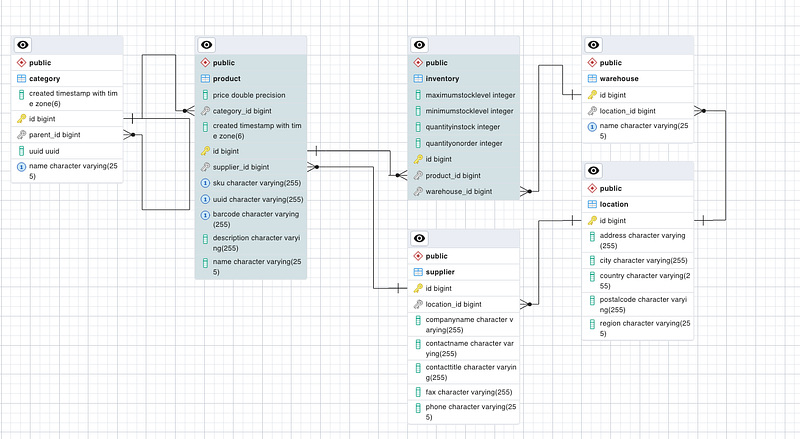
Figure 1. Model of the inventory-service.

3.2 The Product

Let’s explain few things first. The foundation of our system design begins with products. Various industries and business sectors feature distinct product attributes; for instance, clothing includes material, size, and color, while cars encompass attributes such as color, trim level, and engine type.

This article will concentrate on the attributes essential for constructing our model, rather than those specific to sales or other operational aspects.

Product.java

package com.platform.ecommerce.inventory.model;


import io.quarkus.hibernate.orm.panache.PanacheEntity;
import jakarta.persistence.*;
import jakarta.transaction.Transactional;
import org.hibernate.annotations.CreationTimestamp;

import java.time.ZonedDateTime;
import java.util.*;
import java.util.function.Predicate;


@Entity
public class Product extends PanacheEntity  {


    @Column(unique = true, nullable = false)
    public  String SKU;


    @Column(nullable = false,unique = true)
    private String barCode;


    @Column(nullable = false,unique = true)
    public String UUID;

    @Column(nullable = false)
    public  String name;

    @Column
    private String description;

    @Column
    private Double price;


    @ManyToOne(fetch = FetchType.EAGER, cascade = CascadeType.ALL)
    @JoinColumn(name = "category_id", nullable = false)
    private Category category;

    @ManyToOne(fetch = FetchType.EAGER, cascade = CascadeType.ALL)
    @JoinColumn(name = "supplier_id", nullable = false)
    private Supplier supplier;

    @OneToMany(fetch = FetchType.EAGER, mappedBy = "product", cascade = CascadeType.ALL)
    public List<Inventory> inventories = new ArrayList<>();

    private Inventory getOptimalinventory() {
        Optional<Inventory> inventory = inventories.stream().max(Comparator.comparing(Inventory::getQuantityInStock));
        return inventory.orElse(inventories.get(0));
    };


    public Integer getStock() {
        return getOptimalinventory().getQuantityInStock();
    }


    @CreationTimestamp
    public ZonedDateTime created;

    public Product() {}

    public static Product findProductByUUID(String UUID) {
        return find("UUID", UUID).firstResult();
    }
    public static Product findProductById(Long id) {
        return findById(id);
    }
    public static Product findByName(String name){      return find("name", name).firstResult();  }

    public static List<Product>  findByCategory(String category){      return find("category_id", category).list();  }

    public static List<Product> findByMaximumPrice(double price) {
        return find("price < ?1", price).list();
    }

    public static List<Product> findByMinimumPrice(double price) {
        return find("price > ?1", price).list();
    }

    public static void deleteProduct(Long id) {
        findById(id).delete();
    }

    @Transactional
    public static void deleteAllProducts() {
        deleteAll();
    }

    @Transactional
    public static void updateProduct(String UUID, Product newProduct) {
        Product productToBeUpdated = findProductByUUID(UUID);
        productToBeUpdated.name = newProduct.name;
        productToBeUpdated.description = newProduct.description;
        productToBeUpdated.price = newProduct.price;
    }


    @Transactional
    public static void createProduct(Product product) {
        product.persist();
    }

}

3.3 Categories

A Product belongs to a Product Category. Multiple categories exist and modeled in a hierarchy structure.

Category.java

package com.platform.ecommerce.inventory.model;

import io.quarkus.hibernate.orm.panache.PanacheEntity;
import io.quarkus.hibernate.orm.panache.PanacheEntityBase;
import jakarta.persistence.*;
import org.hibernate.annotations.CreationTimestamp;

import java.time.ZonedDateTime;
import java.util.*;


@Entity
public class Category extends PanacheEntity {


    @Column(unique = true, nullable = false)
    public  String name;

    @Column
    public UUID uuid = UUID.randomUUID();


    @ManyToOne
    @JoinColumn(name = "parent_id")
    private Category parent;

    @OneToMany(mappedBy = "parent", cascade = CascadeType.REMOVE, orphanRemoval = true)
    private List<Category> children = new ArrayList<Category>();


    @CreationTimestamp
    public ZonedDateTime created;


    //Here mappedBy indicates that the owner is in the other side
    @OneToMany(fetch = FetchType.LAZY, mappedBy = "category", cascade = CascadeType.ALL)
    private Set<Product> products = new HashSet<Product>();

}

3.4 Suppliers

Every Product is supplied by one specific Supplier. The Supplier of course has a contact person who picks up the phone and takes the order to restock.

Supplier.java

package com.platform.ecommerce.inventory.model;


import io.quarkus.hibernate.orm.panache.PanacheEntity;
import jakarta.persistence.*;

import java.util.HashSet;
import java.util.Set;

@Entity
public class Supplier extends PanacheEntity {

    private String companyName;

    private String contactName;

    private String contactTitle;

    @OneToOne
    @JoinColumn(name = "location_id",referencedColumnName = "id",insertable = true,updatable = true)
    public Location location = new Location();

    private String phone;

    private String fax;


    //Here mappedBy indicates that the owner is in the other side
    @OneToMany(fetch = FetchType.LAZY, mappedBy = "supplier", cascade = CascadeType.ALL)
    private Set<Product> products = new HashSet<Product>();

}

3.4 Product — Inventory — Warehouse Relationship Modeling.

A Single Product can exist in multiple Warehouses across the continent or across different continents. In addition each Warehouse may have different stock levels of the product.

How do we actually model that Many to Many Relationship between Product and Warehouse? By Introducing The ‘Inventory’ Entity.

The inventory entity plays a pivotal role as it symbolizes the connection between products and warehouses. Each product can be present in multiple warehouses, while each warehouse can house a diverse range of products.

Beyond merely establishing this relationship, it is essential to store supplementary data, such as product quantities available. Therefore, we will introduce an entity to encapsulate this association, featuring fundamental stock level attributes such as

a) minimum stock level before auto-order kicks-in b) maximum stock that the warehouse can manage and c) current stock level ‘quantityInStock’.

Inventory.java

package com.platform.ecommerce.inventory.model;

import com.fasterxml.jackson.annotation.JsonIgnore;
import io.quarkus.hibernate.orm.panache.PanacheEntity;
import jakarta.persistence.*;
import java.util.function.Predicate;

@Entity
public class Inventory extends PanacheEntity {

    @Column(nullable = false)
    private Integer minimumStockLevel;

    @Column(nullable = false)
    private Integer maximumStockLevel;

    @Column(nullable = false)
    private Integer quantityInStock;

    @Column(nullable = false)
    private Integer quantityOnOrder;


    @ManyToOne(optional = false, fetch = FetchType.EAGER)
    @JoinColumn(name="product_id", nullable=false)
    @JsonIgnore
    public Product product;

    @ManyToOne(optional = false, fetch = FetchType.EAGER)
    @JoinColumn(name="warehouse_id", nullable=false)
    @JsonIgnore
    public Warehouse warehouse;


    public Integer getQuantityInStock() {
        return quantityInStock;
    }

    public void setQuantityInStock(Integer quantityInStock) {
        this.quantityInStock = quantityInStock;
    }
}

3.5 Location

Finally the location entity holds information about the geographical sites where both warehouses and suppliers are situated. Many organizations operate across multiple locations, and each of these locations may comprise one or more warehouses.

Location.java

package com.platform.ecommerce.inventory.model;

import io.quarkus.hibernate.orm.panache.PanacheEntity;
import jakarta.persistence.Column;
import jakarta.persistence.Entity;

@Entity
public class Location extends PanacheEntity {

    @Column(nullable = false)
    public  String address;

    @Column(nullable = false)
    public  String city;

    @Column(nullable = false)
    public  String region;
    
     @Column(nullable = false)
    public  String postalCode;

    @Column(nullable = false)
    public  String country;


}

STEP 4. Transfering ‘Product’ domain code from order-service to the new inventory-service.

Since both of our micro-services sharing the ‘Product’ entity we are going to transfer the product code from order-service to inventory-service and enrich it.

For start we need to open both of our projects order-service and inventory-service in IntelliJ IDEA. The good thing about Macs and IntelliJ is that you can have multiple projects opened in tabs.

1. Create Product Resource REST API.

COPY:order-service/ProductResource.java -> inventory-service/ProductResource.java

We start our domain transfer process by coping ProductResource code from order-service to inventory-service within a new package named com.platform.ecommerce.inventory.resource.

We also change the REST path to ‘inventory-service/v1/product’ and we implement the new checkStockAvailability method and findProductByUUID method. We also clean the code from any bounded logic to the monolithic application. The end result is:

inventory-service/ProductResource.java

package com.platform.ecommerce.inventory.resource;


import com.platform.ecommerce.inventory.model.InventoryProductRecord;
import com.platform.ecommerce.inventory.model.InventoryStockResultRecord;
import com.platform.ecommerce.inventory.model.Product;
import com.platform.ecommerce.inventory.service.IInventoryService;
import io.quarkus.logging.Log;
import jakarta.enterprise.context.ApplicationScoped;
import jakarta.inject.Inject;
import jakarta.ws.rs.*;
import jakarta.ws.rs.core.*;

import java.net.URI;
import java.util.List;


@Path("inventory-service/v1/product")
@ApplicationScoped
@Produces(MediaType.APPLICATION_JSON)
@Consumes(MediaType.APPLICATION_JSON)

public class ProductResource {


    @Inject
    IInventoryService inventoryService;

    @GET
    @Path("all")
    public List<Product> getAllProducts() {
        return Product.listAll();
    }

    @GET
    @Path("uuid/{UUID}")
    public InventoryProductRecord findProductByUUID(@PathParam("UUID") String UUID) {
        Log.infof(":request item  details with id: %s from inventory",UUID);
        InventoryProductRecord productRecordResult = inventoryService.findProductByUUID(UUID);
        return inventoryService.findProductByUUID(UUID);

    }

    @GET
    @Path("stock/availability/{UUID}/{quantity}")
    public InventoryStockResultRecord checkStockAvailability(@PathParam("UUID") String UUID, @PathParam("quantity") Integer quantity) {
        InventoryStockResultRecord stockAvailabilityResult = inventoryService.checkStockAvailability(UUID,quantity);
        Log.infof(":requested quantity %s of  inventory item: %s.  Available quantity is:  %s",quantity,stockAvailabilityResult.productUUID(),stockAvailabilityResult.availableQuantity());
        return stockAvailabilityResult;
    }
    @GET
    @Path("category/{category}")
    public List<Product>  findByCategory(@QueryParam("category") String category) {
        return Product.findByCategory(category);
    }

    @GET
    @Path("price/maximum/{price}")
    public List<Product> findByMaximumPrice(@PathParam("price") double price) {
        return Product.findByMaximumPrice(price);
    }

    @GET
    @Path("price/minimum/{price}")
    public List<Product> findByMinimumPrice(@PathParam("price") double price) {
        return Product.findByMinimumPrice(price);
    }

    @POST
    @Path("create")
    public Response createProduct(Product product) {
        Product.createProduct(product);

        Log.info("Product created:"+product.UUID);
        return Response.status(Response.Status.CREATED).build();

    }

    @PUT
    @Path("update/{UUID}")
    public Response updateProduct(@PathParam("UUID") String UUID, Product product) {
        Product.updateProduct(UUID,product);
        Log.info("Product updated:"+product.UUID);
        return Response.status(Response.Status.OK).build();
    }

}

2. Create Persistent Service Layer Service.

We then move forward and create our Persistent Service Layer by creating a new interface InventoryService and the implemenetation of it PostGRESDatabaseService.

InventoryService.java

package com.platform.ecommerce.inventory.service;

import com.platform.ecommerce.inventory.model.InventoryProductRecord;
import com.platform.ecommerce.inventory.model.InventoryStockResultRecord;


public interface IInventoryService {


    InventoryProductRecord findProductByUUID(String UUID);

    InventoryStockResultRecord checkStockAvailability(String UUID, Integer quantity);


}

PostGRESDatabaseService.java

package com.platform.ecommerce.inventory.service;

import com.platform.ecommerce.inventory.model.InventoryProductRecord;
import com.platform.ecommerce.inventory.model.InventoryStockResultRecord;
import com.platform.ecommerce.inventory.model.Product;
import io.quarkus.arc.DefaultBean;
import jakarta.enterprise.context.ApplicationScoped;

@ApplicationScoped
@DefaultBean
public class PostGRESDatabaseService implements IInventoryService {


    @Override
    public InventoryProductRecord findProductByUUID(String UUID) {
          Product product = Product.findProductByUUID(UUID);
        InventoryProductRecord productResult = new InventoryProductRecord(product);
          return productResult;
    }

    @Override
    public InventoryStockResultRecord checkStockAvailability(String UUID, Integer requestedQuantity) {
        Product product = Product.findProductByUUID(UUID);
        InventoryStockResultRecord availabilityResult = new InventoryStockResultRecord(product,requestedQuantity);
        return availabilityResult;
    }

}

3. Create or Copy Value Objects

We continue our domain transfer process by coping the necessary Data Transfer Objects — Or Else Value Objects in Domain Design Terms — from order-service to inventory-service within package com.platform.ecommerce.inventory.model.

These objects are InventoryProductRecord and InventoryStockResultRecord.

STEP 5. Populate inventory DB with Sample Product Data.

We also populating our newly created database with proper sample data this time.

inventory-service/import.sql

------------------------------- CATEGORIES -----------------------------------------------------


-- PARENT 1 Mac
INSERT INTO category(id, parent_id, name) VALUES ( 100, null, 'Mac');
-- PARENT 2 iPad
INSERT INTO category(id, parent_id, name) VALUES ( 200, null, 'iPad');
-- PARENT 3  IPhone
INSERT INTO category(id, parent_id, name) VALUES ( 300, null, 'iPhone');


-- CHILD 1 OF  PARENT 1
INSERT INTO category(id, parent_id, name) VALUES ( 101, 100, 'Mac Studio');
-- CHILD 2 OF  PARENT 1
INSERT INTO category(id, parent_id, name) VALUES ( 102, 100, 'Mac Mini');
-- CHILD 3 OF  PARENT 1
INSERT INTO category(id, parent_id, name) VALUES ( 103, 100, 'Mac Book');
-- CHILD 4 OF  PARENT 1
INSERT INTO category(id, parent_id, name) VALUES ( 104, 100, 'Mac Pro');

-- CHILD 1 OF  PARENT 2
INSERT INTO category(id, parent_id, name) VALUES ( 201, 200, 'Ipad Pro');
-- CHILD 2 OF  PARENT 2
INSERT INTO category(id, parent_id, name) VALUES ( 202, 200, 'Ipad Air');

-- CHILD 1 OF  PARENT 3
INSERT INTO category(id, parent_id, name) VALUES ( 301, 300, 'IPhone 13');
-- CHILD 2 OF  PARENT 3
INSERT INTO category(id, parent_id, name) VALUES ( 302, 300, 'IPhone 14');


------------------------------- Locations -----------------------------------------------------

-- Location 1
INSERT INTO location(id, address, city, country, postalcode, region)
VALUES (101, '123 Main St', 'New York', 'USA', '10001', 'East Coast');

-- Location 2
INSERT INTO location(id, address, city, country, postalcode, region)
VALUES (102, '456 Elm St', 'Los Angeles', 'USA', '90001', 'West Coast');

-- Location 3
INSERT INTO location(id, address, city, country, postalcode, region)
VALUES (103, '789 Oak St', 'Chicago', 'USA', '60601', 'Midwest');

-- Location 4
INSERT INTO location(id, address, city, country, postalcode, region)
VALUES (104, '101 Pine St', 'London', 'UK', 'SW1A 1AA', 'England');

-- Location 5
INSERT INTO location(id, address, city, country, postalcode, region)
VALUES (105, '202 Maple St', 'Paris', 'France', '75001', 'Ile-de-France');


------------------------------- Suppliers -----------------------------------------------------

-- Supplier 1
INSERT INTO supplier(id, location_id, companyname, contactname, contacttitle, fax, phone)
VALUES (1, 101, 'Supplier A', 'John Doe', 'CEO', '555-123-4567', '555-987-6543');

-- Supplier 2
INSERT INTO supplier(id, location_id, companyname, contactname, contacttitle, fax, phone)
VALUES (2, 102, 'Supplier B', 'Jane Smith', 'Sales Manager', '555-111-2222', '555-333-4444');

-- Supplier 3
INSERT INTO supplier(id, location_id, companyname, contactname, contacttitle, fax, phone)
VALUES (3, 103, 'Supplier C', 'Robert Johnson', 'CFO', '555-555-5555', '555-666-6666');

-- Supplier 4
INSERT INTO supplier(id, location_id, companyname, contactname, contacttitle, fax, phone)
VALUES (4, 104, 'Supplier D', 'Mary Brown', 'Marketing Director', '555-777-8888', '555-999-0000');

-- Supplier 5
INSERT INTO supplier(id, location_id, companyname, contactname, contacttitle, fax, phone)
VALUES (5, 105, 'Supplier E', 'Michael Wilson', 'Supply Chain Manager', '555-123-7890', '555-456-7890');


------------------------------- Products  -----------------------------------------------------


-- Apple Product 1
INSERT INTO product(id, category_id, supplier_id, sku, uuid, barcode, description, name)
VALUES (1, 104, 1, 'MAC001', '4a05b88a-6e9f-4e94-b799-9d032b33d749', '123456789012', 'Powerful desktop computer for professionals', 'Mac Pro');

-- Apple Product 2
INSERT INTO product(id, category_id, supplier_id, sku, uuid, barcode, description, name)
VALUES (2, 103, 1, 'MAC002', 'b74fe0a0-5799-4343-9820-251d4b3c49ef', '987654321098', 'Slim and lightweight laptop with Retina display', 'Mac Book');

-- Apple Product 3
INSERT INTO product(id, category_id, supplier_id, sku, uuid, barcode, description, name)
VALUES (3, 102, 1, 'IPD001', '7d06a914-4ec3-42d1-821a-21ff8a98e13f', '654321098765', 'High-performance tablet with Apple Pencil support', 'iPad Pro');

-- Apple Product 4
INSERT INTO product(id, category_id, supplier_id, sku, uuid, barcode, description, name)
VALUES (4, 101, 1, 'MST001', 'b3f42c5e-8c7e-4e8f-92f6-104a7a480932', '789012345678', 'Compact desktop computer for creative professionals', 'Mac Studio');

-- Apple Product 5
INSERT INTO product(id, category_id, supplier_id, sku, uuid, barcode, description, name)
VALUES (5, 202, 1, 'IPA001', '6a5e89d0-17a6-4b5a-85de-12fb17001f9d', '543210987654', 'Lightweight and versatile iPad', 'iPad Air');

-- Apple Product 6
INSERT INTO product(id, category_id, supplier_id, sku, uuid, barcode, description, name)
VALUES (6, 201, 1, 'IPA002', '14cfe9e5-5d5e-45d3-8b60-8d89e5cdd96e', '234567890123', 'Professional tablet with Apple Pencil support', 'iPad Pro');

-- Apple Product 7
INSERT INTO product(id, category_id, supplier_id, sku, uuid, barcode, description, name)
VALUES (7, 301, 1, 'IPH001', 'a70c22b7-5a0e-4587-92e5-f85572ca075f', '345678901234', 'Latest iPhone with A15 Bionic chip', 'iPhone 13');

-- Apple Product 8
INSERT INTO product(id, category_id, supplier_id, sku, uuid, barcode, description, name)
VALUES (8, 301, 1, 'IPH002', 'bc4e30d8-5089-4e35-94cc-d305c0906b22', '456789012345', 'Advanced iPhone with Pro camera system', 'iPhone 13 Pro');

-- Apple Product 9
INSERT INTO product(id, category_id, supplier_id, sku, uuid, barcode, description, name)
VALUES (9, 301, 1, 'IPH003', '28aa1913-67a3-4929-ba4b-93019e00e3b5', '567890123456', 'Compact iPhone with powerful features', 'iPhone SE');

-- Apple Product 10
INSERT INTO product(id, category_id, supplier_id, sku, uuid, barcode, description, name)
VALUES (10, 300, 1, 'IPH004', 'ad0da00c-2633-4dd1-9329-aa9437e208e4', '678901234567', 'Flagship iPhone with Pro Max camera system', 'iPhone 13 Pro Max');


----------------------------------    Ware House  Data ------------------------------------

-- USA Warehouse
INSERT INTO public.warehouse(id, location_id, name) VALUES (1, 101, 'USA Warehouse');

-- European Warehouse
INSERT INTO public.warehouse(id, location_id, name) VALUES (2, 105, 'European WareHouse');


----------------------------------    Inventory  Data ------------------------------------

-- Inventory for Warehouse 1
-- Product 1
INSERT INTO inventory(id, product_id, warehouse_id, maximumstocklevel, minimumstocklevel, quantityinstock, quantityonorder)
VALUES (1, 1, 1, 100, 10, 75, 5);

-- Product 2
INSERT INTO inventory(id, product_id, warehouse_id, maximumstocklevel, minimumstocklevel, quantityinstock, quantityonorder)
VALUES (2, 2, 1, 150, 20, 120, 10);

-- Product 3
INSERT INTO inventory(id, product_id, warehouse_id, maximumstocklevel, minimumstocklevel, quantityinstock, quantityonorder)
VALUES (3, 3, 1, 80, 5, 60, 5);

-- Product 4
INSERT INTO inventory(id, product_id, warehouse_id, maximumstocklevel, minimumstocklevel, quantityinstock, quantityonorder)
VALUES (4, 4, 1, 200, 25, 180, 15);

-- Product 5
INSERT INTO inventory(id, product_id, warehouse_id, maximumstocklevel, minimumstocklevel, quantityinstock, quantityonorder)
VALUES (5, 5, 1, 120, 10, 100, 8);


-- Inventory for Warehouse 2
-- Product 6
INSERT INTO inventory(id, product_id, warehouse_id, maximumstocklevel, minimumstocklevel, quantityinstock, quantityonorder)
VALUES (6, 6, 2, 90, 8, 70, 7);

-- Product 7
INSERT INTO inventory(id, product_id, warehouse_id, maximumstocklevel, minimumstocklevel, quantityinstock, quantityonorder)
VALUES (7, 7, 2, 160, 15, 140, 12);

-- Product 8
INSERT INTO inventory(id, product_id, warehouse_id, maximumstocklevel, minimumstocklevel, quantityinstock, quantityonorder)
VALUES (8, 8, 2, 70, 6, 50, 4);

-- Product 9
INSERT INTO inventory(id, product_id, warehouse_id, maximumstocklevel, minimumstocklevel, quantityinstock, quantityonorder)
VALUES (9, 9, 2, 180, 18, 160, 10);

-- Product 10
INSERT INTO inventory(id, product_id, warehouse_id, maximumstocklevel, minimumstocklevel, quantityinstock, quantityonorder)
VALUES (10, 10, 2, 110, 12, 95, 8);

STEP 5. Run order-service and inventory-service.

We need to open both of our projects order-service and inventory-service in IntelliJ IDEA. The good thing about Macs and IntelliJ is that you can have multiple projects opened in tabs.

That’s all! Our inventory-service is ready to run.

Open up a terminal within inventory-service project in IntelliJ and run the project by typing quarkus dev.

Our inventory-service should start and listen at port 8091. Leave it running.

STEP 5. Enable the REST Client micro-service invocation functionality.

Now it is time to test if this new functionality actually works. In our order-service project in IntelliJ change the remote inventory “feature-toggle” to true

microservices.inventory.release.enabled = true

Then open up a terminal within order-service project run the test by typing mvn clean test.

EVERYTHING SHOULD BE WORKING FINE!

Phew! At Last! We finally decompose our Monolith to actually a smaller monolith (hahahah!) by extracting the inventory functionality to a separate micro-service. We name our monolith ‘order-service’ and the new micro-service inventory-service.

We are using synchronous REST communication for their communication, using Quarkus REST Client to exchange Product Info Details and Stock Availability Info.

Our prodution monolith runs as normal and with the use of ‘feature toggles’ and ‘Branch by Abstraction’ we can work towards the decomposition, without breaking apart the whole system.

That’s all for now guys.

By no means the end result is a production ready microservices architecture but it is one of the first steps towards the decomposition of your production monolith.

I hope it helps!

TUTORIAL PARTS

Part 1: Quarkus. From Monolithic to a Microservice Architecture. How to Decompose using ‘Branch By Abstraction’ Pattern.

Part 2: Quarkus. From Monolithic to a Microservice Architecture. How to Decompose using ‘Branch By Abstraction’ Pattern.

PREVIOUS TUTORIAL

Part 1: Quarkus Persistence, CRUD with Panache. E-commerce example.

Part 2: Quarkus Persistence, CRUD with Panache. E-commerce example.

Quarkus Framework
Quarkus
Java
Microservices
Patterns
Recommended from ReadMedium