
avatarGeorge Sotiropoulos

Free AI web copilot to create summaries, insights and extended knowledge, download it at here

26776

Abstract

Items = <span class="hljs-keyword">new</span> <span class="hljs-title class_">ArrayList</span><>();

<span class="hljs-meta">@Transient</span>
<span class="hljs-keyword">public</span> <span class="hljs-keyword">void</span> <span class="hljs-title function_">setTotalPrice</span><span class="hljs-params">()</span> {
    <span class="hljs-type">double</span> <span class="hljs-variable">total</span> <span class="hljs-operator">=</span> <span class="hljs-number">0D</span>;
    <span class="hljs-keyword">for</span> (OrderItem item : orderItems) {
        total += item.totalAmount;
    }
    totalAmount = total;
}


<span class="hljs-keyword">public</span> <span class="hljs-keyword">static</span> Order <span class="hljs-title function_">findOrderById</span><span class="hljs-params">(Long id)</span> {
    <span class="hljs-keyword">return</span> findById(id);
}

<span class="hljs-keyword">public</span> <span class="hljs-keyword">static</span> List&lt;Order&gt; <span class="hljs-title function_">findOrdersByStatus</span><span class="hljs-params">(String status)</span> {
    List&lt;Order&gt; orderList = Order.list(<span class="hljs-string">"status"</span>, Sort.by(<span class="hljs-string">"customer.id"</span>).and(<span class="hljs-string">"created"</span>), status);
    <span class="hljs-keyword">return</span> orderList;
}

<span class="hljs-keyword">public</span> <span class="hljs-keyword">static</span> List&lt;Order&gt; <span class="hljs-title function_">findOrdersByCustomerId</span><span class="hljs-params">(Long customerId)</span> {
    List&lt;Order&gt; orderList = Order.list(<span class="hljs-string">"customer.id"</span>, Sort.by(<span class="hljs-string">"created"</span>), customerId);
    <span class="hljs-keyword">return</span> orderList;
}

<span class="hljs-meta">@Transactional</span>
<span class="hljs-keyword">public</span> <span class="hljs-keyword">static</span> <span class="hljs-keyword">void</span> <span class="hljs-title function_">createOrder</span><span class="hljs-params">(Long customerId, Order order)</span> {
    <span class="hljs-type">Customer</span> <span class="hljs-variable">customer</span> <span class="hljs-operator">=</span> findById(customerId);
    order.customer = customer;
    order.persist();
}


<span class="hljs-meta">@Transactional</span>
<span class="hljs-keyword">public</span> <span class="hljs-keyword">static</span> <span class="hljs-keyword">void</span> <span class="hljs-title function_">addOrderItem</span><span class="hljs-params">(Long orderId,String productUUID, Integer quantity)</span> {
    <span class="hljs-type">Order</span> <span class="hljs-variable">order</span> <span class="hljs-operator">=</span>  findOrderById(orderId);
    <span class="hljs-type">Product</span> <span class="hljs-variable">product</span> <span class="hljs-operator">=</span> Product.findProductByUUID(productUUID);
    <span class="hljs-type">OrderItem</span> <span class="hljs-variable">orderItem</span> <span class="hljs-operator">=</span> <span class="hljs-keyword">new</span> <span class="hljs-title class_">OrderItem</span>(order,product,quantity);
    order.orderItems.add(orderItem);
    order.setTotalPrice();
    order.persist();
    <span class="hljs-comment">//orderItem.persist(); //CASCADING TYPE IS SET TO ALL SO NO NEEDED</span>
}


<span class="hljs-meta">@Transactional</span>
<span class="hljs-keyword">public</span> <span class="hljs-keyword">static</span> <span class="hljs-keyword">void</span> <span class="hljs-title function_">updateOrderItemQuantity</span><span class="hljs-params">(Long orderId, String productUUID, Integer quantity)</span> {
    <span class="hljs-type">Order</span> <span class="hljs-variable">order</span> <span class="hljs-operator">=</span>  findOrderById(orderId);
    Log.info(<span class="hljs-string">"Order found:"</span>+order.id);

    <span class="hljs-type">OrderItem</span> <span class="hljs-variable">orderItem</span> <span class="hljs-operator">=</span> order.orderItems.stream().filter(o -&gt; productUUID.equals(o.product.UUID)).findFirst().orElse(<span class="hljs-literal">null</span>);
    Log.info(<span class="hljs-string">"Order item found:"</span>+orderItem.id);

    orderItem.quantity = quantity;
    Log.info(<span class="hljs-string">"Update quantity to:"</span>+quantity);

    orderItem.setTotalPrice();
    order.setTotalPrice();
    order.persist();
}

<span class="hljs-meta">@Transactional</span>
<span class="hljs-keyword">public</span> <span class="hljs-keyword">static</span> <span class="hljs-keyword">void</span> <span class="hljs-title function_">updateOrderStatus</span><span class="hljs-params">(Long id, String status)</span> {
    <span class="hljs-type">Order</span> <span class="hljs-variable">order</span> <span class="hljs-operator">=</span> findOrderById(id);
    order.status = status;
    order.persist();
}

<span class="hljs-meta">@Transactional</span>
<span class="hljs-keyword">public</span> <span class="hljs-keyword">static</span> <span class="hljs-keyword">void</span> <span class="hljs-title function_">deleteOrderItem</span><span class="hljs-params">(Long orderId, String productUUID)</span> {
    <span class="hljs-type">Order</span> <span class="hljs-variable">order</span> <span class="hljs-operator">=</span> findOrderById(orderId);
    Log.info(<span class="hljs-string">"Order found:"</span>+order.id);

    <span class="hljs-type">OrderItem</span> <span class="hljs-variable">orderItem</span> <span class="hljs-operator">=</span> order.orderItems.stream().filter(o -&gt; productUUID.equals(o.productUUID)).findFirst().orElse(<span class="hljs-literal">null</span>);
    Log.info(<span class="hljs-string">"Order item found:"</span>+orderItem.id);

    order.orderItems.remove(orderItem);
    Log.info(<span class="hljs-string">"Remove item:"</span>+orderItem.id);

    order.setTotalPrice();
    order.persist();
}


<span class="hljs-meta">@Transactional</span>
<span class="hljs-keyword">public</span> <span class="hljs-keyword">static</span> <span class="hljs-keyword">void</span> <span class="hljs-title function_">deleteOrder</span><span class="hljs-params">(Long id)</span> {
    findById(id).delete();
}

}</pre></div><p id="07d7">and our <b>OrderItem </b>entity becomes</p><p id="ab5c"><b>OrderItem.java</b></p><div id="fa0a"><pre><span class="hljs-keyword">import</span> com.fasterxml.jackson.<span class="hljs-keyword">annotation</span>.JsonIgnore; <span class="hljs-keyword">import</span> io.quarkus.hibernate.orm.panache.PanacheEntity; <span class="hljs-keyword">import</span> jakarta.persistence.*;

<span class="hljs-meta">@Entity</span> <span class="hljs-keyword">public</span> <span class="hljs-keyword">class</span> <span class="hljs-title class_">OrderItem</span> <span class="hljs-title">extends</span> <span class="hljs-title">PanacheEntity</span> {

<span class="hljs-comment">//default constructor</span>
<span class="hljs-keyword">public</span> OrderItem() {
}

<span class="hljs-keyword">public</span> OrderItem(Order order, Product product, Integer quantity) {
    <span class="hljs-keyword">this</span>.order = order;
    <span class="hljs-keyword">this</span>.product = product;
    <span class="hljs-keyword">this</span>.productUUID = product.UUID;
    <span class="hljs-keyword">this</span>.quantity = quantity;
    totalAmount = product.price*quantity;
}

<span class="hljs-keyword">public</span> <span class="hljs-built_in">Long</span> getId() {
    <span class="hljs-keyword">return</span> id;
}


<span class="hljs-meta">@Column(nullable = false)</span>
<span class="hljs-keyword">public</span> double totalAmount;

<span class="hljs-meta">@Column(nullable = false)</span>
<span class="hljs-keyword">public</span> Integer quantity;

<span class="hljs-meta">@Transient</span>
<span class="hljs-keyword">public</span> String productUUID;


<span class="hljs-meta">@OneToOne</span>
<span class="hljs-meta">@JoinColumn(name = <span class="hljs-string">"product_uuid"</span>,referencedColumnName = <span class="hljs-string">"uuid"</span>,insertable = true,updatable = false)</span>
<span class="hljs-keyword">public</span> Product product = new Product();

<span class="hljs-meta">@ManyToOne(optional = false, fetch = FetchType.EAGER)</span>
<span class="hljs-meta">@JoinColumn(name=<span class="hljs-string">"order_id"</span>, nullable=false)</span>
<span class="hljs-meta">@JsonIgnore</span>
<span class="hljs-keyword">public</span> Order order;


<span class="hljs-meta">@Transient</span>
<span class="hljs-keyword">public</span> void  setTotalPrice() {
    totalAmount = product.price*quantity;
}

} </pre></div><h1 id="5f64">Branch By Abstraction:STEP 3. Implement the Change Part 2. Create the Service Layers.</h1><p id="407b">We create 2 implementations of the <b>IInventoryService </b>interface<b>. </b>One for the already exisiting functionality for product ferching using a local database access and one for remote micro-service REST invocation of the<b> inventory-service</b>.</p><p id="b105">Our local implementation of the <b>IInventoryService </b>is<b> ProductLocalDatabaseService</b> which uses Panache ORM to fetch product data from our local database. It’s the default functionality of our monolith since we are not want to break the existing production system (<b>also we are using the @DefaultBean annotation</b>) but this time is using product UUID instead of the local database primary key of products table to fetch product records.</p><p id="9784"><b>ProductLocalDatabaseService.java</b></p><div id="d49a"><pre><span class="hljs-keyword">package</span> com.platform.ecommerce.order.service;

<span class="hljs-keyword">import</span> com.platform.ecommerce.order.model.InventoryProductRecord; <span class="hljs-keyword">import</span> com.platform.ecommerce.order.model.InventoryStockResultRecord; <span class="hljs-keyword">import</span> com.platform.ecommerce.order.model.Product;

<span class="hljs-meta">@ApplicationScoped</span> <span class="hljs-meta">@DefaultBean</span> <span class="hljs-keyword">public</span> <span class="hljs-keyword">class</span> <span class="hljs-title class_">ProductLocalDatabaseService</span> <span class="hljs-keyword">implements</span> <span class="hljs-title class_">IInventoryService</span> {

<span class="hljs-meta">@Override</span>
<span class="hljs-keyword">public</span> InventoryProductRecord <span class="hljs-title function_">findProductByUUID</span><span class="hljs-params">(String UUID)</span> {
      <span class="hljs-type">Product</span> <span class="hljs-variable">product</span> <span class="hljs-operator">=</span> Product.findProductByUUID(UUID);
    <span class="hljs-type">InventoryProductRecord</span> <span class="hljs-variable">productResult</span> <span class="hljs-operator">=</span> <span class="hljs-keyword">new</span> <span class="hljs-title class_">InventoryProductRecord</span>(product);
      <span class="hljs-keyword">return</span> productResult;
}

<span class="hljs-meta">@Override</span>
<span class="hljs-keyword">public</span> InventoryStockResultRecord <span class="hljs-title function_">checkStockAvailability</span><span class="hljs-params">(String UUID, Integer requestedQuantity)</span> {
    <span class="hljs-type">Product</span> <span class="hljs-variable">product</span> <span class="hljs-operator">=</span> Product.findProductByUUID(UUID);
    <span class="hljs-type">InventoryStockResultRecord</span> <span class="hljs-variable">availabilityResult</span> <span class="hljs-operator">=</span> <span class="hljs-keyword">new</span> <span class="hljs-title class_">InventoryStockResultRecord</span>(product,requestedQuantity);
    <span class="hljs-keyword">return</span> availabilityResult;
}

}</pre></div><p id="f4c4">Then we create a new implementation of our <b>IInventoryService </b>named <b>ProductRemoteMicroService </b>which supports REST API client invocation to our new inventory micro-service. This is essentially our ‘<b>Branch</b></p><blockquote id="b787"><p>Don’t worry about the <b>@RestClient IProductInventoryClient </b>at the moment<b>. </b>In the next step I explain in depth about it.</p></blockquote><p id="c5a7"><b>ProductRemoteMicroService.java</b></p><div id="fb82"><pre>package com.<span class="hljs-property">platform</span>.<span class="hljs-property">ecommerce</span>.<span class="hljs-property">order</span>.<span class="hljs-property">service</span>;

<span class="hljs-keyword">import</span> com.<span class="hljs-property">platform</span>.<span class="hljs-property">ecommerce</span>.<span class="hljs-property">order</span>.<span class="hljs-property">model</span>.<span class="hljs-property">InventoryProductRecord</span>; <span class="hljs-keyword">import</span> com.<span class="hljs-property">platform</span>.<span class="hljs-property">ecommerce</span>.<span class="hljs-property">order</span>.<span class="hljs-property">model</span>.<span class="hljs-property">InventoryStockResultRecord</span>; <span class="hljs-keyword">import</span> com.<span class="hljs-property">platform</span>.<span class="hljs-property">ecommerce</span>.<span class="hljs-property">order</span>.<span class="hljs-property">rest</span>.<span class="hljs-property">IProductInventoryClient</span>; <span class="hljs-keyword">import</span> io.<span class="hljs-property">quarkus</span>.<span class="hljs-property">arc</span>.<span class="hljs-property">profile</span>.<span class="hljs-property">UnlessBuildProfile</span>; <span class="hljs-keyword">import</span> io.<span class="hljs-property">quarkus</span>.<span class="hljs-property">arc</span>.<span class="hljs-property">properties</span>.<span class="hljs-property">UnlessBuildProperty</span>; <span class="hljs-keyword">import</span> jakarta.<span class="hljs-property">enterprise</span>.<span class="hljs-property">context</span>.<span class="hljs-property">ApplicationScoped</span>; <span class="hljs-keyword">import</span> org.<span class="hljs-property">eclipse</span>.<span class="hljs-property">microprofile</span>.<span class="hljs-property">rest</span>.<span class="hljs-property">client</span>.<span class="hljs-property">inject</span>.<span class="hljs-property">RestClient</span>;

<span class="hljs-meta">@ApplicationScoped</span> <span class="hljs-meta">@UnlessBuildProperty</span>(name = <span class="hljs-string">"microservices.inventory.release.enabled"</span>, stringValue = <span class="hljs-string">"false"</span>) <span class="hljs-comment">//@UnlessBuildProfile("prod")</span> <span class="hljs-keyword">public</span> <span class="hljs-keyword">class</span> <span class="hljs-title class_">ProductRemoteMicroService</span> <span class="hljs-keyword">implements</span> <span class="hljs-title class_">IInventoryService</span> {

<span class="hljs-title class_">IProductInventoryClient</span> inventoryClient;

<span class="hljs-keyword">public</span> <span class="hljs-title class_">ProductRemoteMicroService</span>(<span class="hljs-meta">@RestClient</span> <span class="hljs-title class_">IProductInventoryClient</span> inventoryClient) {
    <span class="hljs-variable language_">this</span>.<span class="hljs-property">inventoryClient</span> = inventoryClient;
}

<span class="hljs-meta">@Override</span>
<span class="hljs-keyword">public</span> <span class="hljs-title class_">InventoryProductRecord</span> <span class="hljs-title function_">findProductByUUID</span>(<span class="hljs-params"><span class="hljs-built_in">String</span> UUID</span>) {
    <span class="hljs-keyword">return</span> inventoryClient.<span class="hljs-title function_">findProductByUUID</span>(<span class="hljs-variable constant_">UUID</span>);
}

<span class="hljs-meta">@Override</span>
<span class="hljs-keyword">public</span> <span class="hljs-title class_">InventoryStockResultRecord</span> <span class="hljs-title function_">checkStockAvailability</span>(<span class="hljs-params"><span class="hljs-built_in">String</span> UUID, Integer quantity</span>) {
    <span class="hljs-keyword">return</span> inventoryClient.<span class="hljs-title function_">checkStockAvailability</span>(<span class="hljs-variable constant_">UUID</span>, quantity);
}

}</pre></div><h1 id="39fb">Branch By Abstraction:STEP 4. Using feature toggles to switch between implementations</h1><p id="b834">Sam Newman at his book “Monolith to Microservices” at page 108 introduces the idea of using ‘feature toggles’ to switch between the new and the old implementation when implementing branch by abstraction.</p><p id="0b94">Therefore within <b>application.properties </b>of our <b>order-service</b> we also enter the following config value.</p><div id="6f1f"><pre><span class="hljs-attr">microservices.inventory.release.enabled</span> = <span class="hljs-literal">false</span></pre></div><blockquote id="cb37"><p>But wait! What is the <b>@UnlessBuildProperty(name = “microservices.inventory.release.enabled”, stringValue = “false”) </b>annotation?</p></blockquote><p id="8d94" type="7">We want to conditionallly enable the new functionality based on quarkus build profiles such as prod, dev and test, or based on some sort of configuration entry in application properties. We are trying to break our monolith but not break the production system!</p><p id="3d79" type="7">You can read more about it at the official quarkus documentation about contexts and dependency injection at 4.7. Enabling Beans for Quarkus Build Profile.</p><p id="bf0a">Tip: To conditionally enable our new implementation based on the build profiles use the <a href="http://twitter.com/io"><b>@io</b></a><b>.quarkus.arc.profile.IfBuildProfile</b> and <a href="http://twitter.com/io"><b>@io</b></a><b>.quarkus.arc.profile.UnlessBuildProfile</b> annotations. For example we want our <b>ProductRemoteMicroService</b> to run only at <b>test</b> and <b>dev</b> profiles and not in <b>production</b>. We annotate like this to protect our production system and have the new functionality ONLY WHEN TESTING</p><div id="7f1a"><pre><span class="hljs-variable">@UnlessBuildProfile</span>(<span class="hljs-string">"prod"</span>)

OR

<span class="hljs-variable">@IfBuildProfile</span>(<span class="hljs-string">"test"</span>)</pre></div><blockquote id="d44d"><p>We then insert this <b>new inventory data service layer </b>as well as the <b>product availability validation code</b> and <b>product fetching code </b>in our <b>OrderResource </b>EndPoint at [1], [2].</p></blockquote><p id="0b6d"><b>OrderResource.java</b></p><div id="941d"><pre><span class="hljs-keyword">package</span> com.platform.ecommerce.order.resource;

<span class="hljs-keyword">import</span> com.platform.ecommerce.order.model.InventoryProductRecord; <span class="hljs-keyword">import</span> com.platform.ecommerce.order.model.InventoryStockResultRecord; <span class="hljs-keyword">import</span> com.platform.ecommerce.order.model.; <span class="hljs-keyword">import</span> com.platform.ecommerce.order.service.IInventoryService; <span class="hljs-keyword">import</span> io.quarkus.logging.Log; <span class="hljs-keyword">import</span> jakarta.enterprise.context.ApplicationScoped; <span class="hljs-keyword">import</span> jakarta.inject.Inject; <span class="hljs-keyword">import</span> jakarta.ws.rs.; <span class="hljs-keyword">import</span> jakarta.ws.rs.core.MediaType; <span class="hljs-keyword">import</span> jakarta.ws.rs.core.Response;

<span class="hljs-keyword">import</span> java.util.List;

<span class="hljs-meta">@Path("order-service/v1/order")</span> <span class="hljs-meta">@ApplicationScoped</span> <span class="hljs-meta">@Produces(MediaType.APPLICATION_JSON)</span> <span class="hljs-meta">@Consumes(MediaType.APPLICATION_JSON)</span>

<span class="hljs-keyword">public</span> <span class="hljs-keyword">class</span> <span class="hljs-title class_">OrderResource</span> {

<span class="hljs-meta">@Inject</span>
IInventoryService inventoryService;


<span class="hljs-meta">@GET</span>
<span class="hljs-meta">@Path("all")</span>
<span class="hljs-keyword">public</span> List&lt;Order&gt; <span class="hljs-title function_">getAllOrders</span><span class="hljs-params">()</span> {<span class="hljs-keyword">return</span> Order.listAll(); }

<span class="hljs-meta">@GET</span>
<span class="hljs-meta">@Path("{id}")</span>
<span class="hljs-keyword">public</span> Response <span class="hljs-title function_">findById</span><span class="hljs-params">(<span class="hljs-meta">@PathParam("id")</span> Long id)</span> {

<span class="hljs-keyword">return</span> Order.findByIdOptional(id)
            .map(order -&gt; Response.ok(order).build())
            .orElse(Response.status(Response.Status.NOT_FOUND).build());
}


<span class="hljs-meta">@POST</span>
<span class="hljs-meta">@Path("create/{customerId}")</span>
<span class="hljs-keyword">public</span> Response <span class="hljs-title function_">createOrder</span><span class="hljs-params">(<span class="hljs-meta">@PathParam("customerId")</span> Long customerId, Order order)</span> {
    Order.createOrder(customerId,order);
    Log.info(<span class="hljs-string">"Order created:"</span>+order.id);
    <span class="hljs-keyword">return</span> Response.status(Response.Status.CREATED).build();
}
<span class="hljs-meta">@PUT</span>
<span class="hljs-meta">@Path("update/status/{id}")</span>
<span class="hljs-keyword">public</span> Response <span class="hljs-title function_">updateOrderStatus</span><span class="hljs-params">(<span class="hljs-meta">@PathParam("id")</span> Long id, String status)</span> {
    Order.updateOrderStatus(id,status);
    <span class="hljs-keyword">return</span> Response.status(Response.Status.NO_CONTENT).build();
}
<span class="hljs-meta">@Path("add/item/{orderId}")</span>
<span class="hljs-meta">@POST</span>
<span class="hljs-keyword">public</span> Response <span class="hljs-title function_">addOrderItem</span><span class="hljs-params">(<span class="hljs-meta">@PathParam("orderId")</span> Long orderId, OrderItem orderItemForm)</span> {
            [<span class="hljs-number">1</span>] <span class="hljs-type">InventoryStockResultRecord</span> <span class="hljs-variable">inventoryStockResult</span> <span class="hljs-operator">=</span> inventoryService.checkStockAvailability(orderItemForm.productUUID, orderItemForm.quantity);
                Log.infof(<span class="hljs-string">":requested stock validation check from inventory for item: %s.  Available quantity is:  %s"</span>, inventoryStockResult.productUUID(),inventoryStockResult.availableQuantity());

            <span class="hljs-keyword">if</span>(inventoryStockResult.available()) {
                Log.info(<span class="hljs-string">"inventory stock validation passed"</span>);

                [<span class="hljs-number">2</span>] <span class="hljs-type">InventoryProductRecord</span> <span class="hljs-variable">inventoryProductResult</span> <span class="hljs-operator">=</span> inventoryService.findProductByUUID(orderItemForm.productUUID);
                    Log.infof(<span class="hljs-string">":requested  details for item  with id: %s from inventory"</span>,inventoryProductResult.UUID());

                Order.addOrderItem(orderId,orderItemForm.productUUID, orderItemForm.quantity);

                <span class="hljs-keyword">return</span> Response.status(Response.Status.OK).build();
            } <span class="hljs-keyword">else</span> {
                Log.info(<span class="hljs-string">"inventory stock validation failed"</span>);
                <span class="hljs-keyword">return</span> Response.status(Response.Status.NOT_ACCEPTABLE).entity(inventoryStockResult).build();
            }
}

<span class="hljs-meta">@Path("update/item/{orderId}")</span>
<span class="hljs-meta">@PUT</span>
<span class="hljs-keyword">public</span> Response <span class="hljs-title function_">updateOrderItemQuantity</span><span class="hljs-params">(<span class="hljs-meta">@PathParam("orderId")</span> Long orderId, OrderItem orderItemForm)</span> {
      [<span class="hljs-number">1</span>] <span class="hljs-type">InventoryStockResultRecord</span> <span class="hljs-variable">inventoryStockResult</span> <span class="hljs-operator">=</span> inventoryService.checkStockAvailability(orderItemForm.productUUID,orderItemForm.quantity);
          Log.infof(<span class="hljs-string">":requested stock validation check from inventory for item: %s.  Available quantity is:  %s"</span>, inventoryStockResult.productUUID(),inventoryStockResult.availableQuantity());

    <span class="hljs-keyword">if</span>(inventoryStockResult.available()) {
        Log.info(<span class="hljs-string">"inventory stock validation passed"</span>);

        [<span class="hljs-number">2</span>] <span class="hljs-type">InventoryProductRecord</span> <span class="hljs-variable">inventoryProductResult</span> <span class="hljs-operator">=</span> inventoryService.findProductByUUID(orderItemForm.productUUID);
            Log.infof(<span class="hljs-string">":requested  details for item  with id: %s from inventory"</span>,inventoryProductResult.UUID());

        Order.updateOrderItemQuantity(orderId,inventoryProductResult.UUID(),orderItemForm.quantity);
        <span class="hljs-keyword">return</span> Response.status(Response.Status.OK).build();
    } <span class="hljs-keyword">else</span> {
        Log.info(<span class="hljs-string">"inventory stock validation failed"</span>);
        <span class="hljs-keyword">return</span> Response.status(Response.Status.NOT_ACCEPTABLE).entity(inventoryStockResult).build();
    }
}

<span class="hljs-meta">@Path("delete/item/{orderId}")</span>
<span class="hljs-meta">@PUT</span>
<span class="hljs-keyword">public</span> Response <span class="hljs-title function_">deleteOrderItem</span><span class="hljs-params">(<span class="hljs-meta">@PathParam("orderId")</span> Long orderId, OrderItem orderItemForm)</span> {
    Order.deleteOrderItem(orderId,orderItemForm.productUUID);
    <span class="hljs-keyword">return</span> Response.status(Response.Status.OK).build();
}

<span class="hljs-meta">@GET</span>
<span cla

Options

ss="hljs-meta">@Path("customer/{id}")</span> <span class="hljs-keyword">public</span> List<Order> <span class="hljs-title function_">findOrdersByCustomerId</span><span class="hljs-params">(<span class="hljs-meta">@PathParam("id")</span> Long id)</span> { <span class="hljs-keyword">return</span> Order.findOrdersByCustomerId(id);

}

<span class="hljs-meta">@DELETE</span>
<span class="hljs-meta">@Path("delete/{id}")</span>
<span class="hljs-keyword">public</span> Response <span class="hljs-title function_">deleteOrder</span><span class="hljs-params">(<span class="hljs-meta">@PathParam("id")</span> Long id)</span> {
    Order.deleteOrder(id);
    <span class="hljs-keyword">return</span> Response.status(Response.Status.OK).build();
}

} </pre></div><h1 id="97cb">STEP 5. Implementing the REST Client Reactive Interface for our new inventory-service.</h1><p id="0257">We then create a new interface class to handle the REST calls of our code branch to the inventory micro-service.</p><p id="c660">This new interface is called <b>IProductInventoryClient </b>within package <b>com.platform.ecommerce.order.rest</b>.</p><p id="061e"><b>IProductInventoryClient.java</b></p><div id="82d1"><pre><span class="hljs-keyword">package</span> com.platform.ecommerce.order.rest;

<span class="hljs-keyword">import</span> com.platform.ecommerce.order.model.InventoryProductRecord; <span class="hljs-keyword">import</span> com.platform.ecommerce.order.model.InventoryStockResultRecord; <span class="hljs-keyword">import</span> jakarta.ws.rs.GET; <span class="hljs-keyword">import</span> jakarta.ws.rs.Path; <span class="hljs-keyword">import</span> jakarta.ws.rs.PathParam; <span class="hljs-keyword">import</span> org.eclipse.microprofile.rest.client.inject.RegisterRestClient;

<span class="hljs-meta">@RegisterRestClient(configKey="inventory-service")</span> <span class="hljs-meta">@Path("/inventory-service/v1/product")</span> <span class="hljs-comment">// The base URL of the REST resource</span> <span class="hljs-keyword">public</span> <span class="hljs-keyword">interface</span> <span class="hljs-title class_">IProductInventoryClient</span> { <span class="hljs-meta">@GET</span> <span class="hljs-meta">@Path("stock/availability/{UUID}/{quantity}")</span> InventoryStockResultRecord <span class="hljs-title function_">checkStockAvailability</span><span class="hljs-params">(<span class="hljs-meta">@PathParam("UUID")</span> String UUID, <span class="hljs-meta">@PathParam("quantity")</span> Integer quantity)</span>;

<span class="hljs-meta">@GET</span>
<span class="hljs-meta">@Path("uuid/{UUID}")</span>
InventoryProductRecord <span class="hljs-title function_">findProductByUUID</span><span class="hljs-params">(<span class="hljs-meta">@PathParam("UUID")</span> String  UUID)</span>;

}</pre></div><p id="3796">Lets examine what is going on:</p><ol><li><b>Declaring the methods</b>: First, we define a Java interface for the REST API of our hypothetical inventory micro-service.</li><li><b>Annotating the interface</b>: Second, we are using the <code>@RegisterRestClient</code> annotation, <b>which is a key annotation used in MicroProfile Rest Client </b>to declare and register a Java interface as a REST client.</li></ol><p id="e1f4" type="7">Thus we are telling Quarkus to generate an implementation of that interface at runtime and to interact with the REST API of our inventory micro-service.</p><p id="575d"><b>3. Specify the URL of our inventory micro-service: </b>Within the<b> @RegisterRestClient </b>annotation<b> </b>we specify information about the base URL of the REST API of the inventory micro-service as well as other config parameters using <b>configKey=”inventory-service”.</b></p><p id="85ae">We also add within application.properties that config-key using the format <i>quarkus.rest-client.<b>{config-key-name}</b>.url</i></p><p id="905d"><b>application.properties</b></p><div id="44a3"><pre><span class="hljs-attr">quarkus.rest-client.inventory-service.url</span>=http://localhost:<span class="hljs-number">8091</span></pre></div><p id="6a4a">4. <b>Injecting the REST Client</b>: In our I<b>ProductRemoteMicroService</b> we inject an instance of this interface using either the <code>@Inject</code> annotation or other dependency injection mechanisms like the constructor style as shown at line [1].</p><div id="9ee0"><pre>package com.<span class="hljs-property">platform</span>.<span class="hljs-property">ecommerce</span>.<span class="hljs-property">order</span>.<span class="hljs-property">service</span>;

<span class="hljs-keyword">import</span> com.<span class="hljs-property">platform</span>.<span class="hljs-property">ecommerce</span>.<span class="hljs-property">order</span>.<span class="hljs-property">model</span>.<span class="hljs-property">InventoryProductRecord</span>; <span class="hljs-keyword">import</span> com.<span class="hljs-property">platform</span>.<span class="hljs-property">ecommerce</span>.<span class="hljs-property">order</span>.<span class="hljs-property">model</span>.<span class="hljs-property">InventoryStockResultRecord</span>; <span class="hljs-keyword">import</span> com.<span class="hljs-property">platform</span>.<span class="hljs-property">ecommerce</span>.<span class="hljs-property">order</span>.<span class="hljs-property">rest</span>.<span class="hljs-property">IProductInventoryClient</span>; <span class="hljs-keyword">import</span> io.<span class="hljs-property">quarkus</span>.<span class="hljs-property">arc</span>.<span class="hljs-property">profile</span>.<span class="hljs-property">UnlessBuildProfile</span>; <span class="hljs-keyword">import</span> io.<span class="hljs-property">quarkus</span>.<span class="hljs-property">arc</span>.<span class="hljs-property">properties</span>.<span class="hljs-property">UnlessBuildProperty</span>; <span class="hljs-keyword">import</span> jakarta.<span class="hljs-property">enterprise</span>.<span class="hljs-property">context</span>.<span class="hljs-property">ApplicationScoped</span>; <span class="hljs-keyword">import</span> org.<span class="hljs-property">eclipse</span>.<span class="hljs-property">microprofile</span>.<span class="hljs-property">rest</span>.<span class="hljs-property">client</span>.<span class="hljs-property">inject</span>.<span class="hljs-property">RestClient</span>;

<span class="hljs-meta">@ApplicationScoped</span> <span class="hljs-meta">@UnlessBuildProperty</span>(name = <span class="hljs-string">"microservices.inventory.release.enabled"</span>, stringValue = <span class="hljs-string">"false"</span>) <span class="hljs-comment">//@UnlessBuildProfile("prod")</span> <span class="hljs-keyword">public</span> <span class="hljs-keyword">class</span> <span class="hljs-title class_">ProductRemoteMicroService</span> <span class="hljs-keyword">implements</span> <span class="hljs-title class_">IInventoryService</span> {

<span class="hljs-title class_">IProductInventoryClient</span> inventoryClient;

[<span class="hljs-number">1</span>] <span class="hljs-keyword">public</span> <span class="hljs-title class_">ProductRemoteMicroService</span>(<span class="hljs-meta">@RestClient</span> <span class="hljs-title class_">IProductInventoryClient</span> inventoryClient) {
    <span class="hljs-variable language_">this</span>.<span class="hljs-property">inventoryClient</span> = inventoryClient;
}

<span class="hljs-meta">@Override</span>
<span class="hljs-keyword">public</span> <span class="hljs-title class_">InventoryProductRecord</span> <span class="hljs-title function_">findProductByUUID</span>(<span class="hljs-params"><span class="hljs-built_in">String</span> UUID</span>) {
    <span class="hljs-keyword">return</span> inventoryClient.<span class="hljs-title function_">findProductByUUID</span>(<span class="hljs-variable constant_">UUID</span>);
}

<span class="hljs-meta">@Override</span>
<span class="hljs-keyword">public</span> <span class="hljs-title class_">InventoryStockResultRecord</span> <span class="hljs-title function_">checkStockAvailability</span>(<span class="hljs-params"><span class="hljs-built_in">String</span> UUID, Integer quantity</span>) {
    <span class="hljs-keyword">return</span> inventoryClient.<span class="hljs-title function_">checkStockAvailability</span>(<span class="hljs-variable constant_">UUID</span>, quantity);
}

}</pre></div><h1 id="f4c2">STEP 6. Import Product Sample Data with UUIDs.</h1><p id="c5c3">Within resources directory we change<b> import.sql</b> file to include insert product statements with UUIDs. We also re-written our sample data to include more items and better names and descriptions this time.</p><blockquote id="617e"><p><b>We don’t touch stock info since we said aleady that we will turn on and off the new functiionality. Thus we need the local database stock info to coexist with the new functionality of fetching that data from the inventory micro-service.</b></p></blockquote><p id="0949">The import SQL file</p><p id="e81d"><b>import.sql</b></p><div id="9f8e"><pre><span class="hljs-keyword">INSERT</span> <span class="hljs-keyword">INTO</span> customer (id, name, surname,email,address,phone) <span class="hljs-keyword">VALUES</span> ( nextval(<span class="hljs-string">'customer_seq'</span>), <span class="hljs-string">'Marco'</span>,<span class="hljs-string">'Verratti'</span>,<span class="hljs-string">'[email protected]'</span>,<span class="hljs-string">'Princes Park (Le Parc des Princes)'</span>,<span class="hljs-string">'000000000'</span>); <span class="hljs-keyword">INSERT</span> <span class="hljs-keyword">INTO</span> customer (id, name, surname,email,address,phone) <span class="hljs-keyword">VALUES</span> ( nextval(<span class="hljs-string">'customer_seq'</span>), <span class="hljs-string">'Kylian'</span>,<span class="hljs-string">'Mbappé'</span>,<span class="hljs-string">'kylian.mbappé@gmail.com'</span>,<span class="hljs-string">'Princes Park (Le Parc des Princes)'</span>,<span class="hljs-string">'000000000'</span>);

<span class="hljs-comment">------------------------------- Products -----------------------------------------------------</span>

<span class="hljs-comment">-- Apple Product 1</span> <span class="hljs-keyword">INSERT</span> <span class="hljs-keyword">INTO</span> product(id, uuid, price, description, name, stock) <span class="hljs-keyword">VALUES</span> (<span class="hljs-number">1</span>, <span class="hljs-string">'4a05b88a-6e9f-4e94-b799-9d032b33d749'</span>, <span class="hljs-number">3999</span>, <span class="hljs-string">'Powerful desktop computer for professionals'</span>, <span class="hljs-string">'Mac Pro'</span>, <span class="hljs-number">75</span>);

<span class="hljs-comment">-- Apple Product 2</span> <span class="hljs-keyword">INSERT</span> <span class="hljs-keyword">INTO</span> product(id, uuid, price, description, name, stock) <span class="hljs-keyword">VALUES</span> (<span class="hljs-number">2</span>, <span class="hljs-string">'b74fe0a0-5799-4343-9820-251d4b3c49ef'</span>, <span class="hljs-number">1999</span>, <span class="hljs-string">'Slim and lightweight laptop with Retina display'</span>, <span class="hljs-string">'Mac Book'</span>, <span class="hljs-number">100</span>);

<span class="hljs-comment">-- Apple Product 3</span> <span class="hljs-keyword">INSERT</span> <span class="hljs-keyword">INTO</span> product(id, uuid, price, description, name, stock) <span class="hljs-keyword">VALUES</span> (<span class="hljs-number">3</span>, <span class="hljs-string">'7d06a914-4ec3-42d1-821a-21ff8a98e13f'</span>, <span class="hljs-number">1999</span>, <span class="hljs-string">'High-performance tablet with Apple Pencil support'</span>, <span class="hljs-string">'iPad Pro'</span>, <span class="hljs-number">100</span>);

<span class="hljs-comment">-- Apple Product 4</span> <span class="hljs-keyword">INSERT</span> <span class="hljs-keyword">INTO</span> product(id, uuid, price, description, name, stock) <span class="hljs-keyword">VALUES</span> (<span class="hljs-number">4</span>, <span class="hljs-string">'b3f42c5e-8c7e-4e8f-92f6-104a7a480932'</span>, <span class="hljs-number">2999</span>, <span class="hljs-string">'Compact desktop computer for creative professionals'</span>, <span class="hljs-string">'Mac Studio'</span>, <span class="hljs-number">100</span>);

<span class="hljs-comment">-- Apple Product 5</span> <span class="hljs-keyword">INSERT</span> <span class="hljs-keyword">INTO</span> product(id, uuid, price, description, name, stock) <span class="hljs-keyword">VALUES</span> (<span class="hljs-number">5</span>, <span class="hljs-string">'6a5e89d0-17a6-4b5a-85de-12fb17001f9d'</span>, <span class="hljs-number">999</span>, <span class="hljs-string">'Lightweight and versatile iPad'</span>, <span class="hljs-string">'iPad Air'</span>, <span class="hljs-number">100</span>);

<span class="hljs-comment">-- Apple Product 6</span> <span class="hljs-keyword">INSERT</span> <span class="hljs-keyword">INTO</span> product(id, uuid, price, description, name, stock) <span class="hljs-keyword">VALUES</span> (<span class="hljs-number">6</span>, <span class="hljs-string">'14cfe9e5-5d5e-45d3-8b60-8d89e5cdd96e'</span>, <span class="hljs-number">1499</span>, <span class="hljs-string">'Professional tablet with Apple Pencil support'</span>, <span class="hljs-string">'iPad Pro'</span>, <span class="hljs-number">100</span>);

<span class="hljs-comment">-- Apple Product 7</span> <span class="hljs-keyword">INSERT</span> <span class="hljs-keyword">INTO</span> product(id, uuid, price, description, name, stock) <span class="hljs-keyword">VALUES</span> (<span class="hljs-number">7</span>, <span class="hljs-string">'a70c22b7-5a0e-4587-92e5-f85572ca075f'</span>, <span class="hljs-number">899</span>, <span class="hljs-string">'Latest iPhone with A15 Bionic chip'</span>, <span class="hljs-string">'iPhone 13'</span>, <span class="hljs-number">100</span>);

<span class="hljs-comment">-- Apple Product 8</span> <span class="hljs-keyword">INSERT</span> <span class="hljs-keyword">INTO</span> product(id, uuid, price, description, name, stock) <span class="hljs-keyword">VALUES</span> (<span class="hljs-number">8</span>, <span class="hljs-string">'bc4e30d8-5089-4e35-94cc-d305c0906b22'</span>, <span class="hljs-number">1099</span>, <span class="hljs-string">'Advanced iPhone with Pro camera system'</span>, <span class="hljs-string">'iPhone 13 Pro'</span>, <span class="hljs-number">100</span>);

<span class="hljs-comment">-- Apple Product 9</span> <span class="hljs-keyword">INSERT</span> <span class="hljs-keyword">INTO</span> product(id, uuid, price, description, name, stock) <span class="hljs-keyword">VALUES</span> (<span class="hljs-number">9</span>, <span class="hljs-string">'28aa1913-67a3-4929-ba4b-93019e00e3b5'</span>, <span class="hljs-number">499</span>, <span class="hljs-string">'Compact iPhone with powerful features'</span>, <span class="hljs-string">'iPhone SE'</span>, <span class="hljs-number">100</span>);

<span class="hljs-comment">-- Apple Product 10</span> <span class="hljs-keyword">INSERT</span> <span class="hljs-keyword">INTO</span> product(id, uuid, price, description, name, stock) <span class="hljs-keyword">VALUES</span> (<span class="hljs-number">10</span>, <span class="hljs-string">'ad0da00c-2633-4dd1-9329-aa9437e208e4'</span>, <span class="hljs-number">1299</span>, <span class="hljs-string">'Flagship iPhone with Pro Max camera system'</span>, <span class="hljs-string">'iPhone 13 Pro Max'</span>, <span class="hljs-number">100</span>);

<span class="hljs-keyword">INSERT</span> <span class="hljs-keyword">INTO</span> users (id, name, password) <span class="hljs-keyword">VALUES</span> ( nextval(<span class="hljs-string">'users_seq'</span>), <span class="hljs-string">'Kylian'</span>,<span class="hljs-string">'1234'</span>); <span class="hljs-keyword">INSERT</span> <span class="hljs-keyword">INTO</span> users (id, name, password) <span class="hljs-keyword">VALUES</span> ( nextval(<span class="hljs-string">'users_seq'</span>), <span class="hljs-string">'Marco'</span>,<span class="hljs-string">'1234'</span>);

</pre></div><p id="c90c"><b>OrderResourceTest.java</b></p><div id="1913"><pre><span class="hljs-keyword">package</span> com.platform.ecommerce.order.resource;

<span class="hljs-keyword">import</span> com.platform.ecommerce.order.model.OrderStatus; <span class="hljs-keyword">import</span> com.platform.ecommerce.order.model.OrderItem; <span class="hljs-keyword">import</span> io.quarkus.test.common.http.TestHTTPEndpoint; <span class="hljs-keyword">import</span> io.quarkus.test.junit.QuarkusTest; <span class="hljs-keyword">import</span> jakarta.json.Json; <span class="hljs-keyword">import</span> jakarta.json.JsonObject; <span class="hljs-keyword">import</span> jakarta.ws.rs.core.MediaType; <span class="hljs-keyword">import</span> jakarta.ws.rs.core.Response; <span class="hljs-keyword">import</span> org.junit.jupiter.api.*; <span class="hljs-keyword">import</span> <span class="hljs-keyword">static</span> io.restassured.RestAssured.given;

<span class="hljs-meta">@QuarkusTest</span> <span class="hljs-meta">@TestHTTPEndpoint(OrderResource.class)</span> <span class="hljs-meta">@TestMethodOrder(MethodOrderer.OrderAnnotation.class)</span> <span class="hljs-comment">//@Disabled</span> <span class="hljs-keyword">public</span> <span class="hljs-keyword">class</span> <span class="hljs-title class_">OrderResourceTest</span> {

<span class="hljs-type">String</span>  <span class="hljs-variable">testProductUUID</span> <span class="hljs-operator">=</span> <span class="hljs-string">"4a05b88a-6e9f-4e94-b799-9d032b33d749"</span>;


<span class="hljs-meta">@Test</span>
<span class="hljs-meta">@Order(1)</span>
<span class="hljs-keyword">public</span> <span class="hljs-keyword">void</span> <span class="hljs-title function_">createOrder</span><span class="hljs-params">()</span> {

    <span class="hljs-type">JsonObject</span> <span class="hljs-variable">order</span> <span class="hljs-operator">=</span> Json.createObjectBuilder()
            .add(<span class="hljs-string">"status"</span>, OrderStatus.Pending).build();


    <span class="hljs-comment">// Test POST</span>
    given()
            .contentType(MediaType.APPLICATION_JSON)
            .body(order.toString())
            .when()
            .when().post(<span class="hljs-string">"create/{customerId}"</span>,<span class="hljs-number">1</span>)
            .then()
            .statusCode(Response.Status.CREATED.getStatusCode());
}


<span class="hljs-meta">@Test</span>
<span class="hljs-meta">@Order(2)</span>
<span class="hljs-keyword">public</span> <span class="hljs-keyword">void</span> <span class="hljs-title function_">addOrderItem</span><span class="hljs-params">()</span> {

    <span class="hljs-type">JsonObject</span> <span class="hljs-variable">orderItem</span> <span class="hljs-operator">=</span> Json.createObjectBuilder()
            .add(<span class="hljs-string">"productUUID"</span>, testProductUUID)
            .add(<span class="hljs-string">"quantity"</span>, <span class="hljs-number">2</span>)
            .build();


    <span class="hljs-comment">// Test POST</span>
    given()
            .contentType(MediaType.APPLICATION_JSON)
            .body(orderItem.toString())
            .when()
            .when().post(<span class="hljs-string">"add/item/{orderId}"</span>,<span class="hljs-number">1</span>)
            .then()
            .statusCode(Response.Status.OK.getStatusCode());
}


<span class="hljs-meta">@Test</span>
<span class="hljs-meta">@Order(3)</span>
<span class="hljs-keyword">public</span> <span class="hljs-keyword">void</span> <span class="hljs-title function_">whenFetchOrder_ThenAtLeastOneOrderShouldBeFound</span><span class="hljs-params">()</span> {
    <span class="hljs-comment">//TEST GET</span>
    com.platform.ecommerce.order.model.<span class="hljs-type">Order</span> <span class="hljs-variable">order</span> <span class="hljs-operator">=</span> given()
            .accept(MediaType.APPLICATION_JSON)
            .when().get(<span class="hljs-string">"{id}"</span>,<span class="hljs-number">1</span>)
            .then()
            .statusCode(Response.Status.OK.getStatusCode())
            .extract()
            .body().as(com.platform.ecommerce.order.model.Order.class);

}

<span class="hljs-meta">@Test</span> <span class="hljs-meta">@Order(4)</span> <span class="hljs-keyword">public</span> <span class="hljs-keyword">void</span> <span class="hljs-title function_">whenUpdateOrderItemQuantity_ThenQuantityShouldBeEqual</span><span class="hljs-params">()</span> { <span class="hljs-type">JsonObject</span> <span class="hljs-variable">orderItemJSON</span> <span class="hljs-operator">=</span> Json.createObjectBuilder() .add(<span class="hljs-string">"productUUID"</span>, testProductUUID) .add(<span class="hljs-string">"quantity"</span>, <span class="hljs-number">5</span>) .build();

    <span class="hljs-comment">// Test UPDATE</span>
    given()
            .contentType(MediaType.APPLICATION_JSON)
            .body(orderItemJSON.toString())
            .when().put(<span class="hljs-string">"update/item/{orderId}"</span>,<span class="hljs-number">1</span>)
            .then()
            .statusCode(Response.Status.OK.getStatusCode());

    <span class="hljs-comment">//FETCH ORDER</span>
    com.platform.ecommerce.order.model.<span class="hljs-type">Order</span> <span class="hljs-variable">order</span> <span class="hljs-operator">=</span> given()
            .accept(MediaType.APPLICATION_JSON)
            .when().get(<span class="hljs-string">"{id}"</span>,<span class="hljs-number">1</span>)
            .then()
            .statusCode(Response.Status.OK.getStatusCode())
            .extract()
            .body().as(com.platform.ecommerce.order.model.Order.class);


    <span class="hljs-comment">//EXTRACT THE ORDER ITEM FOR PRODUCT WITH ID=1</span>
    <span class="hljs-type">OrderItem</span> <span class="hljs-variable">orderItem</span> <span class="hljs-operator">=</span> order.orderItems.stream().filter(o -&gt; o.product.UUID.equalsIgnoreCase(testProductUUID)).findFirst().orElse(<span class="hljs-literal">null</span>);
    Assertions.assertEquals(orderItem.quantity,<span class="hljs-number">5</span>);

}


<span class="hljs-meta">@Test</span>
<span class="hljs-meta">@Order(5)</span>
<span class="hljs-keyword">public</span> <span class="hljs-keyword">void</span> <span class="hljs-title function_">whenAddingOrderItemGreaterThanStockQuantity_ThenValidationShouldReturn</span><span class="hljs-params">()</span> {

    <span class="hljs-type">JsonObject</span> <span class="hljs-variable">orderItem</span> <span class="hljs-operator">=</span> Json.createObjectBuilder()
            .add(<span class="hljs-string">"productUUID"</span>, testProductUUID)
            .add(<span class="hljs-string">"quantity"</span>, <span class="hljs-number">100</span>)
            .build();


    <span class="hljs-comment">// Test POST</span>
    com.platform.ecommerce.order.model.<span class="hljs-type">InventoryStockResultRecord</span> <span class="hljs-variable">availability</span> <span class="hljs-operator">=</span> given()
            .contentType(MediaType.APPLICATION_JSON)
            .body(orderItem.toString())
            .when()
            .when().post(<span class="hljs-string">"add/item/{orderId}"</span>,<span class="hljs-number">1</span>)
            .then()
            .statusCode(Response.Status.NOT_ACCEPTABLE.getStatusCode()).extract()
            .body().as(com.platform.ecommerce.order.model.InventoryStockResultRecord.class);

    Assertions.assertEquals(availability.missingQuantity(),<span class="hljs-number">25</span>);

}

}</pre></div><p id="c2f3">Then within IntelliJ open up a terminal and hit <b>mvn clean test.</b></p><blockquote id="3f6a"><p>Don’t forget that the feature toggle<b> <i>microservices.inventory.release.enabled</i></b><i> should be set to <b>false </b>since we haven’t yet implemented the<b> inventory-service.</b></i></p></blockquote><h1 id="9ce7">Epilogue.</h1><p id="1f16"><i>A few thoughts: We invoke twice the REST Service. One for <b>product availability</b> and a second time for <b>fetching products</b>. Of course this is done only for the purpose of this tutorial and in real-life scenario we may use only one invocation both for inventory stock and product info, since our product data comes from only one micro service, the <b>inventory-service</b>.</i></p><p id="20e9"><i>However let’s say we have the product image served by another micro-service named <b>file-service</b>. Then we need that second invocation. We will explore that scenario in a next article and see how GraphQL with Quarkus comes into play.</i></p><blockquote id="2069"><p><b>GraphQL is a query language for your API that allows clients to request exactly the data they need and nothing more. One of the key advantages of GraphQL is that it enables clients to make multiple related queries in a single request, which can reduce the over-fetching of data and minimize the number of network requests compared to traditional REST APIs.</b></p></blockquote><p id="5c30">That’s all for the first part of this tutorial guys. In the next part of this tutorial we are implementing the <b>inventory-service</b>.</p><p id="0c98">TUTORIAL PARTS</p><p id="3339"><a href="https://readmedium.com/part-3-1-quarkus-e1b8f9732a5f">Part 1: Quarkus. From Monolithic to a Microservice Architecture. How to Decompose using ‘Branch By Abstraction’ Pattern.</a></p><p id="d9e1"><a href="https://readmedium.com/part-3-2-quarkus-from-monolithic-to-a-microservice-architecture-building-the-inventory-4e019f9812b6">Part 2: Quarkus. From Monolithic to a Microservice Architecture. How to Decompose using ‘Branch By Abstraction’ Pattern.</a></p><p id="4e05">PREVIOUS TUTORIAL</p><p id="59de"><a href="https://readmedium.com/part-1-crud-with-panache-orm-in-quarkus-an-eshop-example-cd37ccf051e2">Part 1: Quarkus Persistence, CRUD with Panache. E-commerce example.</a></p><p id="b10d"><a href="https://readmedium.com/part-2-quarkus-persistence-crud-with-panache-e-commerce-example-a19aa5af13d9">Part 2: Quarkus Persistence, CRUD with Panache. E-commerce example.</a></p></article></body>

Quarkus. From Monolithic to a Microservice Architecture. How to Decompose using ‘Branch By Abstraction’ Pattern. Part 1.

‘Branch By Abstraction’ & ‘Database-Per-Service’ patterns implementation using Quarkus REST Client Reactive and Feature Toggles.E-commerce Case Study.

In the previews articles we started building the back-end system for our fictional e-shop. We have implemented 2 Resource Endpoints, the ProductResource and the OrderResource providing functionality for products and orders. However our system is sharing the same database with all the scalability problems arising from that.

It is time to break down our monolithic application into a micro-service architecture following the Database-Per-Service pattern and Branch By Abstraction Pattern. You can read more about this patterns by visiting microservices.io and also Martin Fowler’s blog.

Lets go into some theory first about database sharing between domains in a monolithic application and what are the options of communicating and sharing data between micro-services

A. Database-Per-Service Pattern

Breaking down a monolithic application with a shared database into a microservices architecture with separate databases is a complex process that comes with various challenges and issues. While microservices offer benefits like scalability, flexibility, and faster development, they also introduce complexities that need to be carefully managed.

Our order system is the one shown. When a new item is requested to be added to the order then the item is fetched from the local database using Panache ORM [1] as shown in figure 1.
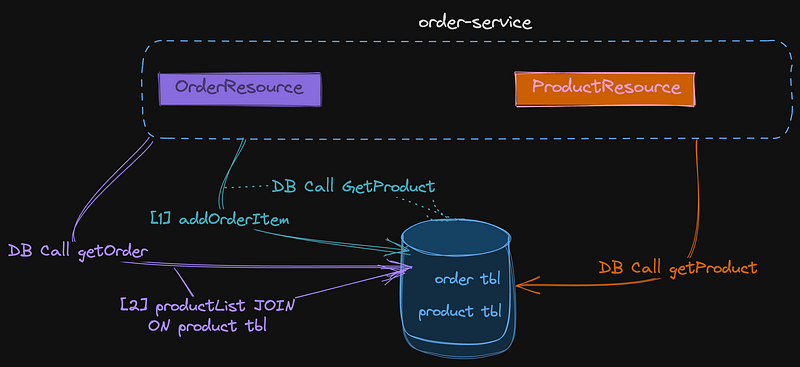
Figure 1. Monolithic Application using a Single Database for both orders and products.

In this series of articles, our goal is to implement a functionality where, upon the addition of a new item to an order, we retrieve both product data and stock availability information from a newly developed inventory microservice. To achieve this, we’ll utilize the Quarkus REST Client. The architecture we aim to build aligns with the representation in Figure 2.
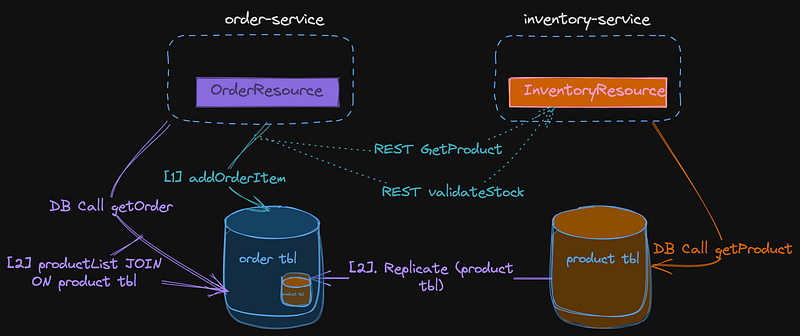
Figure 2. Micro-Service Architecture following the Database per Service Pattern.

B. InterService Communication using REST Client Reactive.

For this inter-service REST comunication for finding a unique product and validating the stock we are going to explore the Quarkus REST Client Reactive, an implementation of MicroProfile Rest Client, which provides a more convenient and type-safe way to invoke RESTful APIs compared to traditional approaches.

‘MicroProfile Rest Client is a part of the Eclipse MicroProfile project, which aims to provide a set of specifications for building microservices-based Java applications. MicroProfile Rest Client is specifically focused on simplifying the consumption of RESTful web services within Java microservices applications. ‘

Here are some key features and benefits of MicroProfile Rest Client:

Declarative API: MicroProfile Rest Client allows you to define RESTful API interfaces using annotations and Java interfaces. This declarative approach means you can create a Java interface that represents the REST API, and the client implementation is generated automatically.

Type Safety: The generated client code is strongly typed, which means you can use Java interfaces and data objects to interact with the REST service. This reduces the chances of runtime errors and makes your code more maintainable.

However Sharing product data through a REST API is not the fastest thing to do comparing to a solution using reference tables in a share database.

C. Monolithic to Micro-Service ‘Data’ Challenge.

Designing a microservice architecture where each microservice corresponds to a single entity may seem like an intuitive approach, but it can lead to excessive inter-service communication.

By definition, microservices should be self-contained units capable of performing their business functions independently. However, most business processes involve multiple entities.

In monolithic applications, it’s common for modules to access required data from a different module through an SQL join to the other table. In our case OrderItem has a reference to Products table as well as to Customers table.

The Latency Problem And Micro-Services Communication

If we decide to adopt a microservices approach, we must be prepared for changes in how data relationships are managed. In our new architecture, orders and products reside in completely different databases.

We may tempted to replace the traditional database join to products [2] by API calls between microservices, introducing latency.

Although the purpose of the article demonstrates the ‘Branch by Abstraction Pattern’ using Quarkus synchronous communication by no means it is the recommended approach for production.The correct approaches are:

Asynchronous Communication:Instead of synchronous communication, consider using asynchronous messaging patterns. This can be achieved through message queues or publish-subscribe systems. The order-service can send a request to the inventory-service and continue processing other tasks while awaiting a response.

Caching:Another technique is to implement caching mechanisms in the order-service to store frequently requested stock information. This can help reduce the need for frequent requests to the inventory service, especially for data that doesn’t change frequently.

Retry and Circuit Breaker Pattern: If you tempted for a synchronous communication FOR START then YOU MUST implement retry mechanisms with backoff strategies for failed requests to the inventory service. In Quarkus it is easy to use the Circuit Breaker Pattern to temporarily halt requests if the inventory service is experiencing issues, preventing cascading failures.

Batch Processing: If the order-service requires multiple pieces of information from the inventory service, consider the ‘Request Batch’ Pattern by batching requests to reduce the overhead of making individual calls. This can be particularly effective since there are multiple items to be checked in a single order.

Data Integrity Problem

Now, let’s address the concern about data integrity. In a microservices architecture, each microservice typically has its own database or separate schema in the same database.

This makes establishing traditional foreign key relationships between the product table of both order-service and inventory-service impractical. As a result, enforcing data integrity at the database level becomes challenging.

The Data Consistency Challenge

The challenge arises from the independent nature of these micro-services where each one manages its own data store and also another problem is that business transactions often involve interactions with multiple microservices. The real problem however is:

There is not a shared transactional mechanism of any kind

Unlike a monolithic system where transactions are typically managed within a single database, microservices operate independently with their own databases and there is not a shared transaction mechanism.

Ensuring consistent and synchronized data across microservices becomes a complex challenge. Scenarios where updates to one service succeed while updates to another may fail, leading to inconsistencies, are common

Achieving traditional ACID properties (Atomicity, Consistency, Isolation, Durability) across distributed services is difficult, nearly impossible if you are building a mission-critical strong consistency application.

To address these problems microservice architecture often rely on patterns like the Saga Pattern, Eventual Consistency, and Compensating Transactions to address the Data Consistency Problem. These patterns introduce mechanisms for managing transactions across services, handling failures, and

EVENTUALLY converging towards a consistent state.

ENENTUALLY. That is.

As noted by a great reader which I’m thankfull, the original ‘The Data Consistency Problem’ paragraph introduced confusion due to the use of the term “splitting business transactions.” You don’t actually split the transaction. The original paragraph:

“Another challenge is maintaining data consistency in a microservices architecture, as business transactions are split across multiple microservices. This necessitates the use of patterns like the SAGA pattern, which involves orchestrating local transactions and creating compensating transactions to handle rollbacks effectively.”

UUID for Product Records

In a microservices architecture, using UUIDs (Universally Unique Identifiers) for primary keys in database tables is a common practice, and it can be particularly beneficial when dealing with distributed systems and services like the order service and the inventory service. Here are some reasons why using UUIDs for the product table might be a good idea:

  1. Uniqueness: UUIDs are designed to be globally unique. This means that in our distributed environment with multiple services and a database per service , we can be reasonably sure that the UUIDs used for products will not collide or conflict with each other.
  2. Decoupling: UUIDs allow each microservice to generate its own unique local primary key identifiers without needing to coordinate with other services. This promotes independence and reduces the need for centralized identity management.
  3. Data Integration: When multiple services need to interact or share data, using UUIDs can simplify data integration. Since UUIDs are globally unique, they can serve as a common identifier across services.
  4. Data Replication: In our case stock and price information about a product needs to be replicated across databases, using Kafka messaging or other techniques. UUIDs make it easier to merge or synchronize data without conflicts.
  5. Avoiding Exposing Internal IDs: Using UUIDs can help prevent the exposure of internal database IDs to external clients, which can be a security best practice.

D. Monolithic to Micro-Service ‘Refactoring Code’ Challenge.

This is another important part. There a few patterns to migrate from our monolithic application to micro-services such as the Strangler Fig pattern, Pattern of Parallel Runs the pattern of Branch By Abstraction and much more.

If you want to dive deep into the theory read this very nice article Patterns to migrate from Monolith to Microservices .

According to Martin Fowler

“Branch by Abstraction” is a technique for making a large-scale change to a software system in gradual way that allows you to release the system regularly while the change is still in-progress.

Gradual. This is the key word. Branch by Abstraction we allow us to do gradual refactor our application. It promotes a structured and incremental approach.

Essentially using an abstraction layer will allow multiple implementations to co-exist in the software system, ensuring that the system builds and runs correctly and when we don’t longer want the old functionality we will remove it.

Lastly we didn’t choose the Strangle Fig Pattern since we are going to do refactoring and changes at component level .

Strangle Fig Pattern is more suited at the monolith’s perimeter by interpet calls of the endpoints using let’s say a proxy, façade or a load balancer .

These are the six phases that are being followed in Branch by Abstraction:

  1. Identify the Change: First, we need to identify the specific change or feature we want to introduce or modify in your software system. This change can range from refactoring code to adding new functionality or even upgrading a critical component.
  2. Create an Abstraction Layer: Instead of directly making changes to the existing codebase, we create an abstraction layer or interface that represents the new functionality or change. This abstraction layer acts as an intermediary between the old and new code.
  3. Implement the Change Separately: We implement the desired change or feature within this abstraction layer or interface. This allows to work on the new code independently of the existing codebase, reducing the risk of conflicts and errors.
  4. Gradual Integration: Once the new functionality is fully developed and tested within the abstraction layer, we can gradually integrate it into the existing codebase. This integration can be done incrementally, piece by piece, or module by module, depending on the complexity of the change and the structure of our codebase.
  5. Deprecate the Old Code: As we integrate the new code, we can start deprecating or phasing out the old code that the abstraction layer replaces. This can involve removing or refactoring the old code to use the new abstraction.

Enough with the theory! We our now ready to start!

STEP 1. Initialization. Add the Rest Client library.

In this article in order to share product stock info between our micro-services we emply a synchronous communication techique using a REST Client invocation library. In Quarkus that librasy is named ‘rest-client-reactive-jackson’, or ‘’rest-reactive’ .

REST Client Reactive is the REST Client implementation compatible with RESTEasy Reactive. This is the library needed in order to create REST Clients and interact with REST API Services or in quarkus terminology our ‘RESTEasy Reactive’ Services. Read more about it in Quarkus Official Documentation.

‘RESTEasy Reactive’ and ‘REST Client Reactive’ terminology doesn’t mean that our REST Endpoints and Services are written in a ‘reactive’ non-blocking style.

Remember this:

SERVER PART — REST Easy Reactive: Providing JSON REST Endpoints

CLIENT PART — REST Client Reactive: Invoking JSON REST Endpoints compatible with RESTEasy Reactive.

We are adding the rest-client-reactive-jackson in our order-service micro-service. Open up a terminal within the order-service project type the following:

quarkus extension add 'rest-client-reactive-jackson'

Branch By Abstraction:STEP 1. Identify The Change

We said that we are going to fetch specific for the needs of our microservice product info from a new hypothetical micro-service named inventory-service through RESΤ API calls and not from the local database.

Thus we need to abstract the findProductById functionality at line [1].

OrderResource.java

..............

@Path("add/item/{orderId}")
    @POST
    public Response addOrderItem(@PathParam("orderId") Long orderId, OrderItem orderItemForm) {
       [1] Product product = Product.findProductById(orderItemForm.productId); 
       Order.addOrderItem(orderId, product, orderItemForm.quantity);
       return Response.status(Response.Status.OK).build();
           
    }

.................

Branch By Abstraction:STEP 2. Create the Abstraction Layer.

We start by creating a new Interface named IInventoryService and we are adding 2 methods for single product data and product availability validation named findProductByUUID and checkStockAvailability respectively, assuming our new inventory-service provides that functionality. As we said we introduce UUIDs for the main product identification mechanism.

IInventoryService.java

package com.platform.ecommerce.order.service;

import com.platform.ecommerce.order.model.InventoryProductRecord;
import com.platform.ecommerce.order.model.InventoryStockResultRecord;
import com.platform.ecommerce.order.model.Product;

public interface IInventoryService {


    InventoryProductRecord findProductByUUID(String UUID);

    InventoryStockResultRecord checkStockAvailability(String UUID, Integer quantity);

}

We also introduce Java Records which can be a convenient choice for representing immutable Data Transfer Objects (DTOs) in our distributed micro-service environment to ex-change data between our micro-services. In addition we reduce all the boilerplate code such as writing getters, setters etc.

InventoryStockResultRecord for the inventory Product Stock Result

and InventoryProductRecord for Products.

InventoryStockResultRecord.java

package com.platform.ecommerce.order.model;

public record InventoryStockResultRecord(String productUUID, Integer availableQuantity, Integer requestedQuantity, Boolean available, Integer missingQuantity) {

    public InventoryStockResultRecord(Product product, Integer requestedQuantity) {
        this(product.UUID,product.getStock(),requestedQuantity, requestedQuantity < product.getStock()    ? true : false, requestedQuantity > product.getStock() ?  requestedQuantity - product.getStock() :  0);

    }

}

InventoryProductRecord.java

package com.platform.ecommerce.order.model;

public record InventoryProductRecord(String UUID, String name) {


    public InventoryProductRecord(Product product) {
        this(product.UUID, product.name);
    }

}

Clean! Java Records are Cool!

Branch By Abstraction:STEP 3. Implement the Change Part 1. Introduce Product UUIDs and Refactor Model Entities.

Since we introduce UUID as a global identifier of products we need to make a lot of refactoring changes to our model entities. Our Product entity introduces a new method findProductByUUID and the UUID column

Product.java

import io.quarkus.hibernate.orm.panache.PanacheEntity;
import jakarta.persistence.Column;
import jakarta.persistence.Entity;
import org.hibernate.annotations.CreationTimestamp;
import java.time.ZonedDateTime;


@Entity
public class Product extends PanacheEntity  {


    @Column(nullable = false,unique = true)
    public String UUID;

    @Column(nullable = false)
    public String name;

    @Column
    private String description;

    @Column
    public Double price;

    @Column(nullable = false)
    public  Integer stock;

    //default stock value
    {stock = 100;}

    @CreationTimestamp
    public ZonedDateTime created;

    public Product() {}

    public static Product findProductByUUID(String UUID) {
        return find("UUID", UUID).firstResult();
    }

    public static Product findProductById(Long id) {
        return findById(id);
    }

    public static Product findByName(String name){      return find("name", name).firstResult();  }

    public Integer getStock() {
        return stock;
    }


}


We change the method signatures of addOrderItem, updateOrderItemQuantity and deleteOrderItem to use product UUID instead of the local database product primary key.

Order.java

package com.platform.ecommerce.order.model;


import com.fasterxml.jackson.annotation.JsonIgnore;
import io.quarkus.hibernate.orm.panache.PanacheEntity;
import io.quarkus.logging.Log;
import io.quarkus.panache.common.Sort;
import jakarta.persistence.*;
import jakarta.transaction.Transactional;
import org.hibernate.annotations.CreationTimestamp;
import jakarta.persistence.Column;

import java.time.ZonedDateTime;
import java.util.ArrayList;
import java.util.List;


@Entity
@Table(name = "orders")
public class Order extends PanacheEntity {


    @Column(nullable = false)
    public double totalAmount;

    @Column(nullable = false)
    public String status;

    @JsonIgnore
    @ManyToOne()
    @JoinColumn(name = "customer_id", nullable = true)
    public Customer customer;

    @CreationTimestamp
    @Column(updatable = false, nullable = false)
    public ZonedDateTime created;


    @OneToMany(mappedBy = "order", cascade = CascadeType.ALL, orphanRemoval = true)
    public List<OrderItem> orderItems = new ArrayList<>();


    @Transient
    public void setTotalPrice() {
        double total = 0D;
        for (OrderItem item : orderItems) {
            total += item.totalAmount;
        }
        totalAmount = total;
    }


    public static Order findOrderById(Long id) {
        return findById(id);
    }

    public static List<Order> findOrdersByStatus(String status) {
        List<Order> orderList = Order.list("status", Sort.by("customer.id").and("created"), status);
        return orderList;
    }

    public static List<Order> findOrdersByCustomerId(Long customerId) {
        List<Order> orderList = Order.list("customer.id", Sort.by("created"), customerId);
        return orderList;
    }

    @Transactional
    public static void createOrder(Long customerId, Order order) {
        Customer customer = findById(customerId);
        order.customer = customer;
        order.persist();
    }


    @Transactional
    public static void addOrderItem(Long orderId,String productUUID, Integer quantity) {
        Order order =  findOrderById(orderId);
        Product product = Product.findProductByUUID(productUUID);
        OrderItem orderItem = new OrderItem(order,product,quantity);
        order.orderItems.add(orderItem);
        order.setTotalPrice();
        order.persist();
        //orderItem.persist(); //CASCADING TYPE IS SET TO ALL SO NO NEEDED
    }


    @Transactional
    public static void updateOrderItemQuantity(Long orderId, String productUUID, Integer quantity) {
        Order order =  findOrderById(orderId);
        Log.info("Order found:"+order.id);

        OrderItem orderItem = order.orderItems.stream().filter(o -> productUUID.equals(o.product.UUID)).findFirst().orElse(null);
        Log.info("Order item found:"+orderItem.id);

        orderItem.quantity = quantity;
        Log.info("Update quantity to:"+quantity);

        orderItem.setTotalPrice();
        order.setTotalPrice();
        order.persist();
    }

    @Transactional
    public static void updateOrderStatus(Long id, String status) {
        Order order = findOrderById(id);
        order.status = status;
        order.persist();
    }

    @Transactional
    public static void deleteOrderItem(Long orderId, String productUUID) {
        Order order = findOrderById(orderId);
        Log.info("Order found:"+order.id);

        OrderItem orderItem = order.orderItems.stream().filter(o -> productUUID.equals(o.productUUID)).findFirst().orElse(null);
        Log.info("Order item found:"+orderItem.id);

        order.orderItems.remove(orderItem);
        Log.info("Remove item:"+orderItem.id);

        order.setTotalPrice();
        order.persist();
    }


    @Transactional
    public static void deleteOrder(Long id) {
        findById(id).delete();
    }


}

and our OrderItem entity becomes

OrderItem.java

import com.fasterxml.jackson.annotation.JsonIgnore;
import io.quarkus.hibernate.orm.panache.PanacheEntity;
import jakarta.persistence.*;


@Entity
public class OrderItem extends PanacheEntity {


    //default constructor
    public OrderItem() {
    }

    public OrderItem(Order order, Product product, Integer quantity) {
        this.order = order;
        this.product = product;
        this.productUUID = product.UUID;
        this.quantity = quantity;
        totalAmount = product.price*quantity;
    }

    public Long getId() {
        return id;
    }


    @Column(nullable = false)
    public double totalAmount;

    @Column(nullable = false)
    public Integer quantity;

    @Transient
    public String productUUID;


    @OneToOne
    @JoinColumn(name = "product_uuid",referencedColumnName = "uuid",insertable = true,updatable = false)
    public Product product = new Product();

    @ManyToOne(optional = false, fetch = FetchType.EAGER)
    @JoinColumn(name="order_id", nullable=false)
    @JsonIgnore
    public Order order;


    @Transient
    public void  setTotalPrice() {
        totalAmount = product.price*quantity;
    }

}

Branch By Abstraction:STEP 3. Implement the Change Part 2. Create the Service Layers.

We create 2 implementations of the IInventoryService interface. One for the already exisiting functionality for product ferching using a local database access and one for remote micro-service REST invocation of the inventory-service.

Our local implementation of the IInventoryService is ProductLocalDatabaseService which uses Panache ORM to fetch product data from our local database. It’s the default functionality of our monolith since we are not want to break the existing production system (also we are using the @DefaultBean annotation) but this time is using product UUID instead of the local database primary key of products table to fetch product records.

ProductLocalDatabaseService.java

package com.platform.ecommerce.order.service;

import com.platform.ecommerce.order.model.InventoryProductRecord;
import com.platform.ecommerce.order.model.InventoryStockResultRecord;
import com.platform.ecommerce.order.model.Product;

@ApplicationScoped
@DefaultBean
public class ProductLocalDatabaseService implements IInventoryService {


    @Override
    public InventoryProductRecord findProductByUUID(String UUID) {
          Product product = Product.findProductByUUID(UUID);
        InventoryProductRecord productResult = new InventoryProductRecord(product);
          return productResult;
    }

    @Override
    public InventoryStockResultRecord checkStockAvailability(String UUID, Integer requestedQuantity) {
        Product product = Product.findProductByUUID(UUID);
        InventoryStockResultRecord availabilityResult = new InventoryStockResultRecord(product,requestedQuantity);
        return availabilityResult;
    }

}

Then we create a new implementation of our IInventoryService named ProductRemoteMicroService which supports REST API client invocation to our new inventory micro-service. This is essentially our ‘Branch

Don’t worry about the @RestClient IProductInventoryClient at the moment. In the next step I explain in depth about it.

ProductRemoteMicroService.java

package com.platform.ecommerce.order.service;

import com.platform.ecommerce.order.model.InventoryProductRecord;
import com.platform.ecommerce.order.model.InventoryStockResultRecord;
import com.platform.ecommerce.order.rest.IProductInventoryClient;
import io.quarkus.arc.profile.UnlessBuildProfile;
import io.quarkus.arc.properties.UnlessBuildProperty;
import jakarta.enterprise.context.ApplicationScoped;
import org.eclipse.microprofile.rest.client.inject.RestClient;


@ApplicationScoped
@UnlessBuildProperty(name = "microservices.inventory.release.enabled", stringValue = "false")
//@UnlessBuildProfile("prod")
public class ProductRemoteMicroService implements IInventoryService {

    IProductInventoryClient inventoryClient;

    public ProductRemoteMicroService(@RestClient IProductInventoryClient inventoryClient) {
        this.inventoryClient = inventoryClient;
    }

    @Override
    public InventoryProductRecord findProductByUUID(String UUID) {
        return inventoryClient.findProductByUUID(UUID);
    }

    @Override
    public InventoryStockResultRecord checkStockAvailability(String UUID, Integer quantity) {
        return inventoryClient.checkStockAvailability(UUID, quantity);
    }


}

Branch By Abstraction:STEP 4. Using feature toggles to switch between implementations

Sam Newman at his book “Monolith to Microservices” at page 108 introduces the idea of using ‘feature toggles’ to switch between the new and the old implementation when implementing branch by abstraction.

Therefore within application.properties of our order-service we also enter the following config value.

microservices.inventory.release.enabled = false

But wait! What is the @UnlessBuildProperty(name = “microservices.inventory.release.enabled”, stringValue = “false”) annotation?

We want to conditionallly enable the new functionality based on quarkus build profiles such as prod, dev and test, or based on some sort of configuration entry in application properties. We are trying to break our monolith but not break the production system!

You can read more about it at the official quarkus documentation about contexts and dependency injection at 4.7. Enabling Beans for Quarkus Build Profile.

Tip: To conditionally enable our new implementation based on the build profiles use the @io.quarkus.arc.profile.IfBuildProfile and @io.quarkus.arc.profile.UnlessBuildProfile annotations. For example we want our ProductRemoteMicroService to run only at test and dev profiles and not in production. We annotate like this to protect our production system and have the new functionality ONLY WHEN TESTING

@UnlessBuildProfile("prod")

OR

@IfBuildProfile("test")

We then insert this new inventory data service layer as well as the product availability validation code and product fetching code in our OrderResource EndPoint at [1], [2].

OrderResource.java

package com.platform.ecommerce.order.resource;


import com.platform.ecommerce.order.model.InventoryProductRecord;
import com.platform.ecommerce.order.model.InventoryStockResultRecord;
import com.platform.ecommerce.order.model.*;
import com.platform.ecommerce.order.service.IInventoryService;
import io.quarkus.logging.Log;
import jakarta.enterprise.context.ApplicationScoped;
import jakarta.inject.Inject;
import jakarta.ws.rs.*;
import jakarta.ws.rs.core.MediaType;
import jakarta.ws.rs.core.Response;

import java.util.List;

@Path("order-service/v1/order")
@ApplicationScoped
@Produces(MediaType.APPLICATION_JSON)
@Consumes(MediaType.APPLICATION_JSON)

public class OrderResource {


    @Inject
    IInventoryService inventoryService;


    @GET
    @Path("all")
    public List<Order> getAllOrders() {return Order.listAll(); }

    @GET
    @Path("{id}")
    public Response findById(@PathParam("id") Long id) {

    return Order.findByIdOptional(id)
                .map(order -> Response.ok(order).build())
                .orElse(Response.status(Response.Status.NOT_FOUND).build());
    }


    @POST
    @Path("create/{customerId}")
    public Response createOrder(@PathParam("customerId") Long customerId, Order order) {
        Order.createOrder(customerId,order);
        Log.info("Order created:"+order.id);
        return Response.status(Response.Status.CREATED).build();
    }
    @PUT
    @Path("update/status/{id}")
    public Response updateOrderStatus(@PathParam("id") Long id, String status) {
        Order.updateOrderStatus(id,status);
        return Response.status(Response.Status.NO_CONTENT).build();
    }
    @Path("add/item/{orderId}")
    @POST
    public Response addOrderItem(@PathParam("orderId") Long orderId, OrderItem orderItemForm) {
                [1] InventoryStockResultRecord inventoryStockResult = inventoryService.checkStockAvailability(orderItemForm.productUUID, orderItemForm.quantity);
                    Log.infof(":requested stock validation check from inventory for item: %s.  Available quantity is:  %s", inventoryStockResult.productUUID(),inventoryStockResult.availableQuantity());

                if(inventoryStockResult.available()) {
                    Log.info("inventory stock validation passed");

                    [2] InventoryProductRecord inventoryProductResult = inventoryService.findProductByUUID(orderItemForm.productUUID);
                        Log.infof(":requested  details for item  with id: %s from inventory",inventoryProductResult.UUID());

                    Order.addOrderItem(orderId,orderItemForm.productUUID, orderItemForm.quantity);

                    return Response.status(Response.Status.OK).build();
                } else {
                    Log.info("inventory stock validation failed");
                    return Response.status(Response.Status.NOT_ACCEPTABLE).entity(inventoryStockResult).build();
                }
    }

    @Path("update/item/{orderId}")
    @PUT
    public Response updateOrderItemQuantity(@PathParam("orderId") Long orderId, OrderItem orderItemForm) {
          [1] InventoryStockResultRecord inventoryStockResult = inventoryService.checkStockAvailability(orderItemForm.productUUID,orderItemForm.quantity);
              Log.infof(":requested stock validation check from inventory for item: %s.  Available quantity is:  %s", inventoryStockResult.productUUID(),inventoryStockResult.availableQuantity());

        if(inventoryStockResult.available()) {
            Log.info("inventory stock validation passed");

            [2] InventoryProductRecord inventoryProductResult = inventoryService.findProductByUUID(orderItemForm.productUUID);
                Log.infof(":requested  details for item  with id: %s from inventory",inventoryProductResult.UUID());

            Order.updateOrderItemQuantity(orderId,inventoryProductResult.UUID(),orderItemForm.quantity);
            return Response.status(Response.Status.OK).build();
        } else {
            Log.info("inventory stock validation failed");
            return Response.status(Response.Status.NOT_ACCEPTABLE).entity(inventoryStockResult).build();
        }
    }

    @Path("delete/item/{orderId}")
    @PUT
    public Response deleteOrderItem(@PathParam("orderId") Long orderId, OrderItem orderItemForm) {
        Order.deleteOrderItem(orderId,orderItemForm.productUUID);
        return Response.status(Response.Status.OK).build();
    }

    @GET
    @Path("customer/{id}")
    public  List<Order> findOrdersByCustomerId(@PathParam("id") Long id) {
        return Order.findOrdersByCustomerId(id);


    }

    @DELETE
    @Path("delete/{id}")
    public Response deleteOrder(@PathParam("id") Long id) {
        Order.deleteOrder(id);
        return Response.status(Response.Status.OK).build();
    }

}

STEP 5. Implementing the REST Client Reactive Interface for our new inventory-service.

We then create a new interface class to handle the REST calls of our code branch to the inventory micro-service.

This new interface is called IProductInventoryClient within package com.platform.ecommerce.order.rest.

IProductInventoryClient.java

package com.platform.ecommerce.order.rest;


import com.platform.ecommerce.order.model.InventoryProductRecord;
import com.platform.ecommerce.order.model.InventoryStockResultRecord;
import jakarta.ws.rs.GET;
import jakarta.ws.rs.Path;
import jakarta.ws.rs.PathParam;
import org.eclipse.microprofile.rest.client.inject.RegisterRestClient;

@RegisterRestClient(configKey="inventory-service")
@Path("/inventory-service/v1/product") // The base URL of the REST resource
public interface IProductInventoryClient {
    @GET
    @Path("stock/availability/{UUID}/{quantity}")
    InventoryStockResultRecord checkStockAvailability(@PathParam("UUID") String  UUID, @PathParam("quantity") Integer quantity);

    @GET
    @Path("uuid/{UUID}")
    InventoryProductRecord findProductByUUID(@PathParam("UUID") String  UUID);

}

Lets examine what is going on:

  1. Declaring the methods: First, we define a Java interface for the REST API of our hypothetical inventory micro-service.
  2. Annotating the interface: Second, we are using the @RegisterRestClient annotation, which is a key annotation used in MicroProfile Rest Client to declare and register a Java interface as a REST client.

Thus we are telling Quarkus to generate an implementation of that interface at runtime and to interact with the REST API of our inventory micro-service.

3. Specify the URL of our inventory micro-service: Within the @RegisterRestClient annotation we specify information about the base URL of the REST API of the inventory micro-service as well as other config parameters using configKey=”inventory-service”.

We also add within application.properties that config-key using the format quarkus.rest-client.{config-key-name}.url

application.properties

quarkus.rest-client.inventory-service.url=http://localhost:8091

4. Injecting the REST Client: In our IProductRemoteMicroService we inject an instance of this interface using either the @Inject annotation or other dependency injection mechanisms like the constructor style as shown at line [1].

package com.platform.ecommerce.order.service;

import com.platform.ecommerce.order.model.InventoryProductRecord;
import com.platform.ecommerce.order.model.InventoryStockResultRecord;
import com.platform.ecommerce.order.rest.IProductInventoryClient;
import io.quarkus.arc.profile.UnlessBuildProfile;
import io.quarkus.arc.properties.UnlessBuildProperty;
import jakarta.enterprise.context.ApplicationScoped;
import org.eclipse.microprofile.rest.client.inject.RestClient;


@ApplicationScoped
@UnlessBuildProperty(name = "microservices.inventory.release.enabled", stringValue = "false")
//@UnlessBuildProfile("prod")
public class ProductRemoteMicroService implements IInventoryService {

    IProductInventoryClient inventoryClient;

    [1] public ProductRemoteMicroService(@RestClient IProductInventoryClient inventoryClient) {
        this.inventoryClient = inventoryClient;
    }

    @Override
    public InventoryProductRecord findProductByUUID(String UUID) {
        return inventoryClient.findProductByUUID(UUID);
    }

    @Override
    public InventoryStockResultRecord checkStockAvailability(String UUID, Integer quantity) {
        return inventoryClient.checkStockAvailability(UUID, quantity);
    }

}

STEP 6. Import Product Sample Data with UUIDs.

Within resources directory we change import.sql file to include insert product statements with UUIDs. We also re-written our sample data to include more items and better names and descriptions this time.

We don’t touch stock info since we said aleady that we will turn on and off the new functiionality. Thus we need the local database stock info to coexist with the new functionality of fetching that data from the inventory micro-service.

The import SQL file

import.sql

INSERT INTO customer (id, name, surname,email,address,phone) VALUES ( nextval('customer_seq'), 'Marco','Verratti','[email protected]','Princes Park (Le Parc des Princes)','000000000');
INSERT INTO customer (id, name, surname,email,address,phone) VALUES ( nextval('customer_seq'), 'Kylian','Mbappé','kylian.mbappé@gmail.com','Princes Park (Le Parc des Princes)','000000000');


------------------------------- Products  -----------------------------------------------------


-- Apple Product 1
INSERT INTO product(id,  uuid, price, description, name, stock)
VALUES (1, '4a05b88a-6e9f-4e94-b799-9d032b33d749', 3999, 'Powerful desktop computer for professionals', 'Mac Pro', 75);

-- Apple Product 2
INSERT INTO product(id,  uuid, price, description, name, stock)
VALUES (2, 'b74fe0a0-5799-4343-9820-251d4b3c49ef',  1999, 'Slim and lightweight laptop with Retina display', 'Mac Book', 100);

-- Apple Product 3
INSERT INTO product(id,  uuid, price, description, name, stock)
VALUES (3, '7d06a914-4ec3-42d1-821a-21ff8a98e13f',  1999, 'High-performance tablet with Apple Pencil support', 'iPad Pro', 100);

-- Apple Product 4
INSERT INTO product(id,  uuid, price, description, name, stock)
VALUES (4,  'b3f42c5e-8c7e-4e8f-92f6-104a7a480932',  2999, 'Compact desktop computer for creative professionals', 'Mac Studio', 100);

-- Apple Product 5
INSERT INTO product(id,  uuid, price, description, name, stock)
VALUES (5,  '6a5e89d0-17a6-4b5a-85de-12fb17001f9d',  999, 'Lightweight and versatile iPad', 'iPad Air', 100);

-- Apple Product 6
INSERT INTO product(id,  uuid, price, description, name, stock)
VALUES (6,  '14cfe9e5-5d5e-45d3-8b60-8d89e5cdd96e',  1499, 'Professional tablet with Apple Pencil support', 'iPad Pro', 100);

-- Apple Product 7
INSERT INTO product(id,  uuid, price, description, name, stock)
VALUES (7,  'a70c22b7-5a0e-4587-92e5-f85572ca075f',  899, 'Latest iPhone with A15 Bionic chip', 'iPhone 13', 100);

-- Apple Product 8
INSERT INTO product(id,  uuid, price, description, name, stock)
VALUES (8, 'bc4e30d8-5089-4e35-94cc-d305c0906b22',  1099, 'Advanced iPhone with Pro camera system', 'iPhone 13 Pro', 100);

-- Apple Product 9
INSERT INTO product(id,  uuid, price, description, name, stock)
VALUES (9,  '28aa1913-67a3-4929-ba4b-93019e00e3b5',  499, 'Compact iPhone with powerful features', 'iPhone SE', 100);

-- Apple Product 10
INSERT INTO product(id,  uuid, price, description, name, stock)
VALUES (10, 'ad0da00c-2633-4dd1-9329-aa9437e208e4',  1299, 'Flagship iPhone with Pro Max camera system', 'iPhone 13 Pro Max', 100);


INSERT INTO users (id, name, password) VALUES ( nextval('users_seq'), 'Kylian','1234');
INSERT INTO users (id, name, password) VALUES ( nextval('users_seq'), 'Marco','1234');


OrderResourceTest.java

package com.platform.ecommerce.order.resource;

import com.platform.ecommerce.order.model.OrderStatus;
import com.platform.ecommerce.order.model.OrderItem;
import io.quarkus.test.common.http.TestHTTPEndpoint;
import io.quarkus.test.junit.QuarkusTest;
import jakarta.json.Json;
import jakarta.json.JsonObject;
import jakarta.ws.rs.core.MediaType;
import jakarta.ws.rs.core.Response;
import org.junit.jupiter.api.*;
import static io.restassured.RestAssured.given;

@QuarkusTest
@TestHTTPEndpoint(OrderResource.class)
@TestMethodOrder(MethodOrderer.OrderAnnotation.class)
//@Disabled
public class OrderResourceTest {

    String  testProductUUID = "4a05b88a-6e9f-4e94-b799-9d032b33d749";


    @Test
    @Order(1)
    public void createOrder() {

        JsonObject order = Json.createObjectBuilder()
                .add("status", OrderStatus.Pending).build();


        // Test POST
        given()
                .contentType(MediaType.APPLICATION_JSON)
                .body(order.toString())
                .when()
                .when().post("create/{customerId}",1)
                .then()
                .statusCode(Response.Status.CREATED.getStatusCode());
    }


    @Test
    @Order(2)
    public void addOrderItem() {

        JsonObject orderItem = Json.createObjectBuilder()
                .add("productUUID", testProductUUID)
                .add("quantity", 2)
                .build();


        // Test POST
        given()
                .contentType(MediaType.APPLICATION_JSON)
                .body(orderItem.toString())
                .when()
                .when().post("add/item/{orderId}",1)
                .then()
                .statusCode(Response.Status.OK.getStatusCode());
    }


    @Test
    @Order(3)
    public void whenFetchOrder_ThenAtLeastOneOrderShouldBeFound() {
        //TEST GET
        com.platform.ecommerce.order.model.Order order = given()
                .accept(MediaType.APPLICATION_JSON)
                .when().get("{id}",1)
                .then()
                .statusCode(Response.Status.OK.getStatusCode())
                .extract()
                .body().as(com.platform.ecommerce.order.model.Order.class);

    }


   @Test
   @Order(4)
    public void whenUpdateOrderItemQuantity_ThenQuantityShouldBeEqual() {
        JsonObject orderItemJSON = Json.createObjectBuilder()
                .add("productUUID", testProductUUID)
                .add("quantity", 5)
                .build();

        // Test UPDATE
        given()
                .contentType(MediaType.APPLICATION_JSON)
                .body(orderItemJSON.toString())
                .when().put("update/item/{orderId}",1)
                .then()
                .statusCode(Response.Status.OK.getStatusCode());

        //FETCH ORDER
        com.platform.ecommerce.order.model.Order order = given()
                .accept(MediaType.APPLICATION_JSON)
                .when().get("{id}",1)
                .then()
                .statusCode(Response.Status.OK.getStatusCode())
                .extract()
                .body().as(com.platform.ecommerce.order.model.Order.class);


        //EXTRACT THE ORDER ITEM FOR PRODUCT WITH ID=1
        OrderItem orderItem = order.orderItems.stream().filter(o -> o.product.UUID.equalsIgnoreCase(testProductUUID)).findFirst().orElse(null);
        Assertions.assertEquals(orderItem.quantity,5);

    }


    @Test
    @Order(5)
    public void whenAddingOrderItemGreaterThanStockQuantity_ThenValidationShouldReturn() {

        JsonObject orderItem = Json.createObjectBuilder()
                .add("productUUID", testProductUUID)
                .add("quantity", 100)
                .build();


        // Test POST
        com.platform.ecommerce.order.model.InventoryStockResultRecord availability = given()
                .contentType(MediaType.APPLICATION_JSON)
                .body(orderItem.toString())
                .when()
                .when().post("add/item/{orderId}",1)
                .then()
                .statusCode(Response.Status.NOT_ACCEPTABLE.getStatusCode()).extract()
                .body().as(com.platform.ecommerce.order.model.InventoryStockResultRecord.class);

        Assertions.assertEquals(availability.missingQuantity(),25);

    }

}

Then within IntelliJ open up a terminal and hit mvn clean test.

Don’t forget that the feature toggle microservices.inventory.release.enabled should be set to false since we haven’t yet implemented the inventory-service.

Epilogue.

A few thoughts: We invoke twice the REST Service. One for product availability and a second time for fetching products. Of course this is done only for the purpose of this tutorial and in real-life scenario we may use only one invocation both for inventory stock and product info, since our product data comes from only one micro service, the inventory-service.

However let’s say we have the product image served by another micro-service named file-service. Then we need that second invocation. We will explore that scenario in a next article and see how GraphQL with Quarkus comes into play.

GraphQL is a query language for your API that allows clients to request exactly the data they need and nothing more. One of the key advantages of GraphQL is that it enables clients to make multiple related queries in a single request, which can reduce the over-fetching of data and minimize the number of network requests compared to traditional REST APIs.

That’s all for the first part of this tutorial guys. In the next part of this tutorial we are implementing the inventory-service.

TUTORIAL PARTS

Part 1: Quarkus. From Monolithic to a Microservice Architecture. How to Decompose using ‘Branch By Abstraction’ Pattern.

Part 2: Quarkus. From Monolithic to a Microservice Architecture. How to Decompose using ‘Branch By Abstraction’ Pattern.

PREVIOUS TUTORIAL

Part 1: Quarkus Persistence, CRUD with Panache. E-commerce example.

Part 2: Quarkus Persistence, CRUD with Panache. E-commerce example.

Quarkus Framework
Quarkus
Microservices
Patterns
Java
Recommended from ReadMedium