
Parallel Processing for CloudFormation Micro-Templates
ACM.408 Speed up deployments by executing multiple templates at the same time using simple Bash constructs
~~~~~~~~~~~~~~~~~~~~~~~~~~~~~~~~~~~~~~~~~~~~~~~~~~~~~~~
⚙️ Check out my series on Automating Cybersecurity Metrics | Code.
🔒 Related Stories: AWS Security | Secure Code
💻 Free Content on Jobs in Cybersecurity | ✉️ Sign up for the Email List
~~~~~~~~~~~~~~~~~~~~~~~~~~~~~~~~~~~~~~~~~~~~~~~~~~~~~~~
In the last post I changed the way I’m passing parameters into functions and my container so I can reference parameters by name instead of position.
Prior to that I showed you how we can combine individual scripts to deploy multiple resources at once.
But there’s even more we can do to speed up our deployments. In this post, I want to explore one method of parallel processing for micro-templates in a container.
One of the benefits of CloudFormation: Parallel processing
One of the benefits of putting a bunch of resources in a single stack is that CloudFormation handles some parallel processing for you. But I haven’t found that processing to always accurately handle dependencies (it does most of the time) and I don’t think it always recognizes when things can be deployed in parallel. The way I’m doing it, you can have more control over all of that if you want.
Even though the parallel processing provided by CloudFormation is helpful, if you have a very large stack it still has to check for any changes to every resource in the stack. If you separate out your resources you have the option to deploy just one or only certain resources in the full stack. Using individual templates gives you fine grained control over your deployments to manage which resources you deploy in a particular job.
Let’s see if we can implement our own form of parallel processing.
In this post I’m going to try to kick off a job that deploys multiple organizational units at the same time.
We will need to keep in mind any quota restrictions. But I think we will be ok deploying all the OUs at once.
Organizational Units in my Organization
I have a starting point for what an AWS Organizations hierarchy might look like in this post.
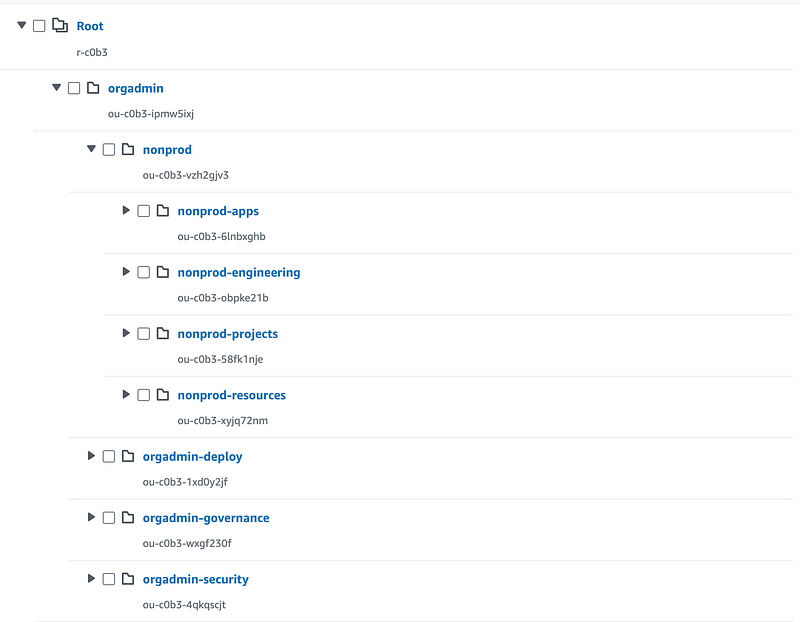
I keep going back and forth on how I want to do this. There’s no “right” answer or single reference architecture for every organization. But I think I’m going to start with this:
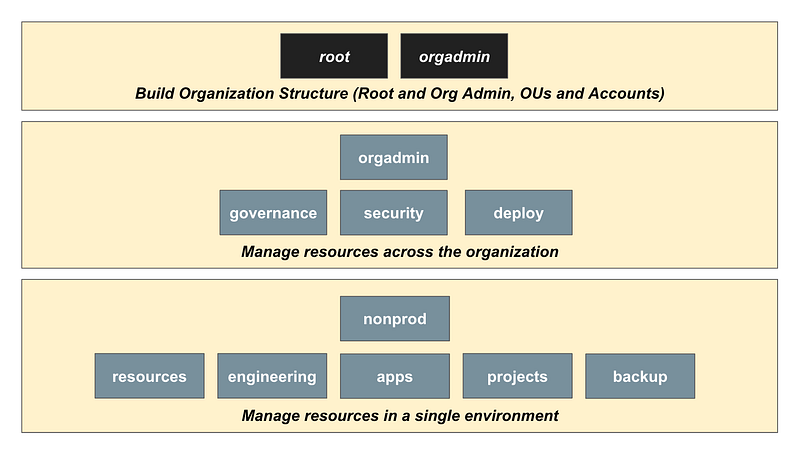
Eventually you might have many other “environments” besides nonprod. You might mirror nonprod so you can push code and resources from one environment to another when they are ready to move to the next stage in the software development lifecycle. So you might have a mirror of what I have above under nonprod under sandbox, dev, qa, staging, and prod, for example.
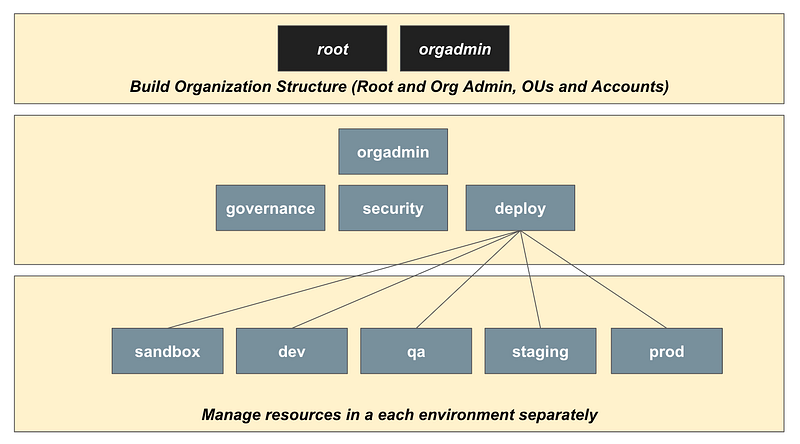
You also might have a duplication of all or part of the above organizational structure for each department or each line of business in an organization. The possibilities are endless.
I may tweak this after additional testing but for the purposes of this blog post we can deploy the above so I can demonstrate parallel deployments.
Deploy the the governance OU as a test
First I deploy the root-suspended OU to make sure my OU script is working. all resources must be prepended with the environment they are in now so I can base polices off those names.
For the deploy script, first I created a generic OU script:
deploy/root-orgadminrole/organizations_organizationalunit.sh
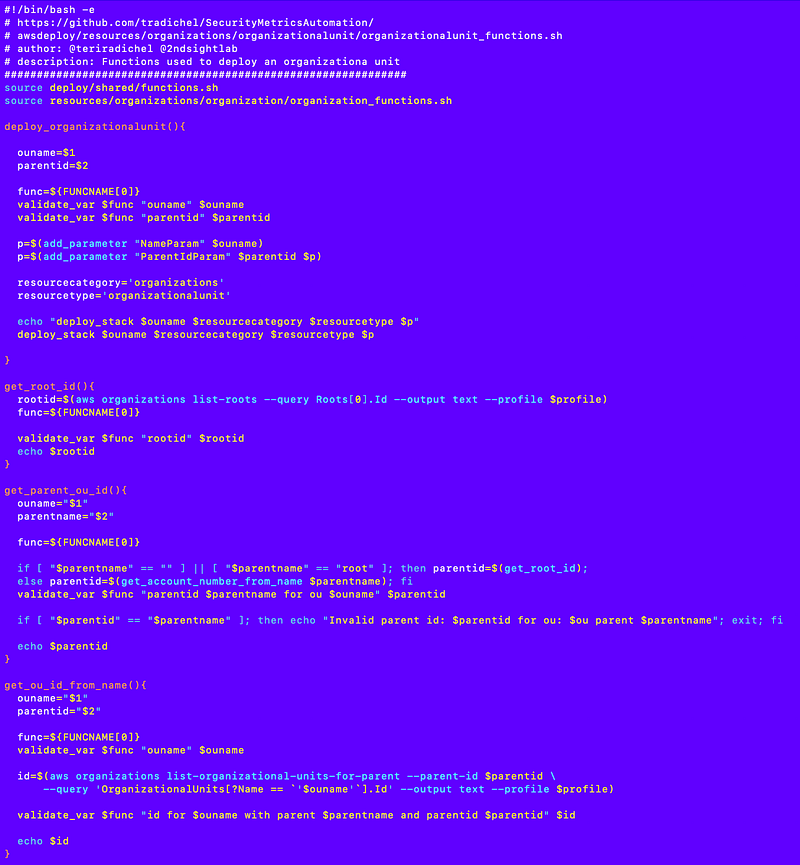
Note that I had to jump through some hoops to retrieve the parent ID for an OU. I wish there was an easier way to do this and maybe there is. I may revisit that later.
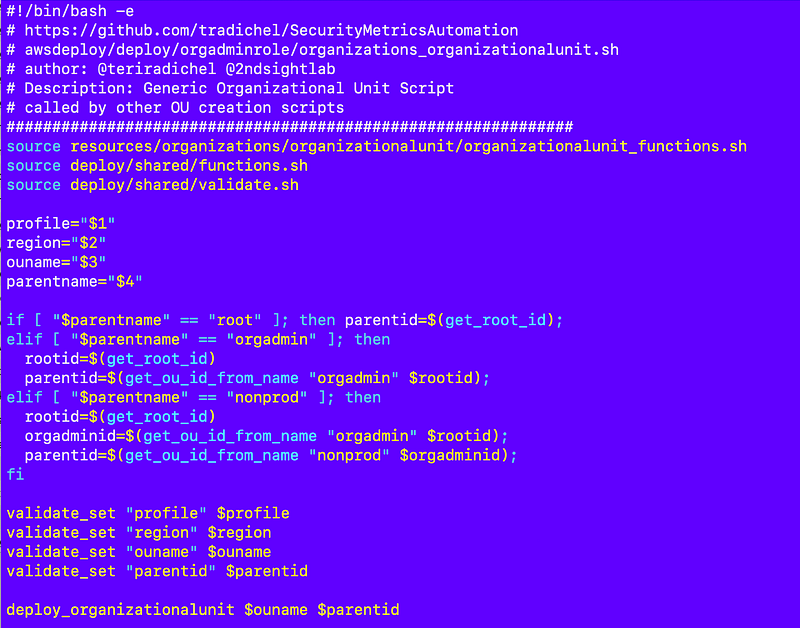
Then I call that script from another script which can be much less code:
deploy/root-orgadminrole/organizations_organizationalunit_suspended.sh
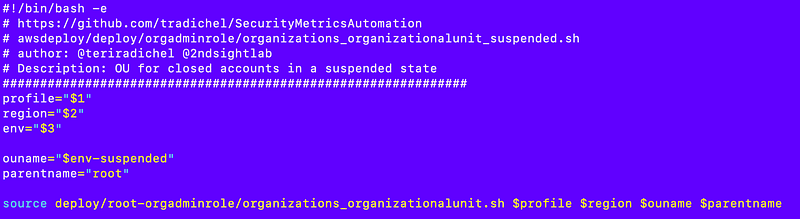
I use a few functions to deploy the OU in this file:
Then, of course, I have my template file:
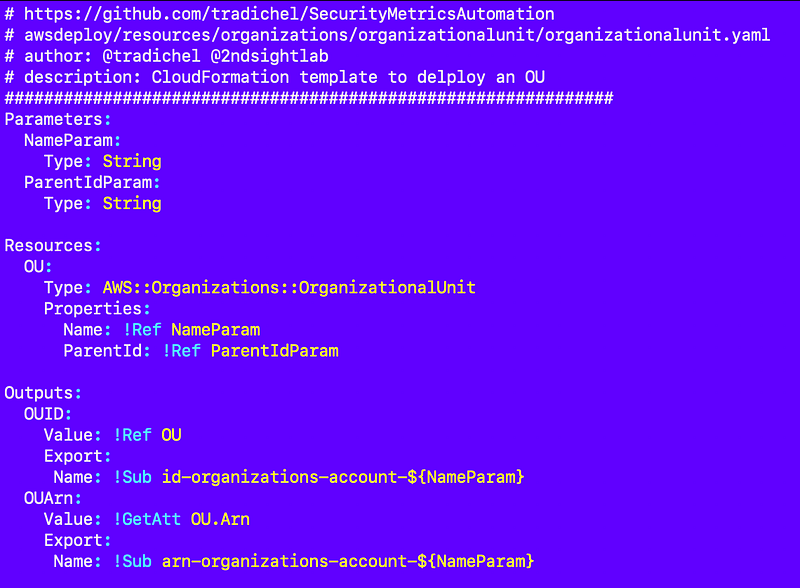
I deployed that and it works. I get one OU to prove my code works — except that it took me quite some time actually to get the parent ID above working properly.
Create the deployment scripts for the rest of the OUs
Now I can copy and paste this file and rename it for each new OU and change a couple of values in it:
deploy/root-orgadminrole/organizations_organizationalunit_suspended.sh
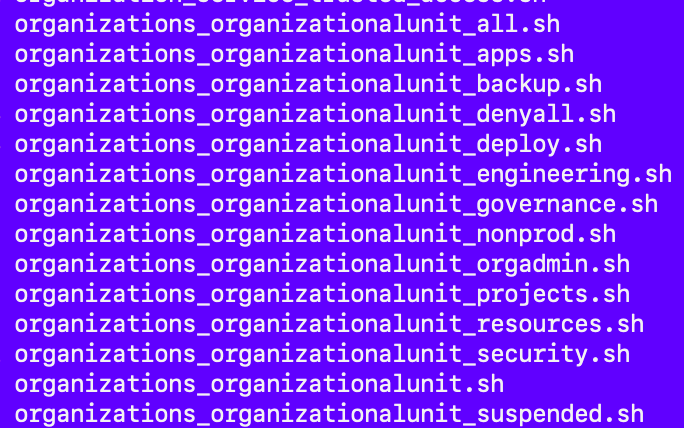
Once I have those files I can create my script to run all of them in parallel.
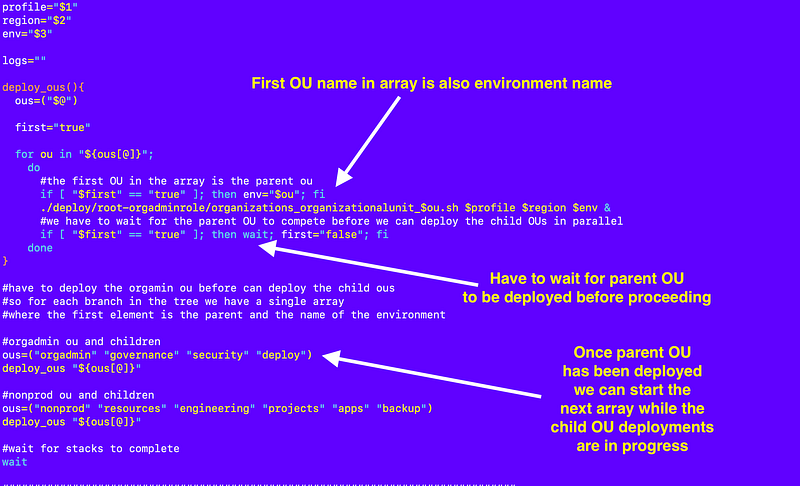
To do that I created my “all” script:
deploy/root-orgadminrole/organizations_organizationalunit_all.sh
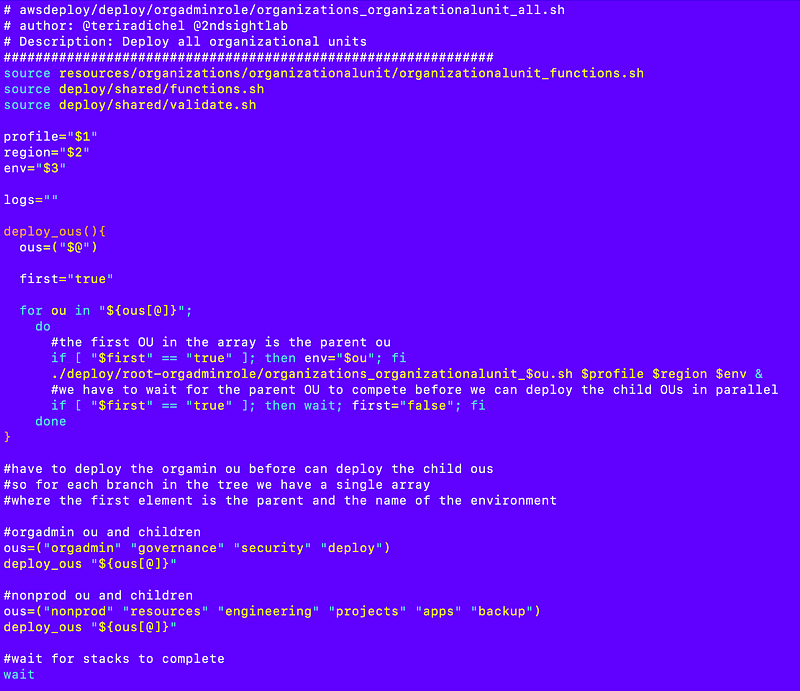
Note the comments. I am passing in an array of accounts that can be deployed in parallel — except the parent OU. I have to wait for the parent account to be created before I can create the child OUs.
I am using the name of the parent, the first OU, as the environment name. All the child accounts have that environment in the name.
I’m not sure how that would impact future movements and renaming of accounts but that is how I am doing it for now anyway.
When I loop through the accounts, I have to wait for the parent account to be deployed before I can deploy the child accounts.
However, once the parent is deployed and the child accounts are being deployed I can continue and deploy the next parent at the same time.
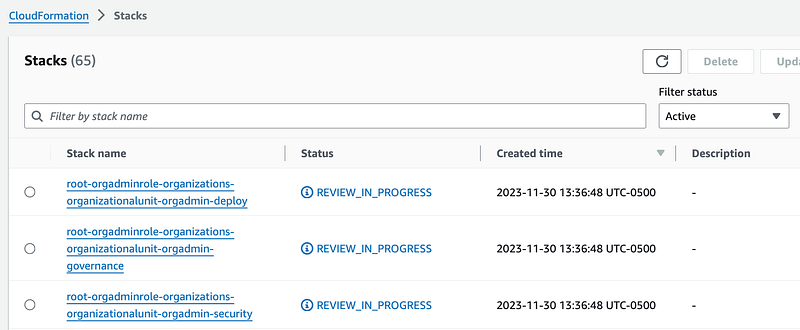
And here we go!
My resources are simultaneously deploying! Check the timestamps.
And within about a minute I have this full organizational unit structure:
Now that’s pretty slick. 😊
Follow for updates.
Teri Radichel | © 2nd Sight Lab 2023
About Teri Radichel:
~~~~~~~~~~~~~~~~~~~~
⭐️ Author: Cybersecurity Books
⭐️ Presentations: Presentations by Teri Radichel
⭐️ Recognition: SANS Award, AWS Security Hero, IANS Faculty
⭐️ Certifications: SANS ~ GSE 240
⭐️ Education: BA Business, Master of Software Engineering, Master of Infosec
⭐️ Company: Penetration Tests, Assessments, Phone Consulting ~ 2nd Sight Lab
Need Help With Cybersecurity, Cloud, or Application Security?
~~~~~~~~~~~~~~~~~~~~~~~~~~~~~~~~~~~~~~~~~~~~~~~~~~~~~~~~~~~~~
🔒 Request a penetration test or security assessment
🔒 Schedule a consulting call
🔒 Cybersecurity Speaker for PresentationFollow for more stories like this:
~~~~~~~~~~~~~~~~~~~~~~~~~~~~~~~~~~~~~~~~~~~~~~~~~~~~~~~~~~~~~
❤️ Sign Up my Medium Email List
❤️ Twitter: @teriradichel
❤️ LinkedIn: https://www.linkedin.com/in/teriradichel
❤️ Mastodon: @teriradichel@infosec.exchange
❤️ Facebook: 2nd Sight Lab
❤️ YouTube: @2ndsightlab