avatarHolly J See (editor fairy)

Free AI web copilot to create summaries, insights and extended knowledge, download it at here

3162

Abstract

ext, the text is highlighted. To see highlighting on your monitor, click on the asterisk and hover your cursor over the note.</p><p id="c873" type="7">Don’t delete private notes, please! Editors use them throughout the editing process and beyond.</p><h2 id="de54">Topic Tags</h2><p id="1ab4">Tags created for specific uses on muddy articles are <i>Muddyum </i>— handy if you need a fifth tag, <i>Muddyumprompt </i>— to <b>respond to </b>MuddyUm prompts, <i>Muddyprompt </i>for the prompt itself (populates <a href="https://medium.com/muddyum/comedywritersprompts/home"><b>Prompts</b></a><b> tab</b>), and <i>Muddyumtips </i>— advice for OUTLAWS under <a href="https://medium.com/muddyum/medium-com-muddyum-outlaws/home"><b>that tab</b></a>.</p><ul><li>Captain Obvious says eponymous topic tags will display your darling article under these MuddyUm tabs: <a href="https://medium.com/muddyum/medium-com-muddyum-self/home"><b>Advice</b></a>, <a href="https://medium.com/muddyum/medium-com-muddyum-catsndogs/home"><b>Cats | Dogs</b></a>, <a href="https://medium.com/muddyum/medium-com-muddyum-comics/home"><b>Comics</b></a>, <a href="https://medium.com/muddyum/medium-com-muddytech/home"><b>MuddyTech</b></a>, <a href="https://medium.com/muddyum/for-the-connoisseur/home"><b>Poetry</b></a>, <a href="https://medium.com/muddyum/medium-com-muddyum-politics/home"><b>Politics</b></a><b>, & <a href="https://medium.com/muddyum/medium-com-muddyum-this-happened/home">This Happened to Me</a></b>.</li></ul><h2 id="64a9">Kickers & Lists</h2><p id="c5bf">Do you write multiple-part articles? Kickers can indicate series, and placement in series, to make it easier for related articles to be found and read in order. Before you publish the third, consider creating a list to embed at the end of each related article to avoid repeated updates.</p><h2 id="dee7">Story headlines: some “little words” ARE capitalized</h2><p id="e761">Here’s where I thank an English teacher for making me memorize the 23 auxiliary — “helping” — verbs:</p><p id="5111"><i>is am are was were be being been has have had do does did shall will should would may might must can could</i></p><p id="7e3f">Some people learn them as a song to the tune of <a href="https://www.youtube.com/watch?v=-F2JWKY63K0"><i>Jingle Bells</i></a>. Capitalize each, regardless of length because, being verbs, they’re essential to the meaning of your title. In subtitles, capitalize <b>only </b>the first word + proper nouns.</p><figure id="cd74"><img src="https://cdn-images-1.readmedium.com/v2/resize:fit:800/0*aVpBc0bcCc7_YTdq.png"><figcaption><b>What’s a preposition? If I don’t feel like looking it up, I use a title case converter.</b> Screenshot from <a href="https://www.grammarly.com/blog/capitalization-in-the-titles/">Grammarly’s blog</a> by author</figcaption></figure><h2 id="ba17">Featured image with a white background</h2><p id="b4cc">Titles have white lettering. After publication, go to Muddy’s home page ASAP to check title legibility. If applicable, and if it matters to you, edit the image’s background to a complementary darker color and add language such as “edited” to its caption. Or pick

Options

a different photo.</p><h2 id="4938">If the thumbnail isn’t to your liking,</h2><p id="e116">change its focal point! It’s easy:</p><figure id="a981"><img src="https://cdn-images-1.readmedium.com/v2/resize:fit:800/0*HQ5n4poVTEW_Yfhg.png"><figcaption>screenshot by author from Medium’s Help Center</figcaption></figure><h1 id="52f0">Advice & Opinions — Stories</h1><div id="d649" class="link-block"> <a href="https://readmedium.com/crickets-versus-piranhas-muddyums-editorial-difference-b80e6313f120"> <div> <div> <h2>Crickets Versus Piranhas: MuddyUm’s Editorial Difference</h2> <div><h3>You’re getting what you haven’t paid for</h3></div> <div><p>medium.com</p></div> </div> <div> <div style="background-image: url(https://miro.readmedium.com/v2/resize:fit:320/1*tjMQGeuYc8DlTAbZoOiesw.jpeg)"></div> </div> </div> </a> </div><div id="4b51" class="link-block"> <a href="https://readmedium.com/self-editing-tips-for-grammarphobes-f99bc962d102"> <div> <div> <h2>Self-Editing Tips for Grammarphobes</h2> <div><h3>Let’s make confusing words clear again</h3></div> <div><p>medium.com</p></div> </div> <div> <div style="background-image: url(https://miro.readmedium.com/v2/resize:fit:320/1*RC2iJISUMXEhk0jzoOfZlg.jpeg)"></div> </div> </div> </a> </div><div id="7ffe" class="link-block"> <a href="https://readmedium.com/tip-top-advice-for-the-timorous-yet-ballsy-writer-401f88aa36ab"> <div> <div> <h2>Tip-Top Advice for the Timorous Yet Ballsy Writer</h2> <div><h3>Nix the prolixity, don’t bury your story, and work on that later</h3></div> <div><p>medium.com</p></div> </div> <div> <div style="background-image: url(https://miro.readmedium.com/v2/resize:fit:320/1*PpTX1N9dhWZWF4_CILCeQw.jpeg)"></div> </div> </div> </a> </div><p id="efe2"><i>Help! <code>read</code> Help! <code>read</code> Help! <code><b>s</b> u b l i m i n a l<b> a</b> d v e r t i s i n g</code> </i>Are you following MuddyUm yet? <a href="https://medium.com/muddyum">Click here</a> to laugh with us.</p><div id="e231" class="link-block"> <a href="https://seethings99.medium.com/membership"> <div> <div> <h2>Join Medium with my referral link - Holly J See</h2> <div><h3>Read stories from Holly J See & thousands of other writers on Medium. By clicking here, you'll directly support me and…</h3></div> <div><p>seethings99.medium.com</p></div> </div> <div> <div style="background-image: url(https://miro.readmedium.com/v2/resize:fit:320/0*323X29KLXPTjPrgr)"></div> </div> </div> </a> </div></article></body>

click here for main index

Outlaw’s Guide to MuddyUm: The Editor Fairy Tips Edition

Story collection + tips hitchhiking in the Guide
Image by paula bassi from Pixabay

🦜 This is an Index story 🦜️

Its content appears in a guide I drafted obsessively as a newbie Mudditor before lists were available. It’s a perpetual work in process. Lists and stories are cross-pollinating.

New in Summer 2022: MuddyUm brand click-pics at the bottom of each Muddy story! Find click-pic options and How-To here. Don’t forget the last step — it makes the image clickable.

I feel like I’m inside a Möbius strip, and this is only my second G2MU Edition story. MuddyUm house — err, ship-keeping isn’t as much fun as Wordle stories.

Susan Brearley is a hardbutt when it comes to piratical ship-keeping. It’s my turn for careening. Careening — as all good pirates who didn’t know before are about to find out, including me, is

content removed by editor for fear of copyright infringement … when this happened before, BOFace was my editor

⚈⚈⚈ so, suffice it to say stock phrase, The Captain has many reasons to detest teredo navalis, the common shipworm.

Psst — for New Mudditors Only

Here’s how to find THE QUEUE — credit: Anu Anniah

Once you are added as a Mudditor, go to the MuddyUm pub. Look for the MuddyUm thumbnail to the right of your profile pic. Click on it. Click on Stories. You will see the Drafts and Submissions tab with all submitted stories waiting to be accepted.

Did your status change from writer to MuddyUm Editor?

Pip pip! Ahoy! Fair winds! Have you read the ATTN Mudditors subsection?

Editor Fairy Tips from The Guide

Private notes

I didn’t understand this as a newbie — if a private note pertains to specific text, the text is highlighted. To see highlighting on your monitor, click on the asterisk and hover your cursor over the note.

Don’t delete private notes, please! Editors use them throughout the editing process and beyond.

Topic Tags

Tags created for specific uses on muddy articles are Muddyum — handy if you need a fifth tag, Muddyumprompt — to respond to MuddyUm prompts, Muddyprompt for the prompt itself (populates Prompts tab), and Muddyumtips — advice for OUTLAWS under that tab.

Kickers & Lists

Do you write multiple-part articles? Kickers can indicate series, and placement in series, to make it easier for related articles to be found and read in order. Before you publish the third, consider creating a list to embed at the end of each related article to avoid repeated updates.

Story headlines: some “little words” ARE capitalized

Here’s where I thank an English teacher for making me memorize the 23 auxiliary — “helping” — verbs:

is am are was were be being been has have had do does did shall will should would may might must can could

Some people learn them as a song to the tune of Jingle Bells. Capitalize each, regardless of length because, being verbs, they’re essential to the meaning of your title. In subtitles, capitalize only the first word + proper nouns.
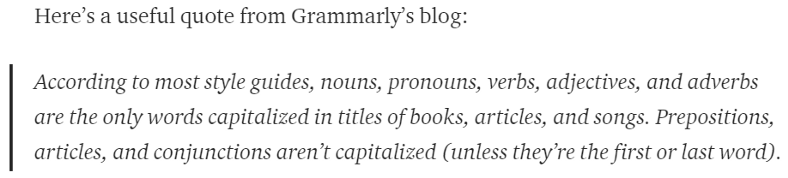
What’s a preposition? If I don’t feel like looking it up, I use a title case converter. Screenshot from Grammarly’s blog by author

Featured image with a white background

Titles have white lettering. After publication, go to Muddy’s home page ASAP to check title legibility. If applicable, and if it matters to you, edit the image’s background to a complementary darker color and add language such as “edited” to its caption. Or pick a different photo.

If the thumbnail isn’t to your liking,

change its focal point! It’s easy:
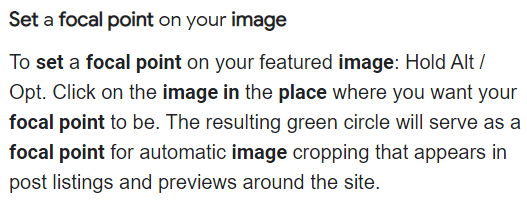
screenshot by author from Medium’s Help Center

Advice & Opinions — Stories

Help! read Help! read Help! s u b l i m i n a l a d v e r t i s i n g Are you following MuddyUm yet? Click here to laugh with us.

Humor
Writing Tips
Index
Muddyumtips
Seethings
Recommended from ReadMedium