
Optimize Selenium WebDriver Automated Test Scripts: Maintainability
Simple techniques to make maintaining automated test steps easier.

Working automated test scripts is only the first test step to successful test automation. As automated tests are executed often and the application changes frequently, it is important that test scripts need to be:
• Fast • Easy to maintain • Easy to read
The №1 technical reason that most test automation attempts failed is that the team fail to maintain the automated test scripts. That’s why most software companies have tried test automation but failed to keep 20 automated tests ( Level 1 of AgileWay Continuous Testing Grading) running reliably and regularly.
In the article, I will show you some simple and practical tips, at the test step level, to enhance the maintainability of automated functional tests.
At a higher level, automated test scripts must be designed with maintenance in mind, such as Maintainable Test Design.
These techniques/tips are:
- One Test Script Line for One User Operation
- Default Parameter Value
- Extend function behaviour with optional Hashmap
The test script examples are in Ruby syntax. But most techniques are applicable to other languages as well.
1. One test script line for one user operation
Programmers who are new to test automation, like me 15 years ago, usually write poor automated tests. I have figured out one rule by working with many manual testers for years: functional tests scripts shall match user operations as close as possible.
The rule reflected on the test step is one test script line for one user operation. A user operation can be
- driving the application, e.g. clicking a link, or
- assertion, e.g., assert the value of a text box
Benefits of One Test Script Line for One User Operation
- Simple and Intuitive Remember, the audience of functional tests are the whole team. The simpler, the better.
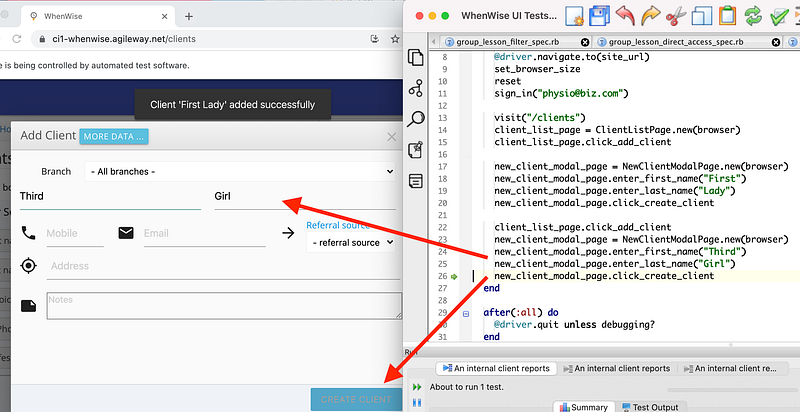
- Easy to follow test execution When a test is executed in a testing IDE (such as TestWise) that supports highlighting the current executed step, it is much easier for users to follow the test execution while watching the actions in the browser as below:
- Make test execution results on CT server more meaningful Successful test automation means all automated tests are run on a Continuous Testing server (such as AgileWay’s BuildWise and Facebook’s Sandcastle; not Jenkins which is a CI server, not suitable for executing UI tests) frequently. In other words, the team will spend a lot of time verifying test failures (to achieve greater benefits: release daily). The well-designed test steps will make the team members address test failures easier. For example, the below test output shows which step line failed in which test script file.
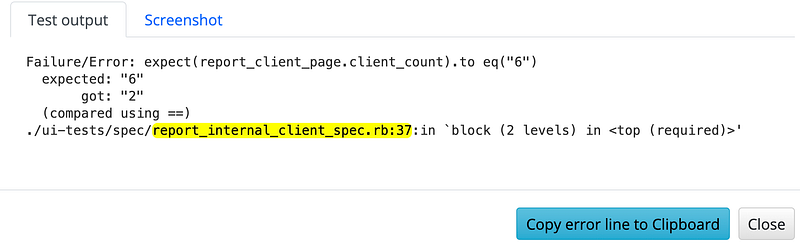
By viewing the test script content (on the CT server’s web interface) and the error screenshot from test failures, the experienced automation tester may know the causes straight away.

- Quick navigation to test step In a real agile team, test case information will be frequently passed among team members. For example, instead of raising defects (bad idea, see this article: Why Don’t I Use Defect Tracking? No Need, I do real Continuous Testing), one member can simply send the test file name + line number to the other members. The recipient can then quickly (a few seconds) navigate to it: - invoke ‘go to file’ with a keyboard shortcut - paste the copied test script file + line number - press ‘Enter’ key

Here are some techniques I frequently use to make test steps one-liner. Please note, shortening test steps must not sacrifice readability.
1. Ternary Operator
The test steps below try to select all text in a text field: press “Command + A” on macOS or “Ctrl + A” on Windows/Linux.
if RUBY_PLATFORM.include?("darwin")
  driver.find_element(:id, "Password").send_keys [:command, "a"]
else
  driver.find_element(:id, "Password").send_keys [:control, "a"]
end
This can be achieved with just one line by using Ternary Operator, ? : .
driver.find_element(:id, "Password").send_keys [RUBY_PLATFORM.include?("darwin") ? :command : :control, "a"]2. Add if and unless after test statement
The statements below try to enter a Country only if a certain environment variable is set.
if ENV["COUNTRY"]
  driver.find_element(:id, "country").send_keys(ENV["COUNTRY"])
end
A better option:
driver.find_element(:id, "country").send_keys(ENV["COUNTRY"]) if ENV["COUNTRY"]The above syntax works in Ruby. It might not work with some other languages.
3. Use the script language well
The test statements below try to generate a random gender (to enter/select it in a web control).
array_count = ["Male", "Female", "Other"]
random_gender = ["Male", "Female", "Other"][rand(array_count)]
A better option:
random_gender =["Male", "Female", "Other"].sampleAnother example:
user = "[email protected]"
if ENV["TEST_USER"]
  user = ENV["TEST_USER"]
end
A better option:
user = ENV["TEST_USER"] || "[email protected]"4. Repeats
driver.find_element("button").send_keys(:tab)
driver.find_element("button").send_keys(:tab)
driver.find_element("button").send_keys(:tab)
A better option:
3.times { driver.find_element("button").send_keys(:tab) }5. Waits
wait = Selenium::WebDriver::Wait.new(:timeout => 4)
wait.until { driver.find_element(:id, "loading") }
A better option:
try_for(4) { driver.find_element(:id, "loading")}This syntax uses Ruby’s blocks. Read this article: “Test AJAX Properly and Efficiently with Selenium WebDriver, and Avoid ‘Automated Waiting’”.
6. Catch error with a default value
The test steps below try to return the record count on a web control on the page. If not found, treat it as 0.
begin
  record_count = driver.find_element(:id, "rec#").text.to_i
rescue => e
  record_count = 0
end
A better option:
record_count = driver.find_element(:id, "rec#").text.to_i rescue 06. Fail-Safe
The test step below tries to click the ‘OK’ button in an intermittently shown modal window. It is not a good idea to ignore the failure (due to intermittency). However, this is acceptable for some apps due to various reasons. Basically, the idea is: perform an operation, if it fails, the test execution flow is OK (i.e., catch and ignore the error).
begin
  driver.find_element(id, "popup-ok-btn").click
rescue => e
  # not popup up is shown
end
A better option:
fail_safe { driver.find_element(id, "popup-ok-btn").click }The fail_safe function is defined here.
2. Parameter with default Value
User login is the most frequently used function in automated test scripts, like the example uses below.
sign_in("[email protected]", "Wise01")
# ...
sign_in("[email protected]", "Wise01")
# ...
sign_in("[email protected]", "Secret02")
At some companies, there is a policy to change the password after a certain period. It will be quite tedious to update every single reference in many test script files when that happens.
A better way is to set apassword parameter with a default value.
def sign_in(email, password = "Wise01")
  # ...
end
Then we can write test scripts as below:
sign_in("[email protected]")
sign_in("[email protected]")
sign_in("[email protected]", "Secret02")  # this works too
Hence, we only need to update the password in one place if the password needs to be changed, Another benefit is that we hide the password from individual test scripts.
3. Extend function behaviour with optional Hashmap
Once a function (either helper function or page functions) is defined in automated test scripts, it may evolve with the application changes. For example, user login now has a ‘remember me’ option.
For any change to code or test scripts, a professional software engineer needs to make sure
- new behaviour works, and
- it will not affect existing test scripts
The latter part is harder, if the test scripts are not well designed, there will be unknown references of an existing function.
A good but simple approach is to add an optional opts hashmap, as below.
def sign_in(email, password, opts = {})
# ... driver.find_element(:id, "rem-me").click if opts[:remember_me]
endThe test scripts:
sign_in("wisetester", "SeleniumRuby") # existing, OK
sign_in("goodtester", "RSpec", :remember_me => false) # new, OK
If you enjoy reading stories like these and want to support me as a writer, consider signing up to become a Medium member. It’s $5 a month, giving you unlimited access to stories on Medium. If you sign up using my link, I’ll earn a small commission.
Related articles:
- Functional Test Refactoring Test refactorings make creating well-designed test scripts efficiently
- AgileWay Test Automation Formula A shortcut to test automation success


