
Optimize Selenium WebDriver Automated Test Scripts: Speed
Simple techniques to improve the execution speed of some automated test steps, up to 50X.

Updated 2023–12–12: a new recipe from my daughter, Use Chained Locator to Speed Up Selenium WebDriver Tests.
Working automated test scripts is only the first test step to successful test automation. As automated tests are executed often and the application changes frequently too, it is important that test scripts need to be
• Fast • Easy to maintain • Easy to read
In this article, I will show some techniques to optimize test scripts for speed.
The test script examples are in Ruby syntax, the techniques are applicable to other languages as well.
1. Assert text in page_source is faster than the text
To verify a piece of text on a web page, frequently for assertions, we can use
driver.page_sourceor driver.find_element(:tag_name => ‘body') .
Besides the obvious different output, there are big performance differences as well. To get a text view (for a whole page or a web control), Webdriver needs to ‘analyze’ the raw HTML to generate the text view, which takes time. We do not usually notice the time spent when the raw HTML is small. However, for a large web page such as the WebDriver Standard (over 430KB in file size), incorrect use of ‘text view’ will slow your test execution significantly.
Page Text:
expect(driver.find_element(:tag_name => "body").text).to include("platform- and language-neutral wire protocol")Page Source:
expect(driver.page_source).to include("platform- and language-neutral wire protocol")Let’s see the difference.
Method 1: Search whole document text took 0.823076 seconds
Method 2: Search whole document HTML took 0.039573 seconds
Though there are functional differences between page_source and page_text too, here I will only focus on the performance differences.
2. Getting the text from a more specific element is faster
A rule of thumb is that we save execution time by narrowing down a more specific web control. The two assertion statements below largely achieve the same purpose but with a big difference in execution time.
expect(driver.find_element(:tag_name, “body”).text).to include(“language-neutral wire”)Execution time: 0.93 seconds.
expect(driver.find_element(:id, “abstract”).text).to include(“language-neutral wire”)Execution time: 0.02 seconds.
Besides (potentially big) time-saving, this test step is more accurate: verify a piece of text in specific web control.
3. Use variables to cache not-changed data
I have often seen that people wrote tests like the below to check multiple texts on a page.
driver.navigate.to(site_url + "/WebDriverStandard.html") expect(driver.find_element(:tag_name, "body").text).to include("Firefox")
expect(driver.find_element(:tag_name, "body").text).to include("chrome")
expect(driver.find_element(:tag_name, "body").text).to include("W3C")
Execution time: 2.35 seconds.
The above three test statements are very inefficient, as every test statement calls driver.find_element(:tag_name, 'body').text, which can be an expensive operation when a web page is large.
Solution: use a variable to store the text (view) of the web page, a very common practice in programming.
the_page_text = driver.find_element(:tag_name, “body”).text expect(the_page_text).to include(“Firefox”)
expect(the_page_text).to include(“chrome”)
expect(the_page_text).to include(“W3C”)
Execution time: 0.86 seconds
As you can see, we obtained constant execution time no matter how many assertions (against the page text) we performed on that page, as long as the page text we checked was not changed.
4. Enter large text into a text box quickly
We normally use send_keys to enter text into a text box. When you find that the text string you want to enter is quite large, e.g. thousands of characters, try to avoid using send_keys as it is not efficient. Here is an example:
long_str = “START” + ‘0’ * 1024 * 5 + “END” # just over 5K text_area_elem = driver.find_element(:id, “comments”) text_area_elem.send_keys(long_str)Execution time: 3.8 seconds.
When this test is executed in Chrome, you can see a batch of text being ‘typed’ into the text box. Furthermore, there might be a limited number of characters that WebDriver ‘sends’ into a text box for browsers at one time. I have seen test scripts that broke the long text into trunks and then sent them one by one (in multiple statements). Not elegant.
The solution is actually quite simple: use JavaScript in Selenium.
driver.execute_script(“document.getElementById('comments').value = arguments[0];”, long_str)Execution time: 0.02 seconds.
5. Use dynamic Waits for dynamic/AJAX operations instead of fixed sleep
Modern web apps are dynamic. I have seen many test automation steps like below for dynamic/AJAX operations.
driver.find_element(:xpath,"//input[@value='Pay now']").click
sleep 10 # seconds
expect(driver.find_element(:id, "bn").text).to include("RN#")
The 10 seconds is the maximum waiting time based on the automation engineer’s knowledge. This means the test execution will always wait for 10 seconds regardless, even the payment might only take 3 seconds.
A better way is to use Selenium Waits, which will return as long as the condition is met.
wait = Selenium::WebDriver::Wait.new(:timeout => 10) # seconds
wait.until{ driver.find_element(:id, "bn").text.include?("RN#") }
From my observation, the testers who wrote the first version (fixed wait) were not lacking the knowledge, just were lazy. When these kinds of steps are used in the abstract layer (such as top page class), the test execution would be much slower.
Once I worked in a company with its ‘own framework’, which is a layer on top of Selenium WebDriver (Java). Eventually, the manager came to me and asked me to help switching to raw Selenium. The first response from the testers was “Selenium Ruby is fast! It is about 3 times faster than our previous framework”. I replied: “No, there are only minor differences among languages with Selenium. The reason is ‘your framework’ was wrong, used a lot of fixed waits”.
If you use Ruby, there is a simple syntax for dynamic waits. Read this article: Test AJAX Properly and Efficiently with Selenium WebDriver, and Avoid ‘Automated Waiting’
The ultimate and the only practical solution to reduce the overall execution time of an automated test suite is Continuous Testing, i.e., to run tests in parallel.
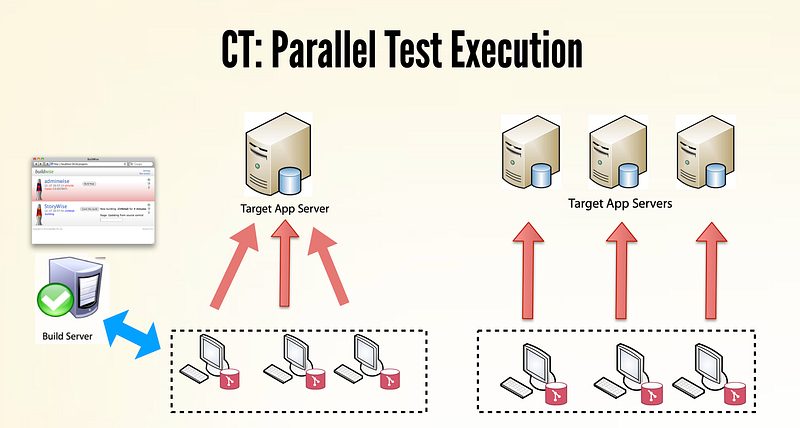
For example, here is a run of 546 Selenium tests (for my WhenWise app) in the BuildWise CT server.
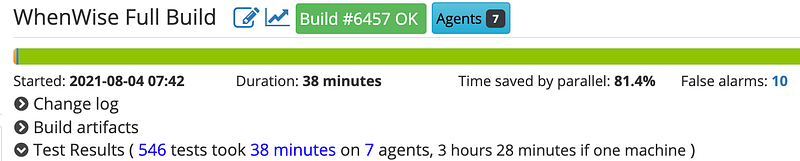
By engaging 7 BuildWise agents, it only took 38 minutes instead of 3.5 hours, a saving of 81.4%.
Check out my other articles on this topic:
- Set Up a Continuous Testing Server to Run Selenium Tests in Minutes
- AgileWay Continuous Testing Grading
- Software Development Trend ⇒ Continuous Testing
- Recommend a Great CI Presentation: “Continuous Integration at Facebook”
- My Continuous Testing Journey

For more automated testing recipes like the above, please check out my “Selenium WebDriver Recipes in Ruby” book.


