
Test AJAX Properly and Efficiently with Selenium WebDriver, and Avoid ‘Automated Waiting’
A simple and efficient way to do AJAX testing, in seconds

This article is included in my “How to in Selenium WebDriver” series.
Table of Contents: ∘ Understand How AJAX (XHR) works ∘ 1. Fixed Wait — not recommended ∘ 2. Selenium Implicit Wait — Avoid ∘ 3. Selenium Explicit Wait — Good ∘ 4. Retry with Ruby Block — my recommendation ∘ Why do I like the retry approach? ∘ How about automated waiting? ∘ I like your approach, however, I am not using Ruby?
AJAX is widely used in modern websites. Testing AJAX (or XHR) operations require waits. Let’s look at a typical AJAX operation: a user clicks the ‘Pay now’ button on the payment page.

A loading image (animated GIF) shows up. A few seconds later, a receipt number is shown.

If you can’t wait to see the approach that I have used in thousands of tests over the past 10 years, please scroll to the end of this article for the part with a video /animated GIF. For more patient readers, I will explain what is AJAX and what are several common approaches to testing it.
Understand How AJAX (XHR) works
We all know testing AJAX or XHR is different from a standard HTTP request which returns the data with the response. For AJAX, a response with no data is returned first, and another response with data comes after.
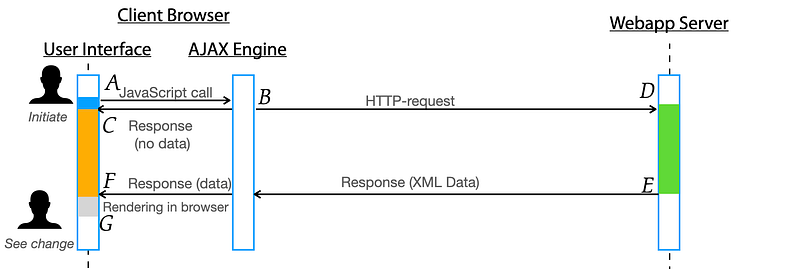
Therefore, testing AJAX basically consists of two steps:
- Trigger an AJAX operation (typically by clicking a link or button), as A→C in the above diagram.
- Wait for the response data, as F→G (F is the time the browser receives the data, G is rendering complete) in the diagram
There are generally four ways to do the waiting (Step 2):
- Fixed wait — not recommended
- Selenium Implicts Wait — Avoid
- Selenium Explits Wait — Good
- Retry with Block (Ruby) — my preference
My rating is based on reliability and efficiency. Many inexperienced testers neglect efficiency. As we are going to test AJAX a lot, we must be able to do it quickly in seconds (with little chance to introduce errors, such as typos).
Having said that, the so-called “Automated Waiting” in some frameworks, such as TestCafe, is poor. I will explain that later after we can do it properly.
I will use Selenium WebDriver (the best and the dominant web test testing framework) with Ruby (the best test scripting language) for test automation.
1. Fixed Wait — not recommended
After triggering an AJAX operation (clicking a link or button, for example), we can set a timer in our test script to wait for all the asynchronous updates to occur before executing the next step.
driver.find_element(:xpath,"//input[@value='Pay now']").click
sleep 9  # wait for 9 seconds, do nothing
expect(driver.find_element(id: "receipt").text).to include("RN#")
After the wait, if the expectation is met, the test passes; otherwise, the test execution fails. If the server finishes the processing and returns the results correctly but exceeds the specified wait time (9 seconds for the above), this test execution would be marked as ‘failed’.
Apparently, waiting for a specified time is not ideal, it will slow test execution unnecessarily. If the operation finishes earlier, the test execution would still be put on halt.
Once I worked at a project that utilised “its own test framework” developed by some Java programmers there. Actually it was not a real framework, just another abstraction layer using Groovy on top of Selenium Java. Unsurprisingly, it failed. The tech lead wanted to try my approach: using raw Selenium WebDriver with Ruby. They assigned one tester to work with me first, as a trial. On the first day, she could write a real work test in Selenium. After the test execution, her first comment was “I couldn’t believe how fast Selenium Ruby is. It is at least 3 times faster”. Of course, this was not true. The speed difference among the official five Selenium languages, in the context of UI testing, is not minimal. A Java programmer added this to the abstraction layer
Thread.sleep(10000);
to make test execution stable!
2. Selenium Implicit Wait — Avoid
An implicit wait is to tell Selenium to poll find a web element (or elements) within a certain amount of time if they are not immediately available. The default setting is 0. Once set, the implicit wait is set for the life of the WebDriver object instance, until its next set.
driver.find_element(:xpath,"//input[@value='Pay now']").click
driver.manage.timeouts.implicit_wait = 9 # seconds
expect(driver.find_element(id: "rn").text).to include("RN#")
This approach is no good, as it applies to all operations until the implict_wait value is set again. It is easy to cause confusion. As a result, it has rarely been used.
3. Selenium Explicit Wait — Good
Instead of passively waiting, we can write test scripts to define an explicit wait statement for a certain condition to be satisfied until the wait reaches its timeout period.
driver.find_element(:xpath,"//input[@value='Pay now']").click
wait = Selenium::WebDriver::Wait.new(:timeout => 9)
wait.until {
  driver.find_element(id: "rn").text).to include("RN#")
}
4. Retry with Ruby Block — my recommendation
Some dynamic language supports Blocks, which offers a simple, more efficient, and more readable way to test AJAX. Below is the way that I have been using for over 10 years.
You may watch the video (27s) to show
- test execution failed at the assertion on an AJAX operation
- add retry
- run the test again and pass
The test script is like the below:
driver.find_element(:xpath,"//input[@value='Pay now']").click
try_for(6) {
  expect(driver.find_element(id: "rn").text).to include("RN#")
}try_foris a function defined in agileway_utils.rb , and included in the test helper (included in the test project created by TestWise IDE, and is free to use in your project). You have the freedom to modify and fit your existing test project.
Let’s see the “adding retry” operation:

The keystrokes are tf , Tab , 6 . (6 is the estimated max wait time).
Why do I like the retry approach?
- Quick. As you have seen in the video, it can be quickly done in TestWise.
This approach can be implemented in any IDE or programming editor, i.e., not limited to TestWise. Just need some work to set up or configure.
2. Logical
When testing an AJAX operation (by triggering first, e.g. clicking a button), the page usually displays a completed state. Therefore, it is better for a tester to focus on writing the assertion steps. The tester may use the ‘Run selected steps against the current browser’ feature to get the assertion step correct first. Then, add the wait, quickly.
3. Concise and more readable
I defined try_for as the retry function name, you may choose another name that might be appealing to your team.
4. Versatile
As the block is a built-in Ruby language feature, you can retry more than just one AJAX operation.
try_for(9, 3) { # try up to 9 seconds with 3-second interval
  # operation 1
  # operation 2
  # assertion 3
  # operation 4
}
Tip: this is really useful, as you don’t need to think much, just wrap the timing-related statements in a try_for { } block.
5. Fun
Many attendants to my training liked this approach, and called it ‘fun’.
6. Specific (knowing the timeout value)
We want to know the slow operations by reading the test scripts, as you will find in manual testing scripts. The so-called automated waiting (often implemented wrongly) will hide this information, which is no good.
How about automated waiting?
Automated Waiting is more of a term used by the marketing team as some proprietary tools. Ignore it.
Anyone with basic web development experience knows that a syntax error will end a JavaScript call. When that happens, the automated waiting might fail (the spinning loading image may be stuck there forever) or time out. It is far better for test engineers to have control by setting an optimal maximum waiting time.
Now you see that it is easy to do with Ruby (may be possible with another language as well), and it is flexible. Moreover, a responsible test engineer (either manual or auto) shall have a good idea of how long an AJAX operation normally takes anyway.
I like your approach, however, I am not using Ruby?
Then you have two options: implementing this approach in your language or switching to Ruby.
Update: According to Hired’s 2023 State of Software Engineers Report: “Ruby on Rails and Ruby are the most in-demand skills (#1 and #2)”
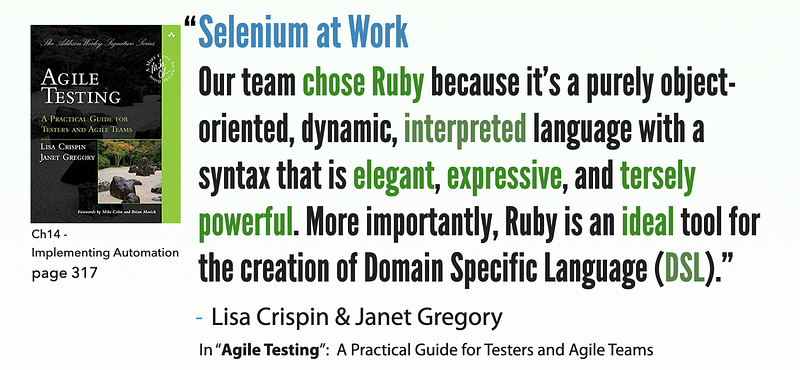
Software Engineer in Test at some top companies, such as Google, often means a better software engineer.
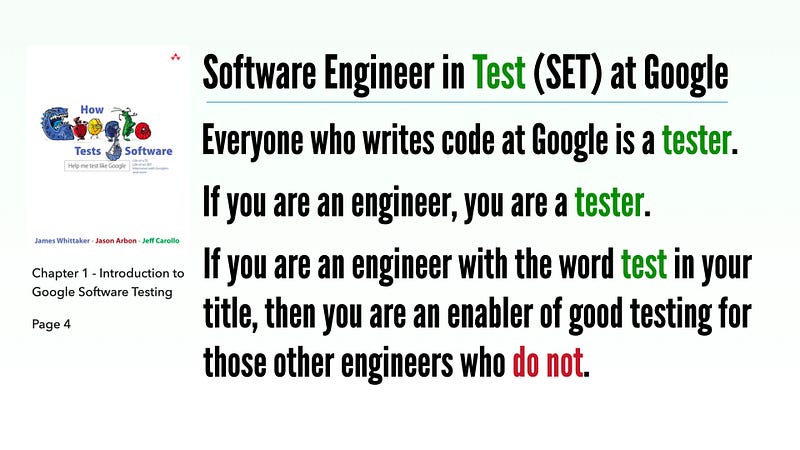
You, as a SET, might not be treated as respectfully as in Google. Still, it is good to take the initiative to implement whatever is necessary to improve test automation efficiency, for the team, and more importantly, for yourself. If Java, JavaScript, or C# is your preferred language (which I am against them being used for test automation), and you like my retry approach, go ahead and implement it. Or, be open to alternatives.

If you enjoy reading stories like these and want to support me as a writer, consider signing up to become a Medium member. It’s $5 a month, giving you unlimited access to stories on Medium. If you sign up using my link, I’ll earn a small commission.
Further reading:


