
.NET 6 Upgrade of OnionAPI — a Visual Studio template to scaffold a clean architecture REST API C# project

REST API C# template for Visual Studio 2022/.NET 6
Introduction
I am happy to announce the release of OnionAPI version 1.5 to support Visual Studio 2022 and .NET 6. This story provides a tutorial on installing and running the template to scaffold an ASP.NET WebAPI project in minutes. The template includes advanced features such as pagination, filter, sorting, and CRUD. The solution is structured based on Clean Architecture, with a layering approach for scalability and maintainability.
OnionAPI template is a recipe for building advanced REST API. The template can save at least 40 hours of coding time in comparision to starting the REST API project from scratch. — Fuji Nguyen, Author of OnionAPI Template
What is a Visual Studio template?
A Visual Studio template provides the files that are required for a particular project type, including standard assembly references, set default project properties, and compiler options. A number of predefined project templates are installed with Visual Studio. These templates, such as the ASP.NET Web Application and Class Library templates, are available to choose from when you create a new project.
What is the OnionAPI template?
Developers can use the Visual Studio template OnionAPI to scaffold a clean architecture (onion view, see Figure 1) ASP.NET Core REST API project.
Once you provide the project name, the template will create five (5) projects inside the Visual Studio solution. Each project is prefixed with the project name and has proper project namespaces in the source code. The five (5) projects are:
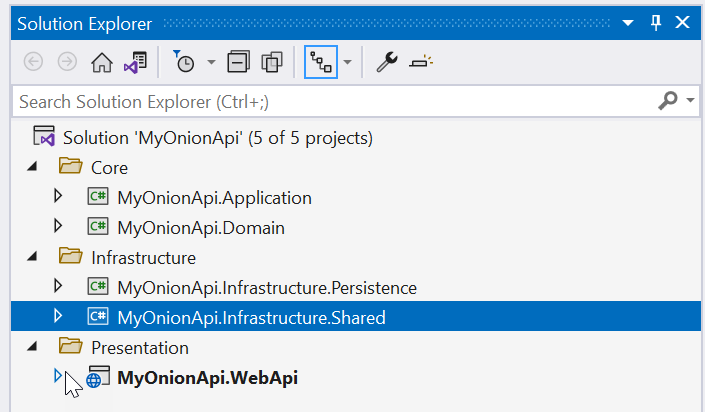
- Domain — entities and the common models
- Application — Interfaces, CQRS Features, Exceptions, Behaviors
- Infrastructure.Persistence — data access API based on Entity Framework
- Infrastructure.Shared — for common services such as Mail Service, Date Time Service, Mock, and so on
- WebApi — for API controllers to expose REST API resources and endpoints
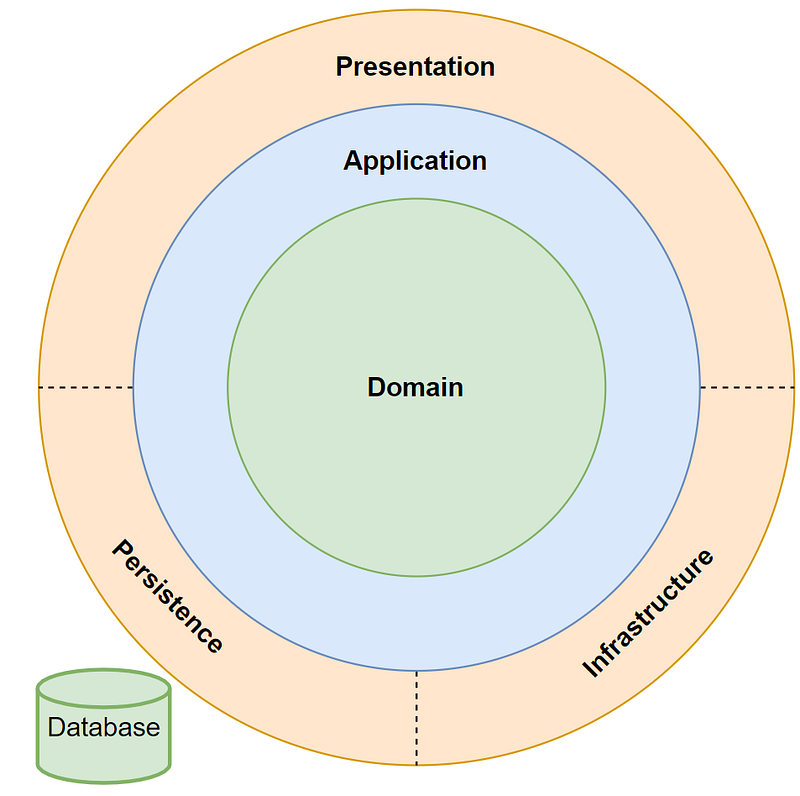
Figure 2 contains a screenshot of the source code scaffolded by the OnionAPI template for the sample project MyOnionApi. The screenshot depicts the organization of 5 projects, grouped into 3 folders Core, Infrastructure, and Presentation, which are corresponding to the layers described in the Clean Architecture pattern.
The solution tech stack provides loosely-coupled and inverted-dependency architecture with good design patterns and practices.
- ASP.NET CORE 6— a framework for creating RESTful services, also known as web APIs, using C#
- Repository Pattern — abstraction layer between the data access layer and the controller
- CQRS (Command and Query Responsibility Segregation) Pattern — separating read and update operations for a data store to maximize performance, scalability, and security
- Entity Framework Core — a lightweight, extensible, open-source, and cross-platform version of the popular Entity Framework data access technology
- Swashbuckle — Seamlessly adds a Swagger to WebApi projects! Combines ApiExplorer and Swagger/swagger-ui to provide a rich discovery, documentation, and playground experience to your API consumers
- Bogus — providing realistic, easy to use mock data .NET library for rapid REST API design and testing
Prerequisites
- Latest Net Core 6 SDK
- Visual Studio 2022 Community — free code editor for C#Tutorial Content
Tutorial Content
The tutorial contains three parts:
Part 1 — Download and install OnionAPI template from Visual Studio Marketplace
Part 2 — Scaffold new API project using OnionAPI tempalte
Part 3 — Try Out Filtering, Sorting, Paging, and Shape features
Part 1 — Download and Install OnionAPI Template
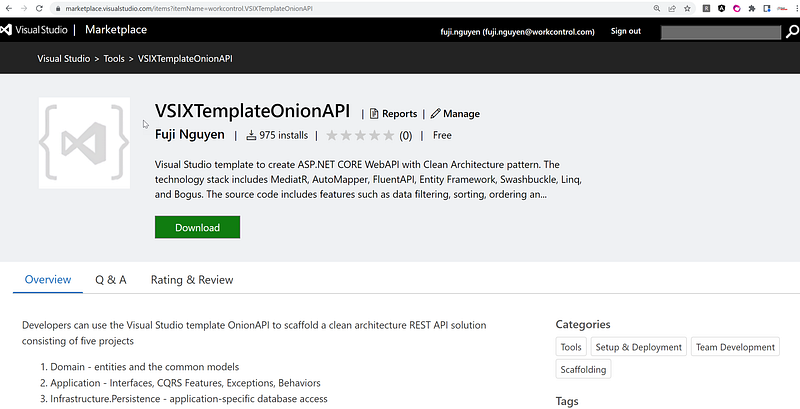
You can download the OnionAPI template from the Visual Studio Marketplace as shown in Figure 3. At the time of this writing, the template was downloaded 975 times by developers.
After download, click on the VSIXTemplateOnionAPI.vsix to install the extension. If you are new to Visual Studio Extension, visit Manage extensions for Visual Studio for installation instructions.
Part 2 — Scaffold a New REST API Project with OnionAPI Template
The easiest way to create a new project is to start from a project template for a particular type of application or website. A project template consists of a basic set of pre-generated code files, config files, assets, and settings.
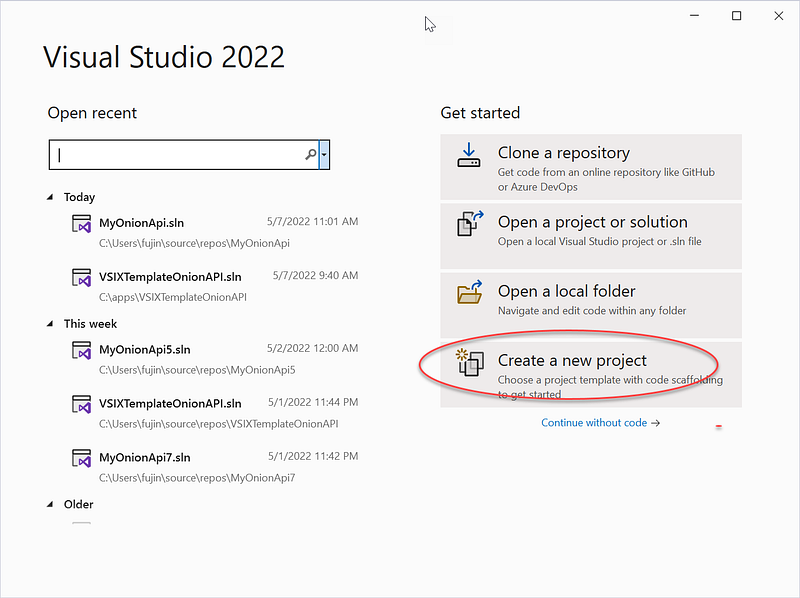
When you first open Visual Studio, the start window appears and from there you can choose to create a new project as shown in Figure 4.
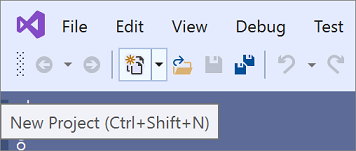
If the Visual Studio development environment is already open, you can create a new project by choosing File > New > Project on the menu bar, as shown in Figure 5, or by clicking the New Project button on the toolbar.
Task 1 — Select a Template Type
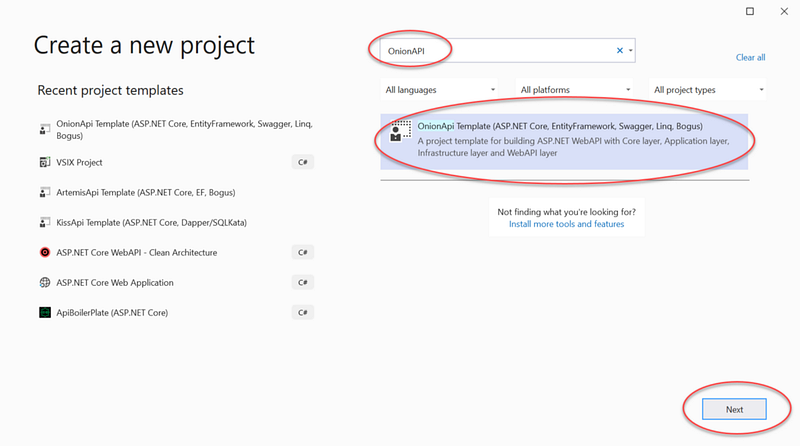
On the Create a new project page, a list of your recently selected templates will appear on the left. The templates are sorted by most recently used.
If you’re not selecting from the recently used templates, you can filter all available project templates by entering search text into the search box to further filter the templates; for example, “OnionAPI”.
Task 2 — Create a Solution
On the Create a new project screen, search for and select the OnionAPI template and click on the Next button. See Figure 6 for visual aid.
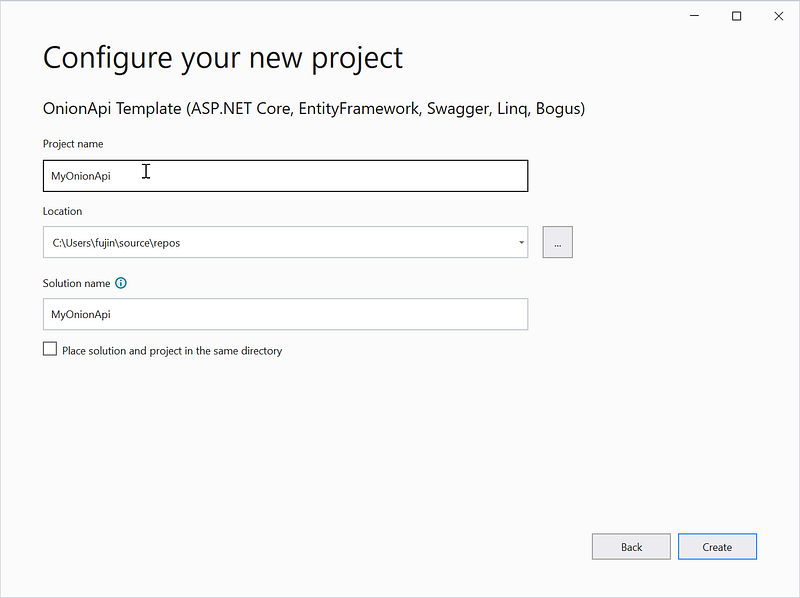
Enter the project name (ex. MyOnionAPI) and click on the Create button. See Figure 7 for visual aid.
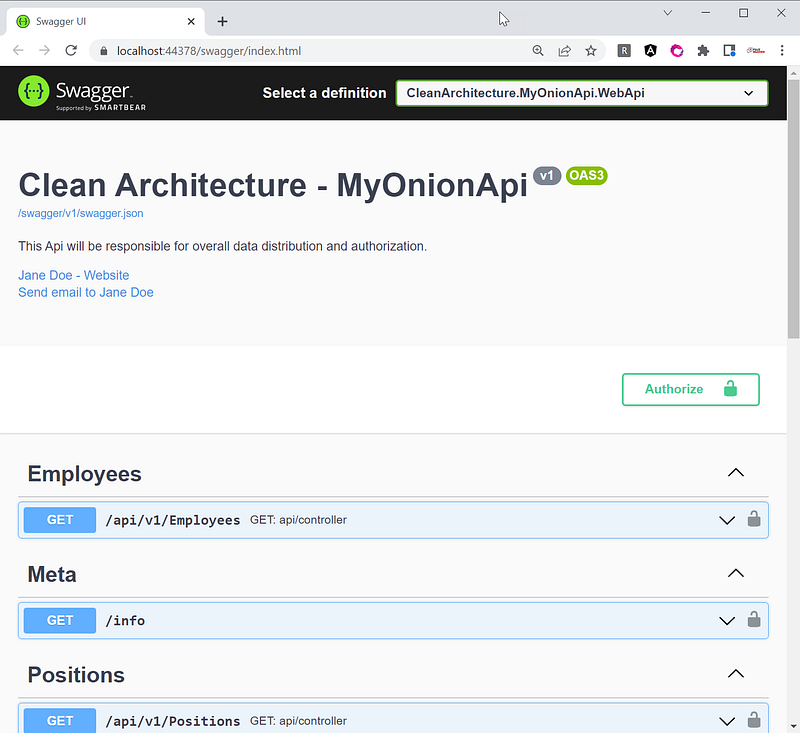
Hit F5 to run. The swagger should show in the browser as shown in Figure 8.
Part 3— Try Out Filtering, Sorting, Paging and Shaping Features
The OnionAPI template creates two REST resources:
- Employees — This is a mock REST API resource where the data is dynamically generated by Bogus library at run time. To learn more about Bogus, check the link in the Related Stories section later on.
- Positions — This REST API resource gets its data from the actual database table Positions. This table is automatically seeded with 1,000 rows of fake data when the project runs the first time.
To try out REST API in Swagger (see Figure 9 for visual aid)
- Click on Employees > GET to expand the screen
- Click on Try it out
- Enter parameters (can be left blank for default values)
- Click on the Execute button
- Review the JSON output
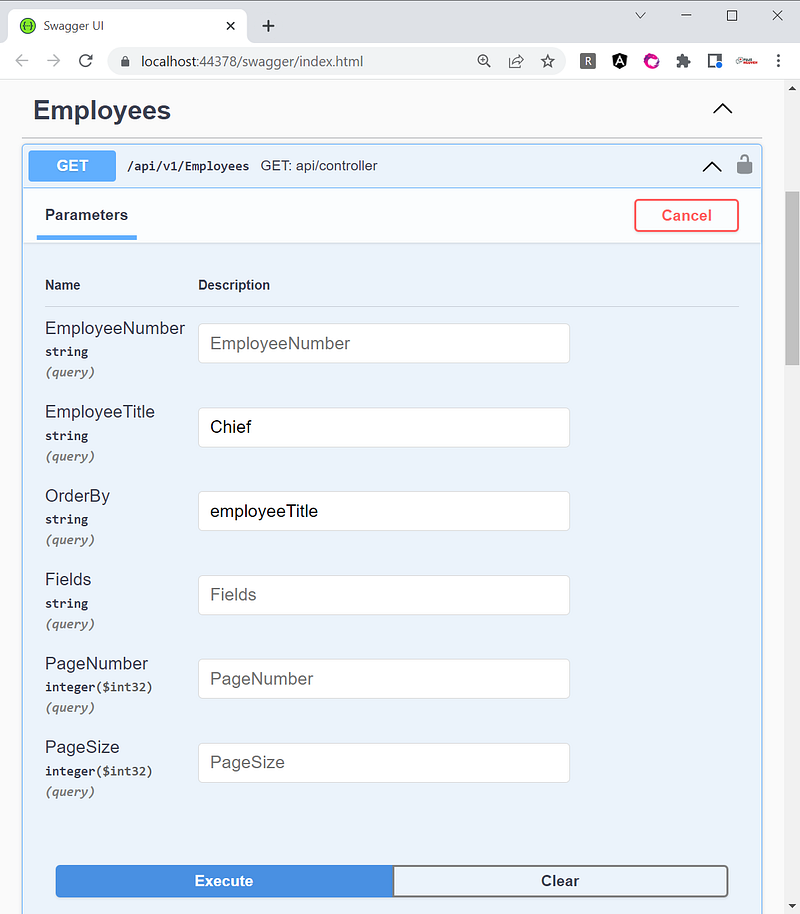
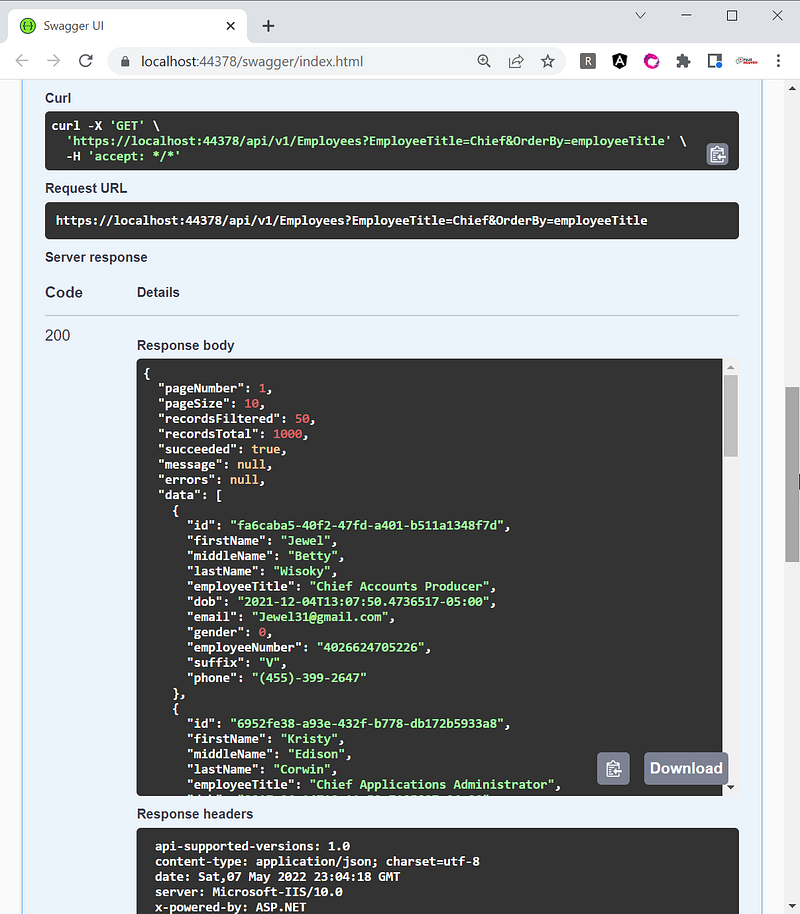
Figure 10 is an example screenshot of the JSON output. For performance, the server-side paging is used. Notice that the response body includes “wrapper” with friendly data for the frontend app to consume.
- pageNumber — pagination index such as 1, 2, 3, etc. The default is page 1.
- pageSize — number of records per page. The default is 10.
- recordsFiltered — number of records found matching the search criteria. In this example, the search criteria is “Chief”.
- recordsTotal — total records number of employees in the database.
- succeeded — boolean true/false indicating status of webapi response
- message — friendly error message if any
- errors — system error if any
- data — response of data in JSON
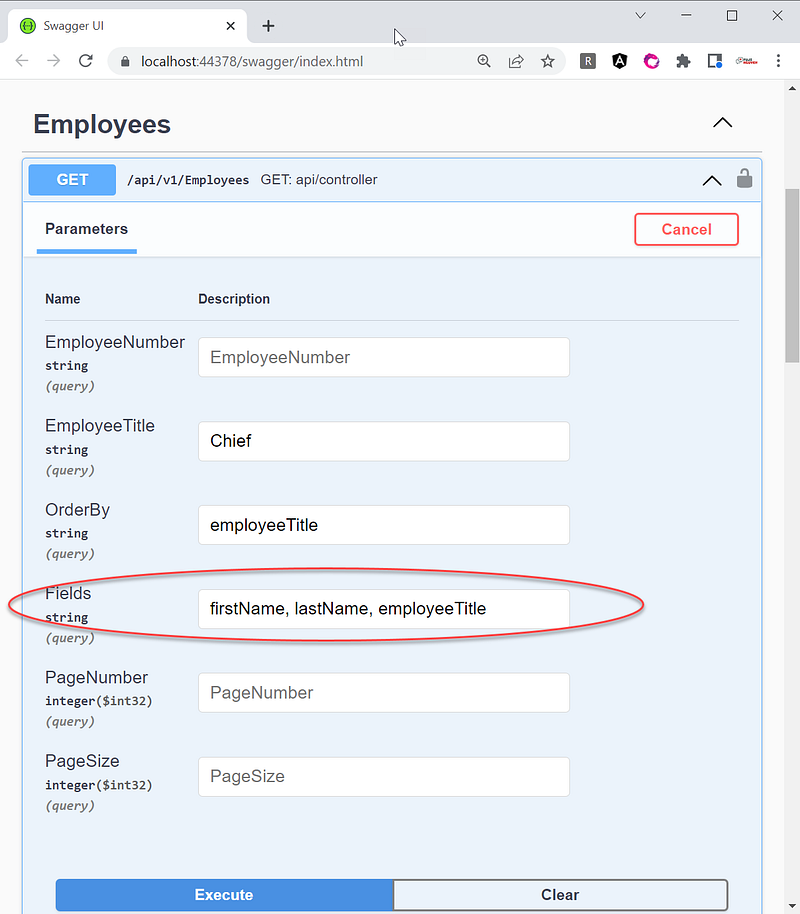
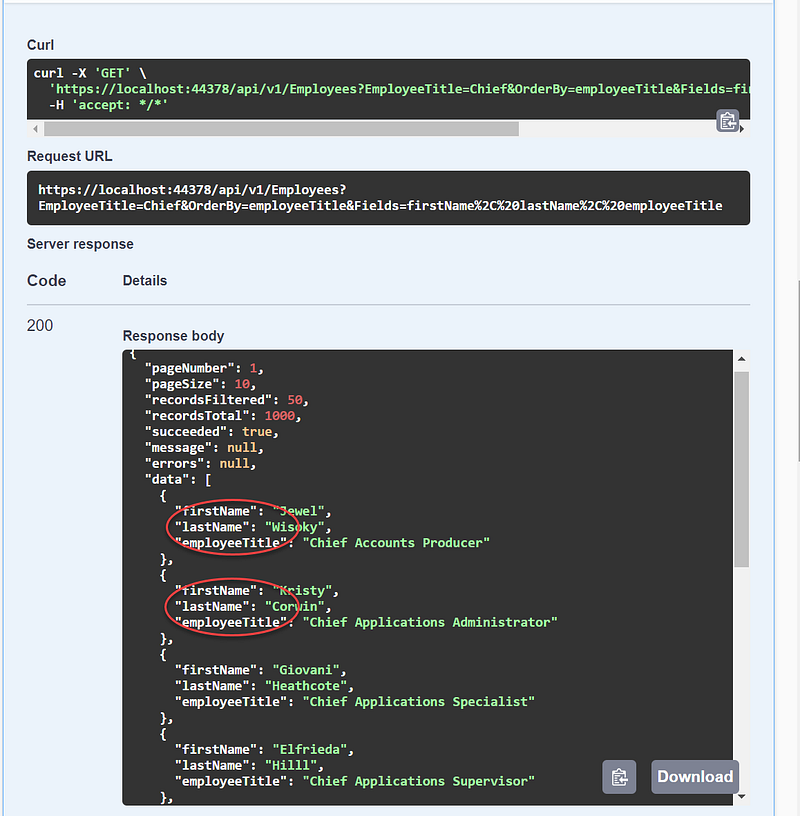
Notice that the data response consists of eleven (11) columns. Suppose you want to shape the response with fewer columns to minimize the data sent over the network. For example, the frontend app only needs three columns: firstName, lastName, and employeeTitle. You can input the column names in the Fields as shown in Figure 11 and the JSON response will contain only three columns in the “Data” section as shown in Figure 12. Check out the References' section for my tutorials on Pagination.
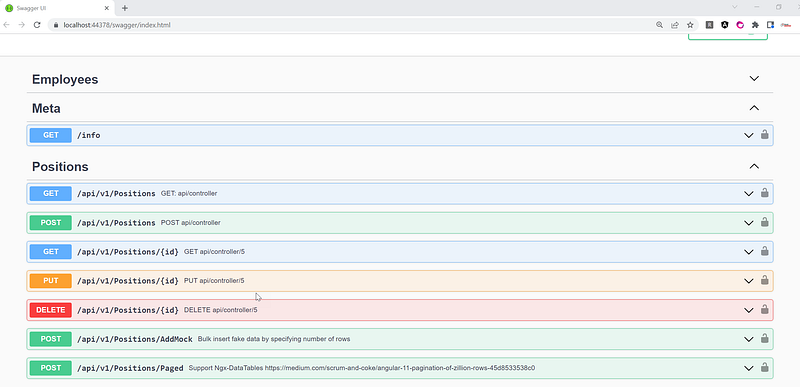
The scaffolded source code also has the data modification example code for the Positions resource. As shown in Figure 13, you find methods such as POST, GET, PUT, and DELETE to support CRUD (create, read, update and delete). Check out the References' section for my tutorials on CRUD.
Source Code
For reference purposes, you can find the scaffolded source code project at workcontrolgit/MyOnionApi (github.com). You can fork and run it with Visual Studio 2022 without any modification.
References
Below are a few technical references on software patterns and my related blogs on pagination, CRUD, etc.
- Common web application architectures — Microsoft publication on common application patterns. Check out the Clean Architecture section.
- CAT architecture pattern for modern app SPA/Mobile — my blog on the modern app architecture based on separation of services.
- Bogus Library for Fake Data In ASP.NET Core WebAPI — my blog on using Bogus library in the Web API project.
- NetCore REST API/Dapper/SQLKata with VS Template KissApi — if you prefer Dapper over EntityFramework, check out the KissAPI template.
- NetCore 5 Pagination 100,000+ Rows — my blog tutorial on implementing pagination using Angular as SPA and .NET CORE as backend WebAPI.
- Angular 11 CRUD with .Net 5 REST API Tutorial — my blog tutorial on implementing CRUD using Angular as SPA and .NET CORE as backend WebAPI.
Summary
When managing the development, many organizations are struggling with governance and look for value-added process improvement tools. The OnionAPI template increases consistency while decreasing delivery time.
The OnionAPI provides boilerplate code to create advanced REST API features such as data filtering, sorting, shaping, paging, and CRUD. These features are written as the base classes, so you can inherit and extend them to meet your project-specific requirements.
Let’s peel the onion!


