My Obsidian Setup (Part 23) — My Homepage
In this article, I will show you my vault Homepage and how I built it. Not too fancy, mostly functional, showing shortcuts to areas that I mostly use.
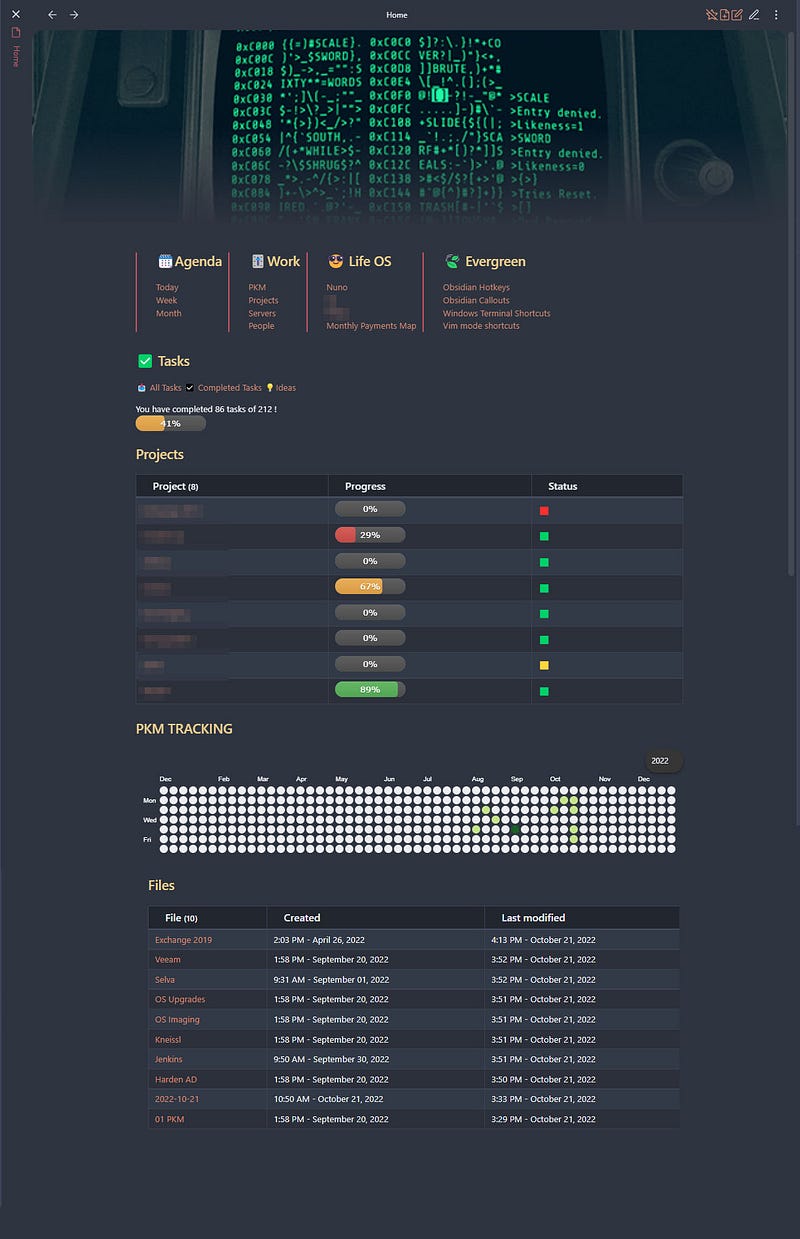
Starting from the top, I’m using the Banners plugin, with a gif image I for from Giphy.
Next, I created a 4 columns zone with shortcuts to notes I often open, using the Modular CSS Layout for Obsidian.
>[!multi-column]
>
>> ## 🗓️Agenda
>> `$= '[['+moment().format("YYYY-MM-DD")+'|Today]]'`
>> `$= '[['+moment().format("YYYY-[W]ww")+'|Week]]'`
>> `$= '[['+moment().format("YYYY - MM-MMM")+'|Month]]'`
>
>> ## 🎚️Work
>> [[01 PKM|PKM]]
>> [[02 Projects|Projects]]
>> [[02-servers|Servers]]
>> [[People|People]]
>
>> ## 😎 Life OS
>> [[01 Nuno|Nuno]]
>> [[02 xxx|xxx]]
>> [[03 xxx|xxx]]
>> [[Monthly Payments Map]]
>
>> ## 🍃 Evergreen
>> [[Obsidian Hotkeys]]
>> [[Obsidian Callouts]]
>> [[Windows Terminal Shortcuts]]
>> [[Vim mode shortcuts]]
>
Next, I have some shortcuts to task views: All Tasks, Completed, and Ideas. I wanted to include this in the above section, next to Evergreen, but the plugin only seems to allow 4 columns.
For the number of tasks, completed tasks, and the progress bar, I’m using DataView plugin with the following code:
```dataviewjs
let nofold = '!"04 Templates'
let allFile = dv.pages().file
let totalTask = allFile.tasks.length
let completedTask = allFile.tasks.where(t => !t.completed).length
let tasks = "You have completed " + completedTask + " tasks of " + totalTask + " !"
let tasksp = Math.round((completedTask / totalTask) * 100)
let pb = ""
dv.paragraph(
tasks + "<br>" + pb
)
```In the next section, Projects, I’m also using the DataView plugin.
```dataview
table WITHOUT ID (link(file.path, alias)) as Project,
" * 100) + "/)" AS Progress, status AS Status
from #project/active
SORT file.path ASCENDING
```tasksCompleted and projectTasks are frontmatter fields calculated on the project’s file. If you want to check how I do it, I’ve already explained it on:
In the last section, I’m showing the last 10 modified files, also with the Dataview plugin.
```dataview
table file.ctime as Created, file.mtime as "Last modified"
where file.name != this.file.name
sort file.mtime DESC
limit 10
```
You can read the previous parts of My Obsidian Setup series here:
Click here to be notified every time I publish a new story 😉.
If you’re not a Medium member yet and wish to support me or get access to all my stories, click here.
If you want to read more about me: