avatarJerry Ng

Free AI web copilot to create summaries, insights and extended knowledge, download it at here

5002

Abstract

e> to capture all the exceptions thrown.</p><div id="3502"><pre><span class="hljs-meta"># middlewares.py</span></pre></div><div id="ca0a"><pre><span class="hljs-keyword">class</span> <span class="hljs-symbol">SentryMiddleware</span>(<span class="hljs-symbol">object</span>): <span class="hljs-symbol">def</span> <span class="hljs-symbol">on_error</span>(<span class="hljs-symbol">self, <span class="hljs-symbol">error</span></span>): <span class="hljs-symbol">capture_exception</span>(<span class="hljs-symbol">error</span>) <span class="hljs-symbol">raise</span> <span class="hljs-symbol">error</span></pre></div><div id="668b"><pre> <span class="hljs-keyword">def</span> <span class="hljs-title function_">resolve</span>(<span class="hljs-params"><span class="hljs-variable language_">self</span>, <span class="hljs-keyword">next</span>, root, <span class="hljs-symbol">info:</span> <span class="hljs-title class_">ResolveInfo</span>, **args</span>): <span class="hljs-keyword">return</span> <span class="hljs-keyword">next</span>(root, info, **args).catch(<span class="hljs-variable language_">self</span>.on_error)</pre></div><p id="9f9f">Next, simply add the newly created <code>SentryMiddleware</code> to your <code>GRAPHENE</code> setting inside your <code>settings.py</code> .</p><div id="0f5d"><pre><span class="hljs-meta"># settings.py</span></pre></div><div id="678e"><pre><span class="hljs-type">GRAPHENE</span> = { <span class="hljs-symbol">'SCHEMA'</span>: <span class="hljs-symbol">'project</span>.schema.schema', <span class="hljs-symbol">'SCHEMA_OUTPUT'</span>: <span class="hljs-symbol">'schema</span>.graphql', <span class="hljs-symbol">'MIDDLEWARE'</span>: [ # ... <span class="hljs-symbol">'django_graphene_starter</span>.middlewares.<span class="hljs-type">SentryMiddleware'</span>, ], }</pre></div><figure id="d4a3"><img src="https://cdn-images-1.readmedium.com/v2/resize:fit:800/1*_QHTmK4x5POuzcEICEvkZw.png"><figcaption>Yay! All errors are logged properly now on the Sentry issue.</figcaption></figure><p id="060d">While this is much better than just <code>Traceback</code> error, the operation name <code>/graphql</code> is still rather inaccurate.</p><p id="2f5d">Ideally, this should be named as the operation name of your GraphQL query or mutation, i.e. <code>updateArticle</code> , <code>createPublication</code> etc. We will work on naming each query and mutation correctly next.</p><h1 id="5efc">Performance Monitoring</h1><p id="5448">Besides error monitoring, Sentry is able to track your software performance by measuring metrics such as throughput and latency. Here’s the official <a href="https://docs.sentry.io/platforms/python/guides/django/performance/">documentation</a> to set up performance monitoring for your Django project.</p><figure id="0884"><img src="https://cdn-images-1.readmedium.com/v2/resize:fit:800/1*j7uoP-PitW6hNDDDRMtRjA.png"><figcaption>Query performance log with SQL statement breakdown</figcaption></figure><p id="52a8">To set this up with your Django Graphene project, you would need to create a <a href="https://docs.graphene-python.org/projects/django/en/latest/authorization/#adding-login-required">custom <code>GraphQLV</code>iew</a>.</p><div id="a5ad"><pre><span class="hljs-keyword">from</span> sentry_sdk.api <span class="hljs-keyword">import</span> start_transaction <span class="hljs-keyword">from</span> graphene_django.views <span class="hljs-keyword">import</span> GraphQLView</pre></div><div id="4a11"><pre><span class="hljs-class"><span class="hljs-keyword">class</span> <span class="hljs-type">CustomGraphQLView</span>(<span class="hljs-type">GraphQLView</span>): def execute_graphql_request( <span class="hljs-title">self</span>, <span class="hljs-title">request</span>: <span class="hljs-type">HttpRequest</span>, <span class="hljs-title">data</span>, <span class="hljs-title">query</span>, <span class="hljs-title">variables</span>, <span class="hljs-title">operation_name</span>, <span class="hljs-title">show_graphiql</span>, ): with start_transaction(): return super().execute_graphql_request(<span class="hljs-title">request</span>, <span class="hljs-title">data</span>, <span class="hljs-title">query</span>, <span class="hljs-title">variables</span>, <span class="hljs-title">operation_name</span>, <span class="hljs-title">show_graphiql</span>)</span></pre></div><figure id="de49"><img src="https://cdn-images-1.readmedium.com/v2/resize:fit:800/1*vjL82RW9glbdPIPTw9r4-Q.png"><figcaption>Our GraphQL query will not be logged on Sentry performance</figcaption></figure><h2 id="a18b">Problem</h2><p id="dcc8">From the code snippet above, each of your GraphQL requests will now be logged under the performance tab on Sentry. Though now we have another problem — all our transactions are being named as <code>/graphql</code> , while the operation is always <code>http.serv

Options

er</code></p><p id="6f5e">We don’t have a clear idea of what we’re looking at or what we’re tracking.</p><h2 id="6878">Solution</h2><p id="4699">Let’s get the operation type and operation name from Graphene.</p><div id="4139"><pre><span class="hljs-meta"># views.py</span></pre></div><div id="2158"><pre><span class="hljs-class"><span class="hljs-keyword">class</span> <span class="hljs-type">CustomGraphQLView</span>(<span class="hljs-type">GraphQLView</span>): def execute_graphql_request( <span class="hljs-title">self</span>, <span class="hljs-title">request</span>: <span class="hljs-type">HttpRequest</span>, <span class="hljs-title">data</span>, <span class="hljs-title">query</span>, <span class="hljs-title">variables</span>, <span class="hljs-title">operation_name</span>, <span class="hljs-title">show_graphiql</span>, ): operation_type = ( <span class="hljs-title">self</span>.<span class="hljs-title">get_backend</span>(<span class="hljs-title">request</span>) .document_from_string(<span class="hljs-title">self</span>.<span class="hljs-title">schema</span>, <span class="hljs-title">query</span>) .get_operation_type(<span class="hljs-title">operation_name</span>) ) with start_transaction(<span class="hljs-title">op</span>=<span class="hljs-title">operation_type</span>, <span class="hljs-title">name</span>=<span class="hljs-title">operation_name</span>): return super().execute_graphql_request( <span class="hljs-title">request</span>, <span class="hljs-title">data</span>, <span class="hljs-title">query</span>, <span class="hljs-title">variables</span>, <span class="hljs-title">operation_name</span>, <span class="hljs-title">show_graphiql</span> )</span></pre></div><p id="10d2">Let’s run our GraphQL query/mutation again:</p><div id="720f"><pre>mutation updatePublicatio<span class="hljs-meta">n</span>(<span class="hljs-keyword">input</span>: UpdatePublicationInput!) { # NOTE updatePublicatio<span class="hljs-meta">n</span>(<span class="hljs-keyword">input</span>: <span class="hljs-keyword">input</span>) { publication { id <span class="hljs-keyword">title</span> } } }</pre></div><div id="a287"><pre><span class="hljs-comment"># <span class="hljs-doctag">NOTE:</span> We need to make sure that we name this mutation accordingly</span></pre></div><figure id="e66f"><img src="https://cdn-images-1.readmedium.com/v2/resize:fit:800/1*mIExHGPf-d4oBlWQWWY5hg.png"><figcaption>Awesome! Now our transactions are being named correctly, with the right operation name and type too!</figcaption></figure><figure id="7fb0"><img src="https://cdn-images-1.readmedium.com/v2/resize:fit:800/1*TWRwPeyXU8s220DYN-8e8g.png"><figcaption>Even the errors are being named correctly now! Yay!</figcaption></figure><h1 id="acee">Conclusion</h1><p id="37aa">Error monitoring improves your applications’ health by providing useful insights into the stability of your software.</p><p id="badf">On top of that, developers can use these insights for addressing existing technical debts and make better decisions around building new features versus fixing bugs.</p><p id="aeb1">I had a lot of fun integrating Sentry with my Django Graphene project, feel free to look at my public <a href="https://github.com/ngshiheng/django-graphene-starter">project</a> on GitHub as a reference.</p><p id="1484" type="7">I hope you find this article helpful! Happy coding!</p><h2 id="995b">This article was originally published at jerrynsh.com</h2><div id="ab96" class="link-block"> <a href="https://readmedium.com/solving-n-1-problem-with-dataloader-in-python-graphene-django-7a75d6c259ba"> <div> <div> <h2>Solving N+1 Problem With Dataloader in Python Graphene Django</h2> <div><h3>A Guide With Examples on How to Use Dataloader in Graphene-Django to Optimize our Python GraphQL API</h3></div> <div><p>medium.com</p></div> </div> <div> <div style="background-image: url(https://miro.readmedium.com/v2/resize:fit:320/0*fqZdRwOFGq-Wdfwm)"></div> </div> </div> </a> </div><div id="e1f7" class="link-block"> <a href="https://readmedium.com/fast-track-your-api-development-with-insomnia-rest-client-d02521c31b9d"> <div> <div> <h2>Fast Track Your API Development With Insomnia REST Client</h2> <div><h3>A Fast and Simple Alternative to Postman for Sending REST and GraphQL Requests</h3></div> <div><p>medium.com</p></div> </div> <div> <div style="background-image: url(https://miro.readmedium.com/v2/resize:fit:320/0*qk-YkW0_3prCwZsS.png)"></div> </div> </div> </a> </div></article></body>

Monitoring Graphene Django Python GraphQL API Using Sentry

Read about How To Set Up Sentry With Your Python GraphQL API In 5 Minutes

Photo by Sigmund on Unsplash

As engineering teams are adopting CI/CD practices, software products are getting delivered faster than ever. Error monitoring comes in handy as it provides developers the confidence to deploy faster while knowing there’s a safety net watching their deployments.

On top of that, having error monitoring helps developers to fix and debug errors faster, in order words, developers can spend more quality time building new high-quality features.

The goal of this post is to document and share some of the issues and tips that I have learned while I was working on setting up Sentry monitoring with Django Graphene projects.

By the end of this post, you would be able to know:

  • How to hide or ignore Traceback (most recent call last) logger errors
  • How to log Sentry errors with Django Graphene using middleware
  • How to monitor your GraphQL query performance on Sentry
  • How to log each GraphQL operation correctly on Sentry

Getting Started With Django

For starters, you can easily set up your Django projects with Sentry by following the official documentation here.

Here’s an example of a settings.py with sentry SDK:

# settings.py
import sentry_sdk
from sentry_sdk.integrations.django import DjangoIntegration
from sentry_sdk.integrations.logging import ignore_logger
    
dsn=YOUR_SENTRY_PROJECT_DSN,
    integrations=[DjangoIntegration()],
    traces_sample_rate=1.0,
    send_default_pii=True,
    environment=YOUR_PROJECT_ENVIRONMENT,
)

Check out Sentry’s documentation to understand what these configuration options mean.

Traceback Error Spams

Problem

As I was using the default setup while working with Graphene, I ran into issues where my Django Graphene project was getting spammed with this Sentry issue:

Sentry was getting spammed with Traceback (most recent call last) error

Looking from the Sentry issue, as this error message isn’t particularly meaningful, nor actionable — which can cause error fatigue in the long run, we chose to ignore it.

Solution

In order to get around this, simply ignore this by using ignore_logger fromsentry_sdk .

In this case, we would be ignoring the graphql.execution.utils , which is the source of the Traceback errors.

# settings.py
from sentry_sdk.integrations.logging import ignore_logger
ignore_logger('graphql.execution.utils')

You can easily ignore other loggers with this method too!

Error Monitoring

Problem

As we try to forward exceptions to Sentry, there was an apparent issue where Graphene Django would swallow everything, especially after ignoring the graphql.execution.utils logger.

Solution

One of the recommended solutions here is to use create and use middleware inside your Graphene settings.

Start by creating a simple SentryMiddeware to capture all the exceptions thrown.

# middlewares.py
class SentryMiddleware(object):
    def on_error(self, error):
        capture_exception(error)
        raise error
    def resolve(self, next, root, info: ResolveInfo, **args):
        return next(root, info, **args).catch(self.on_error)

Next, simply add the newly created SentryMiddleware to your GRAPHENE setting inside your settings.py .

# settings.py
GRAPHENE = {
    'SCHEMA': 'project.schema.schema',
    'SCHEMA_OUTPUT': 'schema.graphql',
    'MIDDLEWARE': [
        # ...
        'django_graphene_starter.middlewares.SentryMiddleware',
    ],
}

Yay! All errors are logged properly now on the Sentry issue.

While this is much better than just Traceback error, the operation name /graphql is still rather inaccurate.

Ideally, this should be named as the operation name of your GraphQL query or mutation, i.e. updateArticle , createPublication etc. We will work on naming each query and mutation correctly next.

Performance Monitoring

Besides error monitoring, Sentry is able to track your software performance by measuring metrics such as throughput and latency. Here’s the official documentation to set up performance monitoring for your Django project.
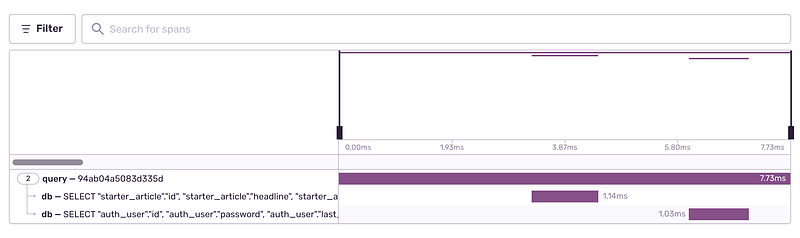
Query performance log with SQL statement breakdown

To set this up with your Django Graphene project, you would need to create a custom GraphQLView.

from sentry_sdk.api import start_transaction
from graphene_django.views import GraphQLView
class CustomGraphQLView(GraphQLView):
    def execute_graphql_request(
        self,
        request: HttpRequest,
        data,
        query,
        variables,
        operation_name,
        show_graphiql,
    ):
        with start_transaction():
            return super().execute_graphql_request(request, data, query, variables, operation_name, show_graphiql)

Our GraphQL query will not be logged on Sentry performance

Problem

From the code snippet above, each of your GraphQL requests will now be logged under the performance tab on Sentry. Though now we have another problem — all our transactions are being named as /graphql , while the operation is always http.server

We don’t have a clear idea of what we’re looking at or what we’re tracking.

Solution

Let’s get the operation type and operation name from Graphene.

# views.py
class CustomGraphQLView(GraphQLView):
    def execute_graphql_request(
        self,
        request: HttpRequest,
        data,
        query,
        variables,
        operation_name,
        show_graphiql,
    ):
        operation_type = (
            self.get_backend(request)
            .document_from_string(self.schema, query)
            .get_operation_type(operation_name)
        )
        with start_transaction(op=operation_type, name=operation_name):
            return super().execute_graphql_request(
                request, data, query, variables, operation_name, show_graphiql
            )

Let’s run our GraphQL query/mutation again:

mutation updatePublication($input: UpdatePublicationInput!) { # NOTE 
  updatePublication(input: $input) {
    publication {
      id
      title
    }
  }
}
# NOTE: We need to make sure that we name this mutation accordingly


Awesome! Now our transactions are being named correctly, with the right operation name and type too!
Even the errors are being named correctly now! Yay!

Conclusion

Error monitoring improves your applications’ health by providing useful insights into the stability of your software.

On top of that, developers can use these insights for addressing existing technical debts and make better decisions around building new features versus fixing bugs.

I had a lot of fun integrating Sentry with my Django Graphene project, feel free to look at my public project on GitHub as a reference.

I hope you find this article helpful! Happy coding!

This article was originally published at jerrynsh.com

Django
GraphQL
Error Handling
API
Monitoring
Recommended from ReadMedium