
Solving N+1 Problem With Dataloader in Python Graphene Django
A guide with examples on how to use dataloader in Graphene-Django to optimize Python GraphQL

There’s one big problem that you will eventually uncover as you spend more hours developing your GraphQL API. The problem doesn’t give you any errors nor it is obvious to developers — the “N+1” problem.
The goal of this article is to shed some light on how one could use Dataloader to address the “N+1” problem in Graphene Django while creating a GraphQL API for the One-to-Many and Many-to-One relationship between tables.
In case you are lost somewhere in between or you would like to try out everything on your own, you may find the source code here at GitHub.
I will also be using Insomnia REST Client to test out the APIs in this article. If you are interested to learn more about Insomnia, check out this article:
Before We Begin
For this article, all the assumptions will be made based on the data models below shown in the models.py file embedded. It is also important to take note that the relationship between Reporter and Article are as below:
- One
Reportercan have manyArticles(One-to-Many) - Each
Articlecan only have oneReporter(Many-to-One)
Problem Statement
Imagine if we want to query a list of 500 reporters and all the articles associated with them from our GraphQL API. We would perform such a query as below:
query reporters {
  reporters(first: 500) {
    edges {
      node {
        id
        articles {
          edges {
            node {
              id
            }
          }
        }
      }
    }
  }
}
While the query doesn’t raise any exceptions or errors, the SQL queries executed are as below.
NOTE: To view the SQL queries generated for the underlying GraphQL queries made using Django Graphene, check out the documentation here. It allows us to view various debug information about the current request/response.
The “N+1” Problem
SELECT * FROM starter_reporter LIMIT 500SELECT * WHERE starter_article.reporter_id = '1'SELECT * WHERE starter_article.reporter_id = '2'...SELECT * WHERE starter_article.reporter_id = '499'SELECT * WHERE starter_article.reporter_id = '500'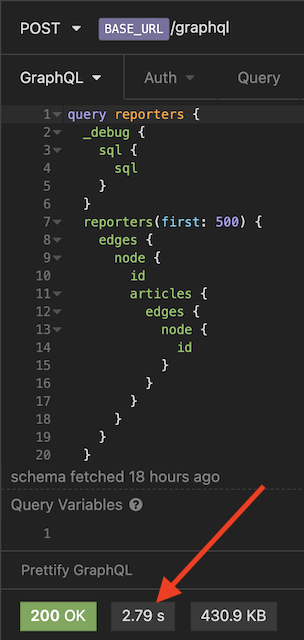
As you can tell, this is highly inefficient where 500 identical database queries were sent to our database.
The entire request took our server about 2.8 seconds on average to respond where we can do better.
Goal
Ultimately, we want to reduce the identical 500 SQL queries into 1 single query such as below with the help of batching using Dataloader.
-- Our Final Goal --SELECT * FROM starter_article WHERE starter_article.reporter_id IN ('1', '2',..., '499', '500')Solution
Dataloader to the rescue 🚀🚀🚀
Dataloader is a generic utility to be used as part of your application’s data fetching layer to provide a consistent API over various backends and reduce requests to those backends via batching and caching. (source)
Concept
Conceptually, here are the 3 key steps of what a Dataloader do:
- Collects a list of keys (object IDs)
- Calls a batch loading function with the list of keys
- Returns a
Promisewhich resolves to a list of values
On top of these 3 key steps, there are 2 main constraints this function must uphold (source):
- The array of values must be the same length as the array of keys.
- Each index in the array of values must correspond to the same index in the array of keys.
Code Example
Our implementation of Dataloader will be divided into two separate parts:
- Part 1: Fetch a list of
Articlesfor eachReporter(reporters→articles) - Part 2: Fetch a single
Reporterfor eachArticle(articles→reporter)
Creating a Middleware to Handle All Requests
NOTE: In this example, we would need to create new
self.*_loadersin__init__every time we want to create a new Dataloader for a resolver.
We would then need to update our Djangosettings.py to include our newly created LoaderMiddleware.
GRAPHENE = {
    'SCHEMA': 'django_graphene_starter.schema.schema',
    'MIDDLEWARE': [
        'django_graphene_starter.middlewares.LoaderMiddleware',
    ],
}
Update DjangoObjectType
Next, let’s use the newly created LoaderMiddleware at our ReporterNode type and create a new field with a resolver called dataloaderArticles.
NOTE: Sure we could override the default
articlesquery, but in this article I want to allow users to compare the performance difference side by side and hence we will create a new field calleddataloaderArticlesinstead.
Creating the Dataloader
Part 1: Fetch a list of Articles for each Reporter (reporters → articles)
This is the code example of a generic Dataloader function where the Type is passed in as a variable.
Explanation — Whenever a query is executed to get fetch all the available articles associated with the reporter, the Dataloader would collect a list of keys (i.e. Reporter ids) from our resolve_dataloder_articles resolver.
The Dataloader would then look up the Article table (passed in via middleware.py) and fetch all Article objects using the Reporter ids from keys.
A dictionary map of resuts_by_ids would be populated as below and converted into an array where each index in the array of values corresponds to the same index in the array of keys.
defaultdict(<class 'list'>,
{1: [<Article: Down-sized maximized firmware>,
    <Article: Front-line mobile system engine>,
    <Article: Implemented high-level migration>,
    <Article: Organized incremental collaboration>,
    <Article: Synergized well-modulated algorithm>],
...
500: [<Article: Automated clear-thinking firmware>,
    <Article: Intuitive radical moderator>,
    <Article: Phased clear-thinking forecast>,
    <Article: Proactive optimal help-desk>,
    <Article: Proactive responsive customer loyalty>]}
)
# NOTE:
# '1'...'500' are the Reporter IDs.
# Each Reporter ID key would contain a list of the related Article objectLastly, the array is then passed to a Promise which resolves to a list of values.
Part 1 Query Result
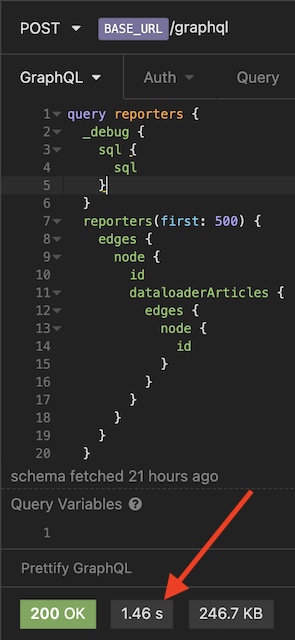
Let’s query for articles again using our newly created field dataloaderArticles.
If we were to look at our SQL query, here’s what it looks like now:
SELECT * FROM starter_reporter LIMIT 500SELECT * FROM starter_article WHERE starter_article.reporter_id IN ('1', '2',...,'499', '500')This request only took 1.46 seconds this time, previously at 2.79 seconds.
Part 2: Fetch a single Reporter for each Article (articles → reporter)
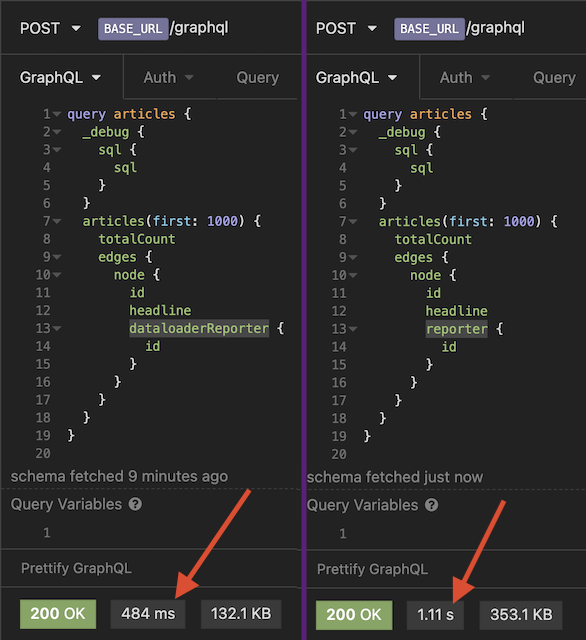
In this section, we will work on the relationship query between Article and Reporter in reverse. Let’s start by adding a new Dataloader class within loaders.py.
Within middlewares.py, let’s update our Loader class with reporter_by_article_loader.
class Loaders:
    def __init__(self):
self.reporter_by_article_loader = loaders.generate_loader(ReporterNode, "id")() # Part 2 self.articles_by_reporter_loader = loaders.generate_loader_by_foreign_key(ArticleNode, 'reporter_id')()Next is to update the ArticleNode with resolve_dataloder_reporter resolver.
Part 2 Query Result
Final Thoughts
By using batch and caching, Dataloader enables our GraphQL API to be much more efficient while fetching data by greatly decreasing the number of requests made to our database.
You may find the complete version of the code at source code here. Good luck!


