

Migrating from LiveData to Kotlin’s Flow
LiveData was something we needed back in 2017. The observer pattern made our lives easier, but options such as RxJava were too complex for beginners at the time. The Architecture Components team created LiveData: a very opinionated observable data holder class, designed for Android. It was kept simple to make it easy to get started and the recommendation was to use RxJava for more complex reactive streams cases, taking advantage of the integration between the two.
DeadData?
LiveData is still our solution for Java developers, beginners, and simple situations. For the rest, a good option is moving to Kotlin Flows. Flows still have a steep learning curve but they are part of the Kotlin language, supported by Jetbrains; and Compose is coming, which fits nicely with the reactive model.
We’ve been talking about using Flows for a while to connect the different parts of your app except for the view and ViewModel. Now that we have a safer way to collect flows from Android UIs, we can create a complete migration guide.
In this post you’ll learn how to expose Flows to a view, how to collect them, and how to fine-tune it to fit specific needs.
Flow: Simple things are harder and complex things are easier
LiveData did one thing and it did it well: it exposed data while caching the latest value and understanding Android’s lifecycles. Later we learned that it could also start coroutines and create complex transformations, but this was a bit more involved.
Let’s look at some LiveData patterns and their Flow equivalents:
#1: Expose the result of a one-shot operation with a Mutable data holder
This is the classic pattern, where you mutate a state holder with the result of a coroutine:
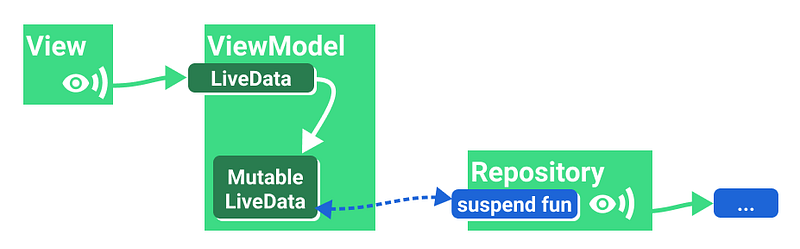
To do the same with Flows, we use (Mutable)StateFlow:
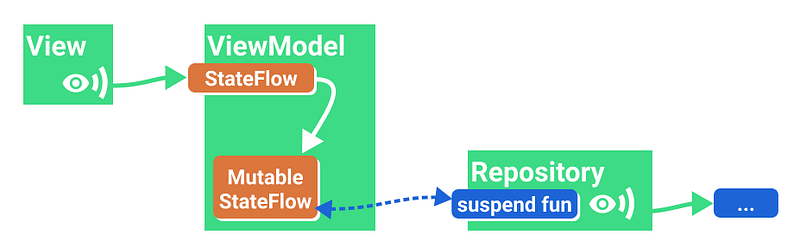
StateFlow is a special kind of SharedFlow (which is a special type of Flow), closest to LiveData:
- It always has a value.
- It only has one value.
- It supports multiple observers (so the flow is shared).
- It always replays the latest value on subscription, independently of the number of active observers.
When exposing UI state to a view, use StateFlow. It’s a safe and efficient observer designed to hold UI state.
#2: Expose the result of a one-shot operation
This is the equivalent to the previous snippet, exposing the result of a coroutine call without a mutable backing property.
With LiveData we used the liveData coroutine builder for this:

Since the state holders always have a value, it’s a good idea to wrap our UI state in some kind of Result class that supports states such as Loading, Success, and Error.
The Flow equivalent is a bit more involved because you have to do some configuration:

stateIn is a Flow operator that converts a Flow to StateFlow. Let’s trust these parameters for now, as we need more complexity to explain it properly later.
#3: One-shot data load with parameters
Let’s say you want to load some data that depends on the user’s ID and you get this information from an AuthManager that exposes a Flow:
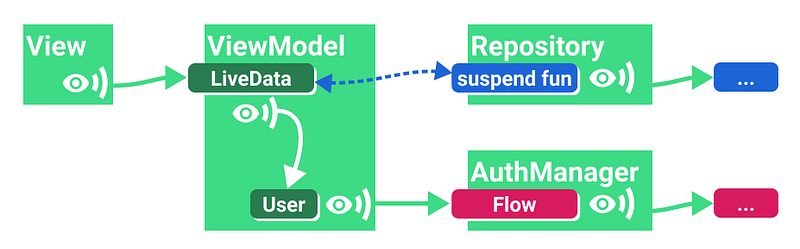
With LiveData you would do something similar to this:
switchMap is a transformation whose body is executed and the result subscribed to when userId changes.
If there’s no reason for userId to be a LiveData, a better alternative to this is to combine streams with Flow and finally convert the exposed result to LiveData.
Doing this with Flows looks very similar:
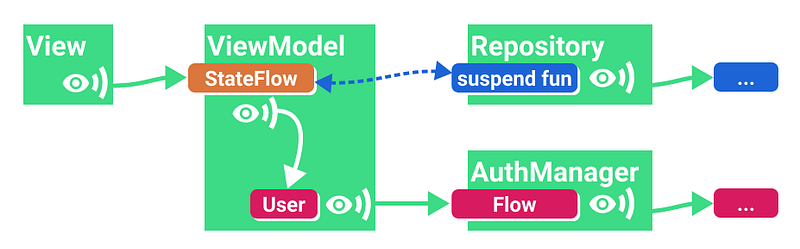
Note that if you need more flexibility you can also use transformLatest and emit items explicitly:
#4: Observing a stream of data with parameters
Now let’s make the example more reactive. The data is not fetched, but observed, so we propagate changes in the source of data automatically to the UI.
Continuing with our example: instead of calling fetchItem on the data source, we use a hypothetical observeItem operator that returns a Flow.
With LiveData you can convert the flow to LiveData and emitSource all the updates:
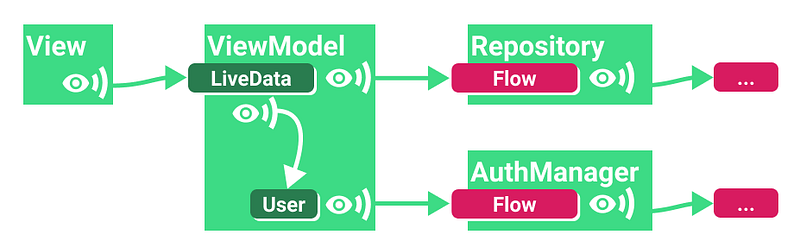
Or, preferably, combine both flows using flatMapLatest and convert only the output to LiveData:
The Flow implementation is similar but it doesn’t have LiveData conversions:
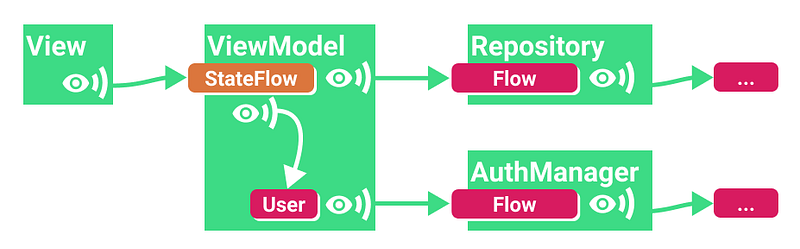
The exposed StateFlow will receive updates whenever the user changes or the user’s data in the repository is changed.
#5 Combining multiple sources: MediatorLiveData -> Flow.combine
MediatorLiveData lets you observe one or more sources of updates (LiveData observables) and do something when they get new data. Usually, you update the value of the MediatorLiveData:
The Flow equivalent is much more straightforward:
You can also use the combineTransform function, or zip.
Configuring the exposed StateFlow (stateIn operator)
We previously used stateIn to convert a regular flow to a StateFlow, but it requires some configuration. If you don’t want to go into detail right now and just need to copy-paste, this combination is what I recommend:
However, if you’re not sure about that seemingly random 5-second started parameter, read on.
stateIn has 3 parameters (from docs):
@param scope the coroutine scope in which sharing is started.@param started the strategy that controls when sharing is started and stopped.@param initialValue the initial value of the state flow.This value is also used when the state flow is reset using the [SharingStarted.WhileSubscribed] strategy with the `replayExpirationMillis` parameter.started can take 3 values:
Lazily: start when the first subscriber appears and stop whenscopeis cancelled.Eagerly: start immediately and stop whenscopeis cancelledWhileSubscribed: It’s complicated.
For one-shot operations you can use Lazily or Eagerly. However, if you’re observing other flows, you should use WhileSubscribed to do small but important optimizations as explained below.
The WhileSubscribed strategy
WhileSubscribed cancels the upstream flow when there are no collectors. The StateFlow created using stateIn exposes data to the View, but it’s also observing flows coming from other layers or the app (upstream). Keeping these flows active might lead to wasting resources, for example, if they continue reading data from other sources such as a database connection, hardware sensors, etc. When your app goes to the background, you should be a good citizen and stop these coroutines.
WhileSubscribed takes two parameters:
public fun WhileSubscribed(
    stopTimeoutMillis: Long = 0,
    replayExpirationMillis: Long = Long.MAX_VALUE
)
Stop timeout
From its documentation:
stopTimeoutMillisconfigures a delay (in milliseconds) between the disappearance of the last subscriber and the stopping of the upstream flow. It defaults to zero (stop immediately).
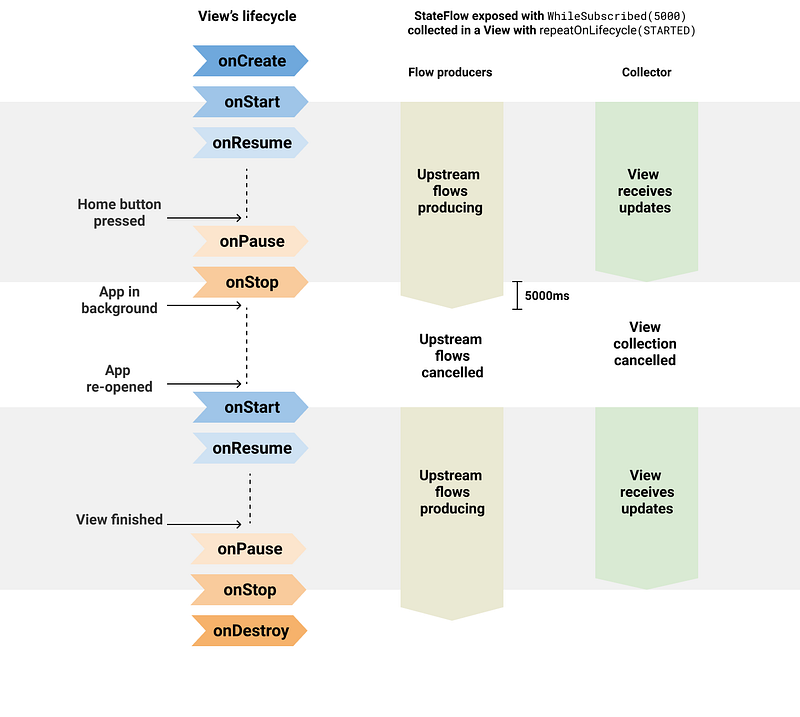
This is useful because you don’t want to cancel the upstream flows if the view stopped listening for a fraction of a second. This happens all the time — for example, when the user rotates the device and the view is destroyed and recreated in quick succession.
The solution in the liveData coroutine builder was to add a delay of 5 seconds after which the coroutine would be stopped if no subscribers are present. WhileSubscribed(5000) does exactly that:
This approach checks all the boxes:
- When the user sends your app to the background, updates coming from other layers will stop after five seconds, saving battery.
- The latest value will still be cached so that when the user comes back to it, the view will have some data immediately.
- Subscriptions are restarted and new values will come in, refreshing the screen when available.
Replay expiration
If you don’t want the user to see stale data when they’ve gone away for too long and you prefer to display a loading screen, check out the replayExpirationMillis parameter in WhileSubscribed. It’s very handy in this situation and it also saves some memory, as the cached value is restored to the initial value defined in stateIn. Coming back to the app won’t be as snappy, but you won’t show old data.
replayExpirationMillis— configures a delay (in milliseconds) between the stopping of the sharing coroutine and the resetting of the replay cache (which makes the cache empty for theshareInoperator and resets the cached value to the originalinitialValuefor thestateInoperator). It defaults toLong.MAX_VALUE(keep replay cache forever, never reset buffer). Use zero value to expire the cache immediately.
Observing StateFlow from the view
As we’ve seen so far, it’s very important for the view to let the StateFlows in the ViewModel know that they’re no longer listening. However, as with everything related to lifecycles, it’s not that simple.
In order to collect a flow, you need a coroutine. Activities and fragments offer a bunch of coroutine builders:
Activity.lifecycleScope.launch: starts the coroutine immediately and cancels it when the activity is destroyed.Fragment.lifecycleScope.launch: starts the coroutine immediately and cancels it when the fragment is destroyed.Fragment.viewLifecycleOwner.lifecycleScope.launch: starts the coroutine immediately and cancels it when the fragment’s view lifecycle is destroyed. You should use the view lifecycle if you’re modifying UI.
LaunchWhenStarted, launchWhenResumed…
Specialized versions of launch called launchWhenX will wait until the lifecycleOwner is in the X state and suspend the coroutine when the lifecycleOwner falls below the X state. It’s important to note that they don’t cancel the coroutine until their lifecycle owner is destroyed.
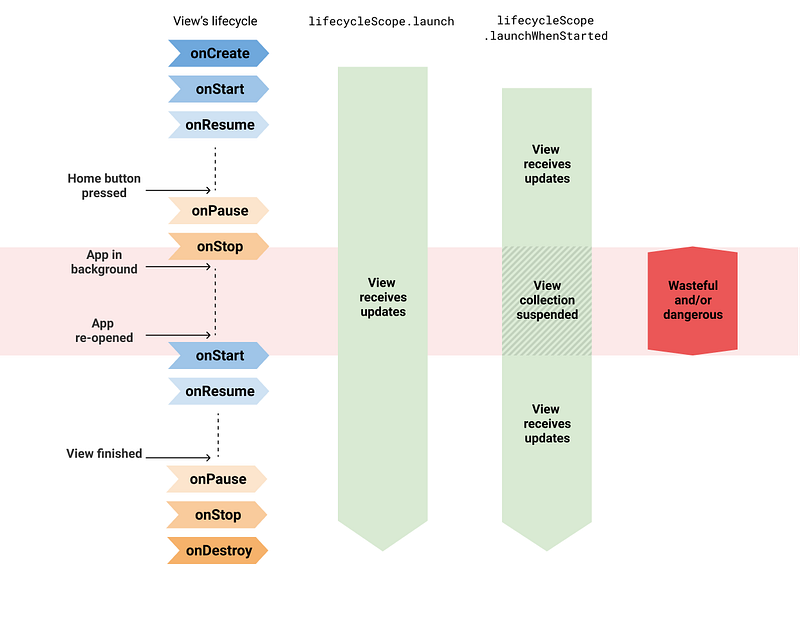
launch/launchWhenX is unsafeReceiving updates while the app is in the background could lead to crashes, which is solved by suspending the collection in the View. However, upstream flows are kept active while the app is in the background, possibly wasting resources.
This means that everything we’ve done so far to configure StateFlow would be quite useless; however, there’s a new API in town.
lifecycle.repeatOnLifecycle to the rescue
This new coroutine builder (available from lifecycle-runtime-ktx 2.4.0-alpha01) does exactly what we need: it starts coroutines at a particular state and it stops them when the lifecycle owner falls below it.
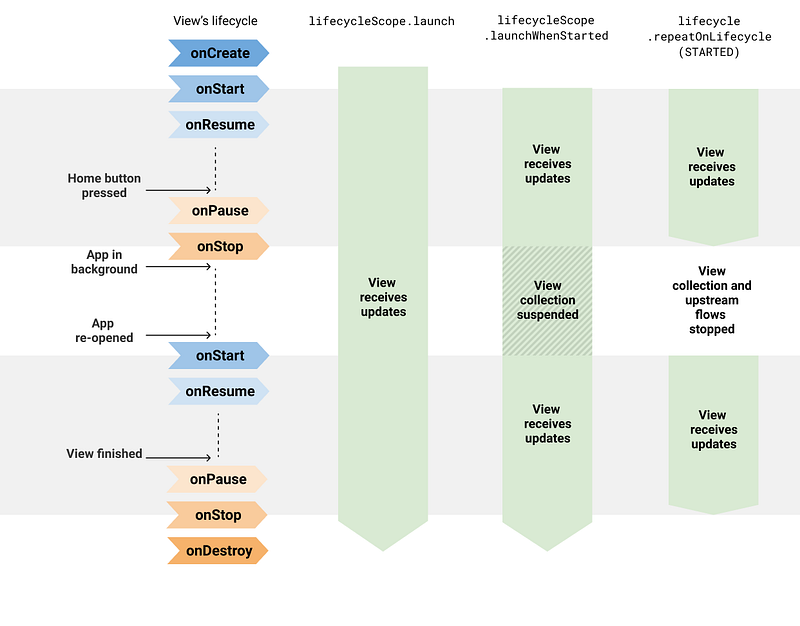
For example, in a Fragment:
This will start collecting when the view of the Fragment is STARTED, will continue through RESUMED, and will stop when it goes back to STOPPED. Read all about it in A safer way to collect flows from Android UIs.
Mixing the repeatOnLifecycle API with the StateFlow guidance above will get you the best performance while making a good use of the device’s resources.
Warning: The StateFlow support recently added to Data Binding uses
launchWhenCreatedto collect updates, and it will start usingrepeatOnLifecycle`instead when it reaches stable.
For Data Binding, you should use Flows everywhere and simply add
asLiveData()to expose them to the view. Data Binding will be updated whenlifecycle-runtime-ktx 2.4.0goes stable.
Summary
The best way to expose data from a ViewModel and collect it from a view is:
- ✔️ Expose a
StateFlow, using theWhileSubscribedstrategy, with a timeout. [example] - ✔️ Collect with
repeatOnLifecycle. [example]
Any other combination will keep the upstream Flows active, wasting resources:
- ❌ Expose using
WhileSubscribedand collect insidelifecycleScope.launch/launchWhenX - ❌ Expose using
Lazily/Eagerlyand collect withrepeatOnLifecycle
Of course, if you don’t need the full power of Flow… just use LiveData. :)
Thanks to Manuel, Wojtek, Yigit, Alex Cook, Florina and Chris!


