avatarGeeky Animals

Free AI web copilot to create summaries, insights and extended knowledge, download it at here

4752

Abstract

i>The <code>--tile</code> parameter is not supported by the upscalers. After selecting a seamless image, the Upscale buttons will not appear. — (Update on 30th October 2023 by Geeky Animals — there is a <a href="https://readmedium.com/midjourney-a-simple-hack-to-upscale-tile-images-3ed9683b8365">simple hack to upscale tile images</a>.)</li><li>When upscaling, there is no option to edit the prompt with <code>/remix</code> mode.</li><li>Upscaling will not remove the blur from a low-resolution image. (However, <a href="https://readmedium.com/the-complete-guide-to-midjourney-inpainting-from-basics-to-advanced-b34519f6e2a2">Vary (Region)</a> inpainting can be used to sharpen a low-resolution image.)</li><li>The upscalers may occasionally darken the image slightly.</li><li>On very rare occasions, a black or corrupted image may appear on 4x upscales. (The developer is currently investigating this matter).</li></ul><p id="473e"><b>Other supporting images</b></p><figure id="99d2"><img src="https://cdn-images-1.readmedium.com/v2/resize:fit:800/1*OMTJVdpe8MZD_yadn8EZ5Q.jpeg"><figcaption>Using upscalers in the /relax mode will result in an error message. (Update on 19th October, 2023 by DavidH: In the meantime, the upscalers can be used with<code>/relax </code>mode now. So, a saving for your fast hours!)</figcaption></figure><p id="847c">A photo of a chameleon was created to differentiate the resolution of the original image versus Upscale (4x).</p><figure id="8efb"><img src="https://cdn-images-1.readmedium.com/v2/resize:fit:800/0*-QipjH-kRxoy6hmU"><figcaption>Original image before upscaling. /imagine prompt: an extreme close-up photo of a chameleon — ar 16:9</figcaption></figure><figure id="9dd6"><img src="https://cdn-images-1.readmedium.com/v2/resize:fit:800/1*zK5kHBzQU3UN4SewPogh7w.png"><figcaption>Image after Upscale (4x). Pay attention to the areas indicated by the arrows.</figcaption></figure><p id="f25e">As expected, the upscaled images (2x and 4x) are clearer and sharper with higher resolution than the original image.</p><ul><li>(Update on 19th October 2023 by DavidH: The 4x upscaler has been updated to make it sharper (than soft)</li></ul><p id="d6d9">The photo’s image resolutions with an aspect ratio 16:9 are:</p><p id="d49b"><code>--ar 16:9</code> (original): 1,456 x 816 pixels Upscale (2x): 2,912 x 1,632 pixels Upscale (4x): 5,824 x 3,264 pixels</p><figure id="70f5"><img src="https://cdn-images-1.readmedium.com/v2/resize:fit:800/1*la9Lb429XWn9FkA1WlZMPg.png"><figcaption></figcaption></figure><figure id="c329"><img src="https://cdn-images-1.readmedium.com/v2/resize:fit:800/1*wmzQZgdkz3Vh_C3gtaKBYw.png"><figcaption>Top (Left) Upscale 4X has clear edges versus Bottom (Right) Original image where the edges are blurry with lesser details.</figcaption></figure><p id="04f1">If you use the tile parameter, there are no Upscale (2x) or Upscale (4x) options.</p><figure id="80c3"><img src="https://cdn-images-1.readmedium.com/v2/resize:fit:800/1*iEPGWJaPo_hfrgEvoRVv8g.png"><figcaption>/imagine prompt: vibrant roses — tile — ar 3:2</figcaption></figure><p id="fb0f"><b>Related stories</b></p><div id="21e3" class="link-block"> <a href="https://bootcamp.uxdesign.cc/midjourney-a-simple-hack-to-upscale-tile-images-3ed9683b8365"> <div> <div> <h2>Midjourney: A simple hack to upscale tile images</h2> <div><h3>A little trick to upscale your tiles to paw-fection!</h3></div> <div><p>bootcamp.uxdesign.cc</p></div> </div> <div> <div style="background-image: url(https://miro.readmedium.com/v2/resize:fit:320/0*ZDNPf-ebAO-CoTxo.png)"></div> </div> </div> </a> </div><div id="71f0" class="link-block"> <a href="https://bootcamp.uxdesign.cc/midjourney-a-simple-method-for-changing-the-panning-direction-and-upscale-panned-images-6f6c3a9617d5"> <div> <div> <h2>Midjourney: a simple method for changing the panning direction and Upscale panned images</h2> <div><h3>It is not true that you can only pan in one direction.</h3></div> <div><p>bootcamp.uxdesign.cc</p></div> </div> <div> <div style="background-image: url(https://miro.readmedium.com/v2/resize:fit:320/0*PRBWfQgrfweM2hQ-.png)"></div> </div> </div> </a> </div><div id="11e2" class="link-block"> <a href="https://bootcamp.uxdesign.cc/midjourney-why-should-you-love-the-default-image-file-names-f0f74b25f5e7"> <div> <div> <h2>Midjourney: Why should you love the defa

Options

ult image file names?</h2> <div><h3>Make a copy before renaming them. Refresh old files to gain access new features, retrieve seeds and prompts using Job…</h3></div> <div><p>bootcamp.uxdesign.cc</p></div> </div> <div> <div style="background-image: url(https://miro.readmedium.com/v2/resize:fit:320/0*TAY37O8R0lpKb0tB.png)"></div> </div> </div> </a> </div><div id="7bbf" class="link-block"> <a href="https://bootcamp.uxdesign.cc/midjourney-a-novel-method-to-create-unlimited-photos-for-a-consistent-character-73c6e1f81f1a"> <div> <div> <h2>Midjourney: A novel method to create unlimited photos for a consistent character</h2> <div><h3>Introducing the advanced Split Screen Method. Turn or tilt your character’s head, change the body postures, camera…</h3></div> <div><p>bootcamp.uxdesign.cc</p></div> </div> <div> <div style="background-image: url(https://miro.readmedium.com/v2/resize:fit:320/0*Zj-5MNAFuBiW8R4i.png)"></div> </div> </div> </a> </div><div id="b6ed" class="link-block"> <a href="https://bootcamp.uxdesign.cc/the-complete-guide-to-midjourney-inpainting-from-basics-to-advanced-b34519f6e2a2"> <div> <div> <h2>The Complete Guide to Midjourney Inpainting: From Basics to Advanced</h2> <div><h3>Unveiling 7 novel methods of Vary (Region) & use cases. Force a dolphin to appear in a forest, color palette &…</h3></div> <div><p>bootcamp.uxdesign.cc</p></div> </div> <div> <div style="background-image: url(https://miro.readmedium.com/v2/resize:fit:320/0*-NxyTH2_y9ElBuS5.png)"></div> </div> </div> </a> </div><div id="c397" class="link-block"> <a href="https://medium.com/@geekyanimals/list/e5b8cabc263d"> <div> <div> <h2>Midjourney</h2> <div><h3>Stories for Midjourney fans</h3></div> <div><p>medium.com</p></div> </div> <div> <div style="background-image: url(https://miro.readmedium.com/v2/resize:fit:320/0*95d33253c6526dd69a46d33fa5f617dfc45d5165.jpeg)"></div> </div> </div> </a> </div><div id="c246" class="link-block"> <a href="https://medium.com/@geekyanimals/list/516b50973fbd"> <div> <div> <h2>Midjourney Mini-Tutorials</h2> <div><h3>Simple and easy-to-follow guides for Midjourney Beginners</h3></div> <div><p>medium.com</p></div> </div> <div> <div style="background-image: url(https://miro.readmedium.com/v2/resize:fit:320/0*5caecb4c96ee685099bde86c2d9580dc6baa26cf.jpeg)"></div> </div> </div> </a> </div><p id="bb29"><b>Conclusion</b></p><ul><li>Today, Midjourney released two upscalers: Upscale (2x) and Upscale (4x).</li><li>Using the upscalers will consume fast hours.</li><li>All outpainting and inpainting features will be lost after upscaling.</li><li>The upscaler is subtle and tries to keep the image’s details as close to the original as possible.</li><li>There are some known issues with the new upscalers.</li></ul><p id="6961">I hope you like this story!</p><p id="c5b5"><b>Please give me a clap or leave a positive comment </b>to let Medium’s algorithm know that this story is helpful and has contributed to its platform’s success.</p><p id="0e8e">Your support inspires me to create higher-quality content in the future!</p><p id="687f">Never miss a story. <b>Follow me on Medium</b> for updates, stories, and tips about Midjourney.</p><div id="ee30" class="link-block"> <a href="https://medium.com/@geekyanimals"> <div> <div> <h2>Geeky Animals — Medium</h2> <div><h3>Read writing from Geeky Animals on Medium. I’m a veterinarian passionate about the intersection of Midjourney, AI, art…</h3></div> <div><p>medium.com</p></div> </div> <div> <div style="background-image: url(https://miro.readmedium.com/v2/resize:fit:320/0*expQMusdp5XOkDiw)"></div> </div> </div> </a> </div><p id="bfb9">Sign up <a href="https://medium.com/@geekyanimals/subscribe"><b>here</b> </a>for a free email alert when I post a new story.</p></article></body>

Midjourney: The 2x and 4x Upscalers

The first look at these new features

Get a free email alert when a new story is published.
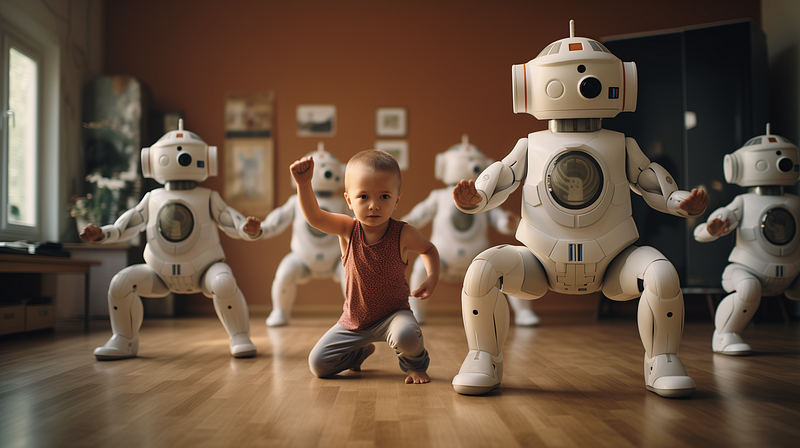
The two new Midjourney upscalers, Upscale (2x) and Upscale (4x), boost image resolution without the need for a third-party application. /imagine prompt: a documentary photograph of humans practicing yoga with cute and adorable cyborgs, dynamic action — ar 16:9

Midjourney just released two new features a few hours after the Weekly Office Hours today.

It’s excellent news for Midjourney fans. But as I’m also the writer for the Midjourney topic, I’m thinking, “Ohh… can’t they release the features tomorrow so that I can rest a day after writing the “Quick Midjourney Update?” Why must they cram everything into a single day?

The new upscaling features are the 2x and 4x upscale buttons. They will appear after clicking U1, U2, U3, or U4 upscale buttons.
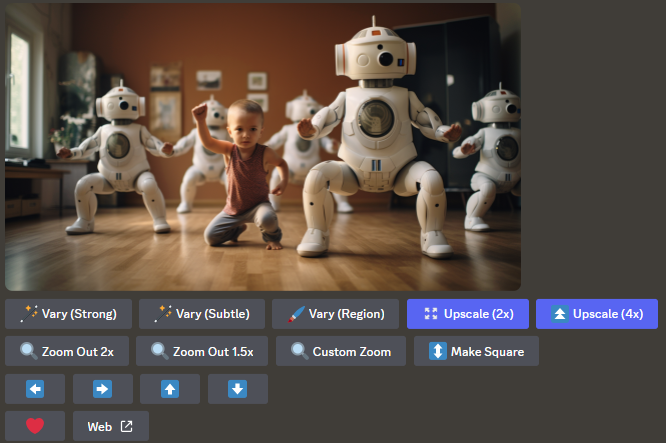

The new buttons Upsacle (2x) and Upscale (4x) will appear at the bottom of the photo after you clicked any of the U1, U2, U3 or U4 buttons. /imagine prompt: a documentary photograph of humans practicing yoga with cute and adorable cyborgs, dynamic action — ar 16:9
The new upscaler buttons.

Ironically, the Upscale (2x) has four arrows pointing outward, whereas Upscale (4x) has two triangles stacked on each other. If the developer could switch the buttons, it might be more straightforward and less confusing. But, in any case, this is unimportant.

The purpose of the Upscale (2x) and Upscale (4x) buttons is to increase the resolution of a selected image so that users do not have to rely on third-party upscalers and, in some cases, to add more subtle details to the image.

Here are the key points about the new upscalers that I’ve learned so far:

  • Both 2x and 4x upscalers will consume fast hours. The developer is considering whether the features could be offered in the /relax mode.
  • (Update on 19th October 2023 by DavidH: In the meantime, the upscalers can be used with/relax mode now. So, a saving for your fast hours!)
  • The 4x upscaler costs roughly three times more GPU minutes than the 2x upscaler.
  • There is no option to reset the image using [Custom Zoom] after using the upscalers. In fact, after upscaling, all outpainting and inpainting features will be lost.
  • Given the fast hours that will be consumed and the loss of access to the inpainting and outpainting features, the Upscale (2x) and Upscale (4x) features are most likely the final steps in the image creation process in Midjourney.
  • In other words, before clicking the Upscale button, make sure you are satisfied with the final image (i.e., no strange anatomy, random useless objects, etc.).
  • You cannot upscale an image immediately after [Pan]. But, you can “reset” the image with [Custom Zoom] to regain access to the Upscaler buttons.
  • The upscaler is subtle and tries to keep the image’s details as close to the original as possible.
  • To use the upscaler features on older images, use the /show Job ID method.
  • The new features support V5 or Niji jobs.
  • (Update on 20th October 2023 by Clarinet) The upscalers will use the image prompts during the upscaling process. As a result, if the images in the image prompt are of poor quality, the maximum output quality will be affected or limited.

Known issues

  • Right-clicking to save the image after upscaling will sometimes save the image file in WEBP format. Navigate to the web gallery and save the image in PNG format.
  • The --tile parameter is not supported by the upscalers. After selecting a seamless image, the Upscale buttons will not appear. — (Update on 30th October 2023 by Geeky Animals — there is a simple hack to upscale tile images.)
  • When upscaling, there is no option to edit the prompt with /remix mode.
  • Upscaling will not remove the blur from a low-resolution image. (However, Vary (Region) inpainting can be used to sharpen a low-resolution image.)
  • The upscalers may occasionally darken the image slightly.
  • On very rare occasions, a black or corrupted image may appear on 4x upscales. (The developer is currently investigating this matter).

Other supporting images
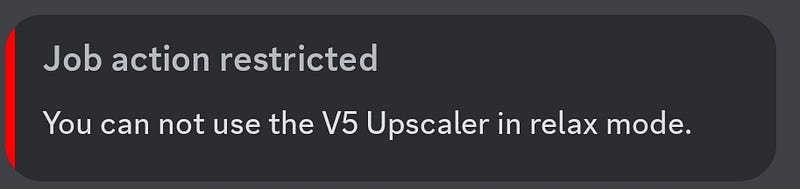
Using upscalers in the /relax mode will result in an error message. (Update on 19th October, 2023 by DavidH: In the meantime, the upscalers can be used with/relax mode now. So, a saving for your fast hours!)

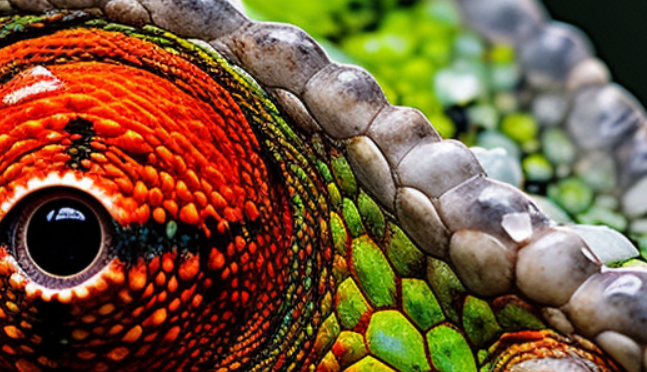
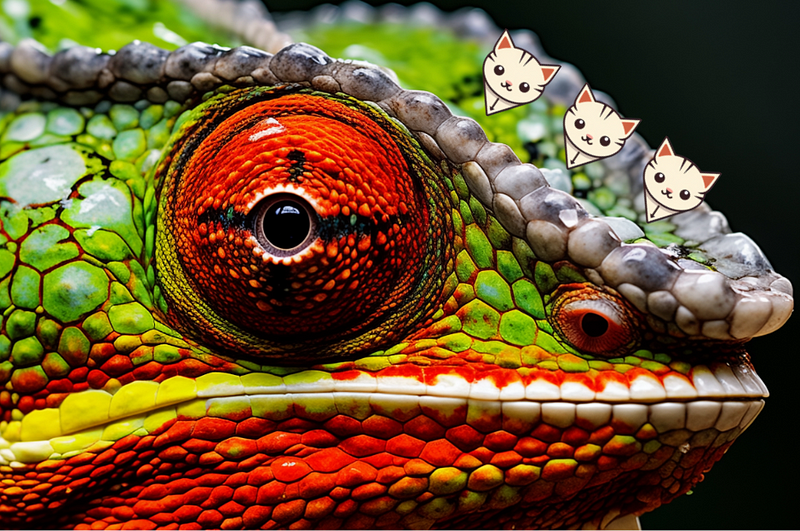
A photo of a chameleon was created to differentiate the resolution of the original image versus Upscale (4x).
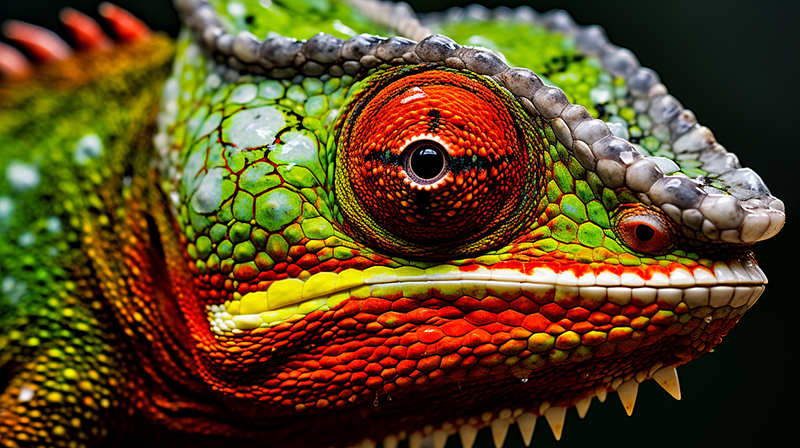
Original image before upscaling. /imagine prompt: an extreme close-up photo of a chameleon — ar 16:9
Image after Upscale (4x). Pay attention to the areas indicated by the arrows.

As expected, the upscaled images (2x and 4x) are clearer and sharper with higher resolution than the original image.

  • (Update on 19th October 2023 by DavidH: The 4x upscaler has been updated to make it sharper (than soft)

The photo’s image resolutions with an aspect ratio 16:9 are:

--ar 16:9 (original): 1,456 x 816 pixels Upscale (2x): 2,912 x 1,632 pixels Upscale (4x): 5,824 x 3,264 pixels
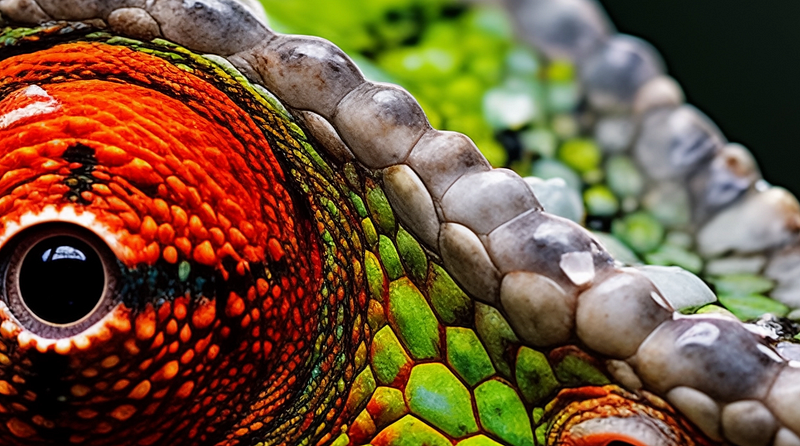
Top (Left) Upscale 4X has clear edges versus Bottom (Right) Original image where the edges are blurry with lesser details.

If you use the tile parameter, there are no Upscale (2x) or Upscale (4x) options.
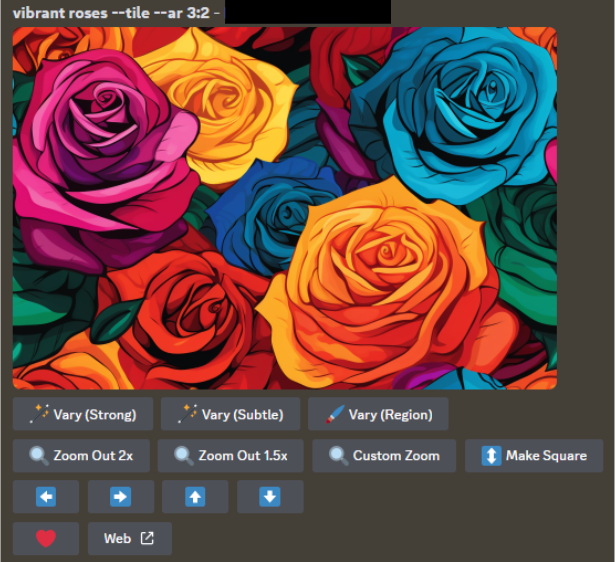
/imagine prompt: vibrant roses — tile — ar 3:2

Related stories

Conclusion

  • Today, Midjourney released two upscalers: Upscale (2x) and Upscale (4x).
  • Using the upscalers will consume fast hours.
  • All outpainting and inpainting features will be lost after upscaling.
  • The upscaler is subtle and tries to keep the image’s details as close to the original as possible.
  • There are some known issues with the new upscalers.

I hope you like this story!

Please give me a clap or leave a positive comment to let Medium’s algorithm know that this story is helpful and has contributed to its platform’s success.

Your support inspires me to create higher-quality content in the future!

Never miss a story. Follow me on Medium for updates, stories, and tips about Midjourney.

Sign up here for a free email alert when I post a new story.

Midjourney
Artificial Intelligence
Technology
Creativity
Design
Recommended from ReadMedium