avatarChristianlauer

Free AI web copilot to create summaries, insights and extended knowledge, download it at here

1402

Abstract

<h2>Power BI Reports in Power Apps</h2> <div><h3>How Microsoft wants to integrate Self Service BI in Office Products</h3></div> <div><p>medium.com</p></div> </div> <div> <div style="background-image: url(https://miro.readmedium.com/v2/resize:fit:320/1*t82IeAmo33N8bDGaxiHSUg.jpeg)"></div> </div> </div> </a> </div><p id="cc66">Microsoft promotes the new feature by saying that now anyone can create dynamic, data driven presentations that are sure to impress their audiences [1]. This is an idea that Microsoft definitely wants to continue with Power BI and Azure products in order to create the data driven enterprise.</p><p id="e6f8">So you can now e.g. paste a <b>single Power BI visual</b> into the PowerPoint add-in.</p><figure id="59aa"><img src="https://cdn-images-1.readmedium.com/v2/resize:fit:800/0*NtUKWYoBKE43rVML.gif"><figcaption>Putting Power BI Visualizations in PowerPoint — Source: Microsoft[1]</figcaption></figure><p id="617f">Another feature which comes with this update is <b>Smart Insights. </b>With this feature, Microsoft is giving you the ability to quickly generate text that summarizes the data in your slide, making it easier to communicate key insights and findings. By using Smart Insights, you can quickly and easily create compelling stories from # Options your data without any manual data analysis or writing [1]. The rest of the new functions can be found in the source below.</p><p id="40ac">Of course, this has some advantages, because often not all employees are equipped with Power BI or the solution is too big for the use case. With the integration of Power BI and PowerPoint, you can now present content well to audiences that don’t have Power BI and, above all, enrich it with information for the respective target group.</p><div id="5cea" class="link-block"> <a href="https://readmedium.com/four-best-practices-for-working-with-microsoft-power-bi-b584ceefeba7"> <div> <div> <h2>4 Best Practices for working with Microsoft Power BI</h2> <div><h3>How to enable an effective Dashboard in Microsoft Environment</h3></div> <div><p>medium.com</p></div> </div> <div> <div style="background-image: url(https://miro.readmedium.com/v2/resize:fit:320/1*dE5NIHf5Cp-l81iN6Y72Sw.jpeg)"></div> </div> </div> </a> </div><h2 id="2968">Sources and Further Readings</h2><p id="c4be">[1] Microsoft, <a href="https://powerbi.microsoft.com/en-us/blog/storytellingga/">Power BI and PowerPoint: A Powerful Combination for Data Visualization is now generally available</a> (2023)</p></article></body>

Microsoft combines Power BI with PowerPoint

A Feature that many have waited for

Photo by Ed Hardie on Unsplash

Microsoft just announced the general availability of the Power BI integration with PowerPoint.

This integration brings Microsoft users the ability to use Power BI in combination with the popular presentation program. It lets people easily add interactive Power BI data visualizations to their PowerPoint presentations, making them more interactive, more informative, and more engaging [1].

Microsoft has already worked on integrating its Office products into each other in the past months. Now, users can easily create interactive visualizations that can easily be embedded into PowerPoint slides.

Microsoft promotes the new feature by saying that now anyone can create dynamic, data driven presentations that are sure to impress their audiences [1]. This is an idea that Microsoft definitely wants to continue with Power BI and Azure products in order to create the data driven enterprise.

So you can now e.g. paste a single Power BI visual into the PowerPoint add-in.
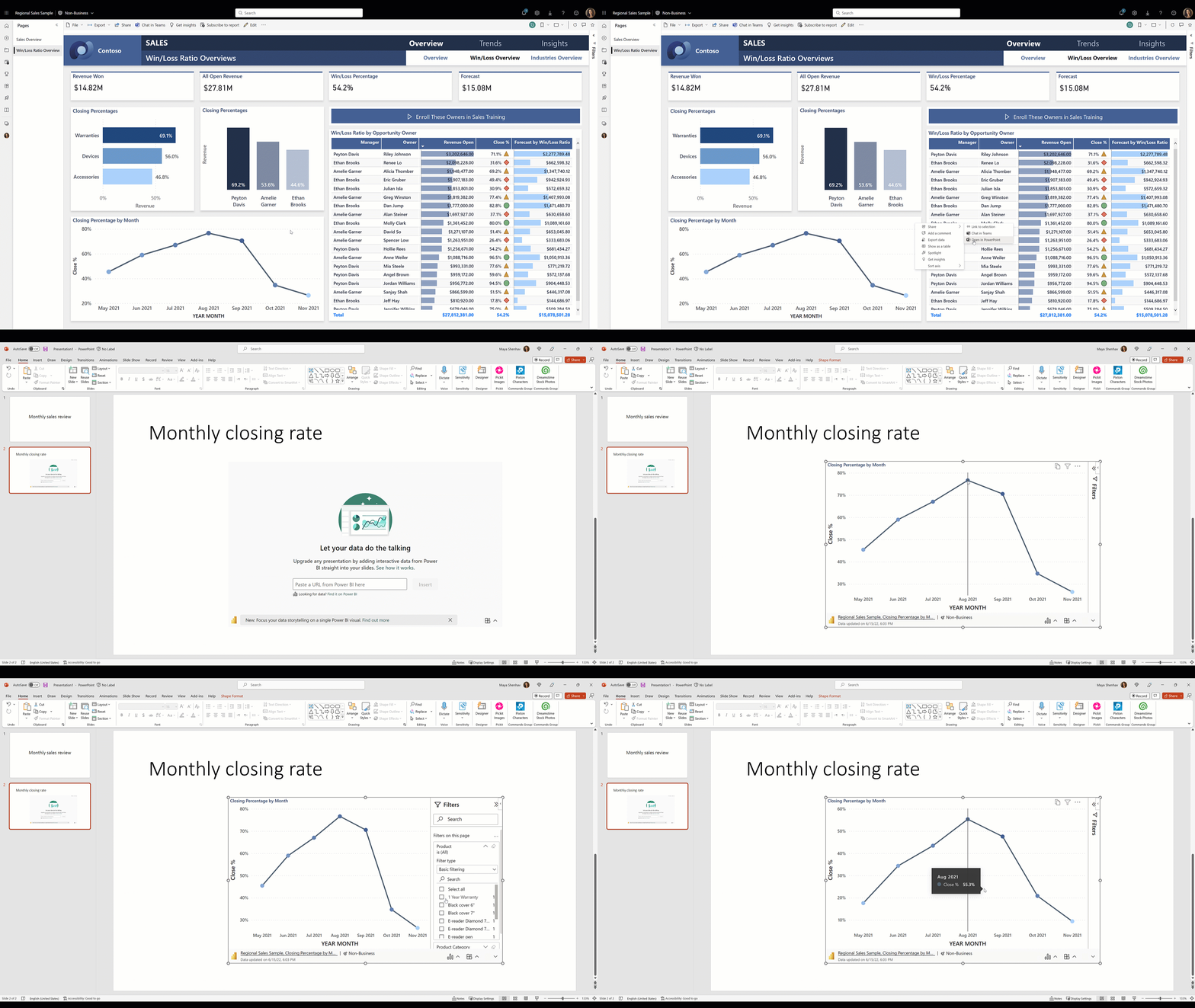
Putting Power BI Visualizations in PowerPoint — Source: Microsoft[1]

Another feature which comes with this update is Smart Insights. With this feature, Microsoft is giving you the ability to quickly generate text that summarizes the data in your slide, making it easier to communicate key insights and findings. By using Smart Insights, you can quickly and easily create compelling stories from your data without any manual data analysis or writing [1]. The rest of the new functions can be found in the source below.

Of course, this has some advantages, because often not all employees are equipped with Power BI or the solution is too big for the use case. With the integration of Power BI and PowerPoint, you can now present content well to audiences that don’t have Power BI and, above all, enrich it with information for the respective target group.

Sources and Further Readings

[1] Microsoft, Power BI and PowerPoint: A Powerful Combination for Data Visualization is now generally available (2023)

Data Science
Technology
Microsoft
Power Bi
Business
Recommended from ReadMedium