avatarCasey Botticello

Free AI web copilot to create summaries, insights and extended knowledge, download it at here

2923

Abstract

summary of your publication.</li><li>Describe how writers can submit articles to your publication.</li></ul><h1 id="c14b">How Do I Customize the Note From The Editor Section of My Publication?</h1><p id="65f8"><b>Step 1</b> — Locate the about section of your Medium publication. Depending upon your publication layout, you may find this button in several places. However, it can always be found at the very bottom of your homepage.</p><p id="0223">For the purposes of this example I will use my publication, called Escaping The 9 to 5:</p><figure id="ec47"><img src="https://cdn-images-1.readmedium.com/v2/resize:fit:800/1*eEJAluOqrWoKRUKnqaoy9A.png"><figcaption></figcaption></figure><p id="995d">Alternatively, you can add “<code>/about</code>” to the homepage of your Medium publication URL:</p><p id="aa19" type="7">https://medium.com/yourpublication/about</p><figure id="cd86"><img src="https://cdn-images-1.readmedium.com/v2/resize:fit:800/1*aSCpzD5VlGVrehersCBkPA.png"><figcaption></figcaption></figure><p id="d045"><b>Step 2</b> — Click on the edit icon at the top right corner of your page:</p><figure id="bfea"><img src="https://cdn-images-1.readmedium.com/v2/resize:fit:800/1*5eGxMuBjp2Hph_JfwHE4ug.png"><figcaption></figcaption></figure><p id="c606"><b>Step 3</b> — Edit the text that is below the<b> Note From The Editor</b> section.</p><p id="0344">The GIF below shows all three steps being completed:</p><figure id="5f1f"><img src="https://cdn-images-1.readmedium.com/v2/resize:fit:800/1*tw6ri3Uoef-6-mukOr4xLw.gif"><figcaption></figcaption></figure><h1 id="a22e">Additional Notes About Note From The Editor Section:</h1><ul><li>You may need to add an about tab in the navigation bar of your publication to help readers see this message more frequently.</li><li>By default, the <b>Note From The Editor</b> section contains the Medium publication description.</li><li><b>Note From The Editor</b> section is limited to 1200 characters.</li></ul><p id="5fda"><a href="undefined">Casey Botticello</a></p><figure id="5f44"><img src="https://cdn-images-1.readmedium.com/v2/resize:fit:800/1*yxZs_V4qKTyOtgwmCpL28g.png"><figcaption></figcaption></figure><p id="59d2"><i>Thanks for reading this article! Leave a comment below if you have any questions. Be sure to sign up for the <a href="https://mediumbloggingguide.substack.com/"><b>Blogging Guide newsletter</b></a>, to get the latest tips, tricks, and news about writing on Medium and to join our Facebook group, <a href="http://bit.ly/Medium-Facebook-Group-Footer-Link"><b>Medium Writing</b></a>, to share your latest Medium posts and connect with other writers.</i></p><div id="0037" class="link-block"> <a href="https://bloggingguide.substack.com"> <div> <div> <h2>Blogging Guide</h2> <div><h3>Learn How to Make Money Writing Online | Medium · Substack · Amazon KDP · Social Media Marketing

Options

· SEO · Building a…</h3></div> <div><p>bloggingguide.substack.com</p></div> </div> <div> <div style="background-image: url(https://miro.readmedium.com/v2/resize:fit:320/0*_GNiD_m4LhlhOEEm)"></div> </div> </div> </a> </div><h2 id="55cd">If you liked this article, here are some other articles you may enjoy:</h2><div id="5f56" class="link-block"> <a href="https://readmedium.com/signal-review-tool-that-auto-tweets-your-medium-articles-on-a-schedule-236fcff6be63"> <div> <div> <h2>Signal Review: Tool That Auto-Tweets Your Medium Articles on a Schedule</h2> <div><h3>A look at the best tool to automate Medium article promotion</h3></div> <div><p>medium.com</p></div> </div> <div> <div style="background-image: url(https://miro.readmedium.com/v2/resize:fit:320/1*RGg2lsp5XgtE7riopOu90Q.png)"></div> </div> </div> </a> </div><div id="2462" class="link-block"> <a href="https://readmedium.com/how-a-new-writer-made-6-000-with-one-of-her-first-medium-stories-314aa9ed2262"> <div> <div> <h2>How a New Writer Made $6,000+ With One of Her First Medium Stories</h2> <div><h3>An update on my interview with Shelby Church and her Medium writing experiment</h3></div> <div><p>medium.com</p></div> </div> <div> <div style="background-image: url(https://miro.readmedium.com/v2/resize:fit:320/1*XVYmd1FvdBRkCrEYaLfJjg.png)"></div> </div> </div> </a> </div><figure id="0e12"><img src="https://cdn-images-1.readmedium.com/v2/resize:fit:800/1*WVlPA9DlzNCkryxXqGVxcg.png"><figcaption></figcaption></figure><p id="87fc"><b>Casey Botticello</b> is a partner at Black Edge Consulting. Black Edge Consulting is a strategic communications firm, specializing in online reputation management, digital marketing, and crisis management. Prior to founding Black Edge Consulting, he worked for BGR Group, a bipartisan lobbying and strategic communications firm.</p><p id="c43e">Casey is the founder of the Cryptocurrency Alliance, a Super PAC dedicated to cryptocurrency and blockchain advocacy. He is a graduate of The University of Pennsylvania, where he received his B.A. in Urban Studies.</p><blockquote id="b539"><p><i>You can connect with him on <a href="https://www.linkedin.com/in/caseybotticello/"><b>LinkedIn</b></a>, <a href="https://twitter.com/caseybotticello"><b>Twitter</b></a>, <a href="https://www.facebook.com/groups/mediumwriting"><b>Facebook</b></a>, or by visiting his website, <a href="https://www.bloggingguide.org"><b>Blogging Guide</b></a>.</i></p></blockquote></article></body>

Medium Publications

Medium Note From The Editor Section

How to edit the “Note From The Editor” section of your Medium publication
Source: Casey Botticello of Blogging Guide

One of the many advantages of creating your own Medium publication is the ability to tweak small bits of your profile information, to better help your readers relate to your content.

One of the most overlooked features that can be edited is the Note From The Editor section.

Note: This is not the same things as leaving a private note on a Medium article.

What is the Note From The Editor Section in a Medium Publication?

The Note From The Editor is found in the about section of a Medium publication. For example, for my publication Blogging Guide, this is the about section:
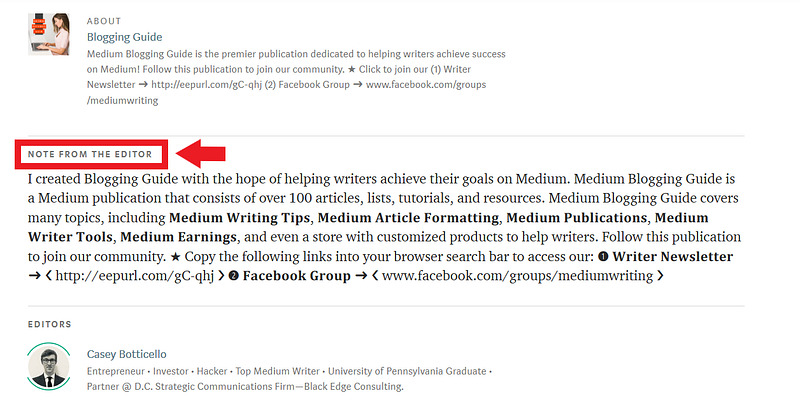
This section can be a great way to:

  • Explain why you started a publication.
  • Describe the type of articles you are looking for in your publication.
  • Give readers/writers a brief bio about you, the editor.
  • Include a longer and more detailed summary of your publication.
  • Describe how writers can submit articles to your publication.

How Do I Customize the Note From The Editor Section of My Publication?

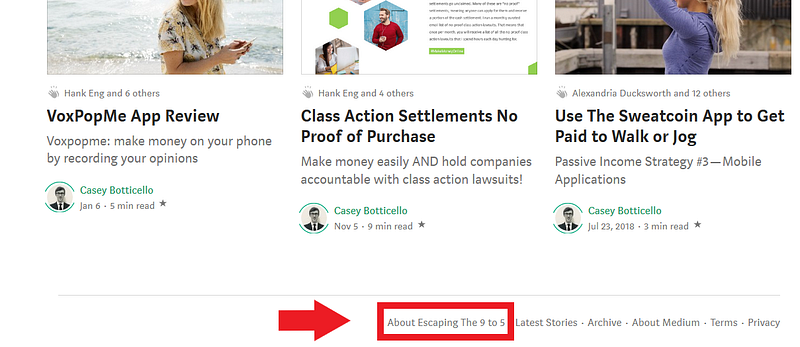
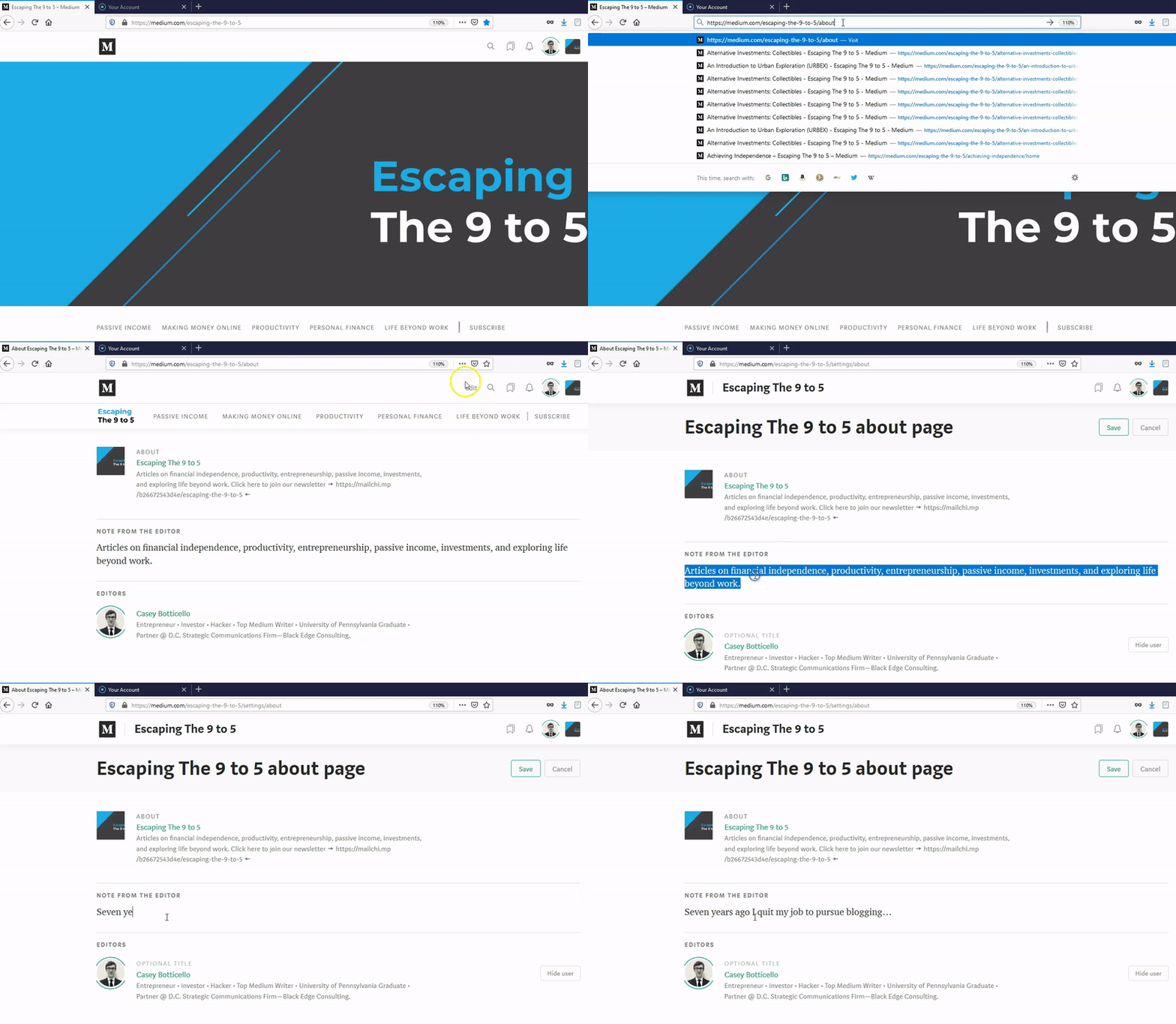
Step 1 — Locate the about section of your Medium publication. Depending upon your publication layout, you may find this button in several places. However, it can always be found at the very bottom of your homepage.

For the purposes of this example I will use my publication, called Escaping The 9 to 5:
Alternatively, you can add “/about” to the homepage of your Medium publication URL:

https://medium.com/yourpublication/about

Step 2 — Click on the edit icon at the top right corner of your page:
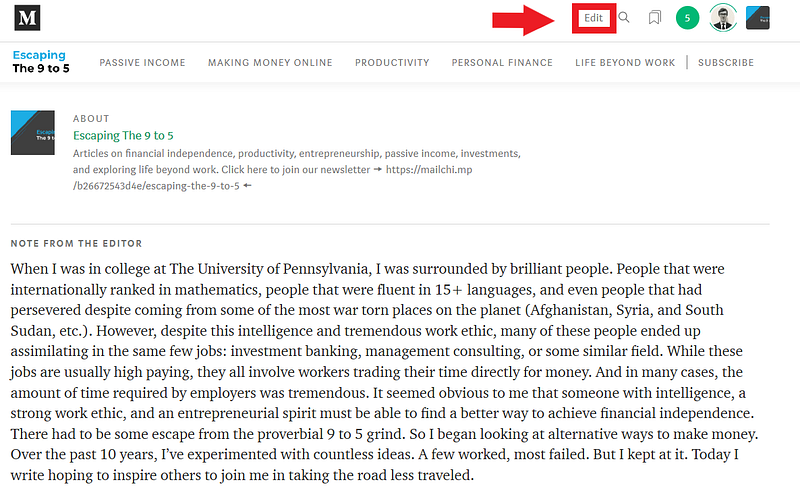
Step 3 — Edit the text that is below the Note From The Editor section.

The GIF below shows all three steps being completed:
Additional Notes About Note From The Editor Section:

  • You may need to add an about tab in the navigation bar of your publication to help readers see this message more frequently.
  • By default, the Note From The Editor section contains the Medium publication description.
  • Note From The Editor section is limited to 1200 characters.

Casey Botticello

Thanks for reading this article! Leave a comment below if you have any questions. Be sure to sign up for the Blogging Guide newsletter, to get the latest tips, tricks, and news about writing on Medium and to join our Facebook group, Medium Writing, to share your latest Medium posts and connect with other writers.

If you liked this article, here are some other articles you may enjoy:

Casey Botticello is a partner at Black Edge Consulting. Black Edge Consulting is a strategic communications firm, specializing in online reputation management, digital marketing, and crisis management. Prior to founding Black Edge Consulting, he worked for BGR Group, a bipartisan lobbying and strategic communications firm.

Casey is the founder of the Cryptocurrency Alliance, a Super PAC dedicated to cryptocurrency and blockchain advocacy. He is a graduate of The University of Pennsylvania, where he received his B.A. in Urban Studies.

You can connect with him on LinkedIn, Twitter, Facebook, or by visiting his website, Blogging Guide.

Medium
Notes
Editor
Medium Publications
Writing Tips
Recommended from ReadMedium