avatarGrace Mary Power

Free AI web copilot to create summaries, insights and extended knowledge, download it at here

3766

Abstract

caption></figcaption></figure><p id="8336">The screenshot above shows 25 <b>views </b>of my story “<a href="https://blog.usejournal.com/5-reasons-why-i-like-playing-big-fish-games-562a7f76bd96">5 Reasons Why I Like Playing Big Fish Games</a>” on 22nd February, which was 20% of the total number of daily views (125) of all of my Medium stories viewed that day. 😃</p><p id="be89">On Feb 24th there were 22 views, then on Feb 25th there were 9 views, and on Feb 26th there were 5 views (which I could see by hovering my mouse over each of the darker green areas over these 3 days).</p><p id="6a11">You can see 3,226 views is highlighted in black. Clicking on the greyed out 1,038 reads will “toggle” on the Stats for the number of <b>Reads </b>for that one story!</p><figure id="0eeb"><img src="https://cdn-images-1.readmedium.com/v2/resize:fit:800/1*XiqcFY14xxA7-_9T33Sxvw.jpeg"><figcaption></figcaption></figure><p id="90ae">There were 15 reads of that story from a total of 51 reads of all of my Stories, on Feb 23, being 29% of the total number of reads that day.</p><p id="69c0">On Feb 24th there were 17 reads, then on Feb 25th there were 2 reads, and on Feb 26th there were 2 reads (which I could see by hovering my mouse over each of the darker green areas over these 3 days).</p><p id="3c7d">So you can quickly see the most impact on viewing and reading was on the day of publication of this story in <a href="https://blog.usejournal.com/">Noteworthy the Journal Blog</a> and the day after.</p><p id="e646">Now, a caveat (warning or proviso) here is that no, you can’t easily find out the Story Titles of any other stories that were viewed or read on any one day.</p><figure id="dae0"><img src="https://cdn-images-1.readmedium.com/v2/resize:fit:800/1*w1ZQsNJqrQoByU46ZoIBCA.jpeg"><figcaption></figcaption></figure><p id="6c04">When you hover your mouse over the top part of the bar for February 22 the <b>total number of reads</b> will appear, however there’s no easy way of telling given we know that 15 of the 51 reads were for “5 Reasons Why I Like Playing Big Fish Games” what the remaining 36 reads were of.</p><p id="a64c">You can try going to “Show in chart” for stories published close to a particular publication date to see if there were any Reads and Views for those, but there may not be, especially if you have been writing on Medium for a while and your “older” stories are still being read.</p><p id="b705">Other ways to see exactly which stories are being viewed and read on any particular day are to laboriously look at and take snapshots of the Stats pages of every single one of your published stories every day or for particular days of interest, and / or to look at your Medium Partner Program stats.</p><figure id="b71d"><img src="https://cdn-images-1.readmedium.com/v2/resize:fit:800/1*n3XBUa2AHysSpI-2lY22rw.jpeg"><figcaption>A snapshot of some of my stories that I received payment for under the MPP as at 6 March 2020</figcaption></figure><p id="61d5">Remember that the payments are cumulative or over the month so far, starting of course from the first of the month, in this case, from 1st March ( or March 1 if you use the American standard ).</p><p id="0cff">When I click on View stats for Medium RSS Feeds, I can see, to my pleasant surprise, that this article had reads every day of January and February 2020.</p><p id="8b11">If you must know <b><i>which stories</i></b> were viewed and read, all I can suggest is that you have a close look each day or maybe each week at the stories that you get paid for, keeping in mind that the total number of Views and Reads for a day or more days must be distributed over the stories that are listed as receiving payment on a day or days.</p><p id="ca34">(A day’s worth will of course on

Options

ly show up for the 1st of the payment month, the next day; and after that payments will be cumulative, so remember that Story titles listed after the first day of the month may have been read on or since day one of the month.)</p><p id="4dea">That is why it is probably a good idea for you to copy the list of all your stories that receive payment for a month, at the beginning of the next calendar month, and then look at the monthly paid stories over the long range past, to see if there are any Stories that have consistently been earners for you. ⭐️</p><p id="e2e2"><i>Now, onto the “meat and potatoes” or “the spinach that Popeye likes” if you are vegetarian.</i></p><p id="3875">I have written a marathon long article previously all about what the Medium Enhanced Stats add-on / extension does, and if you scroll to about half-way down the article, you will see a Section headed “Gimme the Medium Enhanced Stats Extension now”, haha.</p><p id="7572">That section is where I walk you through installing the MES, well, actually I just say you can hit some various buttons and “bob’s your Uncle” meaning that somehow you can install and run the MES, if you follow the prompts from the MES download page.</p><p id="3d7d">Here’s a link to the Article which will show visuals and text about the MES add-on, which I love.</p><div id="27ed" class="link-block"> <a href="https://readmedium.com/medium-statistics-medium-enhanced-stats-extension-for-chrome-1357baaf20ac"> <div> <div> <h2>Medium Statistics: Medium Enhanced Stats Extension for Chrome</h2> <div><h3>See your Claps and Grab your Stats using the Chrome Browser</h3></div> <div><p>medium.com</p></div> </div> <div> <div style="background-image: url(https://miro.readmedium.com/v2/resize:fit:320/1*4XRWJl3a1KAsc9f60HkGHQ.jpeg)"></div> </div> </div> </a> </div><p id="c26d">I did wonder if since Medium changed how it calculates payments, such that since November 2019 they are no longer based upon Claps; if the MES would be used by many Medium writers, including me.</p><p id="4177">My conclusion is that I am a data girl, as opposed to Madonna, being a “material girl” and as I love data, reading, writing, statistics, and information, I will continue using the Medium Enhanced Stats add-on to find my Story Titles and Dates of Views and Reads of particular stories…and to amuse me!</p><p id="6092">Enjoy your week! You may be interested or not, in the following story. 😃</p><div id="1fbf" class="link-block"> <a href="https://readmedium.com/calculating-medium-partner-program-earnings-d3f40b0e86e6"> <div> <div> <h2>Calculating Medium Partner Program Earnings</h2> <div><h3>A change from Monday 28 October 2019</h3></div> <div><p>medium.com</p></div> </div> <div> <div style="background-image: url(https://miro.readmedium.com/v2/resize:fit:320/1*lRxjGgbnZExIixbg_sdFkQ.jpeg)"></div> </div> </div> </a> </div><p id="0369">📝 Save this story in <a href="https://usejournal.com/?utm_source=medium.com&amp;utm_medium=noteworthy_blog&amp;utm_campaign=tech&amp;utm_content=guest_post_read_later_text">Journal</a>.</p><p id="f32b">👩‍💻 Wake up every Sunday morning to the week’s most noteworthy stories in Tech waiting in your inbox. <a href="https://usejournal.com/newsletter/noteworthy-in-tech/?utm_source=medium.com&amp;utm_medium=noteworthy_blog&amp;utm_campaign=tech&amp;utm_content=guest_post_text">Read the Noteworthy in Tech newsletter</a>.</p></article></body>

Medium Stats

Medium Enhanced Stats Graph: find your Story Titles and Dates of Views

Use the Medium Enhanced Stats extension or add-on
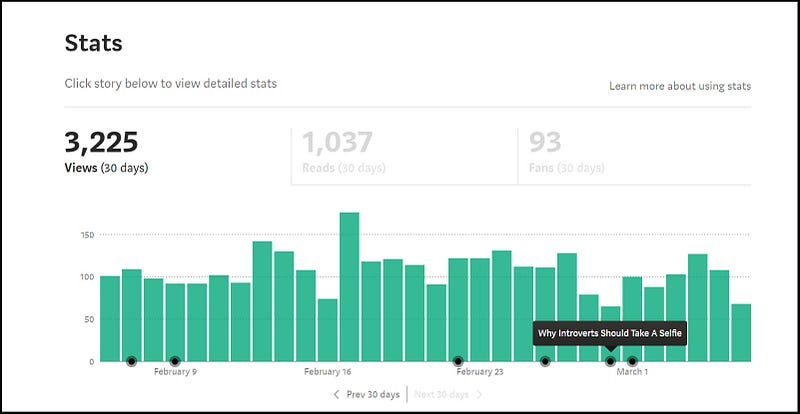
Screenshot from the Stats page showing title of a story that I published on 29 February

Did you know that there is an “add-on” or extension that works with the Chrome browser, that will not only show the number of Claps for each of your published Medium stories, but that nicely plots or places a black dot or circle on each date of publication of all of your published Stories?

If you hover your mouse over any of the black dots or circles, the Story Title will appear!

I find this function really good for seeing at a glance how many Stories or articles I have published over a week or a month or longer time period. Just click on the Prev 30 days to go back to look at data for stories published in the past.

You might want to take a screenshot of the graph with the circles at the end of each month, to capture the count of the number of published stories over 30 days.

You can easily and conveniently remind yourself what your Story Titles are by using this function while online, looking at your Stats section of Medium.

Looking at the stats on the number of stories you’ve published over certain time periods, at the rate of publishing them (like 3 a week or 10 a month), and the types of Stories or story content you have published (gleaned from your Story Titles) in tandem with how much you have earned each month, may help you with planning your further writing on Medium.

To use this plotting function you will need to download and run Google Chrome on your computer, if you aren’t using it already as a browser to view internet content.

Just “google” or search for “Chrome browser download” and you will find it.

Then you will need to add-on or download and install a piece of software, created by Tomas Trajan which is the “Medium Enhanced Stats” add-on for Chrome. 😃

Another function that the Medium Enhanced Stats (MES) provides, that I love, is the “Show in chart” function.
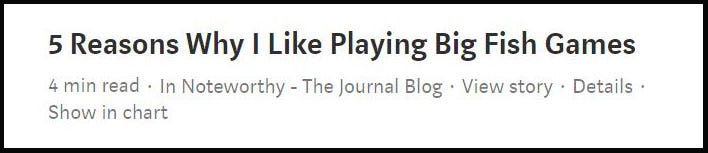
With the MES installed, you will see “Show in chart” for each Story that you have published. 😺

When you click on “Show in chart”, it will show you the stats for the Story in question, in the bar chart, in terms of number of views OR reads, with the percentage of the daily total.
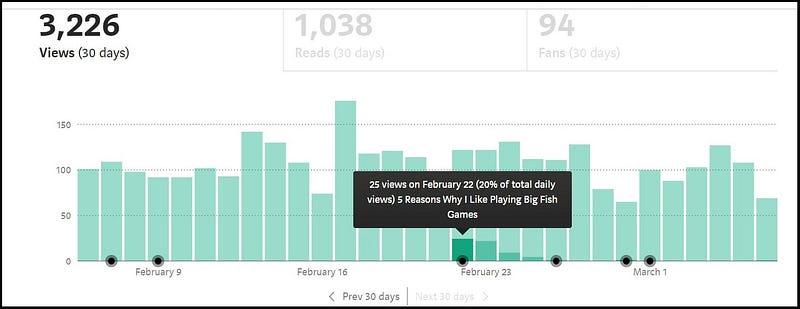
The screenshot above shows 25 views of my story “5 Reasons Why I Like Playing Big Fish Games” on 22nd February, which was 20% of the total number of daily views (125) of all of my Medium stories viewed that day. 😃

On Feb 24th there were 22 views, then on Feb 25th there were 9 views, and on Feb 26th there were 5 views (which I could see by hovering my mouse over each of the darker green areas over these 3 days).

You can see 3,226 views is highlighted in black. Clicking on the greyed out 1,038 reads will “toggle” on the Stats for the number of Reads for that one story!
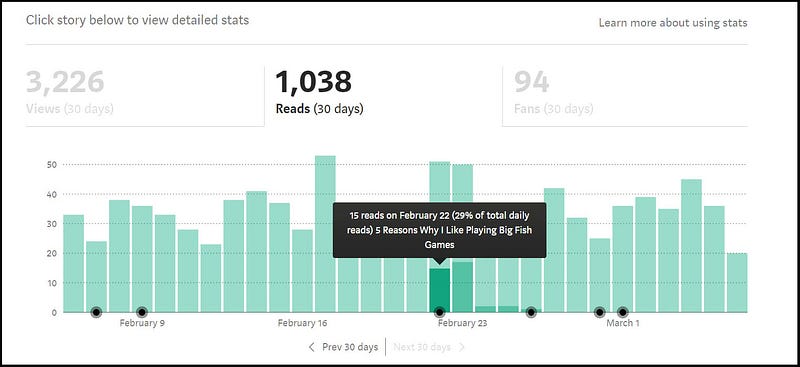
There were 15 reads of that story from a total of 51 reads of all of my Stories, on Feb 23, being 29% of the total number of reads that day.

On Feb 24th there were 17 reads, then on Feb 25th there were 2 reads, and on Feb 26th there were 2 reads (which I could see by hovering my mouse over each of the darker green areas over these 3 days).

So you can quickly see the most impact on viewing and reading was on the day of publication of this story in Noteworthy the Journal Blog and the day after.

Now, a caveat (warning or proviso) here is that no, you can’t easily find out the Story Titles of any other stories that were viewed or read on any one day.
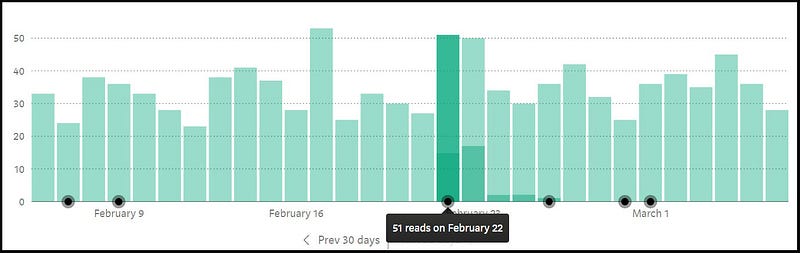
When you hover your mouse over the top part of the bar for February 22 the total number of reads will appear, however there’s no easy way of telling given we know that 15 of the 51 reads were for “5 Reasons Why I Like Playing Big Fish Games” what the remaining 36 reads were of.

You can try going to “Show in chart” for stories published close to a particular publication date to see if there were any Reads and Views for those, but there may not be, especially if you have been writing on Medium for a while and your “older” stories are still being read.

Other ways to see exactly which stories are being viewed and read on any particular day are to laboriously look at and take snapshots of the Stats pages of every single one of your published stories every day or for particular days of interest, and / or to look at your Medium Partner Program stats.
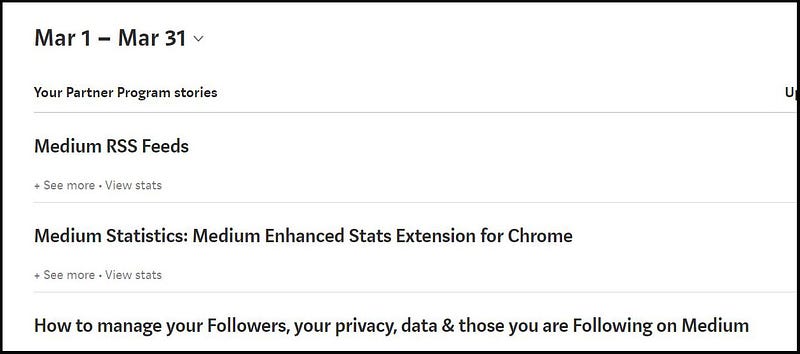
A snapshot of some of my stories that I received payment for under the MPP as at 6 March 2020

Remember that the payments are cumulative or over the month so far, starting of course from the first of the month, in this case, from 1st March ( or March 1 if you use the American standard ).

When I click on View stats for Medium RSS Feeds, I can see, to my pleasant surprise, that this article had reads every day of January and February 2020.

If you must know which stories were viewed and read, all I can suggest is that you have a close look each day or maybe each week at the stories that you get paid for, keeping in mind that the total number of Views and Reads for a day or more days must be distributed over the stories that are listed as receiving payment on a day or days.

(A day’s worth will of course only show up for the 1st of the payment month, the next day; and after that payments will be cumulative, so remember that Story titles listed after the first day of the month may have been read on or since day one of the month.)

That is why it is probably a good idea for you to copy the list of all your stories that receive payment for a month, at the beginning of the next calendar month, and then look at the monthly paid stories over the long range past, to see if there are any Stories that have consistently been earners for you. ⭐️

Now, onto the “meat and potatoes” or “the spinach that Popeye likes” if you are vegetarian.

I have written a marathon long article previously all about what the Medium Enhanced Stats add-on / extension does, and if you scroll to about half-way down the article, you will see a Section headed “Gimme the Medium Enhanced Stats Extension now”, haha.

That section is where I walk you through installing the MES, well, actually I just say you can hit some various buttons and “bob’s your Uncle” meaning that somehow you can install and run the MES, if you follow the prompts from the MES download page.

Here’s a link to the Article which will show visuals and text about the MES add-on, which I love.

I did wonder if since Medium changed how it calculates payments, such that since November 2019 they are no longer based upon Claps; if the MES would be used by many Medium writers, including me.

My conclusion is that I am a data girl, as opposed to Madonna, being a “material girl” and as I love data, reading, writing, statistics, and information, I will continue using the Medium Enhanced Stats add-on to find my Story Titles and Dates of Views and Reads of particular stories…and to amuse me!

Enjoy your week! You may be interested or not, in the following story. 😃

📝 Save this story in Journal.

👩‍💻 Wake up every Sunday morning to the week’s most noteworthy stories in Tech waiting in your inbox. Read the Noteworthy in Tech newsletter.

Médium
Statistics
Productivity
Work
Medium Statistics
Recommended from ReadMedium