
Medium — A Definitive Guide For Beginners
Medium Definitive Guide is dedicated to helping beginners, who are planning to start a blogging career with no or zero investment.

Are you planning to start blogging yet don’t know where to go? How to start? Don’t you have a budget to invest and still want to leverage the online opportunity to reach potential people to share your voice?
Friends, if you are planning to start blogging then you should have the following:
- Budget to buy domain and hosting.
- Knowledge to install WordPress.
- Know how to choose a niche/ category.
- Knowledge of seo optimization and many more.
If you don’t have the above-mentioned knowledge and monetary support, does that mean that you can’t start blogging? If you are thinking so then you are absolutely wrong.
Medium is a very unique platform which is a combination of blogging and Twitter. It is among the top social platforms that offer writers to express their words with large audiences throughout the web.
Before considering Medium as your blogging partner, here are the top reasons why you should consider:

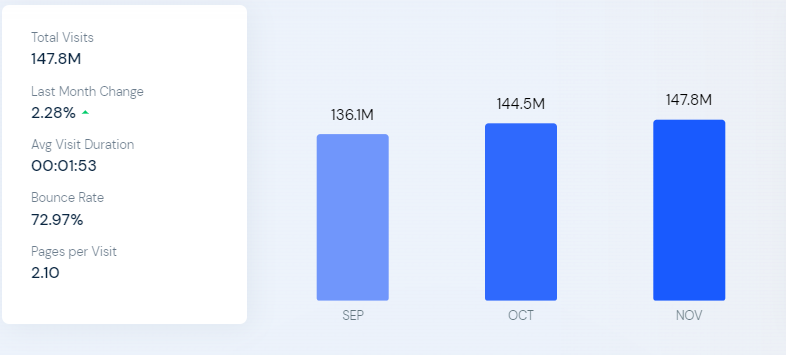
#1 As per similarweb the platform receives 147.8M visits monthly.
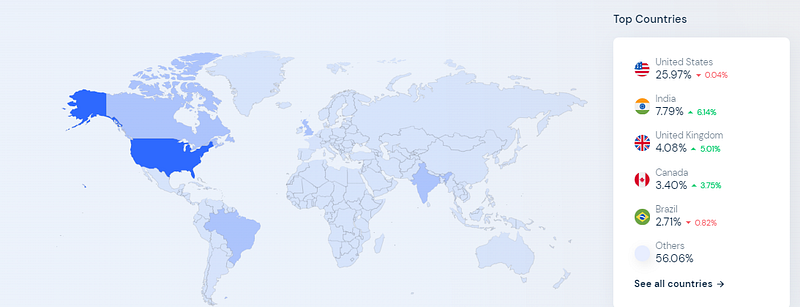
#2 25.97% of users visiting the platform are from the United States followed by India with 7.79%, the United Kingdom with 4.08% and so on.
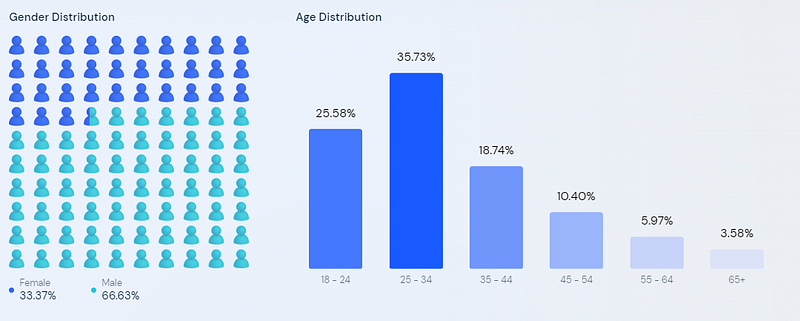
#3 Majority audience visiting the platform is between the age of 18–35 yrs.
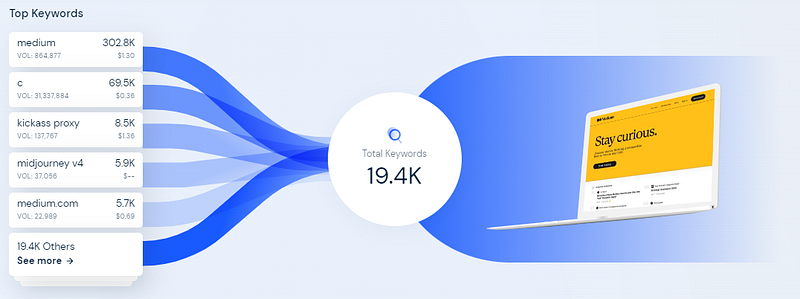
#4 The platform ranks with 19.4K keywords on top of Google searches.
#5 Make money from the Medium Partner Program

The above screenshot is taken from my dashboard sharing the income of the month Nov 2022.
If you are convinced to go with medium.com as your best blogging partner and if you are not then you can get the cheapest hosting services from Hostinger with a free domain. Once you are done, then you can install WordPress through the help of YouTube tutorials and you are all set to go.
As mentioned, we are going for a free platform for making money online from blogging. So, let's talk about medium.com.
A Comprehensive Beginner’s Guide to Medium
What is Medium.com?
A unique and perfect blend of blogging and Twitter makes the platform Medium. A cool new place for storytellers to share their voices among millions of visitors per month.
The platform offers authors to share their content individually or even in publications. I am sure you are confused now and definitely you have a question about Publication. What exactly is Publication?
Chill guys! I am here to help you and answer all your queries.
Publication — Unlike Facebook groups, Publication is a sort of group where people can share their stories and get noticed by a specific category of audience.
Some of the most famous publications for beginners are:
- Illumination
- Write To Inspire
- Inkwater Atlas
- New Writers Welcome
- Synergy
- Illumination Mirror
- Welcome to Writing
How does Medium work for readers?
Unlike blogging platforms, you have various rights and opportunities to explore:
- Express yourself — Express yourself with words and share with millions of readers visiting the website monthly.
- Publication — Post content on your individual profile or curate that in publication for more exposure.
- Follow Unfollow — Unlike Twitter, you can also follow and unfollow authors whom you like or dislike.
- Read Stories — If you are subscribed to publication then you can read unlimited stories published there. A free 3 articles read is allowed to medium members. To engage with unlimited content, join the Medium subscription model which cost only $5 a month.
- Comment — Share your token of love by giving claps and leaving comments.
- Tags — The platform allows you to tag your content to various categories to make your content more searchable. You can find the top 70+ Medium tags and 140+ Medium tags to use on Medium stories to go viral.
- Request Notes — You have the right to invite collaborators to audit your content before hitting publish. The function is similar to that of Google drive.
Now the question is “How to write a story that goes viral on Medium”. You might get the answer here.
Analytics & Insight
For writers, Medium helps you with a 30 days snapshot of all your post with views, reads and recommendations. You can break this down as:
- Views — How many people viewed your content?
- Reads — How many people viewed and read your content?
- Ratio — How many people read your story?
- Recommendation — How many people recommended your content?
Shortcut Keywords on Medium:
a. Ctrl + Alt + 0 = Starts a new paragraph
b. Ctrl + Alt + 1 = Turns a text block into / starts a new Heading 1 style
c. Ctrl + Alt + 2 = Turns a text block into / starts a new Heading 2 style
d. Ctrl + Alt + 5 = Turns a text block into / starts a new BlockQuote style
e. Ctrl + Alt + 6 = Turns a text block into / starts a new Code style
f. Ctrl + Alt + 3 = Turns a text block into / starts a new Heading 3 style
g. Ctrl + b = Turns selected text into bold style
h. Ctrl + k = Adds a new link
i. Ctrl + i = Turns selected text into italic style
j. Ctrl + e = Centers text. This shortcut presumably replaces the now removed Pullquote shortcut, minus the font size (Ctrl + 7, no longer working)
k. Ctrl +: = brings up the shortcut menu with most of the keyboard shortcuts (not all).
How to write Medium headlines?
As we know headline is the only part of the content that helps in driving audiences to your page. The best practices include How to, What to When we should be some of the important keywords to start your sentences and stories.
Bonus Tips:
- Repost your blog or article.
- Promote your affiliate links within stories smartly.
- Link your website or blog with stories.
- Create a publication for your brand.
- Explore visual content.
- Track visitors with UTM parameters.
If you’d like to support me and my writing, please consider becoming a Medium member using my link. For $5 a month, you will have unlimited access to my stories and others, and I’ll earn a small commission too.