
Manipulating Pytorch Datasets
How to work with Dataloaders and Datasets for Deep Learning

The post is the second in a series of guides to build deep learning models with Pytorch. Below, there is the full series:
Part 1: Pytorch Tutorial for Beginners
Part 2: Manipulating Pytorch Datasets (this post)
Part 3: Understand Tensor Dimensions in DL models
Part 4: CNN & Feature visualizations
Part 5: Hyperparameter tuning with Optuna
Part 6: K Fold Cross Validation
Part 7: Convolutional Autoencoder
Part 8: Denoising Autoencoder
Part 9: Variational Autoencoder
The goal of the series is to make Pytorch more intuitive and accessible as possible through examples of implementations. There are many tutorials on the Internet to use Pytorch to build many types of challenging models, but it can also be confusing at the same time because there are always slight differences when you pass from one tutorial to another. In this series, I want to start from the simplest topics to the more advanced ones.
The purpose of this post is to help you in getting familiar with the Pytorch Datasets. Before going deeper with models based on neural networks, you need to understand the general concepts and ideas of two main classes that provide data: Dataset and Dataloader. You are wondering what is difference between the Dataset and the Dataloader. The Dataset is used to store the samples and the corresponding targets. If you already worked with Pandas, it’s very similar to a standard Pandas Dataframe as structure.
Why should we also need the Dataloader? The Dataloader is important to get easy access to the Dataset and split the data into batches, where the batches are the number of samples passed in one iteration to the Machine Learning model. The more the dataset is huge, the more time is needed to train the model. Dividing the dataset into batches provides a way to speed up the training speed of the model.
In this post, I provide an overview to work with these two classes. Later, I show how to perform four common operations to manipulate your dataset:
- Filter class from Pytorch Dataset
- Concatenate Pytorch Datasets
- Convert Pandas Dataframe into Pytorch Dataset
- Random Sampling from Pytorch Dataset
Import libraries and dataset
There are two important libraries you should keep attention at:
torch.utils.datacontains two main classes to store the data:DatasetandDataloadertorchvisionprovides pre-loaded datasets, like MNIST and Fashion MNIST
import torch
from torch.utils.data import Dataset,DataLoader
from torchvision import datasets
from torchvision.transforms import ToTensor
import matplotlib.pyplot as plt
import pandas as pd
import numpy as npLet’s now import the Fashion MNIST [1], a popular dataset that contains Zalando’s article images. Each sample is constituted by an image and the corresponding label that belongs to one of the ten classes.
To check out how many samples the training and test datasets contain, we need the well-known function len:
print(len(train_dataset)) #60000
print(len(test_dataset)) #10000
We can also get access separately to the images and the labels:
train_dataset.data
# tensor([[[0, 0, 0, ..., 0, 0, 0],...[0, 0, 0, ..., 0, 0, 0]]], # dtype=torch.uint8)train_dataset.targets
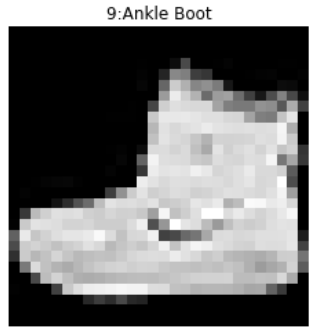
# tensor([9, 0, 0, ..., 3, 0, 5])This output means that the first image corresponds to class 9, the successive two images to class 0 and so on [2]. We can easily verify it by displaying the first image of the training dataset:
Now, we can create a new data loader, based on the training dataset, with a batch size equal 256:
train_loader = DataLoader(dataset=train_dataset, batch_size=256, shuffle=True)We can iterate through the DataLoader using the iter and next functions:
train_features, train_labels = next(iter(train_loader))
print(len(train_labels)) #256
We selected a batch containing 256 images, each one belonging to different classes.
1. Filter class from Pytorch Dataset
Let’s suppose that we only want the images of T-shirts from the training dataset. We’ll need the following lines of code:
We have employed:
np.whereto yield a NumPy array containing the indexes where there are only images of t-shirts in the training dataset.Subsetto select a subset of the dataset, based on the indices passed.
Let’s display some images contained in train_subset:
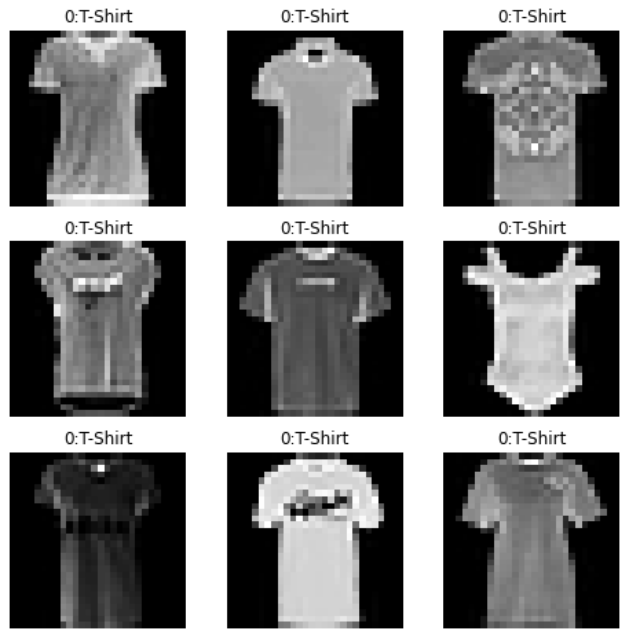
There is a rich variety of t-shirts, don’t you think?
2. Concatenate Pytorch datasets
Let’s merge the training dataset and test dataset into a unique dataset:
The class ConcatDataset takes in a list of multiple datasets and returns a concatenation of these ones. In this way, we obtain a dataset of 7000 samples and a dataloader with 274 batches.
3. Convert Pandas dataframe into pytorch dataset
To train a neural network implemented with Pytorch, we need a Pytorch dataset. The issue is that Pytorch doesn’t provide all the datasets of the world and we need to make some efforts to convert the dataframes into the Pytorch tensor. For example, let’s import the Boston housing prices dataset from sklearn [3]:
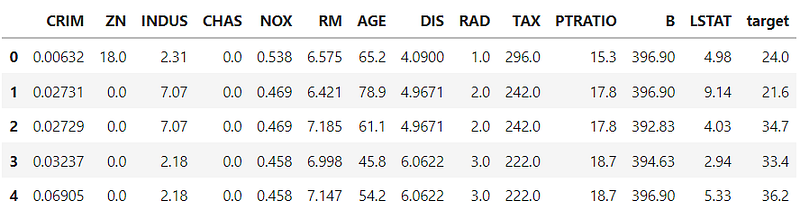
Let’s iterate again through the dataloader to visualize what we have obtained:
train_features, train_labels = next(iter(train_loader))
print(train_features)
print(train_labels)
We can notice that a batch containing two samples is printed. Unluckily TensorDataset can have some limitations when the dataset’s structure is more complex.
An alternative and more efficient method is to create a class, which inherits the attributes and the methods of the class Dataset. Especially, we can override the methods of the class Dataset, depending on the dataset you are working with:
__getitem__method is used for accessing ith sample of the dataset.__len__method returns the dataset’s number of sample.
Then, we create a new object belonging to the class Boston_Dataset , which will be passed to the data_loader function:
b_data = Boston_Dataset(df=df)
b_loader = DataLoader(dataset=b_data,batch_size=4,shuffle=True)
for x,y in b_loader:
print(y)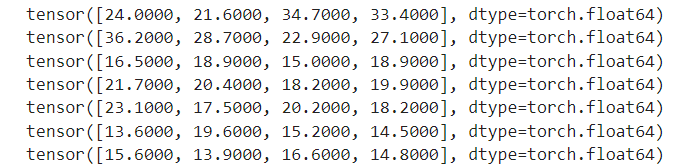
4. Random Sampling from the Dataset
Sometimes it can happen that you want to select random samples from the dataset. Theoretically, there is already the class RandomSampler that does it automatically, but it works only with replacement. For this reason, I will need the following trick to select the samples WITHOUT replacement.
If you instead prefer to draw the sample WITH replacement, you can directly use the class RandomSampler
Final thoughts:
That’s it! Now you should be able to work with Pytorch datasets with less effort. It can be confusing at first, but after some practice, you’ll manage all the difficulties. Thanks for reading. Have a nice day!
References:
[1]https://pytorch.org/vision/main/generated/torchvision.datasets.FashionMNIST.html
[2] https://pytorch.org/tutorials/beginner/basics/data_tutorial.html
[3] https://scikit-learn.org/stable/modules/generated/sklearn.datasets.load_boston.html
Did you like my article? Become a member and get unlimited access to new data science posts every day! It’s an indirect way of supporting me without any extra cost to you. If you are already a member, subscribe to get emails whenever I publish new data science and python guides!


