
Manipulating JavaScript Strings Using Template Literals
An introduction to JavaScript template literals, tagged template literals, and well-known tag libraries

Have you ever written code similar to this?
The console message shows 1 + 2 + 3 = 6.
The output is beautiful, but the code to compose it is ugly and confusing (line 4). Let’s beautify it by using template literals and tagged template literals.
Template Literals
According to MDN Web Docs:
“Template literals are string literals allowing embedded expressions.
…
Template literals are enclosed by backtick (
`) characters instead of double or single quotes.”
Template literals allow placeholders (${ }). Any expression in ${expression} will be evaluated and interpolated into the string.
For example, the previous code can be implemented as:
Line 4 looks more concise in the template literal format.
Template literals can be nested. Within a backticked template, you can insert inner backticks inside a placeholder (${ }).
Here is an example:
Line 4 is a pure template literal.
Line 5 is a nested template literal.
Both lines 4 and 5 output 20.
Newline characters inserted in the source code are part of template literals. It is easier to use template literals to compose multi-line strings.
The following code will keep the shape on the console output:
Tagged Template Literals
Tagged template literals are a more advanced form of template literals. They have a function that precedes template literals. This function is called the tag function, which can perform operations on template literals and return the manipulated strings (or anything).
The first argument of a tag function contains an array of string values derived from its template literal. The remaining arguments are the expressions in the template literal.
We create the following function, myTag, to return the arguments:
The following is the usage with plain text:
The first argument is an array: [“This is a plain string”, raw: array(1)].
The following is the usage with a multi-line template literal:
The first argument is an array: [“↵ — — — — — — -↵ | | |↵ | * | * |↵ | | |↵ — — — — — — -↵”, raw: Array(1)]. The result preserves the enter keys.
When the template literal is a string with interpolations, the first argument is an array derived from values of non-placeholder strings. The rest of the arguments are placeholder expressions. In other words, the second argument is the first interpolation value (1), the third argument is the second interpolation value (2), and so on.
The first argument is [“The first value is “, “, and the second value is “, “.”, raw: Array(3)], the second argument is 1, and the third argument is 2.
Here are more examples of tagged template literals and their console messages:
So far, we have used function declarations to define tag functions. Tag functions can also be function expressions. Regardless of it is a function declaration or function expression, a tag function can use other template literals and tagged template literals in its function body.
You may have noticed that there is a raw property in the first parameter of the tag function. It is similar to String.raw, which keeps the raw strings as they were entered without processing escape sequences.
Line 5 shows that the new line starts a new line.
Line 9 shows the newline character is preserved with String.raw.
Line 12 uses String.raw, and it has no impact on the result.
Lines 17-38 are the tabValues function, which is used by line 39. This example shows how to use the tag function’s parameters and the raw value.
Well-Known Tag Libraries
Tagged template literals have been available since ES2015. It has been applied to a number of libraries.
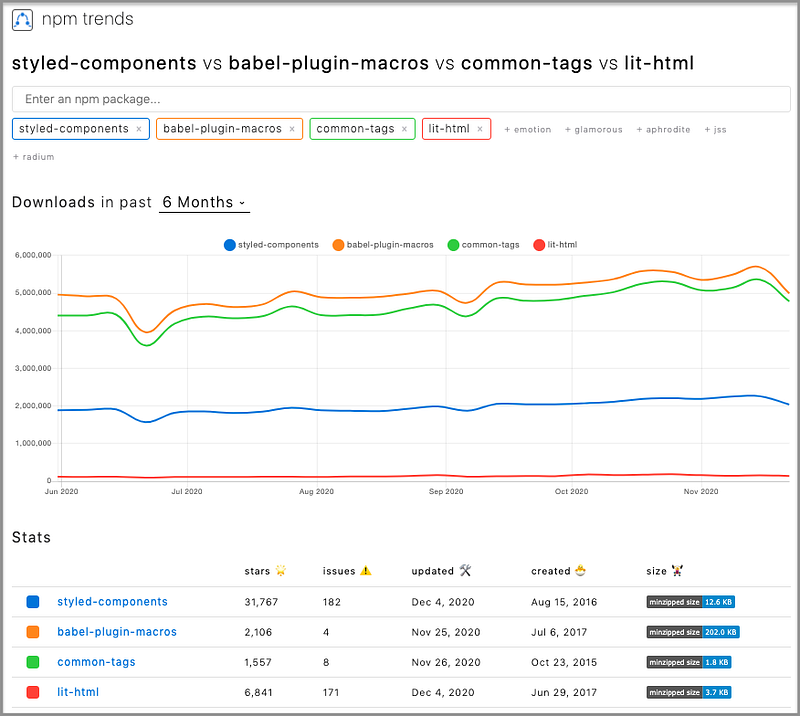
styled-components adopts tagged template literals to enable writing CSS in JavaScript. It is described in detail in another article.babel-plugin-macros uses tagged template literals to enable compile-time processing.common-tags are template literal tags for dealing with strings in ES2015+.lit-html is an efficient, expressive, extensible HTML templating library for JavaScript.
common-tags examples
common-tags exports a bunch of useful pre-cooked template tags for consumption. Create React App includes the package by default. These tag functions can be very handy.
The html tag properly indents arrays as well as newline characters in string substitutions.
Line 9 prints out the resulting string without the html tag. The result is in the comment (lines 10-13). There is an extra newline on line 10, and the alignment on line 12 is not correct.
Line 20 prints out the resulting string with the html tag. The result is in the comment (lines 21-25). The alignment and indentation are correct.
The safeHtml tag is similar to html. In addition, it does safe HTML escaping for strings coming from substitutions.
Line 15 uses the safeHtml tag. The safe HTML escaping is applied to dynamically generated code (lines 22-24) that is displayed in the comment (lines 21-25).
The oneLineCommaListsAnd tag inlines an array substitution as a comma-separated list, the last of which is preceded by the word and. In addition, the string is rendered out onto a single line.
Line 4 uses the oneLineCommaListsAnd tag. It is very effective to combine strings if they don’t concern i18n.
There are many interesting tags in common-tags. It is fun to try them out.
common-tags also exposes an interface for creating your own template tags. It is even more fun to play around with the creation of template tags.
lit-html examples
lit-html provides the functionality to write HTML templates using template literals. It provides two main exports:
html: A template tag used to produce aTemplateResult.render(): A function that renders aTemplateResultto a DOM container.
It needs to install the package:
npm i lit-htmlWe can see the new package in dependencies of package.json:
"devDependencies": {
  "lit-html": "^1.3.0"
}
Here is an example of rendering a greeting message to the element that has the ID test.
Conclusion
In this article, we explored JavaScript template literals, tagged template literals, and well-known tag libraries. They are effective to manipulate strings and more.
However, there are also reasons to consider avoiding tagged template literals. It is said that writing code in strings is against the fundamental law of software engineering because it brings challenges for type checking, linting, formatting, i18n, optimization, compilation, etc.
Well, everything has pros and cons. You make your own choice.
Thanks for reading. I hope this was helpful. You can see my other Medium publications here.


