avatarSuragch

Free AI web copilot to create summaries, insights and extended knowledge, download it at here

2967

Abstract

BAction</span> <span class="hljs-keyword">func</span> <span class="hljs-title function_">showAlertButtonTapped</span>(<span class="hljs-keyword"></span> <span class="hljs-params">sender</span>: <span class="hljs-type">UIButton</span>) {</pre></div><div id="53c6"><pre> <span class="hljs-comment">// create the alert</span> let alert = <span class="hljs-title function_ invoke__">UIAlertController</span>(<span class="hljs-attr">title</span>: <span class="hljs-string">"UIAlertController"</span>, <span class="hljs-attr">message</span>: <span class="hljs-string">"Would you like to continue learning how to use iOS alerts?"</span>, <span class="hljs-attr">preferredStyle</span>: UIAlertController.Style.alert)</pre></div><div id="71b7"><pre> <span class="hljs-comment">// add the actions (buttons)</span> <span class="hljs-selector-tag">alert</span><span class="hljs-selector-class">.addAction</span>(<span class="hljs-built_in">UIAlertAction</span>(<span class="hljs-attribute">title</span>: <span class="hljs-string">"Continue"</span>, <span class="hljs-attribute">style</span>: UIAlertAction.Style.default, <span class="hljs-attribute">handler</span>: nil)) <span class="hljs-selector-tag">alert</span><span class="hljs-selector-class">.addAction</span>(<span class="hljs-built_in">UIAlertAction</span>(<span class="hljs-attribute">title</span>: <span class="hljs-string">"Cancel"</span>, <span class="hljs-attribute">style</span>: UIAlertAction.Style.cancel, <span class="hljs-attribute">handler</span>: nil))</pre></div><div id="1c50"><pre> <span class="hljs-comment">// show the alert</span> <span class="hljs-built_in">self</span>.<span class="hljs-title function_ invoke__">present</span>(alert, <span class="hljs-attr">animated</span>: <span class="hljs-literal">true</span>, <span class="hljs-attr">completion</span>: nil) } }</pre></div><h1 id="729b">Three Buttons</h1><figure id="455f"><img src="https://cdn-images-1.readmedium.com/v2/resize:fit:800/0*_bhMp2CzeLLKPDdO.png"><figcaption></figcaption></figure><div id="b218"><pre><span class="hljs-keyword">class</span> <span class="hljs-symbol">ViewController: <span class="hljs-symbol">UIViewController</span></span> {</pre></div><div id="9ccd"><pre> <span class="hljs-keyword">@IBAction</span> <span class="hljs-keyword">func</span> <span class="hljs-title function_">showAlertButtonTapped</span>(<span class="hljs-keyword"></span> <span class="hljs-params">sender</span>: <span class="hljs-type">UIButton</span>) {</pre></div><div id="4870"><pre> <span class="hljs-comment">// create the alert</span> let alert = <span class="hljs-title function_ invoke__">UIAlertController</span>(<span class="hljs-attr">title</span>: <span class="hljs-string">"Notice"</span>, <span class="hljs-attr">message</span>: <span class="hljs-string">"Lauching this missile will destroy the entire universe. Is this what you intended to do?"</span>,

Options

<span class="hljs-attr">preferredStyle</span>: UIAlertController.Style.alert)</pre></div><div id="001e"><pre> <span class="hljs-comment">// add the actions (buttons)</span> <span class="hljs-selector-tag">alert</span><span class="hljs-selector-class">.addAction</span>(<span class="hljs-built_in">UIAlertAction</span>(<span class="hljs-attribute">title</span>: <span class="hljs-string">"Remind Me Tomorrow"</span>, <span class="hljs-attribute">style</span>: UIAlertAction.Style.default, <span class="hljs-attribute">handler</span>: nil)) <span class="hljs-selector-tag">alert</span><span class="hljs-selector-class">.addAction</span>(<span class="hljs-built_in">UIAlertAction</span>(<span class="hljs-attribute">title</span>: <span class="hljs-string">"Cancel"</span>, <span class="hljs-attribute">style</span>: UIAlertActio.nStyle.cancel, <span class="hljs-attribute">handler</span>: nil)) <span class="hljs-selector-tag">alert</span><span class="hljs-selector-class">.addAction</span>(<span class="hljs-built_in">UIAlertAction</span>(<span class="hljs-attribute">title</span>: <span class="hljs-string">"Launch the Missile"</span>, <span class="hljs-attribute">style</span>: UIAlertAction.Style.destructive, <span class="hljs-attribute">handler</span>: nil))</pre></div><div id="e086"><pre> <span class="hljs-comment">// show the alert</span> <span class="hljs-built_in">self</span>.<span class="hljs-title function_ invoke__">present</span>(alert, <span class="hljs-attr">animated</span>: <span class="hljs-literal">true</span>, <span class="hljs-attr">completion</span>: nil) } }</pre></div><h1 id="116e">Handling Button Taps</h1><p id="a165">The <code>handler</code> was <code>nil</code> in the above examples. You can replace <code>nil</code> with a <a href="https://developer.apple.com/library/ios/documentation/Swift/Conceptual/Swift_Programming_Language/Closures.html">closure</a> to do something when the user taps a button. For example:</p><div id="5425"><pre><span class="hljs-selector-tag">alert</span><span class="hljs-selector-class">.addAction</span>(<span class="hljs-built_in">UIAlertAction</span>(<span class="hljs-attribute">title</span>: <span class="hljs-string">"Launch the Missile"</span>, <span class="hljs-attribute">style</span>: UIAlertAction.Style.destructive, <span class="hljs-attribute">handler</span>: { action in</pre></div><div id="defe"><pre> <span class="hljs-regexp">//</span> <span class="hljs-keyword">do</span> something like... self.launchMissile()</pre></div><div id="f0b3"><pre>}))</pre></div><h1 id="a1f8">Notes</h1><ul><li>Multiple buttons do not necessarily need to use different <code>UIAlertAction.Style</code> types. They could all be <code>.default</code>.</li><li>For more than three buttons consider using an Action Sheet. The setup is very similar. <a href="https://stackoverflow.com/a/32991999/3681880">Here is an example.</a></li></ul></article></body>

Making an Alert in iOS

This is a repost of an answer I wrote on Stack Overflow.

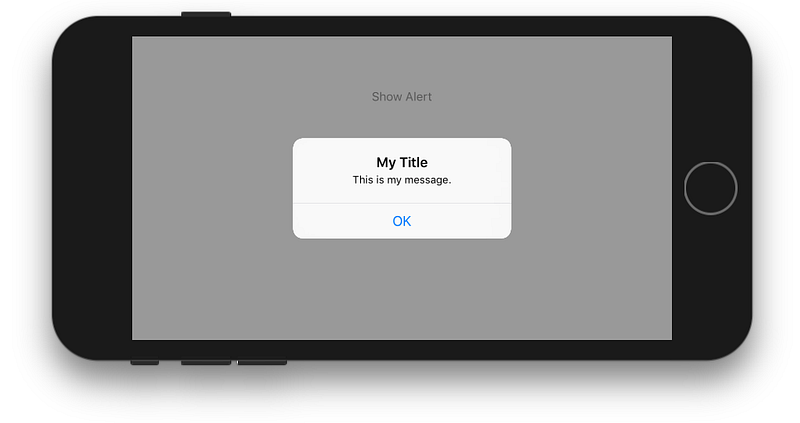
Alerts are useful for displaying a message to a user and optionally giving them a chance to respond to it. In iOS you us a UIAlertController to do that. This is the equivalent of an Android AlertDialog (or a Flutter AlertDialog). The examples below show a basic setup for one, two, and three buttons.

One Button
class ViewController: UIViewController {
    @IBAction func showAlertButtonTapped(_ sender: UIButton) {
        // create the alert
        let alert = UIAlertController(title: "My Title", message: "This is my message.", preferredStyle: UIAlertController.Style.alert)
        // add an action (button)
        alert.addAction(UIAlertAction(title: "OK", style: UIAlertAction.Style.default, handler: nil))
        // show the alert
        self.present(alert, animated: true, completion: nil)
    }
}

Two Buttons

class ViewController: UIViewController {
    @IBAction func showAlertButtonTapped(_ sender: UIButton) {
        // create the alert
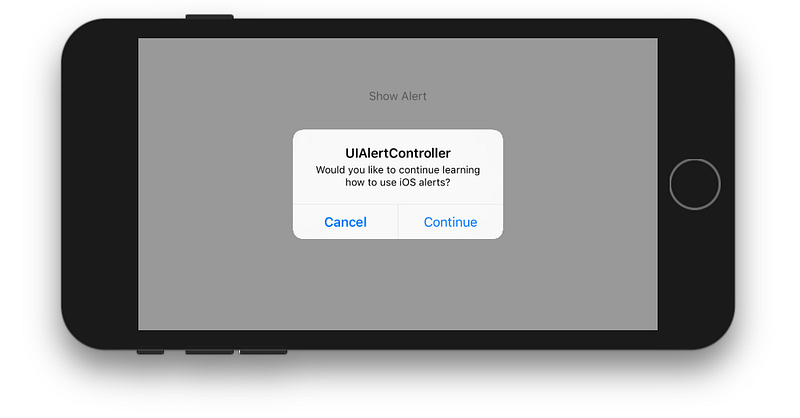
        let alert = UIAlertController(title: "UIAlertController", message: "Would you like to continue learning how to use iOS alerts?", preferredStyle: UIAlertController.Style.alert)
        // add the actions (buttons)
        alert.addAction(UIAlertAction(title: "Continue", style: UIAlertAction.Style.default, handler: nil))
        alert.addAction(UIAlertAction(title: "Cancel", style: UIAlertAction.Style.cancel, handler: nil))
        // show the alert
        self.present(alert, animated: true, completion: nil)
    }
}

Three Buttons

class ViewController: UIViewController {
    @IBAction func showAlertButtonTapped(_ sender: UIButton) {
        // create the alert
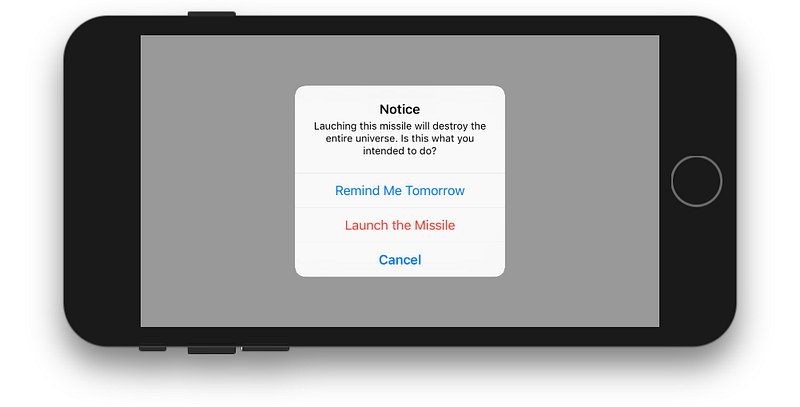
        let alert = UIAlertController(title: "Notice", message: "Lauching this missile will destroy the entire universe. Is this what you intended to do?", preferredStyle: UIAlertController.Style.alert)
        // add the actions (buttons)
        alert.addAction(UIAlertAction(title: "Remind Me Tomorrow", style: UIAlertAction.Style.default, handler: nil))
        alert.addAction(UIAlertAction(title: "Cancel", style: UIAlertActio.nStyle.cancel, handler: nil))
        alert.addAction(UIAlertAction(title: "Launch the Missile", style: UIAlertAction.Style.destructive, handler: nil))
        // show the alert
        self.present(alert, animated: true, completion: nil)
    }
}

Handling Button Taps

The handler was nil in the above examples. You can replace nil with a closure to do something when the user taps a button. For example:

alert.addAction(UIAlertAction(title: "Launch the Missile", style: UIAlertAction.Style.destructive, handler: { action in
    // do something like...
    self.launchMissile()
}))

Notes

  • Multiple buttons do not necessarily need to use different UIAlertAction.Style types. They could all be .default.
  • For more than three buttons consider using an Action Sheet. The setup is very similar. Here is an example.
iOS
Alerts
Recommended from ReadMedium