
Demo
Let’s Develop an E-Commerce Application From Scratch Using Java and Spring
We are going to build an e-commerce application using Java, Spring backend, build web UI in Vue.js. Stay tuned!

Every E-Commerce platform needs users, so in the first tutorial, we are going to create and display user-profiles. We are going to first build the backend APIs using Java and Spring boot, then we are going to create UI in Vue.js.
If you are not a member of medium yet, you can be member by using this link just for $5/month and support me to create great content
Educative course
You can buy this course in Educative. If you have educative unlimited subscription, you can also access this course.
Youtube Tutorial Playlist
Frontend
Backend
Live Demo
You can test the API at the following swagger link. You can create and list all the users.
Frontend
https://github.com/webtutsplus/ecommerce-vuejs
https://simplecoding-ecommerce.netlify.app/
Backend
https://github.com/webtutsplus/ecommerce-backend
https://limitless-lake-55070.herokuapp.com/swagger-ui.html
This article was originally published at Simple Coding
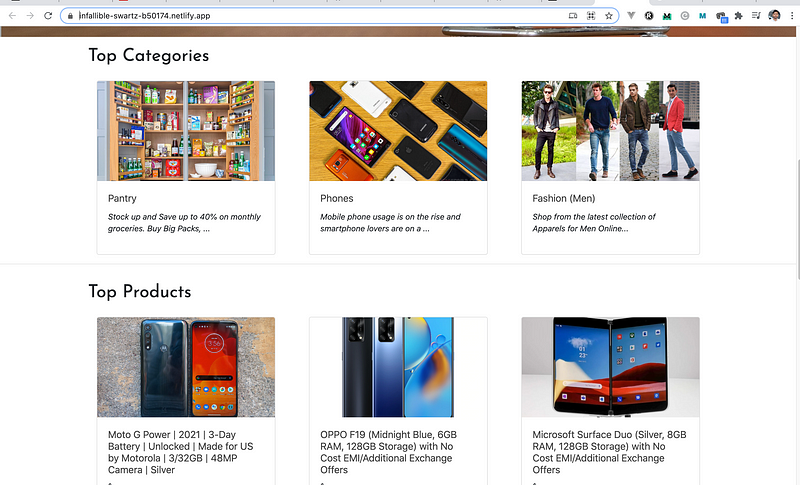
Read All the Articles in this E-commerce Series
- Let’s Develop an E-Commerce Application From Scratch Using Java and Spring
- Let’s Link Products With Category for our E-Commerce App
- Let’s Develop File Upload Service From Scratch Using Java and Spring Boot
- Let’s Create a WishList for Our e-Commerce App using Java and Spring Boot
- Let’s Create a Frontend for our eCommerce App with Vue.js
- Let’s Add Products for our eCommerce App Using JavaScript
- Android UI for E-Commerce User Profile Backend
- Lets’ Add a Shopping Cart feature for our E-Commerce App using Vuejs
- Let’s add a Checkout feature in Spring Boot for our Ecommerce App
- Let’s add a Checkout Feature in Vue.js for Our Ecommerce App
- Let’s add the Place Order feature to our E-commerce app using Spring Boot
Youtube Discussion
Follow me on Twitter to get notified about the newest blog posts and interesting algorithm and web development stuff
Checkout our website and our youtube channel to know more about Full stack development.
About Spring Framework
The Spring Framework is a major open-source Java/J2EE application development framework for more productive application development. It is the most popular Java framework with a 30% share of usage. The Spring Framework features enable efficient development from simple Web to complex enterprise applications.
The main concepts that the Spring Framework depends on are:
- Dependency Injection (DI)
- Aspect-Oriented Programming (AOP)
- Java Persistence API (JPA)
Prerequisites
- Knowledge in Core Java
- Coding skills
- Knowledge in Servlet and JSP
- Java Development Kit (JDK)
- IntelliJ IDEA Ultimate — open-source (recommended)
- MySQL database — You can get it here!
- A good browser (Chrome — recommended)
Make sure you have all the listed prerequisites software installed and have basic knowledge of the request-response cycle as well as web containers. What more? Let’s jump into the tutorial!
Project Setup
- Open Spring Tool Suite application
- Navigate to your workspace
- Click File -> New -> Project ->Spring Starter Project
- Give the essential data in the opened dialog box
Dependencies
The dependencies I am adding to this project are given below. You can either add them during the creation of the project itself or later search for them in the Maven repository and add the tags of the required version in the pom.xml file.
- Spring boot starter web
- Tomcat embed jasper
- Spring boot starter Data JPA
- Mysql connector java
- Spring boot starter test
- Swagger 2
- Swagger UI
Project Hierarchy
The hierarchy is the important thing to notice in the Spring boot Application design structure. My project hierarchy is as below.
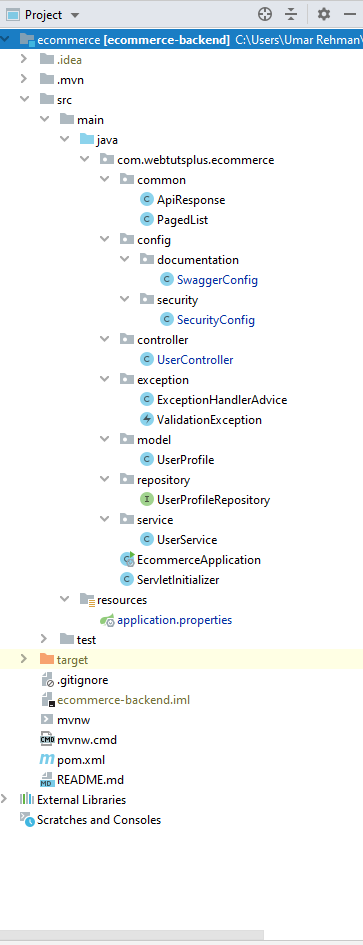
Overview of our Backend Application
In this Spring Application following are important packages that you have to know before starting.
This is the spring architecture. The outside world calls the REST Apis, which interacts with the Service. Service calls the repository. The repository interacts with the database. We follow this pattern to make the codebase maintainable, instead of having spaghetti code which can be a nightmare in long term.
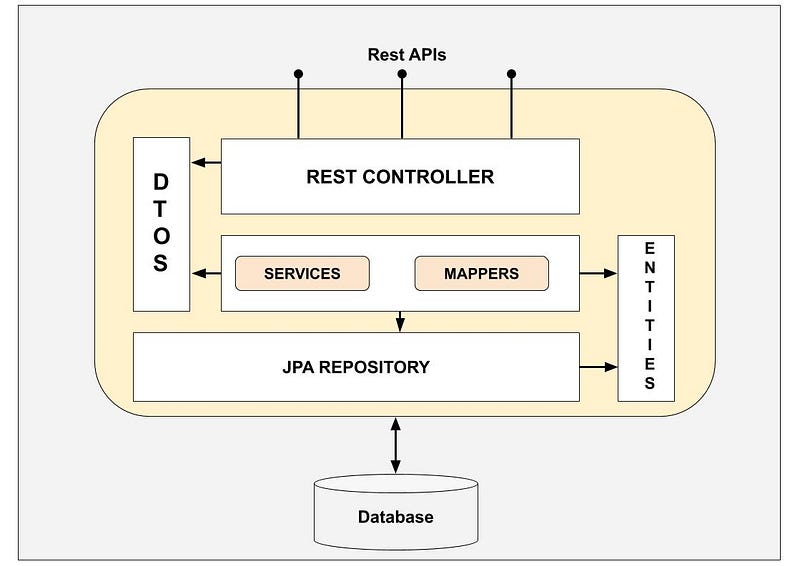
Let's look at first Rest controllers
Controller
The User Controller class provides two HTTP methods GET and Post. The Get mapping function return a complete list of Users and the Post Mapping Function saves the new user profile in the Database.
As we can see UserControllers has a reference to UserService.
Service
As we know the spring boot framework follows the POJO model and every controller has its own service interface, which provides the methods / Operation that is performed in the application.
In service class, there are only two methods list Profiles and add Profiles, which provide information. We can extend or add more functionality in the future according to requirements.
Service calls UserProfileRepository which interacts with the database in form of models. Let's have a look at UserModel.
Model
The model class is a mirror of the user_profile table in the database in form of a java object. All attributes can be accessed through this class. You can also update the attribute values using the model class, which also makes changes in a database table.
Result
After this save the file and run the application. Now you tomcat is listening on 8182 port.
What is Swagger
Swagger is an Interface Description Language for describing RESTful APIs expressed using JSON. Swagger is used together with a set of open-source software tools to design, build, document, and use RESTful web services. Swagger includes automated documentation, code generation, and test-case generation.
You can access the application documentation by entering the following URL in your browser.
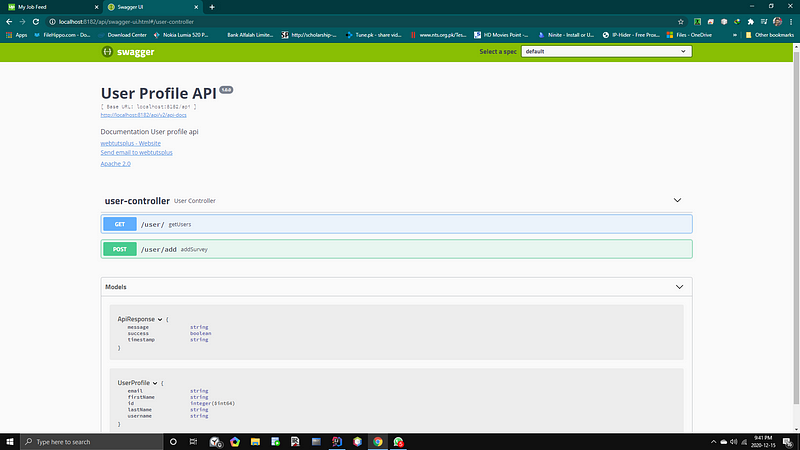
You can edit your API information in documentation.swaggerConfig.java class and getApiInfo() method.
Swagger is very useful on the developer side because it provides very user-friendly API information as well as provide a way to test the API.
Now we are going to look at some extra classes, which play an important role too.
common
In this package, there are two classes
· ApiResponse.java
This class provides the status of API response. It has three methods is Success (), get Message (), get Timestamp (). The get Timestamp () method returns the Current Date and Time in String format.
PagedList.java
This class contains all the information about the pages in the List data structure and provides total Pages, total Elements, has Next, has Previous attributes getter and setter.
Config
In these packages, there are two sub-packages named documentation and security.
· Documentation
In this Package, it provides information about the product and API.
Product API method provides information about the product and gets the Api Info method return information about Api like contact, Title, version, license.
Security
This class is very important for applications because it provides the basic security for the whole application over HTTP or HTTPS protocol. It also implements configuration for users that which users have access to which pages or repositories.
Exception
This class is used in case of exception in any stage of the application. It has two classes Exception handler and validation exception, which throws when there is a validation error in the application at run time.
ExceptionHandlerAdvice.java
ValidationException.java
Hope you had a great session with us! Follow us for such great and awesome tutorials!
Follow the next tutorial where we will build UI in both Vue.js and Android.


