avatarsaurs saurav

Free AI web copilot to create summaries, insights and extended knowledge, download it at here

2321

Abstract

ssauravjs/e4055ce3352cc62b1cd45bab0bd51d41.js" allowfullscreen="" frameborder="0" height="undefined" width="undefined"> </div> </div> </figure></iframe></div></div></figure><p id="215b"><i>saurssaurav/fusesingleuser:latest</i> is image derived from <i>jupyterhub/singleuse</i>r. You can use <i>jupyterhub/singleuser:latest</i> instead.</p><ol><li>Use Below command to create configmap named <b>jupyterhub-config </b>of jupyterhub_config.py</li></ol><div id="deac"><pre>kubectl <span class="hljs-built_in">create</span> configmap jupyterhub-<span class="hljs-built_in">config</span> <span class="hljs-comment">--from-file=./jupyterhub_config.py</span></pre></div><p id="0c81">To check if configmap exits</p><div id="d759"><pre>kubectl <span class="hljs-built_in">get</span> configmap -o yaml</pre></div><p id="6fe0">2. Now time to deploy deployment.yaml.</p><div id="eb02"><pre>kubectl <span class="hljs-built_in">apply</span> -f deployment.yaml</pre></div><figure id="0429"><img src="https://cdn-images-1.readmedium.com/v2/resize:fit:800/1*A_J3DcLOPVTjBlmRJJ_Ihw.jpeg"><figcaption></figcaption></figure><p id="eacb">3. Get a External-IP of the jupyterhub service</p><div id="0999"><pre>kubectl <span class="hljs-built_in">get</span> service</pre></div><figure id="0a60"><img src="https://cdn-images-1.readmedium.com/v2/resize:fit:800/1*yV_hfD6LxGHq5aFAoffv9g.jpeg"><figcaption></figcaption></figure><p id="e3a0">It may take sometime for external IP to generate.</p><h1 id="405c">Part Three : Set a callback-URL and redeploy</h1><p id="67da">1. Open deployment.yaml and add the external ip of cluster into <b>OAUTH_CALLBACK_URL’s </b>key as show below.</p><div id="6b35"><pre><span class="hljs-symbol"> name:</span> OAUTH_CALLBACK_URL <span class="hljs-symbol"> value:</span> <span class="hljs-string">"http://<external-ip>:8000/hub/oauth_callback"</span></pre></div><p id="c757">2. Add <a href="http://35.192.13.208:8000/hub/oauth_callback"><b>http://<external-ip>:8000/hub/oauth_callback</external-ip></b></a><b> </b>in auth0 Allowed Callback URLs</p><figure id="97b7"><img src="https://cdn-images-1.readmedium.com/v2/resize:fit:800/1*twfzLzzN1diKr4E5DnZVlg.jpeg"><figcaption></figcaption></figure><p id="0fad">3. Re-deploy a deployment.yaml file</p><div

Options

id="7683"><pre>kubectl <span class="hljs-keyword">delete</span> deployment jupyterhub</pre></div><div id="de19"><pre>kubectl apply -f deployment<span class="hljs-selector-class">.yaml</span>
<span class="hljs-comment">// you must be in deployment.yaml file destination</span></pre></div><figure id="369f"><img src="https://cdn-images-1.readmedium.com/v2/resize:fit:800/1*RfBlY08TAoQQPnXMgR6_UA.jpeg"><figcaption></figcaption></figure><p id="77c1">4. Browse a <b>http://<external-ip>:8000</b> into Browser. Jupyterhub should be up and running.</p><figure id="a0fe"><img src="https://cdn-images-1.readmedium.com/v2/resize:fit:800/1*JjOjtDi331qBKUGNmitB4A.jpeg"><figcaption></figcaption></figure><h1 id="780f">Conclusion</h1><p id="60a0">If you have any queries, mail me in <b>[email protected].</b></p><div id="e95d" class="link-block"> <a href="https://readmedium.com/jupyterhub-with-nginx-ingress-on-google-kubernetes-engine-b4017aefa7e4"> <div> <div> <h2>JupyterHub with Nginx Ingress on Google Kubernetes Engine.</h2> <div><h3>After going through many blogs, documents and videos, I still had a hard time for setting up Nginx Ingress on Google…</h3></div> <div><p>medium.com</p></div> </div> <div> <div style="background-image: url(https://miro.readmedium.com/v2/resize:fit:320/1*U_lhp_O8a5hWcM6-PHTNbw.jpeg)"></div> </div> </div> </a> </div><h1 id="bf5e">Setup a Jupyterhub in GCP with OAuth and HTTPS using Helm.</h1><div id="71b3" class="link-block"> <a href="https://readmedium.com/jupyterhub-in-googles-cloud-platform-with-github-oauth-and-https-using-helm-part-i-749b2f093d4a"> <div> <div> <h2>JupyterHub in Google’s Cloud Platform with Github OAuth and HTTPS using Helm. Part I</h2> <div><h3>Simple guide to setup a JupyterHub using Helm.</h3></div> <div><p>medium.com</p></div> </div> <div> <div style="background-image: url(https://miro.readmedium.com/v2/resize:fit:320/1*v_lw4i5gkuYTe0u4YQ5KRA.jpeg)"></div> </div> </div> </a> </div></article></body>

JupyterHub In Kubernetes Cluster (google cloud + auth0) In 10 minutes.

without Helm

Before starting, you guys need :

  1. Account on Google Could Platform with kubernetes cluster already created and kubectl must be of that cluster.
  2. Account in AuthO with application.
  3. Knowledge on Jupyterhub, Kubernetes and Auth0.

In this tutorial i will be only focusing in deployment part. So, i will not be going in depth in anything in particular. This Tutorial is divided into three part. If you go along the parts and its steps, you will be up and runing jupyterhub in kubernetes cluster.

Note : persistent disk is not applied in this project. So, file are not saved after pods are deleted.

Too Lazy to go through this guide

Click here for boiler plate.

Part One : Create a App’s deployment file

  1. Create a JupyterHub’s app deployment file.

saurssaurav/jupyterhub-kube-oauth:latest is a jupyterhub image containing kubespwaner and oauthenticator. It's docker file is inside jupyterhub_oauth_kubespawner_docker_file folder in boiler plate provided above.

2. Put a value of following keys in deployment.yaml file.

AUTH0_SUBDOMAIN, OAUTH_CLIENT_ID, OAUTH_CLIENT_SECRET.

But leave a OAUTH_CALLBACK_URL for now as we don’t have endpoint of cluster yet.

Part Two : Create configmap of jupyterhub_config.py and deploy the app

saurssaurav/fusesingleuser:latest is image derived from jupyterhub/singleuser. You can use jupyterhub/singleuser:latest instead.

  1. Use Below command to create configmap named jupyterhub-config of jupyterhub_config.py
kubectl create configmap jupyterhub-config --from-file=./jupyterhub_config.py

To check if configmap exits

kubectl get configmap -o yaml

2. Now time to deploy deployment.yaml.

kubectl apply -f deployment.yaml

3. Get a External-IP of the jupyterhub service

kubectl get service

It may take sometime for external IP to generate.

Part Three : Set a callback-URL and redeploy

1. Open deployment.yaml and add the external ip of cluster into OAUTH_CALLBACK_URL’s key as show below.

              name: OAUTH_CALLBACK_URL
              value: "http://<external-ip>:8000/hub/oauth_callback"

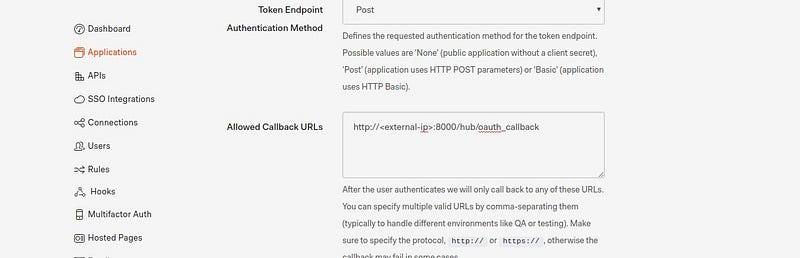
2. Add http://:8000/hub/oauth_callback in auth0 Allowed Callback URLs

3. Re-deploy a deployment.yaml file

kubectl delete deployment jupyterhub
kubectl apply -f deployment.yaml  
// you must be in deployment.yaml file destination

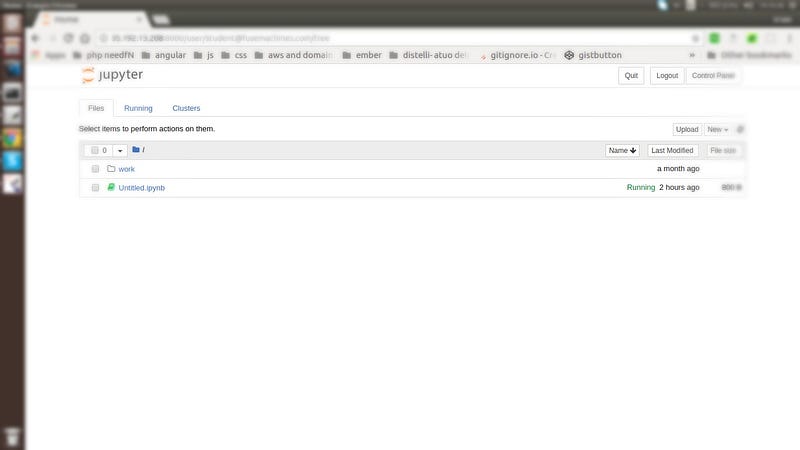
4. Browse a http://<external-ip>:8000 into Browser. Jupyterhub should be up and running.
Conclusion

If you have any queries, mail me in [email protected].

Setup a Jupyterhub in GCP with OAuth and HTTPS using Helm.

Kubernetes
Jupyterhub
Jupyter Notebook
Jupyter
Google Cloud Platform
Recommended from ReadMedium