
JupyterHub with Nginx Ingress on Google Kubernetes Engine.

After going through many blogs, documents and videos, I still had a hard time for setting up Nginx Ingress on Google Kubernetes and run a simple Hello-world app on it. Some were outdated, others were error prone. But After many attempts i finally managed to not only run a simple app but a jupyterhub with nginx-ingress-controller forwarding outside traffic to jupyterhub’s service.
This guide will help to run jupyterhub with nginx ingress on Google kubernetes Engine. As usual before starting, you guys need the following things.
- GCP project with Kubernetes Engine API enabled.
- Helm (only use for deploying nginx-controller)
- Basic Knowledge in Ingress, Kubernetes, Jupyterhub.
This guide is divided into four parts. If you go through all parts and its steps, you will be up and running jupyterhub app on kubernetes.
Part One : Install a Helm And Tiller with RBAC
Long story short, Helm is like apt/yum/homebrew for Kubernetes. We will only use helm for deploying nginx-controller.
- You can install the
helmclient in Cloud Shell using the following commands:
curl -o get_helm.sh https://raw.githubusercontent.com/kubernetes/helm/master/scripts/getchmod +x get_helm.sh./get_helm.sh
The script above fetches the latest version of helm client and installs it locally in Cloud Shell.
-------------------------------OUTPUT-------------------------------Downloading https://kubernetes-helm.storage.googleapis.com/helm-v2.8.1-linux-amd64.tar.gzPreparing to install into /usr/local/bin
helm installed into /usr/local/bin/helm
Run 'helm init' to configure helm.
2. Run the following command to install the server side tiller to the Kubernetes cluster with RBAC enabled.
kubectl create serviceaccount --namespace kube-system tillerkubectl create clusterrolebinding tiller-cluster-rule --clusterrole=cluster-admin --serviceaccount=kube-system:tiller
helm init --service-account tiller --upgradehelm init3. You can also confirm that tiller is running by checking for the tiller_deploy Deployment in the kube-systemnamespace. Run the following command:
kubectl get deployments -n kube-systemPart Two : Deploy JupyterHub App
- Create a jupyterhub-app.yaml
2. Deploy the jupyterhub app
Kubectl create -f jupyterhub-app.yaml3. Expose the jupyterhub Deployment as a Service by running the following command:
kubectl expose deployment jupyterhubPart Three : Deploying the NGINX Ingress Controller via Helm
- Deploy an NGINX controller Deployment and Service by running the following command:
helm install --name nginx-ingress stable/nginx-ingressIn the output you should see,
==> v1/Service
NAME                           TYPE          CLUSTER-IP    EXTERNAL-IP  PORT(S)                     AGE
nginx-ingress-controller       LoadBalancer  10.7.248.226  pending      80:30890/TCP,443:30258/TCP  1s
nginx-ingress-default-backend  ClusterIP     10.7.245.75   none         80/TCP                      1s
2. Confirm that the nginx-ingress-controllerService has been deployed and that you have an external IP address associated with the service. Run the following command:
kubectl get service nginx-ingress-controllerNotice the second service, nginx-ingress-default-backend. The default backend is a Service which handles all URL paths and hosts the NGINX controller doesn’t understand (i.e., all the requests that are not mapped with an Ingress Resource). The default backend exposes two URLs:
/healthzthat returns 200/that returns 404
Part Four : Configure Ingress Resource to use NGINX Ingress Controller
- Create ingress-resource.yaml
The kind: Ingress dictates it is an Ingress Resource object. This Ingress Resource defines an inbound L7 rule for path / to service jupyterhub on port 8000.
2. Deploy Ingress Resource.
kubectl apply -f ingress-resource.yaml=== output ===NAME HOSTS ADDRESS PORTS AGE
ingress-resource * 80 `3. Get a External IP nginx-ingress-controller
kubectl get service nginx-ingress-controller
You should now be able to access the jupyterhub application by going to the EXTERNAL-IP address of the NGINX ingress controller.
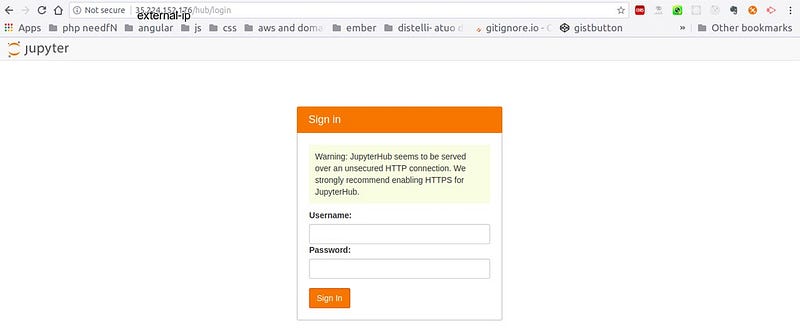
Of course, this app will not spawn any jupyter-notebook as no config is been attached. For that others guides can help.
Conclusion
I am newbie to Kubernetes
Maybe In next blog i will be handling HTTP and HTTPS on Ingress.


