avatarNikhil Vemu

Free AI web copilot to create summaries, insights and extended knowledge, download it at here

7748

Abstract

c22">You can now swipe down to check for an update. Just like you refresh your Insta feed.</p><h1 id="158d">#8. Slide to Type feature for Arabic keyboard ⌨️</h1><p id="a070">If you type in Arabic, you’ve got a massive news. The Arabic keyboard’s now trained enough to support Slide to Type.</p><figure id="4640"><img src="https://cdn-images-1.readmedium.com/v2/resize:fit:800/1*IHEKbu4oQBus-864g4SMbg.jpeg"><figcaption>Image by the author</figcaption></figure><p id="84e3">So instead of typing letter-by-letter, you can now slide your fingers over the keyboard to make words.</p><p id="3222"><i>(Toggle ‘Slide to Type’ in Settings ⚙️ < General ⚙️ < Keyboard</i>.)</p><div id="0bf2" class="link-block"> <a href="https://readmedium.com/10-essential-iphone-typing-hacks-every-user-should-know-f6f97e6857c"> <div> <div> <h2>10 Essential iPhone Typing Hacks Every User Should Know</h2> <div><h3>Unleash the superpowers of that little keyboard</h3></div> <div><p>medium.com</p></div> </div> <div> <div style="background-image: url(https://miro.readmedium.com/v2/resize:fit:320/0*QpFbsfLUDU5gMcR-)"></div> </div> </div> </a> </div><h1 id="0b0b">• Changes to Apple Music 🎵</h1><h1 id="8428">#9. Crossfade Musics 🔀</h1><p id="e1e5">This was announced in WWDC and was already delivered with <a href="https://readmedium.com/ios-17-released-10-amazing-features-you-need-to-know-584a3219fc53">iOS 17 Dev Beta 1</a>. However, when I toggled this on in Settings ⚙️ < Music 🎵 < Crossfade, my iPhone crashed.</p><p id="be22">Anyways, it’s now live with Dev Beta 2.</p><p id="4a8f">So when you toggle Crossfade on, you get to choose the no. of secs you wanna crossfade songs.</p><figure id="a4e0"><img src="https://cdn-images-1.readmedium.com/v2/resize:fit:800/1*jlVow0vtl-XMNIycuzOD7A.jpeg"><figcaption>Image by the author</figcaption></figure><p id="1563">I chose 7, so while I’m listening to music, the next song will start playing with gradually increasing volume 7 seconds before the current song ends, whose volume gradually decreases.</p><p id="66c7">This will ensure a smooth transition between consecutive songs — so you won’t see abrupt changes.</p><div id="6b37" class="link-block"> <a href="https://readmedium.com/7-lesser-known-apple-music-tricks-youll-want-to-keep-using-11fe5e616b71"> <div> <div> <h2>7 Lesser-Known Apple Music Tricks You’ll Want To Keep Using</h2> <div><h3>It’s time to get more groovy</h3></div> <div><p>medium.com</p></div> </div> <div> <div style="background-image: url(https://miro.readmedium.com/v2/resize:fit:320/0*STXmZYCoI4TLDFnK)"></div> </div> </div> </a> </div><h1 id="0665">#10. New Music widgets</h1><p id="e6e7">There were already 2 new Music widgets in <a href="https://readmedium.com/ios-17-released-10-amazing-features-you-need-to-know-584a3219fc53">iOS 17 Beta 1</a>, and I’ve mentioned about them in #9 of this article →</p><div id="0a51" class="link-block"> <a href="https://readmedium.com/i-tried-ios-17-here-are-10-incredible-features-apple-didnt-reveal-7aa6b7040e75"> <div> <div> <h2>Here Are 10 Incredible iOS 17 Features Apple Didn’t Reveal</h2> <div><h3>iOS 17’s a large book. And we’ve judged it by its WWDC.</h3></div> <div><p>medium.com</p></div> </div> <div> <div style="background-image: url(https://miro.readmedium.com/v2/resize:fit:320/0*wnWK1HEvsV7va2Eb)"></div> </div> </div> </a> </div><p id="edb6">The widgets are →</p><ol><li><b>Recommendations:</b> Plays Top Picks, New Releases, and other suggestions from Apple Music.</li><li><b>Top Charts:</b> Plays Top Charts based on locations or city of your choice.</li></ol><p id="c20d">There was a large-size widget for both Recommendations and Top Charts categories.</p><p id="5f4a">With Beta 2, we’ve got a new medium-sized widget for <b>Recommendations</b></p><figure id="e49a"><img src="https://cdn-images-1.readmedium.com/v2/resize:fit:800/1*dP4YIoEgSOKcT5ggpEq-Lg.jpeg"><figcaption>Image by the author</figcaption></figure><p id="ae21">and new small and medium-sized widgets for <b>Top Charts</b></p><figure id="7145"><img src="https://cdn-images-1.readmedium.com/v2/resize:fit:800/1*tv9GaYtQZnRw007G81SfpA.jpeg"><figcaption>Image by the author</figcaption></figure><p id="3f61">Best part, they’re interactive. So just click play beside a song, and the song starts playing right away without opening Music app.</p><div id="ec9c" class="link-block"> <a href="https://readmedium.com/7-lesser-known-apple-music-tricks-youll-want-to-keep-using-11fe5e616b71"> <div> <div> <h2>7 Lesser-Known Apple Music Tricks You’ll Want To Keep Using</h2> <div><h3>It’s time to get more groovy</h3></div> <div><p>medium.com</p></div> </div> <div> <div style="background-image: url(https://miro.readmedium.com/v2/resize:fit:320/0*STXmZYCoI4TLDFnK)"></div> </div> </div> </a> </div><h1 id="85dc">• Changes to Widgets</h1><h1 id="213a">#11. Shortcuts Lock Screen widgets now working!</h1><p id="cc05">Lock Screen’s now got Shortcuts widgets, and I’ve never been so happy. <i>I’ve mentioned this first in <b>#5</b> of this article →</i></p><div id="753d" class="link-block"> <a href="https://readmedium.com/i-tried-ios-17-here-are-10-incredible-features-apple-didnt-reveal-7aa6b7040e75"> <div> <div> <h2>Here Are 10 Incredible iOS 17 Features Apple Didn’t Reveal</h2> <div><h3>iOS 17’s a large book. And we’ve judged it by its WWDC.</h3></div> <div><p>medium.com</p></div> </div> <div> <div style="background-image: url(https://miro.readmedium.com/v2/resize:fit:320/0*wnWK1HEvsV7va2Eb)"></div> </div> </div> </a> </div><p id="4a21">You can now set 4 shortcuts (at max) below the time.</p><figure id="c520"><img src="https://cdn-images-1.readmedium.com/v2/resize:fit:800/1*raXZ86ck82pugpeH1VnkWA.jpeg"><figcaption>Image by the author</figcaption></figure><p id="67af">This’d greatly help keep your most-used shortcuts always accessible on the Lock Screen. So you’d trigger them just as you unlock.</p><p id="1950">As of Beta 1, tapping on them didn’t trigger the corresponding shortcuts. Rather, it simply opened Shortcuts app. But with Beta 2, they’re triggering!</p><h2 id="fabd">Evil hack 😈</h2><p id="c49c">Wanna open your favourite apps directly from Lock Screen? Do this.</p><p id="c18f">Create a Shortcut with just one action — open App <code>App_Name</code> .</p><figure id="4eb1"><img src="https://cdn-images-1.readmedium.com/v2/resize:fit:800/1*APyKXYiZsPYDWZLqp00UYQ.jpeg"><figcaption>Image by the author</figcaption></figure><p id="c55c">Now set this widget on the Lock Screen to open Slack (for example) right from there!</p><h1 id="1d43">#12. New transparent Clock widget 🕑</h1><p id="1f2f">We’ve got a transparent style Clock widget named as Clock III.</p><figure id="4ce3"><img src="https://cdn-images-1.readmedium.com/v2/resize:fit:800/1*dRiWSpf8OeP0SFbp8h1Vtg.jpeg"><figcaption>(Left: Normal | Right: Transparent) clock widgets (Image by the author)</figcaption></figure>

Options

<p id="7415">This looks undistracting as it fades with your wallpaper’s colour behind, isn’t it?</p><div id="6080" class="link-block"> <a href="https://nikhilvemu.medium.com/i-bet-you-havent-seen-an-iphone-widget-like-this-it-s-crazy-7f0b1e2e350a"> <div> <div> <h2>The Craziest iPhone Widget You’ll Likely Ever See</h2> <div><h3>I’m flabbergasted!</h3></div> <div><p>nikhilvemu.medium.com</p></div> </div> <div> <div style="background-image: url(https://miro.readmedium.com/v2/resize:fit:320/1*pIeerQFPhUJY3Ph_gqzj8g.jpeg)"></div> </div> </div> </a> </div><h1 id="206f">• Changes to Notifications 🔔</h1><h1 id="2a09">#13. Show Notifications when in StandBy</h1><p id="2d3c">StandBy’s one of the biggest and most unexpected features of iOS 17. <i>I’ve first written about it in <b>#9</b> of this article →</i></p><div id="77c3" class="link-block"> <a href="https://readmedium.com/ios-17-released-10-amazing-features-you-need-to-know-584a3219fc53"> <div> <div> <h2>iOS 17 Released — 10 Amazing Features You NEED To Know!</h2> <div><h3>Your iPhone’s gonna love it</h3></div> <div><p>medium.com</p></div> </div> <div> <div style="background-image: url(https://miro.readmedium.com/v2/resize:fit:320/1*Aa-INev-SK7S7W63ZLXjmw.jpeg)"></div> </div> </div> </a> </div><p id="2733">However, as of Beta 1, we couldn’t receive notifications on our iPhones while it’s on StandBy, which is pretty ridiculous — as far as the feature’s concerned.</p><p id="792a">But with Beta 2, you can choose to show notifications while your iPhone’s on StandBy mode. (Toggle it in Settings ⚙️ &lt; StandBy 🕰️ &lt; Show Notifications).</p><h2 id="bffa">OMG I just love StandBy →</h2><figure id="76f2"><img src="https://cdn-images-1.readmedium.com/v2/resize:fit:800/1*[email protected]"><figcaption>Credit: <a href="https://nr.apple.com/DH0a5U6GY8">Apple Newsroom</a></figcaption></figure><h1 id="0709">#14. Deliver Critical Alerts messages immediately ❗️</h1><p id="64b3">iOS 17 brings a new toggle for Messages Notification settings → ‘⚠️ Critical Alerts’.</p><figure id="e996"><img src="https://cdn-images-1.readmedium.com/v2/resize:fit:800/1*ZhnAFxqk5Pro3siPcXbYTw.jpeg"><figcaption>Image by the author</figcaption></figure><p id="e097">If you toggle it on, Critical Alerts (like extreme weather alerts by govt.) will be delivered immediately, irrespective of your silent switch position or focus mode.</p><h1 id="1c5a">• Changes to Messages 💬</h1><h1 id="7489">#15. iOS 16.5.1 gets stickable stickers on iMessage</h1><p id="544d">Off topic, I’m not referring to iOS 17 now.</p><p id="e6e1">iOS 16.5.1 gets an iOS 17 Messages feature — Stickable Stickers (I named it so).</p><p id="2d1c">So, instead of simply sending a sticker as a reply to someone’s message, you can drag &amp; drop the sticker over a the message to stick it on it.</p><h2 id="a96f">Demo</h2><figure id="c3c2"><img src="https://cdn-images-1.readmedium.com/v2/resize:fit:800/1*3qFad7-u7aRBqN0QnSI97g.gif"><figcaption>Gif by the author</figcaption></figure><p id="1e23">This will help create less clutter in your Messages, and allow for a more human experience.</p><h2 id="6470">Notes:</h2><ul><li>While sticking, use your other finger to rotate the sticker, if you want.</li><li>Once you stick, there’s no way you can remove it.</li></ul><h1 id="ea2e">#16. Change the app via which Siri sends message</h1><p id="d42c">If you’re on iOS 16 now, try saying, “Hey Siri! Send a message to <code>insert_name</code> ”.</p><p id="a1d9">Are you seeing this?</p><figure id="b44b"><img src="https://cdn-images-1.readmedium.com/v2/resize:fit:800/1*16de09Fg62gcEjxWgWeMmg.jpeg"><figcaption>Image by the author</figcaption></figure><p id="4c84">See, it could only message the other person via Messages, but not via WhatsApp, Telegram, or Gmail — unless mentioned explicitly.</p><p id="75b7">However, from iOS 17, you could change the messaging app by tapping on the app’s icon at the top →</p><figure id="c31e"><img src="https://cdn-images-1.readmedium.com/v2/resize:fit:800/1*X10IaR6gJ-5dhcWXlG64oA.jpeg"><figcaption>Image by the author</figcaption></figure><p id="0944">Also, if Siri’s unable to find the contact in the selected app, it says: “Unable to find <code>contact_name</code> in <code>app_name</code> .”</p><div id="cf7d" class="link-block"> <a href="https://readmedium.com/10-absolutely-useful-siri-tricks-you-probably-havent-tried-yet-312772cfb99"> <div> <div> <h2>10 Absolutely Useful Siri Tricks You Probably Haven’t Tried Yet</h2> <div><h3>These simple tricks might save you hours a year</h3></div> <div><p>medium.com</p></div> </div> <div> <div style="background-image: url(https://miro.readmedium.com/v2/resize:fit:320/1*hjcEyEYTB4NNWUUx86M57Q.png)"></div> </div> </div> </a> </div><h1 id="d158">• Miscellaneous Changes</h1><h1 id="21ac">#17. A calendar-view to track your moods 🗓️</h1><p id="9756">You already know iOS 17 helps track your Mental Health by letting you log your moods throughout the day and analysing your mental states over time.</p><p id="8f1b">You can log two types of moods:</p><ol><li>How you feel right now.</li><li>How you’ve felt overall today.</li></ol><p id="afa4">With Beta 2, you’ve got a calendar view for the second type of moods.</p><figure id="8fa6"><img src="https://cdn-images-1.readmedium.com/v2/resize:fit:800/1*UeEDcWpjE3ST3jxX47Q_vw.jpeg"><figcaption>Image by the author</figcaption></figure><h2 id="9457">Let me know what’s your favourite iOS 17 feature :)</h2><h2 id="49ae">Isn’t iOS 17 awesome?</h2><h2 id="e1f9">110+ new features of iOS 17: A Compilation (Always Updated):</h2><div id="3fd8" class="link-block"> <a href="https://nikhilvemu.medium.com/list/288d8f9c47a1"> <div> <div> <h2>All iOS 17 Features</h2> <div><h3>Save this list to get notified everytime a new story is added!</h3></div> <div><p>nikhilvemu.medium.com</p></div> </div> <div> <div style="background-image: url(https://miro.readmedium.com/v2/resize:fit:320/0*1275dcee312b845f487cfa571697179a6d8a53c4.jpeg)"></div> </div> </div> </a> </div><p id="5143"><i>If you’d like to get a bundle of <b>240+ amazing apps for just $9.99</b>, get <b>Setapp</b> using my <a href="https://linktr.ee/macaffiliate"><b>affiliate link</b></a>. (It’s <b>free for 30 days!</b>)</i></p><p id="cdfa"><i>Join <b>385+</b> others to <a href="https://nikhilvemu.medium.com/subscribe"><b>get notified</b></a> whenever I publish a new story.</i></p><div id="c839" class="link-block"> <a href="https://nikhilvemu.medium.com/membership"> <div> <div> <h2>Join Medium with my referral link — Nikhil Vemu</h2> <div><h3>Read every story from Nikhil Vemu (and thousands of other writers on Medium). Your membership fee directly supports…</h3></div> <div><p>nikhilvemu.medium.com</p></div> </div> <div> <div style="background-image: url(https://miro.readmedium.com/v2/resize:fit:320/0*mBIp7BmNza2bZ74G)"></div> </div> </div> </a> </div></article></body>

17 New iOS 17 Features That Reimagine How You Use Your iPhone

I wonder why Apple never revealed these
Via Midjourney

• Changes for Wireless Transfers 🛜

#1. NameDrop is now active!

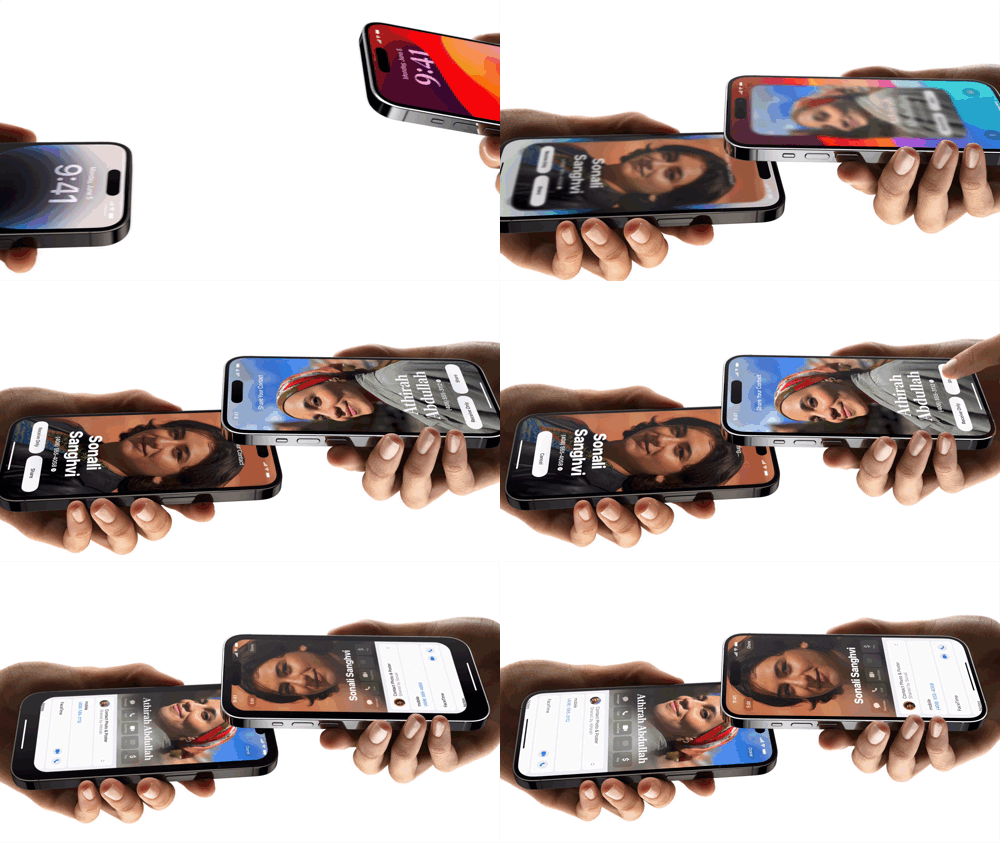
You might already know this — NameDrop’s a brand new iOS feature that lets you exchange contacts with someone by bringing both your iPhones nearby.

Like this →
Credit: Apple Newsroom

How cool, I that incredible animation!

It’s now active with iOS 17 Dev Beta 2.

How to use it?

Turn on AirDrop for Everyone for 10 Minutes — both of you.

Now, whether your iPhones are locked or unlocked, when you bring them together, your contacts will be shared with one another. Pretty cool, right?

However, this bumps up your responsibility of keeping yourself secure.

NEVER leave your iPhone on ‘AirDrop for Everyone’, even for 10 minutes. Set it back to ‘Contacts Only’ after you’re done.

NameDrop’s compatible with all iOS 17-supported iPhones — i.e., iPhone XR and newer.

#2. New way to AirDrop

While I was AirDropping our vacation video to my pal’s iPhone, I saw this new prompt at the bottom:
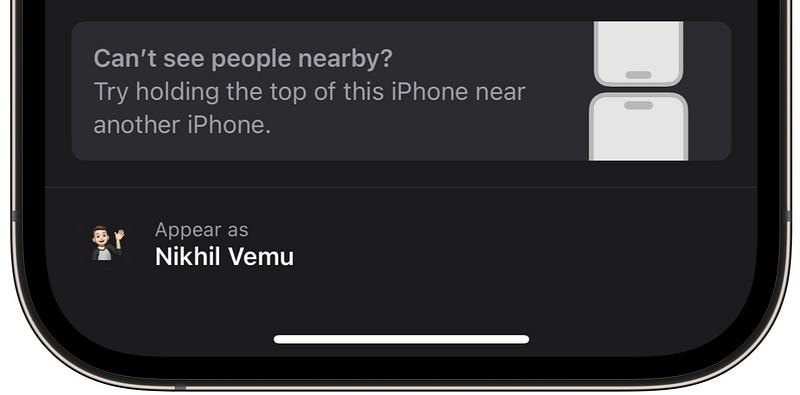
Image by the author

This means:

Instead of tapping on the correct iPhone in the sea of AirDrop-eligible iPhones that show up, I can simply AirDrop a file by holding our two iPhones together — like we did for NameDrop.

:)

• UI/UX Changes

#3. New CarPlay wallpapers 🚗

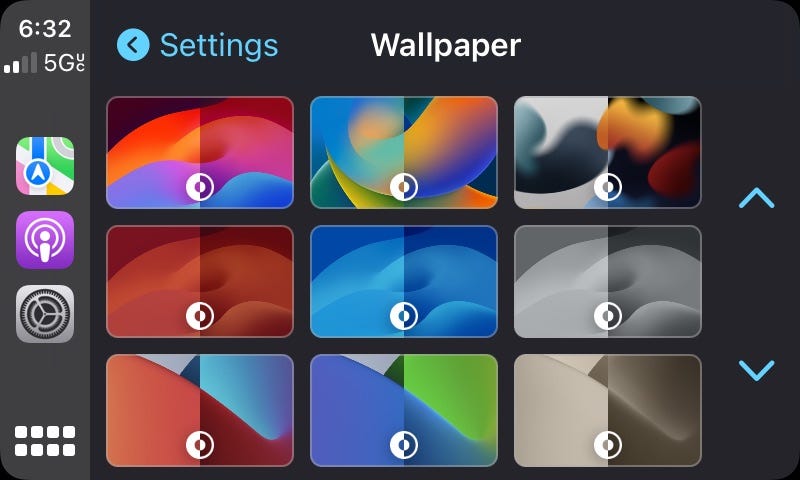
iOS 17 brings great new wallpapers for CarPlay.
Credit: 9to5Mac

If you’re on iOS 16, but still wanna have those wallpapers on your CarPlay screen, download them here →

Difficult downloading each wallpaper separately? Here you go.

#4. Larger space between call logs ☎️

Donny why Apple’s made this change — but call logs on iOS 17 are much more spaced out than those in iOS 16.
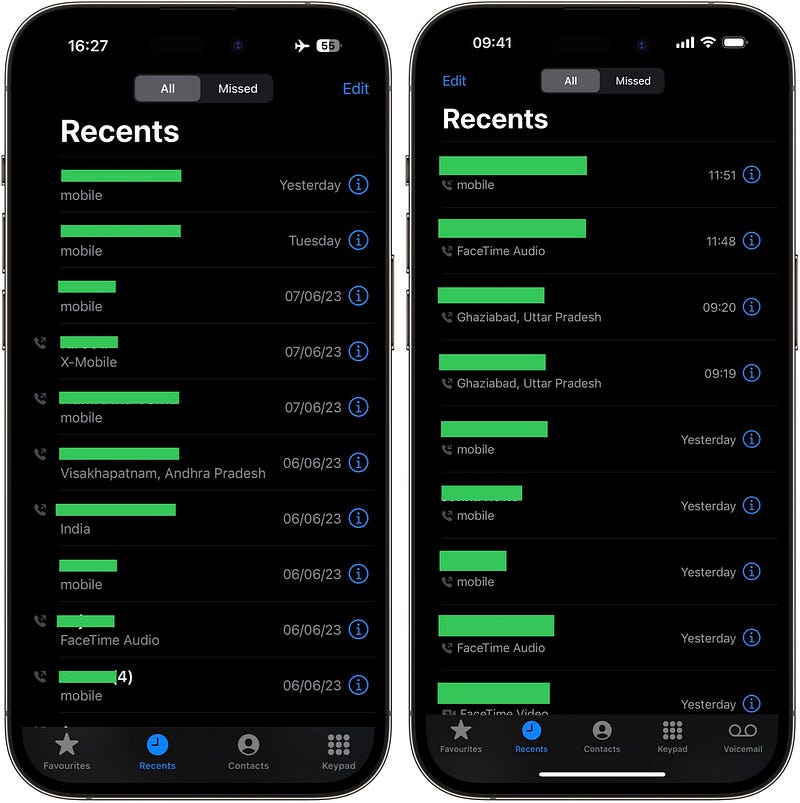
Image by the author (Left: iOS 16.5.1 | Right: iOS 17)

Able to notice? Yep.

#5. ‘Default’ option for Haptic Touch

Previously, there were only two options for Haptic Touch : fast and slow. Now that there are three — fast, default, and slow.

But hey, it’s not that ‘default’ is a new option. It’s equivalent to ‘fast’ of iOS 16.

For better understanding,

iOS 17 fast > iOS 16 fast iOS 16 fast = iOS 17 default iOS 16 slow = iOS 17 slow

And for better visualisation, gifs:

→ iOS 17 fast:
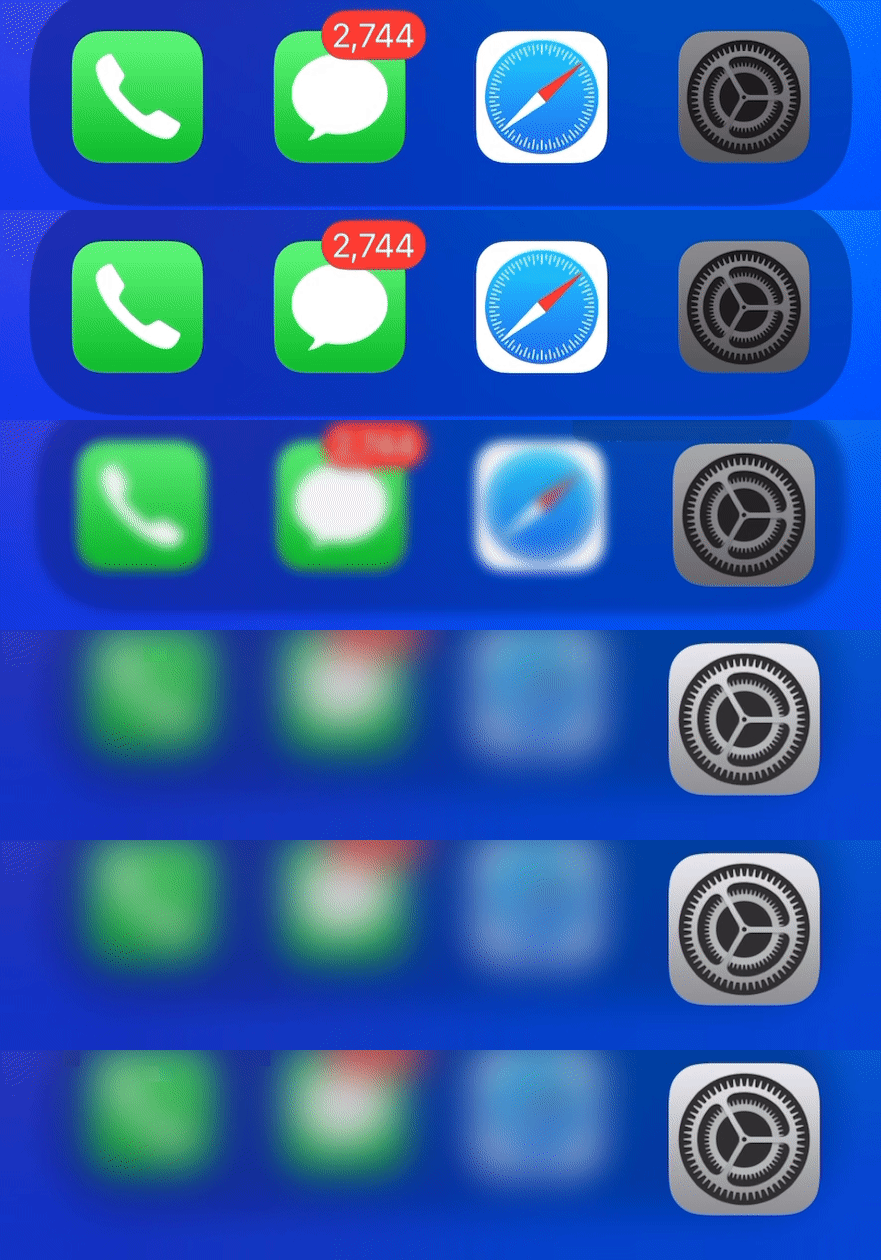
Gif by the author

Trust me, this is incredibly fast. 90% of you would prolly like to set Haptic Touch to this option. It just feels like 3D-Touch’s back alive on iPhones again.

→ iOS 17 default:
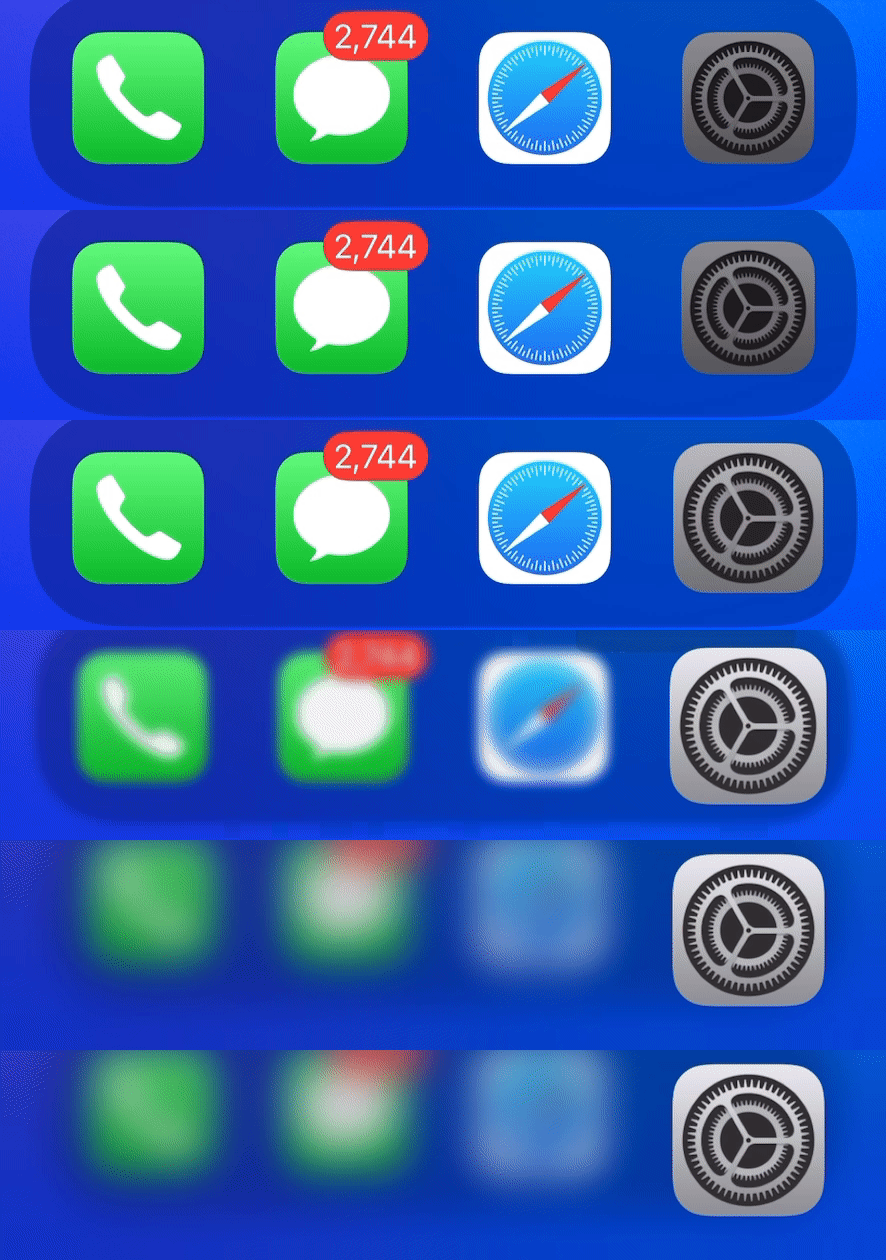
Gif by the author

→ iOS 17 slow:

Gif by the author

(Toggle Haptic Touch in Settings ⚙️ < Accessibility 🚹 < Touch 👆 < Haptic Touch)

• Changes in Settings

#6. MYSTERIOUS new location toggle 📍
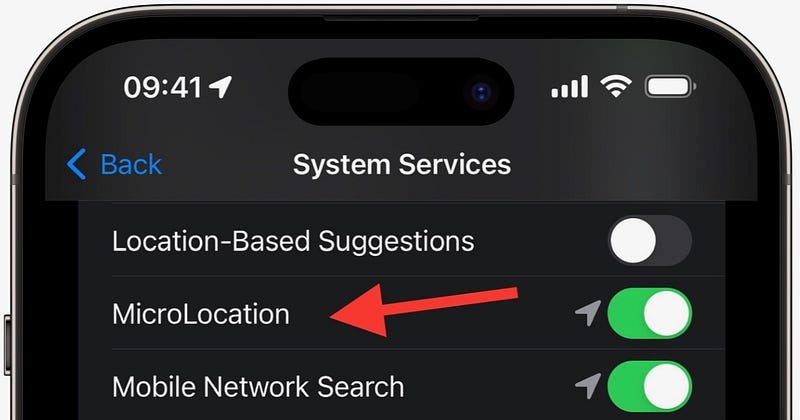
Image by the author

There’s a mysteriously new location toggle called “MicroLocation” that’s toggled on by default. And Apple never mentioned why it’s for.

Hope it’s a hint for a massive feature ahead.

(Find it in: Settings ⚙️ < Privacy & Security ✋ < Location Services ↗️ < System Services ⚙️ < MicroLocation)

#7. Refresh for iOS updates
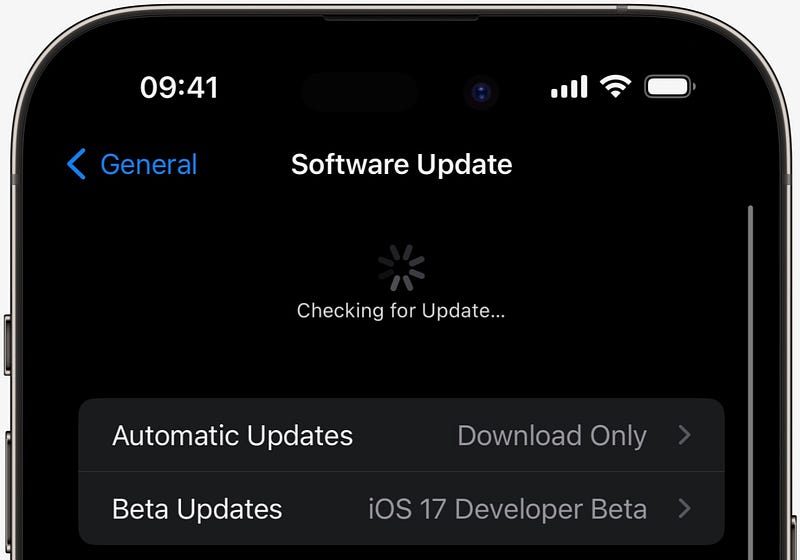
Image by the author

You can now swipe down to check for an update. Just like you refresh your Insta feed.

#8. Slide to Type feature for Arabic keyboard ⌨️

If you type in Arabic, you’ve got a massive news. The Arabic keyboard’s now trained enough to support Slide to Type.
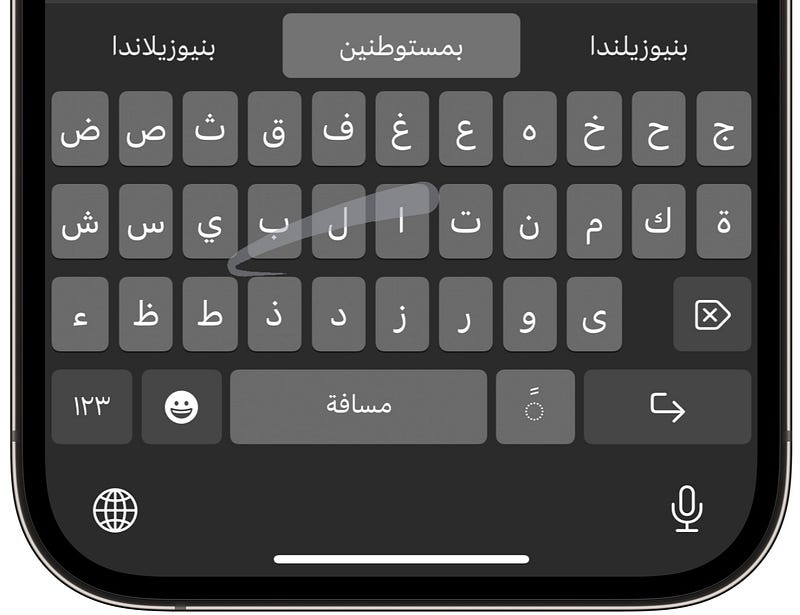
Image by the author

So instead of typing letter-by-letter, you can now slide your fingers over the keyboard to make words.

(Toggle ‘Slide to Type’ in Settings ⚙️ < General ⚙️ < Keyboard.)

• Changes to Apple Music 🎵

#9. Crossfade Musics 🔀

This was announced in WWDC and was already delivered with iOS 17 Dev Beta 1. However, when I toggled this on in Settings ⚙️ < Music 🎵 < Crossfade, my iPhone crashed.

Anyways, it’s now live with Dev Beta 2.

So when you toggle Crossfade on, you get to choose the no. of secs you wanna crossfade songs.
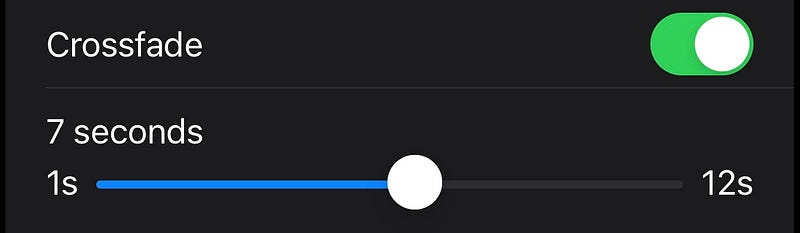
Image by the author

I chose 7, so while I’m listening to music, the next song will start playing with gradually increasing volume 7 seconds before the current song ends, whose volume gradually decreases.

This will ensure a smooth transition between consecutive songs — so you won’t see abrupt changes.

#10. New Music widgets

There were already 2 new Music widgets in iOS 17 Beta 1, and I’ve mentioned about them in #9 of this article →

The widgets are →

  1. Recommendations: Plays Top Picks, New Releases, and other suggestions from Apple Music.
  2. Top Charts: Plays Top Charts based on locations or city of your choice.

There was a large-size widget for both Recommendations and Top Charts categories.

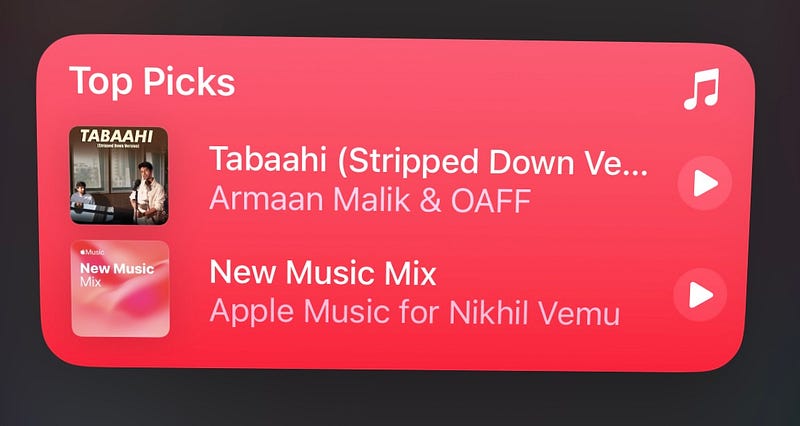
With Beta 2, we’ve got a new medium-sized widget for Recommendations

Image by the author

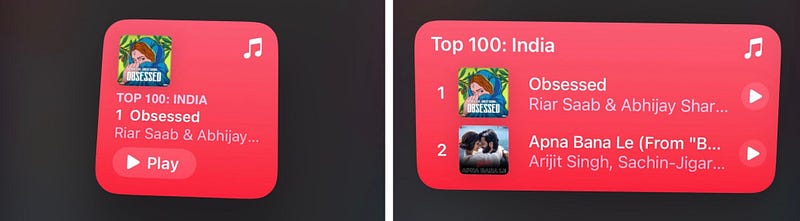
and new small and medium-sized widgets for Top Charts

Image by the author

Best part, they’re interactive. So just click play beside a song, and the song starts playing right away without opening Music app.

• Changes to Widgets

#11. Shortcuts Lock Screen widgets now working!

Lock Screen’s now got Shortcuts widgets, and I’ve never been so happy. I’ve mentioned this first in #5 of this article →

You can now set 4 shortcuts (at max) below the time.
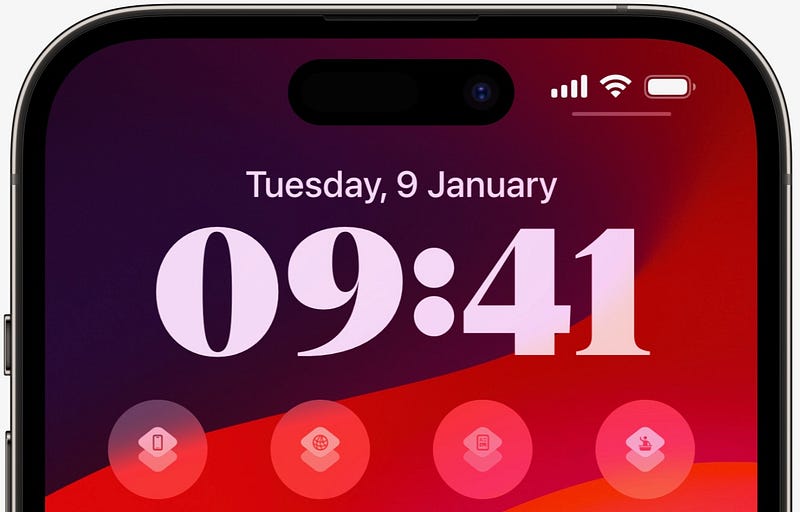
Image by the author

This’d greatly help keep your most-used shortcuts always accessible on the Lock Screen. So you’d trigger them just as you unlock.

As of Beta 1, tapping on them didn’t trigger the corresponding shortcuts. Rather, it simply opened Shortcuts app. But with Beta 2, they’re triggering!

Evil hack 😈

Wanna open your favourite apps directly from Lock Screen? Do this.

Create a Shortcut with just one action — open App App_Name .
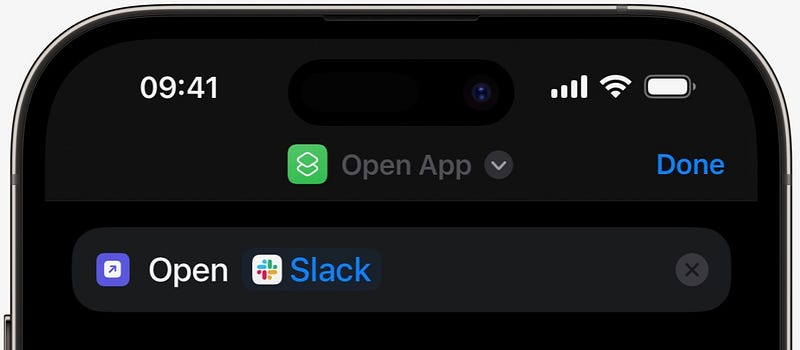
Image by the author

Now set this widget on the Lock Screen to open Slack (for example) right from there!

#12. New transparent Clock widget 🕑

We’ve got a transparent style Clock widget named as Clock III.
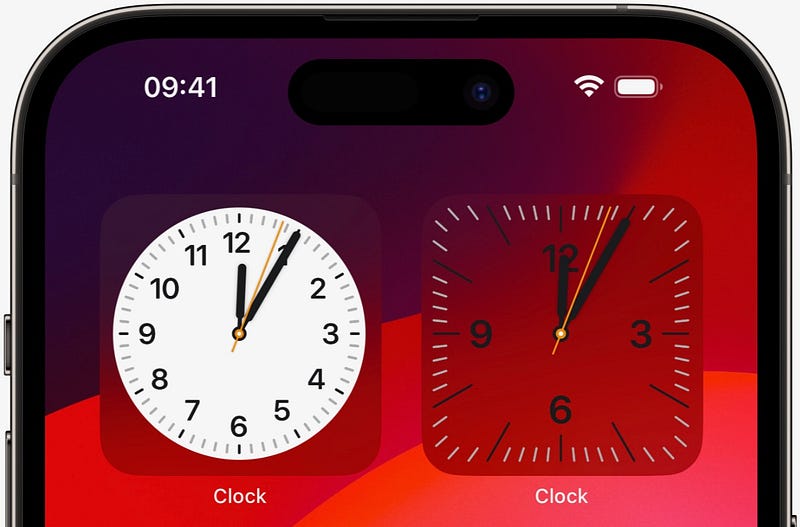
(Left: Normal | Right: Transparent) clock widgets (Image by the author)

This looks undistracting as it fades with your wallpaper’s colour behind, isn’t it?

• Changes to Notifications 🔔

#13. Show Notifications when in StandBy

StandBy’s one of the biggest and most unexpected features of iOS 17. I’ve first written about it in #9 of this article →

However, as of Beta 1, we couldn’t receive notifications on our iPhones while it’s on StandBy, which is pretty ridiculous — as far as the feature’s concerned.

But with Beta 2, you can choose to show notifications while your iPhone’s on StandBy mode. (Toggle it in Settings ⚙️ < StandBy 🕰️ < Show Notifications).

OMG I just love StandBy →
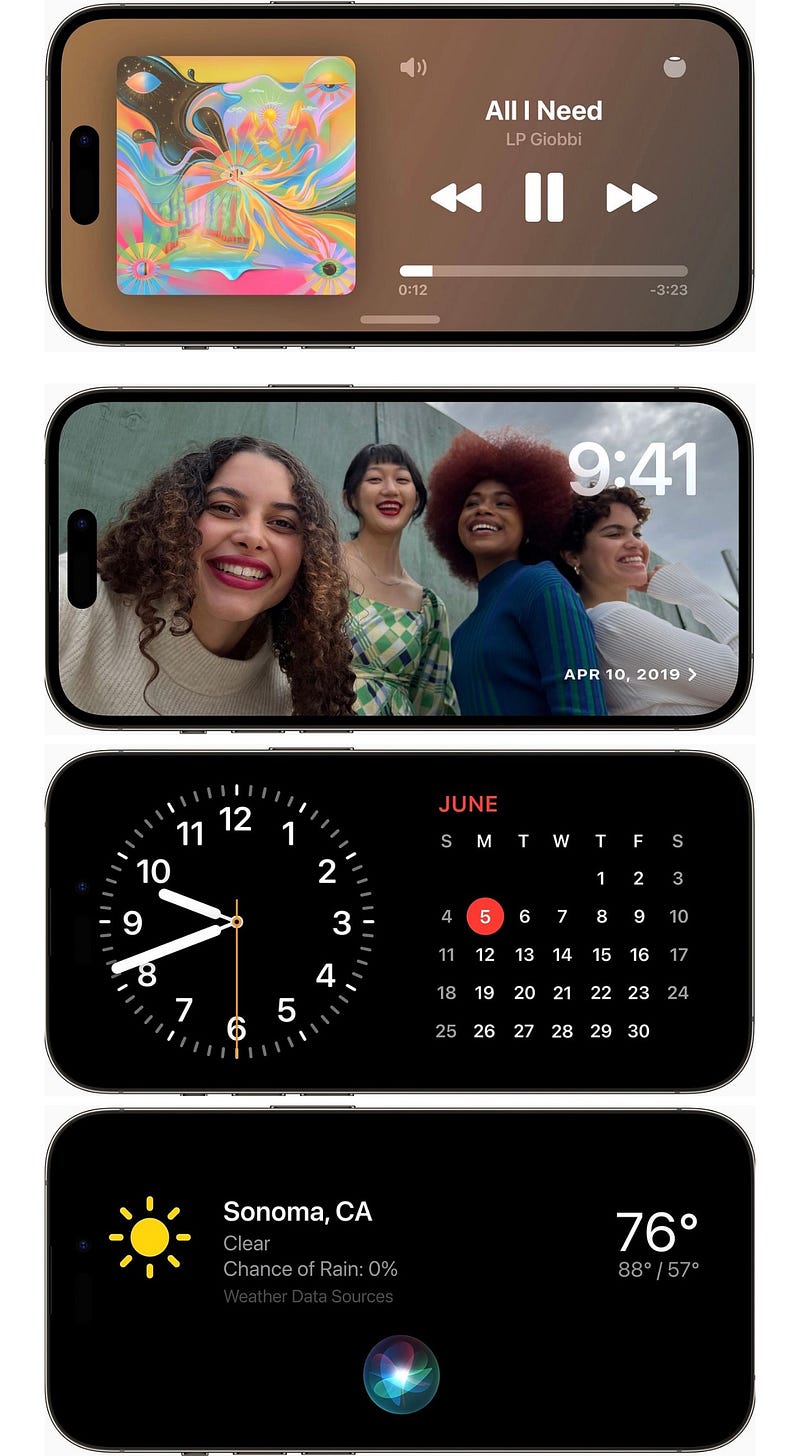
Credit: Apple Newsroom

#14. Deliver Critical Alerts messages immediately ❗️

iOS 17 brings a new toggle for Messages Notification settings → ‘⚠️ Critical Alerts’.
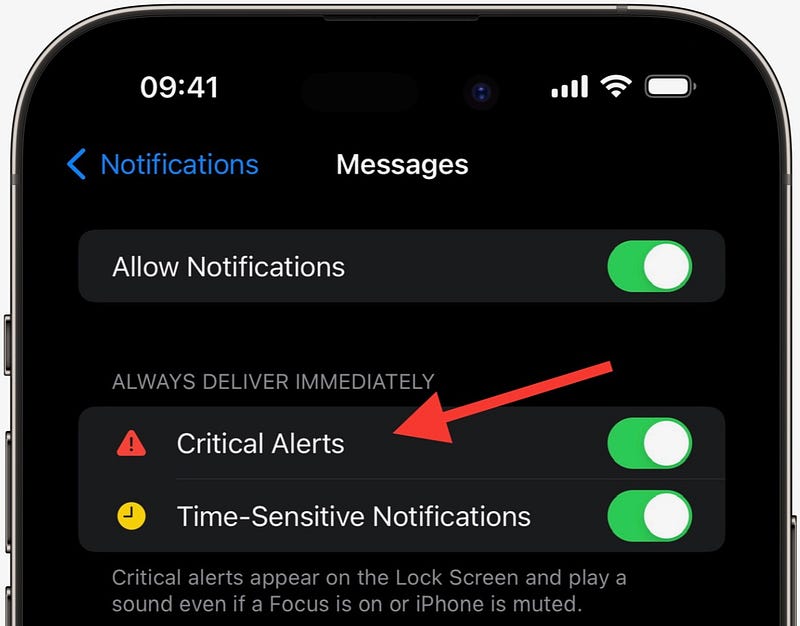
Image by the author

If you toggle it on, Critical Alerts (like extreme weather alerts by govt.) will be delivered immediately, irrespective of your silent switch position or focus mode.

• Changes to Messages 💬

#15. iOS 16.5.1 gets stickable stickers on iMessage

Off topic, I’m not referring to iOS 17 now.

iOS 16.5.1 gets an iOS 17 Messages feature — Stickable Stickers (I named it so).

So, instead of simply sending a sticker as a reply to someone’s message, you can drag & drop the sticker over a the message to stick it on it.

Demo
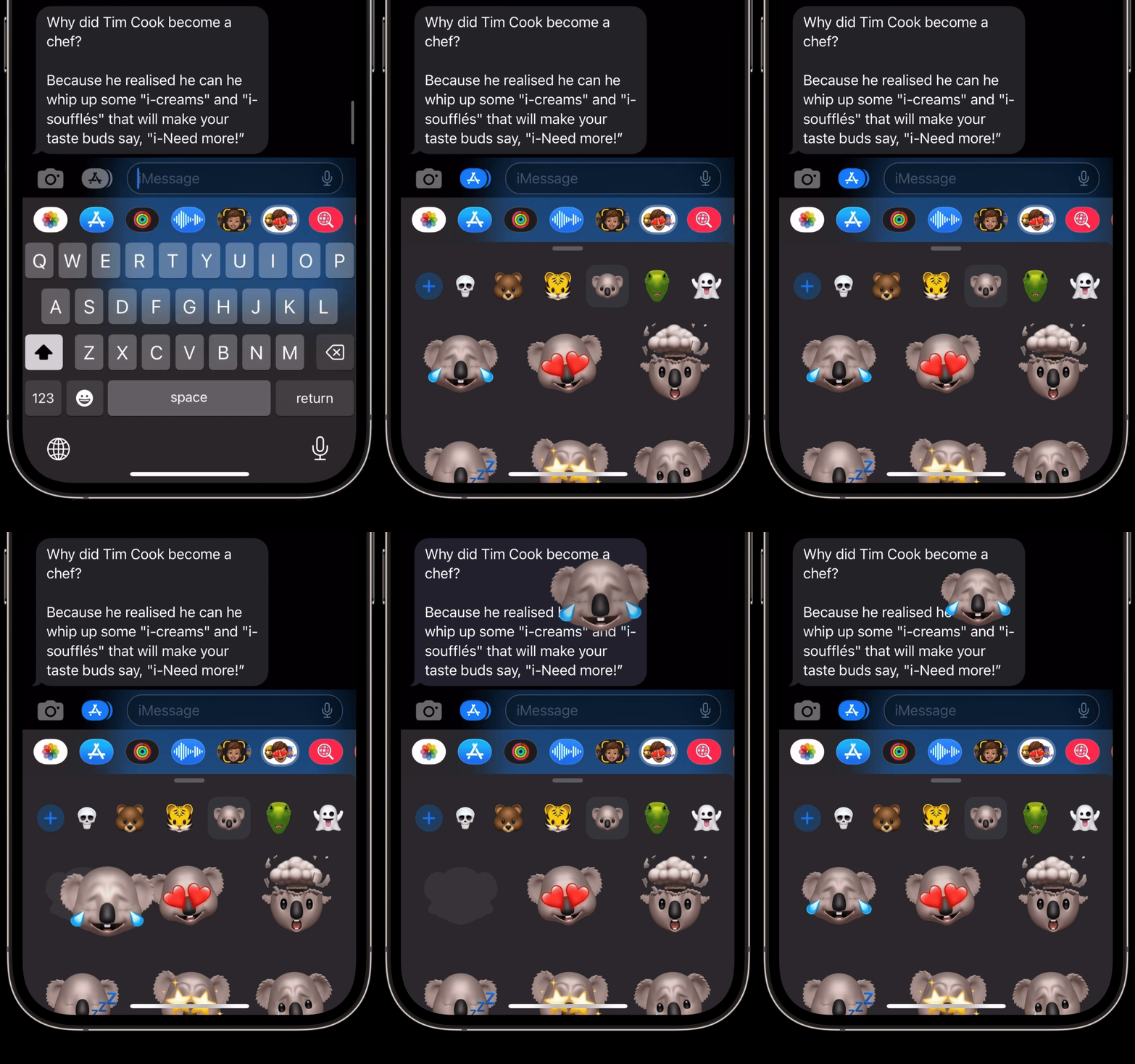
Gif by the author

This will help create less clutter in your Messages, and allow for a more human experience.

Notes:

  • While sticking, use your other finger to rotate the sticker, if you want.
  • Once you stick, there’s no way you can remove it.

#16. Change the app via which Siri sends message

If you’re on iOS 16 now, try saying, “Hey Siri! Send a message to insert_name ”.

Are you seeing this?
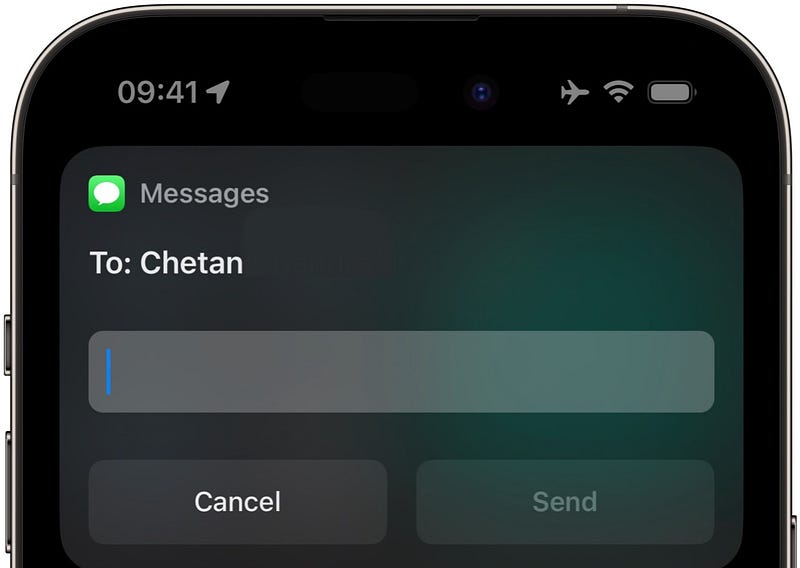
Image by the author

See, it could only message the other person via Messages, but not via WhatsApp, Telegram, or Gmail — unless mentioned explicitly.

However, from iOS 17, you could change the messaging app by tapping on the app’s icon at the top →
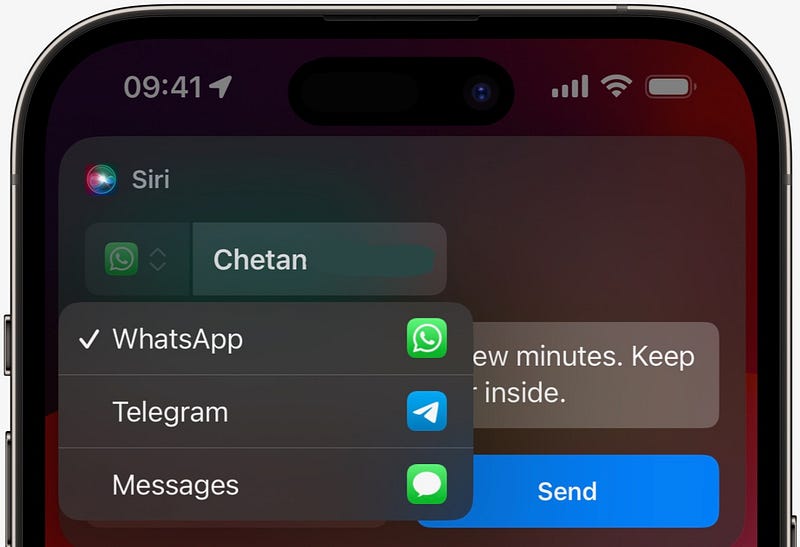
Image by the author

Also, if Siri’s unable to find the contact in the selected app, it says: “Unable to find contact_name in app_name .”

• Miscellaneous Changes

#17. A calendar-view to track your moods 🗓️

You already know iOS 17 helps track your Mental Health by letting you log your moods throughout the day and analysing your mental states over time.

You can log two types of moods:

  1. How you feel right now.
  2. How you’ve felt overall today.

With Beta 2, you’ve got a calendar view for the second type of moods.
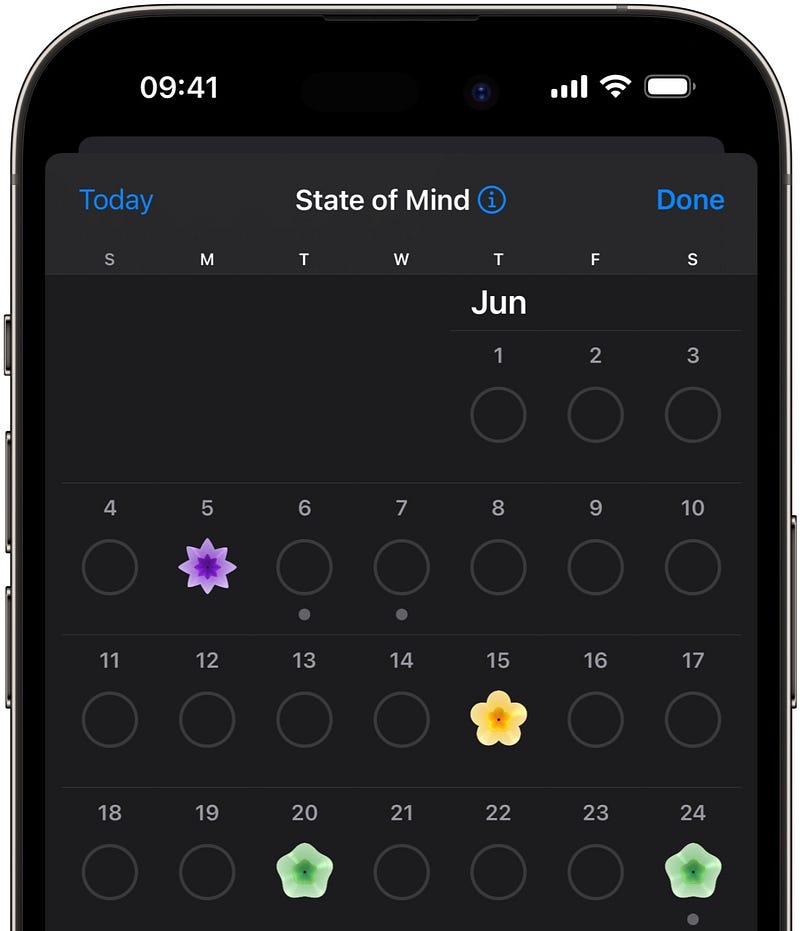
Image by the author

Let me know what’s your favourite iOS 17 feature :)

Isn’t iOS 17 awesome?

110+ new features of iOS 17: A Compilation (Always Updated):

If you’d like to get a bundle of 240+ amazing apps for just $9.99, get Setapp using my affiliate link. (It’s free for 30 days!)

Join 385+ others to get notified whenever I publish a new story.

Technology
Apple
iOS
Mobile
Innovation
Recommended from ReadMedium