
iOS 17.4 Is Way Bigger Than We’ve Expected — 25+ Amazing Features!
I’ve never felt so sad for Apple.
The trillion-dollar company wouldn’t have dreamt in its scariest nightmares that its monopoly in some aspects could be challenged so harshly.
Say hi to iOS 17.4 — it’s a good day for developers and rival companies, and a bad day for Apple.
While this is a pretty major (and much needed) update for iOS, there are a couple of changes Apple made not because it loves to — but to comply with EU’s enforced laws and acts, which, like I said, are throwing a direct blow to Apple’s control over its EU tech.
However, Apple did something for an advantage. For now, the EU-mandated features are only limited to EU-based iPhones — which only represent 7% of its total revenue. Mastermind.
So Apple can still sing its monopoly songs in the rest of world — and people have no other option than to hear them, irrespective of whether they appreciate the melody or not.
What’s in this article
EU-SPECIFIC CHANGES 1 — Sideloading is active! 2 — A prompt to change your default browser 3 — Support for 3rd party browser engines GENERIC CHANGES New Messages Changes 4 — 16 new emojis 5 — Messages for Business 6 — Siri can read out messages in different languages New Settings Changes 7 — Significant change to Stolen Device Protection 8 — Access to ‘Contactless & NFC’ for 3rd party apps 9 — New Regional Identifier New Safari Changes 10 — Wider Tab Bar 11 — ‘Play All Animations’ in a webpage New Podcasts Changes 12 — Follow Podcasts along with live transcripts 13 — Tap episode’s name to view info New Clock Changes 14 — New Clock widget 15 — Stopwatch gains Live Activity New Wallet Changes 16 — Get virtual card number for Apple Card 17 — Improve Wallet Connections New CarPlay Changes Revealed 18 — CarPlay waves goodbye when turning off car 19 — New CarPlay apps and icons New Backend Changes 20 — Game Streaming now possible 21 — Firmware updates for cables!? Changes for Consistency 22 — Revamped iCloud icon 23 — Home section for Books, Music, & Podcasts 24 — Podcasts’ ‘Now Playing’ bar imitates Apple Music New Miscellaneous Changes 25 — SharePlay Music with HomePod and Apple TV 26 — Purchase History in App Store 27 — Drop Hey while calling Siri in German
— EU-SPECIFIC CHANGES —
#1. Sideloading is active!
Sideloading arrives to iOS! — Isn’t this some of the greatest news in the history of tech?
It’s a facility that allows you to install apps from sources other than the original App Store (referred to as Alternative App Marketplaces) — like Play Store, Amazon Appstore, & Setapp (Not sure if these’d arrive to iOS, but just to give you an idea).
(App Marketplace ≈ An iOS app that can install other iOS apps)
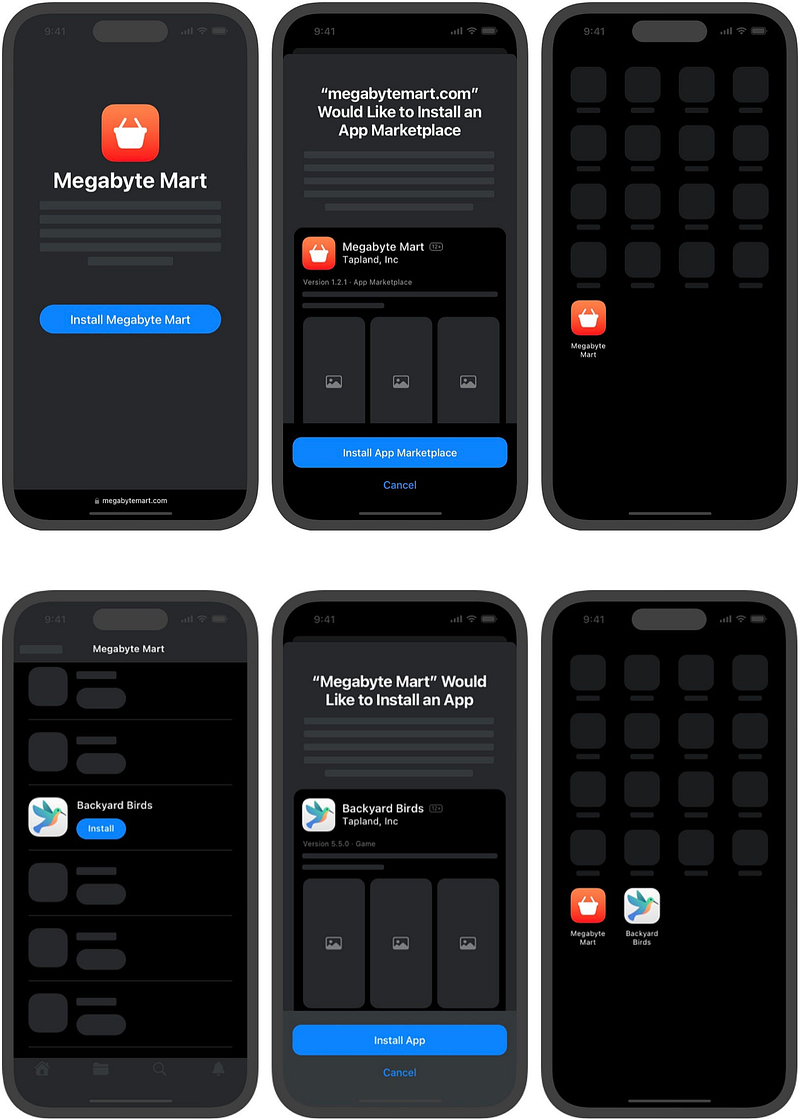
This means you can simultaneously use multiple app stores on your iPhone other than Apple’s original App Store.
Best part, you can set an alternative app store as your default app store — as easily as you change your default browser.
However, Apple — abiding to its privacy & security oaths — will warn you of any malware in an app installed from an alternative app store, and will prevent you from opening it if so.
There’s also a new Screen Time setting that would allow parents to decide whether their children are able to install apps from alternative app stores.
#2. A prompt to change your default browser
Have you ever noticed this? If your default browser is Safari, go to Settings ⚙️ < a browser-that’s-not-Safari, you’ll see a section that allows you to change your default browser.
But that doesn’t appear when you’re in Safari’s settings, which is also a browser. Strange…
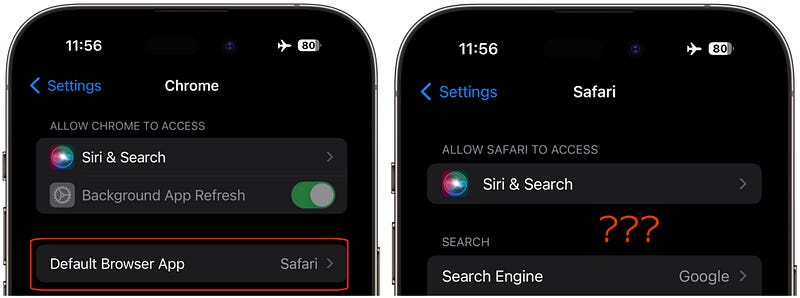
But if you change your default browser to Chrome, Firefox, or anything that’s not Safari, you’ll see the section magically appear in Safari settings too.
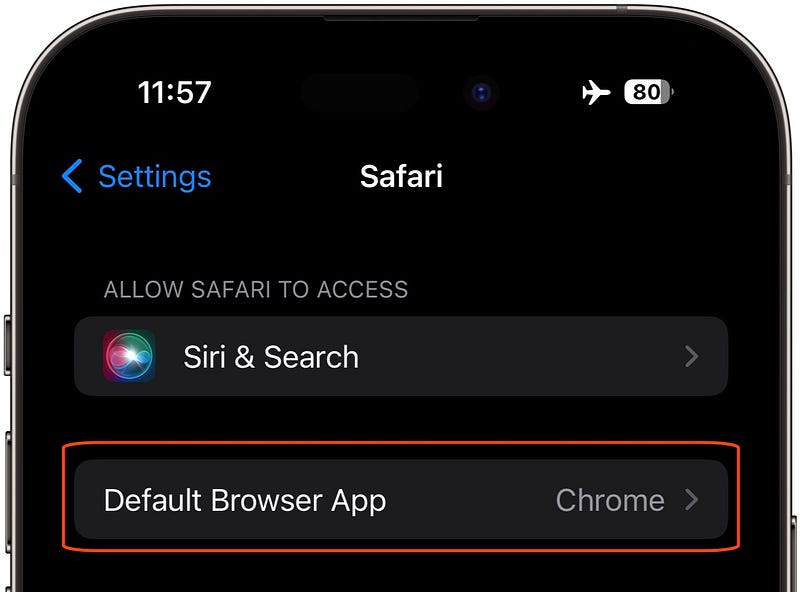
That’s how much Apple wants you to keep Safari as your default browser.
But sadly (for Apple), complying with an EU mandate, it now has to do what it hates — Show a prompt when a user first opens Safari (after updating to iOS 17.4) that gives them choice for a default browser.
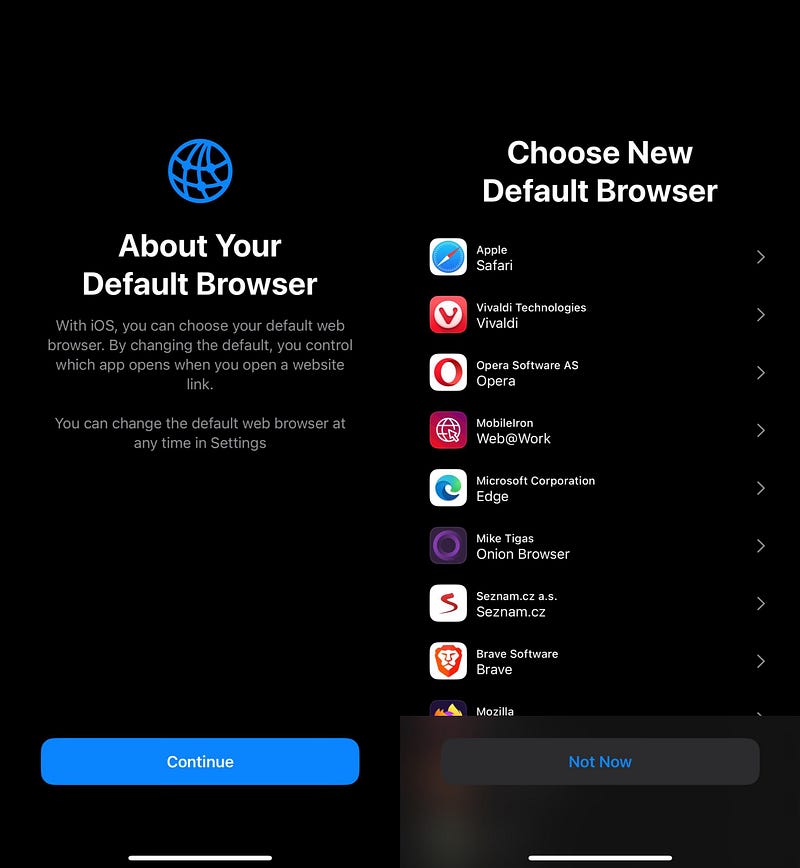
The shown browsers vary from country to country and are random for every user.
The compiled list of browsers includes: Aloha, Brave, Chrome, DuckDuckGo, Ecosia, Edge, Firefox, Ivanti Web@Work, Onion Browser, Opera, Private Browser Deluxe, Qwant, Safari, Vivaldi, You.com AI Search Assistant.
(Source: MacRumors)
The browsers appear even if they aren’t installed on your iPhone. You’ll need to have one downloaded if you wanna set a browser as your default one.
#3. Support for 3rd party browser engines
Apple also opens up way for 3rd party browsers to use their own browser engines.
What’s a Browser Engine?

It's the core underlying component for every browser that converts basic HTML docs into beautiful pages.
Every browser can take the freedom to improve their engine for speed and any additional features.Since the beginning, Apple has allowed many browsers on iOS, but only one engine — Webkit (Apple’s own). Even Chrome and Firefox, which use Blink and Gecko elsewhere, had to stick to WebKit on iOS.
This has limited 3rd party browsers’ freedom to bring many features and improvements.
But now that Apple’s being lax for browser engines other than WebKit to run on iOS — so users in EU can expect more features for their favourite browsers.
Note, Apple will make thorough checks before allowing an engine to run on iOS, but I’m sure most popular engines will slide in.
— GENERIC CHANGES —
• New Messages Changes
#4. 16 new emojis
Apple introduces 16 new emojis complying with the Emoji 15.1 standard. These:
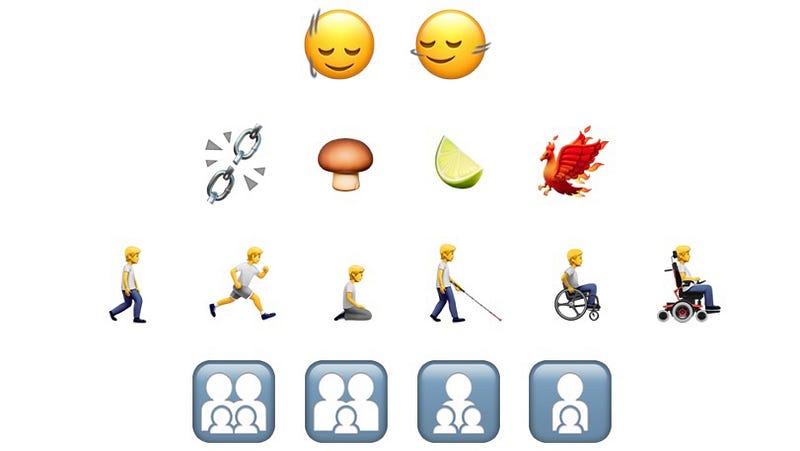
- Emojis in the first two lines are of brand new concepts.
- Emojis in the third line are revamped copies of their previous counterparts which only had people facing left.
- Emojis in the fourth line replace the suite of family emojis (like 👨👩👧👦).
I’ve listed all the new emojis (and their descriptions) at the end of the article for you to copy.
#5. Messages for Business
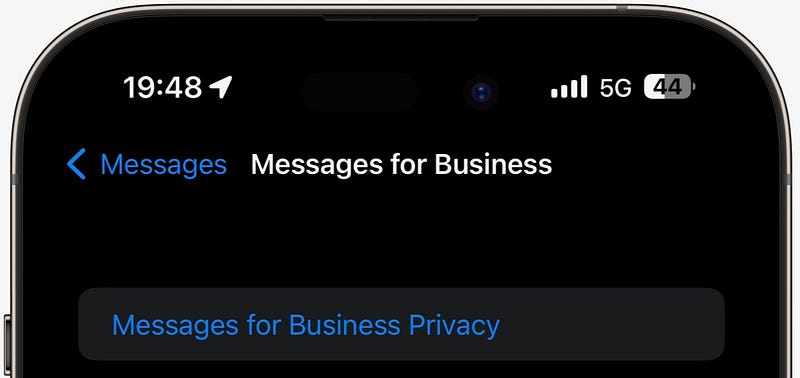
In Settings ⚙️ < Messages 💬, we had a hyperlink saying ‘About Messages for Business & Privacy’.
It’s now replaced with a section — ‘Messages for Business’ — which is hitherto empty, but may eventually house the business you have messaged, with applicable options for each.
#6. Siri can read out messages in different languages
Did you know you could skip that step where Siri asks for confirmation before you send a message to someone?
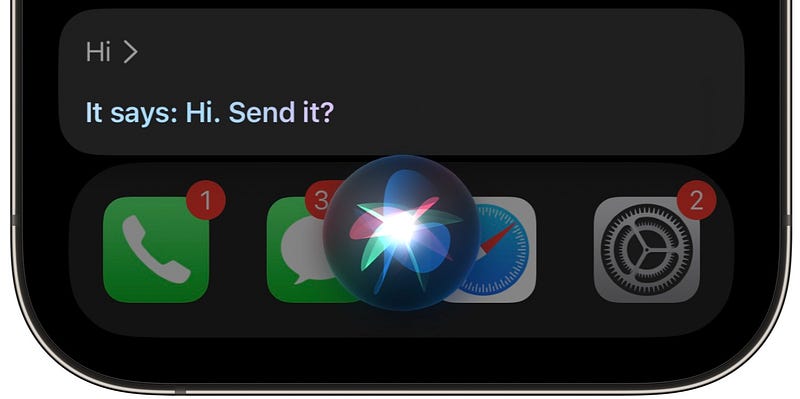
To do that, toggle on ‘Automatically Send Messages’ in Settings ⚙️ < Siri & Search. And bravo! You’ll never see that frustrating confirmation part again.
However, with iOS 17.4, that section is replaced with ‘Messaging with Siri’ — where, along with Automatically Sending Messages, you can also select a few languages which Siri will use to read out messages for you.
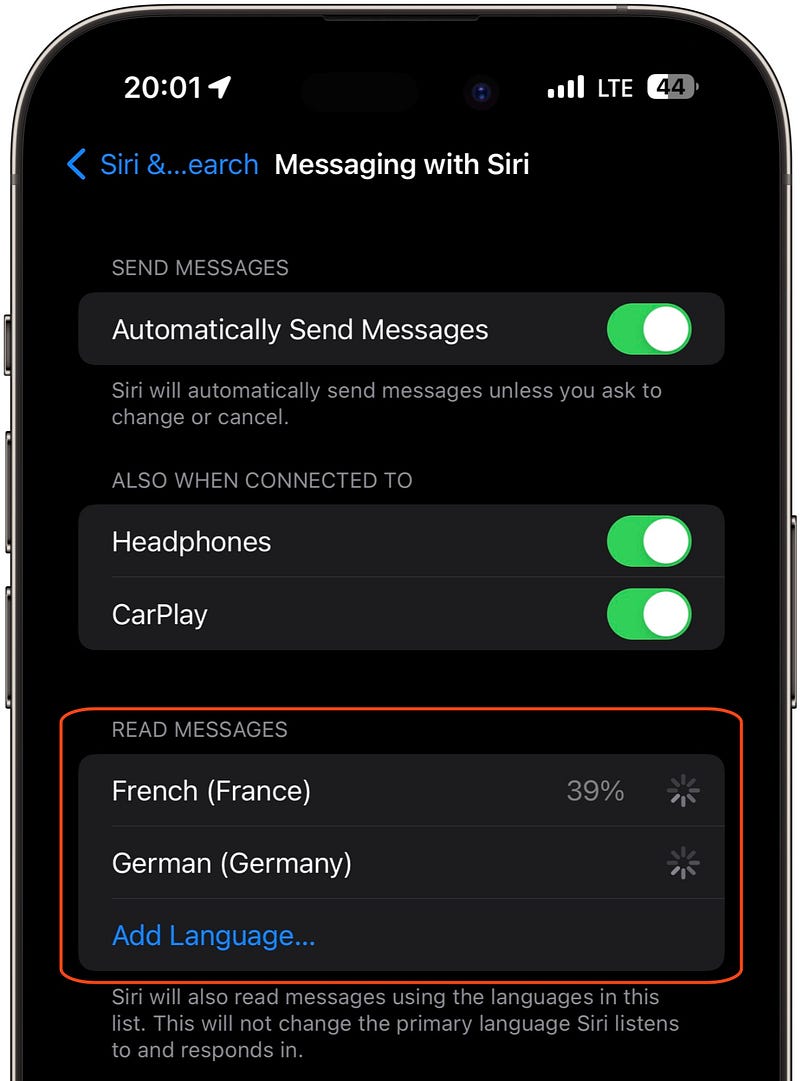
This best helps if you have cosmopolitan friends who message in various languages. Note that the languages set here won’t affect Siri’s primary language.
• New Settings Changes
#7. Significant change to Stolen Device Protection
The Stolen Device Protection feature (of iOS 17.3) is a great new addition to iOS for users’ privacy and security.
It sets a biometric check and a 1-hr delay when you (or anyone else) try to mess with critical system settings. More info in this article →
However, the delay isn’t mandated if you’re in a familiar location (like Home or Work). Only if you’re in an unfamiliar location, need you attend both of them.
But in iOS 17.4, Apple brings a useful feature that lets your iPhone enforce the 1-hr delay regardless of its location. (Tweak it in Settings ⚙️ < Face ID & Passcode 🙂 < Stolen Device Protection.)
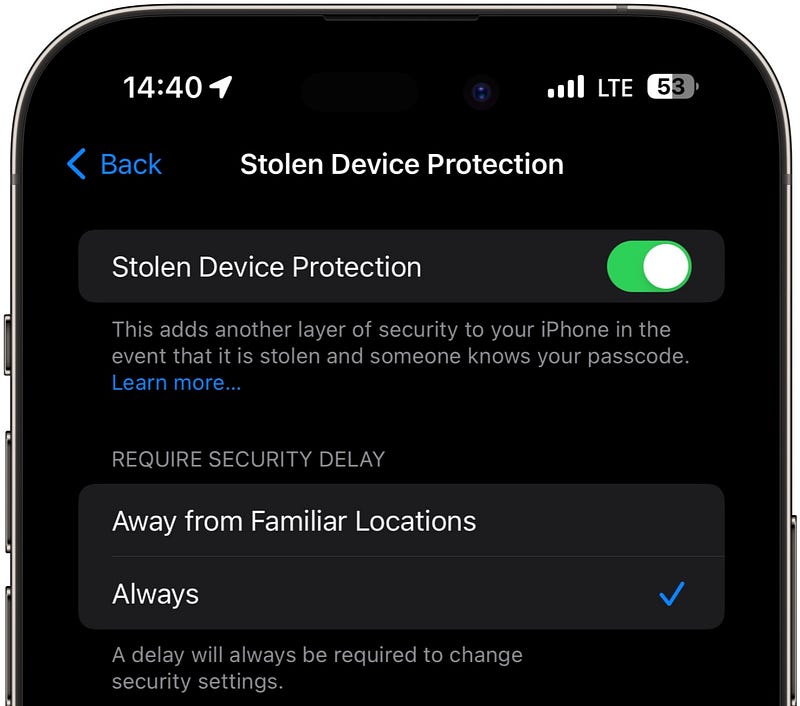
- Choosing ‘Always’ always enforces the 1-hr delay.
- Choosing ‘Away from Familiar Locations’ checks location before it enforces the delay. If it’s familiar, you can instantly access your critical settings (after a quick Face ID check).
#8. Access to ‘Contactless & NFC’ for 3rd party apps
There’s a new section — ‘Contactless & NFC’ — in Settings ⚙️ < Privacy & Security ✋.
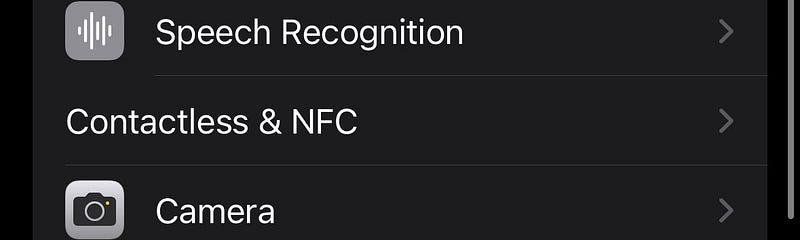
Inside, it’s empty for now — but it says:
“Apps that have requested the ability to use Contactless & NFC will appear here.”
So Apple’s allowing 3rd party apps to use iPhone’s built-in NFC payments feature (for tap-to-pay or cardless POS machine payments).
And in the EU, Apple allows users to select a 3rd-party contactless payment app as default — instead of Wallet. Cool, right?
#9. New Regional Identifier
There’s an unusually new thing — nicknamed IDENTIFIABLE_REGION (in Settings ⚙️ < General ⚙️) that shows your region (country) as identified by Apple.
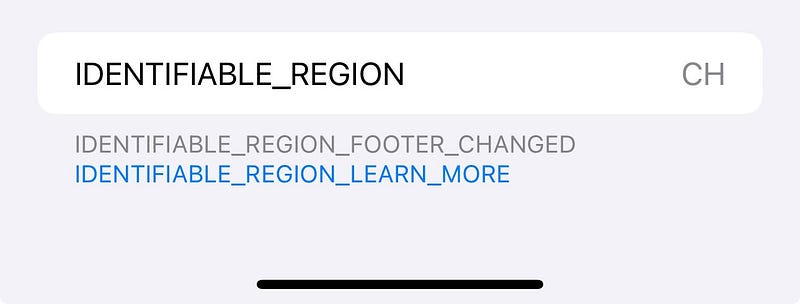
There’s no info about this for now, but it could be a way for Apple to identify if you’re in EU or not — to give you access to EU-specific features.
You can’t fake you’re in EU by changing your billing address, Apple ID region, or by using VPN. Apple’s using an unknown robust way to check it.
• New Safari Changes
#10. Wider Tab Bar
If you use Tab Bars on Safari (tabs at the bottom instead of top), you’ll find a difference now — they get slightly wider.
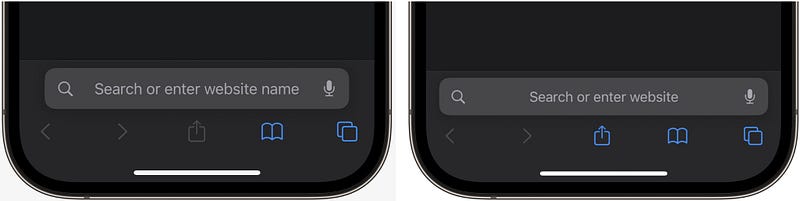
I didn’t like it, but maybe it takes sometime to get used to it.
#11. ‘Play All Animations’ in a webpage
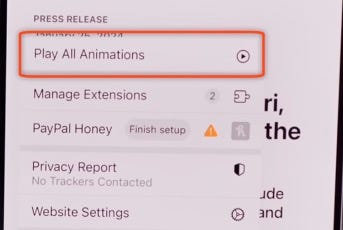
The new ‘Play All Animations’ option in Safari lets you play all the GIF animations on a webpage at once.
• New Podcasts Changes
#12. Follow Podcasts along with live transcripts
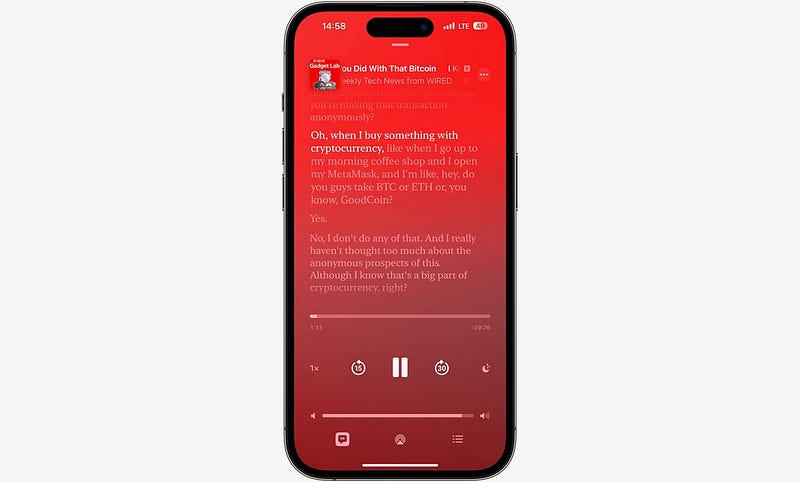
This is a phenomenal feature for Podcasts that users will love forever.
It’s the Apple Music’s lyrics version of Podcasts. You can now follow a podcast along with its transcript. To bring it up, you just need to tap on the transcript glyph at the bottom-left.
Best part, you can even search the transcript for a word or phrase. It’s very helpful if you wanna skip to your favourite part of it.
#13. Tap episode’s name to view info
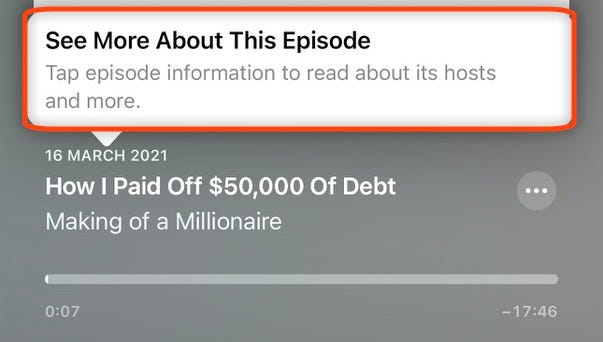
And this is a pretty nifty feature. — You can now tap on an episode’s name to go to its info page.
Apple will suggest that with a prompt, as shown below.
• New Clock Changes
#14. New Clock widget
We get a new Clock widget — named ‘City Digital’:
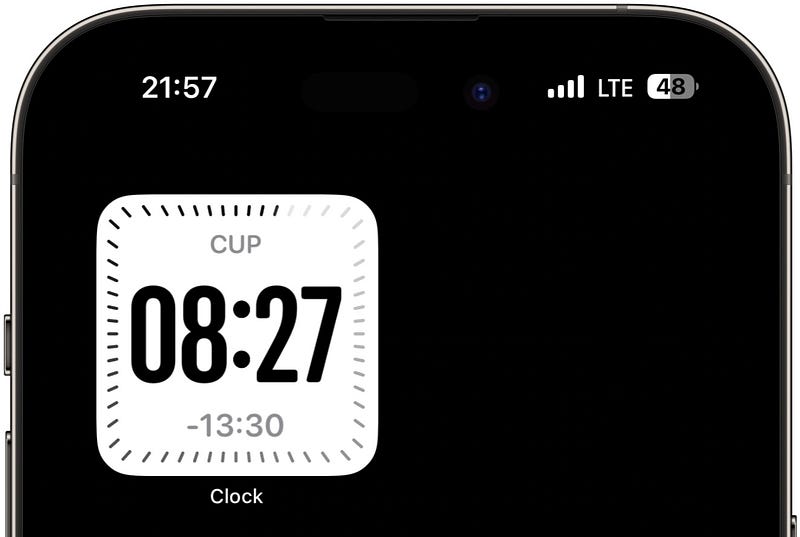
It just shows the same info all the City widgets show — but is square in shape and shows digital time.
#15. Stopwatch gains Live Activity
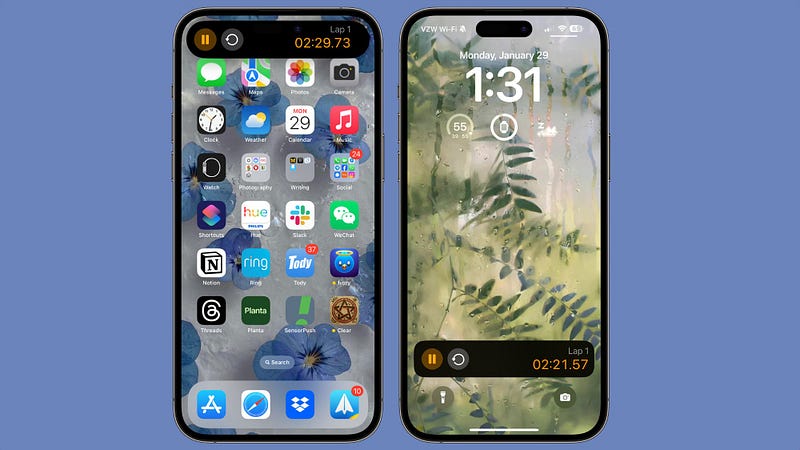
Alarm and Timer have already had Live Activities for so long — making it easier to control them without needing to open Clock app.
Now with iOS 17.4, Stopwatch gets it too. Here’s how it looks:
• New Wallet Changes
#16. Get virtual card number for Apple Card
Apple Cash Card is a great addition to Apple Wallet.
It’s probably the simplest way you could send and receive money from your friends & family. You can also use it like any other prepaid card at a store that accepts Apple Pay.
But what about stores/websites that don’t accept Apple Pay and ask for your card details instead?
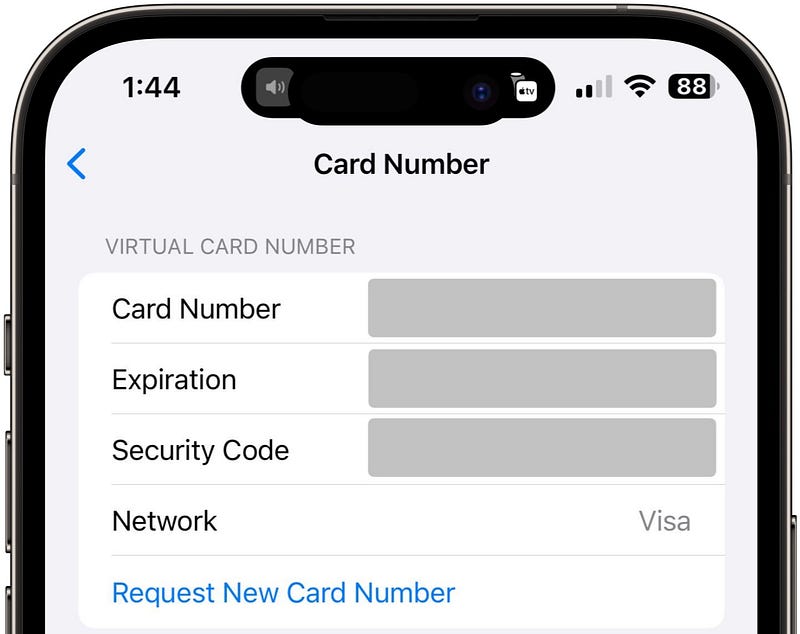
No problem. With iOS 17.4, you can generate a set of card number, expiration date, and security code for your existing virtual Apple Cash Card.
Best part,
- If you suspect your card details are compromised, you can always generate a new set — making the old details obsolete.
- The updated card details are automatically saved to Safari Autofill.
- Your security code changes periodically to ensure safety.
#17. Improve Wallet Connections
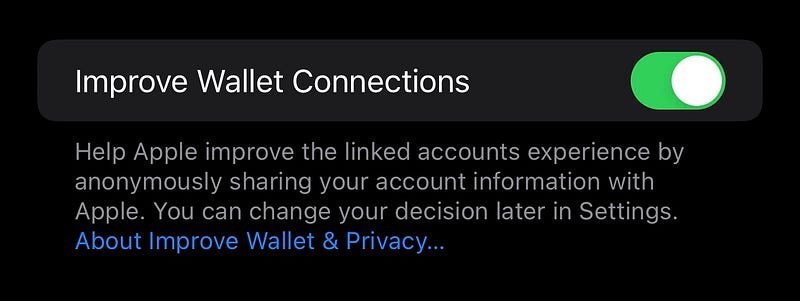
This is a new analytics option in Settings ⚙️ < Privacy & Security ✋ < Analytics & Improvements.
If turned on, it improves your linked accounts experience by sharing your account info with Apple anonymously.
But as I always suggest, turning analytics off will save you battery.
• New CarPlay Changes Revealed
Apple has previewed next-gen CarPlay in WWDC22 — and told us to expect its arrival in late 2023. But alas, 2023 is over!
So Apple updates its CarPlay webpage to say “First models arrive in 2024”. And Aaron (@aaronp613) on 𝕏 spots some of its new icons and animations in iOS 17.4’s code.
#18. CarPlay waves goodbye when turning off car
When you turn off your car, you may see goodbye animation that’s similar to how your iPhone and Mac say hello when they first boot up.

#19. New CarPlay apps and icons
Aaron also spots new icons in CarPlay 2.0. Here’s his full thread on 𝕏:
Also, as MacRumors highlighted, there are eight new apps coming to CarPlay in next-gen CarPlay:
- Auto Settings: Lets you manage paired iPhones and change vehicle settings.
- Car Camera: Displays the vehicle’s rear-view cam’s footage.
- Charge (for EVs): Displays the battery level, charging status, time left until the battery is fully charged, and more.
- Climate: Lets you control vehicle’s climate controls — like adjusting AC temperature, fan speed, seat and steering wheel heating etc.
- Closures: Alerts if any door is accidentally left open and also shows vehicle’s warning symbols.
- Media: Can play FM and AM radios, and also SiriusXM. However, we’re not sure if SiriusXM would be via satellite or be limited to internet.
- Tyre Pressure: Displays air pressure for each tyre, and alerts of high or low pressures and flat tyres.
- Trips: Provides info on average speed, fuel or energy efficiency, time elapsed and distance travelled on a trip, etc.
Many popular car manufacturers like
Acura, Aston Martin, Audi, Ford, Honda, Infiniti, Jaguar, Land Rover, Lincoln, Mercedes-Benz, Nissan, Polestar, Porsche, Renault, and Volvohave already committed to bringing CarPlay 2.0 to their cars.
• New Backend Changes
#20. Game Streaming now possible
Apple speaks about Game Streaming in its recent Developer article. It reads:
“Developers can now submit a single app with the capability to stream all of the games offered in their catalog.”
What's Game Streaming, anyways?It's a type of online gaming that runs games on remote cloud servers and streams the game's video and sound directly to users' devices.This allows users to easily play highly demanding games on a low-power device - as all it requires is just a strong network connection.Until now, game streaming on iOS was accessible only via webapps thru browsers — which isn’t a comfortable & immersive way to experience games
But this move will pave way for services like Xbox Cloud Gaming and Nvidia GeForce NOW to enter the App Store as standalone apps. And it’s a great news for savvy gamers.
#21. Firmware updates for cables!?
As reported by Aaron again, the code for iOS 17.4 suggests Apple adds support for firmware updates for:
- EarPods with USB-C Connector
- USB-C to 3.5 mm Headphone Jack Adapter
This is amazing, I didn’t expect Apple could offer firmware updates even to floppy wires.
So maybe we’ll now find improvements in audio quality and data transfer for the cables with each update.
• Changes for Consistency
#22. Revamped iCloud icon
The iCloud icon in the Files app gets updated.
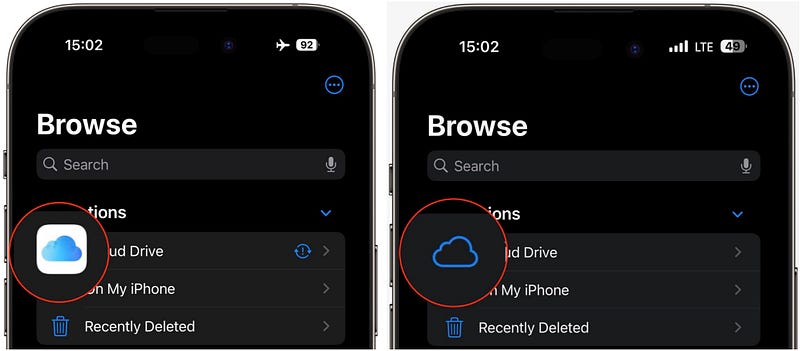
It now turns transparent, resembling the icon for Mac. A good thing — as this’d bring consistency across all Apple OS’s.
#23. Home section for Books, Music, & Podcasts
Apple renames all the main sections of Books, Music, & Podcasts apps to ‘Home’ — bringing simplicity and consistency.
For example:
- Books: Read Now → Home
- Music & Podcasts: Listen Now → Home
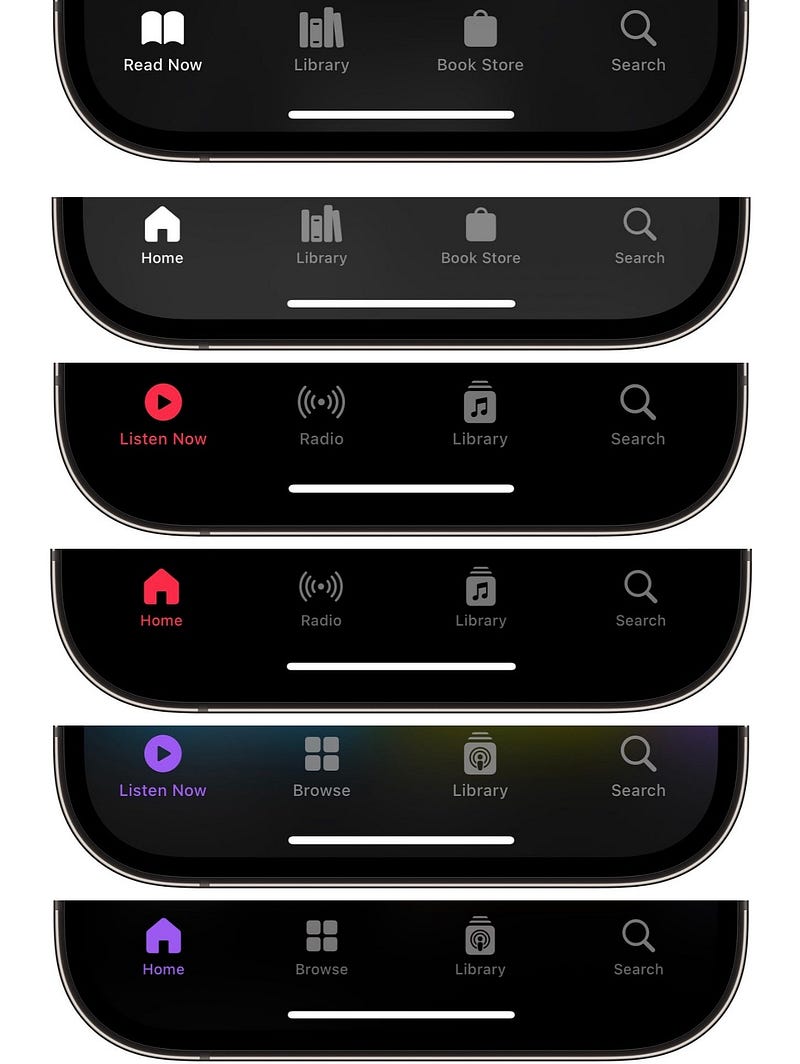
#24. Podcasts’ ‘Now Playing’ bar imitates Apple Music
Also, Podcasts app’s ‘Now Playing’ bar (at the bottom) now resembles Apple Music’s one. Take a look:
It’s previously:
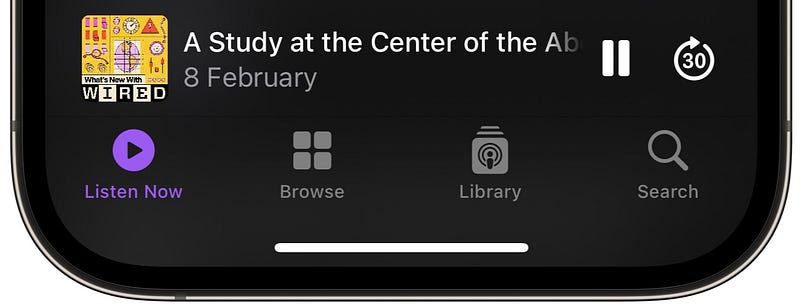
Now it’s:
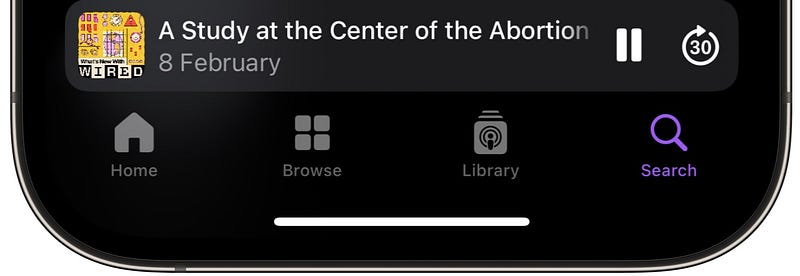
• New Miscellaneous Changes
#25. SharePlay Music with HomePod and Apple TV
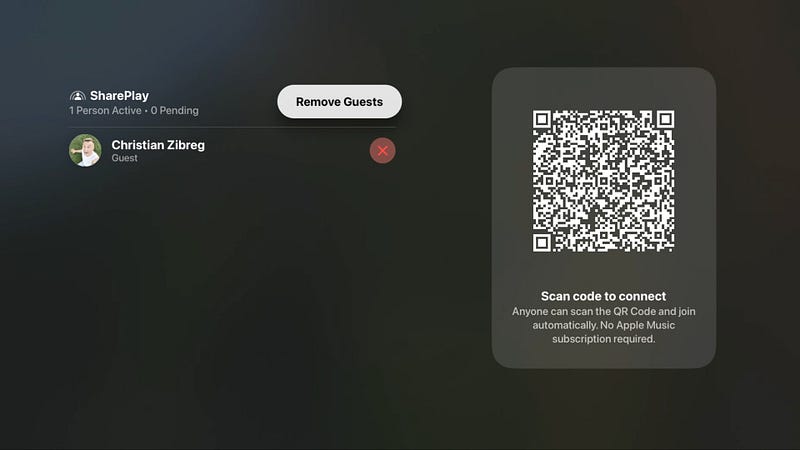
You already know this — From iOS 17, you could SharePlay music in a car with friends & family, where anyone (with permission) can control playback even without an active Apple Music subscription.
Now this arrives to HomePod and Apple TV. To add a participant,
- If you’re using HomePod, on your iPhone, tap on the SharePlay icon at the bottom to get a QR code — which someone can scan to join as a participant.
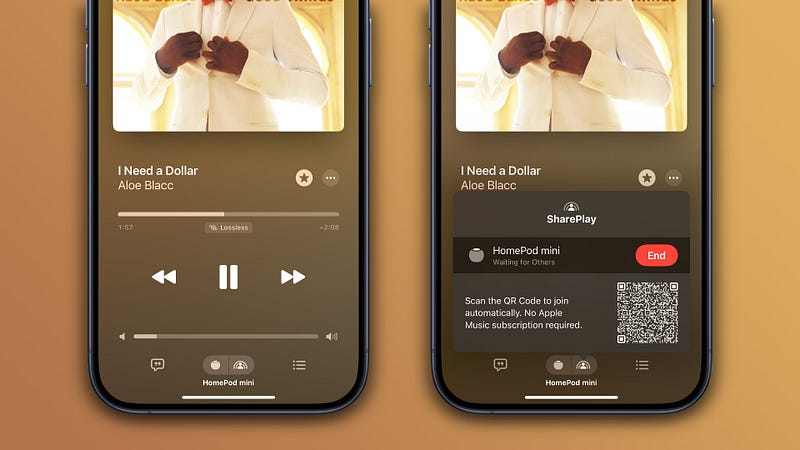
- If you’re using Apple TV with tvOS 17.4 update, you can display the QR code right on Apple TV’s display.
#26. Purchase History in App Store
The App Store can now show the full history of all your purchases — in a new section called ‘Purchase History’.
To see it, open App Store, click on your profile (top-right corner), and click ‘Purchase History’.
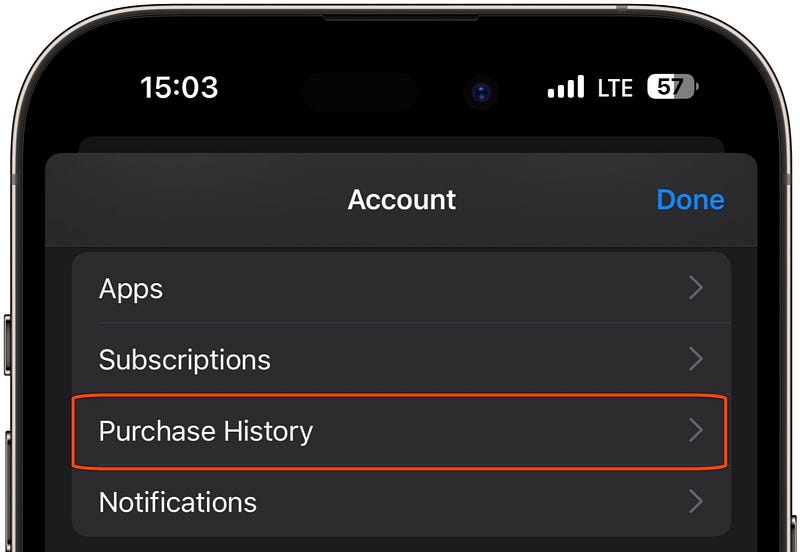
It includes all your purchased apps & games (only paid ones), subscriptions, and in-app purchases.
Also, the section ‘Purchased’ is now renamed to ‘Apps’. Look at the image above. It’s the first one.
#27. Drop Hey while calling Siri in German
Previously, to wake up Siri, you had to say “Hey Siri”. But from iOS 17, you got the option to condense it to just “Siri”.
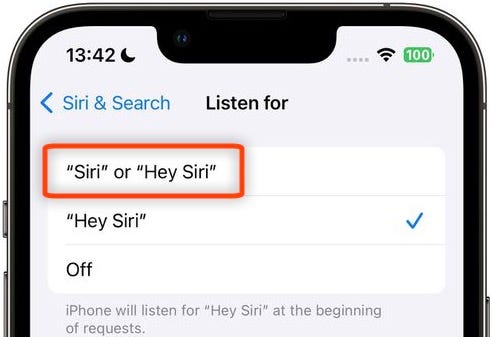
However, it isn’t compatible with all languages yet. And with iOS 17.4, German is included in the compatible languages.
Isn’t iOS 17 awesome?
280+ new features of iOS 17: A Compilation (Always Updated):
Finally,
If you love exploring new iOS & Mac apps (like me), consider subscribing to Setapp. You’ll get access to a curated collection of 240+ amazing apps for just $9.99 a month, which rather cost hundreds of dollars if purchased individually.
- Use my affiliate link to start your Setapp journey! (It’s free for 30 days)
- Get my free list of 70+ Ultimate macOS Apps on Setapp here.
Join 450+ others to get notified whenever I publish a new story!
Appendix: All the new emojis listed
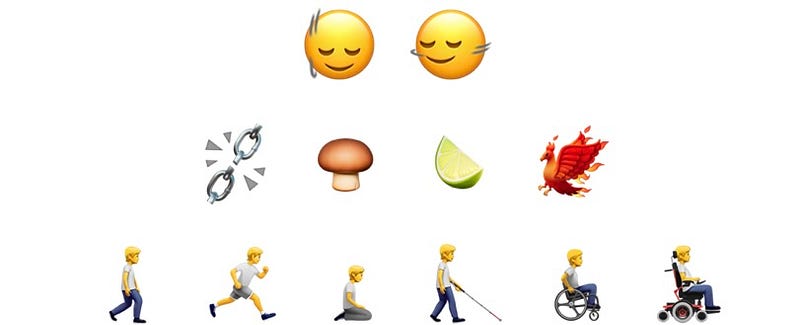
Note, these emojis can’t be comprehended by older iOS versions (like iOS 17.3) and will be represented as a combination of two emojis.
Emojis of first two lines
- 🙂↕️ — Head shaking vertically
- 🙂↔️ — Head shaking horizontally
- ⛓️💥 — Broken chain
- 🍄🟫 — Brown mushroom
- 🍋🟩 — Lime
- 🐦🔥 — Phoenix
Emojis of third Line
- 🚶➡️ — Person walking facing right
- 🏃➡️ — Person running facing right
- 🧎➡️ — Person kneeling facing right
- 🧑🦯➡️ — Person with white mobility cane facing right
- 🧑🦽➡️ — Person in manual wheelchair facing right
- 🧑🦼➡️ — Person in powered wheelchair facing right
There are more similar emojis representing different skin colours and genders. Check them all out in Emojipedia.
Family emojis

All these four emojis replace the suite of family emojis.
The first emoji replaces:
- 🧑🧑🧒🧒 — Family: Adult, Adult, Child, Child
- 👨👨👧👦 — Family with two fathers, daughter, and son
- 👩👩👧👦 — Family with two mothers, daughter, and son
- 👨👩👧👦 — Family with mother, father, daughter, and son
- 👨👨👦👦 — Family with two fathers and two sons
- 👨👨👧👧 — Family with two fathers and two daughters
- 👩👩👦👦 — Family with two mothers and two sons
- 👩👩👧👧 — Family with two mothers and two daughters
- 👨👩👦👦 — Family with mother, father, and two sons
- 👨👩👧👧 — Family with mother, father, and two daughters
The second emoji replaces:
- 👨👨👦 — Family with two fathers and son
- 👨👨👧 — Family with two fathers and daughter
- 👨👩👦 — Family with mother, father, and son
- 👨👩👧 — Family with mother, father, and daughter
- 👪 — Family with two parents and child
- 👩👩👦 — Family with two mothers and son
- 👩👩👧 — Family with two mothers and daughter
The third emoji replaces:
- 👩👦👦 — Family with mother and two sons
- 👩👧👦 — Family with mother, daughter, and son
- 👩👧👧 — Family with mother and two daughters
- 👨👦👦 — Family with father and two sons
- 👨👧👦 — Family with father, daughter, and son
- 👨👧👧 — Family with father and two daughters
The fourth emoji replaces:
- 👨👦 — Family with father and son
- 👨👧 — Family with father and daughter
- 👩👦 — Family with mother and son
- 👩👧 — Family with mother and daughter


