avatarNikhil Vemu

Free AI web copilot to create summaries, insights and extended knowledge, download it at here

5135

Abstract

n recording by the next betas.</p><h1 id="1bd4">#2. Your last chance, pirate developer</h1><p id="e8f0">Until iOS 16.4, if you wanted to enrol yourself for iOS Dev Beta updates, you had to pay 99 a year, download and install the beta profile to your device.</p><p id="2d8a">This is laughably pointless as anyone could bypass the 99 paywall by getting the profile from their friend or a website — and receive betas for free. (I’ll call them pirate developers)</p><p id="f3ff">Apple realised this lately, and has revamped the enrolment process. The profiles are discontinued, and you can (should) now join Beta <b><i>DIRECTLY</i></b> from the Software Update section.</p><figure id="fb99"><img src="https://cdn-images-1.readmedium.com/v2/resize:fit:800/1*uIp1PHAwrFiZXrjF8A_GhQ.jpeg"><figcaption></figcaption></figure><p id="4c49"><i>More info in #5 of this article →</i></p><div id="ed9d" class="link-block"> <a href="https://readmedium.com/the-ios-16-4-update-would-be-way-better-than-weve-expected-10-amazing-features-c7612cf4b97b"> <div> <div> <h2>The iOS 16.4 Update Would be Way Better Than We’ve Expected — 10+ Amazing Features!</h2> <div><h3>My disappointments with iOS 16.3 just vanished</h3></div> <div><p>medium.com</p></div> </div> <div> <div style="background-image: url(https://miro.readmedium.com/v2/resize:fit:320/0*HFtUSFLceMLRyrdN)"></div> </div> </div> </a> </div><p id="edc8">But in case if a pirate dev’s still using a freely acquired profile, he’ll see this after he updates to iOS 16.5.</p><figure id="9347"><img src="https://cdn-images-1.readmedium.com/v2/resize:fit:800/1*sAK-OfdOOgGtpVIjNrPkwQ.jpeg"><figcaption></figcaption></figure><p id="3f35">Meaning: This would be his last Beta update unless he enrols in the Apple Developer Program for $99.</p><p id="5cc4"><i>Read this article if you wanna try out Beta updates, or if you’re a pirate dev →</i></p><div id="0978" class="link-block"> <a href="https://readmedium.com/two-ways-to-install-ios-16-beta-1-before-its-actually-out-88d9b1079f41"> <div> <div> <h2>Two Ways to Install iOS 16 Beta 1 Before It’s Actually Out</h2> <div><h3>Be one among the first to experience it</h3></div> <div><p>medium.com</p></div> </div> <div> <div style="background-image: url(https://miro.readmedium.com/v2/resize:fit:320/0*M_03WxzAG1hG7bb4)"></div> </div> </div> </a> </div><h1 id="7ec4">#3. Breaking News</h1><p id="bea1">News gets big upgrades this time →</p><h2 id="2a06">(1) New Sports Section</h2><p id="e208">Previously, you had ‘Sports’ in Today tab of Apple News. But considering the rising popularity of sports, Apple brought a dedicated tab for it on the Navigation bar.</p><p id="0036"><b>These were the tabs in iOS 16.4 →</b></p><figure id="11c9"><img src="https://cdn-images-1.readmedium.com/v2/resize:fit:800/1*qYWbPRAUFdtmcuK9NndhFA.jpeg"><figcaption></figcaption></figure><p id="47fe"><b>They’re now →</b></p><figure id="7e58"><img src="https://cdn-images-1.readmedium.com/v2/resize:fit:800/1*Z-KltHirnHH4cOp3SbZM0w.jpeg"><figcaption></figcaption></figure><p id="57ec">If you’ve observed it, Apple merged ‘Following’ and ‘Search’ (See the new ‘Following’ icon below).</p><figure id="efbc"><img src="https://cdn-images-1.readmedium.com/v2/resize:fit:800/1*KiePpQhMheCBq3o9ALYfsg.jpeg"><figcaption></figcaption></figure><h2 id="1092">(2) Persistent Navigation bar</h2><p id="3ab6">Previously, if you headed over to your Saved Stories, History, any Channel or Topic, the Navigation bar disappeared.</p><p id="9a08">To access it, you had to come back.</p><p id="28a4">But now, the bar stays persistent — wherever you are in News.</p><div id="6282" class="link-block"> <a href="https://readmedium.com/six-memorable-olympic-records-since-1904-that-probably-might-never-be-broken-e5fa91eb144b"> <div> <div> <h2>Six Memorable Olympic Records Since 1904 That Probably Might Never Be Broken</h2> <div><h3>Modern humans absolutely couldn’t</h3></div> <div><p>medium.com</p></div> </div> <div> <div style="background-image: url(https://miro.readmedium.com/v2/resize:fit:320/0*11A6jnLb1sYVgFes.JPG)"></div> </div> </div> </a> </div><h1 id="1a17">Lastly</h1><p id="9069">We’re still yet to get</p><h2 id="52bc">(1) iMessage Contact Key Verification</h2><figure id="765e"><img src="https://cdn-images-1.readmedium.com/v2/resize:fit:800/1*AdDMSxiTVYSRcnRt8sVihw.jpeg"><figcaption>Credit: <a href="https://nr.apple.com/DH3h9T1Gi1">Apple Newsroom</a></figcaption></figure><ul><li>Alerts you if an attacker ever succeeds in breaching iCloud servers and eavesdrops on your encrypted communications.</li><li>Allows you to compare other person’s verification code

Options

in person, on FaceTime, or other calls.</li></ul><p id="0d19"><i>I’ve first mentioned it in <b>#2.1</b> of this article →</i></p><div id="ac1b" class="link-block"> <a href="https://readmedium.com/the-ios-16-2-update-is-way-bigger-than-weve-expected-7-amazing-features-a47ca64a47d4"> <div> <div> <h2>iOS 16.2 Keeps Getting Impressive — 7 More Features!</h2> <div><h3>The update keeps getting impressive with every beta</h3></div> <div><p>medium.com</p></div> </div> <div> <div style="background-image: url(https://miro.readmedium.com/v2/resize:fit:320/1*oNOYvd1KUvLa33B7plWQEQ.jpeg)"></div> </div> </div> </a> </div><h2 id="c5fc">(2) Apple Card Savings Account</h2><figure id="569b"><img src="https://cdn-images-1.readmedium.com/v2/resize:fit:800/1*U6CDyvAFTU8_8ffwF02wWw.jpeg"><figcaption>Credit: <a href="https://www.apple.com/newsroom/2022/10/apple-card-will-let-users-grow-daily-cash-rewards-while-saving-for-the-future/">Apple Newsroom</a></figcaption></figure><p id="c85b">This is a long-awaited facility of Apple.</p><p id="162b">Apple’s <a href="https://nr.apple.com/DH2R4r1nc4">partnered</a> with Goldman Sachs to offer a high-yield savings account — right in the native Wallet app.</p><p id="bce5">This works pretty much like a bank (actually more) that offers you nice interest rates, cashbacks, and rewards.</p><p id="bc90">Best part, there’s no</p><ul><li>opening fees,</li><li>minimum balance,</li><li>minimum deposit, or</li><li>transfer fees.</li></ul><p id="2eb3"><i>I’ve first mentioned it in <b>#3.2</b> of this article →</i></p><div id="916f" class="link-block"> <a href="https://readmedium.com/7-kick-ass-features-of-the-upcoming-ios-16-1-update-5adec096081e"> <div> <div> <h2>7 Kick-Ass Features Of the Upcoming iOS 16.1 Update</h2> <div><h3>Looks like it’s the Apple’s next surprise after iOS 16</h3></div> <div><p>medium.com</p></div> </div> <div> <div style="background-image: url(https://miro.readmedium.com/v2/resize:fit:320/0*8-CU_mtoxpfu4uNL)"></div> </div> </div> </a> </div><h2 id="e47f">(3) Custom Accessibility Mode</h2><p id="4971">Thanks to 9to5Mac for finding out <b>‘Custom Accessibility Mode’</b> in <a href="https://nikhilvemu.medium.com/ios-16-2-is-finally-out-45-new-features-changes-f3eb4dc043b4">iOS 16.2</a>’s code.</p><p id="b76f">This lets you restrict your device to fewer apps and lesser functionality — and lock it behind your passcode — maybe to save battery or for parental controls.</p><div id="e1fc" class="link-block"> <a href="https://9to5mac.com/2022/11/08/ios-16-2-custom-accessibility-mode/"> <div> <div> <h2>iOS 16.2 to introduce 'Custom Accessibility Mode' with streamlined experience for iPhone and iPad</h2> <div><h3>Apple on Tuesday released iOS 16.2 beta 2 to developers as the company gets ready to make the update available to the…</h3></div> <div><p>9to5mac.com</p></div> </div> <div> <div style="background-image: url(https://miro.readmedium.com/v2/resize:fit:320/0*BLD9Ak4UGwxgybBX)"></div> </div> </div> </a> </div><p id="96af">Though CAM first appeared in back then, it’s still yet to arrive. Hope it comes out right with iOS 16.5. I can’t wait till iOS 17.</p><h2 id="1ce2">Isn’t iOS 16 awesome?</h2><h2 id="6f1d">255+ new features of iOS 16: A Compilation (Always Updated):</h2><div id="e250" class="link-block"> <a href="https://nikhilvemu.medium.com/list/bfb16160e680"> <div> <div> <h2>All iOS 16 Features</h2> <div><h3>186</h3></div> <div><p>nikhilvemu.medium.com</p></div> </div> <div> <div style="background-image: url(https://miro.readmedium.com/v2/resize:fit:320/0*37dec11b2c1fd9e8a904301bbcca0f41bab1efeb.jpeg)"></div> </div> </div> </a> </div><p id="557c"><i>Join <b>320+</b> others to <a href="https://nikhilvemu.medium.com/subscribe"><b>get notified</b></a> whenever I publish a new story.</i></p><div id="c839" class="link-block"> <a href="https://nikhilvemu.medium.com/membership"> <div> <div> <h2>Join Medium with my referral link — Nikhil Vemu</h2> <div><h3>Read every story from Nikhil Vemu (and thousands of other writers on Medium). Your membership fee directly supports…</h3></div> <div><p>nikhilvemu.medium.com</p></div> </div> <div> <div style="background-image: url(https://miro.readmedium.com/v2/resize:fit:320/0*mBIp7BmNza2bZ74G)"></div> </div> </div> </a> </div></article></body>

iOS 16.5 is Gonna be Amazing — Here’s Why

It brings back the iOS 16.4 nostalgia
Photo by Joe Chau on Unsplash
All the unattributed images below are by the author.

The iOS 16.4 update was a tsunami of new features and changes.

And lately, Apple released iOS 16.5 Beta 1. Though it isn’t as stunning as iOS 16.4, it’s got a few nice features — and some amazing features announced by Apple are yet to come.

And I’m sure it’s gonna be Amazing too. Let’s start with the features that arrived →

#1. A new way to record screen

So, tell me how you generally record screen? From Control Centre, right?

With iOS 16.5, you’ve got a new way to do that. After years of its existence, Siri just got skilled enough to record your screen (yeah, I’m a bit sarcastic).

To do that, just say any of these commands by triggering Siri:

  • “Start a screen recording”
  • “Start recording my screen”
  • “Start screen record”
  • “Screen record”

Any similar commands would work too — even to stop recording.

But here’s the buglist (as of Beta 1)

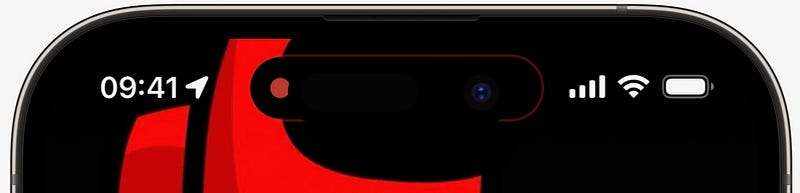
(1) On Dynamic Islands (DIs), the red dot that comes up is different from the regular one.

Regular one:
The one for Siri screen recording:
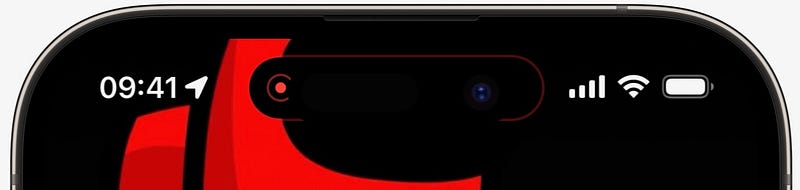
Notice the difference?

The first one’s a big dot. The second one’s a small dot in a circle.

(2) It doesn’t countdown 1, 2, 3 before starting recording.

(3) You can’t record with mic enabled.

“Hey Siri! Record screen with mic on” starts recording screen, but your voice isn’t recorded.

(4) Siri screen record isn’t registered by Control Centre.

If you’re on iOS 16.5 now, try this for yourself →

Start Siri screen record, open Control Centre, and look at the ‘Screen Recording’ block. It isn’t red.
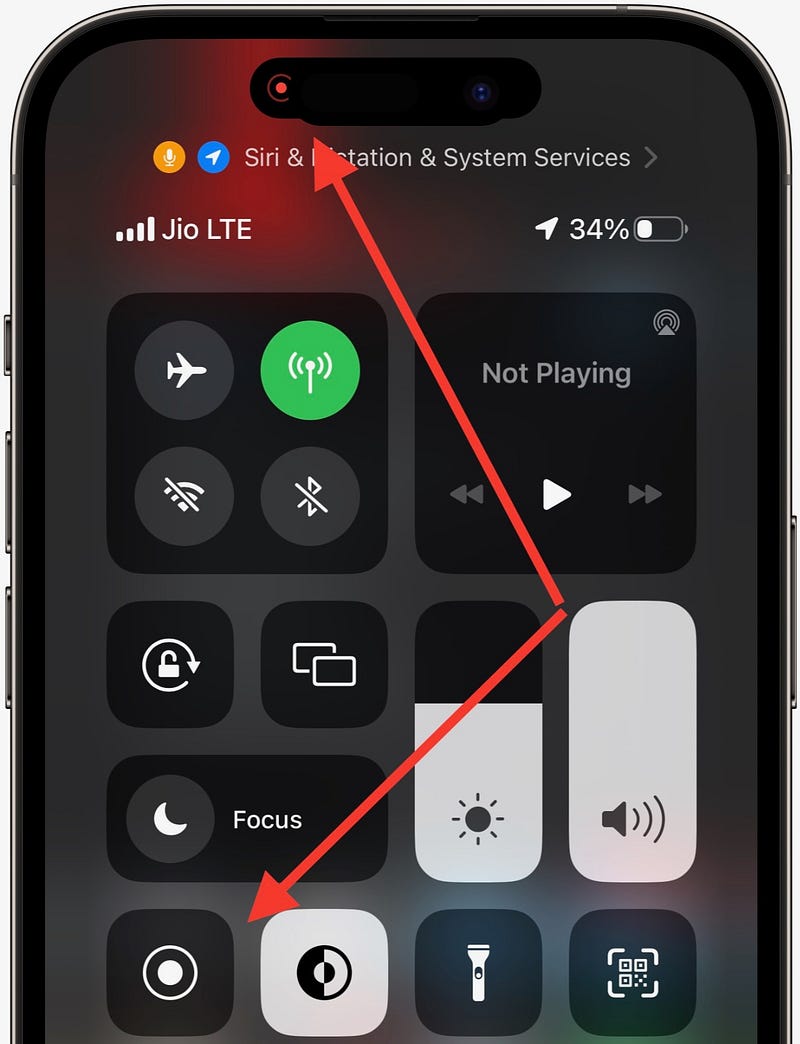
It should be red, right? While recording screen. But it isn’t.

The irony: You can start a normal screen record even while Siri screen record is on.

(5) It’s not optimised for Dynamic Island yet.

I think the build code of this new feature is notch’s, not Dynamic Island’s. Coz

  • you can’t interact with Siri screen record by long-pressing island, which’s possible with the regular one.
  • To stop record, you need to click on island, and click ‘Stop’ on the box that comes below. Now you’ll get a notch-type notification saying it’s saved to Photos — the exact way it happens for notch iPhones.

Lot of improvements needed.

Anyways, considering it’s Beta 1, I hope Apple’s working on fixing these issues — and’s getting Siri reliable on screen recording by the next betas.

#2. Your last chance, pirate developer

Until iOS 16.4, if you wanted to enrol yourself for iOS Dev Beta updates, you had to pay $99 a year, download and install the beta profile to your device.

This is laughably pointless as anyone could bypass the $99 paywall by getting the profile from their friend or a website — and receive betas for free. (I’ll call them pirate developers)

Apple realised this lately, and has revamped the enrolment process. The profiles are discontinued, and you can (should) now join Beta DIRECTLY from the Software Update section.
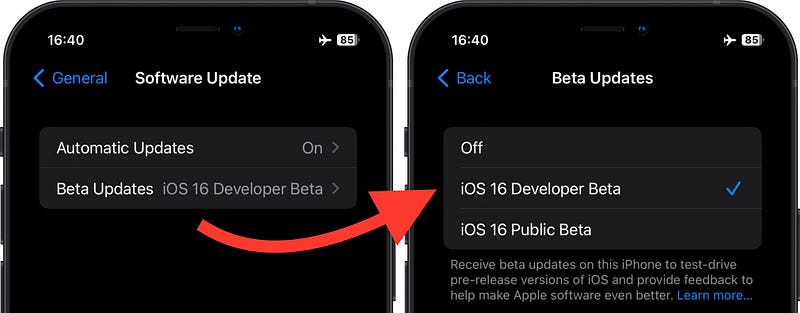
More info in #5 of this article →

But in case if a pirate dev’s still using a freely acquired profile, he’ll see this after he updates to iOS 16.5.
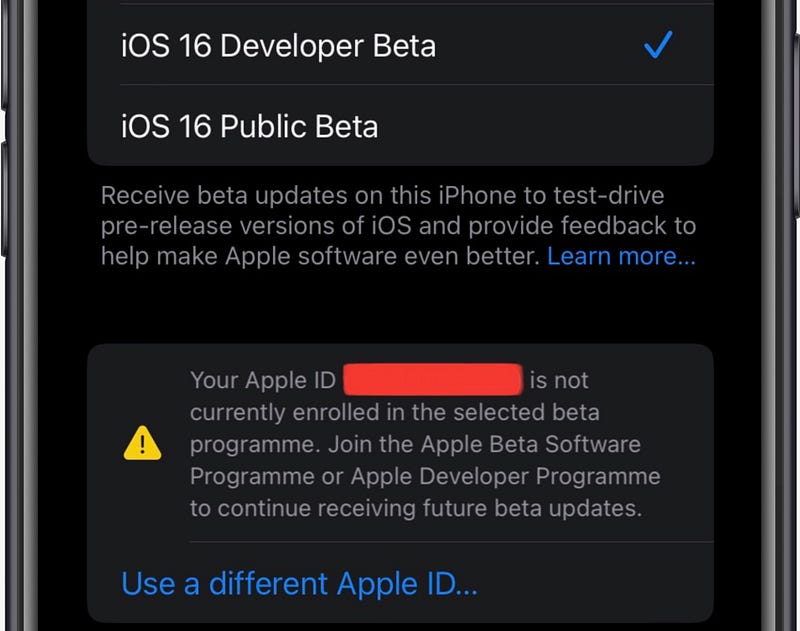
Meaning: This would be his last Beta update unless he enrols in the Apple Developer Program for $99.

Read this article if you wanna try out Beta updates, or if you’re a pirate dev →

#3. Breaking News

News gets big upgrades this time →

(1) New Sports Section

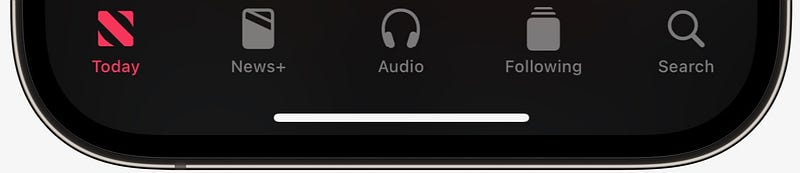
Previously, you had ‘Sports’ in Today tab of Apple News. But considering the rising popularity of sports, Apple brought a dedicated tab for it on the Navigation bar.

These were the tabs in iOS 16.4 →
They’re now →
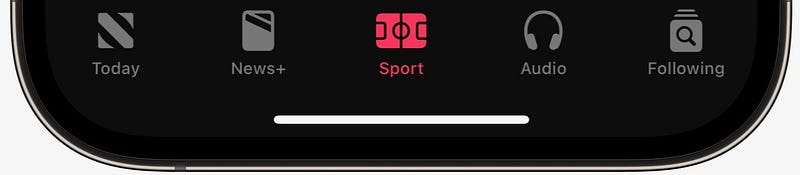
If you’ve observed it, Apple merged ‘Following’ and ‘Search’ (See the new ‘Following’ icon below).

(2) Persistent Navigation bar

Previously, if you headed over to your Saved Stories, History, any Channel or Topic, the Navigation bar disappeared.

To access it, you had to come back.

But now, the bar stays persistent — wherever you are in News.

Lastly

We’re still yet to get

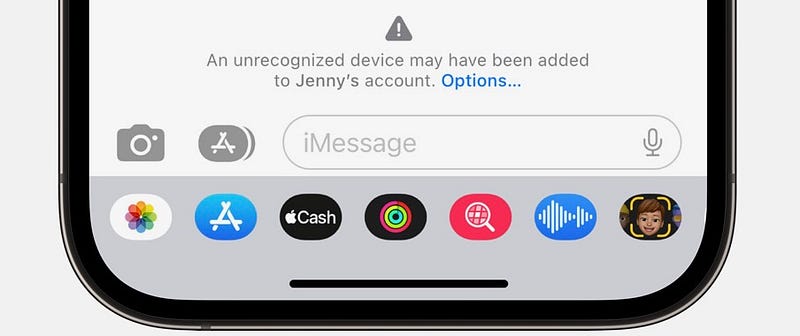
(1) iMessage Contact Key Verification
Credit: Apple Newsroom
  • Alerts you if an attacker ever succeeds in breaching iCloud servers and eavesdrops on your encrypted communications.
  • Allows you to compare other person’s verification code in person, on FaceTime, or other calls.

I’ve first mentioned it in #2.1 of this article →

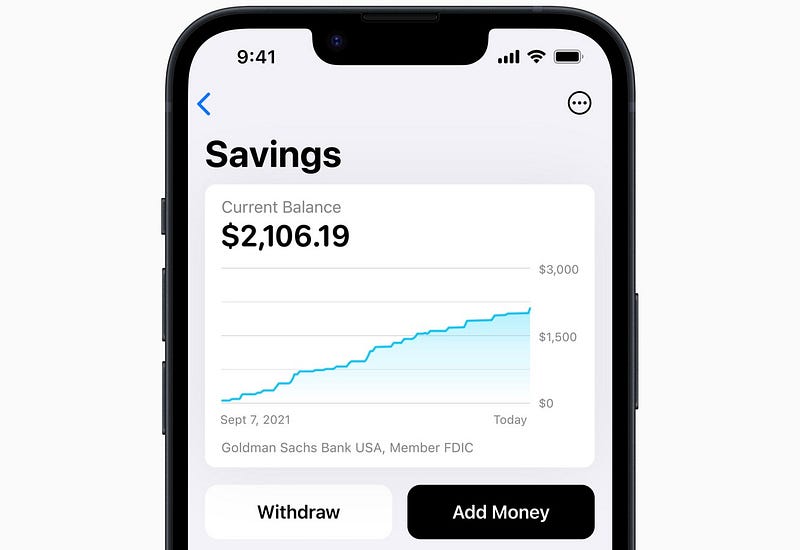
(2) Apple Card Savings Account
Credit: Apple Newsroom

This is a long-awaited facility of Apple.

Apple’s partnered with Goldman Sachs to offer a high-yield savings account — right in the native Wallet app.

This works pretty much like a bank (actually more) that offers you nice interest rates, cashbacks, and rewards.

Best part, there’s no

  • opening fees,
  • minimum balance,
  • minimum deposit, or
  • transfer fees.

I’ve first mentioned it in #3.2 of this article →

(3) Custom Accessibility Mode

Thanks to 9to5Mac for finding out ‘Custom Accessibility Mode’ in iOS 16.2’s code.

This lets you restrict your device to fewer apps and lesser functionality — and lock it behind your passcode — maybe to save battery or for parental controls.

Though CAM first appeared in back then, it’s still yet to arrive. Hope it comes out right with iOS 16.5. I can’t wait till iOS 17.

Isn’t iOS 16 awesome?

255+ new features of iOS 16: A Compilation (Always Updated):

Join 320+ others to get notified whenever I publish a new story.

Technology
Apple
iPhone
iOS
Innovation
Recommended from ReadMedium