avatarNikhil Vemu

Free AI web copilot to create summaries, insights and extended knowledge, download it at here

2802

Abstract

de> in the prompt to download the beta profile.</li><li>Now, go to settings and click on <code>Profile Downloaded</code> .</li><li>Click on <code>Install</code> at the top-right corner, and type your passcode.</li></ul><figure id="a333"><img src="https://cdn-images-1.readmedium.com/v2/resize:fit:800/1*hbXs9VbLx9j3FrDD8NcR0w.jpeg"><figcaption>Screenshot by the author</figcaption></figure><p id="ef04">Now, the profile gets installed and your iPhone’s rebooted.</p><p id="b58a">Your iPhone’s got fully enrolled into Apple Beta Software Program and it will receive iOS 16 beta as soon as it’s released to public beta testers. You can optionally —</p><ul><li>Go to <code>Settings ⚙️ < General ⚙️ < Software Update</code> .</li><li>Update your device to the latest iOS 15 beta.</li></ul><div id="f5c8"><pre><span class="hljs-symbol">Note:</span></pre></div><div id="236c"><pre>• iOS <span class="hljs-number">16</span> public <span class="hljs-keyword">beta </span>might <span class="hljs-keyword">be </span>released a month after the release of developer <span class="hljs-keyword">beta </span>on <span class="hljs-keyword">June </span><span class="hljs-number">6</span>. This is to ensure minimal <span class="hljs-keyword">bugs </span><span class="hljs-keyword">and </span>stability issues.</pre></div><div id="f886"><pre>• Minor updates like iOS <span class="hljs-number">16.1</span> will be released <span class="hljs-keyword">with</span> <span class="hljs-built_in">delay</span> <span class="hljs-keyword">of</span> a <span class="hljs-built_in">day</span> <span class="hljs-keyword">or</span> two only.</pre></div><h1 id="c5be">#2. Enroll in Apple Developer Program (for 99 a year)</h1><p id="a6e9">If you want iOS 16 beta 1 on the first day of its release, this is the way.</p><blockquote id="98ba"><p><i>The Apple Developer Program is specially designed for app developers who want their apps to be compatible with upcoming iOS versions beforehand, so there’ll be no stability issues for their users in the future.</i></p></blockquote><p id="259d">However, you don’t need to be a savvy developer to enroll. All you need is 99. And you get access to all iOS betas at the earliest moment possible.</p><h2 id="46e2">How to enroll?</h2><ul><li>Download <a href="https://apps.apple.com/in/app/apple-developer/id640199958">Developer</a> app from App Store.</li><li>Go to <code>Account</code> menu, and click on <code>Enroll Now</code> .</li><li>Sign in with your Apple ID.</li><li>Click on <code>Continue</code> after you read the benefits.</li><li>Fill in all the required details and pay $99.</li><li>Now, open the <a href="https://idmsa.apple.com/IDMSWebAuth/login?appIdKey=891bd3417a7776362562d2197f89480a8547b108fd934911bcbea0110d07f757&amp;path=%2Fdownload%2F&amp;rv=1">Apple Developer p

Options

ortal</a> and sign in with your Apple ID.</li><li>Click on <code>Install Profile</code> to install the latest developer beta profile of iOS 15.</li></ul><p id="5e47">Now your iPhone’s got fully enrolled into Apple Developer Program and will receive iOS 16 on the day of WWDC22 i.e., June 6.</p><p id="307a">Optionally, you can now update your iPhone to latest iOS 15 beta.</p><h1 id="cd7b">Conclusion</h1><figure id="c7fb"><img src="https://cdn-images-1.readmedium.com/v2/resize:fit:800/0*M_03WxzAG1hG7bb4"><figcaption>Photo by <a href="https://unsplash.com/@unarchive?utm_source=medium&amp;utm_medium=referral">Jeremy Bezanger</a> on <a href="https://unsplash.com?utm_source=medium&amp;utm_medium=referral">Unsplash</a></figcaption></figure><p id="d785">My excitement for iOS 16 is getting to its peaks day by day. I just can’t wait to know what amazing changes we’re gonna get.</p><p id="22e7">Are you too?</p><p id="30e3"><b>If you liked this story, you might also like:</b></p><div id="9031" class="link-block"> <a href="https://readmedium.com/10-absolutely-useful-siri-tricks-you-probably-havent-tried-yet-312772cfb99"> <div> <div> <h2>10 Absolutely Useful Siri Tricks You Probably Haven’t Tried Yet</h2> <div><h3>These simple tricks might save you hours a year</h3></div> <div><p>medium.com</p></div> </div> <div> <div style="background-image: url(https://miro.readmedium.com/v2/resize:fit:320/1*hjcEyEYTB4NNWUUx86M57Q.png)"></div> </div> </div> </a> </div><div id="6f47" class="link-block"> <a href="https://readmedium.com/10-essential-iphone-typing-hacks-every-user-should-know-f6f97e6857c"> <div> <div> <h2>10 Essential iPhone Typing Hacks Every User Should Know</h2> <div><h3>Unleash the superpowers of that little keyboard</h3></div> <div><p>medium.com</p></div> </div> <div> <div style="background-image: url(https://miro.readmedium.com/v2/resize:fit:320/0*QpFbsfLUDU5gMcR-)"></div> </div> </div> </a> </div><p id="e58f"><i>Hey! If you enjoyed this story, <b>sign up for Medium</b> as a member using my <a href="https://nikhilvemu.medium.com/membership"><b>referral link</b></a>! It’s just $5, and you get access to all of Medium.</i></p><p id="19a9"><i>Also, you can join <b>65+</b> others to <a href="https://nikhilvemu.medium.com/subscribe"><b>get notified</b></a> whenever I publish. Grab a free copy of my ebook <b><a href="https://nikhilvemu.gumroad.com/l/atbg">A Tech Blogger’s Guide</a></b> to write tech better!</i></p></article></body>

Two Ways to Install iOS 16 Beta 1 Before It’s Actually Out

Be one among the first to experience it
Image courtesy of MacRumors

The hype for the much anticipated iOS 16 has already begun. Apple’s releasing its first developer beta on June 6, at the WWDC 22. And the public version will be out at the Apple Event in September 2022, alongside the iPhone 14.

If you’d like to know the amazing rumoured features of iOS 16,

And if you’re an Apple fan-guy, like me, who just couldn’t wait to taste the yummy iOS 16 dish at the earliest moment possible, here I give you two ways to do it.

Note: Betas contain fresh codes which aren't fully tested for stability. Therefore, it's highly recommended you install beta updates on a secondary device, and always store a backup of its data.

#1. Enroll in Apple Beta Software Program (for free)

Enrolling in this program is free. With that, you’ll receive public betas of iOS updates, and a chance to try out new features before they’re actually released to public.

Public betas are relatively more stable than developer betas, as they’re further tested for bugs and stability issues.

How to enroll?

Now you’ll be redirected to Guide for Public Betas .

  • Scroll down to Get Started menu, and click on enroll your iOS device .
  • Scroll down to Install profile menu, and click on Download profile .
  • Click on Allow in the prompt to download the beta profile.
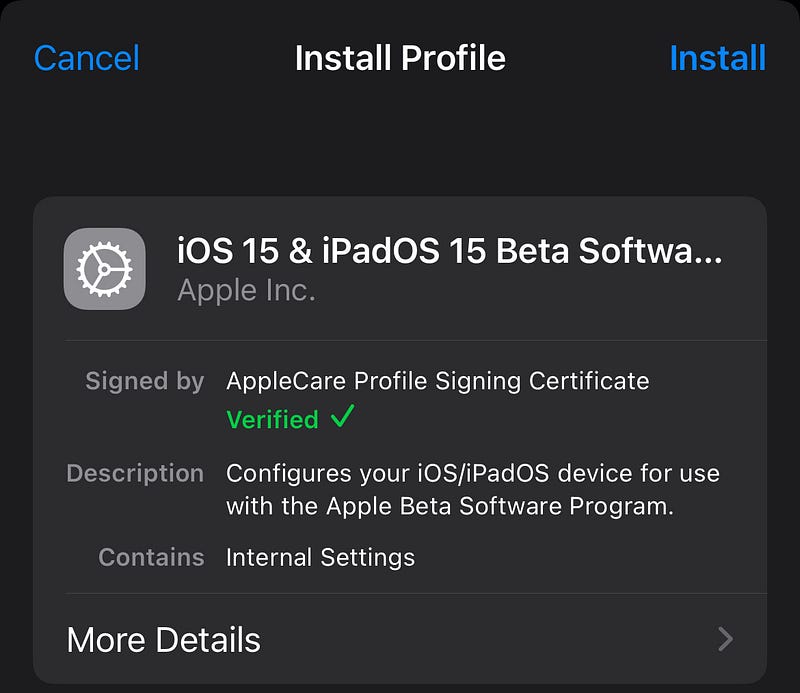
  • Now, go to settings and click on Profile Downloaded .
  • Click on Install at the top-right corner, and type your passcode.
Screenshot by the author

Now, the profile gets installed and your iPhone’s rebooted.

Your iPhone’s got fully enrolled into Apple Beta Software Program and it will receive iOS 16 beta as soon as it’s released to public beta testers. You can optionally —

  • Go to Settings ⚙️ < General ⚙️ < Software Update .
  • Update your device to the latest iOS 15 beta.
Note:
• iOS 16 public beta might be released a month after the release of developer beta on June 6. This is to ensure minimal bugs and stability issues.
• Minor updates like iOS 16.1 will be released with delay of a day or two only.

#2. Enroll in Apple Developer Program (for $99 a year)

If you want iOS 16 beta 1 on the first day of its release, this is the way.

The Apple Developer Program is specially designed for app developers who want their apps to be compatible with upcoming iOS versions beforehand, so there’ll be no stability issues for their users in the future.

However, you don’t need to be a savvy developer to enroll. All you need is $99. And you get access to all iOS betas at the earliest moment possible.

How to enroll?

  • Download Developer app from App Store.
  • Go to Account menu, and click on Enroll Now .
  • Sign in with your Apple ID.
  • Click on Continue after you read the benefits.
  • Fill in all the required details and pay $99.
  • Now, open the Apple Developer portal and sign in with your Apple ID.
  • Click on Install Profile to install the latest developer beta profile of iOS 15.

Now your iPhone’s got fully enrolled into Apple Developer Program and will receive iOS 16 on the day of WWDC22 i.e., June 6.

Optionally, you can now update your iPhone to latest iOS 15 beta.

Conclusion
Photo by Jeremy Bezanger on Unsplash

My excitement for iOS 16 is getting to its peaks day by day. I just can’t wait to know what amazing changes we’re gonna get.

Are you too?

If you liked this story, you might also like:

Hey! If you enjoyed this story, sign up for Medium as a member using my referral link! It’s just $5, and you get access to all of Medium.

Also, you can join 65+ others to get notified whenever I publish. Grab a free copy of my ebook A Tech Blogger’s Guide to write tech better!

Technology
Apple
iOS
Mobile
Innovation
Recommended from ReadMedium