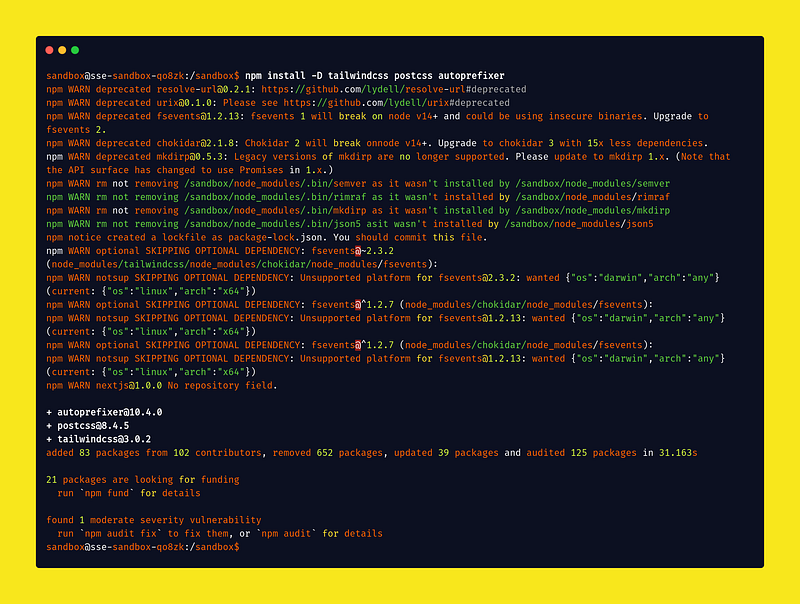
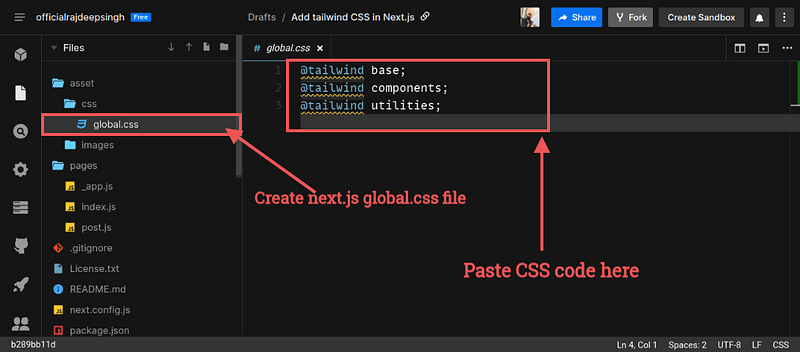
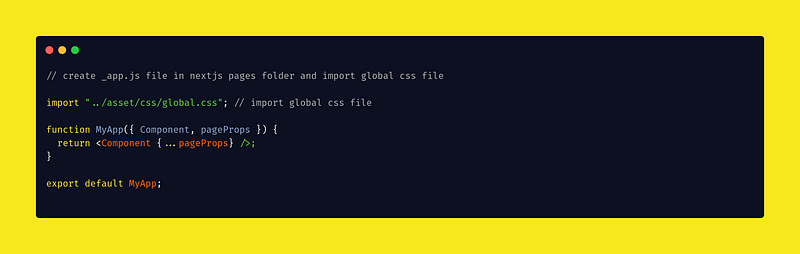
s://cdn-images-1.readmedium.com/v2/resize:fit:800/1ijt8Hu8AO56aXHE6THMKoA.png"><figcaption>Install tailwind CSS in nextJs</figcaption></figure><p id="5ffe">Now install tailwind CSS successfully with all helping packages. You run the Tailwind init command in the terminal. init command generates both <code>tailwind.config.js</code> and <code>postcss.config.js</code>.</p><div id="d0db"><pre>npx tailwindcss <span class="hljs-keyword">init</span> -p</pre></div><figure id="e6e9"><img src="https://cdn-images-1.readmedium.com/v2/resize:fit:800/1*jmUWyquqG6uByzbeDS8DlA.png"><figcaption>Run tailwindcss init command.</figcaption></figure><h2 id="7b96">Configure your template paths</h2><p id="fb82">In your <code>tailwind.config.js</code> the file, you add all template paths. Official configuration only adds <b>pages</b> and <b>components</b> folder paths. If you have any other path, mention it in the <b>content</b> array.</p><div id="9b2e"><pre>module.<span class="hljs-attr">exports</span> <span class="hljs-operator">=</span> <span class="hljs-punctuation">{</span>
<span class="hljs-symbol"> content:</span> [
<span class="hljs-string">"./pages/**/.{js,ts,jsx,tsx}"</span>,
<span class="hljs-string">"./components/**/*.{js,ts,jsx,tsx}"</span>,
],
<span class="hljs-symbol"> theme:</span> <span class="hljs-punctuation">{</span>
<span class="hljs-symbol"> extend:</span> <span class="hljs-punctuation">{</span><span class="hljs-punctuation">}</span>,
<span class="hljs-punctuation">}</span>,
<span class="hljs-symbol"> plugins:</span> [],
<span class="hljs-punctuation">}</span></pre></div><figure id="b636"><img src="https://cdn-images-1.readmedium.com/v2/resize:fit:800/1*jIMBX_GdUUYP1WaFpED2Ig.png"><figcaption>Add tailwind CSS configuration in NextJs.</figcaption></figure><h2 id="794f">Add the Tailwind directives to your CSS</h2><p id="e09c">Adding your tailwind directive means adding a tailwind CSS file in the nextjs CSS global file.</p><div id="e0a1"><pre><span class="hljs-variable">@tailwind</span> base;
<span class="hljs-variable">@tailwind</span> components;
<span class="hljs-variable">@tailwind</span> utilities;</pre></div><figure id="0edf"><img src="https://cdn-images-1.readmedium.com/v2/resize:fit:800/1*gJxlmUX1Q74MnR3gPeN-5g.png"><figcaption>Add tailwind directive in nextjs CSS global file.</figcaption></figure><h2 id="f257">Note</h2><p id="52fb">Make sure your nextjs global file imported in <code>_app.js</code> custom file.</p><figure id="c934"><img src="https://cdn-images-1.readmedium.com/v2/resize:fit:800/1*56eFjLlVYuGIXFPBkqPdCQ.png"><figcaption>Import Global CSS file in custom _app.js file</figcaption></figure><h2 id="d94f">Start your Dev Server</h2><p id="50aa">Now all your configuration is done in the nextjs project. Now you run the nextjs dev server in nextjs.</p><div id="5050"><pre>npm <span class="hljs-built_in">run</span> dev</pre></div><h2 id="1ea6">Start using Tailwind CSS in your project.</h2><p id="9ac2">Your configuration is done, and your local dev server also starts running. Right now, you add tailwind CSS in your nextjs with a happy face.</p><div id="df49"><pre><div <span class="hljs-attribute">className</span>=<span class="hljs-string">"container max-w-4xl mx-auto pt-16 md:pt-32 text-center break-normal"</span>></pre></div><div id="50f1"><pre> <span class="hljs-tag"><<span class="hljs-name">p</span> <span class="hljs-attr">className</span>=<span class="hljs-string">"text-white font-extrabold text-3xl md:text-5xl"</span>></span> Ghostwind CSS
<span class="hljs-tag"></<span class="hljs-name">p</span>></span></pre></div><div id="0a40"><pre><p className=<span class="hljs-string">"text-xl md:text-2xl text-gray-500"</span>> Welcome <span class="hljs-keyword">to</span> <span class="hljs-keyword">my</span> Blog </p>
</<span class="hljs-keyword">div</span>></pre></div><h2 id="8b64">You Install Nextjs with Tailwind Preconfig Setup</h2><p id="c448">You install nextjs with tailwind pre-config setup for the project. The nextjs team provided all examples. In setup, all configs are added by default in your project.</p><div id="5776"><pre><span class="hljs-string">npx</span> <span class="hljs-built_in">create-next-app</span> <span class="hljs-built_in">--example</span> <span class="hljs-string">with-tailwindcss</span> <span class="hljs-string">with-tailwindcss-app</span>
<span class="hljs-comment"># or</span>
<span class="hljs-string">yarn</span> <span class="hljs-string">create</span> <span class="hljs-string">next-app</span> <span class="hljs-built_in">--example</span> <span class="hljs-string">with-tailwindcss</span> <s
Options
pan class="hljs-string">with-tailwindcss-app</span></pre></div><div id="7187" class="link-block">
<a href="https://github.com/vercel/next.js/tree/canary/examples/with-tailwindcss">
<div>
<div>
<h2>next.js/examples/with-tailwindcss at canary · vercel/next.js</h2>
<div><h3>This example shows how to use Tailwind CSS (v3.0) with Next.js. It follows the steps outlined in the official Tailwind…</h3></div>
<div><p>github.com</p></div>
</div>
<div>
<div style="background-image: url(https://miro.readmedium.com/v2/resize:fit:320/0*AU1TKztAg3iIZYF0)"></div>
</div>
</div>
</a>
</div><h2 id="5d7a">Project Demo</h2>
<figure id="860e">
<div>
<div>
<img class="ratio" src="http://placehold.it/16x9">
<iframe class="" src="https://cdn.embedly.com/widgets/media.html?src=https%3A%2F%2Fcodesandbox.io%2Fembed%2Fvoi7s&display_name=CodeSandbox&url=https%3A%2F%2Fcodesandbox.io%2Fs%2Fvoi7s&image=https%3A%2F%2Fcodesandbox.io%2Fapi%2Fv1%2Fsandboxes%2Fvoi7s%2Fscreenshot.png&key=a19fcc184b9711e1b4764040d3dc5c07&type=text%2Fhtml&schema=codesandbox" allowfullscreen="" frameborder="0" height="500" width="1000">
</div>
</div>
</figure></iframe></div></div></figure><h2 id="e49d">Reference</h2><p id="3e3b"><a href="https://tailwindcss.com/docs/guides/nextjs">https://tailwindcss.com/docs/guides/nextjs</a></p><div id="e0d0" class="link-block">
<a href="https://github.com/vercel/next.js/tree/canary/examples/with-tailwindcss">
<div>
<div>
<h2>next.js/examples/with-tailwindcss at canary · vercel/next.js</h2>
<div><h3>This example shows how to use Tailwind CSS (v3.0) with Next.js. It follows the steps outlined in the official Tailwind…</h3></div>
<div><p>github.com</p></div>
</div>
<div>
<div style="background-image: url(https://miro.readmedium.com/v2/resize:fit:320/0*AU1TKztAg3iIZYF0)"></div>
</div>
</div>
</a>
</div><div id="a276" class="link-block">
<a href="https://nextjs.org/docs/getting-started">
<div>
<div>
<h2>Getting Started | Next.js</h2>
<div><h3>Welcome to the Next.js documentation! If you're new to Next.js we recommend that you start with the learn course. The…</h3></div>
<div><p>nextjs.org</p></div>
</div>
<div>
<div style="background-image: url(https://miro.readmedium.com/v2/resize:fit:320/0*ZydRlEu73m2_rg3T)"></div>
</div>
</div>
</a>
</div><p id="5030"><a href="https://nextjs.org/docs/basic-features/built-in-css-support#adding-a-global-stylesheet">https://nextjs.org/docs/basic-features/built-in-css-support#adding-a-global-stylesheet</a></p><h1 id="c81b">Read the previous post</h1><div id="7a18" class="link-block">
<a href="https://readmedium.com/how-to-build-a-layout-in-nextjs-80d28d571673">
<div>
<div>
<h2>How to build a layout in nextjs</h2>
<div><h3>This article is full details article, how are layouting works, and how it uses in nextjs. This article is part of…</h3></div>
<div><p>medium.com</p></div>
</div>
<div>
<div style="background-image: url(https://miro.readmedium.com/v2/resize:fit:320/1*ONFIuW2avF0F7XJd0ll1mw.png)"></div>
</div>
</div>
</a>
</div><div id="9fc7" class="link-block">
<a href="https://readmedium.com/how-to-update-next-js-old-version-to-the-latest-version-6870f1f1b8d1">
<div>
<div>
<h2>How to update Next.js' old version to the latest version?</h2>
<div><h3>This article is full details article, how to update the nextjs old version to the new version with npm and yarn. This…</h3></div>
<div><p>medium.com</p></div>
</div>
<div>
<div style="background-image: url(https://miro.readmedium.com/v2/resize:fit:320/1*Y93WF4_dQ5WXwy6jw0bLWQ.png)"></div>
</div>
</div>
</a>
</div><h2 id="1e69">Conclusion</h2><p id="e720">I hope you easily understand the tailwind installation setup. I will try my best if you have any queries or questions, ask me in the comment section.</p></article></body>
tailwindCSS
Install Tailwind CSS in Next.js?
Tailwind is a modern build responsive website CSS framework. Tailwind framework built with javascript, HTML, and CSS.
Tailwind is a great CSS framework for rapidly building websites. Suppose someone asks me to choose CSS frameworks in bootstrap and tailwind CSS. I select bootstrap because bootstrap is an old CSS framework. I used bootstrap lots of times in past projects. Right now, as a modern area of technology. Many companies hire front-end developers with tailwind CSS frameworks nowadays. There a serval reasons why the Tailwind CSS framework is a very high-demand technology in the front-end world.
Easy to remember CSS class name.
Tailwind never sends unused CSS on production.
I mention two benefits of tailwinds. I know There is a lot of help with a tailwind CSS framework. But I share two that are more critical for me. That is why I understood the tailwind importance and started to learn. If you learn more, then feel free to read these blogs.

Now install tailwind CSS successfully with all helping packages. You run the Tailwind init command in the terminal. init command generates both tailwind.config.js and postcss.config.js.
npx tailwindcss init -p
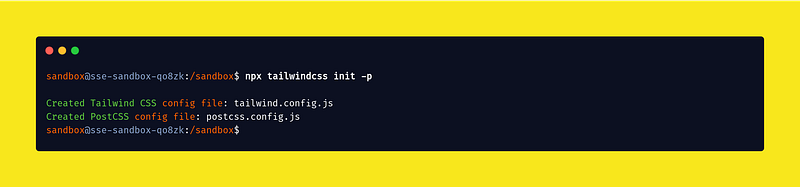
Run tailwindcss init command.
Configure your template paths
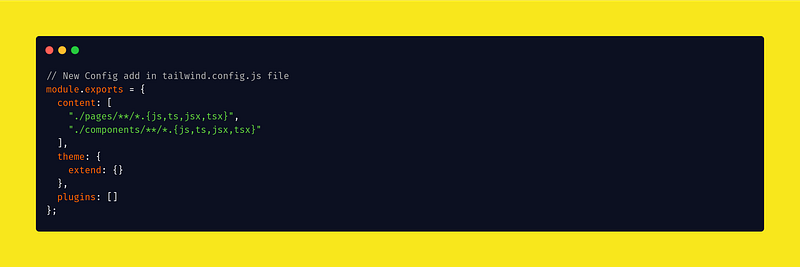
In your tailwind.config.js the file, you add all template paths. Official configuration only adds pages and components folder paths. If you have any other path, mention it in the content array.
<p className="text-xl md:text-2xl text-gray-500"> Welcome tomy Blog </p>
</div>
You Install Nextjs with Tailwind Preconfig Setup
You install nextjs with tailwind pre-config setup for the project. The nextjs team provided all examples. In setup, all configs are added by default in your project.