avatarRajdeep Singh

Free AI web copilot to create summaries, insights and extended knowledge, download it at here

4021

Abstract

aption></figure><p id="54de">If you face an error when updating the nextjs package. This Error shows you because npm does not resolve the dependency, and the second reason, you update your npm package now, your npm binary is changed and broken. So that reason you face an error.</p><p id="8ed1">Now you run the following command, your problem is resolved.</p><div id="263e"><pre>npm <span class="hljs-keyword">update</span> --<span class="hljs-keyword">force</span>

<span class="hljs-keyword">or</span></pre></div><div id="a236"><pre>npm <span class="hljs-keyword">update</span> <span class="hljs-comment">--legacy-peer-deps</span></pre></div><p id="2e87">Deep dive into learning more about this Error, so I recommended you, too, read these articles.</p><p id="9da0"><a href="https://exerror.com/eresolve-unable-to-resolve-dependency-tree-error-when-installing-npm-packages/">https://exerror.com/eresolve-unable-to-resolve-dependency-tree-error-when-installing-npm-packages/</a></p><p id="9456"><a href="https://stackoverflow.com/questions/64573177/unable-to-resolve-dependency-tree-error-when-installing-npm-packages">https://stackoverflow.com/questions/64573177/unable-to-resolve-dependency-tree-error-when-installing-npm-packages</a></p><h2 id="c0f6">YARN</h2><p id="f230">Yarn is a new package manager in javascript as compared to npm. Yarn also started widely used to build projects and share a project with others. Yarn also uses a package.json file to check your package installation list in your project app.</p><p id="20eb">Yarn installation separately in node.js. Npm by default provided with node js package. But yarn installs separately.</p><p id="f883">Installation of yarn with npm command.</p><div id="42e3"><pre>npm install <span class="hljs-comment">--global yarn</span></pre></div><h2 id="c31b">How to update Nextjs library use to YARN command?</h2><p id="5610">Firstly check the outdated package in your project using the yarn outdated command.</p><div id="67b2"><pre><span class="hljs-attribute">yarn outdated</span></pre></div><figure id="1162"><img src="https://cdn-images-1.readmedium.com/v2/resize:fit:800/1*AZBI4zLBTadxnGDQPdDr3w.png"><figcaption></figcaption></figure><p id="4fef">This command checks your package based on the package.json file.</p><h2 id="b768">Note</h2><p id="0b1d">Yarn does not provide global outdated package Check functionality.</p><h2 id="0652">How to update Nextjs library use to YARN command?</h2><p id="5ad4">Update Nextjs package process is based on your nextjs installation.</p><ul><li><b>Globaly update nextJs</b></li></ul><p id="2650">If you install nextjs globally on your laptop, use <code>create-next-app</code>. Then firstly, update yours <code>create-next-app</code> with yarn.</p><div id="0e7a"><pre>yarn <span class="hljs-keyword">global</span> upgrade <span class="hljs-keyword">or</span> yarn <span class="hljs-keyword">global</span> upgrade <span class="hljs-comment">--latest</span> <span class="hljs-keyword">or</span> yarn <span class="hljs-keyword">global</span> upgrade <package-<span class="hljs-type">name</span>></pre></div><p id="b7ad">This command upgrades your all global install package in yarn.</p><div id="e52d"><pre>yarn <span class="hljs-keyword">global</span> upgrade create-<span class="hljs-keyword">next</span>-app</pre></div><p id="d8f2">With the help of this command, you upgrade a specific package. For example, I upgrade <code>create-next-app</code> the package in yarn.</p><ul><li><b>Folder base nextJs</b></li></ul><p id="989a">Secondly, you create a nextjs app using <code>create-next-app</code> and installing nextjs, react, and react-dom Spratly In a folder or directory. Now you update the package in your folder and run the yarn upgrade command without <code>--global</code>keywords.</p><div id="9560"><pre><span class="hljs-attribute">yarn upgrade</span></pre></div><p id="cb1c">Before running the update command, make sure you have the latest version of the yarn package. Otherwise, firstly update yarn with the l

Options

atest version. Then run the yarn install command in your terminal or laptop.</p><p id="f592">Now <code>yarn upgrade</code> command run successfully in the terminal. You also verify your installation using <code>yarn outdated</code> command or check your <code>package.json</code> file.</p><figure id="9cda"><img src="https://cdn-images-1.readmedium.com/v2/resize:fit:800/1*SytnN481LPYnwFKNjd2Hkg.png"><figcaption></figcaption></figure><h2 id="5c4b">Reference</h2><div id="a979" class="link-block"> <a href="https://docs.npmjs.com/cli/v6/"> <div> <div> <h2>CLI documentation | npm Docs</h2> <div><h3>Documentation for the npm registry, website, and command-line interface</h3></div> <div><p>docs.npmjs.com</p></div> </div> <div> <div style="background-image: url(https://miro.readmedium.com/v2/resize:fit:320/0*mI55B4qU168zXrQ_)"></div> </div> </div> </a> </div><div id="c80b" class="link-block"> <a href="https://classic.yarnpkg.com/en/docs/cli/"> <div> <div> <h2>Yarn</h2> <div><h3>Yarn provides a rich set of command-line commands to help you with various aspects of your Yarn package, including…</h3></div> <div><p>classic.yarnpkg.com.</p></div> </div> <div> <div style="background-image: url(https://miro.readmedium.com/v2/resize:fit:320/0*XoYsH4jM0IStOtV6)"></div> </div> </div> </a> </div><div id="c7fc" class="link-block"> <a href="https://nextjs.org/docs/getting-started"> <div> <div> <h2>Getting Started |. Next.js</h2> <div><h3>Welcome to the Next.js documentation! If you're new to Next.js, we recommend that you start with the learning course. The…</h3></div> <div><p>nextjs.org</p></div> </div> <div> <div style="background-image: url(https://miro.readmedium.com/v2/resize:fit:320/0*ivUCXwk4ZWxr0e2P)"></div> </div> </div> </a> </div><h1 id="410a">Read the previous post</h1><div id="00ce" class="link-block"> <a href="https://readmedium.com/how-to-add-an-image-in-next-js-5c1065450e3a"> <div> <div> <h2>How to add an image in next.js?</h2> <div><h3>Full details article for next.js image component and image optimization. This article is part of next.js #SeriesPart8.</h3></div> <div><p>medium.com</p></div> </div> <div> <div style="background-image: url(https://miro.readmedium.com/v2/resize:fit:320/1*N_A8rlei1cfYHPVK856wXw.png)"></div> </div> </div> </a> </div><div id="65fb" class="link-block"> <a href="https://readmedium.com/how-to-create-pages-in-next-js-fcc4891ce3a4"> <div> <div> <h2>How to Create Pages in Next.js?</h2> <div><h3>Learn Next.js Easy And Simple ways #SeriesPart5</h3></div> <div><p>medium.com</p></div> </div> <div> <div style="background-image: url(https://miro.readmedium.com/v2/resize:fit:320/1*0redDW6II_ByZOC5Rx_Ltw.png)"></div> </div> </div> </a> </div><h1 id="1304">Conclusion</h1><p id="79d3">I hope your update your nextjs old version to the new version very easily. If you have any questions and suggestions, please tell me in the comment section.</p><p id="3b41"><i>Read More content at <a href="https://medium.com/nextjs/">Nextjs</a>. Sign up for a <a href="https://medium.com/nextjs/newsletters/nextjs-comunity"><b>free newsletter</b></a><b> and join the nextjs community on medium</b>.</i></p></article></body>

NextJs

How to update Next.js' old version to the latest version?

This article is full of details article how to update the nextjs old version to the new version with npm and yarn. This article is part of next.js #SeriesPart9.

Nextjs library based on the reactjs javascript library. Both libraries are open-source projects developed with javascript language.

In Nextjs, lots of updates are released from time to time. nextjs and reactjs team resolve many bugs weekly in nextjs. As developers, our responsibility is to update our library package and serve the safest and fast website to users.
How to update the library in nextjs?

There are two major javascript package managers in the market.

  1. NPM
  2. YARN

Both packages manage work differently to update packages locally.

NPM

Npm is a widely used package managed in javascript. There are lots of companies used to install and build packages locally.

How to update Nextjs library use to YARN command?

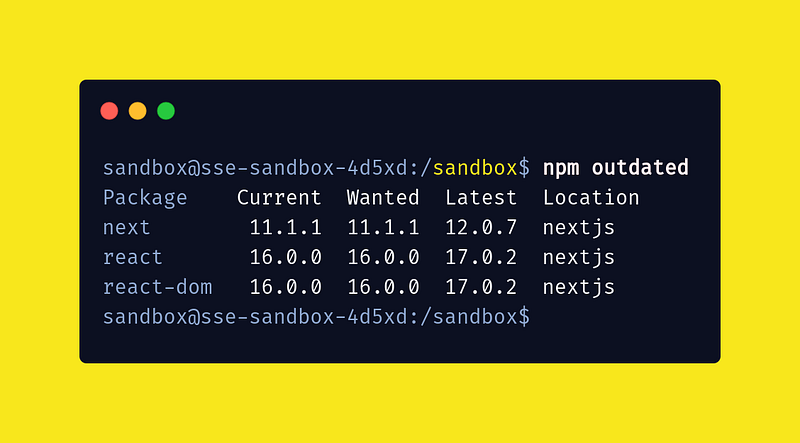
Using the npm outdated command, you check outdated packages locally.

npm outdated

This command checks your current working directory package—based on your package.json file.
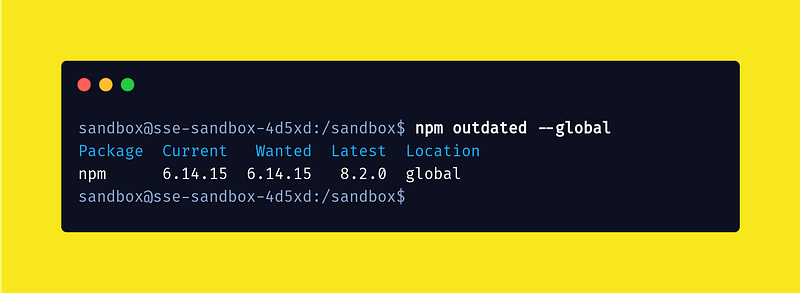
Check the outdated global packages in npm with cli.

npm outdated --global
How to update the Nextjs library using to NPM command?

Update Nextjs package process is based on your nextjs installation.

  • Globaly update nextJs

If you install nextjs globally on your laptop, use create-next-app. Then firstly, update yours create-next-app with npm.

npm update -g create-next-app

In some cases, you also update the nextjs package using the npm install command. Both commands work properly. In the install command, you install create-next-app again in your laptop.

npm install -g create-next-app
  • Folder based nextJs

Secondly, you create a nextjs app using create-next-app and installing nextjs, react, and react-dom separately In a folder or directory. Now you update the package in your folder. Now you run the npm update command without --globalkeywords.

npm update

Before running the update command, ensure you have the latest version of the npm package. Otherwise, firstly update npm with the latest version. then run npm update command in your terminal or laptop.

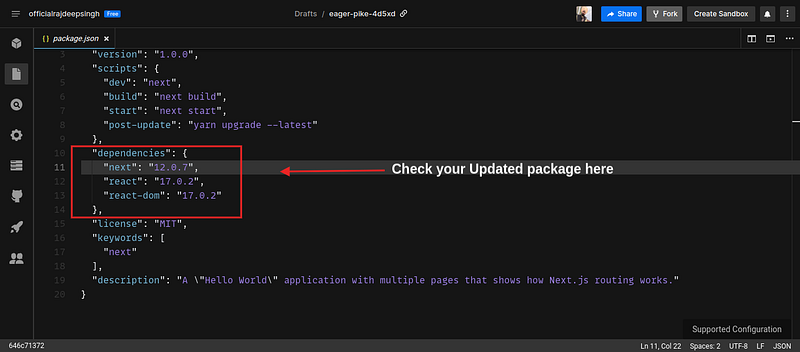
Now npm update command run successfully in the terminal. You also verify your installation using anpm outdated command or check your package.json file.
Error
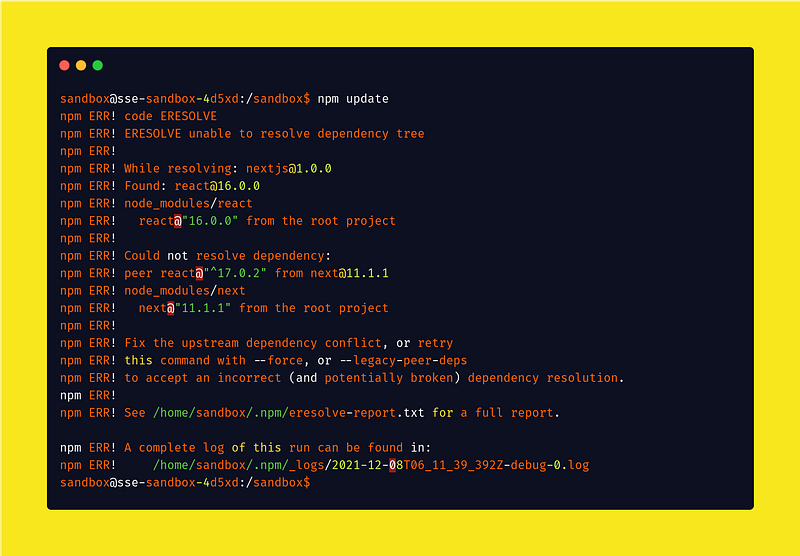
If you face an error when updating the nextjs package. This Error shows you because npm does not resolve the dependency, and the second reason, you update your npm package now, your npm binary is changed and broken. So that reason you face an error.

Now you run the following command, your problem is resolved.

npm update --force
 
or
npm update --legacy-peer-deps

Deep dive into learning more about this Error, so I recommended you, too, read these articles.

https://exerror.com/eresolve-unable-to-resolve-dependency-tree-error-when-installing-npm-packages/

https://stackoverflow.com/questions/64573177/unable-to-resolve-dependency-tree-error-when-installing-npm-packages

YARN

Yarn is a new package manager in javascript as compared to npm. Yarn also started widely used to build projects and share a project with others. Yarn also uses a package.json file to check your package installation list in your project app.

Yarn installation separately in node.js. Npm by default provided with node js package. But yarn installs separately.

Installation of yarn with npm command.

npm install --global yarn

How to update Nextjs library use to YARN command?

Firstly check the outdated package in your project using the yarn outdated command.

yarn outdated
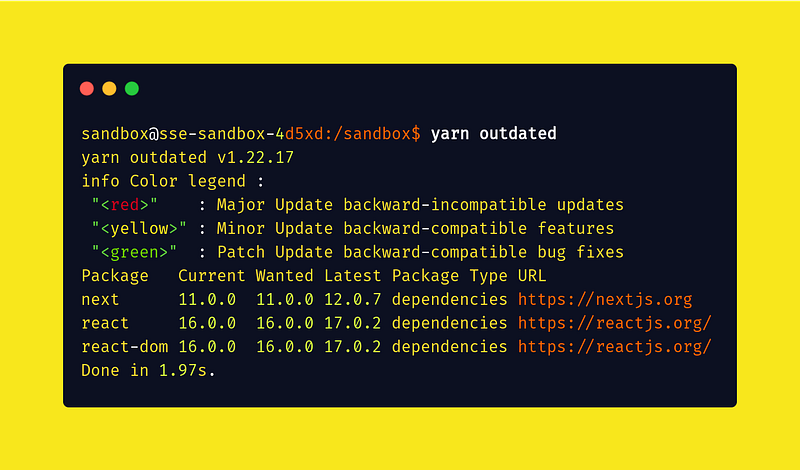
This command checks your package based on the package.json file.

Note

Yarn does not provide global outdated package Check functionality.

How to update Nextjs library use to YARN command?

Update Nextjs package process is based on your nextjs installation.

  • Globaly update nextJs

If you install nextjs globally on your laptop, use create-next-app. Then firstly, update yours create-next-app with yarn.

yarn global upgrade
or
yarn global upgrade --latest
or
yarn global upgrade <package-name>

This command upgrades your all global install package in yarn.

yarn global upgrade create-next-app

With the help of this command, you upgrade a specific package. For example, I upgrade create-next-app the package in yarn.

  • Folder base nextJs

Secondly, you create a nextjs app using create-next-app and installing nextjs, react, and react-dom Spratly In a folder or directory. Now you update the package in your folder and run the yarn upgrade command without --globalkeywords.

yarn upgrade

Before running the update command, make sure you have the latest version of the yarn package. Otherwise, firstly update yarn with the latest version. Then run the yarn install command in your terminal or laptop.

Now yarn upgrade command run successfully in the terminal. You also verify your installation using yarn outdated command or check your package.json file.

Reference

Read the previous post

Conclusion

I hope your update your nextjs old version to the new version very easily. If you have any questions and suggestions, please tell me in the comment section.

Read More content at Nextjs. Sign up for a free newsletter and join the nextjs community on medium.

Nextjs
Nextjs Tutorial
Update Nextjs
Reactjs
Reactjs Developers
Recommended from ReadMedium