s}</span>></span>
<span class="hljs-tag"><<span class="hljs-name">section</span> <span class="hljs-attr">style</span>=</span></span><span class="hljs-template-variable">{{ <span class="hljs-name">width:</span> <span class="hljs-string">"1024px"</span> }}</span><span class="language-xml"><span class="hljs-tag">></span>{children}<span class="hljs-tag"></<span class="hljs-name">section</span>></span>
<span class="hljs-tag"><<span class="hljs-name">SideBar</span> /></span>
<span class="hljs-tag"></<span class="hljs-name">main</span>></span>
<span class="hljs-tag"><<span class="hljs-name">Footer</span> /></span>
<span class="hljs-tag"></></span></span></pre></div><div id="88e5"><pre>)<span class="hljs-comment">;}</span></pre></div><ul><li>Secondly, we import layout components in the custom <code>_app.js</code> app and wrap the existing component with the layout component.</li></ul><div id="1a60"><pre>// <span class="hljs-keyword">import</span> <span class="hljs-keyword">global</span> css
<span class="hljs-keyword">import</span> <span class="hljs-string">"../styles/globals.css"</span>;</pre></div><div id="4acf"><pre><span class="hljs-comment">// import layout components form components folder</span>
<span class="hljs-keyword">import</span> Layout <span class="hljs-keyword">from</span> <span class="hljs-string">"../Components/Layout"</span>;</pre></div><div id="51b4"><pre><span class="hljs-keyword">export</span> <span class="hljs-keyword">default</span> <span class="hljs-keyword">function</span> <span class="hljs-title function_">MyApp</span>(<span class="hljs-params">{ Component, pageProps }</span>) {</pre></div><div id="6fcb"><pre><span class="hljs-keyword">return</span> (</pre></div><div id="fba2"><pre><span class="language-xml"> <span class="hljs-tag"><<span class="hljs-name">Layout</span>></span>
<span class="hljs-tag"><<span class="hljs-name">Component</span> </span></span><span class="hljs-template-variable">{...pageProps}</span><span class="language-xml"><span class="hljs-tag"> /></span>;
<span class="hljs-tag"></<span class="hljs-name">Layout</span>></span></span></pre></div><div id="1a04"><pre>)<span class="hljs-comment">;}</span></pre></div><h2 id="2b76">Wrong ways to add Layouting in nextjs</h2><p id="c197">Suppose you use layout component inside pages folder and custom app file. After wrapping a pages folder, routes in the layout component. You see the Header, Footer and Sidebar show two times in browse UI. But you do not see any error in next.js.</p><div id="7184"><pre><span class="hljs-keyword">import</span> Head <span class="hljs-keyword">from</span> <span class="hljs-string">"next/head"</span>;
<span class="hljs-keyword">import</span> styles <span class="hljs-keyword">from</span> <span class="hljs-string">"../styles/About.module.css"</span>;</pre></div><div id="143e"><pre><span class="hljs-comment">// wrong ways to use layout component in pages folder</span></pre></div><div id="2375"><pre><span class="hljs-keyword">import</span> Layout <span class="hljs-keyword">from</span> <span class="hljs-string">"../Components/Layout"</span>;</pre></div><div id="bdb6"><pre>export default <span class="hljs-keyword">function</span> <span class="hljs-title">About</span>() {
<span class="hljs-keyword">return</span> <span class="hljs-type">(</span></pre></div><div id="d0b1"><pre><span class="hljs-tag"><></span>
<span class="hljs-tag"><<span class="hljs-name">Head</span>></span>
<span class="hljs-tag"><<span class="hljs-name">title</span>></span>About page<span class="hljs-tag"></<span class="hljs-name">title</span>></span>
<span class="hljs-tag"><<span class="hljs-name">link</span> <span class="hljs-attr">rel</span>=<span class="hljs-string">"preconnect"</span> <span class="hljs-attr">href</span>=<span class="hljs-string">"https://fonts.googleapis.com"</span> /></span>
<span class="hljs-tag"><<span class="hljs-name">link</span> <span class="hljs-attr">rel</span>=<span class="hljs-string">"preconnect"</span> <span class="hljs-attr">href</span>=<span class="hljs-string">"https://fonts.gstatic.com"</span> <span class="hljs-attr">crossorigin</span> /></span>
<span class="hljs-tag"><<span class="hljs-name">link</span> <span class="hljs-attr">href</span>=<span class="hljs-string">"https://fonts.googleapis.com/css2? family=Montserrat:wght@200;400&display=swap"</span> <span class="hljs-attr">rel</span>=<span class="hljs-string">"stylesheet"</span> /></span></pre></div><div id="96c3"><pre><span class="hljs-section"></Head></span></pre></div><div id="a2da"><pre>{<span class="hljs-comment">/* Layout wayper in nextjs */</span>}</pre></div><div id="da84"><pre> <span class="hljs-tag"><<span class="hljs-name">Layout</span>></span>
<span class="hljs-tag"><<span class="hljs-name">div</span> <span class="hljs-attr">className</span>=<span class="hljs-string">{styles.container}</span>></span>
<span class="hljs-tag"><<span class="hljs-name">main</span> <span class="hljs-attr">className</span>=<span class="hljs-string">{styles.main}</span>></span>
<span class="hljs-tag"><<span class="hljs-name">div</span> <span class="hljs-attr">className</span>=<span class="hljs-string">{styles.grid}</span>></span>
<span class="hljs-tag"><<span class="hljs-name">h1</span> <span class="hljs-attr">className</span>=<span class="hljs-string">{styles.title}</span>></span> About page <span class="hlj
Options
s-tag"></<span class="hljs-name">h1</span>></span>
<span class="hljs-tag"><<span class="hljs-name">p</span> <span class="hljs-attr">className</span>=<span class="hljs-string">{styles.paragraf}</span>></span> Lorem ipsum dolor sit amet, consectetur adipiscing elit, sed do eiusmod tempor incididunt ut labore et dolore magna aliqua. Ut enim ad minim veniam, quis nostrud exercitation ullamco laboris nisi ut aliquip ex ea commodo consequat. Duis aute irure dolor in reprehenderit in voluptate velit esse cillum dolore eu fugiat nulla pariatur. Excepteur sint occaecat cupidatat non proident, sunt in culpa qui officia deserunt mollit anim id est laborum.
<span class="hljs-tag"></<span class="hljs-name">p</span>></span>
<span class="hljs-tag"></<span class="hljs-name">div</span>></span>
<span class="hljs-tag"></<span class="hljs-name">main</span>></span>
<span class="hljs-tag"></<span class="hljs-name">div</span>></span>
<span class="hljs-tag"></<span class="hljs-name">Layout</span>></span>
<span class="hljs-tag"></></span>
);
</pre></div><figure id="6161"><img src="https://cdn-images-1.readmedium.com/v2/resize:fit:800/1*0K2lbEofotcz-zDjFt7rUw.png"><figcaption></figcaption></figure><h2 id="2bd1">Note</h2><p id="22aa">In this, Nextjs does not show any errors in the terminal. It is a developer mistake, not nextjs. reactjs show all components whatever place you define a component.</p><h2 id="304a">Demo</h2><p id="c96d">Check out the project demo and code on codesandbox online ide run in your browser.</p>
<figure id="c1fc">
<div>
<div>
<img class="ratio" src="http://placehold.it/16x9">
<iframe class="" src="https://cdn.embedly.com/widgets/media.html?src=https%3A%2F%2Fcodesandbox.io%2Fembed%2Fcompetent-water-nnz9u%3Ffontsize%3D14%26hidenavigation%3D1%26theme%3Ddark&display_name=CodeSandbox&url=https%3A%2F%2Fcodesandbox.io%2Fembed%2Fcompetent-water-nnz9u%3Ffontsize%3D14%26hidenavigation%3D1%26theme%3Ddark&image=https%3A%2F%2Fcodesandbox.io%2Fapi%2Fv1%2Fsandboxes%2Fnnz9u%2Fscreenshot.png&key=a19fcc184b9711e1b4764040d3dc5c07&type=text%2Fhtml&schema=codesandbox" allowfullscreen="" frameborder="0" height="500" width="1000">
</div>
</div>
</figure></iframe></div></div></figure><h2 id="44eb">Previous Articles</h2><div id="e986" class="link-block">
<a href="https://readmedium.com/how-to-update-next-js-old-version-to-the-latest-version-6870f1f1b8d1">
<div>
<div>
<h2>How to update Next.js' old version to the latest version?</h2>
<div><h3>This article is full details article, how to update the nextjs old version to the new version with npm and yarn. This…</h3></div>
<div><p>medium.com</p></div>
</div>
<div>
<div style="background-image: url(https://miro.readmedium.com/v2/resize:fit:320/1*Y93WF4_dQ5WXwy6jw0bLWQ.png)"></div>
</div>
</div>
</a>
</div><div id="5adc" class="link-block">
<a href="https://readmedium.com/how-to-add-an-image-in-next-js-5c1065450e3a">
<div>
<div>
<h2>How to add an image in next.js?</h2>
<div><h3>Full details article for next.js image component and image optimization. This article is part of next.js #SeriesPart8.</h3></div>
<div><p>medium.com</p></div>
</div>
<div>
<div style="background-image: url(https://miro.readmedium.com/v2/resize:fit:320/1*N_A8rlei1cfYHPVK856wXw.png)"></div>
</div>
</div>
</a>
</div><h2 id="e535">References</h2><div id="bf5b" class="link-block">
<a href="https://nextjs.org/docs/basic-features/layouts">
<div>
<div>
<h2>Basic Features: Layouts |. Next.js</h2>
<div><h3>The React model allows us to deconstruct a page into a series of components. Many of these components are often reused…</h3></div>
<div><p>nextjs.org</p></div>
</div>
<div>
<div style="background-image: url(https://miro.readmedium.com/v2/resize:fit:320/0*ZSclUI1SIiZM4anu)"></div>
</div>
</div>
</a>
</div><div id="d144" class="link-block">
<a href="https://nextjs.org/docs/advanced-features/custom-app">
<div>
<div>
<h2>Advanced Features: Custom App | Next.js</h2>
<div><h3>Next.js uses the App component to initialize pages. You can override it and control the page initialization. Which…</h3></div>
<div><p>nextjs.org</p></div>
</div>
<div>
<div style="background-image: url(https://miro.readmedium.com/v2/resize:fit:320/0*k_5z2XhUzGMNAXB2)"></div>
</div>
</div>
</a>
</div><h2 id="ef3f">Conclusion</h2><p id="86dc">I hope you understand the basic concept of layouting. layouting is not an official term. I build it because I guide you properly, so I create layouting word.</p><p id="50cc"><i>Read More content at <a href="https://medium.com/nextjs/">Nextjs</a>. Sign up for a <a href="https://medium.com/nextjs/newsletters/nextjs-comunity"><b>free newsletter</b></a><b> and join the nextjs community on medium</b>.</i></p></article></body>
NextJs
How to build a layout in nextjs
This article is full of details article how layouting works and how it uses in nextjs. This article is part of next.js #SeriesPart10.
Build a layout in nextjs
Nextjs provide lots of functionality for developers. Next.js help to build a layout very quickly.
In reactjs, we build a layout with the higher-order components. But in nextjs, we quickly create a layout with a custom app.
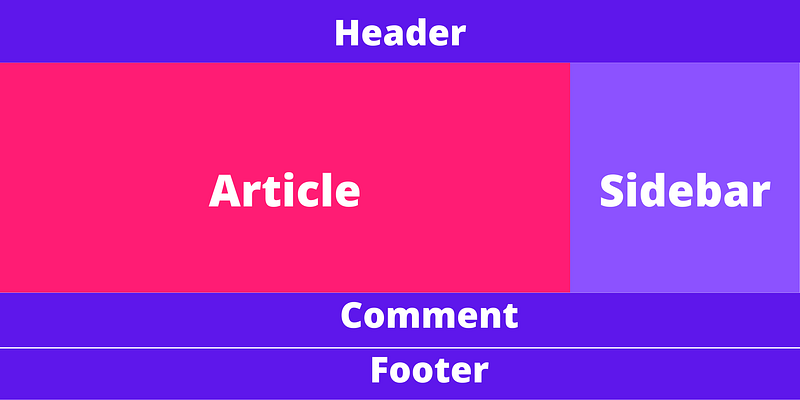
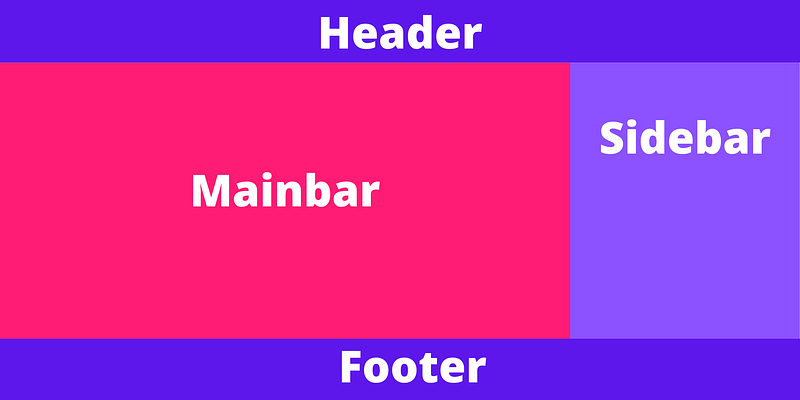
For example, I build a layout for a blog website. The layout looks like in next.js.
Home pageRead page
Demo
Check out the project demo and code on codesandbox online ide run in your browser.
Why do we need layouting in nextjs?
The layout function helps build website layout and secondly organized code on one component in reactjs or nextjs.
Suppose you build a blog website with five pages. You import header, footer and another component on five pages, and suddenly something changes or add props in the component. Now you add props on five pages. At that time, layout functionality help to reduce code complexity and structure your code in one component.
How to add layout functionality in nextjs?
Nextjs Layout functionality help to organize code on one component. Nextjs provide a custom app component. Custom app component renders on every page. When page routes hit new routes, the custom app component renders and afterload another component on-page.
Custom _app.js in nextjs
Custom app component is high order component like reactjs higher-order component. but Nextjs custom _app.js the component provides lots of functionally for developers likes:-
Navigating
Error handling
Pass additional data to page
Add global CSS support.
You create the nextjs app help of create-next-app the npm command. npm create-next-app automatically set up your custom _app.js file in nextjs.
If you download separately now to create _app.js file in the pages folder and paste the following code.
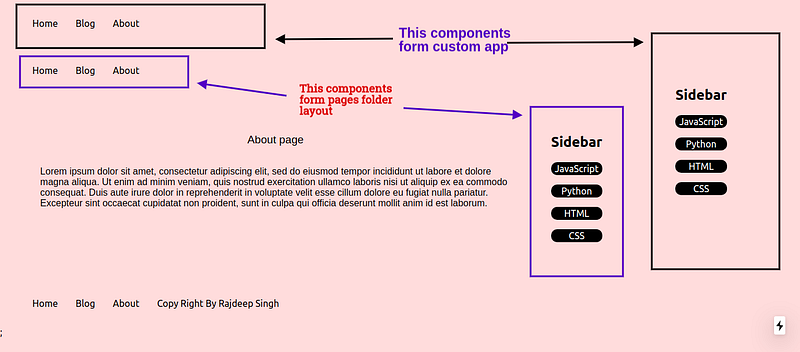
Suppose you use layout component inside pages folder and custom app file. After wrapping a pages folder, routes in the layout component. You see the Header, Footer and Sidebar show two times in browse UI. But you do not see any error in next.js.
import Head from"next/head";
import styles from"../styles/About.module.css";
// wrong ways to use layout component in pages folder
<Layout><divclassName={styles.container}><mainclassName={styles.main}><divclassName={styles.grid}><h1className={styles.title}> About page </h1><pclassName={styles.paragraf}> Lorem ipsum dolor sit amet, consectetur adipiscing elit, sed do eiusmod tempor incididunt ut labore et dolore magna aliqua. Ut enim ad minim veniam, quis nostrud exercitation ullamco laboris nisi ut aliquip ex ea commodo consequat. Duis aute irure dolor in reprehenderit in voluptate velit esse cillum dolore eu fugiat nulla pariatur. Excepteur sint occaecat cupidatat non proident, sunt in culpa qui officia deserunt mollit anim id est laborum.
</p></div></main></div></Layout></>
);
Note
In this, Nextjs does not show any errors in the terminal. It is a developer mistake, not nextjs. reactjs show all components whatever place you define a component.
Demo
Check out the project demo and code on codesandbox online ide run in your browser.
I hope you understand the basic concept of layouting. layouting is not an official term. I build it because I guide you properly, so I create layouting word.
Read More content at Nextjs. Sign up for a free newsletter and join the nextjs community on medium.