
Inconsistencies and Risks That Make AWS KMS Key Deployments Complicated
ACM.286 Troubleshooting a KMS Key Policy used for AWS ECR
~~~~~~~~~~~~~~~~~~~~~~~~~~~~~~~~~~~~~~~~~~~~~~~~~~~~~~~
⚙️ Check out my series on Automating Cybersecurity Metrics | Code.
🔒 Related Stories: AWS Security | Application Security | KMS Security
💻 Free Content on Jobs in Cybersecurity | ✉️ Sign up for the Email List
~~~~~~~~~~~~~~~~~~~~~~~~~~~~~~~~~~~~~~~~~~~~~~~~~~~~~~~
OK I’m back to what I was doing before the AWS Heroes conference in Seattle. I just wrapped up some posts on CloudFormation that were a result of some discussions I had there.
In the last post before I left, I used CloudFormation to deploy a KMS Elastic Container Repository. This was part of my sub-series on deploying a static website and some considerations for secure deployments.
Now, I thought my next post would be a very short and simple post on pushing a container to an Elastic Container Registry. Mind you, it is like 5 commands. Simple.
But then, you try to do the right thing and you want to encrypt your containers. You want integrity so someone can’t see or change the code who doesn’t have the encryption key. Great.
But this is where KMS rears its not so friendly deployment head again.
Inconsistencies prevent consistent templates and governance
Way, way back I wrote about creating a single key for KMS deployments.
The idea is that by using a single key we have some consistency and governance in the way KMS keys get deployed in our AWS account.
The problem is that there is no consistency between how different services do the following:
- Use KMS keys
- Require permissions in granular key policies that limit to only what is required and split the following for segregation of duties: administration, encryption, and decryption.
- Report KMS errors both via CloudFormation and in AWS CloudTrail
- Explain a granular, zero-trust policy to use KMS to work with the particular service at hand.
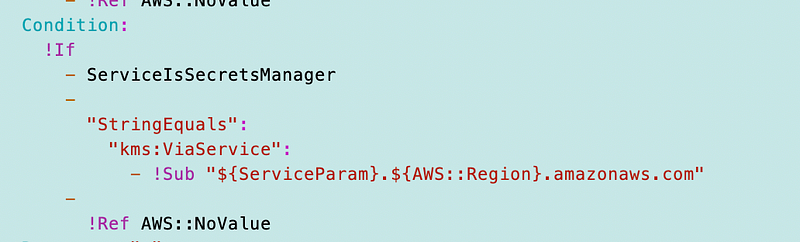
If you recall, I was creating a KMS key policy early on and AWS Secrets Manager has this ability to create a key policy with an interesting condition. You can only use the key if it is being used in conjunction with AWS Secrets Manager.
You can create the following ViaService condition:

So I added that concept to my generic key policy. Cool.
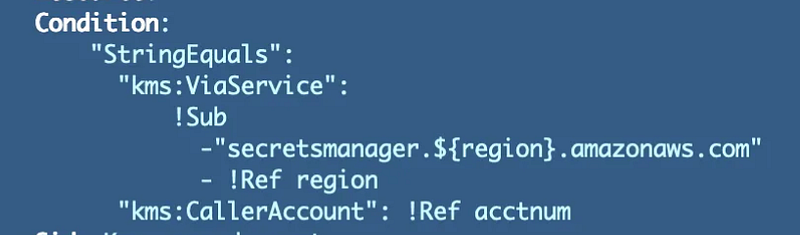
That’s great but…as I have gone on to implement key policies for other services, I have yet to find one that supports this condition.
Update: keep checking the documentation for changes to this. I just noticed you can restrict a key in ECR as well. I’m not sure if I missed this or it just got added:
To allow the KMS key to be used only for requests that originate in Amazon ECR, you can use the kms:ViaService condition key with the
ecr.<region>.amazonaws.comvalue.
This condition is necessary with Secrets Manager as I explained in some of those prior posts due to the encryption/decryption logic and limitations. But because I cannot use that with any other service, I had to write a bunch of if-then statements to do different things for different services.
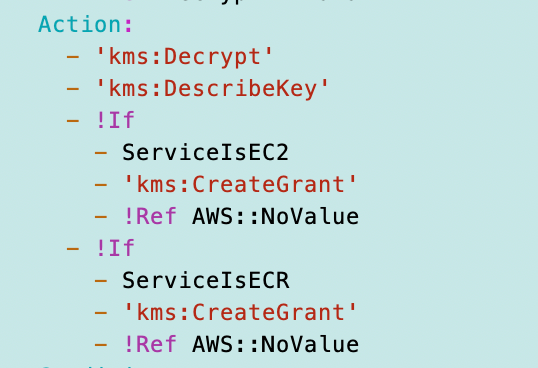
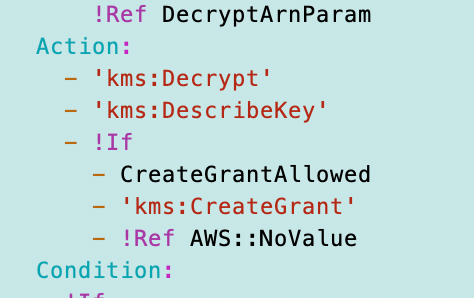
Additionally, now I’ve come to the CreateGrant action. It is not clear to me why some services require this permission and others do not. That also leads to interesting and more complicated logic in my key policy than I would like. I could do something like this but yuck. I need to revisit this.
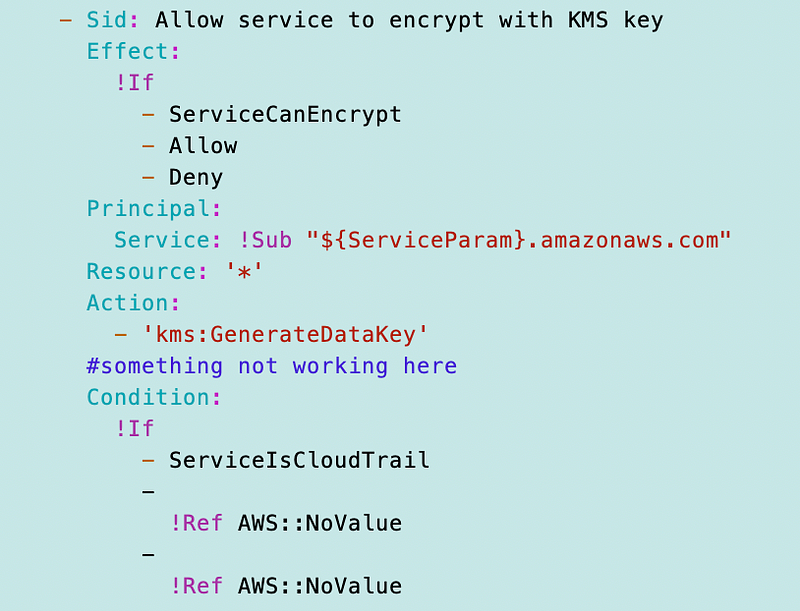
I had to also do some one-off logic with CloudTrail that is not quite finished:
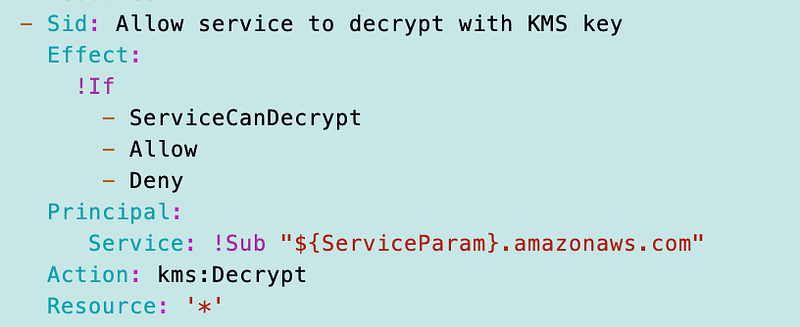
Some services need decrypt permission and others don’t. I’m rethinking this right now as well.
Service Documentation for KMS Deployments is Incomplete
The other problem I’m finding is that many of the services do not even bother to present a zero trust KMS key policy. I’m guessing that is because they are hard to create and troubleshoot so I understand. As mentioned I am currently working with Elastic Container Registry. Here’s the documentation for KMS and ECR:
As I’ve explained in the past different type of policies exist on AWS — the IAM policies that allow a principal to do something — and the resource policies that define — who can access and use a resource.
In the documentation above, it explains both the IAM policies you need to create to allow user to use KMS and access the KMS key.
I would like to know exactly which KMS permissions are required in the key policy for this a principle to:
- Administer they key
- Encrypt data using the key
- Decrypt data using the key
In this case the documentation does not provide that level of detail.
It also does not provide details about the types of conditions you can apply in a key policy — which depend on what is available in the output of CloudTrail logs. And those logs have some issues in this case. I’ll get to that in a minute. That’s why whomever wrote this did not go into more detail, I’m guessing.
An Example Key Policy for a Service in AWS
Here’s the resource policy — the policy applied to the KMS Key — in the ECR documentation. As noted, I’m not picking on ECR here because I see this all the time for AWS services. Here’s a policy that “works” with an incomplete and possibly incorrect description of services and actions.
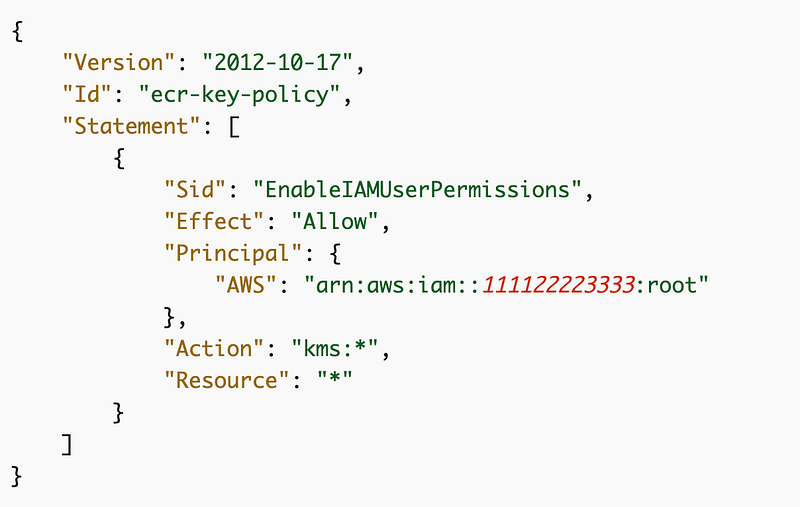
Let’s go through the issues with that key policy.
Actions in KMS policies
It grants access to every KMS action.
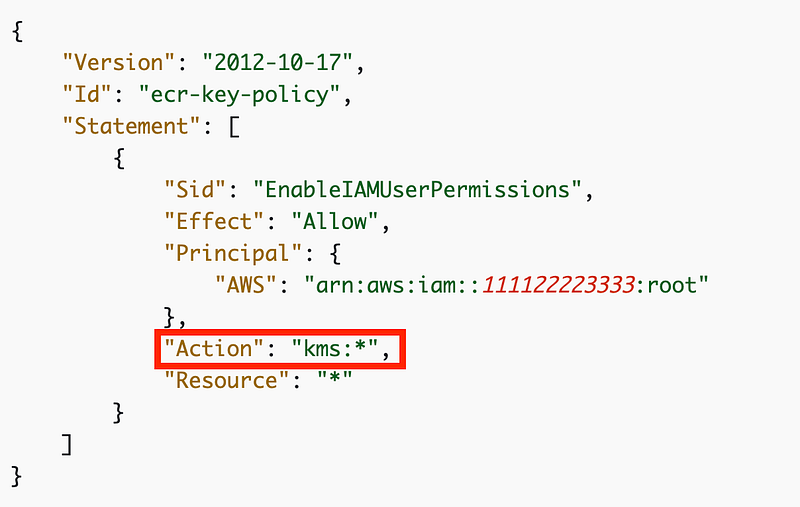
I like to say that in cloud policies the * is an asteRISK. any time you see that * you better make sure that’s what you really want. In my case, I don’t. I want a separate user that administer the key, can create, delete, and change the policy.
Then I have users who are allowed to encrypt, decrypt, or both. I the case of a deployment system, why would it ever need to ENCRYPT the container? It should only be deploying the container — and I’m not even sure if it needs to DECRYPT to do that if Lambda would support running encrypted containers and the decryption happened at the Lamba service level, for example.
I don’t want my developers pushing containers to ECR to be able to change the key policy. They may need both encrypt and decrypt. I’m not sure if they really need decrypt if after they push to KMS they use automated processes to deploy the container. That would be ideal.
But as I’ve written about before, it is very difficult to split ENCRYPT and DECRYPT in an AWS KMS policy for some, if not all, services. I wish that would get fixed, but now with so many people using KMS it’s difficult to fix that and still provide backwards capability. But I really wish there was a resolution to that problem — sooner than later.
As an added bonus, if all services handled KMS in a consistent way it would be easy for every team to use pretty much the same key policy in all the documentation. The teams should have to make their services work with the policy that is going to end up in the documentation.
Resources in KMS policies
There’s also a * for Resource.
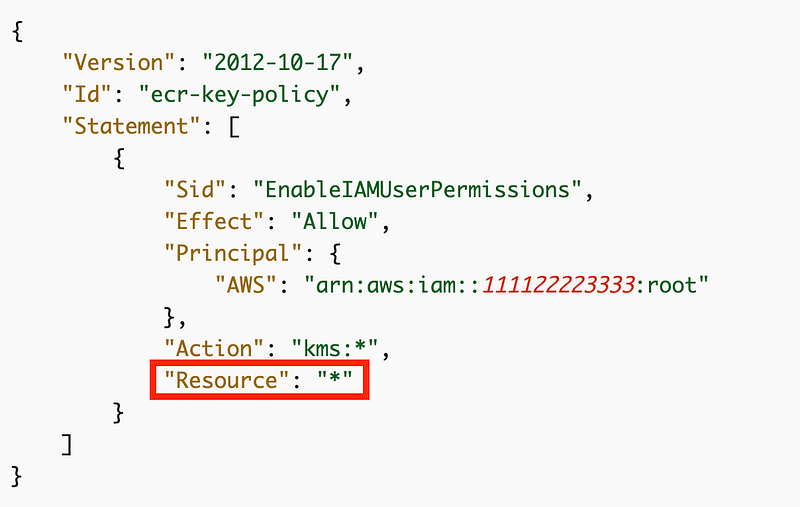
I’m not sure if this matters. Can a key policy assigned to a key allow the principal to act on some other key? If not, why does this even exist in the policy structure? Why is it not auto-populated by AWS behind the scenes? Since it is present, it would be safer to populate this with the key to which the policy is assigned.
Root user in KMS key policies — do you really know what that does?
The principal in this policy is root in the current account.
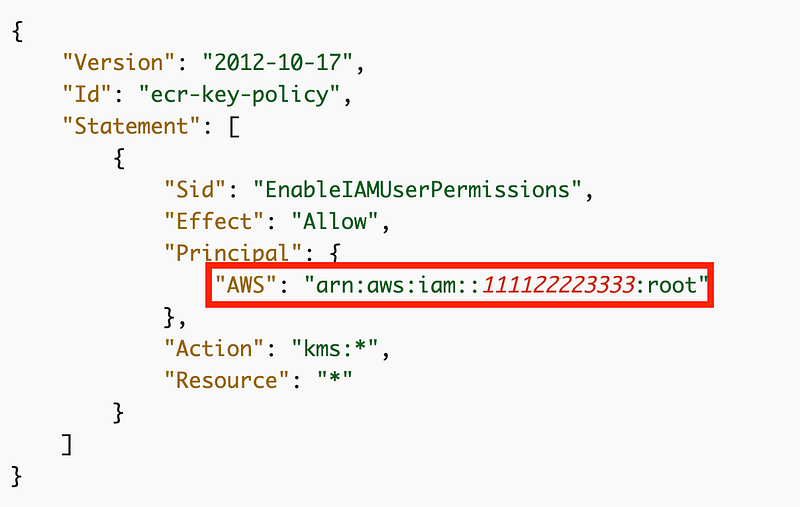
What does that actually mean?
Here’s what the ECR documentation says:
The following example key policy gives the AWS account (root user) that owns the KMS key full access to the KMS key.
Here’s what the KMS documentation says:
A principal in
arn:aws:iam::111122223333:root"format does not represent the AWS account root user, despite the use of "root" in the account identifier. However, the account principal represents the account and its administrators, including the account root user.
Those statements seem to conflict, depending on how you interpret root user. Additionally, “the account and its administrators” is not exactly clear. An “account” is not an AWS principal. Does that mean every principal in the account — including service linked roles? I wrote about the risks of service linked roles here:
If that means every principal in the account that is definitely not something I want to use. If it means every “administrator” in the account, then how is an administrator defined? Is it any user that has the administrator role assigned to them? What about cross-account organizational administrative roles?
It seems to me that AWS should simplify a lot of the documentation around KMS in general and clarify exactly what that means. Maybe I’ll test it out in a separate post. Right now I just want to get this ECR repository push working.
To contrast that with what I attempted to do in my KMS key policy, I’m trying to explicitly define the owner and administrator of a key, separate to the encrypt user and decrypt user. And this template is currently not working for ECR due to inconsistencies and way more complicated than should be required if all teams implemented their services to work with a generic key policy.
Administer:
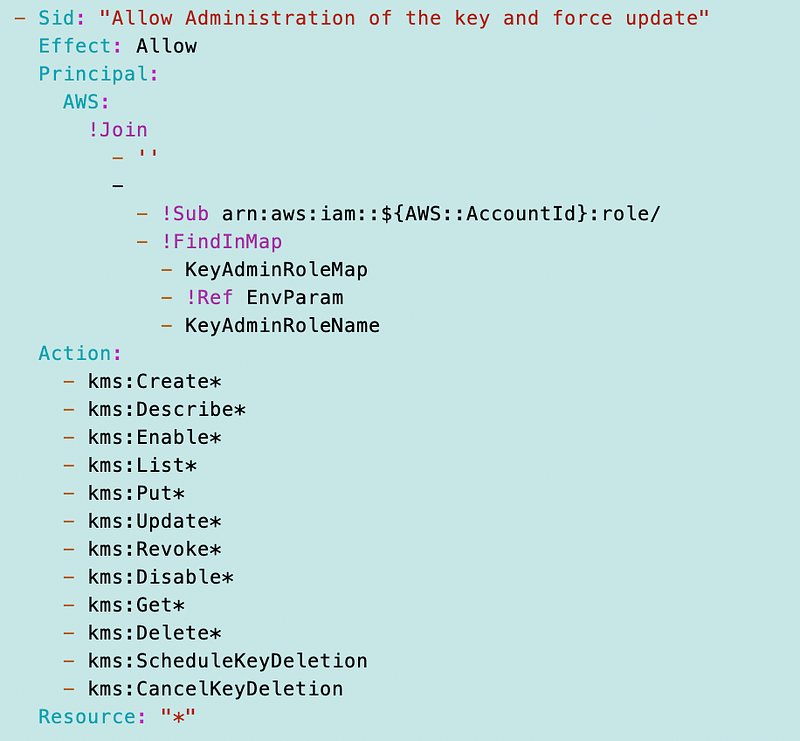
Make sure administers can see all the keys in an account which also unfortunately has delete or the reason mentioned here — which is a problem given the way the root principle works with KMS:
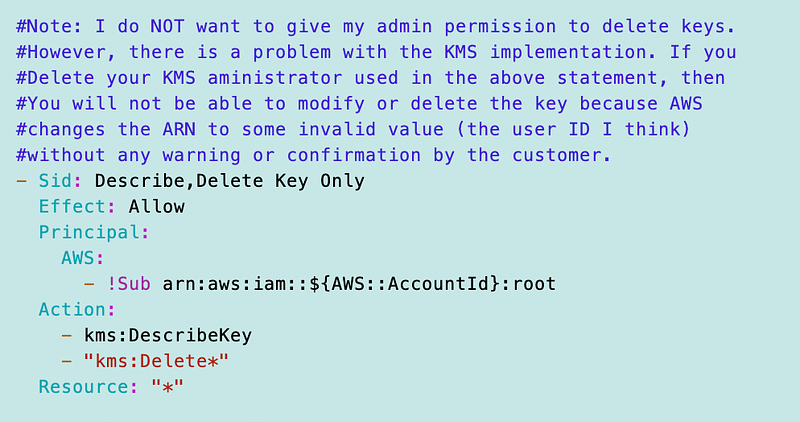
I could overcome the deletion issue by limiting the delete action to a specific user in an SCP but this is getting complicated and dicey.
Encrypt principal:
Now there’s no conditions here since this is pretty specific via the ARNs I pass in, but perhaps it should be more specific. As noted I’m going to simplify the CreateGrant logic.
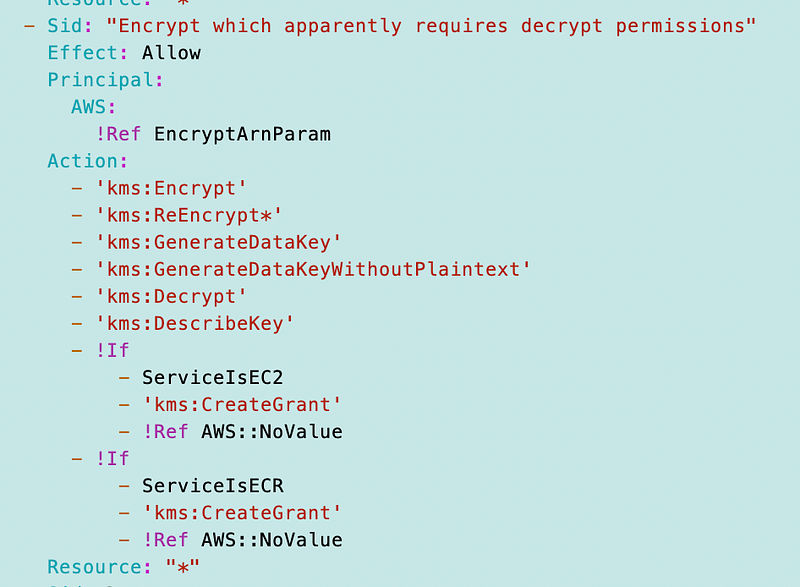
Then I have the decrypt statement for the principles. Here’s where the ViaService comes into play. And I would have to look back to my prior posts as to why this is required but if you don’t have it there’s a loophole.
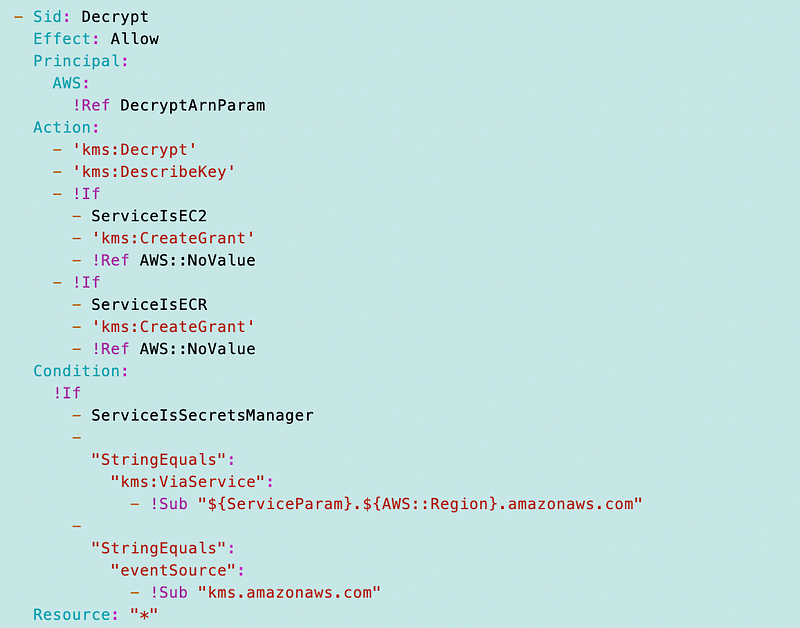
Now the problem with the event source above is that I don’t know in the case of ECR if the event source is the ECR action or the KMS action. But I think it’s problaby KMS. I just can’t see the failed KMS action so I’m not sure. I was trying to specify specific services but that didn’t work — and if every other use case and even the secrets manager use case has an event source of KMS that logic is a bit extraneous so I can remove it.
Then there are a whole bunch of other conditional statements depending on what service needs access to the key. It would be nice if all those service policies were consistent as well. As it is, this policy is way too complicated so I need to step back and simplify it a bit. I’ll get to that at the bottom.
KMS and CloudFormation
There’s a problem with how AWS CloudFormation or whatever component feeds into AWS CloudFormation evaluates key policies, I think. I need to revisit this but I remember in one instance it forced me to add the root user into the key policy. It gave me a warning and said that if I deployed the key with that policy, I wouldn’t be able to administer it in the future. I think the message was wrong somehow but I don’t remember exactly what it was. I could be mistaken or it could have been fixed by now.
But essentially, the KMS key policy should not require a root user in order to deploy it. The KMS key policy should allow the person who is trying to deploy the key to be the administrator of that key, but not necessarily encrypt or decrypt with that key.
I also think that anyone with administrative permissions in any AWS account should be able to see the KMS key and any key policies. That’s why I have the root user in my policy with read-only access. That way a ransomware actor can’t get into the account and deploy a hidden key.
At the same time, that root principle is a problem if it is allowing too much access to the KMS key information in the account with that particular policy — something to explore later.
CloudTrail Log Inconsistencies for KMS
Related to the inconsistencies of conditions in policies, not all services expose the granular KMS key error message. That includes CloudFormation. For this particular ECR policy, I’m looking through the logs for KMS entries and I can’t find them in my region.
Here’s me trying to see why my image push is failing.
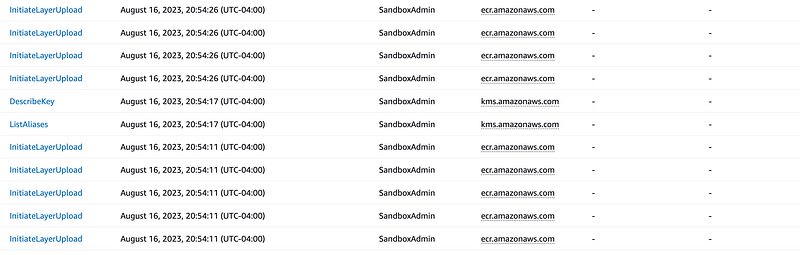
If I click on one of those InitiateLayerUpload events here’s the error message:

Well, my SandboxAdmin user is an administrator so the IAM policy is not blocking. So it must be the Key Policy right? So where in there is the KMS message that provides the details as to which action I need to add to the policy or what the problem is? It’s not there.
I keep looking to see if I missed it somehow but I cannot find it. This seems to conflict with the AWS documentation:
Every call to an AWS KMS API operation is captured as an event in a AWS CloudTrail log.
Perhaps this is intentional, or an oversight, I’m not sure. Is every KMS call to a key that is from an internal AWS service not logged? Only AWS principals in your account? I would like to see every single attempt to access one of my KMS keys. I would like to be able to search on the kms service and see every action like this:
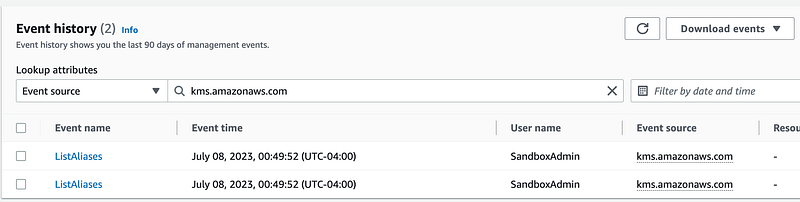
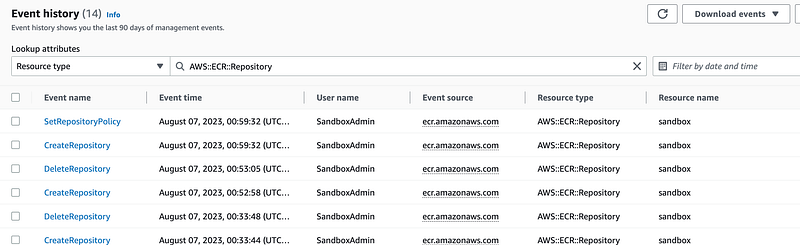
Also, when I search for my ECR repository resource I don’t see my attempts to push a container to that repository as I would expect to find the failing KMS key action:
I can search on the event source:
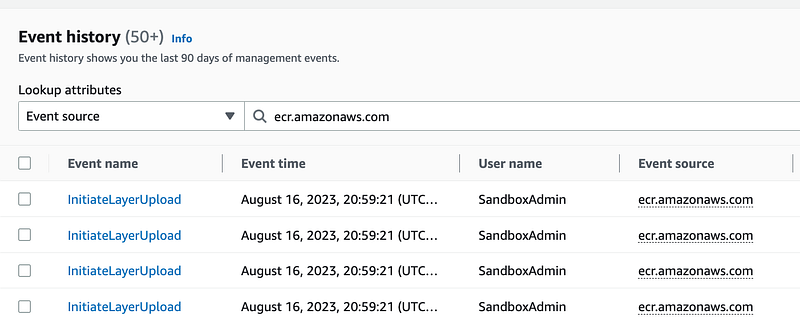
It seems like some test cases for every service and how the logs are handled to improve some consistency might help. In any case, if I wanted to use a condition in my policy related to the KMS key, I can’t see the CloudTrail logs related to the action that was restricted to try to troubleshoot the problem.
Simplifying the Key policy and troubleshooting conditions to work around inconsistencies
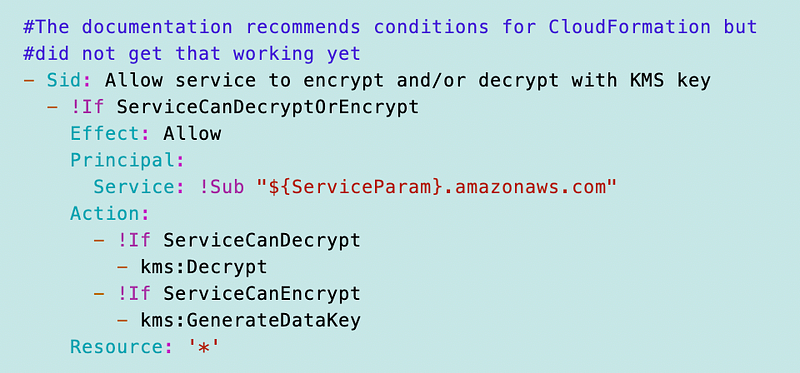
Well, there’s not a lot of consistency here but I did find a way to simplify policies in this prior post. It was an aha moment. I was constantly trying to find a way to simplify things and finally figured out that I can conditionally add statements like this:
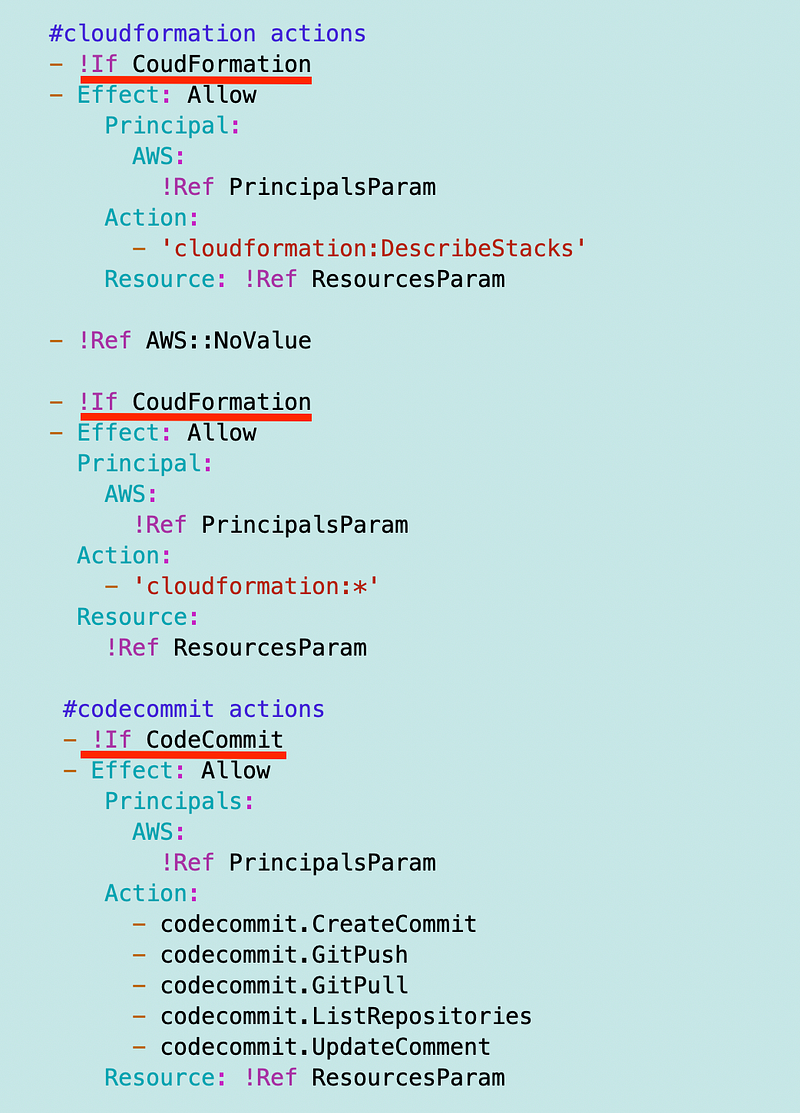
I wrote about that in this post.
So let’s see if I can rejigger this policy and get ECR working (I’ll explain how to push to ECR in the next post. This was kind of a distraction.
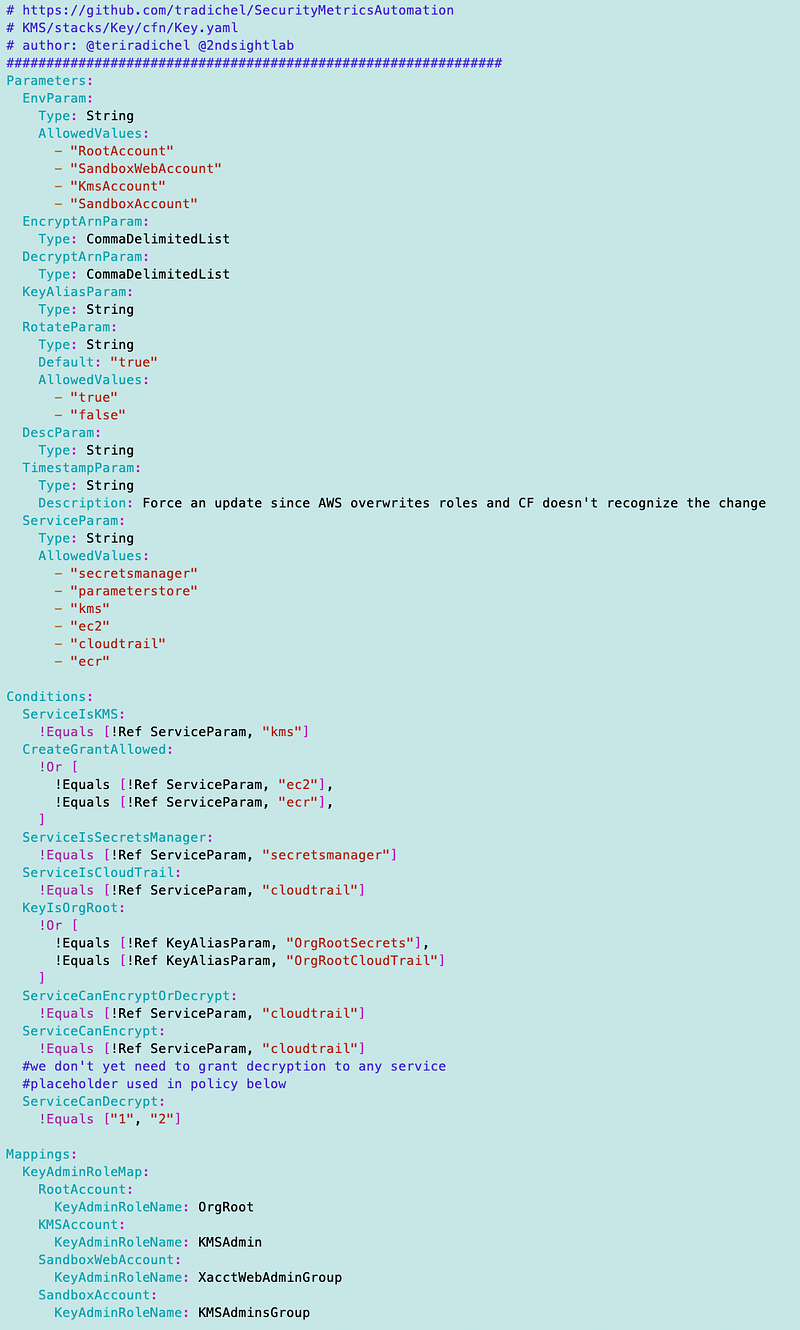
My KMS Key and Policy template is here:
SecurityMetricsAutomation/KMS/stacks/KMS/cfn/Key.yamlI had a couple policies I could combine:
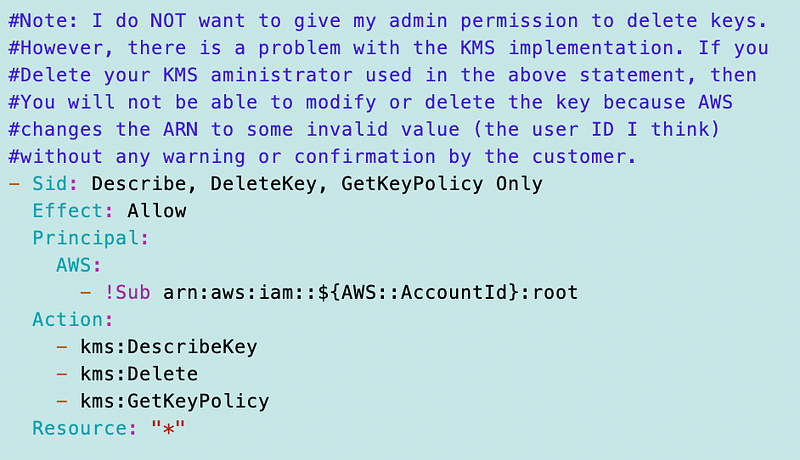
I’m adding ViaService for SecretsManager now otherwise no value:
I simplified the CreateGrant logic:
I’m going to try to combine and optionally include the last statement based on the logic from the last blog post and combine the encrypt and decrypt permissions for services.
Recall that my script for deploying a KMS key for sandbox is here:
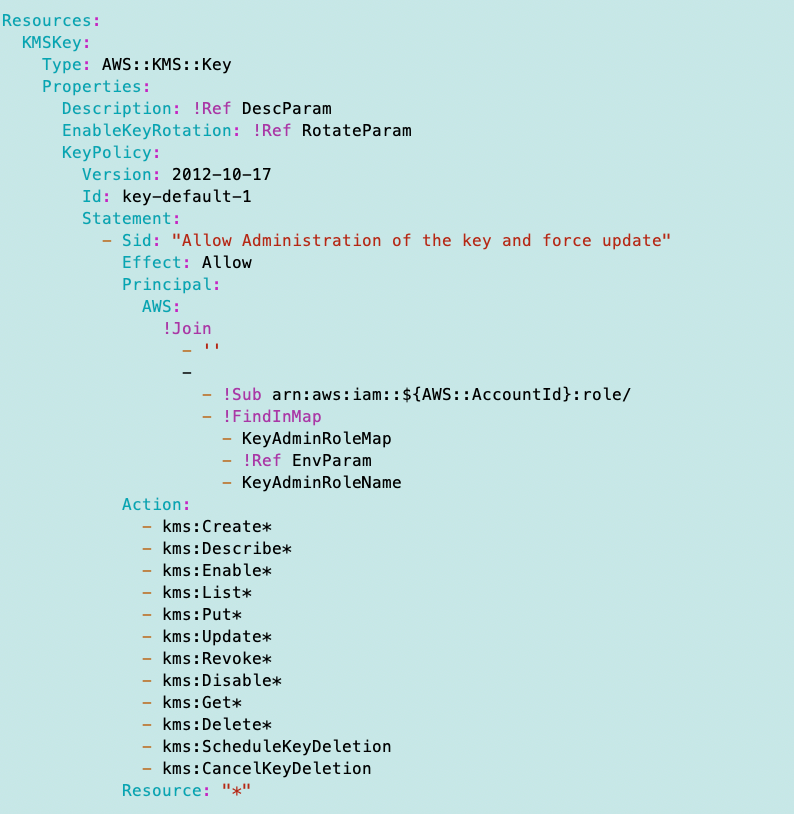
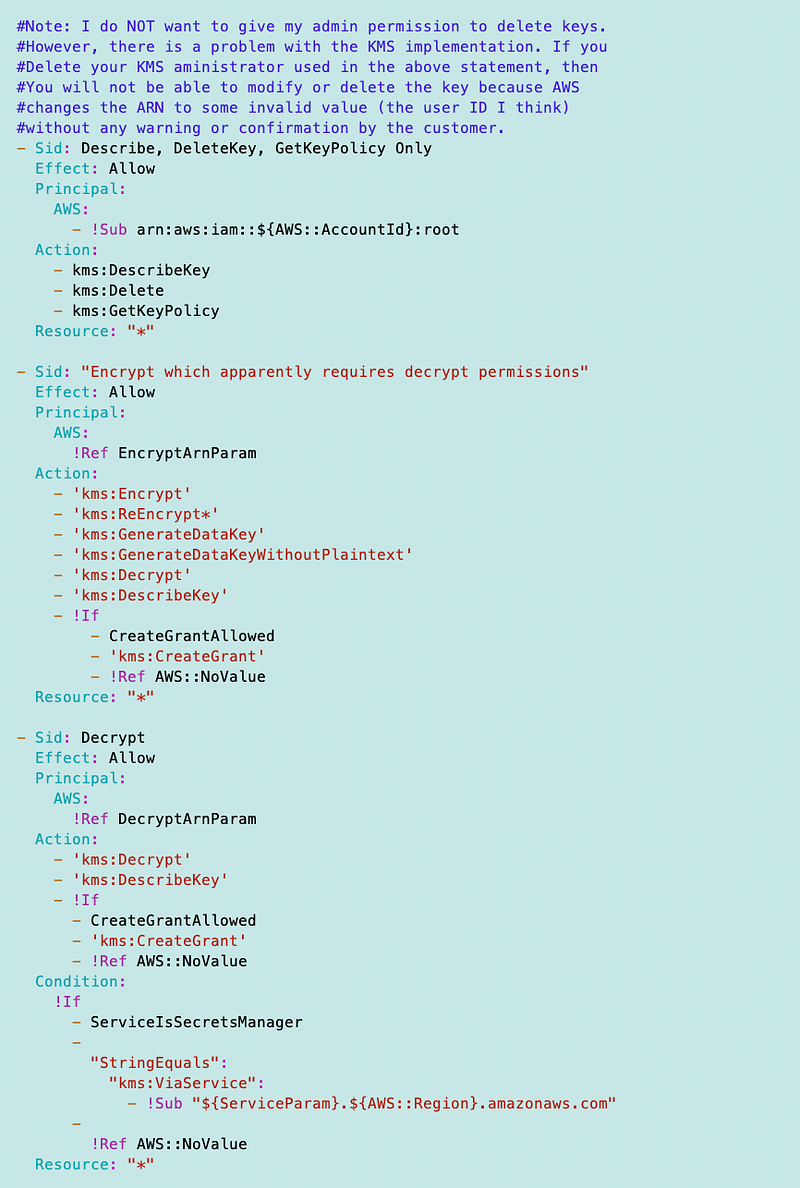
SecurityMetricsAutomation/Org/stacks/Sandbox/deploy.shWell, I had a few typos above. Here’s the working template. I removed any conditions that should be affecting ECR as I only use the ViaService condition for SecretsManager otherwise there are no other conditions. I’m not sure if I need CreateGrant for both Encrypt and Decrypt but this is where it stands at the moment and it seems to work.
The template is still very long. I’m thinking about how to shorten it up. But due to the length it’s displayed in pieces below:
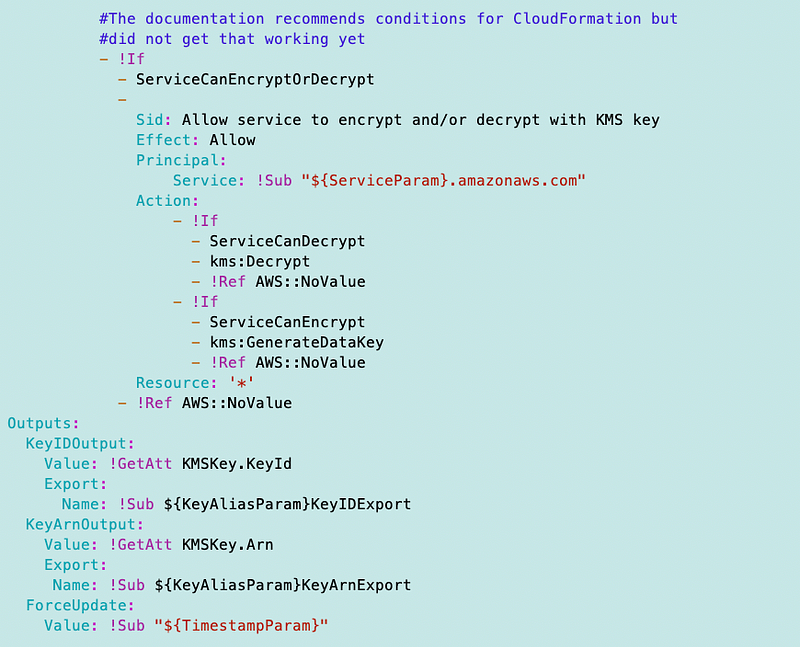
Now I can finish my post on pushing a container to AWS ECR!
Update: While working through this in future posts there are a few other things that complicate matters:
- Does the service need permission or an IAM user need permission in conjunction with that service?
- What if you need to use the key with multiple services in an account? My template only handles one right now. I’ll address that in a future post.
Follow for updates.
Teri Radichel | © 2nd Sight Lab 2023
About Teri Radichel:
~~~~~~~~~~~~~~~~~~~~
⭐️ Author: Cybersecurity Books
⭐️ Presentations: Presentations by Teri Radichel
⭐️ Recognition: SANS Award, AWS Security Hero, IANS Faculty
⭐️ Certifications: SANS ~ GSE 240
⭐️ Education: BA Business, Master of Software Engineering, Master of Infosec
⭐️ Company: Penetration Tests, Assessments, Phone Consulting ~ 2nd Sight Lab
Need Help With Cybersecurity, Cloud, or Application Security?
~~~~~~~~~~~~~~~~~~~~~~~~~~~~~~~~~~~~~~~~~~~~~~~~~~~~~~~~~~~~~
🔒 Request a penetration test or security assessment
🔒 Schedule a consulting call
🔒 Cybersecurity Speaker for PresentationFollow for more stories like this:
~~~~~~~~~~~~~~~~~~~~~~~~~~~~~~~~~~~~~~~~~~~~~~~~~~~~~~~~~~~~~
❤️ Sign Up my Medium Email List
❤️ Twitter: @teriradichel
❤️ LinkedIn: https://www.linkedin.com/in/teriradichel
❤️ Mastodon: @teriradichel@infosec.exchange
❤️ Facebook: 2nd Sight Lab
❤️ YouTube: @2ndsightlab


