
Importing a Resource In an AWS Deployment Container
ACM.449 A generic function to import CloudFormation resources
~~~~~~~~~~~~~~~~~~~~~~~~~~~~~~~~~~~~~~~~~~~~~~~~~~~~~~~~~
⚙️ Part of my series on Automating Cybersecurity Metrics. The Code.
🔒 Related Stories: AWS Security | Application Security
💻 Free Content on Jobs in Cybersecurity | ✉️ Sign up for the Email List
~~~~~~~~~~~~~~~~~~~~~~~~~~~~~~~~~~~~~~~~~~~~~~~~~~~~~~~~~
I wrote about potential resource injection into CloudFormation stacks in the last post:
The reason I’m thinking about imports which led to drift detection which led to the cases where it didn’t work in the post prior to that, is because I need to figure something out with my AWS Organization import in my very first deployment in a new account.
I have a single container that can be used to deploy almost anything:
I want to modify the initial deployment in a new account to use that container so I’m going to create a configuration for it in my config repository. I wrote about those repositories here:
I was about to do that when I realized I had forgotten one thing. The AWS Organizations deployment imports the resource if it already exists, otherwise it updates it.
So that got me back to thinking about something I was pondering earlier. Can I make this import generic so it can be used for all resource types?
Probably. With a few caveats.
Let’s take a look at the code.
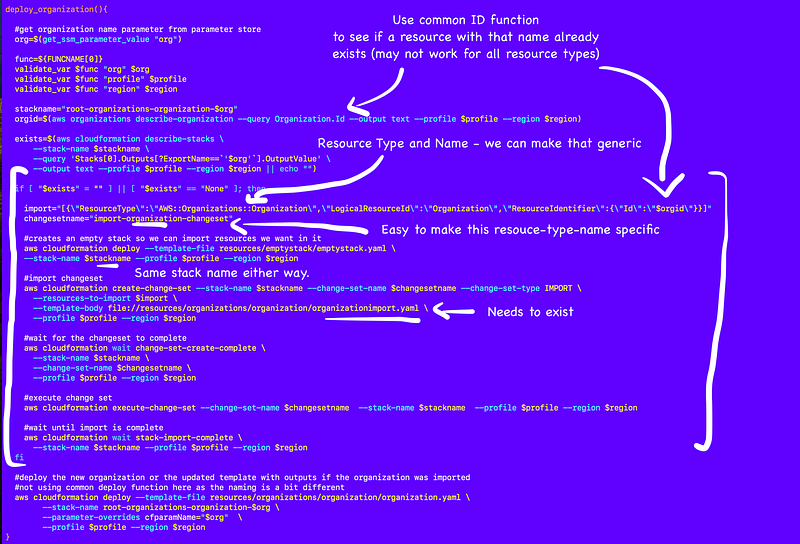
Here I’ve pulled up the code and shown how we can essentially replace everywhere it’s using “organizations” or the resource category with a variable. Similarly we can replace resource type with a variable.
We can probably move the import block into its own function and call it if needed from our generic deploy_stack function instead of what I’m doing below.
We can check to see if a resource already exists using the generic “get_id” function I’m adding to every resource to get an id to pass into our import statement. I’m not sure how or if that will work for certain resources but we’ll cross those bridges when we come to them.
The empty stack template can be used for every stack.
All that said we don’t really have to write any new code for new resource types for which we want to support import except for one thing — I have an import yaml file for an organization. Let’s take a look at that.
Here’s the organizationimport.yaml file.
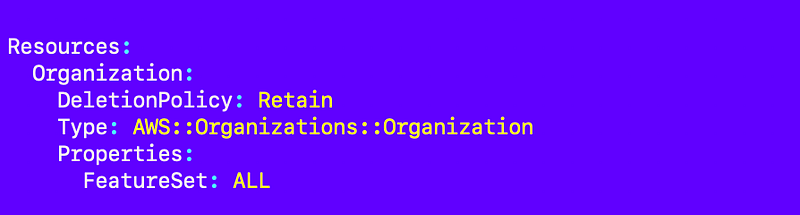
Well, this makes things pretty simple actually. When the code runs it could check for the import file if the user is trying to import a resource and tell them it doesn’t exist and that they need to add it first. If it exists, then import is supported.
It may also be pretty easy to generate the import file. The reason I didn’t use the organization.yaml file is because outputs are not supported on import. So I first ran the command to import the resource and then I ran the template with the outputs.
But how will the import process handle parameters and values associated with the resource?
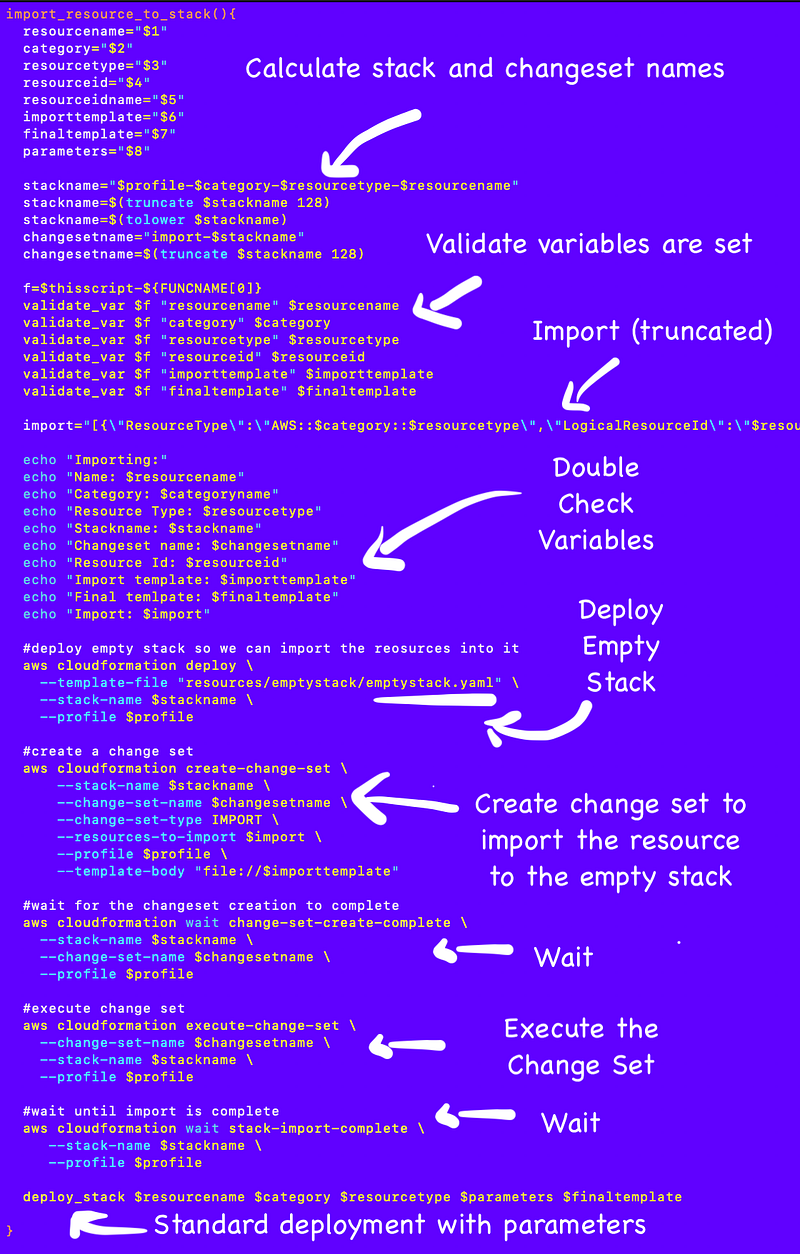
I started to work on a generic import function here:
I showed how I used placeholders for the VPC id in the import template:
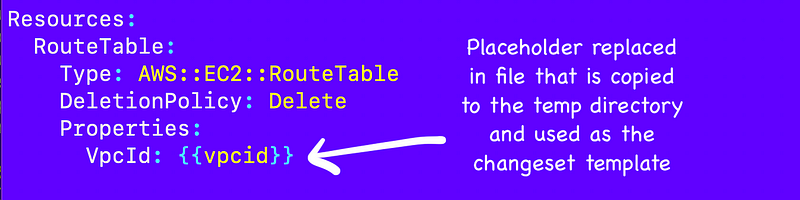
I’ll need to make a few changes to this but the building blocks are all there to import any resource if it already exists.
Determining when to run import versus creating or updating a stack
The next challenge will be how to know if the code should import a resource or update an existing stack.
- Call get_id for the resource name.
- If no id exists, deploy a new stack.
- If the id exists, then the resource already exists.
- Then check to see if a stack already exists for that resource.
- If no stack exists for that resource based on our naming convention, then deploy a new stack.
- If a stack exists, but the resource is not in that stack, import the resource into that stack.
We can probably use describe-stack-resources to determine if a stack exists in a resource:
Placeholder code:
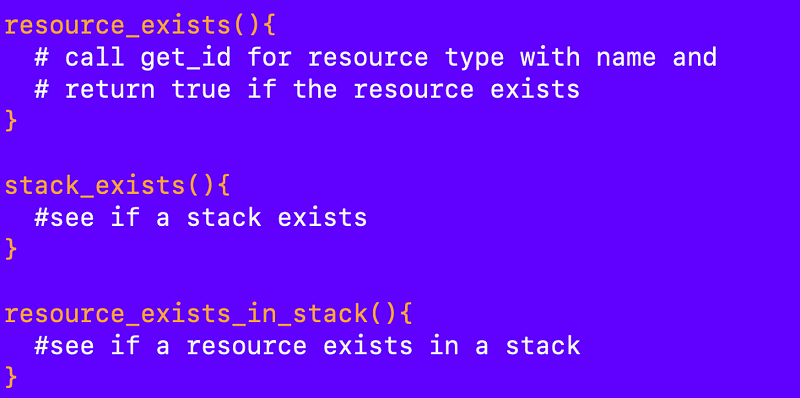
Figure out whether to call deploy or import:
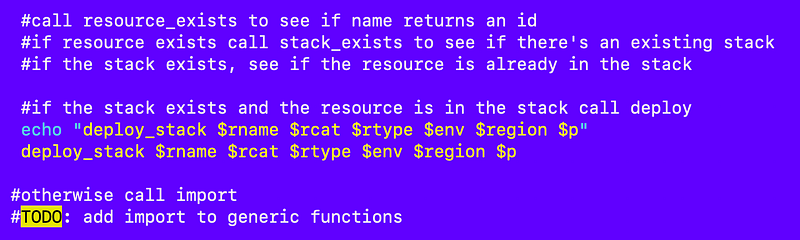
That seems like it should work. Now to add that to my deploy function. Working on this and will update the repo and publish a blog post here when it’s ready.
It’s always like this. I start working on one thing, which leads to another which leads to another. But once we have all the things I’ve written about in the last few posts, it seems like it should be decently straightforward to create a new configuration and the template if it doesn’t exist and deploy just about anything.
Follow for updates.
Teri Radichel | © 2nd Sight Lab 2024
About Teri Radichel:
~~~~~~~~~~~~~~~~~~~~
⭐️ Author: Cybersecurity Books
⭐️ Presentations: Presentations by Teri Radichel
⭐️ Recognition: SANS Award, AWS Security Hero, IANS Faculty
⭐️ Certifications: SANS ~ GSE 240
⭐️ Education: BA Business, Master of Software Engineering, Master of Infosec
⭐️ Company: Penetration Tests, Assessments, Phone Consulting ~ 2nd Sight Lab
Need Help With Cybersecurity, Cloud, or Application Security?
~~~~~~~~~~~~~~~~~~~~~~~~~~~~~~~~~~~~~~~~~~~~~~~~~~~~~~~~~~~~~
🔒 Request a penetration test or security assessment
🔒 Schedule a consulting call
🔒 Cybersecurity Speaker for PresentationFollow for more stories like this:
~~~~~~~~~~~~~~~~~~~~~~~~~~~~~~~~~~~~~~~~~~~~~~~~~~~~~~~~~~~~~
❤️ Sign Up my Medium Email List
❤️ Twitter: @teriradichel
❤️ LinkedIn: https://www.linkedin.com/in/teriradichel
❤️ Mastodon: @teriradichel@infosec.exchange
❤️ Facebook: 2nd Sight Lab
❤️ YouTube: @2ndsightlab