avatarTeri Radichel

Free AI web copilot to create summaries, insights and extended knowledge, download it at here

3274

Abstract

readmedium.com/v2/resize:fit:800/1*7357Iwrp7eRc1RN9tVP9xA.png"><figcaption></figcaption></figure><p id="6bd5">The <i>awsdeploy</i> container is going to do the exact same thing so we can combine those.</p><p id="8fca">What about the first job that initializes the environment? The execution.sh script doesn’t use a parameter. Well, we can change that. I will alter the first job to use an SSM parameter so we can leverage the same container for all three.</p><h2 id="de33">Moving the function shared by all three jobs to execute.sh</h2><p id="5c5c">Where is that “shared/parse_config.sh file coming from? It’s currently in the exec repository. But really that code is specific to AWS and this job. I can basically move parse_config.sh config code into the execute.sh file for this job:</p><p id="1021">Here’s the top of the file:</p><figure id="fb06"><img src="https://cdn-images-1.readmedium.com/v2/resize:fit:800/1*epcgAxaBJ8-vvT0mb3F_aw.png"><figcaption></figcaption></figure><p id="ea22">See the other blog for the full code.</p><p id="2131">Here’s the bottom with the call to deploy at the end:</p><figure id="e4b2"><img src="https://cdn-images-1.readmedium.com/v2/resize:fit:800/1*d1Fl1vNT-WnWqAapW6ZRmg.png"><figcaption></figcaption></figure><h2 id="6883">What’s left that’s different?</h2><p id="b08c">The script that runs the job is different depending on where the credentials exist. I can combine all that logic into one<b> <i>run_local.sh</i></b><i> </i>script.</p><p id="1c02">This script is copied into CloudShell to run the root job to deploy the initial organization and the aws-root user and role, or the job run by aws-root user to deploy the first enviroment shell. Once those are set up, CloudShell can be locked down and the framework can be used on another compute resource in a prive network to execute jobs.</p><p id="c416">I had an<i> init.sh</i> script in the first two jobs and a <i>testexecute.sh</i> in the last job. We can combine those three scripts as follows.</p><p id="d517">In the code below I ask which job the user wants to run.</p><p id="1a92">Here I can fix the issue with the missing org and domain parameters from the prior post. We can set the config parameters</p><p id="8b7d">The code is not done but you get the idea.</p><figure id="1070"><img src="https://cdn-images-1.readmedium.com/v2/resize:fit:800/1*-sBqEa3793U_FCLCjxXPOQ.png"><figcaption></figcaption></figure><p id="087d">Now all three jobs make use of a parameter so the execute.sh file in a single container can be used for all three.</p><p id="1d17">I can add an if-then statement to get the credentials from the correct source depending on the job:</p><figure id="9000"><img src="https://cdn-images-1.readmedium.com/v2/resize:fit:800/1*JsZY6nEMBR6s446U6Wz3Ew.png"><figcaption></figcaption></figure><p id="36f7">I can pull in all the code from <i>testexecute.sh</i> that asks for the token and handles the role assumption and add it in the second portion of the if-then statement above.</p><p id="2471">Then I can optionally add the token to the parameters depending on if it is present or not:</p><figure id="6cca"><img src="https://cdn-images-1.readmedium.com/v2/resize:fit:800/1*1rMzWvGjLIgBfPjzcQp-mQ.png"><figcaption></figcaption></figure><p id="ece9">If you are

Options

running a job using a role that requires MFA to assume and the user doesn’t pass in a token the job will fail to execute. It will also fail in any but the root account if you add the SCP I created in a prior post to enforce MFA on all actions not taken by roles (which includes role assumptions).</p><h2 id="013f">Pulling in resources to the container</h2><p id="a620">There’s one other thing I need to change in my container image build and that is the location from which I pull in my resources.</p><p id="51fe">As explained in the last post resources moved to a separate repository to create a more flexible architecture. I will need to change the code that references the resources to pull them from a different source. They will get added to the container in the same location where they are now. Therefore once the files are in the container the original location is irrelevant.</p><p id="6d41">I will need to modify this command in my code that builds the container to include a build context for the resources now also:</p><figure id="d8db"><img src="https://cdn-images-1.readmedium.com/v2/resize:fit:800/1*odCony02vmvoGtKMw1lDVg.png"><figcaption></figcaption></figure><p id="46f1">I also need to modify the Dockerfile to reference the new build-context:</p><figure id="6e34"><img src="https://cdn-images-1.readmedium.com/v2/resize:fit:800/1*ayC0sp1JruZk7sVj7ockng.png"><figcaption></figcaption></figure><p id="f813">I will have those changes up in GitHub after I test that the code works.</p><p id="6753">After those changes I should have one container to run all the AWS deployments regardless of wether in CloudShell or on a compute resource.</p><p id="0295">Follow for updates.</p><p id="4a3a">Teri Radichel | <i>© <a href="https://2ndsightlab.com/?source=post_page---------------------------">2nd Sight Lab</a> 2024</i></p><div id="8b5f"><pre><span class="hljs-section">About Teri Radichel:

⭐️ Author: Cybersecurity Books
⭐️ Presentations: Presentations by Teri Radichel
⭐️ Recognition: SANS Award, AWS Security Hero, IANS Faculty
⭐️ Certifications: SANS ~ GSE 240
⭐️ Education: BA Business, Master of Software Engineering, Master of Infosec
⭐️ Company: Penetration Tests, Assessments, Phone Consulting ~ 2nd Sight Lab</pre></div><div id="caae"><pre><span class="hljs-section">Need Help With Cybersecurity, Cloud, or Application Security?
~~~~~~~~~~~~~~~~~~~~~~~~~~~~~~~~~~~~~~~~~~~~~~~~~~~~~~~~~~~~~</span>
🔒 Request a penetration test or security assessment
🔒 Schedule a consulting call
🔒 Cybersecurity Speaker for Presentation</pre></div><div id="5a42"><pre>Follow <span class="hljs-keyword">for</span> more stories like <span class="hljs-keyword">this</span>:

❤️ Sign Up my Medium Email List ❤️ Twitter: <span class="hljs-meta">@teriradichel</span> ❤️ LinkedIn: https:<span class="hljs-comment">//www.linkedin.com/in/teriradichel</span> ❤️ Mastodon: <span class="hljs-meta">@teriradichel</span><span class="hljs-meta">@infosec</span>.exchange ❤️ Facebook: 2nd Sight Lab ❤️ YouTube: @2ndsightlab</pre></div><figure id="faf5"><img src="https://cdn-images-1.readmedium.com/v2/resize:fit:800/0*H9Ew1KCl-29nZiPR.jpeg"><figcaption></figcaption></figure></article></body>

One AWS Deployment Container

ACM.443 More abstraction and code reduction

~~~~~~~~~~~~~~~~~~~~~~~~~~~~~~~~~~~~~~~~~~~~~~~~~~~~~~~~~~~

⚙️ Part of my series on Automating Cybersecurity Metrics. The Code.

🔒 Related Stories: AWS Security | Application Security | Batch Jobs

💻 Free Content on Jobs in Cybersecurity | ✉️ Sign up for the Email List

~~~~~~~~~~~~~~~~~~~~~~~~~~~~~~~~~~~~~~~~~~~~~~~~~~~~~~~~~~~

In the last post I wrote about how I am changing my repositories to create a more flexible and secure code base.

In this post I want to answer this question:

Can I reduce my jobs to use a single container?

The root user has MFA but not virtual MFA. When that user runs the container in CloudShell using my init script it picks up the credentials and passes them to the container.

What happens in my second job? Same thing. The credentials are picked up from CloudShell and passed to the container in the parameters.

What happens in my third job? The test script reaches out to Secrets Manager to get some credentials, assumes a role with MFA, and ….passes the resulting short term credentials to the container.

So in reality, all three containers handle the credentials the same way. There are some variations in how those credentials are obtained but not how the container ultimately uses them.

What’s different in the container?

The execution script was initially different but in the last post I modified the execution script for the second job to become was is essentially going to be used in our awsdeploy container.

The job prints out the global variables used to execute the job. Then it includes the parse_config.sh file I created a couple of posts back to deploy resources based on SSM configurations and calls the deploy function.
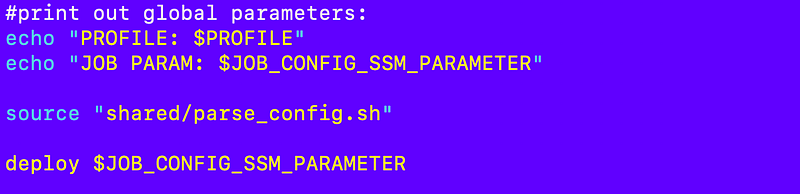
The awsdeploy container is going to do the exact same thing so we can combine those.

What about the first job that initializes the environment? The execution.sh script doesn’t use a parameter. Well, we can change that. I will alter the first job to use an SSM parameter so we can leverage the same container for all three.

Moving the function shared by all three jobs to execute.sh

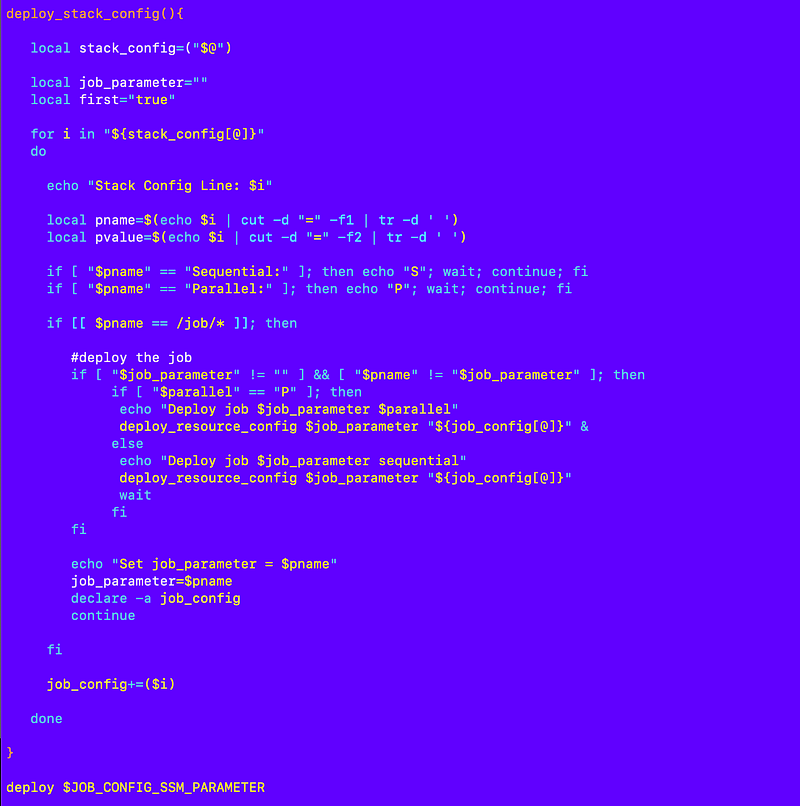
Where is that “shared/parse_config.sh file coming from? It’s currently in the exec repository. But really that code is specific to AWS and this job. I can basically move parse_config.sh config code into the execute.sh file for this job:

Here’s the top of the file:
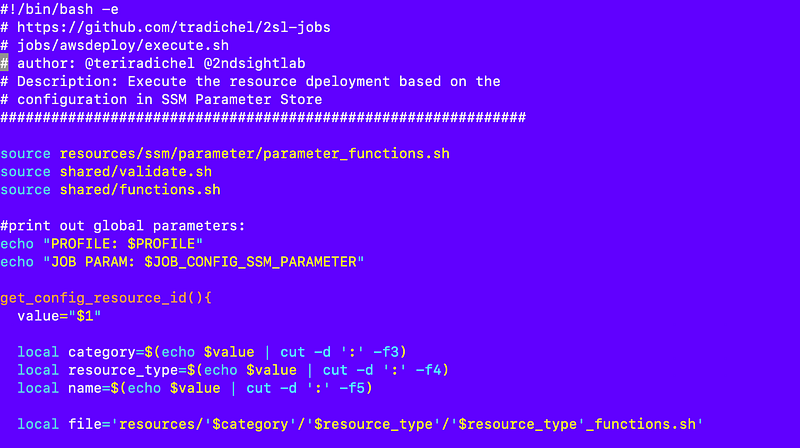
See the other blog for the full code.

Here’s the bottom with the call to deploy at the end:
What’s left that’s different?

The script that runs the job is different depending on where the credentials exist. I can combine all that logic into one run_local.sh script.

This script is copied into CloudShell to run the root job to deploy the initial organization and the aws-root user and role, or the job run by aws-root user to deploy the first enviroment shell. Once those are set up, CloudShell can be locked down and the framework can be used on another compute resource in a prive network to execute jobs.

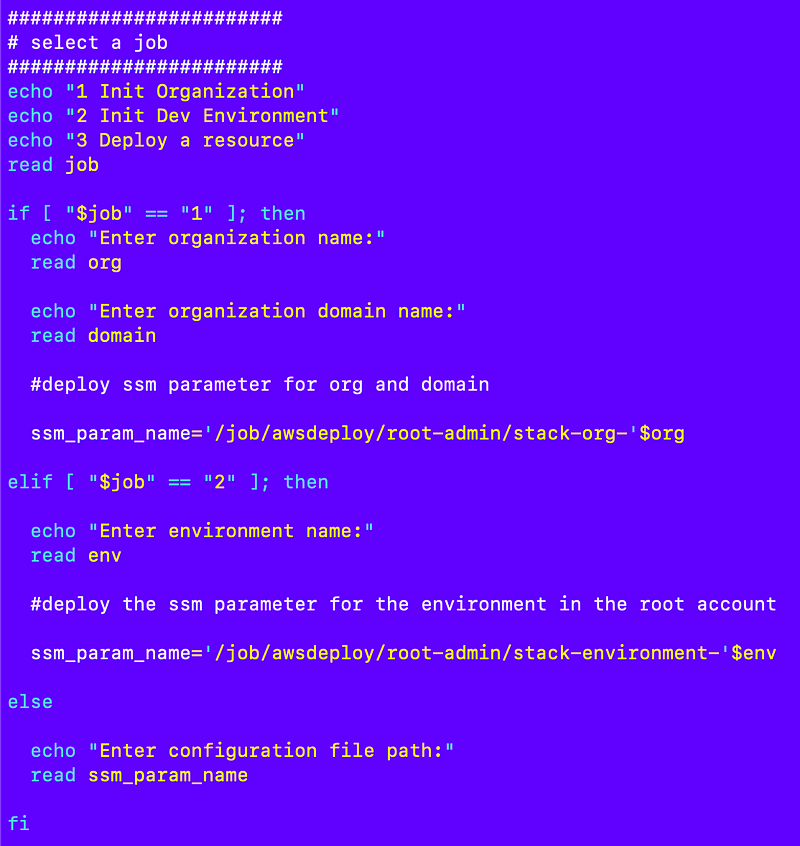
I had an init.sh script in the first two jobs and a testexecute.sh in the last job. We can combine those three scripts as follows.

In the code below I ask which job the user wants to run.

Here I can fix the issue with the missing org and domain parameters from the prior post. We can set the config parameters

The code is not done but you get the idea.
Now all three jobs make use of a parameter so the execute.sh file in a single container can be used for all three.

I can add an if-then statement to get the credentials from the correct source depending on the job:
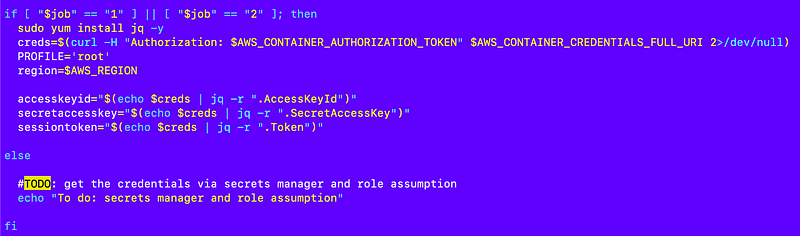
I can pull in all the code from testexecute.sh that asks for the token and handles the role assumption and add it in the second portion of the if-then statement above.

Then I can optionally add the token to the parameters depending on if it is present or not:
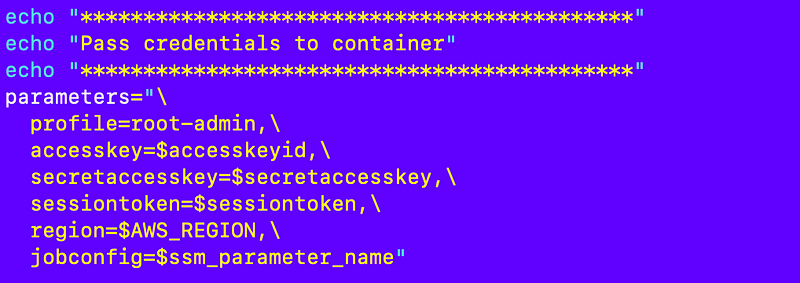
If you are running a job using a role that requires MFA to assume and the user doesn’t pass in a token the job will fail to execute. It will also fail in any but the root account if you add the SCP I created in a prior post to enforce MFA on all actions not taken by roles (which includes role assumptions).

Pulling in resources to the container

There’s one other thing I need to change in my container image build and that is the location from which I pull in my resources.

As explained in the last post resources moved to a separate repository to create a more flexible architecture. I will need to change the code that references the resources to pull them from a different source. They will get added to the container in the same location where they are now. Therefore once the files are in the container the original location is irrelevant.

I will need to modify this command in my code that builds the container to include a build context for the resources now also:

I also need to modify the Dockerfile to reference the new build-context:
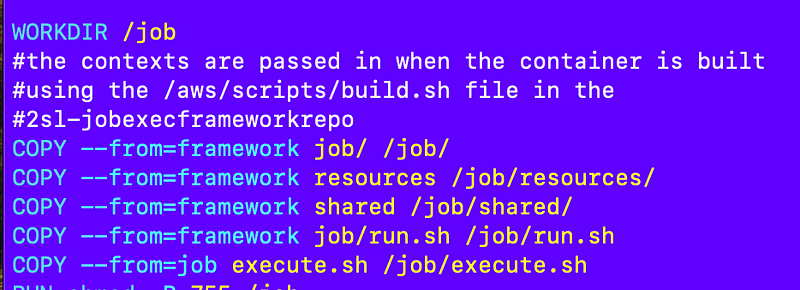
I will have those changes up in GitHub after I test that the code works.

After those changes I should have one container to run all the AWS deployments regardless of wether in CloudShell or on a compute resource.

Follow for updates.

Teri Radichel | © 2nd Sight Lab 2024

About Teri Radichel:
~~~~~~~~~~~~~~~~~~~~
⭐️ Author: Cybersecurity Books
⭐️ Presentations: Presentations by Teri Radichel
⭐️ Recognition: SANS Award, AWS Security Hero, IANS Faculty
⭐️ Certifications: SANS ~ GSE 240
⭐️ Education: BA Business, Master of Software Engineering, Master of Infosec
⭐️ Company: Penetration Tests, Assessments, Phone Consulting ~ 2nd Sight Lab
Need Help With Cybersecurity, Cloud, or Application Security?
~~~~~~~~~~~~~~~~~~~~~~~~~~~~~~~~~~~~~~~~~~~~~~~~~~~~~~~~~~~~~
🔒 Request a penetration test or security assessment
🔒 Schedule a consulting call
🔒 Cybersecurity Speaker for Presentation
Follow for more stories like this:
~~~~~~~~~~~~~~~~~~~~~~~~~~~~~~~~~~~~~~~~~~~~~~~~~~~~~~~~~~~~~ 
❤️ Sign Up my Medium Email List
❤️ Twitter: @teriradichel
❤️ LinkedIn: https://www.linkedin.com/in/teriradichel
❤️ Mastodon: @teriradichel@infosec.exchange
❤️ Facebook: 2nd Sight Lab
❤️ YouTube: @2ndsightlab

AWS
Deploy
Container
Job
Credentials
Recommended from ReadMedium