
If You Can Answer These 7 Questions Correctly You’re Decent at PHP
PHP Tricky Questions
Ah, PHP. The language that’s been around since the mid-’90s and dutifully powered millions of websites from behind the scenes. Some developers like it; others don’t. But one thing is for sure: if one wants to work on web development, a certain knowledge of PHP is good.
Despite new languages and frameworks, PHP continues to be relevant with the uptake of Content Management Systems like WordPress, currently powering a huge part of the web.
But do you really know PHP well enough? You can print out “Hello, World!” on the screen, and maybe even feel pretty good about using loops and conditionals.
But, for more serious stuff, in the meantime, PHP starts getting quirky, proving itself completely unintuitive to really powerful developers. In this article, we’re going to run through seven of the nastiest questions on PHP.
If you can answer these, you’re not just pretty good at PHP — you might be ready for some advanced projects. Don’t stress too much if any of them give you a hard time; PHP is pretty complicated, and even seasoned developers will occasionally find themselves referring to the manual.
So grab your favorite drink, lean back in your chair, and let’s take off into the realms of PHP.
1. What’s the Difference Between == and === in PHP?
Let’s start with a classic. If you’ve worked with PHP for a bit now, you almost certainly have encountered the == and === operators to compare values. They may seem like they are interchangeable, but that’s a long way from the truth.
- == (Loose Equality): This operator tests if the two values are equal and does not check their data types. PHP will type juggle, which means it will try to convert values to a common type before it performs comparison. For example, a string “5” and an integer 5 would be considered equal (“5” == 5 is true).
- === (Strict Equality): This operator checks if both the value and the type are the same. So, “5” === 5 will return false because one is a string and the other is an integer. What it’s never going to do is juggle the type around.
Why Does This Matter?
Using == can give you an unexpected result, especially when you’re comparing values that might not be of the same type. Consider this:
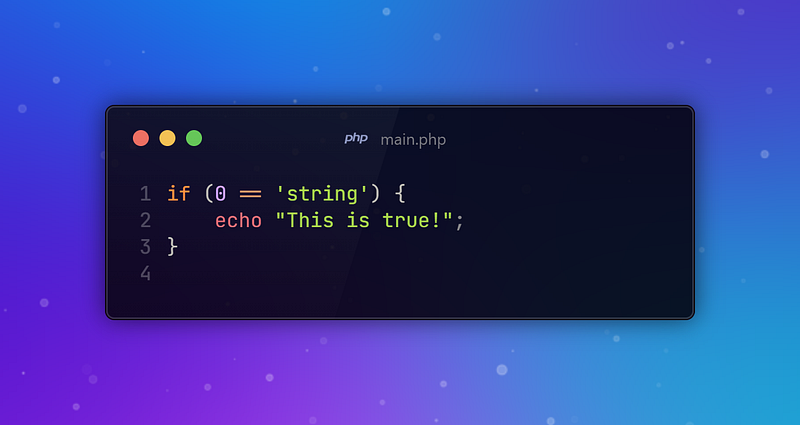
Surprised to know, this condition evaluates to true! That’s because PHP treats any non-numeric string that’s compared to an integer as 0, making 0 == ‘string’ evaluate to true. Scary, right?
On the other hand, using === would ensure that it did not do so:
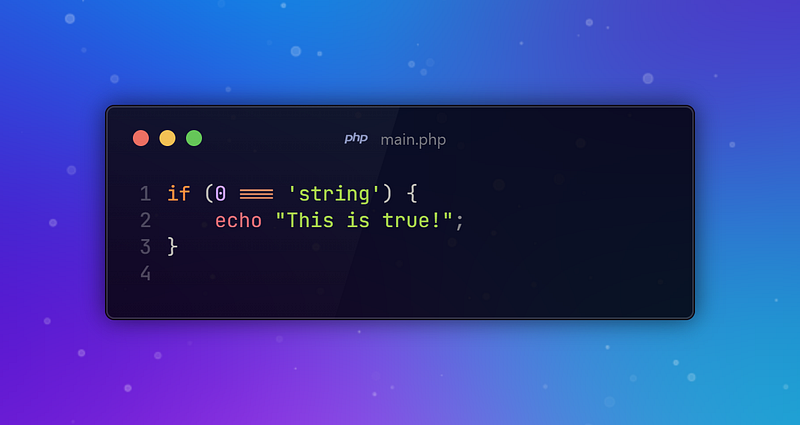
Here, the comparison returns false, as you might expect.
💡 Pro Tip: When in doubt, use === by default for comparisons unless you really have a reason to use ==. This helps in avoiding any unexpected type juggling and thus makes your code more predictable.
2. What are PHP traits all about and how do they work?
Whenever you find yourself lost in a situation in which there is a need for the sharing of methods between classes that are not directly related to one another, then PHP traits will lend you a helping hand. Traits make it possible for one to share methods among multiple classes without the need to use inheritance.
Basic Example:
Say you have two classes: User and Admin, both of them needing to log actions to a file. For this reason, you should not copy the function inside both classes but use a trait.
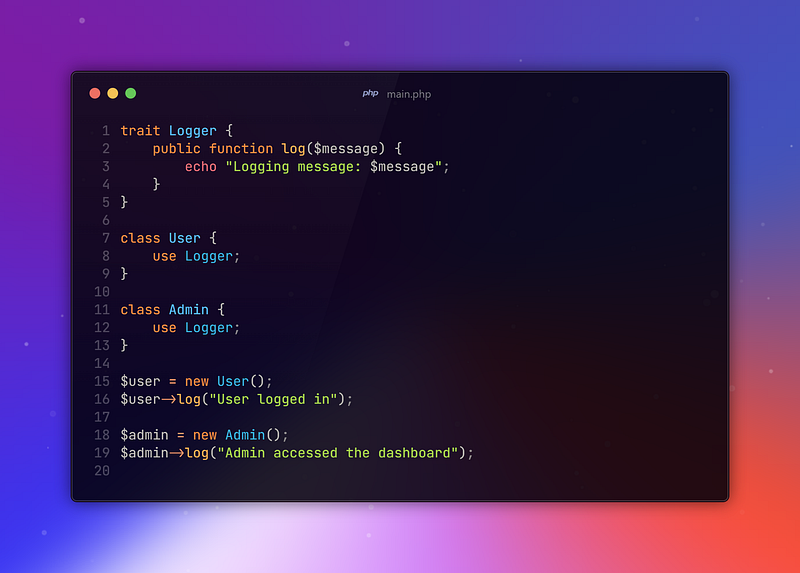
In this example, both the User and Admin classes have access to the log method without having a common parent class or inheriting directly from a common ancestor.
Why Traits?
Traits give a way to mix in functionality to classes that aren’t related. It turns out to be an especially useful feature in larger applications, where multiple classes may otherwise need similar behavior without creating a monstrously large and deeply tangled web of inheritance.
But as the saying goes: with great power comes great responsibility. Traits should be used judiciously — overuse will result in spaghetti code or a really hazy picture of where, exactly, all these methods are coming from. If you find yourself relying too much on traits, it might be time to rethink your class design.
💡 Pro Tip: Use Traits when you have behavior that should be shared across multiple, unrelated classes. But be wary of using them to avoid proper object-oriented design.
3. How Does PHP Handle Sessions and What Are Best Practices?
Broadly speaking, a session is some kind of interaction that is happening between a client and a server over a period of time. In PHP, control is laid down concerning sessions by client-side cookies and server-side storage.
Working with Sessions in PHP
Starting a session with session_start(), PHP creates a new session file inside the server while, at the same time, sending out a cookie with a unique session ID to hold this information on the client side.
This file will contain different user data, which can be used so you will not lose it on each page change within your application.
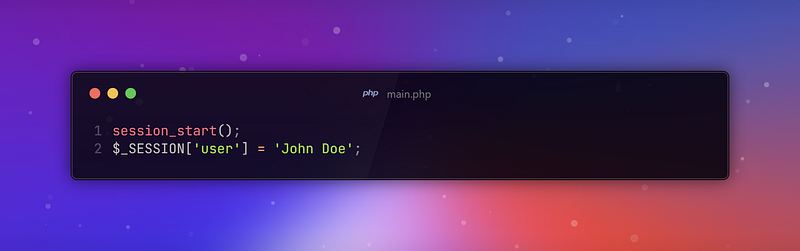
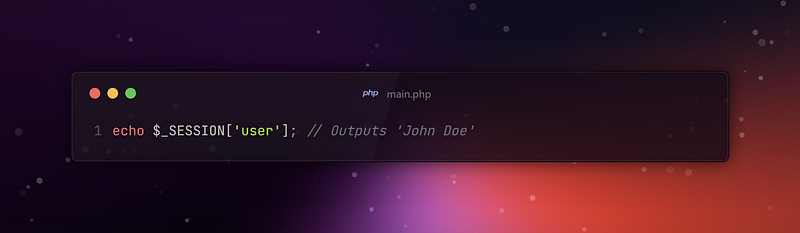
The following code sets up a session and stores the user’s name in the session data. On any subsequent request, while the session has not expired, you can retrieve this value using:
Session Best Practices:
- Securing Session IDs: Do not let your session IDs appear in URLs. Keep on regenerating your Session IDs at regular intervals; it will keep the Session Fixation attacks away. As a rule of thumb, apply session_generate_id() after a sensitive operation (such as login).
- HTTPS: Transmission of session cookies should always be over HTTPS. This is done to prevent session hijacking via man-in-the-middle attacks.
- Cookie Settings: Set the right cookie flags, like HttpOnly and Secure, to reduce session cookie theft risk by XSS.
- Session Expiry: Implement a reasonable session expiry and inactivity timeout to mitigate the risk that an inactive session is taken over by an attacker.
Example Setup of a Secure Session:
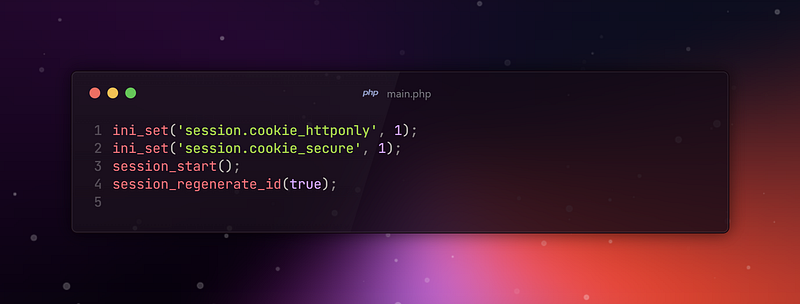
In this example, the session cookie is flagged to only be accessible through HTTP and not JavaScript; that is, it is transmitted only over secure HTTPS connections. The session ID is also regenerated to reduce the risk of fixation attacks.
💡 Pro Tip: Always treat session data as potentially sensitive. Always secure your sessions just like you would other forms of user data.
If you are struggling with Sessions, check this out:
4. Define differences between include, require, include_once, require_once
PHP avails multiple methods to include and execute files. This occurs within another PHP script. Initially the differences might appear trivial. Yet, nuances set these apart. They serve unique objectives.
- include: This expression includes and evaluates a file. PHP looks for the specified file. If it isn’t found PHP emits warning. Yet script will continue to run.
- require: There is similarity with include. It involves file evaluation. If PHP doesn’t find the file, it is fatal. This leads to an error. Execution is then terminated.
- require_once: This shares similarity with the require statement. However like include_once it ensures only single inclusion.
- include_once: This functions as an include. But it ensures that file is only included once. The script’s execution prompts this. If the file has been included already, it doesn’t include it again.
Use requirement when the file’s importance is critical (e.g. config files). Not having the file is probably undesirable. You may not want application to continue to run in this case. Use include when file carries non-essential importance. A non-vital script or template is an example.
Use expression variations with *_once. This is to avoid potential issues. The issues arise from including a file multiple times. These issues include class or function redeclaration.
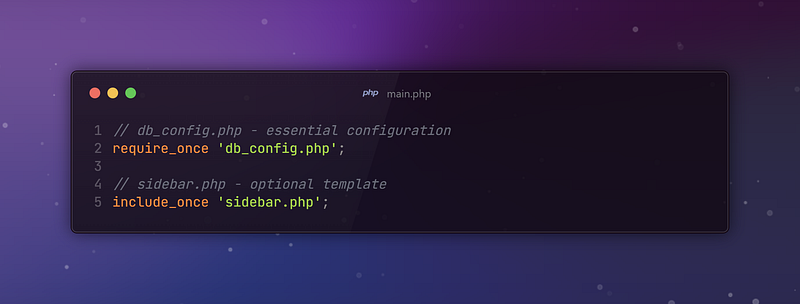
In this situation we have db_config.php It is critical to the execution of database operations. So it’s included. It is done through a call to require_once.
On the other hand, the sidebar template is an optional module. Its inclusion is not necessary to regular operation.
💡 Pro Tip: Prefer require_once for essential files and include_once for optional ones to ensure that files are included exactly once, avoiding potential issues with multiple inclusions.
5. Can You Explain PHP’s Magic Methods?
Magic methods are special methods. They start with double underscores (__). They have a distinct role.
Tyhe offer ability to override and put into action particular behaviors. This occurs when certain operations happen on an object. Let’s check out some of regularly used magic methods:
- include_once: This functions as an include. But it ensures that file is only included once. The script’s execution prompts this. If the file has been included already, it doesn’t include it again.
- __construct(): This stands for constructor method. It gets automatically called when an object gets instantiated.
- __destruct(): It deals with destructor method. It is called when object is torn down or when script ceases.
- __get($name): This method is brought into play when any attempt is made to read any property not accessible or doesn’t even exist.
- __set($name, $value): This method kicks in when substantial to non-accessible property occurs. Or when non-existent property becomes written.
- __isset($name): It is controlled when you call isset() or empty() for a property you cannot access or it doesn’t even exist.
- __unset($name): It’s brought into action when unset() is employed on a ghost property you can’t access or nonexistent property.
- __call($name, $arguments): Triggered when you try to access or call a method that doesn’t exist. The method is non-accessible too.
- __callStatic($name, $arguments): It works like __call() method. Yet it’s for static methods.
- __toString(): Turns on when an object gets used as a string. This might happen if you use echo for instance.
- __invoke(): Serves purpose when you call object as a function.
Example of Magic Methods in Use:
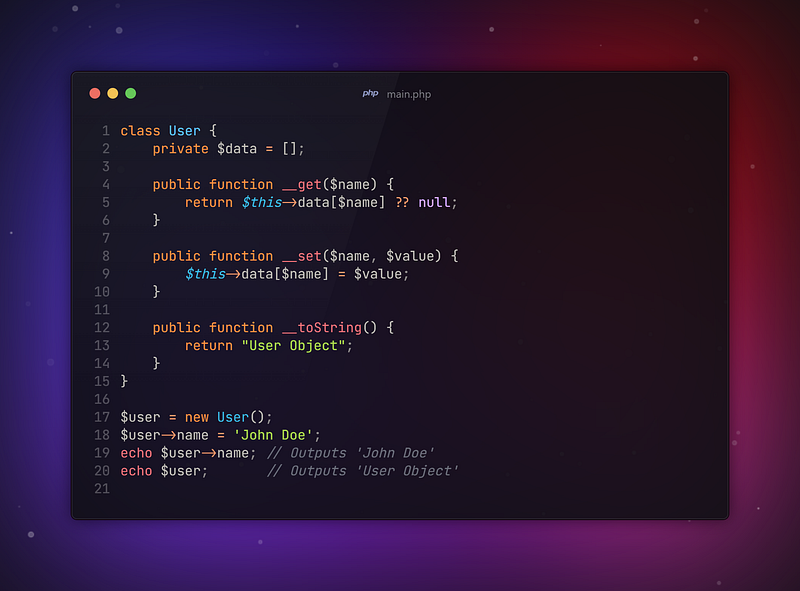
In this instance __get and __set allow for management dynamic properties in an associative array. On the other hand __toString presents a string representation of object.
💡 Pro Tip: Methods of magic can possess power. However these methods can make code harder to debug and understand. Use with caution and guarantee their purpose clarity in documentation.
6. How Do PHP Namespaces Work? And Why Are They Important?
Namespaces within PHP are significant. They prevent naming conflicts. These conflicts are common in large projects. They also occur often when using third-party libraries. In PHP they permit you to associate related classes functions as well as constants. You can put them together under an assigned title.
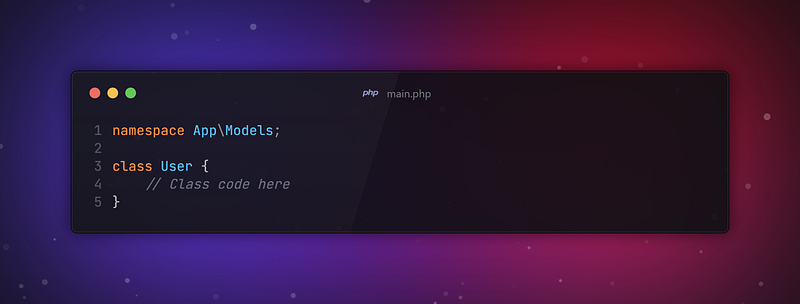
Above code you can see User belongs to the App\Model namespace. That means, there can be a diffrent user class in the app but you can use all of them.
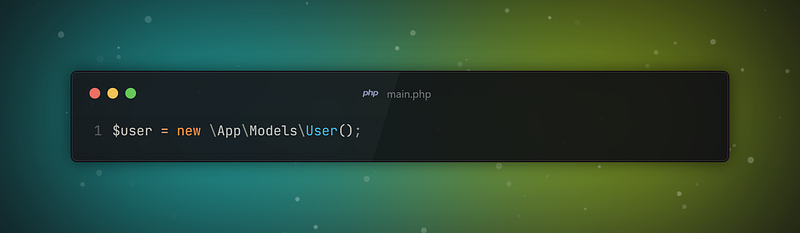
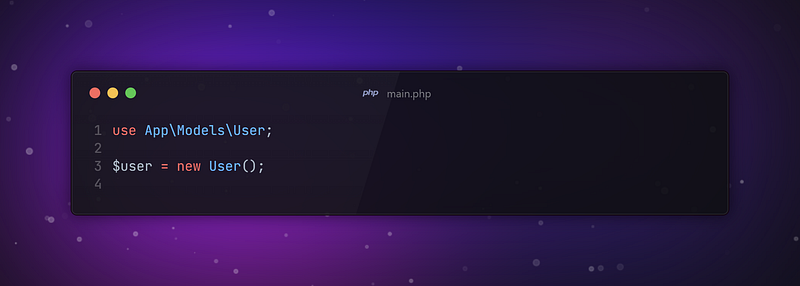
You can also use “use” key to call namespace.
Importance of Namespaces
Namespaces play an integral role. They prevent naming conflicts in projects. This is particularly true in larger ventures.
As a project expands it is more likely to have multiple classes with identical name. Namespaces prove to be helpful because they group classes. They prevent conflicts by safely enclosing them.
You’re able to use identical class name in various parts of application without complication. Namespace despite limitation appears as an advantage. It allows for greater flexibility in design. It aids in managing different components.
1. Consistent Usage of Namespaces: Place every class in a namespace. That stands for met a small project.The reason? To retain cohesiveness. The need to write future-proof code is also covered.
2. Observing PSR-4: Here is a standard to follow. This is recommended by the PSR-4 standard. The file structure must reflect the layout of namespaces. Need an example? Consider a class. Named App/Models/User is its designation. It should be contained in a file called User.php.
3. Avoid Deeply Nested Namespaces: Yes, namespaces assist in the management of code. However they still present a difficulty. A challenging one at that. Deeply nested namespaces can amplify this issue. More intricacy is introduced.
💡Pro Tip: Large apps are not the only beneficiaries of namespaces. Even small projects can incorporate them. This eases the path to writing clear and structured code. Start applying namespaces as a matter of routine.
7. What Exactly Is a PHP Closure? And How It Is Utilized?
PHP closures are sometimes named anonymous functions. Not having an actual name is a defining characteristic. The functions are usually defined and applied as inputs to other functions. PHP closures pack powerful capabilities with their potential in variable capture.
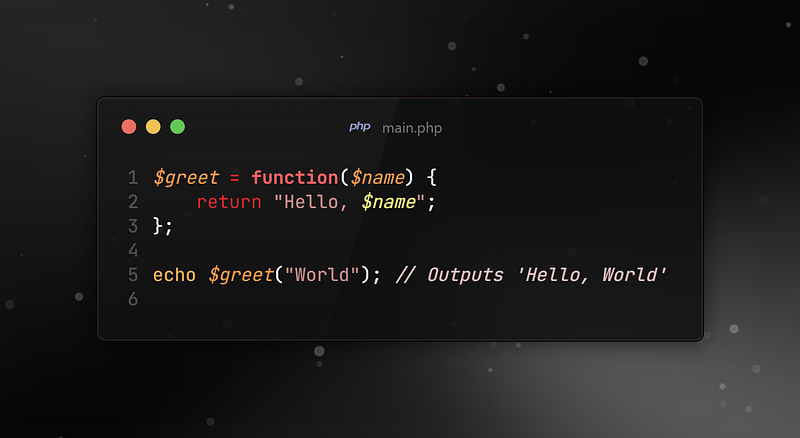
For instance consider the $greet in the example. The definition of $greet exhibits a closure. The closure takes a parameter and outputs a string. It’s possible to treat $greet like an ordinary variable.
Closing with Closures:
One of the defining features of closures is their ability to capture variables from the parent scope. This is done using the use keyword.
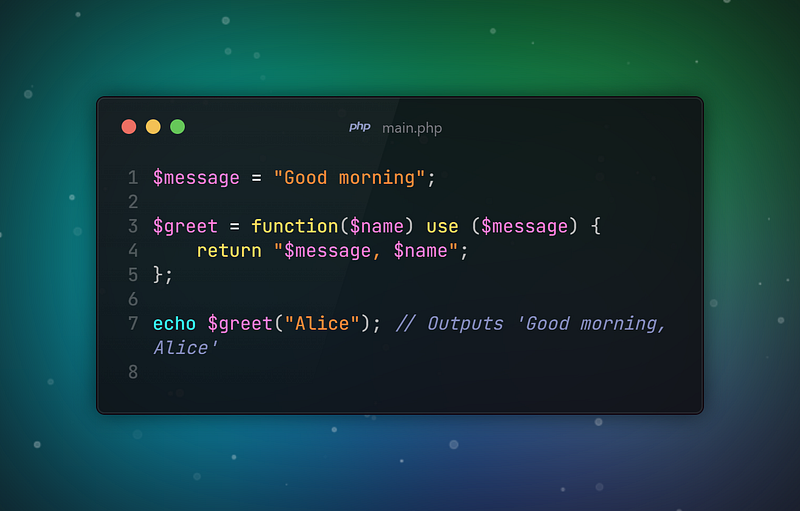
Closures in Real-World Scenarios:
Closures are commonly used in callback functions, such as with array functions like array_map or array_filter:
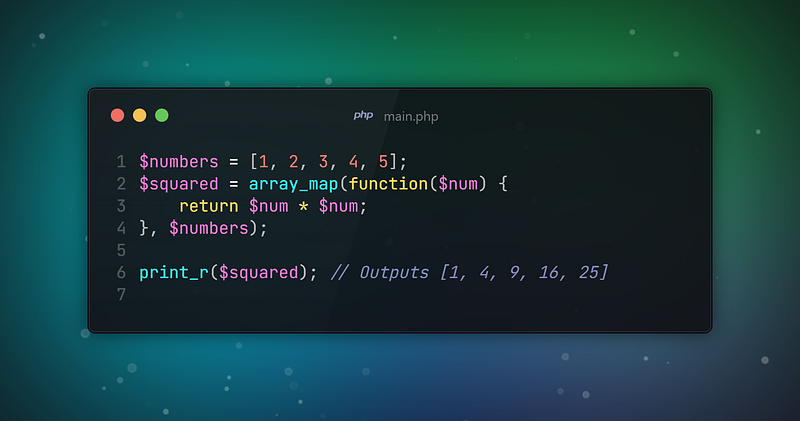
In this case closure passed to array_map code. It applies a transformation. This transformation goes to each element on the array.
💡Pro Tip: Closures hold power. Balance power and readability when writing code. Only use them with purpose. Do not convert each function to a closure. It could compromise readability.
Conclusion:
Could you answer the questions? If you grasped the content of these seven questions aptly congratulations! You have a firm grasp on PHP learning. Each idea in these questions reveals deeper section of PHP.
If you master these, you will evolve into an efficient developer. Even though PHP has some idiosyncrasies it’s amazingly adaptable. Moreover, it’s extensively used. Clarity in nuances can guide one to excellence:
For instance understanding secure session management is essential. Knowing when to use strict comparisons is crucial too. Equally important is knowing how to structure code with traits and namespaces. These things together can set you apart from other developers.
Don’t forget! The essential path to proficiency in PHP, it mirrors proficiency in any language. That path is consistent learning.
Consistent learning and practice. Continuously challenge yourself with fresh projects. As you do so, remember never fear. Dive without reservation into the intrinsic language facets.
The more knowledge you gain aids in preparation. Preparation is crucial. You want to be equipped to deal effectively with any challenges ahead. The road of continuous learning can be arduous. However, it is rewarding.
Have a wonderful day! Stay connected, stay online.
Thanks for coming this far 🎉
- 👏 Could you please clap the story to help spread the article? (50 applause).
- 📩 Also if you want to my newsletter: https://yunus-emre-adas.ck.page/c090914848
You can reach me from the links below:
To access my other articles:


