
I Used ChatGPT (Every day) for 5 Months, Here Are the Incredible Use Cases That Will Blow Your Mind
Discovering the endless possibilities of ChatGPT.

After the launch of ChatGPT-3, there has been a surge in the number of AI applications that have been introduced.
Many of these applications rely on the OpenAI API, while others have developed their own machine-learning models.
During this period, OpenAI released a new version of ChatGPT, known as ChatGPT-4. While there are some free options to explore this new version, such as through Microsoft Bing otherwise accessing ChatGPT-4 requires a monthly payment of $20.
However, the benefits of using ChatGPT-4 far outweigh the cost, as it can significantly improve productivity and increase income.
As someone who has been using ChatGPT versions for over five months, I have gained a great deal of knowledge about its capabilities.
Even, I have written a couple of posts explaining the incredible use cases.
- I Used ChatGPT Every Day for a Month, Here’s What I’ve Learned
- I Used ChatGPT (Every day) for 3 Months, Here’s What I’ve Learned
- I Used ChatGPT-4 (Every day) for a Month, Here’s What I’ve Learned
With that in mind, let’s dive into some examples of what you can achieve with ChatGPT.
1. From Script to Music: How AI Made This Incredible Video

Nick Pierre, a Twitter user, recently shared a fascinating thread about his experience using AI tools to create a video. The result is far more impressive than what many people may have thought possible.
Here is a detailed summary of the steps he took.
To start, Nick used ChatGPT to create a script for a 9-second video with a science-fiction theme. This involved providing ChatGPT with some basic instructions and parameters for the script. The tool then generated a complete script based on those inputs.
Next, he used Midjourney to create a reference image for the video. This tool allowed Nick to input some keywords related to the theme of his video and then generated an image that would serve as a reference point for the footage he planned to record.
Nick then recorded some footage in his living room on his iPhone, trying to make it match the reference image generated by Midjourney as closely as possible.
Once he had the footage, he uploaded it along with the reference image to Gen-1, which is a tool that helps apply the style and composition of an image to a video. This helped to make the final video look more polished and professional.
Next, Nick used a simple video editor called iMovie to trim and combine the various clips together, and so on.
The end result was a 9-second video with a science-fiction theme that was surprisingly impressive, considering that it was created using a combination of AI tools and a smartphone.
You can read more about Nick’s experience and the AI tools he used in his thread on Twitter.
2. Become a Data Analyst with Code Interpreter
As someone who works in the programming world, I can confidently say that transitioning to becoming a data scientist or analyst can be a challenging undertaking.
It often involves spending numerous hours studying multiple programming languages and working with big databases full of errors and inconsistencies.
However, there is some good news for the newbie even for businesses.
Thanks to the innovative new Code Interpreter plugin, which is now available to many GPT-4 users, anyone can become a data analyst.
For instance, Code Interpreter can help you leverage data to improve your business, analyze stocks and cryptocurrencies by simply uploading CSV data, and even create graphs based on data without requiring any coding experience. Additionally, government agencies can also utilize this plugin.
If you want to read more about it, here is a wonderful post.
3. Automate tasks using ChatGPT
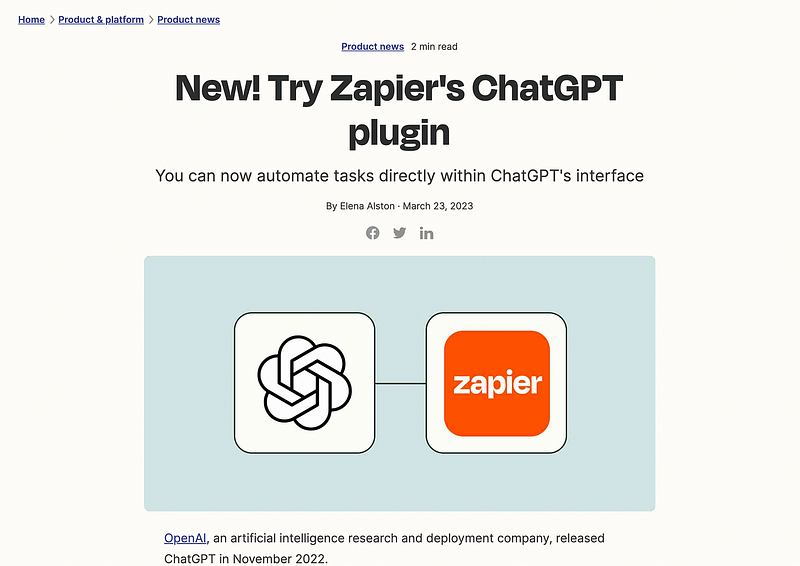
We’ve been discussing ChatGPT plugins, and I’d like to share some more information with you. While I can’t cover all the plugins in this post, I want to highlight one that’s been added by Zapier.
Earlier, I talked about some tools that help automate workflows, like Bardeen. However, as a programmer, I have an edge since I can automate a lot of tasks. But, here’s the good news — automation isn’t just for programmers anymore!
With ChatGPT’s launch, anyone can streamline their work easily. This is made possible with plugins that allow you to automate tasks in different platforms such as Google Sheets, Gmail, Slack, and more. One plugin that deserves special mention is the one added by Zapier.
What’s really cool is that you don’t need to be a coding expert to take advantage of automation anymore.
With ChatGPT and a few plugins, you can make your workflow smoother like a pro. By using these plugins, you can automate your work and save time, reduce errors, and improve efficiency.
So, are you ready to give it a try? It’s really cool!
4. Discover the Future of Automation with AutoGPT
You may have heard about AutoGPT. It’s a really cool tool that can help you achieve your goals.
Basically, AutoGPT is an experimental open-source application that uses the power of the GPT-4 language model to autonomously accomplish whatever task you set for it.
According to its official GitHub repo, AutoGPT chains together LLM “thoughts” to reach your desired outcome.
In one of my previous posts, I explained how you can set up AutoGPT on your personal computer, and I even gave an example of how it works. Later, I wrote a brand-new post detailing all the incredible things you can do with AutoGPT.
The possibilities are endless! You can make AutoGPT an intelligent intern, create a new recipe, conduct AI-powered research, build a website in just three minutes, automate your work on Discord, and so much more.
If you want to learn more about AutoGPT and its potential, check out the link.
Trust me, you won’t be disappointed!
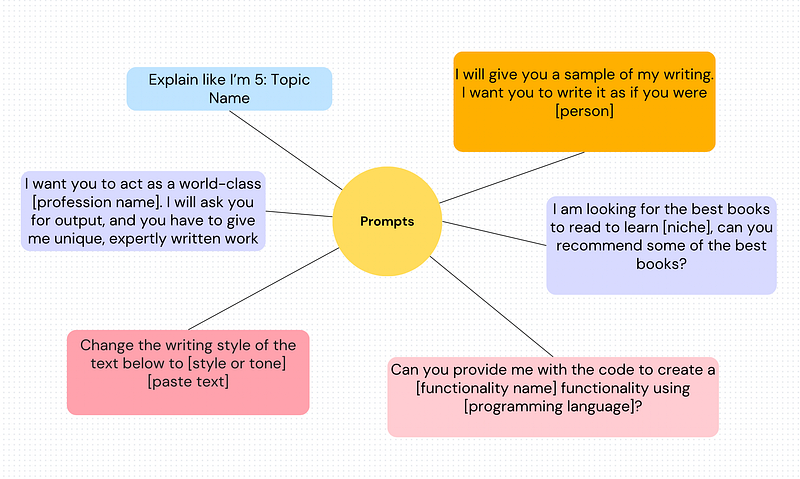
5. Unlock the Power of ChatGPT with These 6 Expert Prompts!
ChatGPT is a language model that helps you generate text. The quality of the output depends on the prompts you provide it.
And to get the best results, you need to be good at Prompt Engineering. But don’t worry, we’ve got you covered!
Here are six of the best prompts you can use to save time and maximize efficiency when using ChatGPT:
You can read more about it, here.
Hope you like it.
That’s it — thanks.
Consider becoming a Medium member if you appreciate reading stories like this and want to help me as a writer. It costs $5 per month and gives you unlimited access to Medium content. I’ll get a little commission if you sign up via my link.


