
I Tracked Every Hour in 30-Minute Intervals for 31 Days — Here’s What I’ve Learned
An experiment to learn where time *really* goes
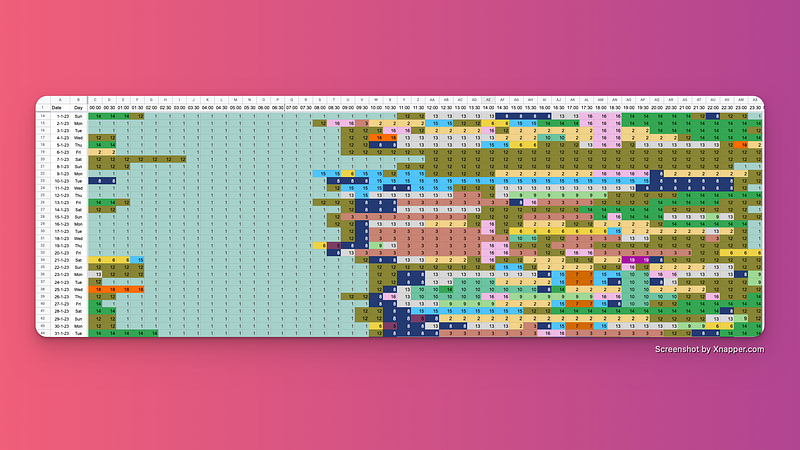
You feel busy, pulled in all directions, and think you have “no time” to work on your project or study your target language.
But is that true? Only data can tell.
Mallesh Gujjala inspired me to give tracking every hour a try. I started collecting data to:
- Kill my excuses
- Learn where my time goes
- Get a better insight into my habits and patterns throughout the day
- Where and when I tend to waste time
- And, therefore, what I can do about it.
Here’s how I did that and what I’ve learned along the way.
Methodology: How I tracked every hour for 31 days
Tools used
You shouldn’t rely on your brain to remember what you did yesterday, let alone two days before. You need tools:
- Toggl Track Chrome extension for time tracking (Free)
- Focusmate virtual coworking platform to book sessions. Sessions appear on your calendar (get 3 free sessions per week)
- A Make (formerly Integromat) automation that adds calendar slots for each time slot tracked in Toggl (free)
- A customized Google Sheets template where I manually log entries, inspired by Mallesh Gujjala (slide 2)
- My Zepp Life smartwatch with an app that shows me when I slept
A short walkthrough of the Track Every Hour Google Sheets template
I track every hour in 30-minute intervals on my Google Sheets template.
Why?
- I often book 25-minute sessions on Focusmate, a virtual coworking tool I use daily. During these 25-minute sessions, I’ll focus on a single or several smaller tasks. I group them under the category Admin or Miscellaneous.
- I don’t always spend a whole hour on one task. When I track activities per 30 minutes, I’ll get a more accurate representation of how I spend my time.
Adding a key
I added a key that groups activities together.
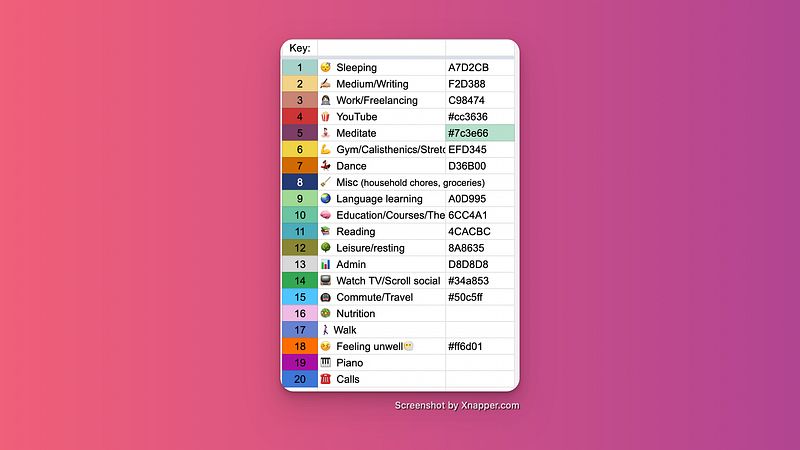
Every activity (or group of activities) gets a number and a color.
Conditionally formatting the spreadsheet fields
I select all fields where I’ll track my hours and add rules.
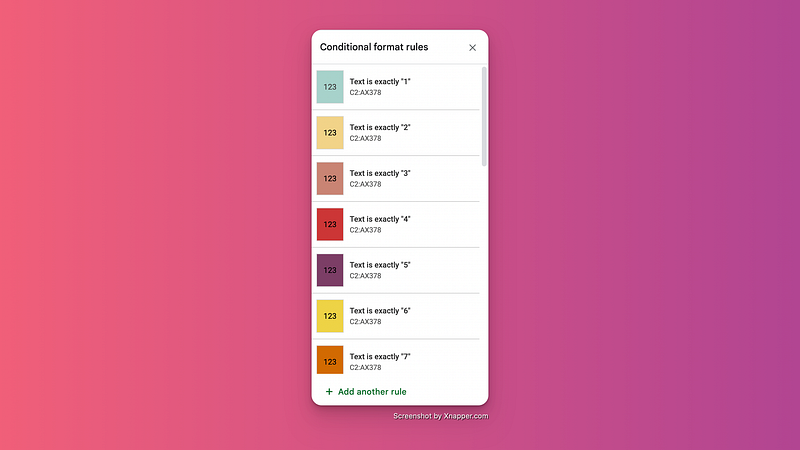
The rules above read: when you write “1” in a field, and color it green. When you write 2, make it yellow, and so on. When I do something that doesn’t fit under an existing category, I add a new one. Then, I update the conditional formatting on the entire spreadsheet.
By color-coding the spreadsheet cells, you’ll catch patterns in your behavior at an eye’s glance.
How I manage to accurately Track Every Hour
At the beginning of the day, I book a bunch of Focusmate sessions that represent when I will work on that day.
The first session of the day serves as a “getting started session.” I take 25 or 50 minutes to:
- Do any remaining morning routine activities
- Update my tracking templates, among which the Habit Tracker and Track Every Hour
- And make a to-do list for the day
When I fill up the Track Every Hour template, I add:
- The number of hours I slept
- How I spent my morning so far
- Mark the current time slot as Admin
- And any time slots from the previous day that I didn’t fill out yet.
I extract my slept hours from the Zepp Life app.
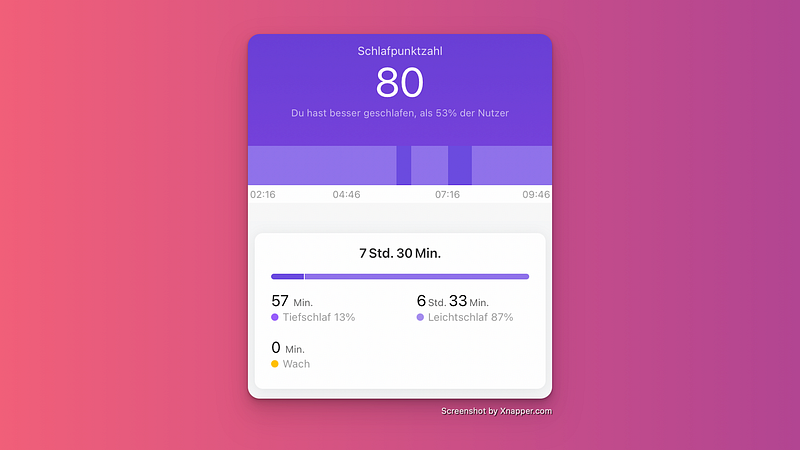
Half an hour before sleeping, I usually wind down. The first half an hour upon waking up, I typically spend staring at the ceiling while I wake up. Track your sleep hours, and you already cover one-third of the day. Easy win, right?
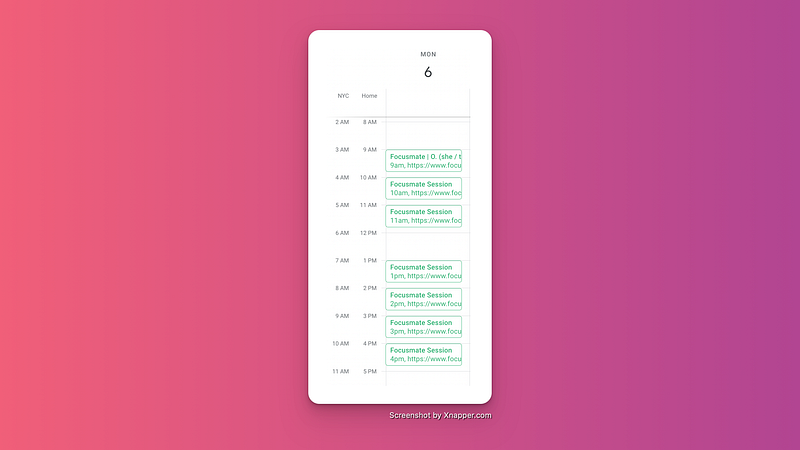
The Focusmate virtual coworking sessions represent my intended working times on any given day.
Each session is automatically added to my Google Calendar (you can turn this on inside the Focusmate Settings > Notifications).
After booking sessions, my calendar looks like this.
But being inside a session doesn’t mean you’re getting actual work done. For all you know, you were scrolling cat videos again.
When I do actual work, I start a timer in my Toggl Chrome Extension. And I stop it the second I start slacking off. This timer does NOT continue to run when I quickly grab water, use the restroom, or stare at the wall. Up to the very minute, I’ll know exactly how many hours I’ve been doing something worthwhile.
We don’t need such accuracy for the Track Every Hour template, but it helps me to know what I was doing at what time.
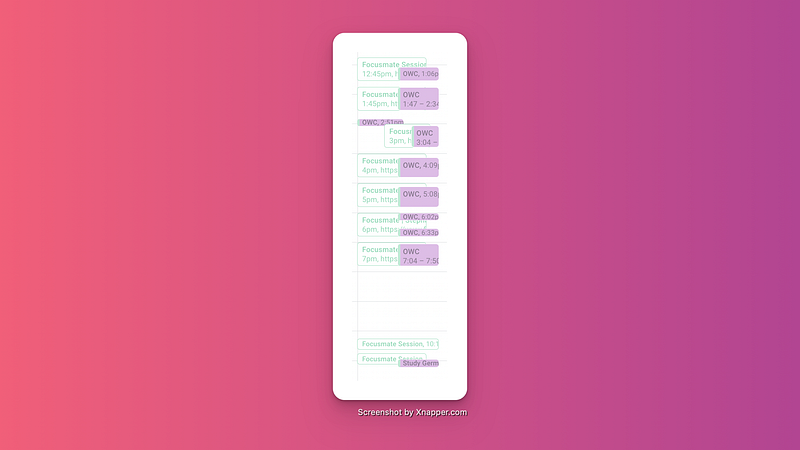
A Make (formerly Integromat) automation adds each tracked time entry as an event to my Google Calendar — on top of the Focusmate sessions.
My calendar now looks something like this.
Tracking other fixed events on your calendar
Sports: When I book a dance class, I get an event invite that I immediately add to my Google Calendar. I’ll need 30 minutes before and afterward to commute from and to the venue. The plan is to set up an automation that automatically does all the above.
Language course: I’m currently following an advanced German course with 3 contact hours per week. The dates are set for the next six months and added to the calendar. This means I’ll probably not do anything useful in the time slot right before and after — and that I have another 4 hours per week covered in my Track Every Hour template.
Appointments: These have set times and require a commute. That’s 30 minutes to an hour for the appointment itself, and commuting time before and afterward.
How to track the remaining time slots
You spend many hours on sleep, work, and getting from and to appointments.
The remaining empty slots? Those can be estimated.
- After work, you hung out with your friend. That falls under Leisure Time.
- Skipped the gym and binged Netflix? That falls under Slacking Off Time.
There’s one thing to watch out for. You don’t want to let too much time pass between doing your tasks and updating the template.
By updating the template during my morning routine, I make sure to stay on track. The preset calendar slots and tracked time in Toggl serve as backups when my brain can’t remember what I did.
Results of my 31-Day Track Every Hour Experiment
The numbers
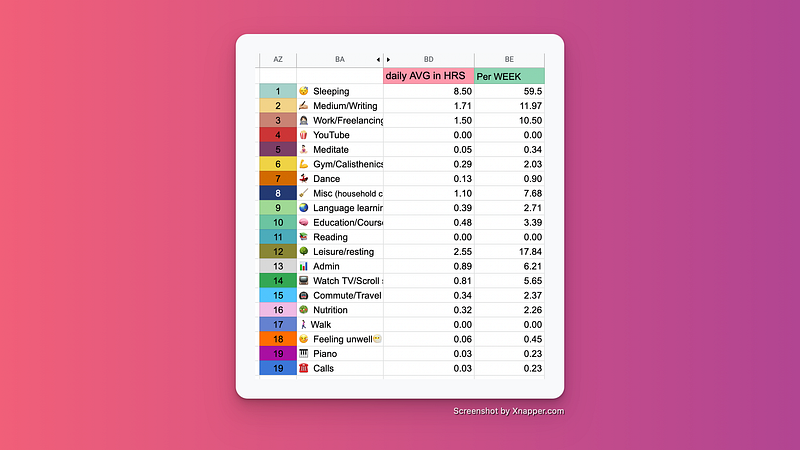
Time allocation across different categories
Total weekly hours worked: 28.68
- Medium/Writing: 11.97
- Work/Freelancing: 10.50
- Admin: 6.21 (taxes, emails, DMs, applications, pitches)
You may think, “What, only 28 hours?” As I said, I only track actual time spent. This includes admin tasks that support my one-person business.
Try to track what percentage of your week is spent on actual work.
Let’s not pretend we’re busy 24/7. Also, more work hours don’t equal better work. *shrugs*
Time spent on health per day: 9.71 hours
- Sleep: ± 8.5 hours
- Meditate: ± 23 minutes
- Nutrition: ±30 minutes
- Sport: ± 20 minutes (morning stretches, pushups)
Give the body what it needs.
I’ve stopped trying to compete for the badge “More Tired Than You” or “Up Earlier Than You” by sacrificing sleep. I don’t care and neither should you. Tracking my numbers for a month has shown me I need sleep. Lots of it, too.
Total weekly hours spent on education: 6.09 hours
- Reading: 0 hours
- Language learning: 2.7 hours
- Courses: 3.39
The only point of dissatisfaction here is the lack of time spent reading.
Unexpected insights based on the data
Category 14 — Social media/Watch tv: When I touch the computer at the end of the day, I’m out of willpower. I may watch more than the intended “just one episode” on Netflix. I expected the stats to show worse, but they didn’t because I don’t binge-watch every day.
Category 7 — Dance: I was also surprised to have such a low number of dance hours logged. Then again, I had a 2-month break and only started going back to the studio last week.
Insights after checking the numbers against the color trends
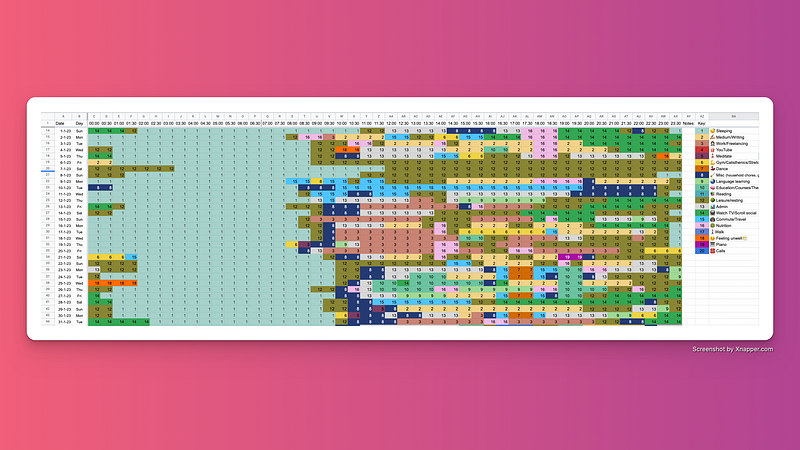
- No real fixed daily routine
- Netflix binging happens late in the evening — but sporadically
- The later I go to bed, the later I wake up. If I want to wake up earlier, I should go to bed earlier (and not start binging late at night when I’m already out of willpower)
- Changing phases of shorter-term projects
- After waking up, it takes some time to get the engine running. I log that under “12 — Resting” and follow it up with “8 — Misc” (running errands)
- I start getting active and productive between 9 AM and 12 PM. The starting times fluctuate
- I don’t “2 — Write” or “11 — Read” every day
- I can ditch category “17 — Walking.” I didn’t use it once and logged all my walks under “12 — Leisure/resting” already
- “2 — Writing” usually happens after noon and in the evenings
4 improvements I plan to implement
I know where I spend my time in general terms (thanks to tracking every hour). I also know my productive time up to the minute (thanks to Toggl).
One thing that bothers me is starting to work at noon. It leaves little time in the evenings, especially on days when I go to a sports class. It also doesn’t leave enough time to tick off all my daily habits.
This is what I plan to do about it.
- Stop touching screens beyond 10:30 PM. Looking at the stats, I barely do anything useful after 10:30 PM. Late-night screen staring contests negatively impact sleep. Blue light suppresses melatonin production and tricks your brain into thinking it’s still daytime. On some days, I pound away on the keyboard late at night and jump into bed straight after while my brain is still overly active.
- From 10:30 PM, only allow selected activities. Think language learning (without a laptop), reading a book, meditation, or going for a walk.
- Kick-start the morning routine immediately after waking up. The first half an hour upon waking up I don’t do anything useful. So I might as well start with my morning routine immediately.
- Implement a fixed lunch and dinner time. From time to time, I forget to eat because I’m too focused on work. But not eating is, well… not healthy. Neither is going to sports class on an empty stomach. Plus, implementing fixed times will signal to my brain that it’s time to eat.
The goal is to rely more on systems. Not spontaneity.
I also don’t want to need to think about everything I do. Instead, I want to focus on doing it.
Reflecting on this experiment
Tracking Every Hour requires a system. If you’re not used to keeping track of what you do in a day, this experiment can be challenging to keep up with.
I shared how I track every hour to give you ideas. The exact method is yours to choose, be it a spreadsheet, a paper notebook, or a printable daily planning template. So long as there’s a record of what you do in a day, you’re good to go.
I already had some systems in place that tracked large parts of my day.
All I had to do, was fill in the gaps.
For the time being, I’m continuing the experiment. Knowing where my time goes in this much detail benefits me. I can now see what’s working well, where I fall off the bandwagon, and what I can do to work and feel better.
Sign up for email updates to never miss a story by Gracia Kleijnen.


