
How to Train YOLOv5 on Custom Data?
Object-detection technology is widely used as the backend of many applications in the industry including desktop and web applications. Also, it’s a backbone for many computer vision tasks, which include object segmentation, object tracking, object classification, object counting, etc. In the modern era, The goal of everyone regarding any application is,
“Application must be easy in use, take less processing time and provide best results”.
In the previous few years, many new Object-detection models came, and every one has its own advantages and disadvantages, but until now the best Object-detection models in terms of speed & accuracy include YOLOv4, and YOLOv5.
In this article, we will learn how to train YOLOv5 on custom data, all the mentioned steps can be followed by both (Windows and Linux) users. let's start its training process.
Step-1
Create a folder named “YOLOv5-Training”. Clone the YOLOv5 repository from the link, and extract it into the above-created folder.
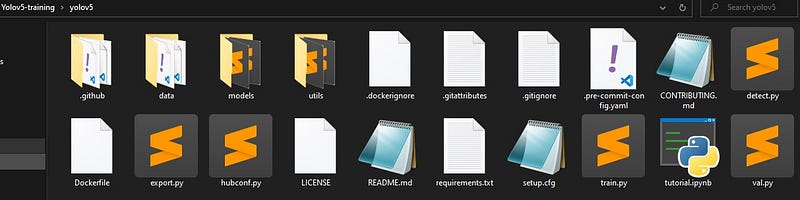
Step 2
Now, we need to install different packages needed to use the cloned repository. For this, we will use the requirement file, already added in the YOLOv5 repository.
You first need to download and install torch module from website), once torch installed, then you can comments (torch and torchvision) in requirments.txt file. Now Open the terminal and type command written below.
pip install -r requirements.txt
or
pip3 install -r requirements.txt
Step-3
Let’s detect some objects with pre-trained provided models, to check whether all requirements are satisfied. (The detected image will be saved in the YOLOv5/data/images folder)
python detect.py --source data/images/bus.jpg
or
python3 detect.py --source data/images/bus.jpg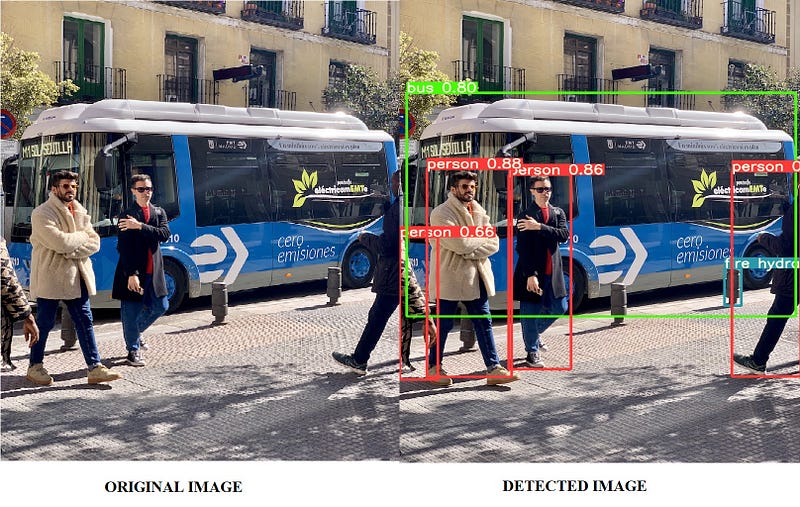
The steps for custom training are as follows.
1- collect data
2- label data
3- split data (train & test)
4- create config files
5- start training
Step-1
Now, we need to create a dataset for YOLOv5 custom training. if you have no data, You can use the dataset from the openimages database.
Yolov4 and yolov5 take label data in a text(.txt) file having format,
<object-class-id> <x> <y> <width> <height>
Step-2
For data annotation of custom data, check my article, Annotate your data for object detection (YOLO).
Step-3
Once you label your data, Now, we need to split our data into train and test folders. The split ratio will be totally dependent on the user while the normally preferable split is (80–20)%, which means 80% data is used for training while 20% data used for testing. Store images and labels with the below folder architecture.
Folder structure:
├── yolov5
# └── dataset
 ## └── train
 ####└── images (folder including all training images)
 ####└── labels (folder including all training labels)
 ## └── test
 ####└── images (folder including all testing images)
 ####└── labels (folder including all testing labels)
Step-4
Now we need to create a custom configuration file. (Make sure to set the correct path), because the training process will totally dependent on that file.
create a file having the filename “custom. yaml”, inside the (yolov5/data) folder. paste the below code in that file. set the correct path of the dataset folder, change the of classes and their names, and then save it.
path: complete path to (yolov5->dataset folder)
train: train folder name
test: test folder name
# Classes
nc: 80 # number of classes
names: ['person', 'bicycle', 'car', 'motorcycle', 'airplane', 'bus', 'train', 'truck', 'boat', 'traffic light',
'fire hydrant', 'stop sign', 'parking meter', 'bench', 'bird', 'cat', 'dog', 'horse', 'sheep', 'cow',
'elephant', 'bear', 'zebra', 'giraffe', 'backpack', 'umbrella', 'handbag', 'tie', 'suitcase', 'frisbee',
'skis', 'snowboard', 'sports ball', 'kite', 'baseball bat', 'baseball glove', 'skateboard', 'surfboard',
'tennis racket', 'bottle', 'wine glass', 'cup', 'fork', 'knife', 'spoon', 'bowl', 'banana', 'apple',
'sandwich', 'orange', 'broccoli', 'carrot', 'hot dog', 'pizza', 'donut', 'cake', 'chair', 'couch',
'potted plant', 'bed', 'dining table', 'toilet', 'tv', 'laptop', 'mouse', 'remote', 'keyboard', 'cell phone',
'microwave', 'oven', 'toaster', 'sink', 'refrigerator', 'book', 'clock', 'vase', 'scissors', 'teddy bear',
'hair drier', 'toothbrush'] # class namesStep-5
All preprocessing steps are done, it's time to start training. open the terminal in the main “YOLOv5-cloned folder”, and run the below command.
python train.py --img 640 --batch 16 --epochs 300 --data custom.yaml --weights yolov5s.pt
or
python3 train.py --img 640 --batch 16 --epochs 300 --data custom.yaml --weights yolov5s.pt
— img = size of images on which model will train, the default value is 640.
— batch = batch size used in training.
— epochs = training epochs
— data = path of custom config file
— weights = pre-trained weights (yolov5s.pt/yolov5m.pt/yolov5l.pt/yolov5x.pt)
If the above command runs successfully, you will be able to see a screen like the one below, which means training started.

Note: Training will not start if any image is corrupt.
That is all regarding “How to Train YOLOv5 on Custom Data”. you can try this on your own data.
- Dataset creation from Videos: *Article Link
- Labeling Data for Custom Training: *Article Link
- Train YOLO-v5 on Custom Data: *Article Link
- How to Prune and Sparse YOLOv5: *Article Link
- How Hyperparameters of YOLOv5 Works: *Article Link
About Me
- Muhammad Rizwan Munawar is a highly experienced professional with more than three years of work experience in Computer Vision and Software Development. He is working as a Computer Vision Engineer and has knowledge and expertise in different computer vision techniques including Object Detection, Object Tracking, Pose Estimation, Object Segmentation, Segment Anything, Python, and Sofware Development, Embedded Systems, Nvidia Embedded Devices. In his free time, he likes to play online games and enjoys his time sharing knowledge with the community through writing articles on Medium.
Please feel free to comment if you have any questions 🙂, If you like the article, Let’s connect on LinkedIn :) 👇


