
Medium Publications Beginner Step By Step!
Taking Your Medium To The Next Level!
Medium Non-Members Can Read The Full Story HERE!
What you will learn from this article.
Why you must start and join Medium publications.
How to start your first medium publication.
Home page layout and display.
Setting up your publication newsletter.
Understand your Medium publication menu.
Getting writers for your Medium publication.
Medium publications and Quora spaces.
Publications Owned By Deon Christie.
Your own Medium publication summary.
Why you must start and join Medium publications.
One of the best ways to get a lot more exposure to your Medium stories is to get approved as a writer on large Medium publications. Medium publications are a great way to grow.
With your own Medium publications, remember that your Medium publication title becomes a slug to the primary Medium domain. Making it an indexable URL in search engines.
With a rather popular primary domain (medium(dot)com). But those are just some of the logical advantages I personally see. Some large Medium publications have millions of followers and monthly readers.
Once your own Medium publications start getting stories from their writers. Remember that those writers are going to share that Medium story over their social media profiles.
Seeing that their post is published in your Medium publication, it states that at the top of the particular Medium story. That way, more visitors might be interested in taking a look at (your) Medium publication.
Combine writing for other Medium publications with your own. Like writing a post about your Medium publication and how writers can apply to write for your publication.
Or write a post about Medium publications in general (kind of like what I’m doing right now) and then share that post with other large Medium publications. That way you can get readers from popular publications to your own too.
But we will get to the part of writing Medium stories and obtaining writers for your own Medium publications a bit later on. Because we will also be throwing Quora into the mix.
How to start your first medium publication.
Before you get started if you do not already have an image design and editing tool. Then I strongly suggest you create a free account with Canva. You will need that for a professional presentation.
Start by clicking on your profile image in the top right-hand side corner of your profile home page. A drop-down menu will appear with the option “Publications” or “See All Publications”.
The latter will display in the event you are already approved as a writer for other publications, follow other publications, or already have your own Medium publications.
Clicking on “Publications” will take you to a new page where you will see the option for “New Publication”, right next to the heading “Publications”. Click on that and another page will open.
This is where you will start your first publication. You should be on a page resembling the illustration below. As illustrated, the general information for your new publication includes.
Name Or Title.
Tagline.
Description.
Publication Avatar.
Publication Logo.
Publication Cover Image.
Contact Info.
Social Media Profiles.
Topics.
Publication Editors.
Publication Writers.
Please complete all the sections and note the suggested image dimensions and file format. Personally, I prefer uploading images as PNG files for faster image upload. Just getting started you do not need to concern with editors and writers just yet.
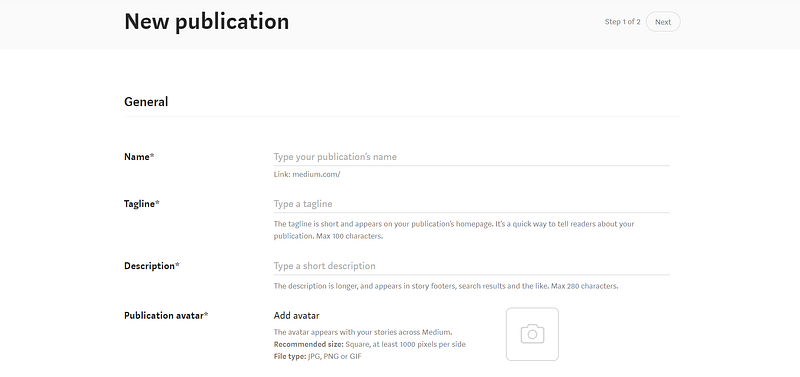
Your Medium publication title or name, as mentioned earlier is of utmost importance. Remember that it becomes a slug to the primary Medium domain. Choose a maximum of 2–3 short tail keywords that best describe your Medium publication.
But you also want to focus on keywords related to the most searched and read topics on Medium. As well as high search volume and low competition keywords in search engines.
Also, include your target keywords in the tagline and description but within the context of the sentence or phrase. You cannot just cram a bunch of keywords in there that make no sense.
It must form a readable and understandable phrase or sentence. Once you’re on the page to start your first Medium publication, you will soon see the simplicity. It is super easy.
Think of the tagline as a striking slogan type of phrase, containing your target keywords if possible. You might find in many instances that the words you choose may be already in use.
Therefore, it might take some time to establish a fitting title (name), tagline, description, and topic. But please take your time, this is a journey, not a contest.
Once you are done with the general settings, simply click on “Save” and you will be taken to your Medium publication homepage to access another menu. Your Medium publication editing menu.
But we will get to understanding the Medium publication editing menu in a bit. It is also where you set up your navigation bar, layout, and so much more
Home page layout and display.
This is where you add your header tagline, logo, and cover image. The same images you have just created and used with your general Medium publication settings.
Layout size, S, M, L (Small, Medium, Large) will just display your cover image with title and logo to the size you choose. Personally, I set mine on medium. Although using the large option works better for presentational screenshots.
There is also a background or navigational bar colour. To have a black navigation bar, just enter the code “000000” (six zeros) and it will automatically set to black.
Next to the colour option, you then click on “Bold” to activate the colour change. As for layout I personally prefer the grid layout. But I also like turning on the title (right next to the trash sign). That will allow you to add a targeted subtitle.
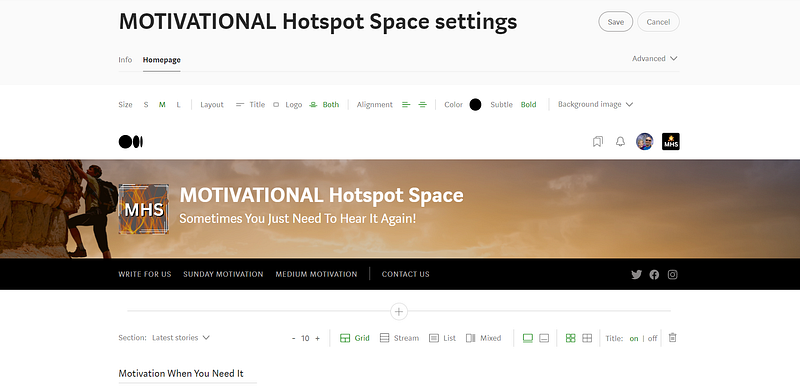
Adding a background image and logo is also rather easy. Just use the same images as you have with the general medium publication settings. Now the background image you might have realized does not come with a suggested dimension.
Inside Canva, simply use the “presentation” template. Once you have uploaded your Medium publication cover image, from inside the editing menu just click on the “background image” option again.
You will be presented with an option to move around your image and choose the best part to display. I like to display the logo, title, and tagline with the cover image.
Just get to know your way around both the general and homepage settings. If you take your time and pay attention you will realize how super easy it can be.
Not super-fast, easy to understand. Nothing happens super-fast! Take your time and provide your readers with value. Design your Medium publication in such a way that it attracts attention and creates curiosity.
Setting up your publication newsletter.
Pretty much the same basics as the general settings with your Medium publication. But you have a lot fewer areas to complete when creating your Medium publication newsletter. These areas include.
Newsletter Name.
Newsletter Description.
Newsletter Avatar.
Promotion.
Be sure that the promotion block is marked “Promote your newsletter on your publication’s stories.” At the bottom of the newsletter settings page. That helps with gaining subscribers and followers.
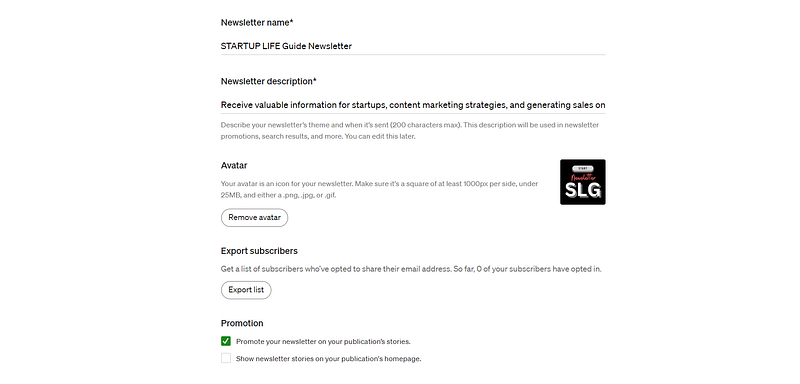
As with your Medium publication settings, you want to complete every step and leave nothing out. Just as you would with your Medium profile, also create your Medium publication as professionally as possible.
Understand your Medium publication menu.
Your Medium publication editing menu is accessible by clicking the publication Avatar next to your profile image in the top right-hand side corner of the Medium publication home page.
As illustrated below, you can see the drop-down menu. This menu will provide you with 8 different options. You can explore the rest, because for the purpose of this demonstration, we will focus only on the newsletter, and navigation, along with the homepage and settings sections.
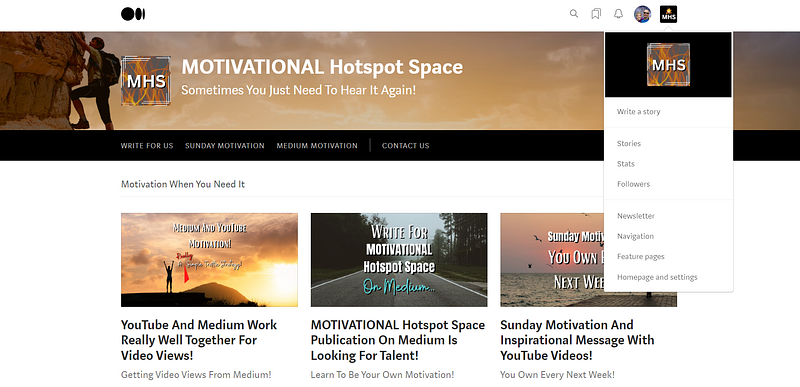
The 8 options as we have just mentioned, include the following selections. You must explore these on your own and understand the purpose of each.
Write A Story.
Stories.
Stats.
Followers.
Newsletter.
Navigation.
Feature Pages.
Homepage And Settings.
We have already covered the newsletter option, along with the homepage and settings section. Therefore, we will take a look at the navigation option.
With the navigation, you can add posts that are published in your Medium publication. We will get to the “Write For Us” button in the navigation.
We also want to include the one external link allowed with the Medium publication navigation. But before you can add an external link, you must first add the link to some of the posts. Like the “Write For Us” post.
For this external link, you can choose to add your blog. But I have come up with another idea. Adding a “Contact Us” button that immediately opens in the reader’s email.
Adding such a “Contact Us” button, instead of a URL, you will enter the following and turn that into a type of contact form. That way writers can also contact you via email if they want to be considered to write for you.
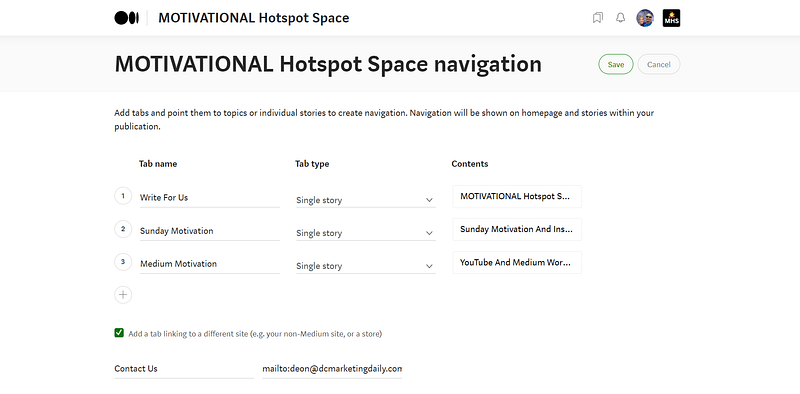
As illustrated above, that is where you add navigation buttons that link to posts on your Medium publication. To get started, have at least 2 navigation buttons “Write For Us” and “Contact Us”.
Instead of a URL, simply enter the following as your external link (mailto:your email address). Now your readers and writers can contact you directly via email.
Getting writers for your Medium publication.
As we have just briefly mentioned, add a “Write For Us” button in the navigation bar, linked to the post where you introduce your Medium publication.
This same Medium story must also explain the requirements and steps to apply for being a writer with your Medium publication. In order to add any post to the navigation, remember that you must first post it in your Medium publication.
When adding writers to your Medium publication, you will find that in some instances the writer ID r handle might not be accepted. When this happens, it’s usually because you might not be following the Medium writer.
You need to follow the Medium writers that you wish to add to your Medium publication as accepted writers. Now along with the “Write For Us” button, you also have the “Contact Us” navigation.
If your Medium publication is professionally designed, attracts attention, and creates curiosity. Writers will soon start responding to your “Write For Us” post, and even through email messages.
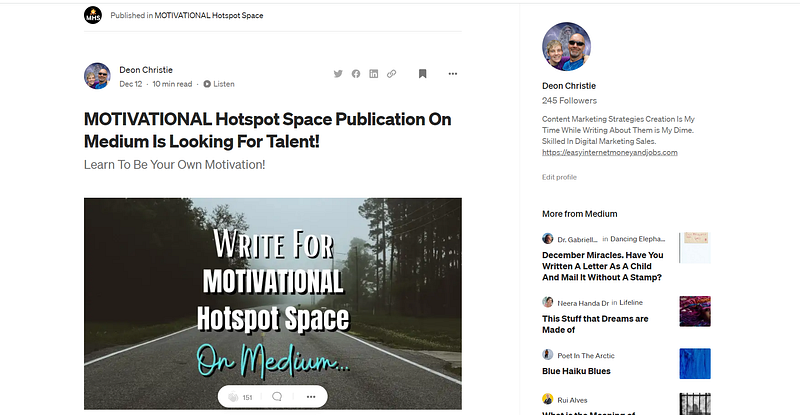
But those are just a few ways of getting Medium writers to your Medium publication. You can also share both your publications and “Write For Us” posts over your social networks.
Perhaps offer free giveaways (I offer 2 of my best traffic eBooks) for new Medium publication writers, subscribers, and followers. Admittedly, I have only started with personal Medium publications recently.
But have been writing for a few well-known Medium publications for quite some time. These are all strategies I personally use and find rather effective. But next, we’re going to throw Quora into the mix.
Medium publications and Quora spaces.
Having Quora spaces is a great way to get views, reads, and claps to both your Medium profile and your Medium publications. In a nutshell, as illustrated below.
You include the link to the “Write For Us” Medium post in the Quora space description area. But you can also include a link to your Medium profile and other social profiles.
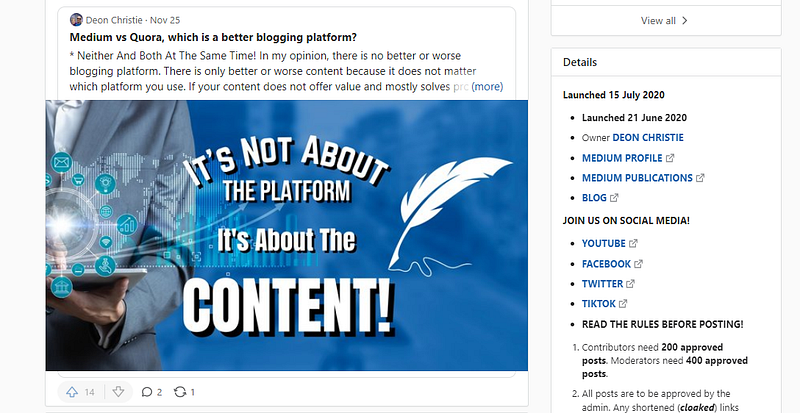
Or you can choose to include the Medium publication link directly in the Quora space description area. But I have covered that in another post, therefore, you might want to check out this medium story.
Publications owned by Deon Christie.
Currently, I have 8 Medium publications where I am both editor and writer. Some already have a few writers and followers, but as mentioned earlier, still in the making.
These 8 publications target some of the most searched and read topics on Medium. But also some of the high volume with low to medium competition in search engines. Among them, you will find.
Motivation And Inspiration.
Startup Life.
Social Media.
Writing.
Making Money.
Content Marketing.
Work From Home.
Digital Marketing.
You are more than welcome to apply and become a writer with any one of the 8 publications, or all 8 if you choose. But please just follow the requirements under each “Write For Us” post.
If there is anything you need help with, please don’t hesitate to shoot me an email through the “Contact Us” navigation. Below is a list of the current 8 Medium publications by Deon Christie.
You can also take a look at these publications to get a basic idea of design, layout and structure. Although I am looking forward to having you as one of my most valued writers.
But why would you want to write for a brand new, hardly known Medium publication? Good question, and rightly so. Judging by the keyword, search phrase, and title targeting.
I think these Medium publications are going to do just fine. Admittedly, I now need writers. New writers will enjoy the benefits of growing with the Medium publication and getting known as professionals in their field.
Growing with any Medium publication means you have the chance of having the most content published. This is beneficial as a long-term goal. Besides, if you do get accepted as a writer, then you also get 2 of my top traffic eBooks 100% free.
Your own Medium publication summary.
In a nutshell, there are 9 steps or requirements I find rather helpful. All you have to do is complete the simple steps and take your Medium experience to the next level. These basic steps include.
Complete All Settings.
Complete All Homepage Settings.
Complete All Newsletter Settings.
Add A “Write For Us” Navigation.
Add A “Contact Us” Navigation.
Write At Least One Medium Story.
Connect With Quora Spaces.
Offer Free Stuff Where Possible.
It might take you a few days to do a really good job, so take your time and don’t try to rush the process. Medium publications are among my own personal best tools to reach targeted and responsive audiences.
But you need to both write for and own your personal Medium publications. If you love designing, creating and writing as much as I do, then you’re going to have a lot of fun with this!
Today all my website traffic is generated from my own efforts, efforts that I have perfected over the years that have created up to 16,364 targeted visitors per day and returned revenue in excess of (See For Yourself Inside) per month! — Source
AFFILIATE DISCLOSURE: Some of the links in this post are links to affiliate offers. If you visit them to make a purchase, I will earn a commission. The decision is yours, and whether or not you decide to buy something is entirely up to you. All offers come with a full money-back guarantee!
Free Stuff For My Medium Subscribers.
All new subscribers on Medium will receive 4 free gifts. 2 of my top traffic eBooks, and 2 free memberships (invitation only) for buyer traffic tools I use. Subscribe to me (Deon Christie) on Medium and your free stuff will be emailed to you asap. Medium has no affiliation, nor do they endorse the free giveaway in any way. It is my personal free giveaway to all new Medium subscribers.


