
Writing For More Exposure And Readers!
Medium Publications Should Be Your Next Move!
Medium Non-Members Can Read The Full Story HERE!
What You Will Learn From This Article.
Introduction To Medium Publications.
Benefits Of Having A Medium Publication.
How To Start A Medium Publication.
Getting The Most Out Of Your Content.
Introduction To Medium Publications.
Medium Publications are basically fairly new to me. But it is a good thing then that I am a full-blown research junkie, and a fast learner, right? This will not be the first time I had to “figure something out”.
Figuring things out is the easy part (and an excellent way to gather knowledge) because we have an ocean of information with Google and YouTube.
Any possible task you can think of to complete, most probably already have a few articles and videos on Google, along with loads of videos on YouTube.
If you want to know how to do absolutely anything, all you have to do is tell search engines what you want answers to. This has always worked for me in the past and is working still to this day.
YOU are your own best teacher, never forget that. And when you “figure things out” and learn from other professionals. Then you will never forget “how it gets done”.
This is also one of the reasons I am only going to walk you through the basics. It will be up to you to do a bit of research and understand the entire process better.
This is important because to me it is not only about providing you with content marketing strategies. But also to educate you on how to come up with your own through research.
How to “figure things out” is the key to understanding the logic behind anything. Once you understand the logic, then all the technicalities just fall into place.
This is my first attempt at having my own Medium Publication. It’s called “WRITING Solutions”. I chose that name because it is a fusion of 2 ideas. Writing material about writing advice, or.
Writing advice that offers a solution to a problem (answer to a question), or a guide other than writing advice specifically.
It broadens the topic field quite a bit within the digital marketing niche and allows the Medium Publication to be less limited. A bit of how my mind works, but we don’t want to share too much of that now, do we?
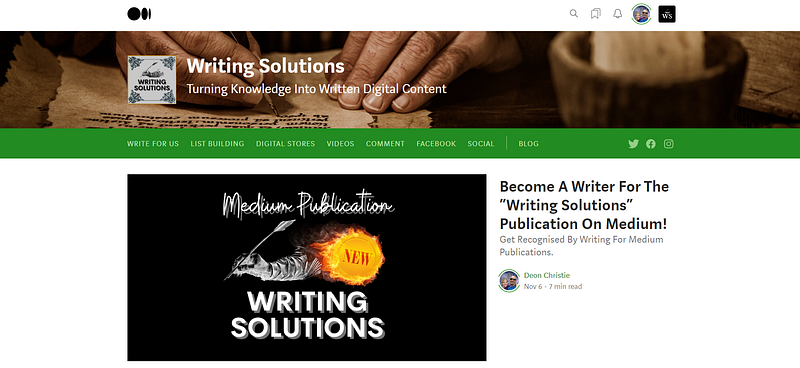
Above you have access to WRITING Solutions just in case you want to take a look for yourself. The image is a screenshot of my first-ever Medium Publication home page display.
Benefits Of Having A Medium Publication.
Some of the benefits of having your own Medium Publication I have identified as. Building large numbers of Writers and Followers, while gaining Newsletter Subscribers.
That is besides the fact that you can publish your own content in your Medium Publication and boost the views. Judging by the current stats on my new Publication.
I can only assume that publications receive more attention on Medium.
You will see the unbelievable views in a really short time in a bit, and I can assure you that for the amount of promotional effort, I have applied. It could not have come from only that.
WRITING Solutions is not even a full day old, and I have hardly started promoting or spreading the word about the new “WRITING Solutions” Publication on Medium.
Next, we will take a look at the stats comparison between my Medium Profile and Medium Publication. I have mentioned this several times in previous posts, that I have had to start over on Medium.
But you can read the article about that entire rollercoaster in another article I published on Medium.
So the stats below are only for the last month with a new Medium Profile, the last month’s stats, which is also the first month’s stats. There is a clear and consistent interest and growth.
Judging by the number of reads compared to views, I’d say my profile content is underway to reach the exact audience it is supposed to. Based on both GEO targeting and based on interests.
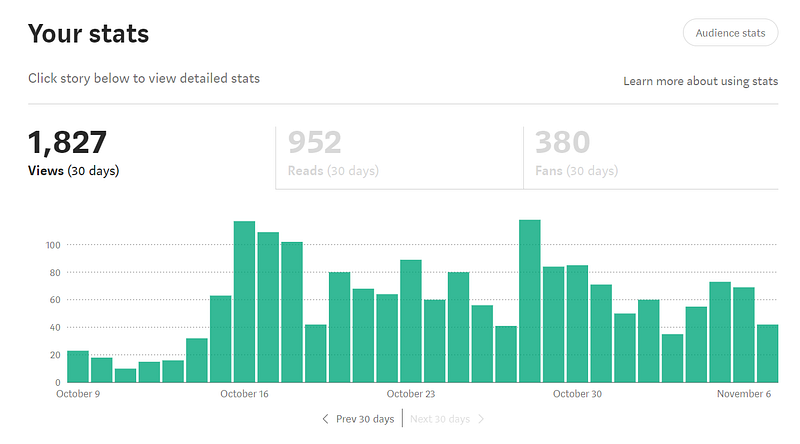
At the time of writing this article, around 50% of all the views, are from people who actually read the content. When I got started, I set goals of getting at least 1000 views and 100 followers in the first month.
Both goals were met with 1827 views, and 131 followers for the first month. I am quite happy with that, it means there was growth, and that matters most.
The Medium Publication stats, however, is “shocking” in comparison! Especially considering the fact that I have not yet gained any followers or subscribers to this particular Medium Publication (WRITING Solutions).
In fact, at the time of writing this article it was not even a day old yet! But I said that already, just so you know. As illustrated below, the results speak for themselves.
In my opinion, based on recent experience, your Publication it would seem will attract more attention (views) than your Medium profile! Why?
Well, honestly, I am not quite sure. As mentioned before, I have also just started with Medium Publications. So, it is a learning curve for us both then.
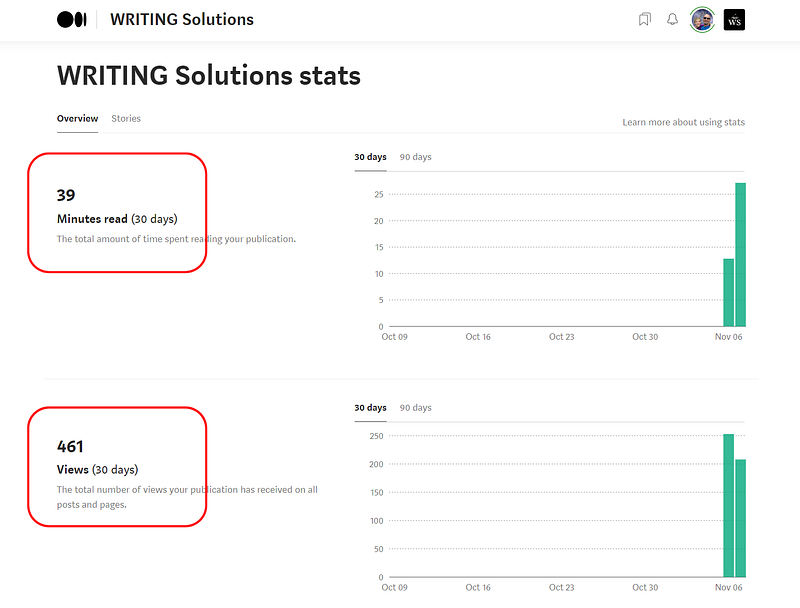
One thing is abundantly clear though (as illustrated above), and that is the fact that this (Medium Publications) is yet another content marketing strategy proving to be a traffic magnet!
461 views and 39 minutes of reading time in less than a day! What does that mean? It means.
Quality Content — Check!
Audience Is Interested In The Content — Check!
Curiosity Keeps Them Reading — Check!
I am pretty convinced there is quite some interest in the content. And interest feeds curiosity, while a curious visitor is an active visitor.
These results were honestly with hardly any promotional effort from my side. This, to me, is proof enough. This is a traffic strategy and potential I refuse not to explore!
How To Start A Medium Publication.
Starting your own Medium Publication is easier than creating a Blog, Website, Facebook Page, Facebook Group, or any other site for that matter, in my opinion.
But your Medium Publication is also an excellent “website” you have to share. In other words, an indexable URL. So be careful when you choose the title, tagline, and description.
Your Medium Publication Title will also be the slug to the medium URL, so choose the keywords you wish to target carefully. In my own case, as laid out above, I am targeting the writing niche.
Because writing and making money online is not only among the top searched and read topics on Medium. It so happens the topic is also right up my alley!
Creating your first Medium Publication includes a few basic steps, as we’re only covering the basics, remember? Summarizing this whole exercise into steps, it comes down to the following.
Settings.
Publishing.
Manage Publications.
Create New Publication.
Name.
Tagline.
Description.
Publication Avatar.
Publication Logo.
Publication Cover Image.
Social Links.
Contact Info.
Topics.
People.
Images should be in different sizes, but they will be indicated inside the publication editor. I will however share the preferred image dimensions and file format once we get to that part of starting your new Medium Publication.
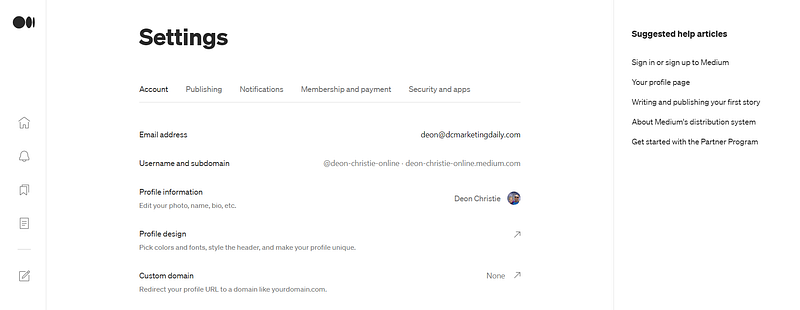
Start by going to your settings page inside your Medium Profile, where you will see the option to click on “Publishing”, as illustrated below. Click on “publication” to proceed.
When you click “Publishing”, you will land on a page with a clickable option to “Manage Publications”. That is your next step, just click on that. A drop-down window should appear, similar to what is illustrated below.
If you are not yet a writer for any publishers, then your display will only include the option to “Create A New Publication”. It will not show publications as illustrated.
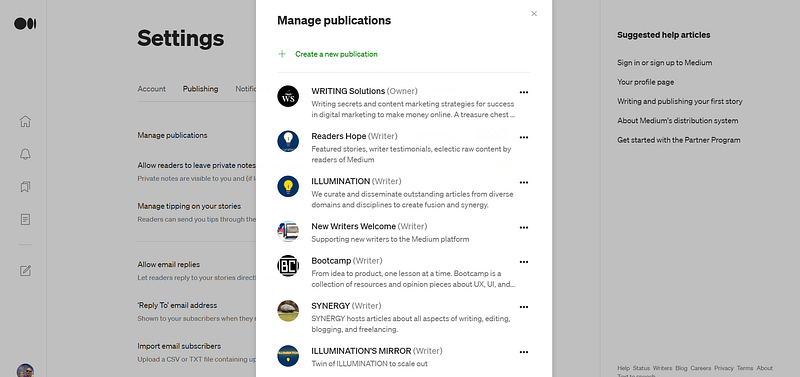
Regardless, all you want to do is click on “Create A New Publication”, because that is what you are going to do by following along in this illustrated article.
The “New Publication” page will open, and now the fun and design start. I might not keep mentioning it, but every time you have added or edited anything to your new publication, don’t forget to hit the green “Save” button.
This is the general information about your new Medium Publication, and you want to pay special attention. The success of your Medium Publication depends on your ability to target the right audience and readers.
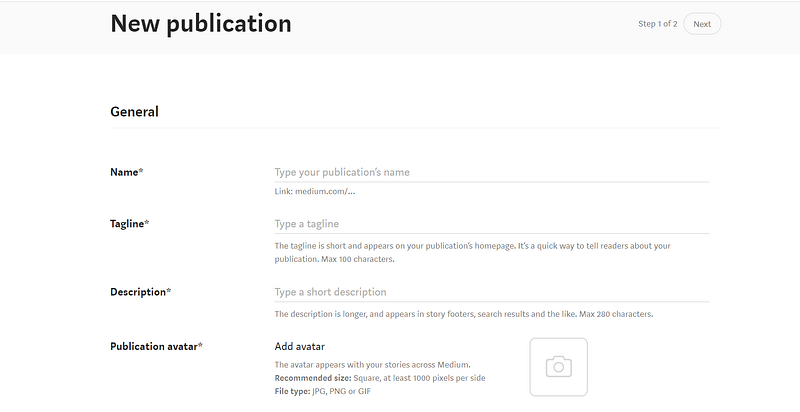
On the “New Publication” page you must fill out and complete all of the next steps. But remember, as mentioned earlier. Your Medium Publication Title will be the slug of your Publication URL.
Keep it short and objective. I would suggest no more than 3 words forming a search phrase. Medium uses your Publication Title as the slug and separates the words with a hyphen.
Name (Title).
Tagline.
Description.
Publication Avatar.
Publication Logo.
Publication Cover Image.
Social Links.
Contact Info.
Topics.
People.
There are different requirements for the different images needed, but you will be guided by Medium too.
Publication Avatar (1000 x 1000 pixels) in JPG, PNG, or GIF format. I strongly suggest going with PNG image files for all your images. It makes for a much better-quality display.
Remember that your Publication Avatar is the image that will show on social posts and as a thumbnail in any feed or search result pages.
Therefore, focus your text on the centre of the image.
The publication Logo (400 x 400 pixels), and the Publication cover image can be a “Presentation 16:9” size. I find it displays rather well.
Just use an image editing tool called Canva, and you will be able to design stunning images and presentations in no time.
Follow the steps and complete every one, leave nothing for “later”. You don’t need traffic “later”, you need traffic now, and you know that. Keep going, and when you get stuck?
Simply consult Google and YouTube, they know EVERYTHING!
Once you have completed this bit, you may continue to the next step and just keep following along. The Medium guide really makes it super simple to understand.
If you can write on Medium, then trust me, you can easily create your own Medium Publisher Site. Once your site is live on Medium, you can access your editing options as illustrated below.
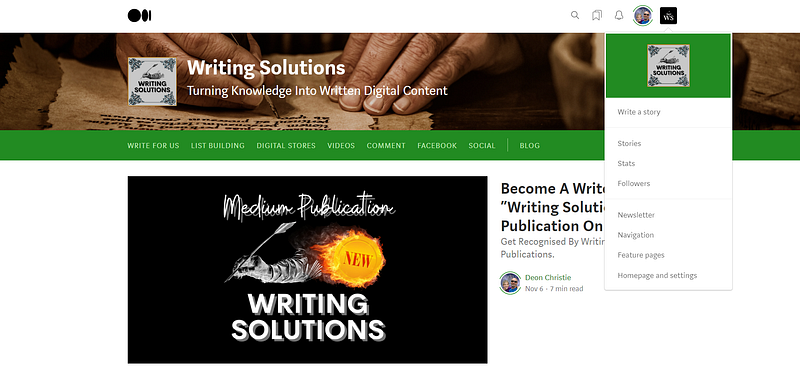
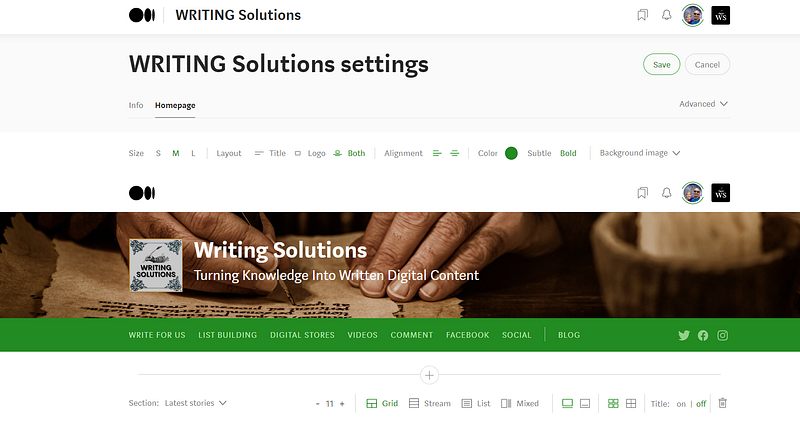
“Homepage And Settings”, right at the bottom is where you access the tools to edit your Medium Publication. From here it does remind me slightly of the WordPress C-Panel, just A LOT easier!
For your Medium Publication homepage layout, allow me to suggest the “Grid” view. It displays the featured images of posts in your Medium Publication with much more clarity. But the choice is yours.
On this Medium Publication editing page, you have 2 options. Info, and Homepage. Info is the part containing the Medium Publication Title, Tagline, Description, Avatar, etc.
The “Homepage” option as illustrated below, contains all the editing buttons for colours, layouts, sections, and much more.
Getting The Most Out Of Your Content.
Introduce your medium Publication on social networks, and remember, as mentioned earlier. Your Medium Publication Avatar is what will show in social networking feeds, and on search result pages in search engines.
When you share your Medium Publication URL on sites like Facebook, then the Avatar will automatically be loaded as the thumbnail or presentation image.
Write a post about your new Medium Publication and share it with other publications where you are a writer (where applicable). Also, share the post with all major social networks already provided by Medium.
Add some of your own top posts on Medium to your publication, and perhaps write an article on how to become a writer for your Medium Publication. Then link that post to the navigation of your Medium Publication.
The “Navigation” section, by the way, is visible in the drop-down menu where you chose to click on “Homepage And Settings”. From there again, you just follow the simple steps.
Take your time and explore all the editing options with Medium Publications, get to know your way around the concept, and give it all you got!
The top video marketers and earners on YouTube are calling this the ultimate video SEO super weapon! How much traffic do you think you will get the minute you reach page 1 on Google and YouTube? Are you ready to find out? — Source
AFFILIATE DISCLOSURE: Some of the links in this post are links to affiliate offers. If you visit them to make a purchase, I will earn a commission. The decision is yours, and whether or not you decide to buy something is entirely up to you. All offers come with a full money-back guarantee!
Free Stuff For My Medium Subscribers.
All new subscribers on Medium will receive 4 free gifts. 2 of my top traffic eBooks, and 2 free memberships (invitation only) for buyer traffic tools I use. Subscribe to me (Deon Christie) on Medium and your free stuff will be emailed to you asap. Medium has no affiliation, nor do they endorse the free giveaway in any way. It is my personal free giveaway to all new Medium subscribers.