
How to Reach Instagram’s Customer Support
A tutorial for something surprisingly hard to do

Instagram claims that it’s their responsibility to foster a safe and supportive community for everyone, but their actions do not reflect that.
Without a simple and easily reachable customer service channel where users can effectively challenge wrongful content takedowns and shadowbanning, the Instagram community isn’t truly safe and supported by Instagram itself.
Sadly, Instagram does not provide an accessible customer service channel, but there is a way to contact Facebook’s customer service team who will help resolve your Instagram problems (if you have an Instagram business account and Facebook Ads Manager account). Here’s how you do it.
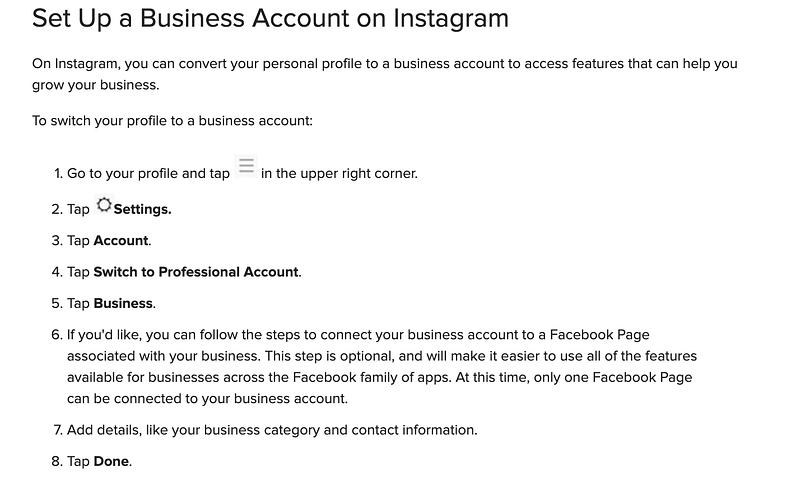
Set Up a Business Account
Turn your Instagram account into an Instagram business account (you can learn about how to grow your small business on IG through my Instagram Small Business Class). You can’t contact Facebook’s (and therefore Instagram’s) customer service without one.
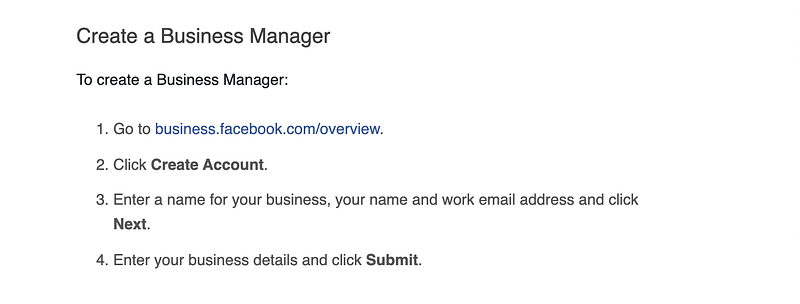
Make a Facebook Business Page
Create a Facebook business page for your Instagram. Since the complaint will focus on your Instagram, make sure that the Facebook business page that you start is for your Instagram account. This will help speed along the process when you submit your complaint about your Instagram.
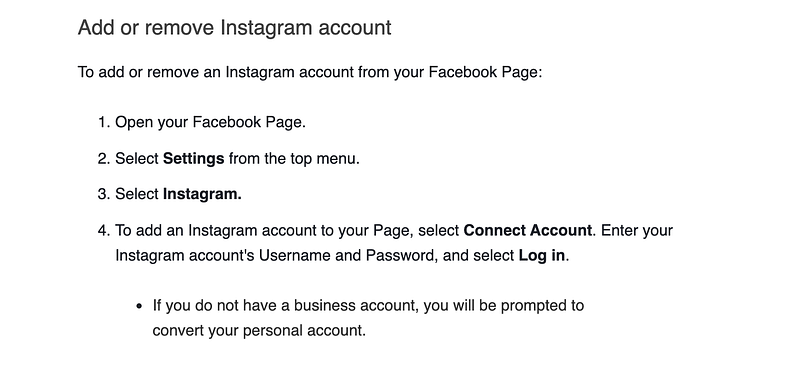
Connect Your Accounts
Connect your Instagram business account to your Facebook business page. This will enable the Facebook customer service team to view your Instagram page and address the issue you’re experiencing. Without connecting your Instagram, they will not help you regarding a complaint about your Instagram account.
Make an Ads Manager Account
Set up a Facebook Ads Manager account. Once your Instagram business is linked to your Facebook business, set up Ads Manager on your Facebook business page. The customer service team requires you to have an ad account ID to submit a complaint and you can only get one if you have an Ads Manager account.
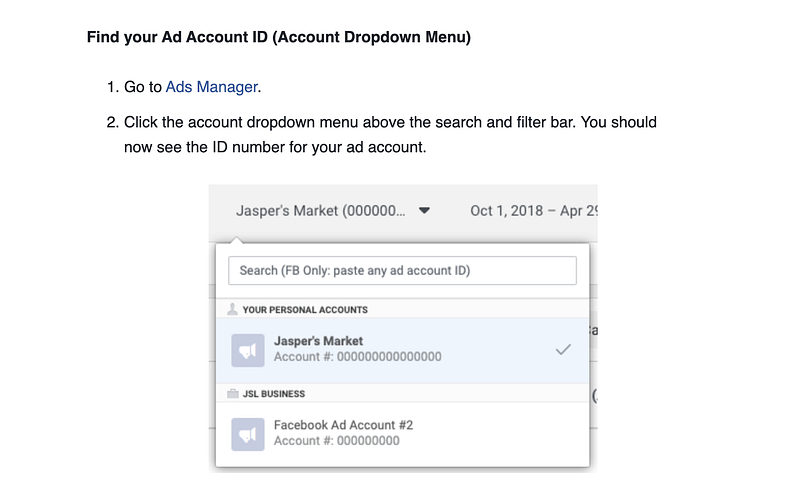
ID Yourself
Identify your Ad Account ID. You can’t submit a complaint without one.
And Last…
Contact the Facebook Business Support Team and submit your complaint. Currently, you can find their contact page here (if that link doesn’t work for you, you can try the Send Message icon through their FB page here), but if they change it in the future, you can also find it by Googling “Facebook Business Customer Service.” In it, you will find a chat option where you will be prompted to fill out a contact form for your complaint. Make sure to enter your ad account ID and mark Instagram when it comes to what your question is about. Be specific in describing the problem, clarify that it is regarding your Instagram page only, and click “Start Chat.”
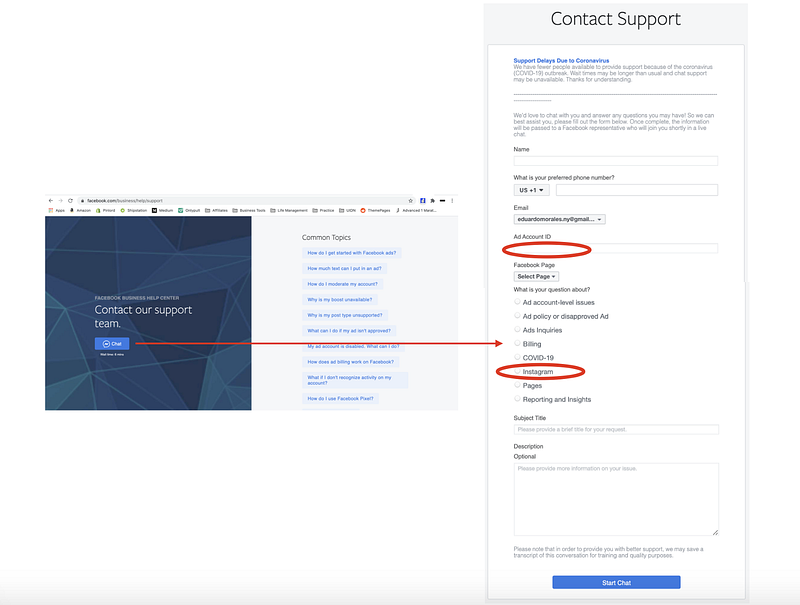
Once you’ve submitted your claim, they usually respond through your Facebook Chat within 24 hours.
It’s a shame that Instagram places such high barriers of entry for their users to be able to complain about real issues they have on their platform, but it’s a reality and we have to work around it. This is one way to do it.
Hope it helps! Also, please share with us your experience with Instagram’s customer support and how you were able to connect with them. It’ll help everyone reading this article stay up to date with the latest ways they are making it difficult for users to contact them.
Thanks so much for taking the time to read my article! If you enjoyed it, you can support me by signing up to my Instagram Small Business class, sharing this article and giving it a bunch of claps. You can also follow me on Instagram to get updates whenever I publish a new piece ❤
Oh, and if you’re interested in more articles about how your Instagram growth, read my others pieces on what Instagram really is and how works, Is Instagram dying?, how the Instagram algorithm works, Instagram niches and why they are the key to growth, how to know if your Instagram is worth growing, Instagram bots 2022, how to pick the right Instagram username, the best Instagram bot that’s keep your account safe, everything you need to know about Instagram hashtags, the best Instagram content scheduling tools, how I make money on Instagram, how the Instagram algorithm works, how to check if you’re shadowbanned, how to create a repost account, how to pick the right Instagram username, TikTok Bots, how to write an Instagram bio, how to increase your Instagram engagement, why you’re losing Instagram followers and how to fix it, how to create a visually appealing grid layout, as well as how to find the most valuable influencers on Instagram, how to measure what an influencer is worth, how to reach out to influencers, and how to measure your influencer marketing ROI.


