avatarTeri Radichel

Free AI web copilot to create summaries, insights and extended knowledge, download it at here

3392

Abstract

er">17</span>]</pre></div><blockquote id="c020"><p>Compact Map()</p></blockquote><p id="b1c2"><code>compactMap</code> function is similar to <code>map</code>, but it also includes an additional step, it filters out any <code>nil</code> values that result from applying the transformation closure. This is particularly useful when you have an array of optional values and you want to transform them while simultaneously filtering out the <code>nil</code> elements.</p><div id="9cf9"><pre><span class="hljs-keyword">extension</span> <span class="hljs-title class_">Array</span> { <span class="hljs-keyword">func</span> <span class="hljs-title function_">compactMap</span><<span class="hljs-type">T</span>>(<span class="hljs-keyword">_</span> <span class="hljs-params">transforms</span>: (<span class="hljs-type">Element</span>) -> <span class="hljs-type">T</span>?) -> [<span class="hljs-type">T</span>] { <span class="hljs-keyword">var</span> result <span class="hljs-operator">=</span> <span class="hljs-type">T</span> <span class="hljs-keyword">for</span> element <span class="hljs-keyword">in</span> <span class="hljs-keyword">self</span> { <span class="hljs-keyword">if</span> <span class="hljs-keyword">let</span> element <span class="hljs-operator">=</span> element { result.append(transform(element)) } } <span class="hljs-keyword">return</span> result } }</pre></div><p id="fe9c">Here the only change from <code>Map</code> and <code>Compact Map</code> is avoiding the nil value with a condition.</p><p id="3b42">In the above code</p><ul><li>It takes a closure <code>transform</code> as an argument, which specifies how each element should be transformed.</li><li>Inside <code>compactMap</code>, a new array <code>result</code> is created to store the transformed non-nil elements.</li><li>It then iterates over each element of the original array (<code>self</code>), applies the transformation closure to each element, and checks if the result is non-nil.</li><li>If the result is non-nil, it appends the transformed element to the <code>result</code> array.</li><li>Finally, it returns the <code>result</code> array containing all the non-nil transformed elements.</li></ul><blockquote id="9909"><p>How to consume it?</p></blockquote><div id="41f1"><pre><span class="hljs-keyword">let</span> mapArray <span class="hljs-operator">=</span> [<span class="hljs-number">23</span>, <span class="hljs-number">43</span>, <span class="hljs-number">56</span>, <span class="hljs-literal">nil</span>, <span class="hljs-number">75</span>, <span class="hljs-number">9</span>, <span class="hljs-number">14</span>] <span class="hljs-keyword">let</span> result<span class="hljs-operator">=</span> mapArray.compactMap { <span class="hljs-variable">$0</span> } <span class="hljs-built_in">debugPrint</span>(result) output: [<span class="hljs-number">23</span>, <span class="hljs-number">43</span>, <span class="hljs-number">56</span>, <span class="hljs-number">75</span>, <span class="hljs-number">9</span>, <span class="hljs-number">14</span>]</pre></div><blockquote id="854c"><p>Flat Map()</p></blockquote><p id="b656">FlatMap is typically the same as <code>map</code> does, only difference is that it always return flatten array joining all elements. Typically used to collect specific data in n

Options

ested array, dictionary or set</p><div id="6431"><pre><span class="hljs-keyword">extension</span> <span class="hljs-title class_">Array</span> { <span class="hljs-keyword">func</span> <span class="hljs-title function_">flatMap</span><<span class="hljs-type">T</span>>(<span class="hljs-keyword">_</span> <span class="hljs-params">transform</span>: (<span class="hljs-type">Element</span>) -> [<span class="hljs-type">T</span>]) -> [<span class="hljs-type">T</span>] { <span class="hljs-keyword">var</span> result <span class="hljs-operator">=</span> <span class="hljs-type">T</span> <span class="hljs-keyword">for</span> element <span class="hljs-keyword">in</span> <span class="hljs-keyword">self</span> { result.append(contentsOf: transform(element)) } <span class="hljs-keyword">return</span> result } }</pre></div><p id="75fa">In the above code</p><ul><li>It takes a closure <code>transform</code> as an argument, which specifies how each element should be transformed into a sequence.</li><li>Inside <code>flatMap</code>, a new array <code>result</code> is created to store the flattened elements.</li><li>It then iterates over each element of the original array (<code>self</code>), applies the transformation closure to each element, and concatenates the resulting sequences into the <code>result</code> array.</li><li><code>append(contentsOf: )</code> will add the elements of a sequence to the end of the array.</li><li>Finally, it returns the <code>result</code> array containing all the flattened elements.</li></ul><blockquote id="2285"><p>How to consume it?</p></blockquote><div id="117f"><pre><span class="hljs-keyword">let</span> arrayOfArrays <span class="hljs-operator">=</span> [[<span class="hljs-number">1</span>, <span class="hljs-number">2</span>, <span class="hljs-number">3</span>], [<span class="hljs-number">4</span>, <span class="hljs-number">5</span>, <span class="hljs-number">6</span>], [<span class="hljs-number">7</span>, <span class="hljs-number">8</span>, <span class="hljs-number">9</span>]] <span class="hljs-keyword">let</span> transformedArray <span class="hljs-operator">=</span> arrayOfArrays.flatMap { <span class="hljs-variable">$0</span> } <span class="hljs-built_in">print</span>(transformedArray) output: [<span class="hljs-number">1</span>, <span class="hljs-number">2</span>, <span class="hljs-number">3</span>, <span class="hljs-number">4</span>, <span class="hljs-number">5</span>, <span class="hljs-number">6</span>, <span class="hljs-number">7</span>, <span class="hljs-number">8</span>, <span class="hljs-number">9</span>]</pre></div><h1 id="3bda">Conclusion</h1><p id="057c">There are plenty of other use cases for higher-order functions. This is a gist of what we have discovered today:</p><ul><li>If you need to simply transform a value to another value, then use <code>map</code>.</li><li>If you need to remove nil values, then use <code>compactMap</code>.</li><li>If you need to flatten your result one level down, then use <code>flatMap</code>.</li></ul><p id="0a10">Thank you for your time and attention! 👏👏👏</p><p id="33e6">Do clap👏 if you like this and comment your suggestions!!! <i>Happy coding</i>!!!</p><blockquote id="1e0c"><p>Source Code: <a href="https://github.com/Vikassingamsetty/HigherOrderFunctions.git">GitHub</a></p></blockquote></article></body>

How to Prevent a GitHub Breach Like the One That Just Happened To Mercedes-Benz

Strategies for securing your GitHub accounts

~~~~~~~~~~~~~~~~~~~~~~~~~~~~~~~~~~~~~~~~~~~~~~~~~~~~~~~~~~~

⚙️ Check out my series on Automating Cybersecurity Metrics. The Code.

🔒 Related Stories: GitHub Security | Application Security | Data Breaches

💻 Free Content on Jobs in Cybersecurity | ✉️ Sign up for the Email List

~~~~~~~~~~~~~~~~~~~~~~~~~~~~~~~~~~~~~~~~~~~~~~~~~~~~~~~~~~~

A recent compromise of Mercedes-Benz showed that attackers could have gained access to all their source code.

Bleeping Computer contains the following information:

“The GitHub token gave ‘unrestricted’ and ‘unmonitored’ access to the entire source code hosted at the Internal GitHub Enterprise Server,” reads RedHunt Labs’ report.

Here’s how you can prevent a similar scenario in your organization.

Fine-Grained Tokens and Token Restrictions

First of all, create fine-grained personal access tokens. What that means is that when you grant permission to an access token you don’t give it access to everything. You limit that access to certain accounts. Disallow classic tokens.
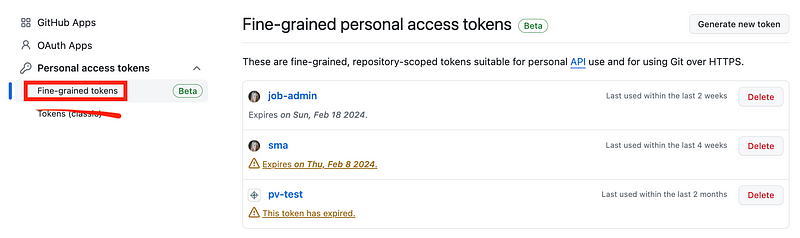
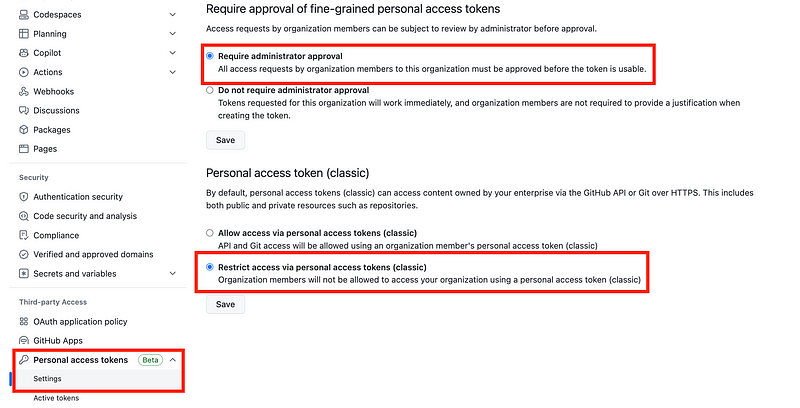
You can prevent people from using classic tokens in your organization settings. Scroll down to personal access tokes.

Require approval before a new token can be used and make sure it has limited permissions, not access to “everything.”

Disallow the creation of classic tokens which have access to “everything.”
Network Restrictions

In addition, you can limit your account to specific IP ranges. That way, even if someone obtains your personal access token, they can’t use it unless they are also in your network.

This post explains how to do those things:

If you can, you might consider running your own GitHub server in your own private network. That way you can limit access on the network to specific IP ranges.

Be aware that GitHub made a change recently where IP addresses allowed to access your account exists in two different places. I’m not a fan of that personally but make sure you know all the places where IP addresses may be configured to access your account.

Separation of Duties and Reducing the Blast Radius

Unfortunately, if the attackers have accessed one of your developer’s systems, then they may have access to your network and any systems that developer can access. Such was the case in this LastPass breach.

Consider not putting all your source code in a single repository or even a single account or on a single server. I use separate accounts for different purposes. I wrote about that here.

Leverage separation of duties so access to one individual’s machine doesn’t grant access to the keys to your kingdom:

The unfortunate thing is that with GitHub, unlike AWS CodeCommit, you can’t require MFA for specific actions like reading or writing to a GitHub repository. I wish they would add that. This post explains how you can add MFA for actions on AWS CodeCommit:

GitHub actions are risky for that and other reasons as I explain in the following posts, but if you choose to use them I also provide some security guidance:

Hope that helps!

Follow for updates.

Teri Radichel | © 2nd Sight Lab 2024

About Teri Radichel:
~~~~~~~~~~~~~~~~~~~~
⭐️ Author: Cybersecurity Books
⭐️ Presentations: Presentations by Teri Radichel
⭐️ Recognition: SANS Award, AWS Security Hero, IANS Faculty
⭐️ Certifications: SANS ~ GSE 240
⭐️ Education: BA Business, Master of Software Engineering, Master of Infosec
⭐️ Company: Penetration Tests, Assessments, Phone Consulting ~ 2nd Sight Lab
Need Help With Cybersecurity, Cloud, or Application Security?
~~~~~~~~~~~~~~~~~~~~~~~~~~~~~~~~~~~~~~~~~~~~~~~~~~~~~~~~~~~~~
🔒 Request a penetration test or security assessment
🔒 Schedule a consulting call
🔒 Cybersecurity Speaker for Presentation
Follow for more stories like this:
~~~~~~~~~~~~~~~~~~~~~~~~~~~~~~~~~~~~~~~~~~~~~~~~~~~~~~~~~~~~~ 
❤️ Sign Up my Medium Email List
❤️ Twitter: @teriradichel
❤️ LinkedIn: https://www.linkedin.com/in/teriradichel
❤️ Mastodon: @teriradichel@infosec.exchange
❤️ Facebook: 2nd Sight Lab
❤️ YouTube: @2ndsightlab

Github
Mercedes Benz
Token
Security
Data Breach
Recommended from ReadMedium